

CLI Banner
The classic "wrong SSH terminal" scenario is the CLI counterpart to the original
motivation of this extension: running an import, a custom deployment command or
impexp: on the live system instead of staging. The CLI banner
prints an environment banner with a colored background to stderr before
a console command runs, e.g. a cyan bar reading 🚦 STAGING — project..
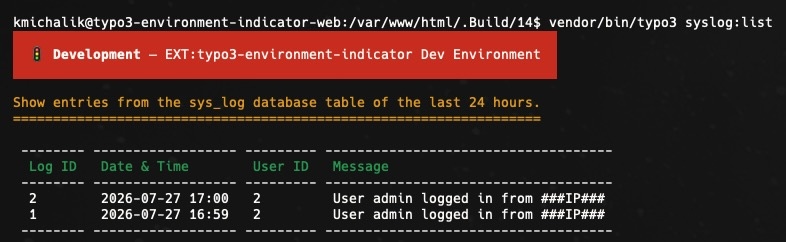
CLI banner
The banner is printed via a listener on the Symfony Console
Console, so it appears before the command is executed. It is
written to stderr, so parsed stdout output (JSON, CSV) stays
untouched.
You can register the indicator in your ext_:
use KonradMichalik\Typo3EnvironmentIndicator\Configuration\Handler;
use KonradMichalik\Typo3EnvironmentIndicator\Configuration\Indicator;
use KonradMichalik\Typo3EnvironmentIndicator\Configuration\Trigger;

Handler::addIndicator(
    triggers: [
        new Trigger\ApplicationContext('Production/Staging')
    ],
    indicators: [
        new Indicator\Cli\Banner([
            'text' => 'STAGING',
            'color' => 'cyan',
        ])
    ]
);Additional optional configuration keys:
text(string): The banner text. Default is the current application context.color(string): The banner background color. Accepts a named ANSI color (e.g.cyan,red,yellow) or a hex value (e.g.#00ACC1, rendered on truecolor terminals) and is combined with bold white text. Default is no color (plain text, no background).icon(string): A leading glyph. Default is🚦.commands(array): A whitelist of command name patterns (fnmatchsyntax, e.g.['site:*', 'impexp:*']). If set, the banner is only printed for matching commands. Default is empty (the banner is printed for all commands).
Note
The banner is only printed for interactive terminals. Cron jobs, CI
pipelines and scheduler runs (as well as --) are left
untouched to avoid log noise. Non-decorated output (piped stdout,
the NO_ convention) automatically drops the ANSI color codes.
Note
In the CLI there is no backend/frontend user and no client IP. User- and IP-based triggers (Admin, Backend User Group, Frontend User Group, IP Address) therefore cannot resolve and the banner will not activate. Application Context and Custom work as usual.
Note
This indicator is deliberately indicator only (a banner). It does not add confirmation prompts ("Really execute on live? [y/N]") — that would be guard functionality and out of scope.
Note
A small set of low-level TYPO3 core commands (cache:,
cache:, cache:, list, help,
upgrade:*, among others) always run in TYPO3's failsafe CLI
bootstrap, which uses a no-op event dispatcher for resilience — so this and
any other third-party listener never fires for them, regardless of
configuration. Some community packages register additional commands the
same way (e.g. helhum/'s database:,
database:, install:*). The banner works normally for
everything else, including custom extension commands, site:* and
impexp:*.
The CLI banner is opt-in and disabled by default — enable it globally via the extension configuration.