
Tool/function calling
Tool calling (also known as function calling) allows the LLM to request execution of functions you define. The model decides when to call a tool based on the conversation context.
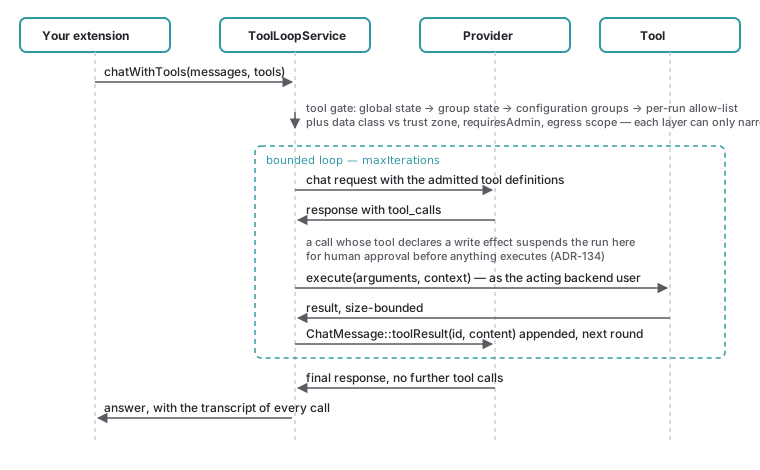
One round of the bounded loop. The gate runs before the model is offered anything, and a call whose tool declares a write effect suspends the run for approval before it executes.
Defining tools
$tools = [
    [
        'type' => 'function',
        'function' => [
            'name' => 'get_weather',
            'description' => 'Get current weather for a location',
            'parameters' => [
                'type' => 'object',
                'properties' => [
                    'location' => [
                        'type' => 'string',
                        'description' => 'City name',
                    ],
                    'unit' => [
                        'type' => 'string',
                        'enum' => ['celsius', 'fahrenheit'],
                    ],
                ],
                'required' => ['location'],
            ],
        ],
    ],
];Executing tool calls
Completion is a list of
Netresearch value objects —
$tool is already a JSON-decoded associative array,
so no manual json_ is needed. The two follow-up turns are
built with the Chat factories:
Chat echoes the assistant turn that
carries the tool calls, and Chat answers one
call by its id.
use Netresearch\NrLlm\Domain\ValueObject\ChatMessage;

$response = $this->llmManager->chatWithTools($messages, $tools);

if ($response->hasToolCalls()) {
    // Echo the assistant turn (with all its tool calls) back first
    $messages[] = ChatMessage::assistantToolCalls($response->toolCalls, $response->content);

    foreach ($response->toolCalls as $toolCall) {
        // Execute your function — $toolCall->arguments is a decoded array
        $result = match ($toolCall->name) {
            'get_weather' => $this->getWeather($toolCall->arguments['location']),
            default => throw new \RuntimeException("Unknown function: {$toolCall->name}"),
        };

        // Answer the call by its id
        $messages[] = ChatMessage::toolResult($toolCall->id, json_encode($result, JSON_THROW_ON_ERROR));
    }

    // Ask the model to answer with the tool results in context
    $response = $this->llmManager->chat($messages);
}Providers that implement toolcapableinterface support tool calling.