
Introduction
The secret problem
Your TYPO3 site integrates with Stripe, SendGrid, Google Maps, and a dozen other services. Where are those API keys right now?
Probably in one of these places:
- Plain text in
Local(committed to git?)Configuration. php - Unencrypted in a database field (visible in backups, exports, SQL injection)
- Hardcoded in extension configuration (accessible to every backend user)
If your database leaks, your secrets leak. If an intern gets backend access, they can see your payment credentials. If you need to rotate a compromised key, you're editing config files and redeploying.
There has to be a better way.
How secrets are typically stored
Let's compare common approaches, from most to least secure:
| Method | Security | Operational Reality |
|---|---|---|
| External Services (HashiCorp Vault, AWS Secrets Manager) | ⭐⭐⭐⭐⭐ | Requires dedicated infrastructure, network connectivity, and authentication to the service itself. Enterprise-grade, enterprise-priced. |
| Environment Variables | ⭐⭐⭐ | Requires deployment pipeline or host access to set. Container restart needed to change values. No rotation UI, no audit trail, hard to manage. |
| Files outside webroot | ⭐⭐⭐ | Requires deployment or server access. Proper file permissions a must. No management interface, rotation means redeployment. |
| nr-vault (encrypted in database) | ⭐⭐⭐⭐ | Runtime manageable via TYPO3 backend. Rotate anytime. Full audit trail. No external infrastructure required. |
| Plain text in config/database | ⭐ | ❌ No protection. Secrets visible to anyone with database or file access. |
The trade-off nobody talks about
Notice something? All the "more secure" methods share the same operational pain:
- External services: Infrastructure cost, complexity, another system to maintain
- Environment variables: Need DevOps to change a value. Restart containers. No audit trail. "Who changed the Stripe key last Tuesday?" Good luck.
- Files outside webroot: Same deployment dance. No UI. No history.
And then there's plain text - which is what most TYPO3 extensions actually use.
Why nr-vault?
nr-vault is the sweet spot between "no security" and "enterprise complexity":
| Challenge | Env Vars / Files | nr-vault |
|---|---|---|
| Rotate a compromised API key | Call DevOps, update config, redeploy, restart | Click in backend, done |
| See who accessed a secret | Check deploy logs (if they exist) | Full audit log with timestamps |
| Emergency credential revocation | Wait for deployment pipeline | Immediate via backend module |
| Non-technical editor needs to update SMTP password | Create support ticket | Self-service in backend |
| Compliance audit: prove access history | Manually correlate logs | Export tamper-evident audit trail |
The pitch: Enterprise-grade secret management without enterprise-grade complexity.
What is nr-vault?
nr-vault is a TYPO3 extension providing:
- Encryption at rest
- Every secret is encrypted with its own key (envelope encryption - the same pattern used by AWS KMS and Google Cloud KMS). Even if your database leaks, secrets remain protected.
- Runtime management
- Create, update, rotate, and revoke secrets through the TYPO3 backend. No deployments. No config file editing. No container restarts.
- Access control
- Fine-grained permissions based on backend user groups. The marketing team can manage their Mailchimp key without seeing payment credentials.
- Audit logging
- Tamper-evident logs with hash chain verification. Know exactly who accessed what, when - for compliance and incident response.
- Usage analytics
- A backend dashboard surfaces stale, expired, never-rotated, and unused secrets - redaction candidates you can safely remove. Automated and manual reads are counted separately, so a secret revealed only by hand is not mistaken for one a running integration still depends on.
- TYPO3-native integration
- TCA field type, site configuration support, TypoScript integration, CLI commands. Works the way TYPO3 developers expect.
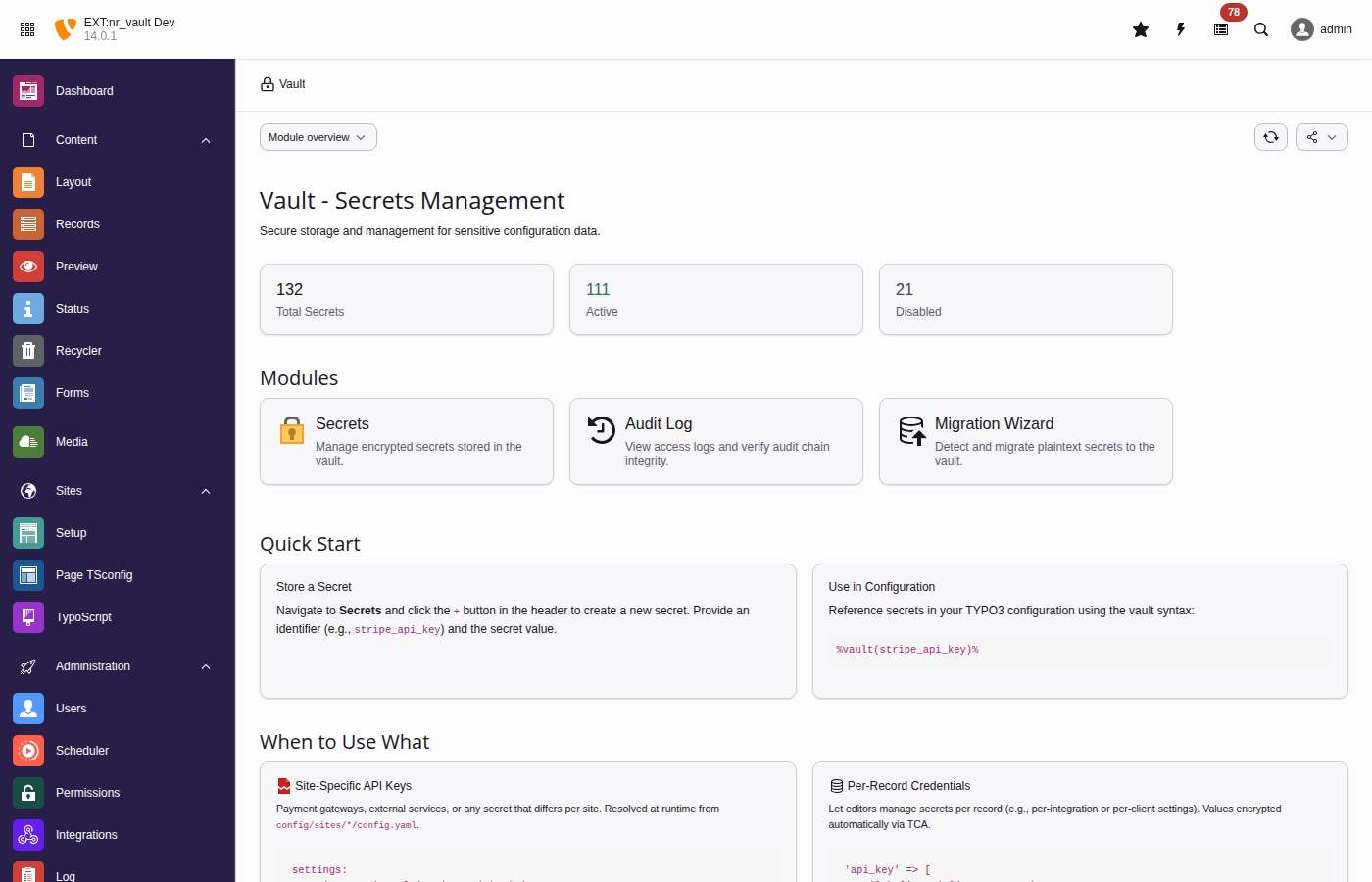
The vault backend module provides an intuitive interface for managing secrets
Use cases
- Payment gateway credentials - Stripe, PayPal, Adyen API keys
- Email service authentication - SMTP passwords, Mailchimp, SendGrid tokens
- Third-party API keys - Google Maps, analytics, CRM integrations
- OAuth client secrets - with automatic token refresh via Vault HTTP Client
- Database credentials - connection strings for external systems
- Per-record credentials - different API keys per client in TCA records
- Multi-site secrets - site-specific configuration in multi-domain setups
Requirements
- TYPO3 v13.4 LTS or v14.3 LTS
- PHP 8.2 or higher
- PHP sodium extension (bundled with PHP 8.2+)
- Composer-based TYPO3 installation