
Usage
Backend module
Access the vault through the TYPO3 backend:
- Go to Admin Tools > Vault.
- The overview shows statistics and quick-start examples.
- Navigate to Secrets to manage your secrets.
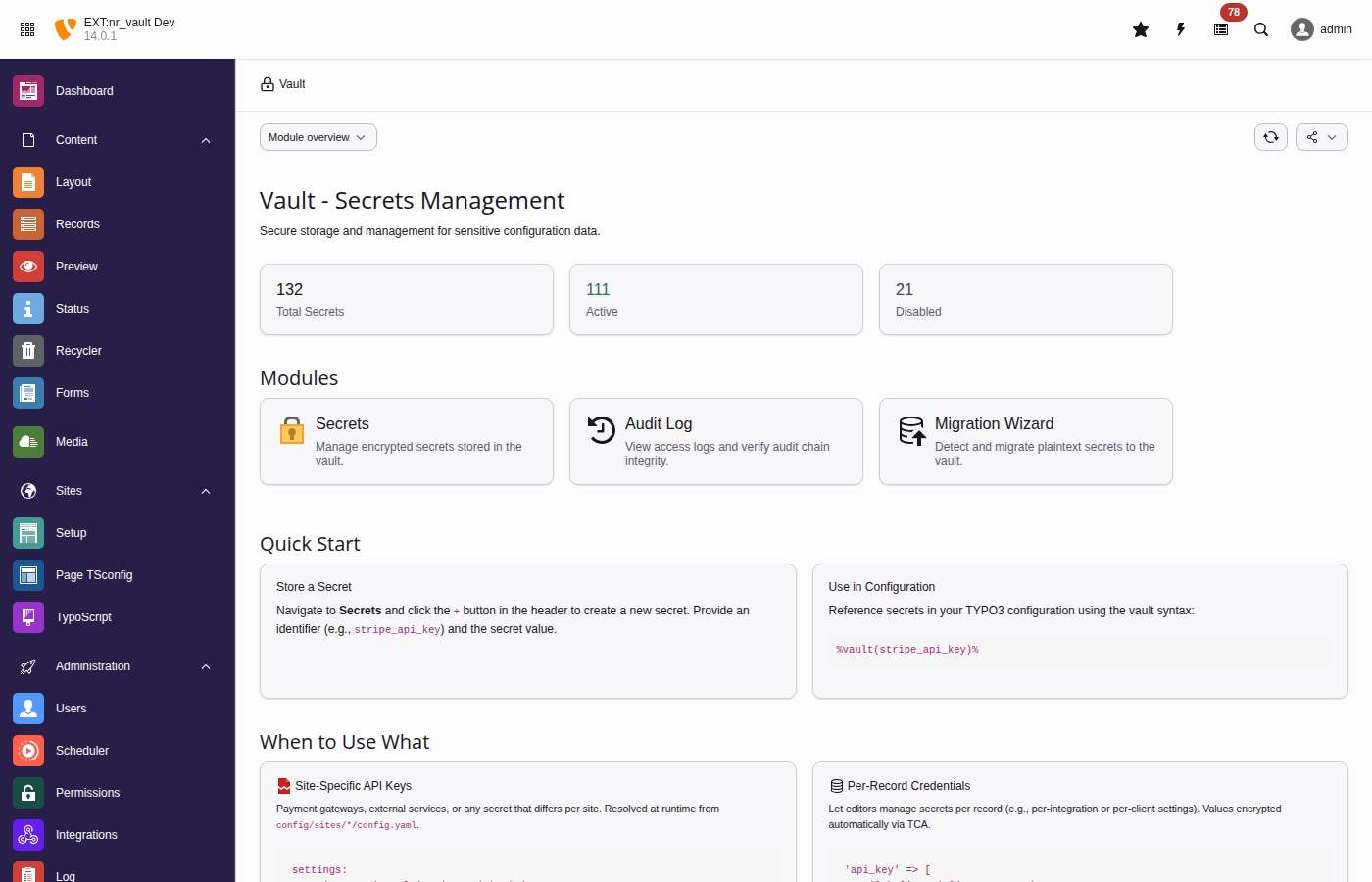
The vault overview displays key metrics and provides quick-start code examples
The overview also carries a Security Readiness panel: the active security
profile, an "N of M controls passed" ratio, and the open findings with the risk
each one carries and the command that fixes it. The detailed finding list requires
the vault.configure permission, because it names this installation's concrete
weak points; everyone else sees the profile badge and the ratio.
The panel and vault:doctor evaluate the same controls, so the module and a CI gate cannot disagree. Use the command for anything scheduled or automated — see Deployment gate.
Creating secrets
- Click Create Secret (+ button).
-
Fill in the form:
- Identifier
- Unique identifier for the secret (e.g.,
stripe_api_key). - Value
- The secret value to encrypt.
- Description
- Optional description for documentation.
- Context
- Optional context for organization (e.g.,
payment). - Allowed groups
- Backend user groups that can access this secret.
- Expiration
- Optional expiration date after which the secret becomes inaccessible.
- Click Save.
Note
A refused save leaves nothing behind. If the vault declines the value — a missing permission, an audit write that fails — the record row is removed again, the field is rolled back and no success audit entry survives. You will not find a half-created secret to clean up, and the audit log will not later read as though the create succeeded.
The same holds for the other two lifecycle operations. Copying a record clones its secrets under fresh identifiers; if any clone fails, the ones already made are deleted and every vault field of the copy is blanked, so a copy never quietly shares the original's secrets. Deleting a record checks every vault field's delete permission before removing the first secret, and cancels the record delete outright if the cleanup fails — the vault will not give a deleted secret back, so the record is kept rather than orphaning a secret.
What the backend will not do to a secret record
TYPO3's record commands are not all meaningful for a vault secret, and three
of them are refused outright. Each refusal cancels the command, tells you why
in the backend, and records an access_denied entry in the audit chain.
The refusals apply to everyone, administrators included: they express what the
product guarantees about a secret, not who is trusted with it.
| Command | Why it is refused |
|---|---|
Restore (undelete) | The vault has no restore operation. A delete is a soft delete —
the row keeps its ciphertext, its wrapped DEK,
frontend_accessible and both ACL tiers — so a restore would
hand the working secret straight back, and TYPO3's own restore
applies no vault check to do it. Recovering a deleted secret is a
deliberate database operation, not a button. See
Secret disposal. |
| Copy | A copied secret would carry no value: the encrypted columns are not part of the record's editable fields, so the copy is created empty. It would, however, claim the original's identifier and can shadow it — breaking a secret that was never touched. |
| Move | Secrets live on the root level of the page tree. A secret moved onto a page is deleted along with that page, through a code path that applies no vault permission check and writes no audit entry. The page a secret sits on grants nothing — the access scope is the record's own Scope page field. |
Note
"Deleted" means unreachable, not erased. The encrypted row is retained in the database until it is removed there or the master key is destroyed. That is deliberate — it keeps the delete auditable — but do not read a deleted secret as a disposed one. Decommissioning covers actual disposal.
Viewing and editing secrets
Secrets are displayed with their metadata but not their values. Click Reveal to temporarily show a secret value.
Note
Revealing a secret creates an audit log entry.
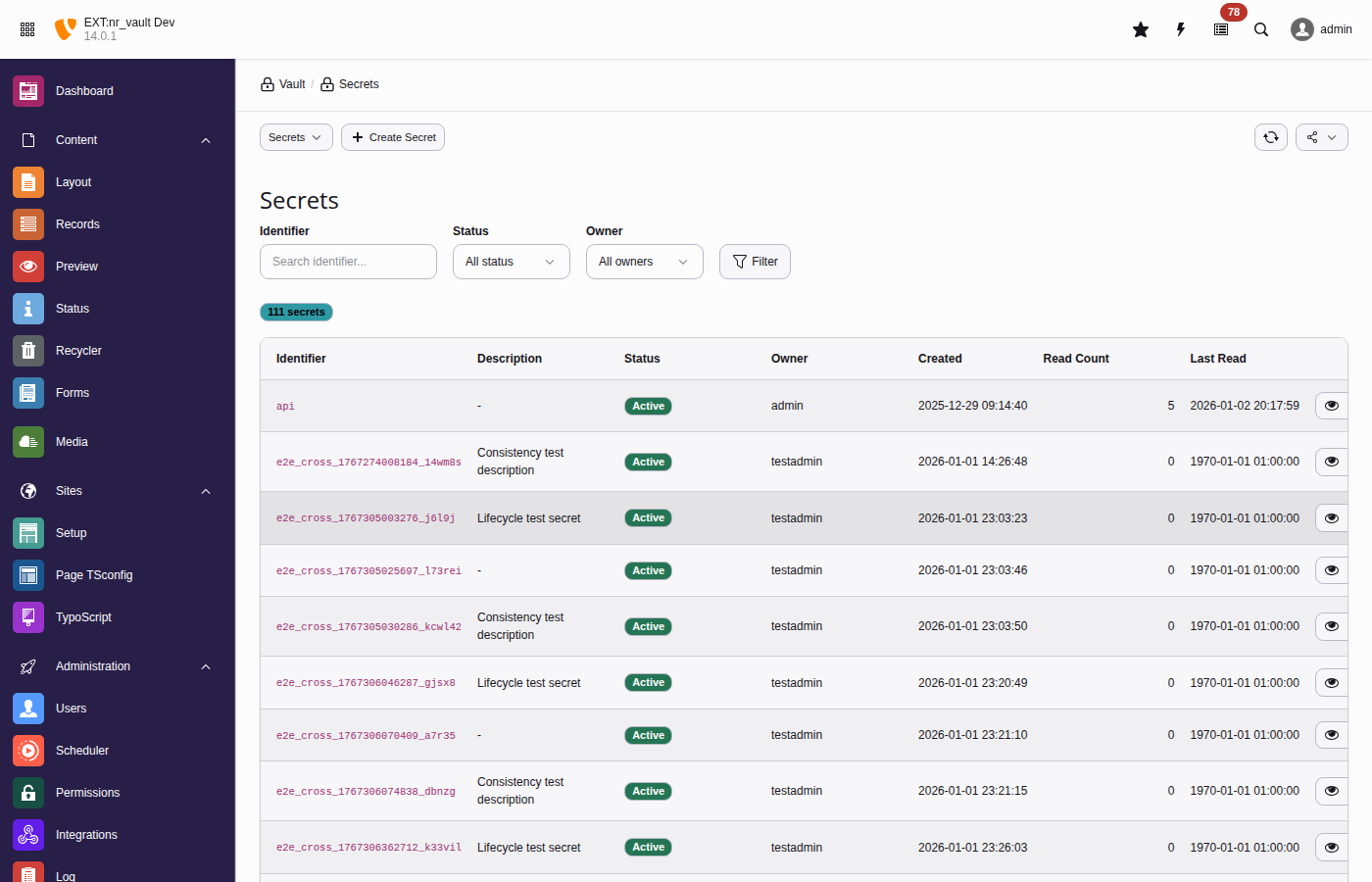
The secrets list provides filtering, bulk actions, and quick access to secret operations
Analytics
The Analytics submodule gives administrators an at-a-glance view of secret usage and highlights secrets that may be safe to remove. Choose the evaluation window with the 30d / 90d / 180d / 365d selector at the top.
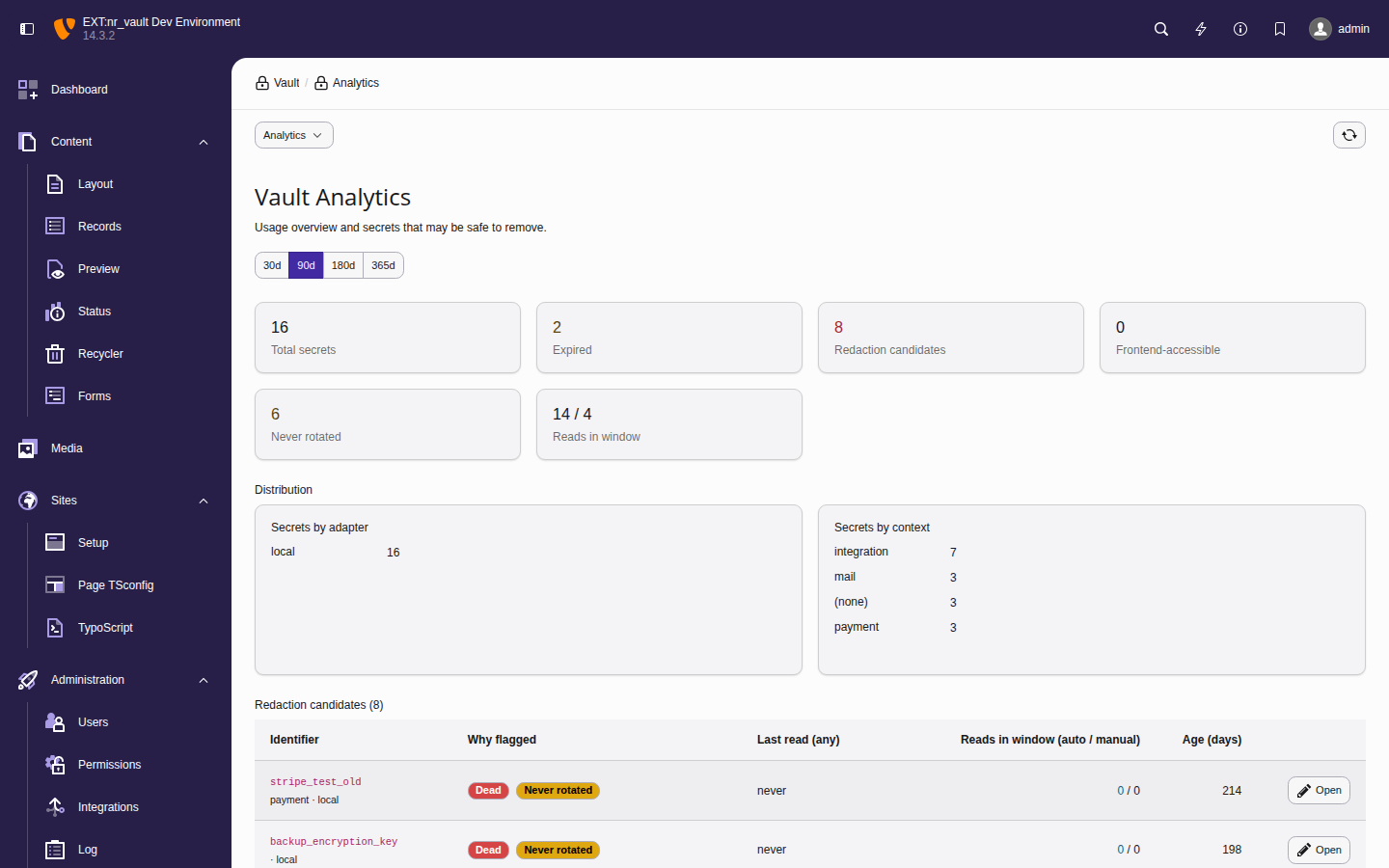
The analytics dashboard summarises usage and flags redaction candidates
Key metrics
- Total secrets
- Active (non-deleted) secrets in the vault.
- Expired
- Secrets whose expiration date has passed but that still exist.
- Redaction candidates
- Secrets flagged by at least one staleness rule (see below).
- Frontend-accessible
- Secrets marked
frontend_accessible- review these with extra care. - Never rotated
- Secrets that have never been rotated within the configured threshold.
- Reads in window (automated / manual)
- Read activity for the selected window, split into automated reads (CLI, scheduler, API) and manual reveals performed in the backend.
Redaction candidates
The table lists every flagged secret together with the rule(s) that flagged it, its last read of any kind, the automated / manual read split for the window, and its age in days. Open deep-links straight to the secret record so you can review or delete it.
Secrets are flagged by these rules:
- Dead
- Never read and older than the threshold, or not read for a long time - the primary deletion candidate.
- Expired
- Past its expiration date but still present in the vault.
- Never rotated
- Older than the rotation threshold without ever having been rotated.
- Automation-stale
- Revealed manually but never read by automation. This is a review signal rather than a deletion signal: the secret may legitimately be used only through manual workflows. It is therefore never combined with Dead.
Note
The automated-versus-manual split is derived from the audit log
(actor_type), so it reflects only reads recorded while audit logging was
active. Reads in TYPO3 CLI context (console commands, scheduled jobs, queue
workers) are recorded with actor type cli and count as automated, even
though the CLI bootstrap authenticates the _cli_ backend user. The day
thresholds are configurable — see
staleNeverReadDays,
staleNotReadDays and
staleNeverRotatedDays.
Tip
To explore the dashboard with realistic, dated history on a development instance, seed demo secrets and audit events with the vault:seed-demo command (development context only).
Site configuration
Reference secrets in your site configuration files using the
%vault syntax:
settings:
  payment:
    stripePublicKey: 'pk_live_...'
    stripeSecretKey: '%vault(stripe_secret_key)%'
  email:
    mailchimpApiKey: '%vault(mailchimp_api_key)%'
sendgridToken: '%vault(sendgrid_token)%'References are not resolved automatically when TYPO3 loads the site
configuration. Resolve them explicitly, at the point of use, with
Site:
use Netresearch\NrVault\Configuration\SiteConfigurationVaultProcessor;
use TYPO3\CMS\Core\Utility\GeneralUtility;

$site = $request->getAttribute('site');
$processor = GeneralUtility::makeInstance(SiteConfigurationVaultProcessor::class);
$config = $processor->processConfiguration($site->getConfiguration(), $site);
$stripeSecret = $config['settings']['payment']['stripeSecretKey'];This keeps sensitive values out of your version control while still allowing you to configure them through the familiar site settings.
Important
Resolution is caller-driven, not automatic. TYPO3 persists the loaded
site configuration into its shared, on-disk core cache; resolving
%vault references eagerly at load time would write the
decrypted secrets into that cache file in cleartext and would run the
per-principal access check only once, when the cache is warmed. Resolving
at read time keeps the plaintext within the current request and re-checks
access for every reader. Passing the
$site
object also enables
site-scoped identifiers (site:<siteIdentifier>:<secret>).
TypoScript integration
Use vault references in TypoScript for frontend-accessible secrets:
lib.googleMapsKey = TEXT
lib.googleMapsKey {
  value = %vault(google_maps_api_key)%
  stdWrap.cache.disable = 1
}

page.headerData.10 = TEXT
page.headerData.10 {
  value = <script>var API_KEY = '%vault(public_api_key)%';</script>
  stdWrap.cache.disable = 1
}Note
The stdWrap. sub-array is required, not decoration. TEXT removes
value from its configuration before rendering, so a TEXT object whose
only property is value never calls stdWrap() at all — and the
placeholder is what reaches the page. Earlier releases of this documentation
showed the property-less form; it never resolved.
Warning
Security considerations:
- Only secrets marked as
frontend_accessiblecan be resolved. - Resolved values may be cached - use
cache.disable = 1for secrets that should not be cached. - Consider using
USER_INTfor content containing secrets.
Which placeholders resolve in the frontend
The listener that expands
%vault runs on the output of
every stdWrap call. That includes strings the integrator did not author:
an editor-written tt_content field rendered with `std`. Without a
restriction, anyone who can type into a content element — or append a query
string — could name any frontend-accessible secret and have it expanded into
the (cacheable) page.
In a frontend request — and on the command line — the extension therefore resolves an identifier only when it was published through a source an editor cannot write:
A1 — frontend TypoScript. The identifier appears in the setup array, i.e.
somewhere in the site's TypoScript. sys_template is admin-only and site
TypoScript lives on disk. This covers every documented example on this page:
writing lib.apiKey.value = %vault(my_api_key)% publishes my_api_key.
A2 — site configuration and site settings. An identifier used anywhere in
config/ or in the site settings is published for
that site. This is what keeps site configuration
values usable in content.
A3 — the explicit list. For an identifier that is used only in a Fluid
template file, a userFunc or a DataProcessor — that is, nowhere in the setup
array — name it once per site:
plugin.tx_nrvault.frontendResolvableIdentifiers = my_api_key, public_widget_tokenA4 — integrator PHP. In an eID handler or any other entry point that has no TypoScript and no site attribute, publish the identifier for the current request:
use Netresearch\NrVault\Security\FrontendPlaceholderPolicyInterface;
use TYPO3\CMS\Core\Utility\GeneralUtility;

// $request is the PSR-7 request your handler received.
GeneralUtility::makeInstance(FrontendPlaceholderPolicyInterface::class)
->allowIdentifier('my_api_key', $request);The request argument is not decoration, and it is not a freshness hint either:
it is the key. The policy is a shared service that lives for the whole PHP
process, so the grant is stored against that request object in a
\Weak, and a later request — an anonymous frontend render in the same
worker process, possibly on another site — holds a different object and cannot
address it.
Important
Pass the request you are handling, and call
set with the
same object on the content object renderer you render with. The grant is
matched by object identity against the request the renderer carries;
$GLOBALS is never consulted for it, because TYPO3
sets that global and never unsets it, so in a worker SAPI it outlives the
request that set it. A renderer carrying a different request — or none —
resolves nothing.
Warning
Never pass request-derived data as the identifier — that hands the
allow-set back to the caller and re-opens the hole. Where you can, prefer
Vault, which returns the value
instead of widening the allow-set.
Failure is loud, but quiet in production. An unpublished identifier leaves
the literal %vault(identifier)% in the output. In Development
context a single notice per request names the first rejected identifier; in
every other context the skip path writes nothing, so unauthenticated input
cannot drive log volume.
Warning
The flip side is that a rejected identifier leaves no trace outside
Development: no log record and — because the check runs before
the vault is touched — no AccessDenied audit row either. Probing for
which identifiers a site publishes is therefore free and invisible; the only
signal is whether the literal survives in the page. If you need that signal,
run the site in Development while investigating, or watch for
%vault( in rendered output. This is a deliberate trade: emitting a record
per rejection is exactly the amplification an anonymous visitor could drive.
Scope of the restriction. It applies to frontend requests, to any web
request whose type cannot be established (eID among them, where
$GLOBALS does not exist), and to the command line —
scheduler, Symfony Messenger, console commands. Backend requests are
unaffected, a backend request being recognised by the request the renderer
itself carries and never by what an earlier request left in
$GLOBALS. The check is on the identifier, not on where
the placeholder sits: an identifier this site already publishes stays resolvable
wherever it appears.
The command line is covered because
scheduler: authenticates the
_cli_ administrator: the admin bypass grants the read, so this allow-set is
the only gate left on editor-authored content that a scheduled newsletter or
export job renders. A deployment whose internal render jobs genuinely need the
old behaviour opts back into it with frontendPlaceholderLegacyCli; publishing the identifiers is the
narrower remedy.
One further case is worth naming: on a fully cached page hit with no
USER_INT or COA_INT object, core's frontend TypoScript factory
returns before the setup array is built, so A1 and A3 are empty for that request
and only A2 and A4 apply. No documented example is affected, and the direction is
fail-closed. See ADR-035.
CLI commands
vault:init
Initialize the vault and generate a master key:
vendor/bin/typo3 vault:init

# Output as environment variable format
vendor/bin/typo3 vault:init --env

# Specify custom output location
vendor/bin/typo3 vault:init --output=/secure/path/vault.keyvault:store
Create or update a secret:
# Interactive (prompts for value)
vendor/bin/typo3 vault:store stripe_api_key

# With options (arbitrary metadata via repeatable --metadata key=value)
vendor/bin/typo3 vault:store payment_key \
  --value="sk_live_..." \
  --metadata="description=Stripe production key" \
  --metadata="context=payment" \
--groups="1,2"vault:retrieve
Retrieve a secret value:
vendor/bin/typo3 vault:retrieve stripe_api_key

# Quiet mode for scripting
API_KEY=$(vendor/bin/typo3 vault:retrieve -q stripe_api_key)vault:list
List all accessible secrets:
vendor/bin/typo3 vault:list

# Filter by pattern
vendor/bin/typo3 vault:list --pattern="payment_*"

# JSON output for automation
vendor/bin/typo3 vault:list --format=jsonvault:rotate
Rotate a secret with a new value:
vendor/bin/typo3 vault:rotate stripe_api_key \
--reason="Scheduled quarterly rotation"vault:delete
Delete a secret:
vendor/bin/typo3 vault:delete old_api_key \
  --reason="Service deprecated" \
--forcevault:audit
View the audit log:
# View entries since a given date
vendor/bin/typo3 vault:audit --since=2026-05-01

# Filter by secret
vendor/bin/typo3 vault:audit --identifier=stripe_api_key

# Export to JSON
vendor/bin/typo3 vault:audit --format=json > audit.jsonImportant
Listing and --verify assert audit.view — verification recomputes and
compares, which is a read of the chain. --export asserts
audit.export, and --reset-anchor asserts vault.configure,
because it mutates tamper evidence. On the CLI all three additionally need
allowCliAccess plus the operation in
cliAllowedOperations, which excludes them by default
— see vault:audit.
Verify the tamper-evident chain:
vendor/bin/typo3 vault:audit --verifyThe output ends with a Tip anchor: line. The anchor is what detects removal
of the end of the log — a truncation leaves no gap and no broken link, so the
chain walk alone cannot see it (see Tip anchor (truncation detection)).
ok- The anchored entry is still present and unchanged.
NOT ARMED- No anchor recorded yet. It arms itself on the next audit log write.
VIOLATED- The anchored entry is gone or was replaced — the log was truncated or wiped. Snapshot the table before changing anything else.
UNREADABLE- The stored anchor is malformed or its MAC does not verify — a tampered
value, or a master key changed without a re-seal. Treated as critical
regardless of
auditAnchorRequired, and never resolved by clearing the anchor before you know which of the two it was.
Three further states appear in narrower situations: not checked (a
range-bounded verification, which does not evaluate the anchor at all),
disabled (auditHmacEpoch = 0, where the anchor does not run), and
inconclusive (a re-seal committed while verification was reading — re-run
it).
After a wipe or purge you performed deliberately, clear the anchor so it can arm again. The reset is itself written into the chain:
vendor/bin/typo3 vault:audit --reset-anchor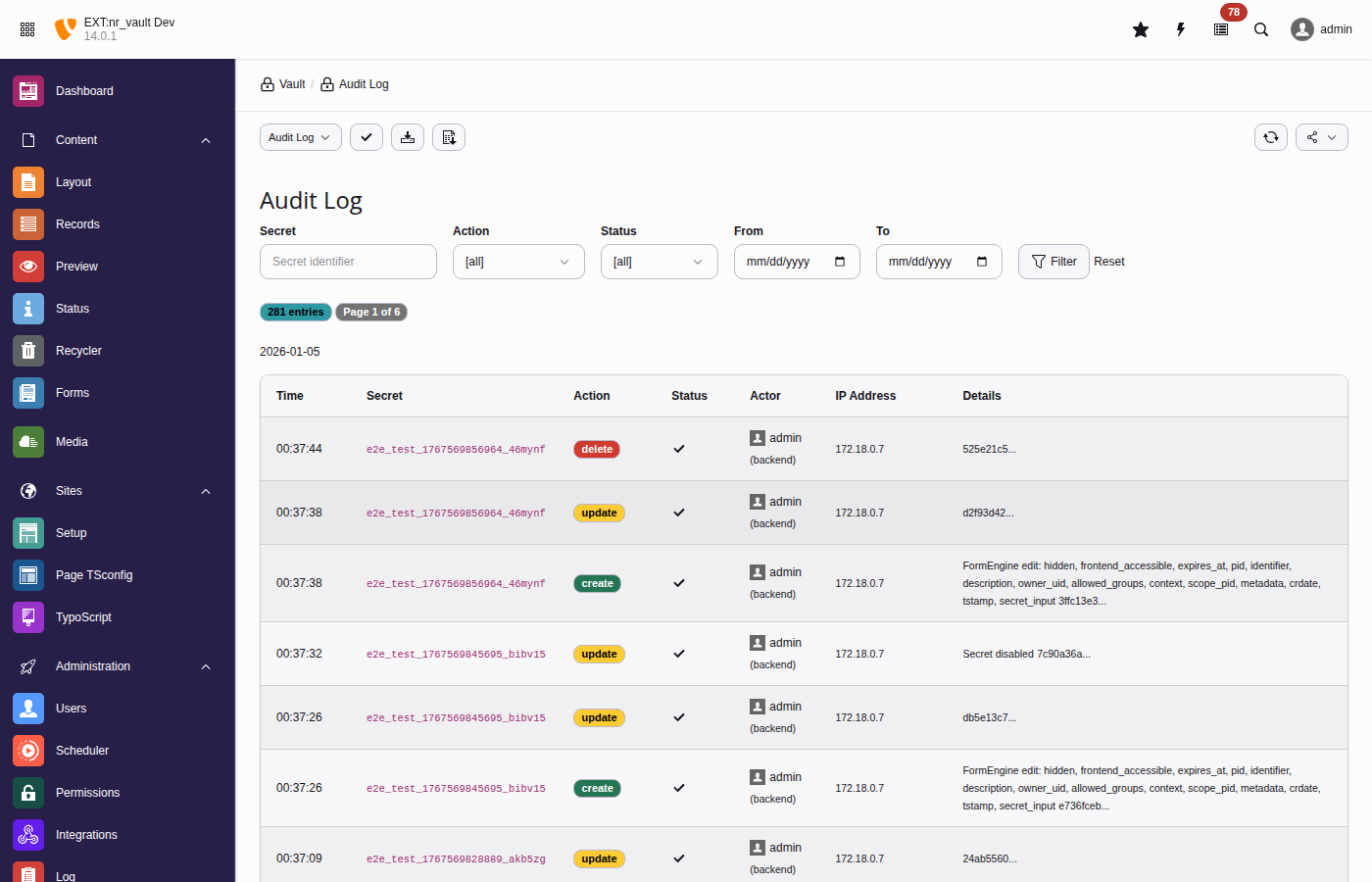
The audit log tracks all secret operations with tamper-evident hash chains
vault:rotate-master-key
Rotate the master encryption key (re-encrypts all DEKs):
# Using old key from file, new key from current config
vendor/bin/typo3 vault:rotate-master-key \
  --old-key=/path/to/old.key \
  --confirm

# Dry run to simulate
vendor/bin/typo3 vault:rotate-master-key \
  --old-key=/path/to/old.key \
--dry-runvault:scan
Scan for potential plaintext secrets in database:
vendor/bin/typo3 vault:scan

# Only critical issues
vendor/bin/typo3 vault:scan --severity=critical

# JSON for CI/CD
vendor/bin/typo3 vault:scan --format=jsonvault:migrate-field
Migrate existing plaintext field values to vault:
# Preview
vendor/bin/typo3 vault:migrate-field tx_myext_settings api_key --dry-run

# Execute
vendor/bin/typo3 vault:migrate-field tx_myext_settings api_keyvault:cleanup-orphans
Remove orphaned secrets from deleted records:
vendor/bin/typo3 vault:cleanup-orphans --dry-run
vendor/bin/typo3 vault:cleanup-orphans --retention-days=30PHP API
VaultService
Inject the VaultService to access secrets programmatically:
use Netresearch\NrVault\Service\VaultServiceInterface;

final class PaymentService
{
    public function __construct(
        private readonly VaultServiceInterface $vaultService,
    ) {}

    public function getApiKey(): ?string
    {
        return $this->vaultService->retrieve('stripe_api_key');
    }
}Storing secrets
$this->vaultService->store(
    identifier: 'payment_api_key',
    secret: 'sk_live_...',
    options: [
        'description' => 'Stripe production API key',
        'context' => 'payment',
        'groups' => [1, 2], // Backend user group UIDs
        'expiresAt' => time() + (86400 * 90), // 90 days
    ],
);Checking existence
if ($this->vaultService->exists('stripe_api_key')) {
    $value = $this->vaultService->retrieve('stripe_api_key');
}Listing secrets
// Get all accessible secrets
$secrets = $this->vaultService->list();

// Filter by pattern
$paymentSecrets = $this->vaultService->list(pattern: 'payment_*');Vault HTTP client
Make authenticated API calls without exposing secrets to your code.
The HTTP client is PSR-18 compatible. Configure authentication with
with, then use standard
send.
Inject
Vault directly:
use GuzzleHttp\Psr7\Request;
use Netresearch\NrVault\Http\SecretPlacement;
use Netresearch\NrVault\Http\VaultHttpClientInterface;

final class ExternalApiService
{
    public function __construct(
        private readonly VaultHttpClientInterface $httpClient,
    ) {}

    public function fetchData(): array
    {
        // Configure authentication, then use PSR-18
        $client = $this->httpClient->withAuthentication(
            'api_token',
            SecretPlacement::Bearer,
        );

        $request = new Request('GET', 'https://api.example.com/data');
        $response = $client->sendRequest($request);

        return json_decode($response->getBody()->getContents(), true);
    }
}Or access via VaultService:
use GuzzleHttp\Psr7\Request;
use Netresearch\NrVault\Http\SecretPlacement;

$client = $this->vaultService->http()
    ->withAuthentication('stripe_api_key', SecretPlacement::Bearer);

$request = new Request(
    'POST',
    'https://api.stripe.com/v1/charges',
    ['Content-Type' => 'application/json'],
    json_encode($payload),
);

$response = $client->sendRequest($request);Authentication options
use GuzzleHttp\Psr7\Request;
use Netresearch\NrVault\Http\SecretPlacement;

// Bearer token
$client = $vault->http()
    ->withAuthentication('api_token', SecretPlacement::Bearer);
$response = $client->sendRequest(new Request('GET', $url));

// API key header (X-API-Key)
$client = $vault->http()
    ->withAuthentication('api_key', SecretPlacement::ApiKey);
$response = $client->sendRequest(new Request('GET', $url));

// Custom header
$client = $vault->http()
    ->withAuthentication('api_key', SecretPlacement::Header, [
        'headerName' => 'X-Custom-Auth',
    ]);
$response = $client->sendRequest(new Request('GET', $url));

// Basic authentication with separate secrets
$client = $vault->http()
    ->withAuthentication('service_password', SecretPlacement::BasicAuth, [
        'usernameSecret' => 'service_user',
    ]);
$response = $client->sendRequest(new Request('GET', $url));

// Query parameter
$client = $vault->http()
    ->withAuthentication('api_key', SecretPlacement::QueryParam, [
        'queryParam' => 'key',
    ]);
$response = $client->sendRequest(new Request('GET', $url));For a complete real-world example combining TCA vault fields with the HTTP client, see Example: API endpoint management.