
Image Reference Validation
The extension ships a validator that detects and fixes stale or broken image references in RTE content fields. It is available both as a CLI command and as an Upgrade Wizard in the TYPO3 Install Tool.
Table of Contents
Overview
Over time, image references stored inside RTE bodytext fields can become
stale. Common causes include TYPO3 major upgrades, bulk file operations in the
Filelist module, and manual database edits. The validator scans every <img>
tag that carries a data-htmlarea-file-uid attribute, resolves the
corresponding FAL file, and compares the src attribute against the file's
current public URL.
Six categories of issues are detected:
| Type | Description | Auto-fixable |
|---|---|---|
processed_image_src | src points to a _processed_/ URL. Processed files are
regenerated on demand and their paths change between TYPO3 versions,
so storing them as src will break after an upgrade. | Yes |
src_mismatch | src does not match the FAL file's current public URL. This happens
when a file is moved or renamed in the Filelist module while existing
RTE content still references the old path. Also covers slashless
src values (e.g. fileadmin/x.jpg without the leading slash) —
these are broken relative URLs in modern TYPO3 and are repaired to
the canonical leading-slash form. | Yes |
broken_src | src is empty or missing, but a valid data-htmlarea-file-uid is
present. The correct URL can be resolved from FAL. | Yes |
orphaned_file_uid | data-htmlarea-file-uid references a FAL file that no longer exists
in sys_file. The stale data-htmlarea-file-uid attribute is
removed, but no src correction is possible because the file is gone. | Yes (attribute removed) |
missing_file_uid | The <img> tag has no data-htmlarea-file-uid attribute at all.
Without a file UID there is no way to determine which FAL file the
image should reference, so this issue requires manual intervention. | No |
nested_link_wrapper | The <img> tag is wrapped in two or more nested <a> tags
(e.g., <a><a><img></a></a>). This typically occurs after
upgrading from older extension versions where the tags.a and
externalBlocks.a handlers both wrapped the same image. The
inner duplicate <a> wrapper is removed, preserving the outer
link and its attributes. | Yes |
For fixable issues the validator replaces the src attribute with the file's
current getPublicUrl() value. The orphaned_file_uid type is treated as
fixable in the scan (it is counted and reported), but no src update is
applied because the underlying file no longer exists.
Prerequisites
The validator relies on the TYPO3 reference index (sys_refindex) to
discover which RTE fields contain image references. On a fresh installation or
after large imports, the reference index may be empty or out of date. Always
update it before running the validator:
bin/typo3 referenceindex:updateIf the validator reports "Scanned records: 0" despite images existing in RTE content, this is almost certainly the cause.
CLI Command
The rte_ckeditor_image:validate command scans RTE content fields and
reports (or fixes) broken image references.
Dry-run (default)
Run the command without any flags to perform a read-only scan:
bin/typo3 rte_ckeditor_image:validateThe output shows a summary of scanned records and images, followed by a table
listing every issue found, including the current src, the expected src,
and whether the issue is auto-fixable.
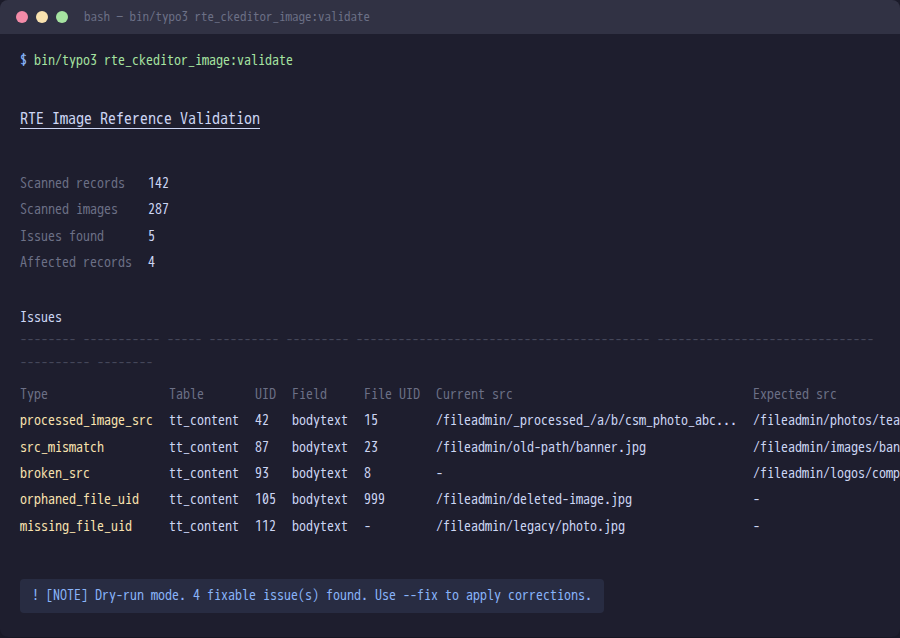
Example output of bin/typo3 rte_ckeditor_image:validate in dry-run mode.
Apply fixes
Add the --fix flag to write corrected src attributes back to the
database:
bin/typo3 rte_ckeditor_image:validate --fixWarning
--fix modifies database records directly. Always run a dry-run scan
first and create a database backup before applying fixes in production.
Skipped origins
New in version 13.9.0
Not every <img src> value can be repaired by the validator. By default the
command classifies each src and skips four out-of-scope categories:
| Category | Example | Why skipped |
|---|---|---|
external | https://cdn.example.com/foo.jpg | Off-site URL — not part of this TYPO3's FAL. |
data | data:image/png;base64,... | Inline-encoded image, no FAL reference exists. |
legacy | typo3conf/ext/some_ext/Resources/... | Pre-FAL extension path, file lives outside FAL. |
securedl | /securedl/sk=.../foo.jpg | URL signed by EXT:naw_securedl / similar — the
on-disk path differs from the signed URL. |
Skips are surfaced in the CLI summary as a per-origin breakdown so they stay visible (added to the existing "Scanned records / Scanned images / Issues found" definition list):
Skipped (out of scope)
16 total (12 external, 3 data, 1 legacy)Use --include to opt one or more categories back in if your environment
needs them validated:
# Re-include external URLs (the validator will then flag them as
# mismatches against FAL) — useful when migrating off a CDN.
bin/typo3 rte_ckeditor_image:validate --include=external

# Re-include multiple categories at once
bin/typo3 rte_ckeditor_image:validate --include=external,legacy

# Disable all skipping (validate every <img src> regardless of origin)
bin/typo3 rte_ckeditor_image:validate --include=allLimit to a specific table
Use the --table (short: -t) option to restrict the scan to a single
table:
bin/typo3 rte_ckeditor_image:validate --table=tt_contentThis is useful on large installations where you want to process one table at a time or only care about a particular table.
Combining options
Options can be combined freely:
# Fix issues in tt_content only
bin/typo3 rte_ckeditor_image:validate --fix --table=tt_contentExit codes
| Code | Meaning |
|---|---|
0 | No issues found, or all fixable issues were repaired successfully. |
1 | Issues were found (dry-run mode), or no fixable issues exist while unfixable issues remain. |
Upgrade Wizard
The same validation logic is exposed as a TYPO3 Upgrade Wizard named Validate RTE image references.
To run it:
- Open Admin Tools > Upgrade > Upgrade Wizard.
- Locate Validate RTE image references in the list of available wizards.
- Click Execute.
The wizard scans all RTE fields, and if fixable issues are found it
automatically applies corrections. It implements RepeatableInterface, so it
can be executed multiple times safely.
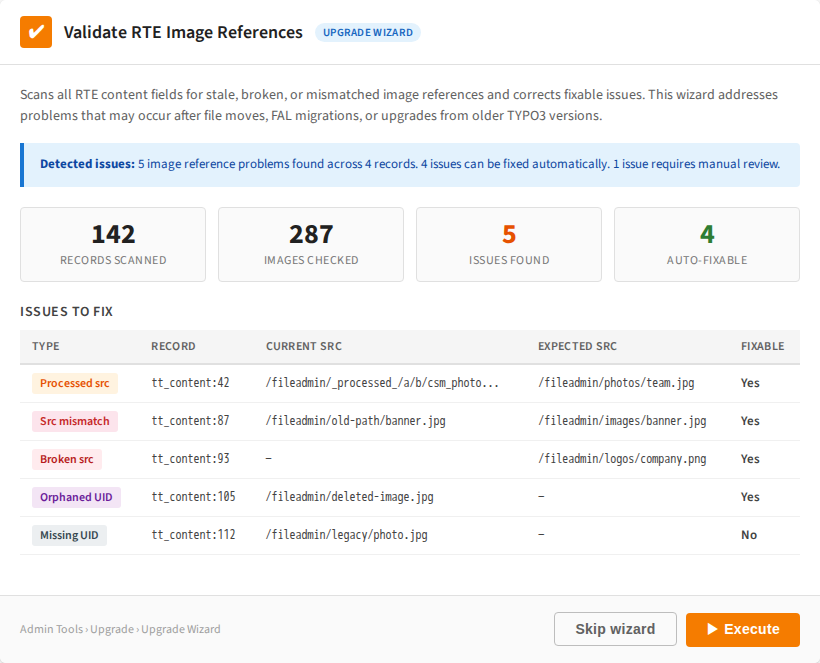
The Upgrade Wizard panel with detected issues and the Execute button.
Tip
The wizard requires the database to be up-to-date (DatabaseUpdatedPrerequisite).
Run all database schema migrations before executing this wizard.
Page Module Preview Warning
New in version 13.5.0
In addition to the CLI command and upgrade wizard, the extension now detects broken image references directly in the TYPO3 page module preview. When a content element contains images with validation issues, a yellow warning callout is shown above the content preview:
┌─────────────────────────────────────────────┐
│ ⚠ Image reference issues detected           │
│ 2 orphaned file reference(s),               │
│ 1 outdated src path(s).                     │
│ Run the upgrade wizard                      │
│ rteImageReferenceValidation or CLI command   │
│ bin/typo3 rte_ckeditor_image:validate --fix  │
│ to repair.                                   │
└─────────────────────────────────────────────┘This warning appears automatically for all CTypes that use the
RteImagePreviewRenderer (see RtePreviewRendererRegistrar).
The detection happens during page module rendering and requires no additional
configuration.
The same five issue types detected by the CLI command are shown in the warning:
orphaned_file_uid, src_mismatch, processed_image_src,
missing_file_uid, and broken_src.
Tip
The warning is purely informational and does not block editing. Editors can continue working with the content element while an administrator runs the upgrade wizard or CLI command to fix the references.
When to Use
Run the validator in the following situations:
After a TYPO3 major upgrade
Especially when upgrading from TYPO3 v10, v11, or v12 to v13+. Older
versions of TYPO3 and of this extension sometimes stored _processed_/
URLs in bodytext instead of the original file path. These processed paths
break after an upgrade because processed files are regenerated with different
names.
After bulk file operations
When files are moved or renamed in the Filelist module, the extension
updates references in RTE content automatically (via the
UpdateImageReferences listener). However, if files were moved by
other means (direct filesystem operations, TYPO3 CLI, third-party
tools), references may become stale.
As a periodic maintenance check
Run the dry-run scan periodically to detect drift before it causes broken images in the frontend. The scan is read-only and safe to run at any time.
After upgrading on a subpath install
If TYPO3 is served from a subpath (e.g. https://example.com/~user/,
https://example.com/subsite/) and the install is on a version
prior to the leading-slash storage convention, existing src values
may have been stored without a leading slash. After upgrading, run:
./vendor/bin/typo3 rte_ckeditor_image:validate --fix --table=tt_content
to migrate them to the canonical /fileadmin/... form.
--table=tt_content restricts the scan to the standard content
element table (the common case); omit the flag to scan every table
that has an entry in sys_refindex with `softref_ is set to the
subpath troubleshooting-frontend-issues`) so the rendered
HTML prepends it correctly.