
Quick configuration
Note
Before you proceed, make sure to read the Developer Notes section. It contains important instructions for correctly configuring the extension. Missing or incorrect configuration can prevent the comment form from rendering.
Adding TypoScript setup
To enable the default behavior and frontend output of the rd_ extension, you need to include its TypoScript configuration.
In the TYPO3 backend, go to the Web > Template module and select your root page. Make sure a TypoScript template record exists.
Switch the view to Info/Modify and click Edit the whole template record to open the template editor.
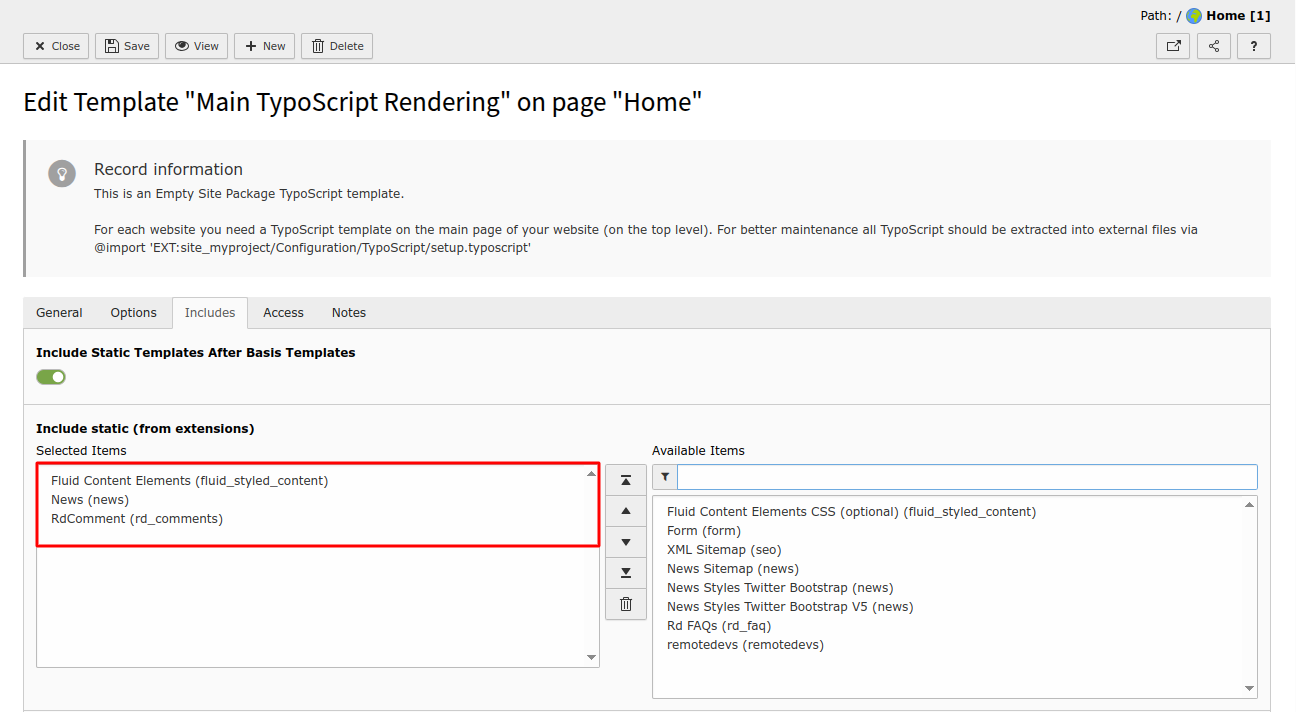
Go to the Includes tab and add the following static template from the list:
- RD Comments (rd_comments)
This step loads all required TypoScript settings to display the comment form and comment threads in the frontend automatically.
If needed, you can override the default configuration using TypoScript constants or by modifying the templates.