
Community Contributed News Publishing Pipeline
This page outlines the publication pipeline for community-submitted TYPO3 News articles and events. Content should primarily be submitted through the Content Request Form.
The TYPO3 Company maintains a different pipeline for their internal content and content sourced from official partners. If you're an official partner, feel free to reach out to your contact person for more information.
Please refer to How to Get and Article Published in TYPO3 News for an overview of the process and and the Guidelines for News Articles for information on how to write suitable content.
Who is responsible?
The publishing pipeline is managed by the TYPO3 Content Group.
Location — Trello board
The publishing pipeline for news and events on typo3.org is maintained on a public Trello board.
Pipeline stages
The pipeline has eight stages (aka. swim lanes):
Content requests
New content requests submitted through the Content Request Form land in this swim lane.
Cards in this swim lane are unprocessed by the TYPO3 Content Group.
Content in progress
This swim lane holds Trello cards for content that is still being written.
Needs review or proofreading
Trello cards move into this swim lane when the content they represent has been written and is ready for review and proofreading. The Content Group will pick up cards and assign a proofreader.
Reviewed and returned to author
When an article has been proofread, the Trello card representing it is moved into this swim lane. The author is notified by the proofreader and asked to review changes and suggestions.
Ready to publish
Once an article's author has reviewed and approved an article for publication, the Trello card representing it is moved into this swim lane. Cards in this lane can be published at typo3.org.
Articles in this swim lane usually have an assigned publication date (indicated by the Trello card's deadline field). The Content Group is responsible for assigning publication dates.
Published and ready for next newsletter
After an article or event has been published on typo3.org, the Trello card representing it is moved into this swim lane. The Published URL information in the description is updated and the deadline is set to completed.
Already published in newsletter
Once an article has been included in a published newsletter, the Trello card representing it is moved into this swim lane. The card will automatically be archived and disappear from view.
Blocked
Trello cards representing articles and events, whose progress is somehow blocked, are manually moved into this swim lane.
Labels
Within the Trello board, labels are used to indicate how the news articles or events should be treated.
Labels can be combined, as far as it makes sense.
The labels are listed in the order they have in Trello.
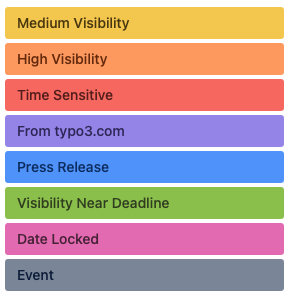
Medium Visibility
Color: yellow
Once published, the article or event should have social media mention.
The exact nature of the visibility outside of typo3.org is decided by the person responsible for social media in the TYPO3 Company.
High Visibility
Color: orange
A higher level of visibility than for the Medium Visibility label. Once published, the article or event should have social media mention at a favorable time, a banner on typo3.org, special graphics, etc.
The exact nature of the visibility outside of typo3.org is decided by the person responsible for social media in the TYPO3 Company.
Time Sensitive
Color: red
The item should be published sooner, rather than later.
From the TYPO3 Company
Color: violet
This article originates in the TYPO3 Company's content pipeline.
Talk with the person responsible for content publication at the TYPO3 Company before changing this item.
Press Release
Color: blue
This item represents a press release and will be published as such.
Visibility Near Deadline
Color: green
This item represents information about a time-limited opportunity, such as a vote or poll. It should be given additional visibility closer to the end of the time-limited period.
The exact nature of the visibility outside of TYPO3’s websites is decided by the person responsible for social media in the TYPO3 Company. For more information, see the list of press contacts.
Date Locked
Color: magenta
The item's publication date must not be changed.
Event
Color: dark gray
The Trello card represents an event, not a news article. Consequently, the information contained in the document should be published as an event, visible in the event listing. Event dates, etc., should be contained within the description text or attached document.