The Extension Builder helps you to develop a TYPO3 extension based on the
domain-driven MVC framework Extbase and the templating engine Fluid.
It provides a graphical modeler to define domain objects and their relations
as well as associated controllers with basic actions. It also provides a
properties form to define extension metadata, frontend plugins and backend
modules that use the previously defined controllers and actions. Finally, it
generates a basic extension that can be installed and further developed.
In addition to the kickstart mode, the Extension Builder also provides a
roundtrip mode that allows you to use the graphical editor
even after you have started making manual changes to the files.
In this mode, the Extension Builder retains the manual changes,
such as new methods, changed method bodies, comments and annotations,
even if you change the extension in the graphical editor.
It provides a graphical modeler to define domain objects and their relations
as well as associated controllers with basic actions.
It also provides a properties form to define extension metadata, frontend
plugins and backend modules that use the previously defined controllers
and actions.
Finally, it generates a basic extension with that can be installed
and further developed:
In addition to the kickstart mode, the Extension Builder also provides a
roundtrip mode that allows you to use the graphical editor
even after you have started making manual changes to the files.
In this mode, the Extension Builder retains the manual changes,
such as new methods, changed method bodies, comments and annotations,
even if you change the extension in the graphical editor.
What does it not do?
Custom TYPO3 content elements
The Extension Builder focuses on the implementation of business logic in the
sense of Domain-Driven Design.
Unlike the deprecated Kickstarter extension, the Extension Builder is not
intended for creating your own TYPO3 content elements.
To create them, you should either use the Extension Builder to create a TYPO3
extension skeleton (without domain objects, controllers, plugins and modules)
and add
TYPO3 content elements manually,
or use one of the dedicate extensions like Mask
or Dynamic Content Elements (DCE)
instead.
Compatibility of existing extension with newer TYPO3
To make an existing TYPO3 extension compatible with a newer TYPO3 version,
we recommend using TYPO3 Rector
instead of trying to load and save the extension in the Extension Builder of
the newer TYPO3 version.
Installation
Admin rights are required to install and activate the Extension Builder.
If you are in composer mode, you need to add at least one entry inside "repositories" in your composer.json file. Otherwise the extension_builder will fail to save your extension. The extension_builder will store your generated extension in this folder.
Go to the backend module of the Extension Builder,
switch to the graphical editor by selecting the Domain Modelling
view (1)
and ensure that the properties form (2) is expanded, located on the left side of
the graphical modeler (3).
Please note that some configuration options are only available if the advanced
options are enabled by clicking the Show advanced options button
in the upper right corner (4). These options are mainly intended for experienced
TYPO3 developers.
2. Insert meta data of extension
Enter meaningful meta data of your extension in the properties form (2) on the
left side.
Once you have filled in the required Name, Vendor name and Key fields,
you can click the Save button at the top to create the extension
skeleton in your file system based on your configuration.
Feel encouraged to save frequently.
Name
The extension name can be any string and is used as title property in the extension configuration
file ext_emconf.php.
It is displayed, for example, in the TYPO3 Extension Repository (TER)
and the Extension Manager module.
An example is "The EBT Blog".
Vendor name
The vendor name must be an UpperCamelCase, alphanumeric string. It is used
in the namespace of PHP classes: <VendorName>\<ExtensionName>\<Path>\<To>\<ClassName> and
in the name property of the composer.json: <vendorname>/<extension-key>.
An example is "Ebt".
Key
The extension key must be a lowercase, underscored, alphanumeric string.
It must be unique throughout the TER and is best composed of the vendor name and an extension specific
name, such as <vendorname>_<extension_name>, where it must not start with "tx_", "pages_", "sys_",
"ts_language_", and "csh_". It is used
as extension directory name <extension_key>/,
in the language files: product-name=<extension_key> and
in the composer.json: name: <vendor-name>/<extension-key>.
An example is "ebt_blog".
Description
The extension description can be any text. It is used as description property in extension
configuration files ext_emconf.php and composer.json.
Version
(More options)
A good versioning scheme helps to track the changes. We recommend semantic versioning.
State
(More options)
The status indicates whether the extension has already reached a stable phase, or whether it is still in
alpha or beta.
Extension authors
There is a possibility to add developers or project managers here.
3. Create a domain object
If you want to extend the extension skeleton to implement business logic, create
at least one domain object by dragging the gray New Model Object tile onto
the canvas.
Give it a meaningful name, which must be an UpperCamelCase, alphanumeric string,
for example "Blog".
3.a. Edit domain object settings
Edit the general settings of the domain object by opening the
Domain object settings subsection.
Is aggregate root?
Check this option if this domain object combines other objects into an aggregate. Objects
outside the aggregate may contain references to this root object, but not to other objects
in the aggregate. The aggregate root checks the consistency of changes in the aggregate.
An example is a blog object that has a related post object that can only be accessed through
the blog object with $blog->getPosts().
Checking this option in the Extension Builder means that a controller class is generated for
this object, whose actions can be defined in the following Default actions
subsection.
Additionally, a repository class is generated that allows to retrieve all instances of this
domain object from the persistence layer, i.e. in most scenarios from the database.
Description
The domain object description can be any text. It is used in the PHPDoc comment of its
class.
Object type
(Advanced options)
Select whether the domain object is an entity or a value object.
An entity is identified by a unique identifier and its properties usually change during the
application run. An example is a customer whose name, address, email, etc. may change, but
can always be identified by the customer ID.
A value object is identified by its property values and is usually used as a more complex
entity property. An example is an address that is identified by its street, house number,
city and postal code and would no longer be the same address if any of its values changed.
Note: As of TYPO3 v11, it is recommended to specify any domain object of type "entity"
due to the implementation details of Extbase. However, this might change in upcoming TYPO3
versions.
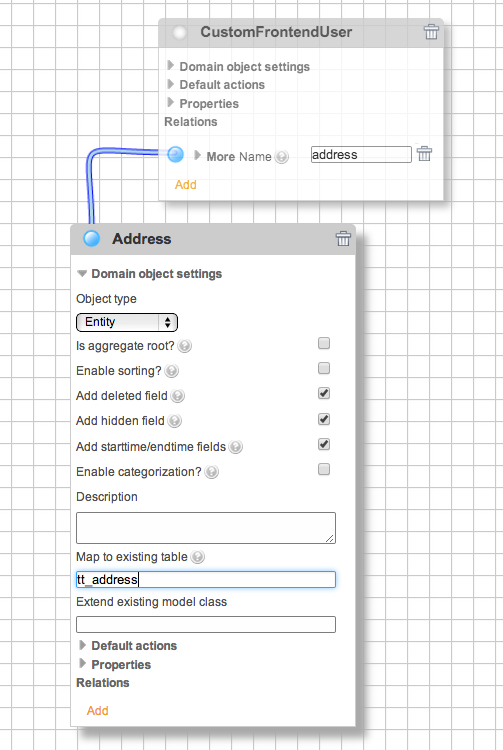
Map to existing table
(Advanced options)
Instead of creating a new database table for the domain object, you can let it use an
existing table. This can be useful if there is no domain object class using this table yet.
Enter the appropriate table name in this field. Each object property will be assigned to an
existing table field if both names match, otherwise the table field will be created.
This check takes into account that the property name is a lowerCamelCase and the table field
name is a lowercase, underscored string, for example the firstName property matches the
first_name field. For more information on this topic, see the page
"Extending domain objects or map to existing tables".
An example is "tt_address".
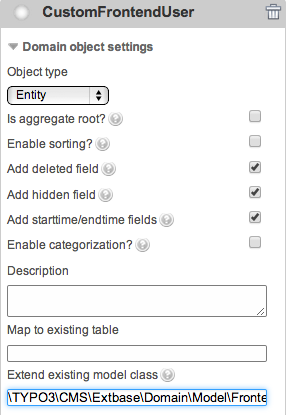
Extend existing model class
(Advanced options)
Extbase supports single table inheritance, which means that a domain object class can
inherit from another domain object class and instances of both are persisted in the same
database table, optionally using only a subset of the table fields. The class to inherit
from must be specified as a fully qualified class name and must exist in the current TYPO3
instance.
Each object property will be assigned to an existing table field if both names match,
otherwise the table field will be newly created. Additionally, a table field
tx_extbase_type is created to specify the domain object class stored in this table
row. For more information on this topic, see the "Extending domain objects or map to existing tables"
page.
An example is "\TYPO3\CMS\Extbase\Domain\Model\Category".
3.b. Add actions
If the domain object is an aggregate root, open the Default actions section
and select the actions you need and add custom actions if required.
All selected actions are made available in the controller class that is created
along with the domain object class, and a Fluid template with an appropriate name is
generated for each action.
3.c. Add properties
Expand the properties subsection to add domain object properties:
Property name
The property name must be a lowerCamelCase, alphanumeric string. It is used
in language files and domain object classes as <propertyName> and
in the database table as <property_name>.
An example is "firstName".
Property type
Select the type of the property. This determines the field type in the database table, the
TCA type for TYPO3 backend rendering, and the Fluid type for TYPO3 frontend rendering.
Note: As of TYPO3 v11, the types marked with an asterisk (*) are not fully implemented
for frontend rendering for various reasons. For example, the frontend handling of the types
"file" and "image" is not yet implemented, because an implementation in Extbase is missing.
For these, many implementation examples can be found on the Internet.
Description
(Advanced options)
The property description can be any text. It is displayed in the List module of the TYPO3
backend as context sensitive help when you click on the property field.
Is required?
(Advanced options)
Enable this option if this property must be set in TYPO3 frontend. Required properties are
provided with a @TYPO3CMSExtbaseAnnotationValidate("NotEmpty") PHPDoc annotation
in the domain object class.
Is exclude field?
(Advanced options)
Enable this option if you want to be able to hide this property from non-administrators
in the TYPO3 backend.
3.d. Add relations
If you create multiple domain objects you may want to connect them by relations.
A relation property can be added in the relations subsection.
When being added, it can be connected to the related object by dragging the
round connector of the relation property and dropping it at the connector of the
related object. When expanding the relation property panel you can refine the
type of relation.
Name
The relation property name must be a lowerCamelCase, alphanumeric string. It is used like an
ordinary property.
Type
These relation types are available:
one-to-one (1:1)
This relation property can be associated with a specific instance of the related domain
object and that instance has no other relation. An example is a person who has only one
account and this account is not used by any other person.
This setting results in a side-by-side selection field with a maximum of 1 selected item in
the TYPO3 backend.
one-to-many (1:n)
This relation property can be associated with multiple instances of the related domain
object, but each of those instances has no other relation. An example is a blog with
multiple posts, but each post belongs to only one blog.
See Render type description for more details on the rendering of the property in the TYPO3
backend.
many-to-one (n:1)
This relation property can be associated with a specific instance of the related domain
object, but that instance can have multiple relations. An example is when each person has
a specific birthplace, but many people can have the same birthplace.
This is represented in the TYPO3 backend as a side-by-side selection field with a maximum
number of 1 selected item.
many-to-many (m:n)
This relation property can be associated with multiple instances of the related domain
object, and each of these instances can also have multiple relations. An example is when a
book may have multiple authors and each author has written multiple books.
See Render type description for more details on the rendering of the property in the TYPO3
backend.
Note: For the many-to-many relation to work properly, you must perform two additional
tasks:
1. Add a many-to-many relation property in the related domain object as well and connect it
to this object.
2. Match the database table name in the
MM property of the TCA files of both domain
objects in the generated extension. If this is not the case, the relations of one object
are stored in a different database table than the relations of the related object.
Render type
This option is only available for the one-to-many and many-to-many relations and defines the
display of the relation property field in the TYPO3 backend:
The relation description can be any text. It is displayed in the List module of the TYPO3
backend as context sensitive help when you click on the relation property field.
Is exclude field?
(Advanced options)
Enable this option if you want to be able to hide this relation property from
non-administrators in the TYPO3 backend.
Lazy loading
(Advanced options)
Should the related instances be loaded when an instance of this domain is created
(eager loading) or on demand (lazy loading). Lazy loading relation properties are
provided with a @TYPO3CMSExtbaseAnnotationORMLazy PHPDoc annotation in the
domain object class.
4. Create a frontend plugin
If you want to create an extension that generates output in the TYPO3 frontend,
add a plugin in the Frontend plugins subsection of the properties form.
It will then be available for selection in the type field of the
TYPO3 content element "General Plugin".
Name
The plugin name can be any string. It is displayed in the list of available plugins in the
TYPO3 content element wizard. An example is "Latest articles".
Key
The plugin key must be a lowercase, alphanumeric string. It is used to identify the plugin
of your extension. An example is "latestarticles".
Description
The plugin description can be any text. It is displayed in the list of available plugins in
the TYPO3 content element wizard below the plugin name.
Controller action combinations
(Advanced options)
In each line all actions of a controller supported by this plugin are listed by
<controllerName> => <action1>,<action2>,.... The first action of the first line is the
default action. Actions are defined in the related aggregate root object, and the controller
name corresponds to the object name.
An example is Blog => list,show,new,create,edit,update and
Author => list,show.
Non cacheable actions
(Advanced options)
Each line lists all actions of a controller that should not be cached. This list is a subset
of the Controller action combinations property list.
An example is Blog => new,create,edit,update.
5. Create a backend module
If your extension should provide a TYPO3 backend module,
add a module in the Backend modules subsection of the properties form.
It will then be available in the module menu on the left side of the TYPO3
backend.
Name
The module name can be any string. It is currently used only internally in the
Extension Builder, for example in validation results. An example is "EBT Blogs".
Key
The module key must be a lowercase, alphanumeric string. It is used to identify the module
of your extension. An example is "ebtblogs".
Description
The module description can be any text. It is displayed in the About module of the
TYPO3 backend.
Tab label
The module name in the TYPO3 module menu can be any string.
Main module
This is the module key of the section in the TYPO3 module menu to which the module is
assigned. For example, "web" or "site".
Controller action combinations
(Advanced options)
In each line all actions of a controller supported by this module are listed by
<controllerName> => <action1>,<action2>,.... The first action of the first line is the
default action. Actions are defined in the related aggregate root object, and the controller
name corresponds to the object name.
An example is Blog => list,show,new,create,edit,update,delete,duplicate and
Author => list,show,new,create,edit,update,delete.
6. Save the extension
If your model represents the domain you wanted to implement you can hit the
Save button at the top.
The Extension Builder generates all required files for you in a location that
depends on your local setup:
6.a. Composer mode
If you run TYPO3 in Composer mode, you
have to specify and configure a local path repository
before saving your extension. Extension Builder reads the path from the TYPO3
project composer.json and offers it as a target path to save the
extension.
The local path repository is normally configured as follows:
To install the extension in the TYPO3 instance you have to execute the usual:
composer require <extension-package-name>:@dev
Copied!
, for example:
composer require ebt/ebt-blog:@dev
Copied!
which will cause a symlink typo3conf/ext/<extension_key>/ to your extension
to be created and the extension to be recognized in the Extension Manager.
Before TYPO3 11.4 you had to install the extension additionally in the Extension
Manager.
6.b. Legacy mode
If you run TYPO3 in Legacy mode
the extension will be generated directly at typo3conf/ext/<extension_key>/.
Once the extension is saved you should be able to install it in the Extension
Manager.
7. Continue developing
Now you can start modifying the generated files in your IDE. If you still want
to be able to modify the domain model in the graphical editor you have to make
sure that the roundtrip mode is activated in the
configuration, before loading the extension in the
Extension Builder again.
Generated extension
The generated extension looks like this, following the blog example from the
previous chapter:
This is the minimum set of extension files generated when only the required
metadata has been entered into the properties form and no domain modeling has
been performed:
The extension metadata is stored in the composer.json and ext_emconf.php
files and is used for installations in Composer mode and Legacy mode
respectively.
The extension icon Extension.svg is displayed in the list of extensions
of the Extension Manager module.
The Documentation/ folder contains a basic set of documentation files.
Read the section "Documentation" how to proceed with the documentation.
The Extension Builder stores some internal data in the ExtensionBuilder.json
file and in the Configuration/ExtensionBuilder/ folder which should be
kept as long as the extension is edited in the Extension Builder.
Domain modeling files
Most of the extension files are created for modeling the domain and configuring
frontend plugins and backend modules:
The frontend plugins are registered in the ext_localconf.php file and
the backend modules are registered in the Configuration/Backend/Modules.php
file.
The associated views are configured in the Configuration/TypoScript/
folder and the Fluid view templates are bundled in the Resources/Private/
folder.
The database schema of the domain model is defined in the ext_tables.sql
file.
The controller classes are provided in the folder Classes/Controller/,
the classes that define the domain model are provided in the
folder Classes/Domain/ and their representation in the TYPO3 backend
is configured in the folder Configuration/TCA/.
Last but not least, the tests of the classes are located in the folder
Tests/.
Note
TYPO3 v12 TCA field types:
Integer properties use type = 'number' (previously type = 'input' with
eval = 'int'). Link properties use type = 'link' (previously
renderType = 'inputLink'). TCA items arrays use associative format with
label and value keys.
Dependency Injection:
Controllers and services use constructor injection. Dependencies are declared
in Configuration/Services.yaml and injected automatically by the
TYPO3 DI container.
For more information on tests, see the section "Tests" and for everything
else, please refer to the Extbase & Fluid book of
the official TYPO3 documentation.
Documentation
The Extension Builder has already created sample documentation for your
extension if you have Generate documentation enabled in
the properties form.
Writing documentation
The generated documentation is written in the reStructuredText (reST)
markup language with support for Sphinx directives and provides a typical
documentation structure with some dummy entries. More about how to document with
reStructuredText and Sphinx can be found in the official TYPO3 documentation:
Once you have made changes to the documentation files, you should render them
locally to test the output. The recommended method is to use the official
TYPO3 Documentation Team Docker image, but you can also install all the required
rendering tools from scratch. You can find more about this in the official TYPO3
documentation on rendering documentation.
For example, on a Linux host with Docker installed, rendering boils down to
these commands:
cd <path-to-extension>
source <(docker run --rm t3docs/render-documentation show-shell-commands)
dockrun_t3rd makehtml
xdg-open "Documentation-GENERATED-temp/Result/project/0.0.0/Index.html"
Copied!
Publish documentation
If you publish the extension to the TYPO3 Extension Repository (TER), do not
put the rendered documentation under version control, as the documentation will
be registered during the publishing process for
automatic rendering and deployment to
https://docs.typo3.org/p/<vendor-name>/<extension-name>/<version>/<language>/
, for example to
https://docs.typo3.org/p/friendsoftypo3/extension-builder/12.0/en-us/.
If the extension is for private use, you are free to do anything with the
rendered documentation - including, of course, putting it under version control.
Tests
The TYPO3 Core is covered by thousands of tests of varying complexity:
Unit tests (testing part of a class), functional tests (testing multiple classes
in combination) and acceptance tests (testing the entire website user
experience). To simplify testing, the general functionality for writing tests is
bundled in the TYPO3 Testing Framework,
and all custom tests should use it by inheriting from its base classes.
The Extension Builder generates a set of unit tests and a dummy functional test
that easily cover the generated classes of your extension. The generated tests
should encourage you to write your own tests once you start customizing the
code.
If you are new to testing, we recommend that you invest
some time to learn the benefits of software testing. It will certainly improve
the quality of your software, but it will also boost your programming skills.
Moreover, it will allow you to refactor without fear of breaking anything:
Code that is covered by tests shows less unexpected behavior after refactoring.
Covered classes and methods
The Extension Builder generates unit tests for the public API of
domain objects and
default controller actions.
Covered domain object methods
The covered methods of domain object classes match the patterns
get*()
set*()
add*()
remove*().
For example:
/**
* @test
*/publicfunctionsetTitleForStringSetsTitle(): void{
$this->subject->setTitle('Conceived at T3CON10');
self::assertEquals('Conceived at T3CON10', $this->subject->_get('title'));
}
Copied!
All types of properties are covered, for example integers, strings, file
references or relations to other domain objects.
Covered controller actions
The covered controller actions match the names
listAction()
showAction()
newAction()
createAction()
editAction()
updateAction()
deleteAction()
and test the following behavior:
asserting data in the action is assigned to the view and
asserting the action delegates data modifications to a repository,
like adding, updating, removing or fetching objects.
Unit tests of your extension can be executed on the command line by following
the testing pages of the official TYPO3
documentation. The generated tests use PHPUnit 10 and
TYPO3 Testing Framework ^7.
Configuration
There are two places to configure the Extension Builder:
Globally, in the Extension Configuration module of the TYPO3
backend.
Locally, in the file Configuration/ExtensionBuilder/settings.yaml
of the generated extension.
In the TYPO3 backend go to Settings > Extension Configuration and
open the configuration of the Extension Builder. Here are several settings
configurable:
Setting
Description
Default
Enable roundtrip mode
If you enable the roundtrip mode, you can modify the generated files and
your changes will be preserved even if you customize the extension again in
the Extension Builder. For more information on the roundtrip mode, see the
page "Roundtrip mode".
If you disable it (kickstart mode), all files are regenerated every time you
save in the Extension Builder.
true
Backup on save
The Extension Builder creates a backup of the extension every time it is saved
if this option is set to true.
true
Backup directory
The directory where the Extension Builder stores the backup –
specified as an absolute path or relative to PATH_site.
var/tx_extensionbuilder/backups
Local configuration
After the initial creation of an extension, you will find the file
Configuration/ExtensionBuilder/settings.yaml in the extension which
contains the following extension specific settings:
Overwrite settings
Note
These settings only apply if the roundtrip mode is enabled in the global
configuration.
The nesting reflects the file structure and a setting applies recursively to all
files and subfolders of a file path.
Setting
Description
merge
All properties, methods and method bodies of class files are modified
and not overwritten.
Existing keys and identifiers in language files are preserved.
In any other file you will find a split token at the end of the file.
The part before this token is overwritten, the part after is preserved.
keep
These files are never overwritten.*
skip
These files are not created.*
Warning
* These settings may break the functionality to edit your extension in the
Extension Builder! Handle with care!
By default, the generated controller, domain object and repository classes
inherit from the corresponding Extbase classes. It might be useful to inherit
from your own classes - which should then extend the Extbase classes.
The nesting reflects the class hierarchy and is restricted to the classes
Controller
Model\AbstractEntity
Model\AbstractValueObject
Repository
with these options available:
Setting
Description
parentClass
The fully qualified class name of the class to inherit from.
setDefaultValuesForClassProperties
By default, the class builder initializes class properties with the default
value of their type, for example integer types with 0, string types with "",
etc.
Set this option to false if class properties should not be initialized,
for example if you want to distinguish whether a property is not yet set
or has been explicitly set to the default value.
There are more options for working with the Extension Builder itself.
Setting
Description
ignoreWarnings
Some modeling configurations result in warnings.
For example, if you configure a show action as a default action, you are
warned that you need to define a parameter of a domain object to be shown.
However, there may be use cases where you want to ignore the warning and thus
prevent it from appearing every time you save. Add the warning code that will
be displayed with the warning to the list of this setting. Each code should be
listed on its own line and indented by 2 spaces.
This is an example of the settings.yaml file:
ignoreWarnings:503
Copied!
Security
Check access of controller actions
Be aware that any controller action can be called just by appending a parameter
to the URL where the frontend plugin or backend module is included:
?tx_<extensionkey>_<pluginkey>[action]=<action>
For example, if a controller provides an edit and a delete action,
the edit action URL could look like this:
the blog would be deleted instead of being edited.
You have to make sure in your receiving controller to only allow context-specific
actions and generally restrict access to critical actions.
Publish to TER and Packagist
If your new extension does not reflect the business logic of a specific
customer but serves a general purpose, you might want to release the new
extension and let it become part of the TYPO3 ecosystem.
As much as we encourage you to contribute and live the open source ideas, we
want to keep the quality of the TYPO3 Extension Repository (TER) high and
therefore ask you to check these questions in advance:
Isn't there already an extension in the TER that provides the same
functionality? If so, wouldn't it be an option to contribute to the existing
extension?
Can you accurately describe the benefits of your extension for the TYPO3
community?
Does your extension include or require external libraries? If so, make sure
their licensing is compliant.
Do you have the resources to maintain this extension?
If you have checked all the questions and are still convinced of the benefits of
publishing your extension, you can secure your extension by reading and applying
before publishing the extension on TER and Packagist, following the official
publishing guide.
In-Depth
Some topics may be too rich in content to be explained in a section of the
previous pages. Therefore, they deserve their own page where all the details
are explained:
Sooner or later you get to the point where you need to add or rename domain
objects, but already changed code of the originally created files. At this
point the roundtrip mode is needed.
It aims to preserve your manual changes while applying the new domain model
configuration:
The roundtrip mode is enabled by default. To disable it, see the Extension
Builder configuration Configuration.
The general rule is: All configurations that can be edited in the graphical
editor should be applied in the graphical editor. For example, if your
extension depends on another extension, you should add it in the properties form
of the graphical editor and not directly in the ext_emconf.php and
composer.json.
the extension will be copied to a folder named like the new extension key
all classes and tables are renamed
your code should be adapted to the new names (not just overridden with the
default code)
If you change the vendor name:
namespaces in all class files are updated
use/import statements referencing the old vendor namespace are updated
type hints, var types, and return types in methods and parameters are updated
TypoScript files are regenerated with the new vendor name automatically
If you rename a property:
the corresponding class property is renamed
the corresponding getter and setter methods are updated
TCA files and SQL definitions are newly generated, modifications will be LOST
existing data in the corresponding table field will be LOST, except you
RENAME the field in the database manually
If you rename a relation property:
the corresponding class property is renamed
the corresponding getter/setter or add/remove methods are updated
the new SQL definition and default TCA configuration will be generated
existing data in the corresponding table field will be LOST, except you
RENAME the field in the database manually
existing data in many-to-many database tables will be LOST, except you RENAME
the table manually
If you change a property type:
the var type doc comment tags are updated
the type hint for the parameter in getter and setter methods are updated
the SQL type is updated if necessary
existing data in the corresponding table field might get LOST, except you
ALTER the field type in the database manually
If you change a relation type:
if you switch the type from 1:1 to 1:n or n:m or vice versa the getter/setter
or add/remove methods will be lost (!)
the required new getter/setter/ or add/remove methods are generated with the
default method body
existing data in many-to-many database tables will be LOST, except you RENAME
the table manually
If you rename a domain object:
the corresponding classes (domain object, controller, repository) will be
renamed
all methods, properties and constants are preserved
relations to this domain object are updated
references to the renamed classes in OTHER classes are NOT updated (!)
TCA files and SQL definitions are new generated, modifications will be LOST
Hint
By default, in case changes lead to unexpected results, Extension Builder
saves a backup every time the extension is saved, which can be used to
restore a previous state. More about backup configuration can be found on the
"Configuration" page.
Extending domain objects or map to existing tables
Since the TYPO3 Core already contains a number of database tables and domain
object classes, it may prove useful to reuse or extend existing domain objects
instead of creating new ones:
The Extension Builder supports single table inheritance.
This means you can extend domain object classes, either from your current
extension or from other extensions.
You must enter the fully qualified class name of the domain object you want to
extend in the Extend existing model class field in the domain object
settings form.
The class must be loadable, i.e. you can only extend classes of extensions that
are installed. After saving and updating the database (if necessary), you should
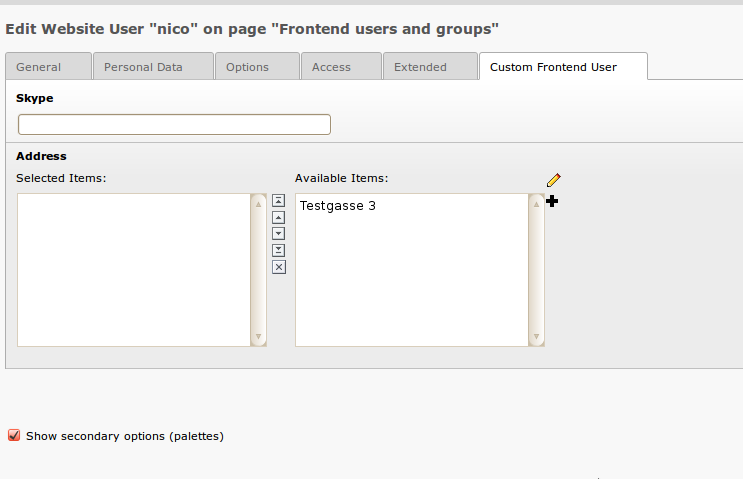
find a drop-down list Record Type and a new tab with the new properties in the
backend record form.
Note
Since single table inheritance depends on the $TCA[ctrl][type] field,
the Extension Builder tries to detect if a type field is already configured,
and if so, it adds your domain object class as new type.
Otherwise, the Extension Builder creates a new tx_extbase_type field
and configures it as a new type field.
This can lead to errors in certain cases. Especially if you don't see any
form at all when opening existing records in the backend, look at the type
field configuration and the existing values in the type field!
In this example, the frontend user domain object was extended:
Mapping to tables
If you want to store a domain object in an existing table, for example if there
is no domain object class for that table yet (like tt_address),
then you can enter the table name in the Map to existing table
field in the domain object settings form.
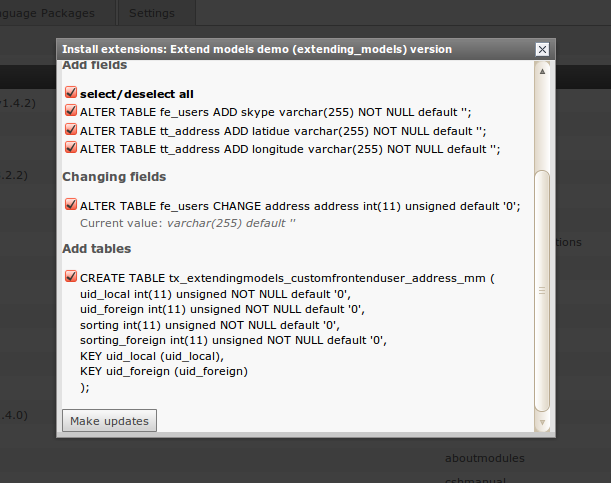
The Extension Builder will then add fields to this table for each property you
added to your domain object. If you name the properties according to the
existing field names, you can access the existing fields with the getters and
setters of your domain object class, and no new fields are created.
In this example the domain object is mapped to table tt_address:
and these are the resulting database updates:
and this is the backend form of the extended frontend user:
Note
Restrictions for single table inheritance
You should be aware that mapping to an existing table has some side effects:
Extbase stores the class name of the domain object instance in the table.
When it tries to restore the instance, for example when a parameter
tx_myext_myplugin[objectname]=23 is passed to a controller, it must
find the correct subclass.
This is implemented by a type field defined in $GLOBALS[TCA][<table>][ctrl][type].
But in many TYPO3 Core tables like pages or tt_content the type
field is used for other purposes, for example the type field of tt_content
contains the content type of the record and is used to find the correct
rendering definition for that record. Now when you map your domain object to
tt_content, a new type value is added that is not a rendering definition.
Another problem related to single table inheritance is that there is no real
implementation in TYPO3 to avoid conflicts when multiple extensions extend
the same domain object. If there are 3 extensions extending a news object,
you always have to decide which domain object to use. You can't use the
features of all subclasses in one domain object.
Caution
Do not use single table inheritance from external domain objects in
extensions that you want to publish in TER and Packagist. Extension users
have no control over how many other extensions try to extend the same object,
which will lead to unexpected behavior!
Relations to domain objects of other extensions
If you want to add a relation to a domain object that is not part of your
current extension, you must enter the fully qualified class name of that object
in the relation settings form. The related class must be loadable, so you can
only add domain objects from installed extensions.
Tip
Do not forget to enter the TYPO3 extension of the domain object your domain
object inherits from in the Depends on field of the properties
form.
Only then the Package Manager will take care of the correct order when
loading the extensions.
Migrating to TYPO3 13 / PHP 8.3
Note
This guide is for existing extensions only.
If you are creating a new extension with Extension Builder 13.x, the
generated code already follows all patterns described here — nothing
to do.
This guide is relevant if you have an extension that was originally
generated with an older version of the Extension Builder (TYPO3 11 or
earlier) and you are now running it on TYPO3 13. The Extension Builder
preserves existing code during round-trips and does not automatically
update old patterns. The items below describe what needs to be checked
and updated manually.
System Requirements
Component
Required version
TYPO3
^13.0
PHP
^8.3
Extension Builder
13.x branch
Generated Code Changes
The Extension Builder 13.x branch generates code that is compatible with
TYPO3 13 and PHP 8.3. If you have previously generated an extension with
an older version, you need to update the following patterns manually or
regenerate the affected files.
This enables constructor injection for all classes under Classes/.
Migration Checklist
Use this checklist when migrating a previously generated extension:
PHP / Backend
[ ] All repository classes extend TYPO3\CMS\Extbase\Persistence\Repository
[ ] All model properties have native PHP type declarations
[ ] Controllers use constructor injection (not injectX() methods)
[ ] All action methods return ResponseInterface
[ ] declare(strict_types=1) at top of every PHP file

TCA
[ ] sys_language_uid uses type = 'language'
[ ] Date/time fields use type = 'datetime'
[ ] No deprecated type = 'input' with eval for dates

Module / Routing
[ ] Module registered in Configuration/Backend/Modules.php (not ext_tables.php)
[ ] No TBE_MODULES array manipulation

Dependency Injection
[ ] Configuration/Services.yaml present with autowire: true
[ ] ext_localconf.php does not use makeInstance for services
Found a bug or missing a feature? Discuss it in our Slack channel or directly
create an issue or even a pull request in our
GitHub repository.
If you want to participate in a great open source community, you should
contribute to the Extension Builder and become a team member!
– The TYPO3 project - Inspiring people to share
Change log
Version 13.2.0
[FEATURE] TCA select properties can now have custom items configured directly in the domain modeling editor — each item has a label and a value.
[TASK] locallang_csh_*.xlf files are no longer generated. CSH (Context Sensitive Help) was removed in TYPO3 v12; field descriptions are now written exclusively to locallang_db.xlf and referenced via the TCA description key. When a domain object is removed via RoundTrip, any leftover locallang_csh_*.xml and locallang_csh_*.xlf files are cleaned up automatically. Existing generated extensions may have orphaned CSH files that can be deleted manually.
[BUGFIX] Renaming a domain object no longer corrupts the controller constructor and action parameter names.
[BUGFIX] Property settings panel now correctly shows and hides fields based on the selected property type.
[BUGFIX] Boolean properties no longer always appear as checked after loading an existing extension.
[BUGFIX] Saving an extension no longer fails after a relation has been deleted.
[BUGFIX] Opening old ExtensionBuilder.json files that are missing the renderType key no longer causes an error — the field is silently ignored.
[BUGFIX] Indentation of nested method calls is preserved correctly during RoundTrip.
[BUGFIX] Field descriptions are now preserved with their original casing in generated XLF files.
[BUGFIX] SelectProperty type is now stored as a string instead of an integer, fixing issues when loading extensions that use select fields.
[BUGFIX] Fixed undefined array key excludeField warning in ObjectSchemaBuilder.
Version 13.1.0
[BUGFIX] ext_tables.sql now includes a CREATE TABLE statement for models that have no own properties but are the target of a ZeroToMany inline relation — previously the FK column was silently dropped, leaving the database table uncreated.
[BUGFIX] A validation warning is now shown when a domain object has no properties, informing the user that no CREATE TABLE statement will be generated in ext_tables.sql.
[BUGFIX] Generated controller actions now declare ResponseInterface as their return type, matching the TYPO3 v13 standard.
[BUGFIX] f:image ViewHelper calls in generated templates now use the image attribute instead of src, fixing rendering of filenames with Umlauts or special characters.
[FEATURE] XLF files are no longer rewritten when only the date= attribute changed — avoids VCS noise on every regeneration. The staticDateInXliffFiles setting is removed as it is no longer needed.
[FEATURE] Generated backend module extensions now include a user.tsconfig file that makes the backend module accessible without manual TSconfig setup.
[FEATURE] extbase is now automatically added as a dependency to generated extensions that use Extbase controllers or domain objects.
Version 13.0.0
Breaking changes and migrations (v12 → v13):
[TASK] Update dependencies to TYPO3 ^13.4, PHP ^8.3.
[TASK] Frontend plugins are now registered as CType content elements using PLUGIN_TYPE_CONTENT_ELEMENT — the deprecated list_type approach is no longer used. page.tsconfig wizard entries are no longer generated because registerPlugin() with CType automatically adds the plugin to the content element wizard. Existing generated extensions using list_type must be regenerated to adopt the new registration.
[TASK] TypoScript is no longer loaded via ext_typoscript_setup.typoscript (which was dropped in TYPO3 v13) — the extension now registers its TypoScript paths via addTypoScriptSetup() in ext_localconf.php.
[FEATURE] Extensions with frontend plugins can now optionally generate a Site Set (Configuration/Sets/). When the Generate Site Set option is enabled in the editor, the generator creates config.yaml, setup.typoscript, and constants.typoscript instead of the classic addStaticFile approach. The classic behavior is unchanged when the option is not enabled.
[BUGFIX] Constructor property promotion flags (readonly, visibility modifiers) are now preserved correctly during RoundTrip code generation.
[TASK] Generated TypoScript setup templates no longer include a storagePid setting — the line is commented out so integrators can enable it deliberately.
[TASK] Migrate TCA items arrays to associative format (label/value keys)
Version 11.0.13
[DOCS] Adds information about a possible missing storage path when using composer mode
Bugfixes
Version 11.0.12
[TASK] Switch documentation rendering to PHP (thanks to Sandra Erbel)
[BUGFIX] fix issue with default value for nodefactory
[BUGFIX] Enables scroll view of extension save dialog confirmations (thanks to warki)
Version 11.0.11
[TASK] Use current standard for web-dir (thanks to Sybille Peters)
[BUGFIX] - Undefined array key $parentClass
Version 11.0.10
[BUGFIX] Allow null for native date and time
[TASK] one controller action pair per line
[FEATURE] add tca field description
[BUGFIX] resolve nullable types correctly
Version 11.0.9
[BUGFIX] Generate correct TCA for images and files
[TASK] Corrected CSS-Default-Styles
[DOCS] Small changes in Documentation
Version 11.0.8
[BUGFIX] fixes links in extension module
[TASK] Set the description field of backend module to textarea
[BUGFIX] Fix issue in JS - "Relations"
Version 11.0.4
[BUGFIX] Fix warning if setDefaultValuesForClassProperties does not exist
[DOCS] Add sponsoring page
[BUGFIX] fixes title for advanced option button
[BUGFIX] Generate correct .xlf files
[BUGFIX] Language file not merged
[BUGFIX] issue 599 missing property settings
Version 11.0.3
[TASK] Add support for typo3/cms-composer-installers v4
Version 11.0.2
[DOCS] Checkbox was renamed to "Generate documentation"
[DOCS] Fix controller action names in blog example
[DOCS] Small fixes derived from backport of documentation
[DOCS] Small fixes derived from backport of documentation v11
[TASK] Make Extension Builder compatible with PHP 8.0
[TASK] Add allowed composer plugins
[TASK] Update return type hint for model getters
[BUGFIX] Strip trailing spaces after comma
[DOCS] Rename slack channel to #extension-builder
[TASK] Align with new TYPO3 documentation standards
[TASK] Align with new TYPO3 documentation standards (follow-up)
[BUGFIX] Fix PHP8 warning because overwriteSettings not found in empty settings
Sponsoring
This extension and manual were created in endless hours, mostly by a few
developers. It is currently maintained on-demand, which means we are collecting
incoming bug reports and feature requests and approving pull requests, but we
are waiting for sponsorship from web agencies and individuals to do the
implementation.
If this extension helps you in any way to meet your business needs, and if you
want to make sure this extension is ready in time for the next TYPO3 release, or
if you need a feature that is not yet implemented, or if you need a bunch of
bugs cleaned out, just let us know. We will find a way to put together a
suitable sponsorship package so that your request can be implemented on time and
in good quality.