TYPO3 JobRouter Data 

Extension key

jobrouter_data

Package name

jobrouter/typo3-data

Version

main

Language

en

Author

Chris Müller, JobRouter GmbH

License

This document is published under the Creative Commons BY 4.0 license.

Rendered

Tue, 28 Oct 2025 14:33:08 +0000


Connect JobRouter® JobData tables with TYPO3


Table of Contents:
Introduction 

JobRouter® is a scalable digitalisation platform which links processes, data and documents. The TYPO3 extension TYPO3 JobRouter Data connects JobRouter® JobData tables with TYPO3.

What does it do? 

TYPO3 JobRouter Data is a TYPO3 extension that

  • Provides a module to manage JobData table links
  • Synchronises data sets from JobData tables into TYPO3
  • Transmits data sets from TYPO3 into JobData tables
  • Provides a form finisher to store form data into a JobData table

A content element is available to display synchronised data sets on a web page.

This extension uses the JobRouter REST Client library and has the TYPO3 JobRouter Connector extension as a requirement to define connections to JobRouter® installations.

Release management 

This extension uses semantic versioning which basically means for you, that

  • Bugfix updates (for example, 1.0.0 => 1.0.1) just includes small bug fixes or security relevant stuff without breaking changes.
  • Minor updates (for example, 1.0.0 => 1.1.0) includes new features and smaller tasks without breaking changes.
  • Major updates (for example, 1.0.0 => 2.0.0) includes breaking changes which can be refactorings, features or bug fixes.

The changes between the different versions can be found in the changelog.

Installation 

Target group: Administrators

Requirements 

The extension in version main is available for TYPO3 v12 LTS and TYPO3 v13 LTS.

To use the dashboard widgets, install and activate the Dashboard system extension. To use the form finisher install and activate the Form system extension.

Version matrix 

JobRouter Data PHP TYPO3
4.0 8.1 - 8.4 12.4 / 13.4
3.0 8.1 - 8.3 11.5 / 12.4
2.0 8.1 - 8.3 11.5 / 12.4
1.1 7.4 - 8.2 10.4 / 11.5
1.0 7.3 - 8.1 10.4 / 11.5

Installation via composer 

The recommended way to install this extension is by using Composer. In your Composer-based TYPO3 project root, just type:

composer req jobrouter/typo3-data
Copied!

and the recent version will be installed.

The extension offers some configuration which is explained in the Configuration chapter.

Installation in Extension Manager 

You can also install the extension from the TYPO3 Extension Repository (TER). See t3start:extensions-legacy-management for a manual how to install an extension.

Configuration 

Target group: Developers, Integrators

Site sets (TYPO3 v13+) 

This extension supports site sets introduced with TYPO3 v13.1.

Add jobrouter/typo3-data as dependency to the configuration of your site package:

EXT:your_sitepackage/Configuration/Sets/<your-set>/config.yaml
name: your-vendor/your-sitepackage
label: Sitepackage

dependencies:
  # ... some other dependencies

  - jobrouter/typo3-data
Copied!

Include TypoScript sets 

The extension ships some TypoScript code which needs to be included.

  1. Switch to the root page of your site.
  2. Switch to the Site Management > TypoScript and edit Edit TypoScript Record in the upper menu bar.
  3. Press the link Edit the whole template record and switch to the tab Advanced Options.
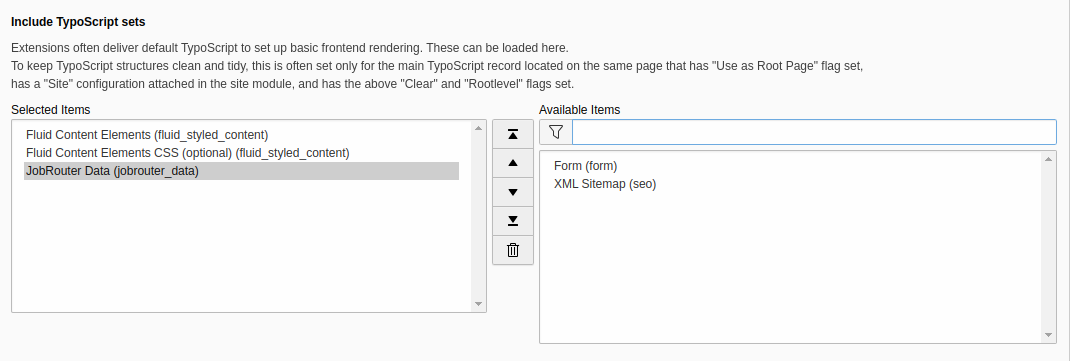
  4. Select JobRouter Data from the available items at the field Include TypoScript sets:
Include static TypoScript

Include static TypoScript

Or import the TypoScript setup file in your site package.

Content element 

It is possible to adjust the CSS classes of the content element table via TypoScript:

tt_content.tx_jobrouterdata_table {
   settings {
      cssClasses {
         # The class of the table tag
         table = ce-table

         # The class of table cells which should be aligned left
         left = ce-align-left

         # The class of table cells which should be aligned centered
         center = ce-align-center

         # The class of table cells which should be aligned right
         right = ce-align-right
      }
   }
}
Copied!

The alignment is selected when configuring the table columns.

Logging 

If separate logging is necessary to track synchronisations and possible warnings or errors, you can set up log writers depending on your needs.

Example: To log all warnings and higher levels of this extension into a separate file, add this snippet to the ext_localconf.php file of your site package extension:

$GLOBALS['TYPO3_CONF_VARS']['LOG']['JobRouter']['Typo3Data']['writerConfiguration'][\Psr\Log\Level::WARNING] = [
   \TYPO3\CMS\Core\Log\Writer\FileWriter::class => [
      'logFileInfix' => 'jobrouter_data'
   ]
];
Copied!

The messages are then written to the var/log/typo3_jobrouter_data_<hash>.log file.

Commands 

Target group: Administrators

Surely you want to execute the commands regularly. Simply set up cron jobs that will execute the commands regularly, for example, once an hour or once a day, depending on your needs.

Synchronise tables 

To synchronise the tables from JobRouter installations in TYPO3 a command is available. Run the following command in the project directory:

vendor/bin/typo3 jobrouter:data:sync
Copied!
public/typo3/sysext/core/bin/typo3 jobrouter:data:sync
Copied!

Hopefully you will receive a successful response:

[OK] 2 table(s) processed
Copied!

You can also synchronise just one table:

vendor/bin/typo3 jobrouter:data:sync jobs
Copied!
public/typo3/sysext/core/bin/typo3 jobrouter:data:sync jobs
Copied!

Where jobs is the handle of the table.

It is also possible to force the synchronisation of one or all tables. By default, only changed datasets are synchronised. Use the force option:

vendor/bin/typo3 jobrouter:data:sync --force
Copied!
public/typo3/sysext/core/bin/typo3 jobrouter:data:sync --force
Copied!

If an error occurs, the command issues a warning:

[WARNING] 1 out of 2 table(s) had errors during processing
Copied!

Other synchronisations are not affected by an error in one synchronisation. According to your logging configuration, the error is also logged.

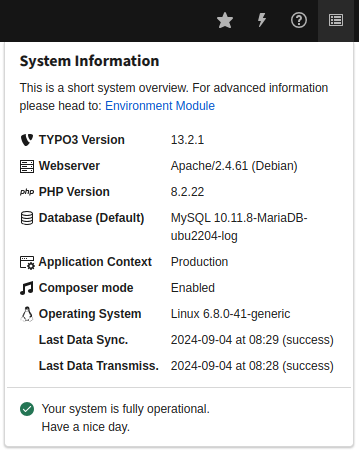
The last run of the command is shown in the system information toolbar (Last Data Sync.):

System information with last run of the sync command

System information with last run of the sync command

Transmit data sets 

If you use the transfer table to transmit JobData data sets to a JobRouter® installation must also use the transmit command from the project directory:

vendor/bin/typo3 jobrouter:data:transmit
Copied!
public/typo3/sysext/core/bin/typo3 jobrouter:data:transmit
Copied!

In general you should receive a successful answer:

[OK] 13 transfer(s) transmitted successfully
Copied!

If an error occurs, the command issues a warning:

[WARNING] 2 out of 6 transfer(s) had errors on transmission
Copied!

Other transmissions are not affected by an error in one transmission. According to your logging configuration, the error is also logged.

The last run of the command is shown in the system information toolbar (Last Data Transmiss.):

System information with last run of the transmit command

System information with last run of the transmit command

Clean up transfers 

After successfully transmitting data sets from the transfer table, these transfers are marked as successful. They may contain sensitive data and should be deleted regularly. A command is available for this task:

vendor/bin/typo3 jobrouter:data:cleanuptransfers
Copied!
public/typo3/sysext/core/bin/typo3 jobrouter:data:cleanuptransfers
Copied!

In general you should receive a successful answer:

[OK] 23 successful transfers older than 30 days deleted
Copied!

By default, successful transfer records that are older than 30 days are deleted. You can adjust this value by adding an argument to the command:

vendor/bin/typo3 jobrouter:data:cleanuptransfers 7
Copied!
public/typo3/sysext/core/bin/typo3 jobrouter:data:cleanuptransfers 7
Copied!

Now successful transfer records that are older than seven days are deleted. If you use 0 as argument, all successful transfers are deleted.

Module 

Target group: Integrators, Administrators

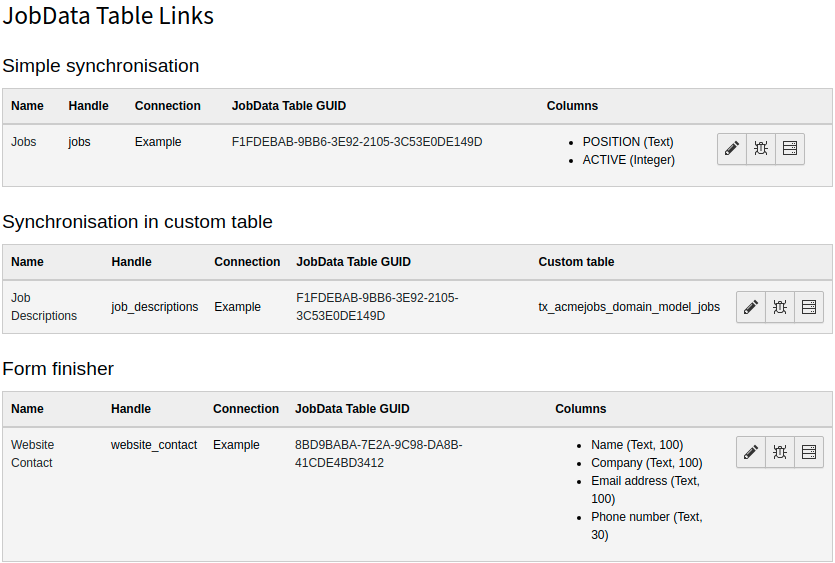
The links to JobData tables in JobRouter® installations are managed in the module JobRouter > Data.

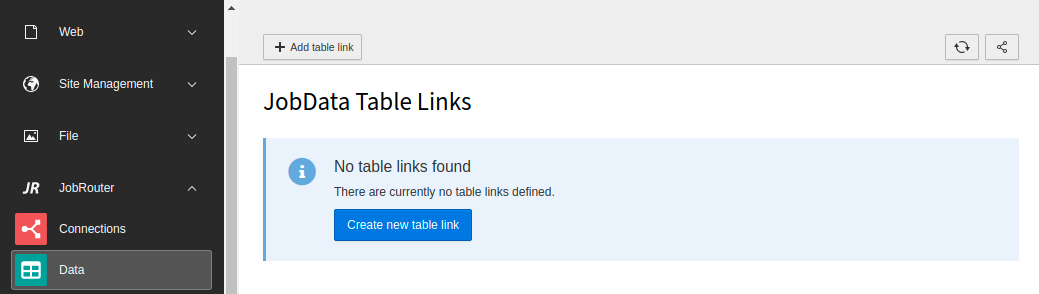
On your first visit after installing the extension you will see the following screen:

Initial Data module screen

Initial Data module screen

Form finisher 

Target group: Integrators, Developers

Transmit data 

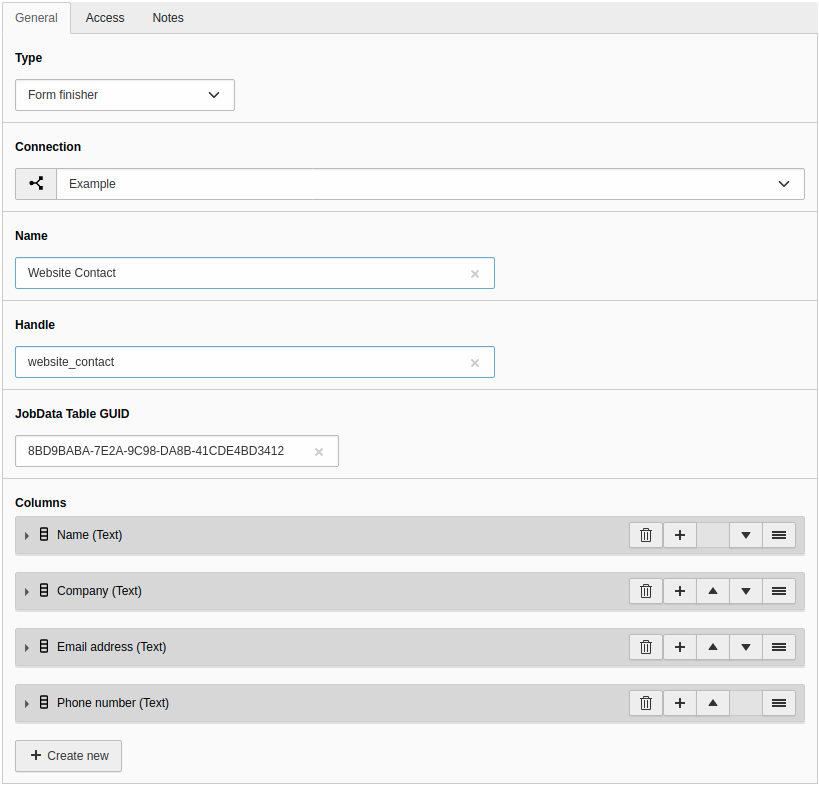
A form finisher JobRouterTransmitData is available to transmit form fields to a JobData table. After submitting a form, the form values are stored in a transfer table. A command, hopefully executed regularly, takes these transfer records and transmit this data. This is due the fact, that a JobRouter® installation can be temporarily not available due to maintenance or network problems. Also the submitting of a form should be as fast as possible for better user experience.

Transmit to a JobData table 

So, let's start with an example. The form finisher is defined in the YAML configuration of the specific form:

finishers:
   -
      identifier: JobRouterTransmitData
      options:
         handle: 'website_contact'
         columns:
            name: '{preName} {lastName}'
            company: '{company}'
            email_address: '{email}'
            phone_number: '{phone}'
            message: '{message}'
            source: 'Website'
Copied!

The handle is required as it connects the fields to the appropriate table link.

You can map the form fields to the JobData columns. As you can see in the example above, you define the JobData column as the key (for example, email_address) and then map it with the value to be stored. This can be the form field identifier which is enclosed in curly brackets (for example, {email}), a static value, a combination of a static value with a form field or even multiple form fields.

Start multiple transmissions 

It is also possible to start multiple transmissions – even on different JobRouter® installations. Just use the array notation in options:

finishers:
   -
      identifier: JobRouterTransmitData
      options:
         -
            handle: 'website_contact'
            columns:
               name: '{preName} {lastName}'
               company: '{company}'
               email_address: '{email}'
               phone_number: '{phone}'
               message: '{message}'
               source: 'Website'
         -
            handle: 'anonymous_messages'
            columns:
               ANON_MESSAGE: '{message}'
               FROM_URL: 'https://www.example.com/demo'
Copied!

Variables 

You can use variables as column values. For more information have a look into the available variable resolvers. You can also write your own variable resolvers.

Dashboard widgets 

Target group: Editors, Integrators, Administrators

Table of Contents

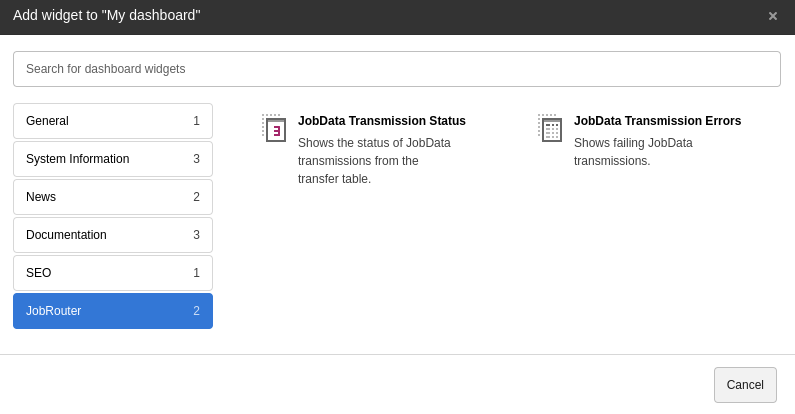
With the Dashboard system extension installed, some widgets can be used for statistics. You can find them in the Add widget wizard on the JobRouter tab:

Add JobRouter widgets

Add JobRouter widgets

The widgets are based on the transfer table. All entries are considered - successfully started, pending and erroneous entries.

JobData transmission status 

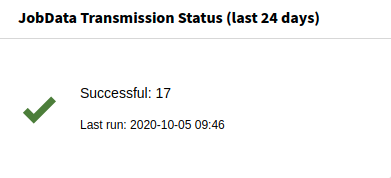
The status of the JobData transmissions can be shown with this widget:

JobData Transmission Status widget

JobData Transmission Status widget

JobData transmission errors 

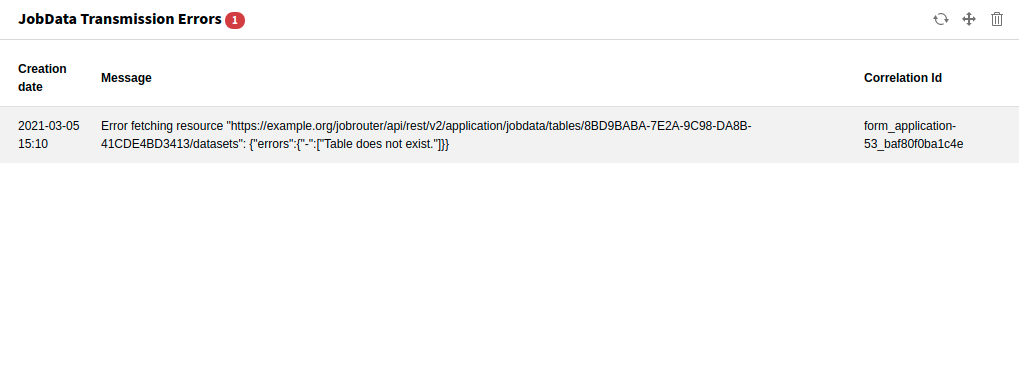
If errors occur when transmitting a JobData data set, they can be displayed with this widget:

JobData Transmission Errors widget

JobData Transmission Errors widget

For editors 

Target group: Editors

Content element 

Content of JobData tables that are synchronised with the simple type can be easily displayed on the website with the content element JobData Table.

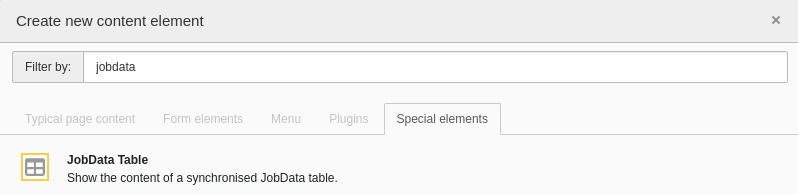
Go to the Web > Page module and select the desired page in the page tree. Click on + Content in the column and position you want to insert. To add the content element, select the Special elements tab in the Create new content element wizard and click on the JobData Table element:

Content element wizard

Content element wizard

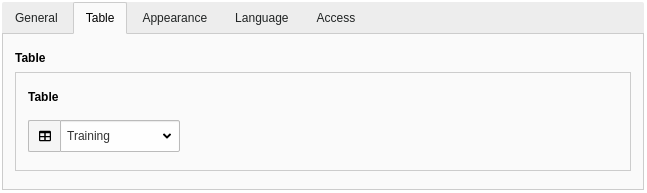
In the following form, click on the Table tab and select the desired table link:

Content element configuration

Content element configuration

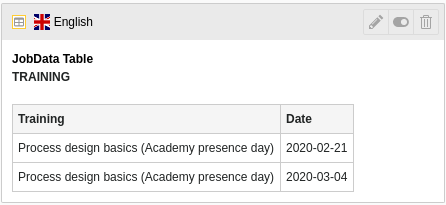
After saving the element, a preview section is displayed:

Preview of the content element

Preview of the content element

Switch to the web page to see the content of the table displayed:

Content of the table on the web page

Content of the table on the web page

Developer corner 

Target group: Developers

Modify data sets on synchronisation 

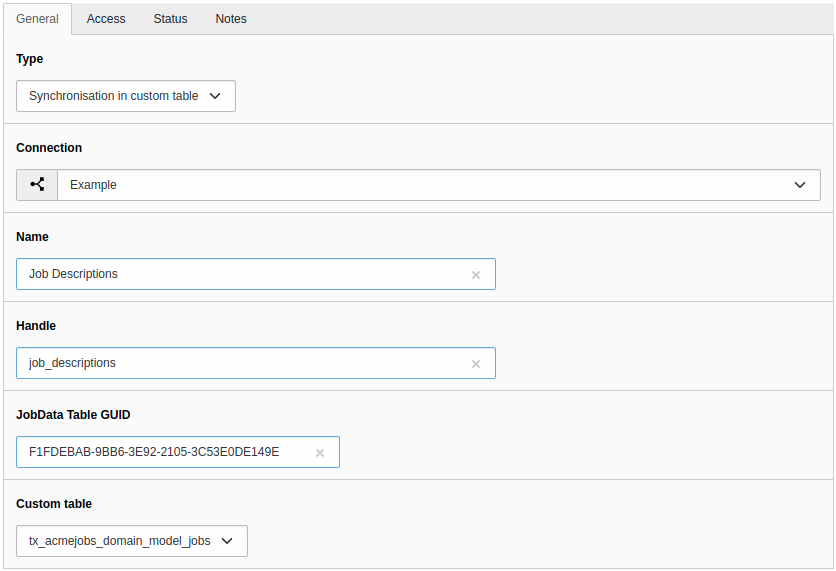
The records that are synchronised with the table types Simple synchronisation or Synchronisation in custom table can be adapted to the needs of the website or rejected during synchronisation. This can be useful if only records with a date column are used where the date is relevant in the future. Another scenario would be to match the content of one column with the content of another table.

Example 

A PSR-14 event listener can be used for this case. In the following example, a record is rejected under a certain condition and a static string is added to each "position" column value.

  1. Create the event listener

    EXT:my_extension/Classes/EventListener/AdjustJobsDataset.php
    <?php
    declare(strict_types=1);
    
    namespace MyVendor\MyExtension\EventListener;
    
    use JobRouter\AddOn\Typo3Data\Event\ModifyDatasetOnSynchronisationEvent;
    
    final class AdjustJobsDataset
    {
       public function __invoke(ModifyDatasetOnSynchronisationEvent $event): void
       {
          // Only the table with the handle "jobs" should be considered
          if ($event->getTable()->handle !== 'jobs') {
             return;
          }
    
          $dataset = $event->getDataset();
          if ($dataset['jrid'] === 3) {
             // For some reason we don't like jrid = 3, so we reject it
             // and it doesn't get synchronised
             $event->setRejected();
          }
    
          $dataset['POSITION'] .= ' (approved by me™)';
          $event->setDataset($dataset);
       }
    }
    Copied!
  2. Register your event listener

    EXT:my_extension/Configuration/Services.yaml
    services:
       MyVendor\MyExtension\EventListener\AdjustJobsDataset:
          tags:
             - name: event.listener
               identifier: 'adjustJobsDataset'
    Copied!

Transfer data sets to a JobRouter installation 

Sometimes it is necessary to transfer data sets from TYPO3 to a JobRouter® installation. An API and a transmit command are available for this use case.

Data sets are transferred asynchronously, since a JobRouter® installation may be unavailable or in maintenance mode and to avoid long page loads. Let's take a look at the flow:

Transferring data sets

Transferring data sets

As you can see from the diagram, you can prepare multiple data sets. The different data sets can be transmitted to different JobRouter® installations – depending on the configuration of the table link in the Data module.

Preparing the data sets 

If you want to transfer data sets programmatically to a JobRouter® installation, you can use the Preparer class within TYPO3, for example, in an Extbase controller:

EXT:my_extension/Classes/Controller/MyController.php
<?php
declare(strict_types=1);

namespace MyVendor\MyExtension\Controller;

use JobRouter\AddOn\Typo3Data\Exception\PrepareException;
use JobRouter\AddOn\Typo3Data\Transfer\Preparer;
use TYPO3\CMS\Extbase\Mvc\Controller\ActionController;
use Psr\Http\Message\ResponseInterface;

final class MyController extends ActionController
{
   public function __construct(
      private readonly Preparer $preparer,
   ) {
   }

   public function myAction(): ResponseInterface
   {
      // ... some other code

      try {
         $this-preparer->store(
             // The table link uid
            42,
            // Some descriptive identifier for the source of the dataset
            'some identifier',
            // Your JSON encoded data set
            '{"your": "data", "to": "transfer"}'
         );
      } catch (PrepareException $e) {
         // In some rare cases an exception may be thrown
         var_dump($e->getMessage());
      }

      // ... some other code
   }
Copied!

The transmit command must be activated with a cron job to periodically transmit the data sets to the JobRouter® installation(s).

Using the JobDataRepository 

The \JobRouter\AddOn\Typo3Data\Domain\Repository\JobRouter\JobDataRepository provides methods to access the JobData REST API in TYPO3, for example, in a command or a controller.

The following methods are available:

add(string $tableHandle, array $dataset): array

add(string $tableHandle, array $dataset): array

Adds a dataset to a JobData table and returns the stored dataset.

remove(string $tableHandle, int ...$jrid): void

remove(string $tableHandle, int ...$jrid): void

Removes one or more datasets from a JobData table.

update(string $tableHandle, int $jrid, array $dataset): array

update(string $tableHandle, int $jrid, array $dataset): array

Updates the dataset with the given jrid for a JobData table and returns the stored dataset.

findAll(string $tableHandle): array

findAll(string $tableHandle): array

Returns all datasets of the JobData table;

findByJrId(string $tableHandle, int $jrid): array

findByJrId(string $tableHandle, int $jrid): array

Returns the dataset for the given jrid of a JobData table.

Example 

EXT:my_extension/Classes/Command/MyCommand.php
<?php
declare(strict_types=1);

namespace MyVendor\MyExtension\Command;

final class MyCommand extends Command
{
   public function __construct(
      private readonly JobDataRepository $jobDataRepository,
   ) {
     parent::__construct();
   }

   protected function execute(InputInterface $input, OutputInterface $output): int
   {
      $datasets = $this->jobDataRepository->findAll('some_handle');

      // ... your logic

      return 0;
   }
}
Copied!

Customising the formatting of a table column in the content element 

The extension comes with four formatters that are used when rendering the column content in the content element:

  • DateFormatter
  • DateTimeFormatter
  • DecimalFormatter
  • IntegerFormatter

These are implemented as PSR-14 event listeners and are located in the Classes/EventListener folder of this extension. They receive a \JobRouter\AddOn\Typo3Data\Event\ModifyColumnContentEvent event with the following methods:

getTable()

getTable()

The table entity.

Return value
The entity class of a table ( \JobRouter\AddOn\Typo3Data\Domain\Entity\Table).

getColumn()

getColumn()

The column entity.

Return value
The entity class of a column ( \JobRouter\AddOn\Typo3Data\Domain\Entity\Column).

getContent()

getContent()

The content of a table cell.

Return value
The value of the content (types: float, int, string).

setContent($content)

setContent($content)

Set a content for a table cell.

Parameter
float|int|string $content The formatted content of a table cell.

getLocale()

getLocale()

The locale of the website page.

Return value

The locale (for example, "de-DE" or "en-US").

Custom formatters 

As a PSR-14 event is dispatched for formatting a cell content, a custom event listener can be used. Have a look into the existing formatter event listeners.

Upgrade 

Target group: Developers

From version 3.0 to 4.0 

Previously, the TypoScript configuration was included automatically. With version 4.0 you have to include/import it manually. See Include TypoScript sets.

Or use site sets instead.

From version 2.0 to 3.0 

The namespace of the JobRouter TYPO3 Data classes have changed from

\Brotkrueml\JobRouterData
Copied!

to

\JobRouter\AddOn\Typo3Data
Copied!

The easiest way to update your code to the new namespace is to use search/replace in your project.

The package name (used in composer.json) has changed from brotkrueml/jobrouter-typo3-data to jobrouter/typo3-data.

From version 1.x to version 2 

Version 2 of this extension introduced some breaking changes, notably:

  • The repository classes are no longer based on Extbase. They are now using the connection object or the query builder provided by TYPO3 and Doctrine DBAL.
  • The Extbase model classes are gone. Instead there are now immutable entity classes for column, dataset, table and transfer under the namespace \Brotkrueml\JobRouterData\Domain\Entity. There are also no getters available anymore, instead just use the public properties (which are readonly).
  • The Dataset entity does not provide a getDatasetContentForColumn() method as the previous Extbase model. Instead the dataset property now always holds an array of the JSON-decoded dataset.
  • The JobDataRepository is now injectable via constructor. All method signatures have changed and now require the table handle as first argument.
  • The getLocale() method of the PSR-14 event ModifyColumnContentEvent returns always a IETF RFC 5646 compatible locale string in TYPO3 v12.

Changelog 

All notable changes to this project will be documented in this file.

The format is based on Keep a Changelog, and this project adheres to Semantic Versioning.

Unreleased 

4.0.0 - 2024-10-01 

Added 

  • Compatibility with TYPO3 v13
  • Add site set for TYPO3 v13

Changed 

  • TypoScript must now be included/imported

Removed 

  • Compatibility with TYPO3 v11

3.0.2 - 2024-09-03 

Fixed 

  • Long runtime when checking table connection in backend module

3.0.1 - 2024-06-06 

Fixed 

  • Closing edit view in backend shows empty page
  • Disabled table links are not marked in backend list view

3.0.0 - 2024-02-21 

Changed 

  • Require JobRouter REST Client in version 3
  • Namespace from Brotkrueml\JobRouterData to JobRouter\AddOn\Typo3Data

2.0.0 - 2023-05-31 

Added 

  • Compatibility with TYPO3 v12

Changed 

  • Require JobRouter Client in version 2
  • Require JobRouter Connector extension in version 2
  • Require JobRouter Base extension in version 2
  • Constants from Table model are moved into the new TableType enum
  • Models are no longer Extbase-based and are moved to the Domain/Entity namespace
  • Repositories are no longer Extbase-based
  • JobDataRepository is now injectable, method signatures have changed
  • ModifyColumnContentEvent->getLocale() might return a different locale in TYPO3 v12

Fixed 

  • Error in content element when table link is disabled or deleted

Removed 

  • Compatibility with TYPO3 v10 (#14)
  • Compatibility with PHP 7.4 and 8.0

1.1.2 - 2022-12-23 

Fixed 

  • Avoid injecting the query builder

1.1.1 - 2022-09-24 

Fixed 

  • Exception in frontend using JobData Table plugin in TYPO3 v10 (#22)

1.1.0 - 2022-06-02 

Removed 

  • Compatibility with PHP 7.3

1.0.1 - 2022-05-19 

Fixed 

  • Handle multibyte characters correctly when cutting string to given length for transmission

1.0.0 - 2022-01-18 

Added 

  • Formatters for table columns in content element (#10)
  • Alignment for table columns in content element (#11)
  • Sorting of table columns in content element (#12)
  • PSR-14 event to adjust or reject a dataset on synchronisation (#13)
  • Option in sync command for forcing a synchronisation

Changed 

  • Store only configured columns with simple synchronisation

Fixed 

  • Domain model Table::setHandle() sets the correct property
  • Database error in module DB Check > Records Statistics due to wrong labels in TCA

Removed 

  • Configuration of log writers in the extension configuration

0.14.0 - 2021-11-21 

Added 

  • Compatibility with TYPO3 v11 LTS
  • Possibility to refresh dashboard widgets (TYPO3 v11+ only)

Changed 

  • Rename "own table" to "custom table"
  • Use table handle instead of uid as argument in SyncCommand

Deprecated 

  • Configuration of log writers in the extension configuration

Fixed 

  • Content element cannot be selected from new content element wizard

Removed 

  • Compatibility with PHP 7.2

0.13.0 - 2021-03-14 

Added 

  • Show number of days for available transfers in status widget

Updated 

  • TYPO3 JobRouter Connector to version 1.0
  • TYPO3 JobRouter Base to version 1.0

Fixed 

  • Set crdate in transfer table correctly

0.12.3 - 2021-03-07 

Added 

  • Dashboard widget "JobData Transmission Errors"

0.12.2 - 2021-03-02 

Changed 

  • TYPO3 form extension is no longer a requirement

0.12.1 - 2021-02-12 

Changed 

  • Raise minimum required version to TYPO3 10.4.11
  • Throw DatasetNotAvailableException in JobDataRepository when querying a non-existing jrid

0.12.0 - 2020-10-19 

Added 

  • Form finisher to transmit form fields to a JobData table
  • Dashboard widget for JobData transmission status

Changed 

  • Use log table from TYPO3 JobRouter Base extension
  • Rename "transfer identifier" to "correlation id" in transfer table

Fixed 

  • Store jrid correctly in transfer table after transmission
  • Lazy load client in JobDataRepository to avoid errors on initialisation

Removed 

  • Report

0.11.0 - 2020-09-01 

Added 

  • Description field to table record
  • Introduce the JobDataRepository

Updated 

  • TYPO3 JobRouter Connector to version 0.11

Removed 

  • RestClientFactory is not available anymore, use from connector extension instead

0.10.0 - 2020-06-06 

Added 

  • Support for TYPO3 v10 LTS
  • Prepare for upcoming major PHP versions
  • Introduce a handle field for table links
  • Add last run of sync and transmit command to system information toolbar

Changed 

  • Rename DeleteOldTransfersCommand to CleanUpTransfersCommand

Removed 

  • Support for TYPO3 v9 LTS

0.9.0 - 2020-02-24 

Added 

  • Command for deleting old transfers
  • Use own user agent addition

Updated 

  • TYPO3 JobRouter Connector to version 0.9

0.8.0 - 2020-02-17 

Fixed 

  • Only one command (sync, transmit) can run at a time

0.7.0 - 2020-02-09 

Added 

  • Implement reports for synchronisation and transfers

Changed 

  • Remove plugin in favour of content element
  • Use log table from TYPO3 JobRouter Connector

0.6.0 - 2020-01-27 

Added 

  • Command for transmitting datasets to JobData tables
  • Documentation

Changed 

  • Renamed table column (local_table => own_table) in table tx_jobrouterdata_domain_model_table
  • Revise logging and enable logging into table

Updated 

  • TYPO3 JobRouter Connector to version 0.7

Removed 

  • Switchable controller actions in plugin

Fixed 

  • Sync other tables when one table throws error on synchronisation

0.5.0 - 2020-01-11 

Updated 

  • TYPO3 JobRouter Connector to version 0.6

0.4.0 - 2020-01-02 

Updated 

  • TYPO3 JobRouter Connector to version 0.5

Fixed 

  • Delete datasets from simple synchronisation when table is deleted (#6)
  • Clear cache of a page with plugin after synchronisation (#7)

0.3.1 - 2019-11-24 

Updated 

  • TYPO3 JobRouter Connector to version 0.4

0.3.0 - 2019-11-24 

Added 

  • DatasetRepository
  • Possibility to add tables for other usage in module

Changed 

  • Dataset model

0.2.0 - 2019-10-26 

Changed 

  • Adjust package name

0.1.0 - 2019-10-25 

Initial pre-release