
Backend user settings
All settings described in the Editors manual are configured as exclude fields.
This means each field must be explicitly allowed for the editor user or user group.
Note
See Backend user permissions and Allowed exclude fields for more information.
Allow text-tracks and video controls
Switch to the Backend Users > Backend user groups module
Edit the appropriate user group and switch to the Access Rights tab.
Important
To add or modify tracks and time-based data, the group must have permission to list (read) and modify (write) the File Metadata table.
To add or modify poster images and video controls, the group must have permission to list (read) and modify (write) the File Reference table.
See Table permissions for more information.
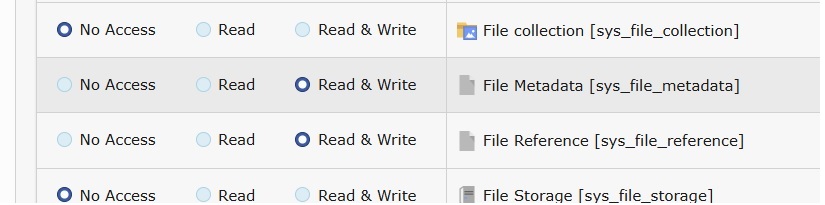
Allow the File Metadata and File Reference tables
In the Allowed excludefields section of the same group, follow these steps to enable the necessary fields:
- Go to the
File Metadatatable. Here, the administrator decides which fields the editor is allowed to see and use. Allow the following fields:
- Poster Image (poster) [sys_file_metadata:poster]
- Text Tracks and Time-based Data (tracks) [sys_file_metadata:tracks]
-
Go to the
File Referencetable. The administrator determines which fields are accessible to the editor. Allow the following fields:- Video/ Audio Controls:
-
- Loop Video / Audio (loop) [sys_file_reference:loop]
- Muted (mute) [sys_file_reference:mute]
- Show Controls (controls) [sys_file_reference:controls]
- Show info (showinfo) [sys_file_reference:showinfo]
- Picture in picture (picinpic) [sys_file_reference:picinpic]
- Controls List (Chromium Browsers) (controlslist) [sys_file_reference:controlslist]
- Start video at (start_time)
- End video at (end_time)
- Video subtitles language (lang)
- Poster Image:
-
- Poster Image (Override Poster from Metadata) (poster) [sys_file_reference:poster]
- Tracks and time-based data:
-
- Default attribute (track_default) [sys_file_reference:track_default]
- Track label (track_label) [sys_file_reference:track_label]
- Track language (track_language) [sys_file_reference:track_language]
- Track type (track_type) [sys_file_reference:track_type]
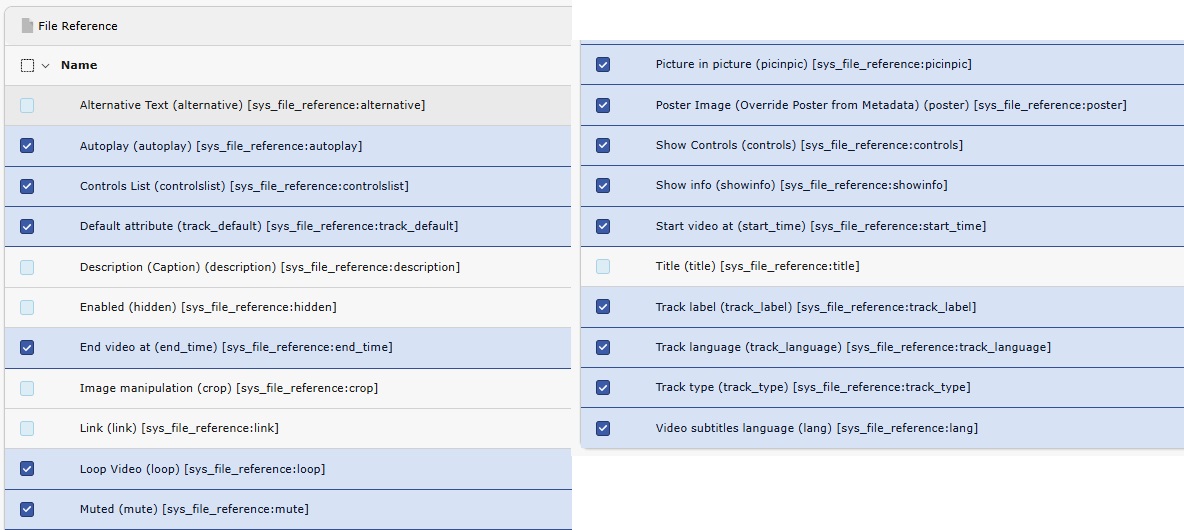
Allow the applicable fields for the File Reference table