
Site Settings
All configuration options are managed via TYPO3 Site Settings. This provides site-specific configuration and better caching behavior.
Configuration is done in your site's config/ file
or via the TYPO3 backend in Site Management > Sites > Edit site > Settings.
Available Settings
Enable/Disable
frontendEdit.enabled
-
- type
-
bool
- Default
-
true
Enable or disable the frontend editing functionality for this site.
frontendEdit:
  enabled: true
Copied!
Appearance Settings
frontendEdit.colorScheme
-
- type
-
string
- Default
-
'auto'
Choose the color scheme for the frontend editing UI. Options: auto (follows system preference), light, dark.
frontendEdit:
  colorScheme: 'auto'
Copied!
frontendEdit.showInsertButtons
-
- type
-
bool
- Default
-
true
New in version 2.3.0
Show the
+buttons above and below each content element on hover to insert a new element before or after it via the New Content Element Wizard. This setting also controls the New content after entry in the Edit Menu. Disable to hide both.frontendEdit: showInsertButtons: trueCopied!
frontendEdit.showStickyToolbar
-
- type
-
bool
- Default
-
true
Show the Toolbar with page editing options and toggle functionality.
frontendEdit:
  showStickyToolbar: true
Copied!
frontendEdit.toolbarPosition
-
- type
-
string
- Default
-
'bottom-right'
Choose the position for the Toolbar.
Available options:
top-left,top-center,top-rightbottom-left,bottom-center,bottom-rightleft-top,left-center,left-bottomright-top,right-center,right-bottom
frontendEdit:
  toolbarPosition: 'bottom-right'
Copied!
frontendEdit.enableOutline
-
- type
-
bool
- Default
-
true
Show an outline around content elements when hovering over them.
frontendEdit:
  enableOutline: true
Copied!
frontendEdit.enableScrollToElement
-
- type
-
bool
- Default
-
true
Automatically scroll to the edited content element after saving and returning to the frontend.
frontendEdit:
  enableScrollToElement: true
Copied!
frontendEdit.enableContextualEditing
-
- type
-
bool
- Default
-
false
New in version 2.2.0
Note
This feature is experimental.
Enables Inline Editing: content element and page property edit forms open in a panel next to the page instead of navigating to the backend.
The setting is required on all supported TYPO3 versions — it also gates the New Content Element Wizard used by Column Targets. Only the presentation differs and is chosen automatically: a sidebar panel on TYPO3 v14.2+ (native
record_edit_contextualroute), a slide-in modal on TYPO3 v13 and v14.0/v14.1.See Inline Editing for details on how to use this feature.
frontendEdit:
  enableContextualEditing: true
Copied!
frontendEdit.enableDragAndDrop
-
- type
-
bool
- Default
-
false
New in version 2.5.0
Note
This feature is experimental.
Allows editors to reorder content elements by dragging them within a column or into another column of the same page. The move is persisted through the core DataHandler.
Requires your Fluid template to mark each column with the
Column; without those markers no drag handle is rendered. Columns of EXT:container elements are supported when the template passesTarget View Helper containerUid. Translated elements and nesting a container inside another container keep the backend move dialog.See Drag & Drop Reordering for details on how to use this feature.
See also
Column Targets describes the required template markers.
frontendEdit:
  enableDragAndDrop: true
Copied!
frontendEdit.enableFlashMessages
-
- type
-
bool
- Default
-
true
Show TYPO3 flash messages (e.g., save confirmations) as toast notifications in the frontend after returning from the backend. When you use "Save & Close" in the backend, success or error messages will be displayed as notifications in the frontend.
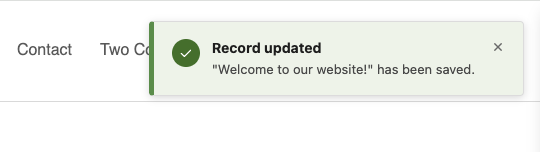
Flash message notification after saving a content element
frontendEdit:
  enableFlashMessages: true
Copied!
Filter Settings
frontendEdit.filter.ignorePids
-
- type
-
string
- Default
-
''
Comma-separated list of page IDs (and their subpages) where frontend editing should be disabled.
frontendEdit:
  filter:
    ignorePids: '1,2,3'
Copied!
frontendEdit.filter.ignoreDoktypes
-
- type
-
string
- Default
-
''
Comma-separated list of page types (doktype) where frontend editing should be disabled. Common doktypes: 1 (Standard), 3 (External URL), 4 (Shortcut), 6 (Backend User Section), 7 (Mount Point), 199 (Menu Separator), 254 (Folder), 255 (Recycler).
frontendEdit:
  filter:
    ignoreDoktypes: '4,199,254'
Copied!
frontendEdit.filter.ignoreCTypes
-
- type
-
string
- Default
-
''
Comma-separated list of content types (CType) to exclude from frontend editing.
frontendEdit:
  filter:
    ignoreCTypes: 'html,div'
Copied!
frontendEdit.filter.ignoreListTypes
-
- type
-
string
- Default
-
''
Comma-separated list of plugin types (list_type) to exclude from frontend editing.
frontendEdit:
  filter:
    ignoreListTypes: 'news_pi1'
Copied!
frontendEdit.filter.ignoreUids
-
- type
-
string
- Default
-
''
Comma-separated list of specific content element UIDs to exclude from frontend editing.
frontendEdit:
  filter:
    ignoreUids: '100,200,300'
Copied!
Example Configuration
Full example with all available options:
frontendEdit:
  enabled: true
  colorScheme: 'auto'
  showContextMenu: true
  showInsertButtons: true
  showStickyToolbar: true
  toolbarPosition: 'bottom-right'
  enableOutline: true
  enableScrollToElement: true
  enableFlashMessages: true
  enableContextualEditing: false
  enableDragAndDrop: false
  filter:
    ignorePids: '1,2,3'
    ignoreDoktypes: '4,199,254'
    ignoreCTypes: 'html,div'
    ignoreListTypes: ''
    ignoreUids: ''