
Introduction
What does it do?
This extension adds editing tools to the frontend, allowing backend users to edit, hide, delete, reorder and create content elements and pages without leaving the site.
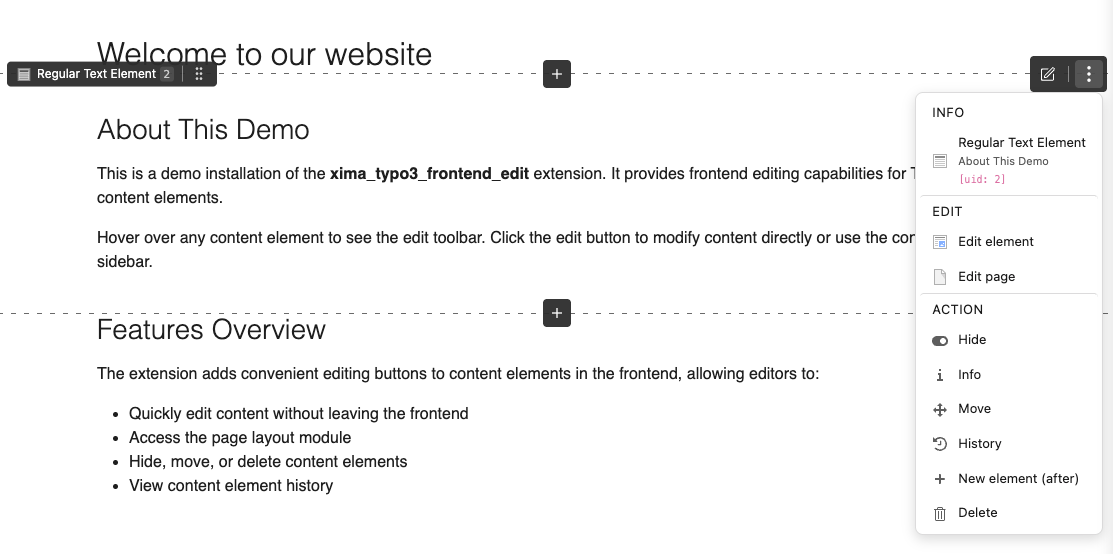
Editing actions appear directly on the content element
TYPO3 editors normally switch to the backend to find and change the right content element. The extension closes that gap: a small JavaScript is injected into the frontend, asks the backend which elements the current user may edit, and renders the matching actions right where the content is displayed.
Features
Editing content elements
| Feature | What it does |
|---|---|
| Edit Menu | Edit, hide, delete, move, info and history for every content element, with a confirmation dialog before deleting. |
| Inline Editing (experimental) | Edit content elements and page properties in a panel next to the page, without navigating to the backend. |
| New content | Insert buttons on hover and per column, opening TYPO3's native New Content Element Wizard. |
| Drag & Drop (experimental) | Reorder elements within a column or move them into another column of the same page, including EXT:container columns. |
Editing pages
| Feature | What it does |
|---|---|
| Toolbar | Page-level actions and a toggle to switch frontend editing on and off, at one of 12 configurable positions. |
| Save & Close | An extra button in backend edit forms that returns straight to the frontend. |
| Flash messages | Backend save confirmations are shown as toast notifications in the frontend. |
Configuration and extensibility
| Feature | What it does |
|---|---|
| Site Settings | Per-site configuration via YAML or the site module, including filters for pages, doktypes, CTypes and UIDs. |
| UserTSconfig | Disable frontend editing per backend user or user group. |
| PSR-14 Events | Add, remove or modify menu entries and attach custom data to elements. |
| ViewHelpers | Edit links for related records (e.g. news items) and column markers for new-content buttons. |
| Dark / Light mode | Follows the system preference or is pinned to a fixed scheme. |
Note
This is not a further development of the "original" extension frontend_editing. It is an independent implementation with a different approach, similar in some ways to feedit. See Delineation for a detailed comparison with related extensions like visual_editor and content_preview.
Support
There are several ways to get support for this extension:
- GitHub issues: https://github.com/xima-media/xima-typo3-frontend-edit/issues
- FAQ — answers to the most common problems
Security policy
Please read our security policy if you discover a security vulnerability in this extension.
License
This extension is licensed under GNU General Public License 2.0 (or later).