
Backups
Prerequisites: a backup encryption password is set in Settings.
Important
ZIP AES-256 encrypts file contents, not archive metadata. Entry names,
sizes and the directory tree remain readable without the password. Keep
backup directories outside the web root (default
var/). Never publish .t3vault. or ZIP
parts under public/.
config. (standalone password, signing secret, backup password)
is not included. TYPO3 settings. /
Local are stored with DB credentials and
encryptionKey removed — reconfigure them on restore.
Manual backups from New Backup open a dialog to include or exclude
components (database, configuration, packages, Composer files, FAL/media,
uploads). The job label reflects the selection (e.g. database-only is shown as
a database backup, not a full site backup). Only a complete set (database +
configuration + Composer / typo3conf) enables a full site restore; the
restore installer warns and skips inapplicable steps for partial packages.
Scheduled tasks of type full still back up all components.
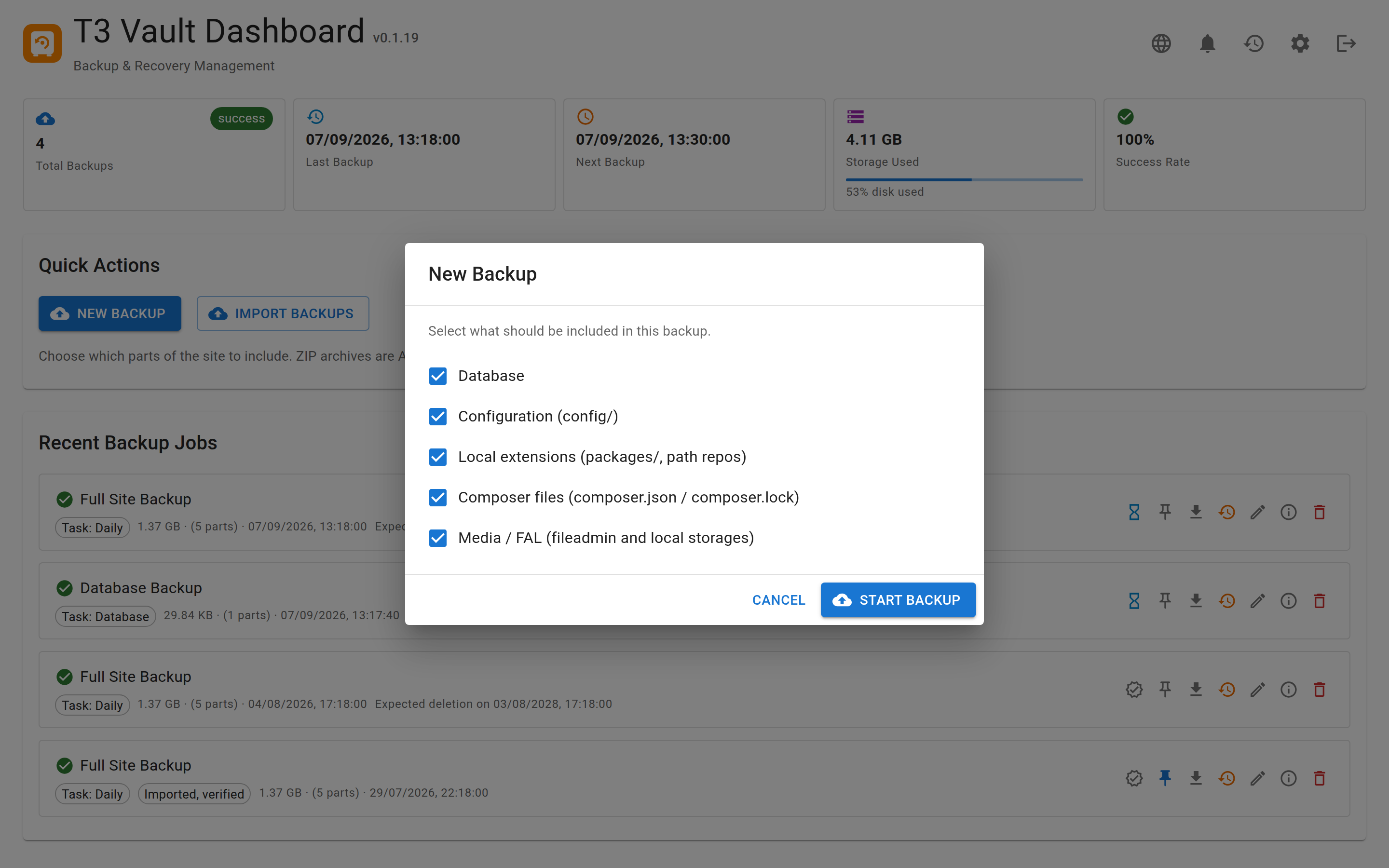
Manual backups let you include or exclude components before the job starts.
Backup types
full-
Default. Everything needed to reinstall elsewhere (or a selected subset when started from the New Backup dialog).
Composer layout (
config/+public/):database.(AES-256; entryzip database.)sql. gz config/(settings, additional, sites)packages/and other local Composer path repositories (e.g.extensions/fromcomposer.)json composer./json composer.lock public/and other local FAL storages (withoutfileadmin/ _processed_//_temp_/)- optional
uploads/,index.,php .htaccess
Classic layout (
typo3conf/in the document root):database.(AES-256; entryzip database.)sql. gz typo3conf/(without temp/autoload caches)fileadmin/, optionaluploads/(without_processed_//_temp_/)index.,php .htaccess- Core (
typo3/,typo3_) andsrc/ typo3temp/are not included
fileadmin- Media only (ZIP parts of fileadmin / FAL; without
_processed_//_temp_/). database- Encrypted database dump only (
database.+zip MANIFEST.). Useful for frequent scheduled tasks when a full site backup is not required every night.json
Each completed backup also contains MANIFEST. with layout-specific
restore hints and environment metadata (PHP / DB / TYPO3 versions).
Scheduled backup tasks
Backup tasks define what to back up, when, and how long to keep
archives. Configure them in the UI (Backup tasks) or via the API
(GET/POST /tasks). Definitions are stored in
tasks. inside the T3Vault data directory (0600).
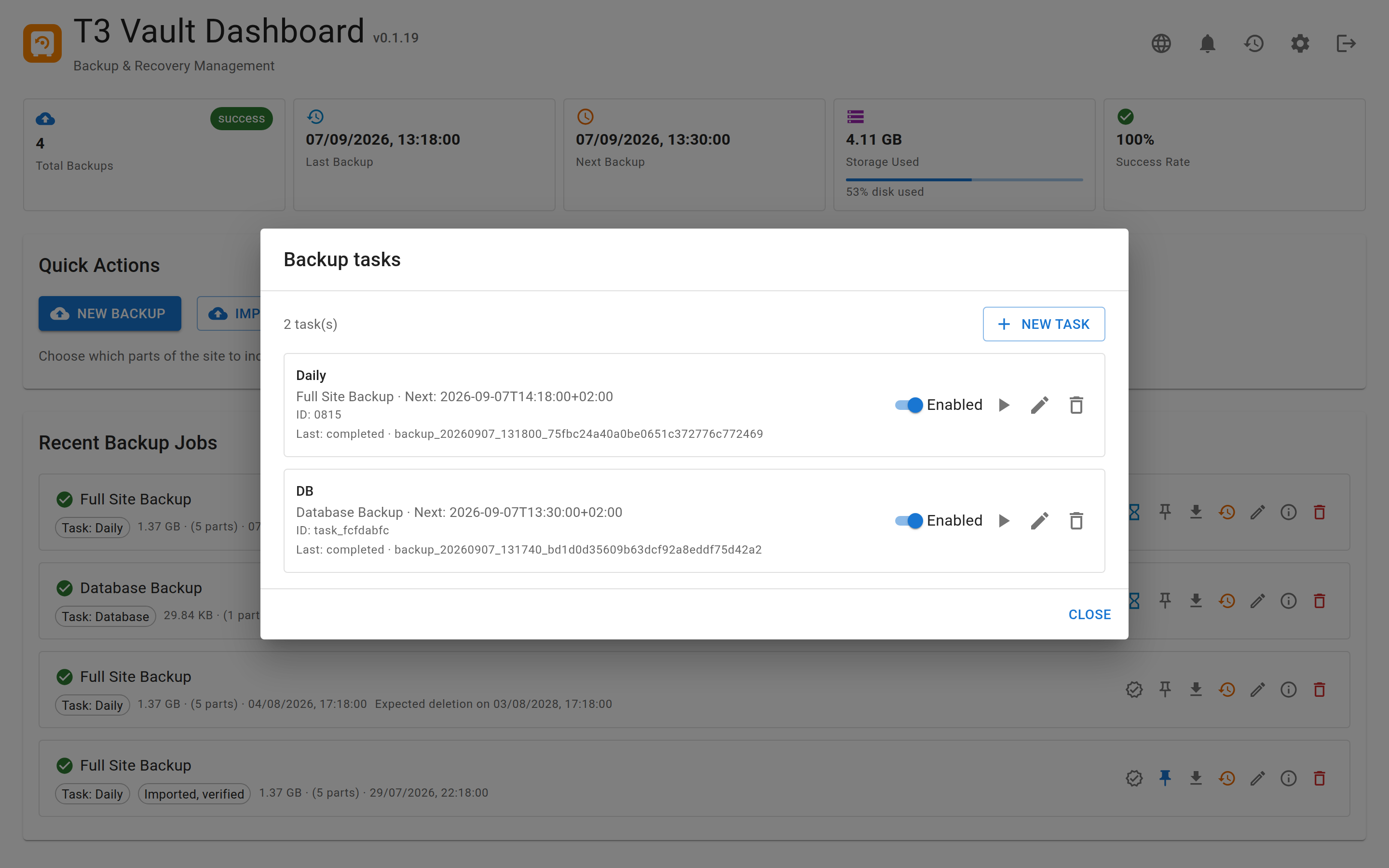
Scheduled tasks define what to back up, when to run, and how long to keep archives.
Each task has:
type—database,fileadminorfullschedule—hourly(minute of hour) /daily/weekly/monthly(withattime) or a five-fieldcronexpressionretention— one or more tiers{ every: { value, unit }, keep }withunitinhour|day|week|month|year
Retention uses independent historical slots per tier, measured from the newest non-pinned backup of that task:
- The finest tier (smallest
every) covers ages[0, keep·E)inkeepslots of lengthE(includes the newest backup). - Coarser tiers start one full period back: slots
[E, 2·E)…[keep·E, (keep+1)·E). So “1× month / keep 1” retains a backup about 30–60 days old, and “1× year / keep 1” about 365–730 days old (fixed durations: month = 30 days, year = 365 days).
Each slot keeps the newest backup in that age interval; the union of all tiers
survives. Manual backups (no taskId) and pinned backups are never deleted
by retention.
Run due tasks from cron (synchronous, no HTTP self-invocation loop):
php t3vault/cli/t3vault-run.php due
php t3vault/cli/t3vault-run.php task <id>
php t3vault/cli/t3vault-run.php retention
php t3vault/cli/t3vault-run.php listOr via the TYPO3 console (recommended on Composer installs):
vendor/bin/typo3 t3vault:run due
vendor/bin/typo3 t3vault:run task <id>
vendor/bin/typo3 t3vault:run retention
vendor/bin/typo3 t3vault:run listTYPO3 Scheduler (ext:scheduler suggested):
- Dedicated task “T3Vault: run due backup tasks”, or
- Task type Execute console commands → command
t3vault:run(optional argumentdue, which is the default).
On the local DDEV project, scheduler:run is invoked every minute via
Supercronic (.ddev/web-build/typo3.cron). After creating a Scheduler task
in the backend, due T3Vault backups run automatically while ddev start is
active — no host crontab needed.
Manual “Run now” in the UI starts the job via the normal web process chain.
Backups created by a task carry taskId / taskName / mode in the
plan and manifest so retention only touches that task’s archives.
What is never packed
- Symlinks leaving the backup scope. Because archiving follows symlinks, a
link inside
fileadmin/that points to~/.,ssh/ id_ rsa /etc/or anpasswd .envoutside the project would otherwise end up in the archive. Such links are skipped and listed asskippedSymlinksin the backup plan. Links that resolve back into the project are kept, so Composer path repositories invendor/,public/_and the classicassets/ typo3/links keep working. - System directories configured as FAL storage. A
sys_file_storagerow with a base path such as/etc,/root,/usror a bare home directory is ignored. Regular storages outside the project root (for example/srv/) are still backed up as external parts.shared- media
How processing works
- Start a backup from the UI (type
full,fileadminordatabase), or let a scheduled task / the CLI runner start it. - A JSON plan is written under the backup directory.
- Web path: the server continues batches via self-invocation (CURL), so
closing the browser does not stop the job — useful on shared hosting
without cron.
CLI path (
t3vault/): one process runs the plan to completion without HTTP continuation.cli/ t3vault- run. php - When finished, integrity sealing runs (hashes + OpenTimestamps). Job status
completedis independent of whether the stamp already reached Bitcoin blockchain confirmation (see Integrity & trust).
Optional batch options (API / advanced):
| Option | Default meaning |
|---|---|
maxZipSizeMb | Target size per ZIP part (default 500) |
filesPerBatch | Files per batch iteration (default 50) |
maxTimePerBatch | Seconds per batch (default 20) |
Directory layout
var/t3vault/backups/
└── backup_YYYYMMDD_HHMMSS_<id>/
    ├── backup-plan.json
    ├── backup-plan.json.state.json   # while running
    ├── backup.log
    ├── database.zip                 # AES-encrypted SQL dump (full backups)
    ├── MANIFEST.json
    ├── *_part_*.zip                 # AES-encrypted
    ├── integrity.json
    ├── integrity.json.hmac          # optional
    ├── integrity.json.ots
└── integrity-meta.jsonbackup- may also hold optional user fields name (label,
max. 120 characters) and note (free text, max. 2000 characters). Edit them
from the backup list (pencil icon). They are not part of the integrity seal, so
changing them does not invalidate the archive signature. An empty value removes
the field. Without a custom name, the UI shows the backup type label.
Error messages and references
API responses keep infrastructure detail out: instead of an exception message
with absolute paths, a failing request answers with a generic message and a
reference such as ref: 9f2ac41b77e0. The full detail — exception class,
message, file and line — is written to
var/t3vault/state/error.logSearch that file for the reference to see what actually happened. The file is
created with 0600 in the private directory, outside the web root.
Download
From the backup list you can download:
.t3vault.— archive of the backup directorytar - Installer helpers for restore on a target server
- DDEV project script (
t3vault-) for local Composer-based reproductionddev. sh
A browser download cannot send the Authorization header, so each download is
authorised by a separate short-lived token in the URL (60 s; 120 s for the
installer). The token is bound to one purpose, to one backup, and — on first use
— to the requesting client. Repeat requests from the same client still work
(redirects, resumed transfers), while the same URL from anywhere else is refused.
The generated DDEV script therefore carries its own archive token (one hour),
because it runs later and from another client than the browser.
Importing backups
An upload (.t3vault. or loose artifacts) is content from outside, so
it is checked before it appears in the backup list.
Request limits. At most uploadMaxFiles files, uploadMaxFileBytes per
file and uploadMaxTotalBytes in total (see Settings overview). The
import is also refused when the target volume has less than roughly twice the
payload free, because a TAR import stages the archive and then writes the
extracted artifacts. Only one import runs at a time.
Structural validation. Every ZIP part is inspected with the same rules the
restore installer applies: absolute entry paths, .. segments, backslashes and
symlink entries are rejected, as is an implausible compression ratio. A rejected
upload is deleted immediately and answered with a log reference — no half-imported
directory stays behind.
Trust marking. A backup created here is sealed: integrity. lists
the artifact hashes and integrity. binds that list to this
installation's signing secret. An import is therefore rated:
| Rating | Meaning |
|---|---|
| verified | Hashes match integrity. and the HMAC verifies
with the local secret — sealed here, unchanged |
| unverified | Anything else: no integrity., altered artifacts, a
seal from another installation, or no local signing secret |
A foreign archive cannot verify here — that is expected, not an attack, and it
is reported as such. The list and the details dialog show the rating with its
reason, and the generated RESTORE. of an unverified import carries a
warning: restoring an archive of unknown origin introduces its code and data into
the target system.
integrity- from an upload is discarded. It records the result of
a verification run on the source system and must not be shown as this
installation's verification state.