

Backend theme
New in version 3.1
This indicator requires TYPO3 v14 or later.
Warning
This feature is experimental. The TYPO3 backend CSS framework is currently considered internal API. While the overridden CSS custom properties are stable within TYPO3 v14, they may change in future major versions.
Note
Because it is experimental, the backend theme is disabled by default.
Enable it via the extension configuration setting backend.
(Admin Tools > Settings > Extension Configuration). Even with the
default configuration active, the backend stays uncolored until this flag is
turned on.
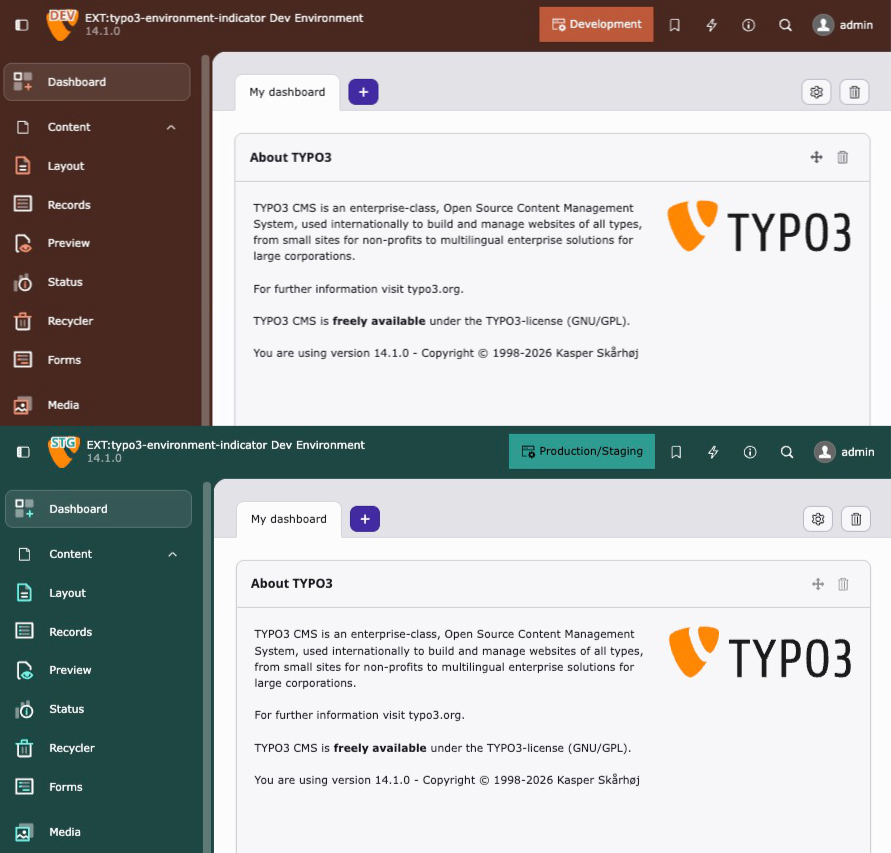
The backend theme indicator colors the entire TYPO3 backend by overriding CSS custom properties introduced with the TYPO3 v14 Fresh theme. Instead of modifying individual elements, it sets the primary accent color and scaffold variables, which automatically cascade through the backend UI - including the topbar, sidebar, buttons, active states, and focus rings.
This works with all TYPO3 backend themes (Fresh, Modern, Classic) and supports both light and dark mode.
You can adjust the theme in your ext_:
use KonradMichalik\Typo3EnvironmentIndicator\Configuration\Handler;
use KonradMichalik\Typo3EnvironmentIndicator\Configuration\Indicator;
use KonradMichalik\Typo3EnvironmentIndicator\Configuration\Trigger;

Handler::addIndicator(
    triggers: [
        new Trigger\ApplicationContext('Development*'),
    ],
    indicators: [
        new Indicator\Backend\Theme([
            'color' => '#bd593a',
        ]),
    ],
);Configuration keys:
color(string): The primary accent color as hex value. Required.scaffold(bool): Whether to color the backend header. Default isHeader true.scaffold(bool): Whether to color the backend sidebar. Default isSidebar true.neutral(string): The neutral tinting strength as CSS percentage value. Default isMix '15%'.
use KonradMichalik\Typo3EnvironmentIndicator\Configuration\Handler;
use KonradMichalik\Typo3EnvironmentIndicator\Configuration\Indicator;
use KonradMichalik\Typo3EnvironmentIndicator\Configuration\Trigger;

Handler::addIndicator(
    triggers: [
        new Trigger\ApplicationContext('Development*'),
    ],
    indicators: [
        new Indicator\Backend\Theme([
            'color' => '#bd593a',
            'scaffoldHeader' => true,
            'scaffoldSidebar' => true,
            'neutralMix' => '20%',
        ]),
    ],
);Note
This indicator requires TYPO3 v14 or later. On TYPO3 v13 and below, the indicator is silently ignored.
Important
When this indicator is active, the user's theme selection in User Settings > Theme is overridden by the environment color. An info box is displayed in the User Settings to inform the user.
Note
The backend theme indicator can be combined with other backend indicators like Backend toolbar or Backend topbar for maximum visual distinction between environments.