
Developer Corner
This section provides technical details for developers working on or with the extension.
Technical implementation
The extension is built as a plain TYPO3 backend controller (not using
Extbase), registered via the #[AsController] attribute. It leverages
TYPO3 core's "View page" mechanism (PreviewUriBuilder) to obtain a
preview URL for the selected page, which the frontend JavaScript then loads
into a hidden iframe and scans in the browser; no scanning happens on the
server, and no results are ever persisted.
Issue classification
Findings are classified as editor or developer responsibility by
checking whether the offending HTML element correlates with content actually
delivered from the database, specifically the pages and tt_content
tables for the current page (ContentFactsService and
IssueClassificationService). If a match is found, the finding is
attributed to the editor who can fix it by editing that record; otherwise it
is attributed to the developer who maintains the Fluid template or CSS.
This correlation deliberately does not rely on markers or data attributes
added by fluid_styled_content. It is derived from the actual database
content, so classification keeps working with custom or third-party content
rendering.
Developer Corner access gate
The For developers tab and its findings are only rendered when
DeveloperCornerAccessService::hasAccess() returns true for the current
backend user: always for administrators and system maintainers, otherwise
only if the tx_a11ybydefault_developer_corner flag is set on the user
record or on one of its backend groups (see Developer Corner access).
Editors without this access only ever receive the editor-facing findings from
the controller: the developer-facing data is not included in the page
payload at all, not merely hidden with CSS.
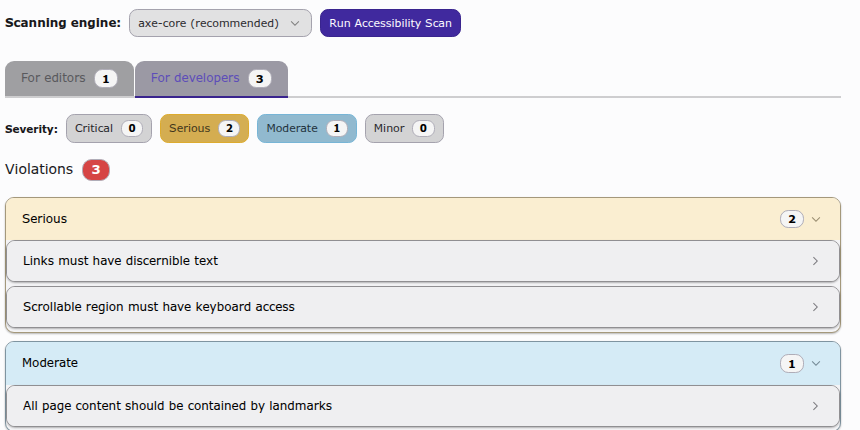
The For developers tab, only visible to users with Developer Corner access.
Read-only markup viewer
Each finding shows the exact HTML markup that triggered it in a read-only
code viewer (the <a11y-code-viewer> custom element). It is built directly
on the CodeMirror packages TYPO3's backend already loads via its importmap,
combining EditorState.readOnly with EditorView.editable(false) so the
markup is displayed without a focusable, blinking-caret editor. Viewers mount
lazily via IntersectionObserver as their accordion panel is expanded, to
avoid paying for a CodeMirror instance per hidden finding.
Scanning engines
The extension bundles two scanning engines, both running client-side in the browser against the rendered page:
- axe-core (default)
- HTML CodeSniffer (user-selectable per scan)
Compatibility handling
The extension supports both TYPO3 v13 and v14. Where core APIs differ
between versions, the extension checks for availability at runtime rather
than branching on the version number. For example, the contextual
(side-panel) record edit route introduced in v14 is only wired up if
ContextualRecordEditController exists.
Translations
All user-facing labels are translated into every language officially
supported by the TYPO3 core, using standard XLIFF files under
Resources/Private/Language/. When adding new labels to locallang.xlf,
locallang_mod.xlf or locallang_db.xlf, only the English source needs
updating manually; translations are expected to be contributed or maintained
through the usual TYPO3 localization tooling.
Build process
The frontend assets (TypeScript, built via Rollup) must be built before the
extension is used from a working copy. The project uses a runTests.sh
script, the same one used by TYPO3 core, to manage the build environment.
# Install dependencies
./Build/Scripts/runTests.sh -s npmInstall

# Build assets
./Build/Scripts/runTests.sh -s buildJsTesting
The extension follows TYPO3's testing standards, using the TYPO3 Testing Framework for PHP and Jest for TypeScript.
PHP testing
# Unit tests
./Build/Scripts/runTests.sh -s unit

# Functional tests
./Build/Scripts/runTests.sh -s functionalJavaScript testing
Unit tests for the TypeScript sources are located in
Build/TypeScript/tests/, mirroring the structure of
Build/TypeScript/src/.
# Lint JavaScript
./Build/Scripts/runTests.sh -s lintJs