
Column Targets
The extension can display "Create new content" buttons for columns directly in the frontend — both for empty columns and at the end of columns that already contain content. This allows editors to add content without switching to the TYPO3 backend.
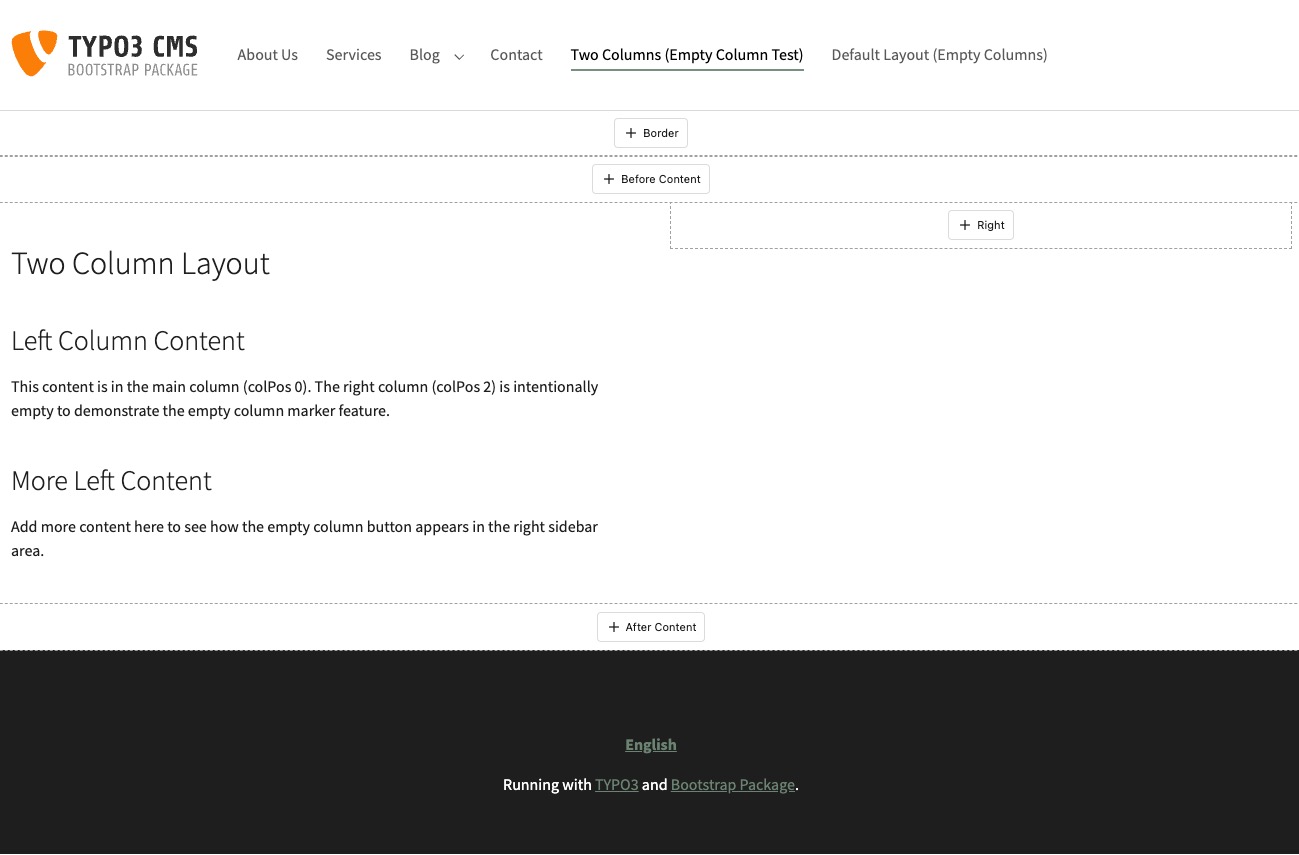
A "Create new content" button appears in empty columns and at the end of filled columns when frontend editing is enabled
It works in two steps:
- The integrator places a lightweight marker in their Fluid templates
- The extension detects empty columns via AJAX and injects the buttons client-side
ColumnTargetViewHelper
The
Column renders a hidden
<div> element as a DOM marker. No content, no styling, no logic — just a marker that the JavaScript picks up after the page loads.
Register the namespace in your Fluid template:
{namespace xfe=Xima\XimaTypo3FrontendEdit\ViewHelpers}Or use the XML namespace syntax:
<html xmlns:xfe="http://typo3.org/ns/Xima/XimaTypo3FrontendEdit/ViewHelpers"
data-namespace-typo3-fluid="true">Arguments
| Name | Type | Required | Description |
|---|---|---|---|
colPos | int | yes | The column position from the backend layout |
containerUid | int | no | The UID of the parent container element (for b13/container columns) |
Page columns
Place the marker after the content rendering for each column:
{namespace xfe=Xima\XimaTypo3FrontendEdit\ViewHelpers}

<f:cObject typoscriptObjectPath="lib.dynamicContent" data="{pageUid: '{data.uid}', colPos: '0'}" />
<xfe:columnTarget colPos="0" />

<f:cObject typoscriptObjectPath="lib.dynamicContent" data="{pageUid: '{data.uid}', colPos: '1'}" />
<xfe:columnTarget colPos="1" />A "+" button always appears at the marker position — whether the column is empty or already contains content. Clicking it opens TYPO3's native New Content Element Wizard to choose a content type, then creates the new element in that column.
Note
This feature requires contextual editing to be enabled
(frontendEdit.enableContextualEditing: true in the site settings) — the
wizard is hosted inside the slide-in iframe modal that this setting activates.
On both TYPO3 v13 and v14 the wizard opens in the slide-in iframe modal: the page module is loaded inside the modal and the matching wizard button is auto-clicked, so the editor sees TYPO3's real wizard. On v14 the contextual editing sidebar continues to handle editing of existing elements; creating new content uses the modal.
Container columns
For container elements (e.g. two-column layouts, tabs, accordions using b13/container), add the containerUid argument:
{namespace xfe=Xima\XimaTypo3FrontendEdit\ViewHelpers}

<div class="column-left">
    <f:for each="{children_201}" as="record">
        <f:format.raw>{record.renderedContent}</f:format.raw>
    </f:for>
    <xfe:columnTarget colPos="201" containerUid="{data.uid}" />
</div>

<div class="column-right">
    <f:for each="{children_202}" as="record">
        <f:format.raw>{record.renderedContent}</f:format.raw>
    </f:for>
    <xfe:columnTarget colPos="202" containerUid="{data.uid}" />
</div>Important
The marker must always be rendered, even when the column is empty. Do not wrap it in a condition like <f:if condition="{children_201}"> — otherwise the marker is missing from the DOM when the column is empty and the button cannot appear.
How it works
- The ViewHelper renders
<div data-(invisible, no layout impact)xfe- colpos="0" hidden></ div> - The extension's JavaScript scans the page for these markers after loading
- A "+" button is injected at each marker position, regardless of whether the column already contains content
- Clicking the button opens the page module inside the iframe modal and auto-clicks the matching wizard button, so TYPO3's native New Content Element Wizard appears with the correct colPos pre-filled
- The wizard lets the editor choose a content type before the record editor opens — inside the iframe modal on both v13 and v14
Container support requires the b13/container extension. The service automatically detects whether it is installed. Without it, only page columns are supported and container markers are silently ignored.
Note
The marker is only rendered when a backend user is logged in and frontend editing is enabled. For regular frontend visitors, nothing is output.