
Contextual Editing
New in version 2.2.0
Note
Contextual editing is experimental.
Note
Thanks to Violetta Digital Craft for supporting the development of this feature.
Contextual editing lets editors modify content elements and page properties directly in the frontend. Clicking an edit button opens a sidebar panel that slides in from the right, displaying the TYPO3 FormEngine edit form — no detour through the backend required.
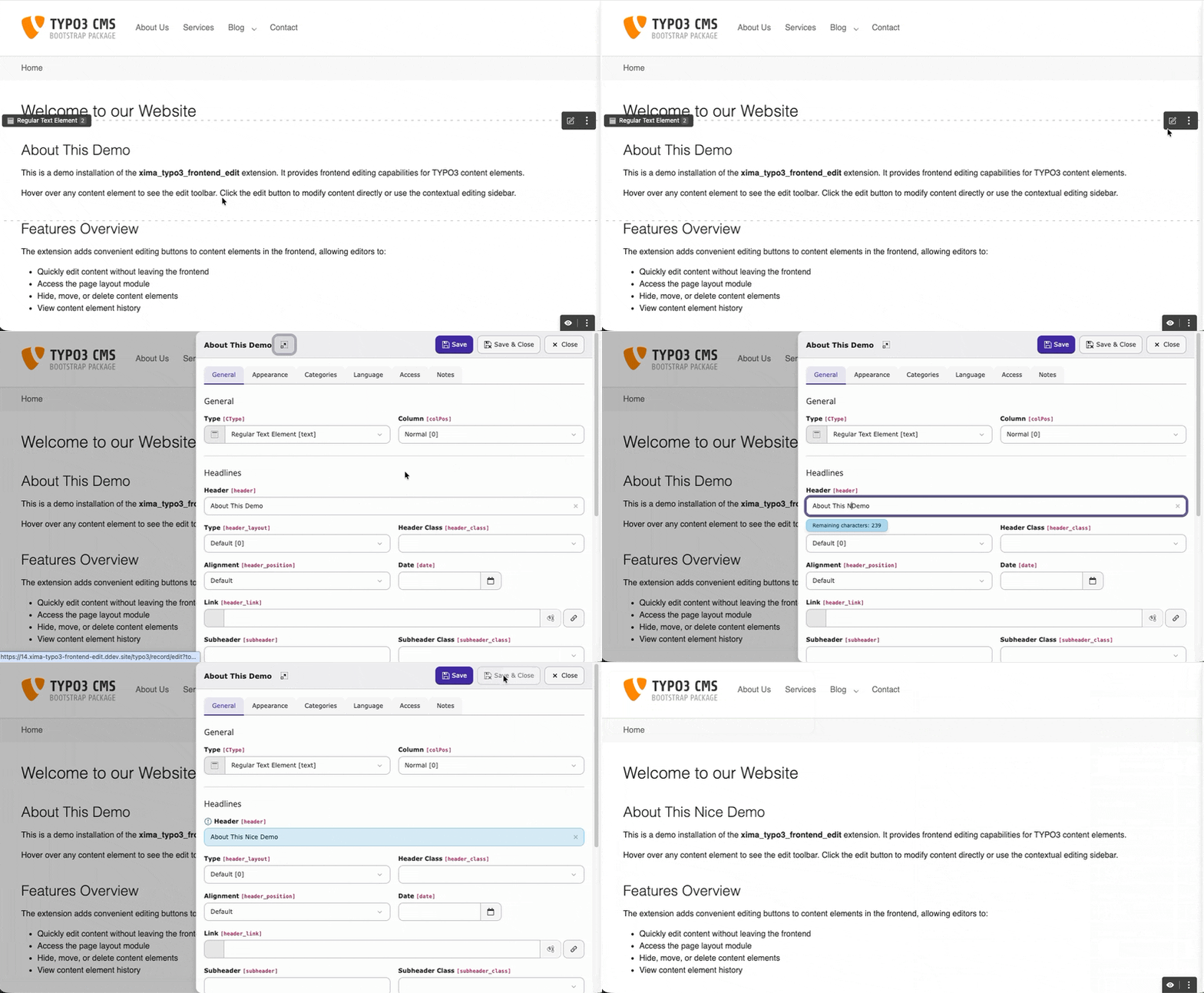
Editing a content element via the contextual sidebar
Setup
Enable the feature in your site settings:
frontendEdit:
enableContextualEditing: trueOr via the TYPO3 backend: Site Management > Sites > Edit site > Settings > Frontend Edit > Appearance.
Usage
With contextual editing enabled:
- Clicking an edit button opens the sidebar instead of navigating to the backend.
- The page properties link in the sticky toolbar also opens in the sidebar.
- Ctrl+Click (or Cmd+Click on macOS) bypasses the sidebar and opens the full backend editor directly.
Controls
- Save
- Saves the record and keeps the sidebar open.
- Save & Close
- Saves and closes the sidebar. The page reloads to reflect changes.
- Close
- Closes the sidebar. Unsaved changes trigger a confirmation prompt.
- Expand
- Opens the full backend editor. Respects the
linkTargetBlanksetting (same window or new tab).
Escape and clicking the backdrop also close the sidebar.
Limitations
The FormEngine runs inside an iframe outside its intended context. Some advanced features may not work fully:
- IRRE / relation browsers may have limited functionality.
- Context menus (three-dot menu) are not available inside the iframe. Primary actions (edit, hide, delete) are accessible as direct buttons.
- Console errors from backend JavaScript modules are expected and harmless.
For full editing capabilities, use the expand button.
Fallback Behavior
- Setting disabled: All edit links navigate to the backend as before.
- JavaScript disabled: Edit links fall back to their
hrefattribute, pointing to the standard backend URL.
Tip
On TYPO3 v14.2+ the sidebar uses the native record_edit_contextual
route. On TYPO3 v13 the same sidebar loads the standard backend edit form
in an iframe. The behavior is identical from an editor's perspective.