
Creating multiple pages
If you need to build out a new section of your website quickly, you can create many pages at once from the page tree.
First click into the Content > Layout module in the left sidebar.
-
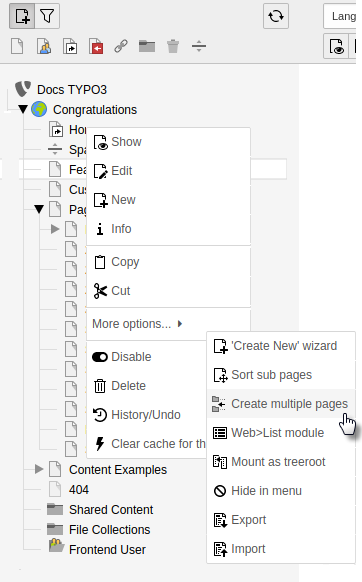
Open the bulk creator: Right-click a "parent" page in the page tree and choose More options > Create multiple pages from the context menu.
-
Name your pages: Enter a title and a page type for each page. Here we are just creating normal "standard" pages.
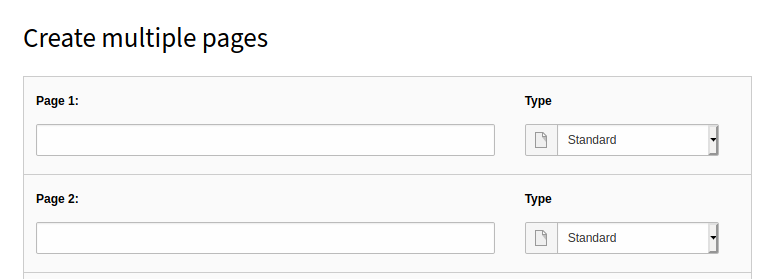
- Expand your list: Click Add more lines to add five more pages as needed.
-
Set page position and visibility if necessary at the bottom of the screen:
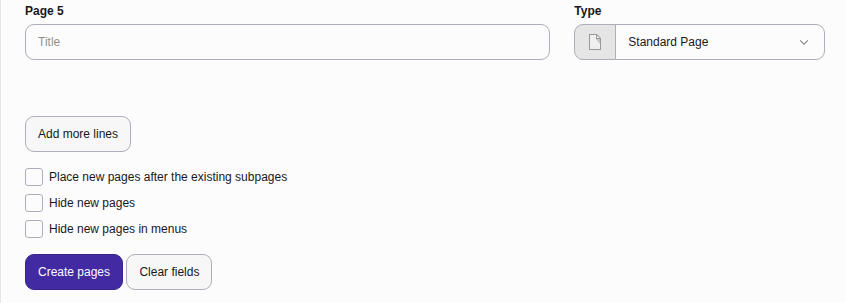
- Positioning: Toggle Place new pages after the existing subpages to add the pages below any existing subpages. Leave it off to place them above.
- Visibility: Toggle Hide new pages or Hide new pages in menus.
- Save your changes: Click Create pages.
Tip
Hidden pages are completely offline and inaccessible to visitors. Hidden in menus pages are online but will not appear in your site navigation. Visitors will still be able to visit your pages via URL.