
Using and Developing Query Managers
Query managers are used in <query> tags to execute queries that can be used in charts.
The SAV Charts extension comes with an internal query
manager named savcharts that can
handle TYPO3 database queries as well as queries
from other databases.
Using the Query Manager
In the backend in Records mode create a new record
in a page or a folder.

Select Database if you need to access to an external database,
fill the different fields and save.
Tip
You do not need to create a new database access if you only need to access to the current TYPO3 database.
Select Query to create a query. Select a database (default is
TYPO3 Database), fill the different clauses and save.
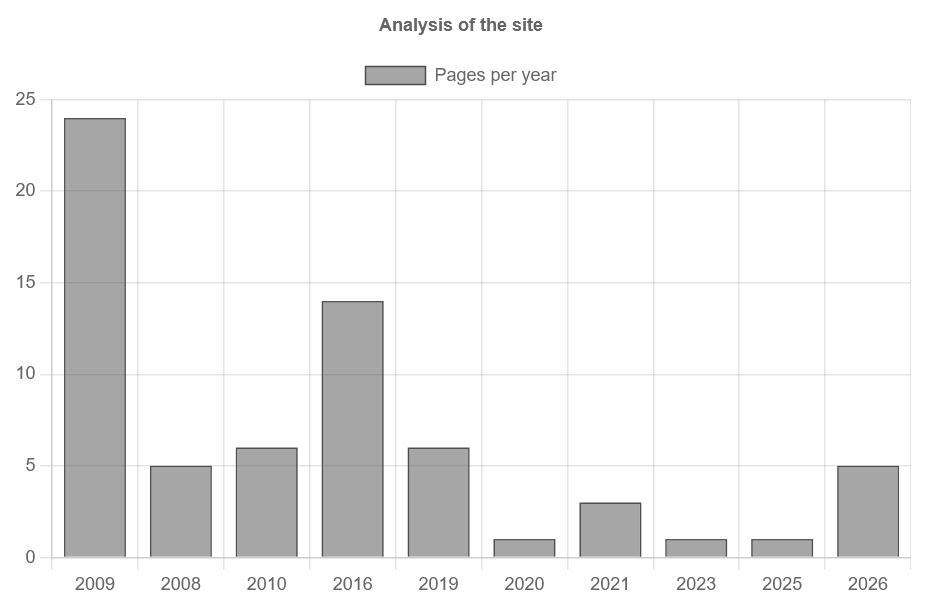
The following configuration is an example of how to obtain the number of pages created per year.
-
In SELECT clause field
COUNT(*) AS Count,
YEAR(FROM_UNIXTIME(crdate)) AS Year
Copied! -
In FROM clause field
pagesCopied! -
In WHERE clause field
NOT deleted AND NOT hiddenCopied! -
In GROUP BY clause field
yearCopied!
The following query is generated by this configuration.
SELECT
    COUNT(*) AS Count,
    YEAR(FROM_UNIXTIME(crdate)) AS Year
FROM
    pages
WHERE
    NOT deleted AND NOT hidden
GROUP BY
YearIf the new query has ID 1, the following FlexForm configurations will display a bar chart showing the number of pages per year.
Important
The flag Allow queries must be set by an Admin user in the content
Flexform to execute queries.
-
In the Markers Flexform field
<marker id="title">Analysis of the site</marker> <marker id="labelSet0">Pages per year</marker>Copied!<c:marker id="title">Analysis of the site</c:marker> <c:marker id="labelSet0">Pages per year</c:marker>Copied! -
In the Queries Flexform field
<query id="1"> <setQueryManager name="savcharts" uid="1" /> </query>Copied!<c:query id="1" manager="savcharts" uid="1" />Copied! -
In the Data Flexform field
<data id="data0" > <setDataFromQuery query="1" field="Count" /> </data> <data id="labels" > <setDataFromQuery query="1" field="Year" /> </data> <data id="data"> <item key="0" value="data#data0" /> </data>Copied!<c:data id="labels" values="{query__1.Year}" /> <c:data id="data"> <c:item key="0" value="{query__1.Count}" /> </c:data>Copied! -
In the Templates Flexform field
<template id="1"> EXT:sav_charts/Resources/Private/Templates/ChartsExamples/BarChartAdvanced.xml </template>Copied!<c:template id="1"> EXT:sav_charts/Resources/Private/Templates/ChartsExamples/FluidParser/BarChartAdvanced.fluid </c:template>Copied!
The default query manager, savcharts, is used
in the Queries section. It calls the query
with the UID 1.
The Data section of the FlexForm overloads the template to display a single bar chart with data from the query, as explained in Using Advanced Templates.
Go to the front-end to view the resulting chart.
Using Markers in Queries
Markers can be used in queries. For example,
assume that the previous query should return
the number of pages created between the
years year and year.
First, insert the syntax ###marker### into
the WHERE clause of the previous content element
in the query.
NOT deleted AND NOT hidden AND YEAR(FROM_UNIXTIME(crdate)) BETWEEN ###yearMin### AND ###yearMax###Add markers to the Flexform field of your chart, then save and go to the front-end.
<marker id="title">Analysis of the site</marker>
<marker id="labelSet0">Pages per year</marker>

<marker id="yearMin">2010</marker>
<marker id="yearMax">2020</marker><c:marker id="title">Analysis of the site</c:marker>
<c:marker id="labelSet0">Pages per year</c:marker>
<c:marker id="yearMin">2010</c:marker>
<c:marker id="yearMax">2020</c:marker> 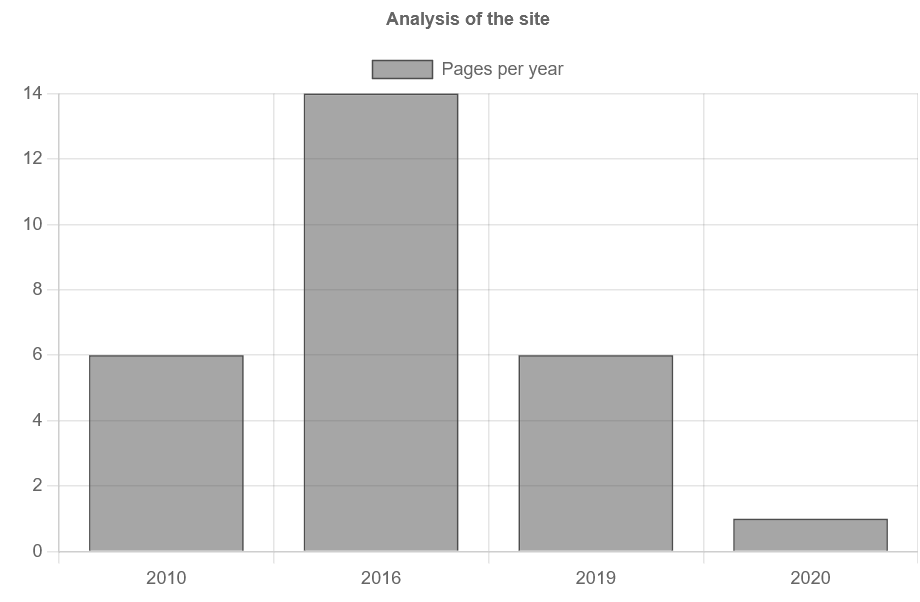
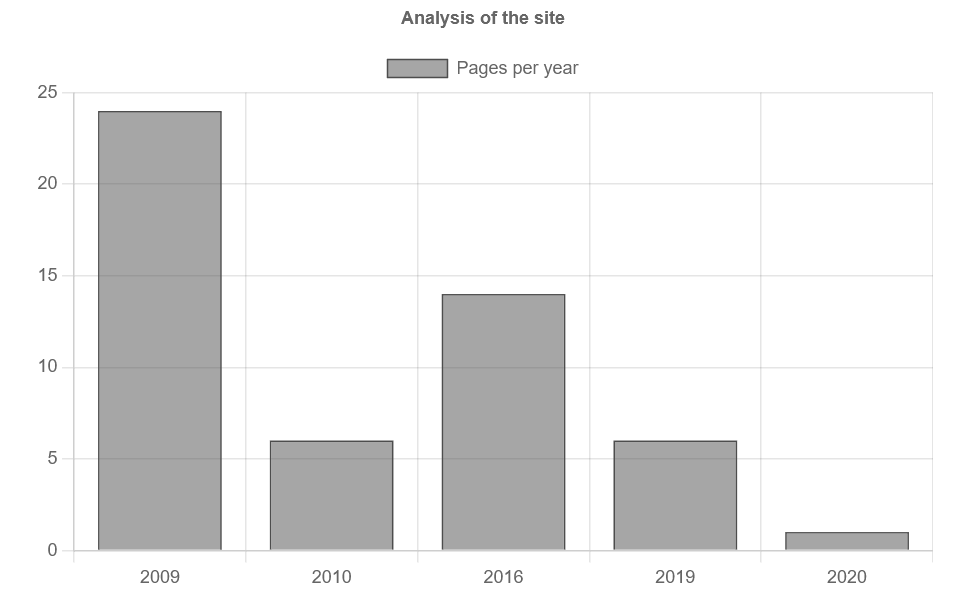
You can also introduce markers in TypoScript.
For example, add the following TypoScript to
your page to modify only the value of the
###year marker, then clear the cache and
go to the front-end. The syntax custom refers
to the query with the UID of 1.
plugin.tx_savcharts.settings.customQuery.1 {
  yearMin = TEXT
  yearMin.value = 2009
} 
Developing Your Query Manager
Query managers are implemented by means of hooks.The hook for the internal query manager
is in Classes/. This class extends the abstract class
AbstractQueryManager (Classes/)
which itself implements the interface QueryManagerInterface
(Classes/).
You can develop your own query manager by providing a hook which must
be added in the file ext_
of your extension.
Assuming that your vendor name is My and your extension
name is my_. Assuming also
that you have written your manager as the class MyQueryManager
in Classes/.
Finally, assuming that you want to name your query manager my, you should add
the following code in ext_ of your extension.
$TYPO3_CONF_VARS['EXTCONF'][$_EXTKEY]['queryManagerClass']['myManager'] = \MyVendorName\MyExtension\Hooks\MyQueryManager::class;