
Managing skills
Skills are GitHub-hosted SKILL.md files — a YAML front-matter block
with a name and description plus a markdown body — that nr-llm can
ingest, review, and (from Plan 1b) inject into prompts. You add a skill
source that points at GitHub, sync it, and then enable the individual
skills you want.
Skill management is admin-only. It lives in AI > Authoring > Skills and is not delegated to other backend groups: a skill body becomes prompt context, so the two skill tables are treated as a privilege-escalation surface.
Note
Ingest — adding sources, syncing and reviewing — is described by ADR-035. Attaching enabled skills to tasks and configurations and injecting them into text-generation prompts is described by ADR-036 and the Attaching skills section below.
Source types
A source has one of three types:
single_file- One
SKILL.mdat a fixed path in a repository. A single, explicit admin act — its skill may default to enabled. repo- A whole repository. Every
SKILL.mdunder the repo root,skills/<name>/,.claude/skills/<name>/or<plugin>/skills/<name>/is discovered. Discovered skills arrive disabled for review. marketplace- An Anthropic
marketplace.jsonindex that lists plugins pointing at further repositories. Each entry is expanded with therepoflow. All discovered skills arrive disabled.
Adding a source
- Navigate to AI > Authoring > Skills.
- Click New Skill Source.
-
Fill in the fields:
- Title
- Display name for the source list.
- Type
single_file,repoormarketplace(see above).- URL
- The GitHub URL the type expects (the
SKILL.mdURL, the repository URL, or themarketplace.jsonURL). - Ref
- A branch or tag (for example
mainorv1.2.0). It is resolved once to an immutable commit SHA at sync time; all bodies are then fetched by that SHA, never by the moving branch.
- Click Save.
The pinned_sha, sync_status, sync_error and last_synced
fields are managed by the sync run and shown read-only.
GitHub token and rate limits
Unauthenticated GitHub API access is limited to 60 requests per hour,
which is quickly exhausted by a repo or marketplace sync. Add a
personal access token (a read-only, public-repo token is enough) to raise
the limit and to read private repositories.
- The token is set through the Set token action on a source, not typed into a FormEngine field. It is stored as an nr-vault UUID (envelope-encrypted), mirroring provider API-key storage — never as plaintext in TCA, YAML or the database.
- When a sync hits the rate limit (HTTP 403 with no remaining quota), the
source is set to
sync_status = errorcarrying the reset time; state is not partially corrupted. Add a token and re-sync.
Host-allowlist prerequisite
nr-llm enforces an app-level GitHub allowlist on every skill request:
the scheme must be https and the host must be one of github.com,
raw.githubusercontent.com, api.github.com or
codeload.github.com. This is separate from, and in
addition to, the nr-vault SSRF guard.
On hardened instances that restrict outbound HTTP through the global
HTTP/allowed_hosts SSRF setting, those four GitHub hosts must be on
that list, otherwise every sync fails closed. This is a deliberate
prerequisite — nr-llm never silently bypasses the SSRF guard.
Syncing and the review flow
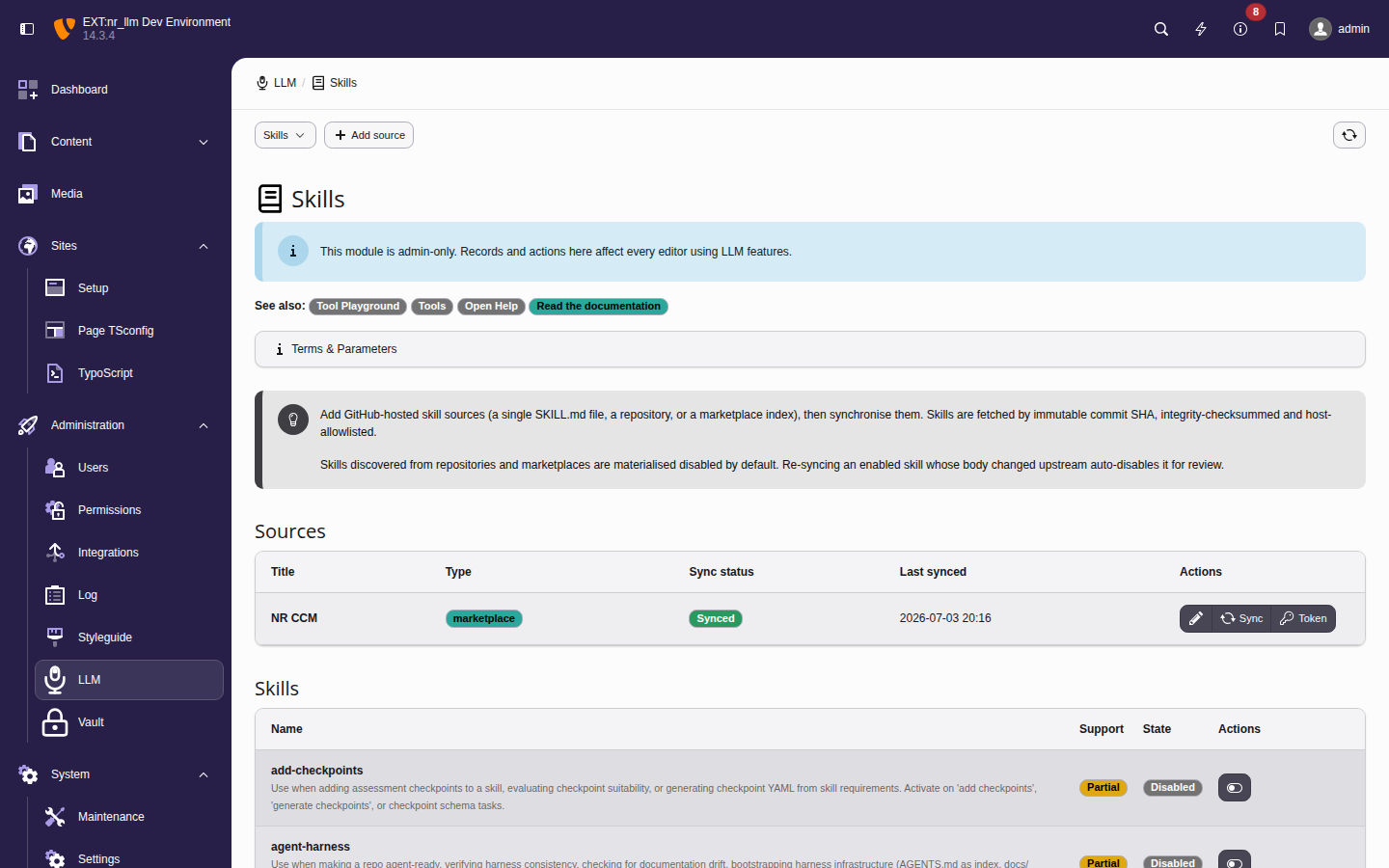
The Skills module — the Sources table (type, sync status,
last synced, per-source actions) above the discovered Skills
with their partial / full support badge and enabled state.
- On a source, click Sync. The source moves through
never_synced→syncing→ok/partial/error. Thesyncingstate also acts as a lock: a second concurrent sync on the same source is refused. partialmeans the per-sync file-count or wall-time bound was reached (large marketplaces); the skills fetched so far are stored.- Discovered skills from
repoandmarketplacesources are created disabled by default. Review each one, then toggle it on with Enable. - Re-sync never silently changes an enabled skill. If a re-sync
recomputes a different
body_checksumfor an enabled skill, nr-llm auto-disables it and surfaces a diff (Review changes) so you re-confirm before it is used again. Accepting the diff re-pins the SHA atomically. - A skill that disappeared upstream is marked orphaned and disabled, never silently dropped, so attachments (Plan 1b) do not vanish.
Deleting a source cascade-deletes its skills.
The partial support badge
Each skill carries a support badge:
full- The skill is plain front-matter and prose.
partial- The body or front-matter references scripts,
references/,assets/or anallowed-toolsdeclaration.
Warning
partial is not a "safer content" badge. It only signals that
the referenced scripts and assets are not executed by nr-llm
(which is true for every skill in this release). The prose itself is
fully untrusted regardless of the badge. Asset references are stripped
from injected prose purely to avoid dangling instructions, not as a
security control.
See ADR-035 for the full design and security rationale.
Attaching skills and injecting them into prompts
Enabled, non-orphaned skills can be attached to a Task and/or an
LLM configuration via the Skills field on those records
(only enabled skills are offered). At execution time, for text-generation
operations only — completion, translation and task execution; never
embeddings, vision or speech — nr-llm composes the attached skills into a
delimited block and prepends it to the user prompt. The configuration
system_prompt is never modified.
Note
Injection is eager and complete, not on demand. The whole skill
body — the entire SKILL.md prose after the front-matter, not just
the name/description — is written into the prompt before the model
runs. Unlike a tool, a skill is not
something the model calls or fetches when it decides it needs it: there is no
runtime round-trip that loads a skill's body, and none that loads its
references/ / scripts/ / assets/ (those lines are stripped from
partial skills, and the files are never executed). An attached skill
therefore always costs its full body in tokens on every run (subject to the
budget below).
Planned direction (not in this release): a progressive-disclosure mode
that injects only the description and lets the model pull the full body
or a referenced file on demand — the same shape as the tool runtime.
Executing a skill's bundled scripts or assets is a separate, harder step and
is not on the near-term roadmap.
Composition rules:
- Precedence. Configuration skills are the baseline, task skills are additive; the set is the union deduped by source + identifier (the configuration wins on a duplicate). The configuration block renders first.
- Budget. The block is bounded by a conservative character budget; when it is exceeded, task-additive skills are dropped before configuration-baseline skills and each drop is logged.
- Integrity. Each skill's body checksum is re-verified at injection time; a mismatch (tampering or a stale row) drops that skill — it is never injected.
- Untrusted output. Skill prose is third-party text; output produced under its influence is treated as untrusted and escaped/sanitized where it is stored or rendered. Message role is defense-in-depth, not a trust boundary.
See ADR-036 for the injection design.
Isolation controls: trust, fingerprint, injection scan, audit
On top of the SHA-pin and checksum controls above, each source and skill carries the isolation controls introduced in ADR-061.
Publisher trust level. Every source is classified — untrusted (the
default, for anonymous public GitHub content), community, verified or
first_party (operator-controlled). This is provenance, independent of the
partial support badge. Each synced skill denormalises its source's level, so
re-classifying a source takes effect on the next sync. The instance-wide floor
skills.minTrustLevel (extension configuration, default untrusted) gates
use: a skill below the floor is dropped from both prompt injection and the
allowed-tools union. Raising the floor to verified therefore hides every
community/untrusted skill without deleting it. Trust is separate from the
enabled = false default — an untrusted skill still needs an explicit
enable. An unreadable or mistyped floor falls back to untrusted; the value
actually in force is shown under Effective policy.
Skill-block byte budget. skills.maxBytes (extension configuration,
default 24000) caps the composed block that is prepended to the user
prompt. The measure is bytes, not tokens — a deliberate over-estimate, since no
tokenizer is available. When the block exceeds the budget, skills are dropped
from the tail first: task-additive skills go before the configuration baseline,
and every drop is logged as a warning. Lower the value to reserve more of the
model's context window for the conversation itself; raise it if a large
configuration baseline is being trimmed. An empty, non-numeric or zero value
falls back to 24000 — the cap cannot be switched off, so an emptied field
never puts an unbounded block on the wire. The budget is instance-wide and
independent of the model's context window; the per-request window bound is
handled separately by the context-window manager (ADR-107).
The budget bounds the prompt block only, not the allowed-tools union
(Gating tools). The union is computed
over the effective skills before the block is assembled, so a skill dropped
for the budget still grants its tools while its usage rules stay out of the
prompt. That is deliberate — a budget-aware union would widen the gate,
because dropping the last declaring skill removes the restriction entirely.
Watch the drop warnings when lowering the value: they name every skill whose
prose stopped shipping while its tools kept being offered.
Manifest fingerprint (optional). A source may declare an
expected_fingerprint: the sha256 its whole skill set must hash to. When set,
the digest is recomputed at sync and verified before anything is materialised; a
mismatch fails closed (no skill is imported, the source goes to error) and
leaves the last known-good skills untouched. Leave it empty to rely on the
commit-SHA pin alone. This binds the reviewed bytes to a publisher-declared
identity beyond "these bytes from this URL"; it is a declared digest, not a
public-key signature.
Prompt-injection scan. Each body is scanned at ingest for known injection
signatures. A high-confidence jailbreak marker (e.g. "ignore all previous
instructions", role reset, chat-template control tokens) force-disables the
skill at import — even a single-file source that would otherwise default
enabled — and must be re-reviewed before enabling. Lower-confidence findings are
recorded on the skill (Injection scan findings) for review without blocking.
Immutable audit trail. Every ingest, enable, disable and fail-closed
rejection is written to tx_nrllm_skill_audit with who / when / source / SHA /
checksum / trust level / scan result. The trail is append-only — the application
never updates or deletes a row — so the provenance of any skill that can reach a
prompt is reconstructable after the fact.