
AI Permissions
Guided setup wizard for TYPO3 backend usergroup AI permissions.
Path: AI Foundation > AI Permissions
AI Foundation AI Permissions Demo
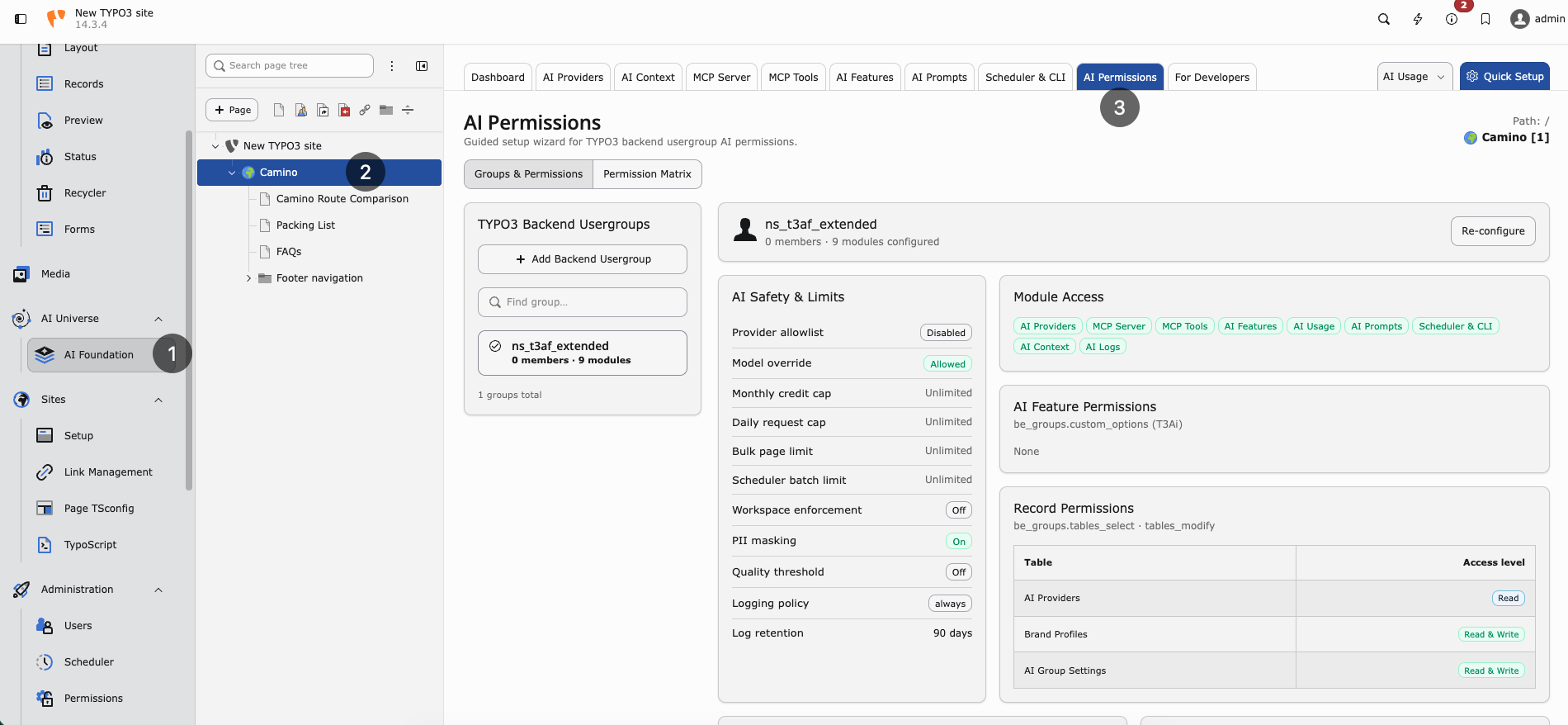
AI Permissions — configure backend usergroups and review the cross-group Permission Matrix.
Only TYPO3 administrators can open and change this module. Runtime enforcement still applies to every backend user.
Purpose
Role-based access and permissions for AI on TYPO3: a guided wizard over backend usergroups so junior staff, clients, and freelancers get safe AI access without seeing admin-only tools.
Configure per group:
- Module access — Which AI Foundation tabs and child modules appear
- Fine-grained feature permissions — Which features inside those modules are allowed
- Record-level restrictions — Read vs read/write on providers, prompts, context profiles, logs, and other catalog records
- Page-scope and batch limits — Bulk page limits, scheduler batch limits, and workspace enforcement where enabled
- Per-group credit limits — Monthly credit caps and daily request caps
The module writes into normal TYPO3 backend user group ACL fields
(groupMods, custom_options, tables_select, tables_modify) and
merges only AI-managed keys. Unrelated modules and tables already granted to
the group stay intact.
TYPO3 Backend Usergroups
The left sidebar lists backend user groups (same shell pattern as MCP Tools).
- Search with Find group…
- Each row shows the group name, member count, and how many AI modules are configured
- Select a group to open the guided wizard for that group
Example: a group such as ns_t3af_extended may show 0 members and a
configured module count after you apply permissions.
Guided wizard
After you select a group, the wizard walks through five steps:
- Modules — Toggle AI Foundation admin modules and installed child extensions (for example AI Assistant, AI Search Hub, and other registered suite modules).
- Features — Grant fine-grained feature permissions for the modules you enabled.
- Records — Set record-level read or read/write access for catalog records those modules manage.
- Limits — Set per-group credit limits, daily request caps, bulk/page batch limits, workspace enforcement, and audit/logging options (shown in the matrix under Credits, Workspace, and Audit).
- Review — Preview the merged
be_groupsvalues, then apply.
Use Back / Next in the wizard footer. On Review, confirm the preview, then apply and flush caches before testing with an editor account.
Permission Matrix
Open the Permission Matrix tab for a cross-group overview. The subtitle
shows how many groups exist and how many are configured (for example
1 groups, 1 configured).
Legend
- Use / Read / On — Allowed (green check)
- Mgr — Manage / read+write
- — — No access
AI Foundation columns
Typical matrix columns for AI Foundation:
- Group name and member count
- Admin modules: AI Providers, MCP Server, MCP Tools, AI Features, AI Usage, AI Prompts, Scheduler & CLI, AI Context, AI Logs
- AI Safety / limits: Credits, Workspace, Audit
Child extension scope tabs appear when those extensions register an access catalog. Unconfigured groups stay dimmed with a Not configured badge.
What enforcement does
After you apply permissions:
- Restricted editors only see AI Foundation tabs they are allowed to use
- Dashboard may show an allowed-tabs overview instead of full analytics when usage/context/MCP tabs are closed
- AI Providers create/edit/delete needs write access on the provider table; otherwise the list stays read-only (Test connection can still work)
- Child extension tabs, cards, and mutating routes follow the same grants (403 when write is denied)
Administrators always keep full access to configure AI Permissions.
Recommended workflow
- Create or choose a backend user group for editors.
- Open AI Foundation > AI Permissions.
- Select the group and complete Modules → Features → Records → Limits → Review.
- Check the Permission Matrix for that group.
- Flush caches.
- Log in as a user in that group and confirm hidden tabs and read-only screens match the matrix.
When to use this module
- Safe AI access for junior staff, clients, and freelancers
- Editors share one instance across departments
- MCP or provider management must stay admin-only
- Per-group credit or request caps are required
- Child extensions must show only allowed tabs, features, and write actions
Developer extensions can register additional modules, features, and records through Custom Access Catalogs.
Product overview: AI Foundation on GitHub.