
AI Providers
Providers represent connections to AI services. Each provider stores an adapter type, optional endpoint, encrypted credentials, models, and capability flags.
Path: AI Foundation > AI Providers
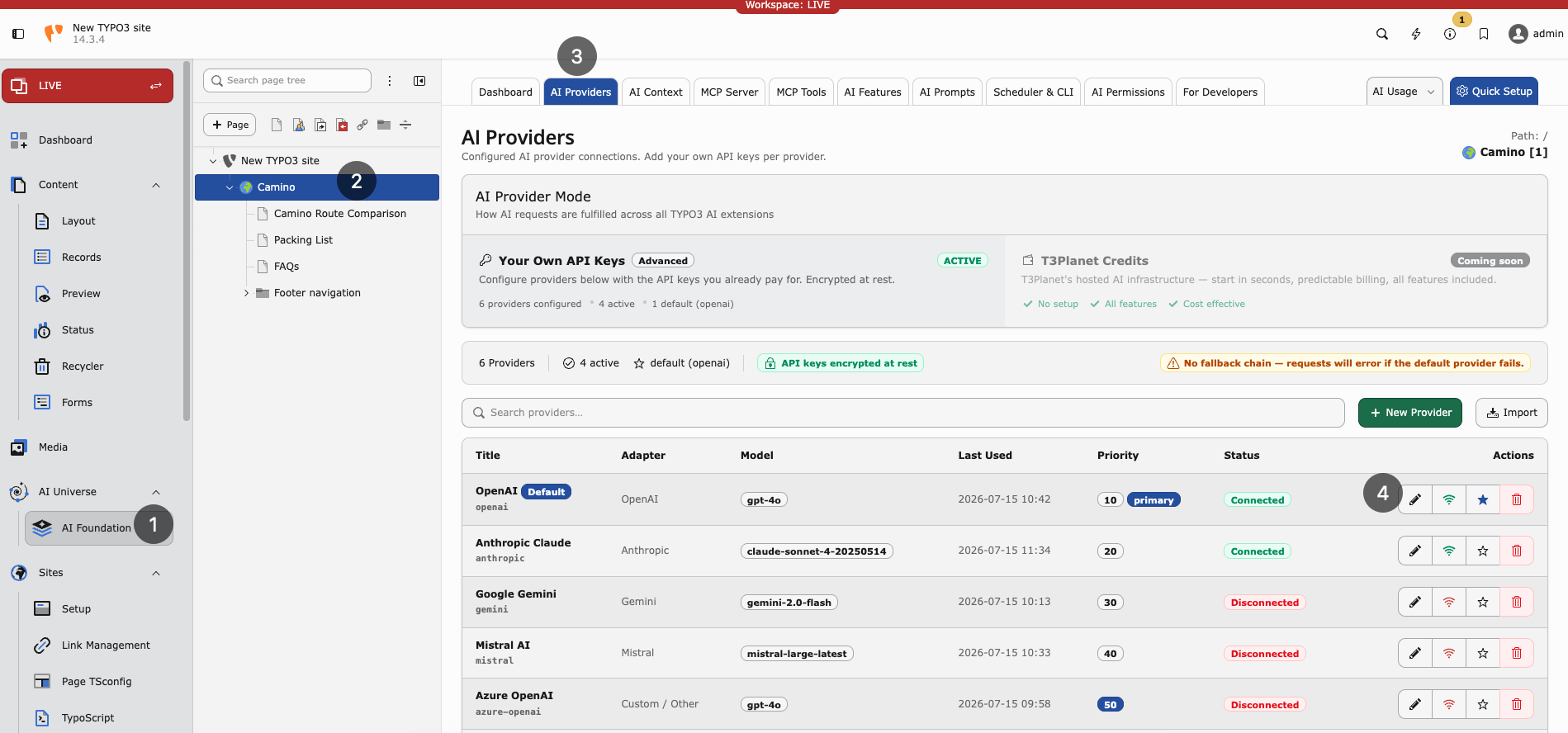
AI Providers list — configured adapters, models, connection status, and default provider.
Without at least one working provider, no AI feature runs.
Adding a provider
- Open AI Foundation > AI Providers.
- Click Add provider.
-
Fill in the required fields:
- Display name — Friendly label for your team (for example `
Open`).AI production - Adapter type — Vendor protocol (OpenAI, Anthropic, Gemini, Azure, Mistral, DeepSeek, xAI, Ollama, or custom OpenAI-compatible).
- API key — Cloud vendors need a key. Leave empty for local Ollama.
- Model ID — Completion model (for example
gpt-4o-mini).
- Display name — Friendly label for your team (for example `
- Optionally set the endpoint URL, embedding model, capabilities, temperature, and pricing fields.
- Click Save.
- Enable Default on exactly one provider.
Tip
For first-time setup, use Quick Setup in the AI Foundation module header. It walks through provider creation with fewer decisions.
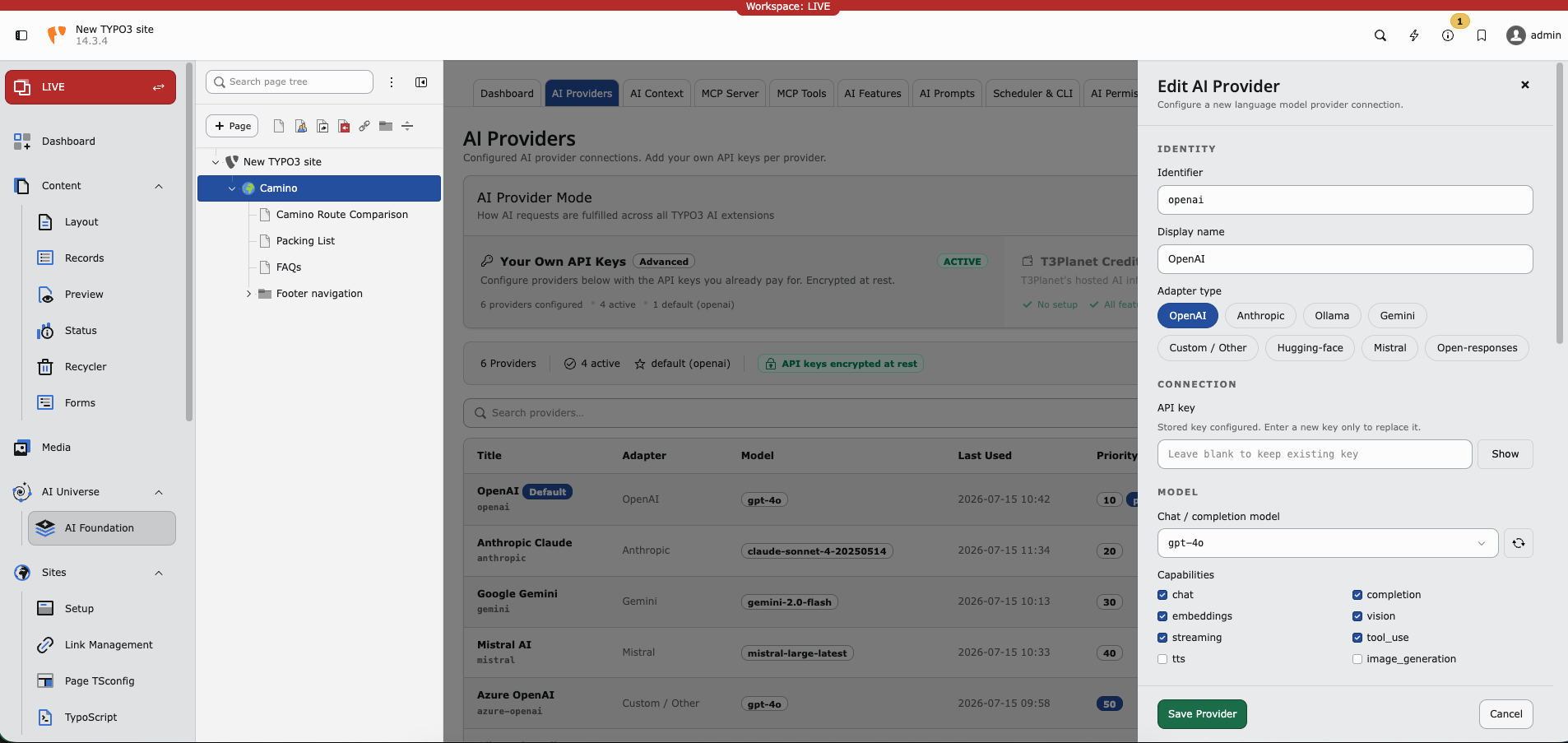
Edit AI Provider — adapter type, API key, chat model, and capability flags.
Testing a connection
After saving a provider, click Test connection to verify the setup. The test calls the provider API and reports:
- Connection status (success or failure)
- Error details on failure
- Model / capability hints when the adapter can list them
Note
Self-hosted endpoints (such as Ollama) must be reachable from the TYPO3 server. Typical causes of a failed test:
- Wrong host or port in Endpoint URL (default
http://localhost:11434for Ollama) - Docker/network isolation between PHP and the model host
- Outbound HTTPS blocked for cloud vendors
Local adapters usually do not need an API key. Cloud adapters do.
If your server reaches the internet only through a corporate proxy, configure TYPO3 HTTP settings:
$GLOBALS['TYPO3_CONF_VARS']['HTTP']['proxy'] = 'http://proxy.example.com:8080';Editing and deleting providers
- Click a provider row to edit its settings in the drawer.
- Use Test connection after rotating an API key or changing the model.
- Use Delete to remove a provider. Features that pointed at that provider fall back to the global default (or fail until another provider is assigned).
Warning
Deleting the only default provider leaves child extensions without a global fallback. Set another provider as Default first.
Supported adapters
Built-in and discovered adapters include:
symfony.openai— OpenAIsymfony.anthropic— Anthropic Claudesymfony.gemini— Google Geminisymfony.mistral— Mistral AIsymfony.ollama— Local Ollamasymfony.openrouter— OpenRouternst3af.openai_compatible— Custom / OpenAI-compatible endpoints- Additional Symfony AI bridges when their Composer packages are installed (for example Azure, DeepSeek, xAI)
Custom adapters: Custom AI Providers.
Capabilities
Pick a model that supports what you need. Test connection helps validate the choice.
- Chat — Text generation
- Streaming — Live response display in the backend
- Embeddings — Search and similarity features
- Vision — Image analysis
- Tool use — MCP agent workflows
Multiple providers — when and why
Dev and live — Separate rows with different API keys per environment.
Cost saving — Cheap model as global default; premium model assigned in AI Features for important tasks.
EU hosting — Mistral or Azure in an EU region for data residency requirements.
Provider fields
Fields below map to the AI Providers drawer and the
tx_nst3af_provider table.
Required
identifier
-
- Type
- string
- Required
true
Unique slug for programmatic access (for example
openai-prod,ollama-local). Must be unique.
title
-
- Type
- string
- Required
true
Display name shown in the backend and dropdowns.
adapter_type
-
- Type
- string
- Required
true
Adapter protocol identifier, for example
symfony.openaiornst3af.openai_compatible.
Connection
api_key
-
- Type
- string
API key for authentication. Stored as sodium ciphertext with an
enc:v1:prefix — raw keys are never kept in the database. Required for cloud adapters; usually empty for local Ollama.
endpoint_url
-
- Type
- string
- Default
- Adapter default
Custom API base URL. Required for OpenAI-compatible and Ollama-style adapters when the default host is wrong for your network.
model_id
-
- Type
- string
Default completion / chat model ID.
embedding_model_id
-
- Type
- string
Default embedding model ID when embeddings are enabled.
Optional configuration
capabilities
-
- Type
- string list
Enabled capabilities:
chat,completion,embeddings,vision,streaming,tool_use.
temperature
-
- Type
- float
- Default
0.7
Default sampling temperature (
0.0–2.0).
system_prompt
-
- Type
- text
Optional provider-level system message prepended to requests.
is_default
-
- Type
- bool
- Default
false
Mark as the global default. Keep exactly one default among enabled rows.
is_enabled
-
- Type
- bool
- Default
true
Soft on/off switch without deleting the row.
priority
-
- Type
- integer
- Default
50
Ordering hint (
0–100) when multiple providers are listed.
be_groups
-
- Type
- backend groups
Restrict this provider to selected backend groups. Empty means available to all groups.
privacy_level
-
- Type
- string
- Default
standard
Telemetry detail:
standard,reduced(no prompt content), ornone.
Governance and status
Optional pricing (pricing_input_per_1m, pricing_output_per_1m,
pricing_currency, cost_center), retention overrides, dashboard analytics
flags, and read-only status fields (last_status, last_status_at,
last_status_message, last_used_at) support monitoring and cost tracking.
Status fields update after Test connection and live requests.
Troubleshooting
Test fails — Check the API key, model ID, endpoint URL, and outbound HTTPS/firewall rules.
Rate limit — Wait or upgrade the vendor plan.
Vision returns empty — Use a vision-capable model (for example GPT-4o with vision).
Module works but child extension fails — Check AI Features for per-task overrides.
Security
- Rotate keys every 90 days
- Use one key per environment (dev, staging, live)
- Restrict access via AI Permissions
- Never commit API keys to Git
Where to get API keys
Note
- OpenAI: https://platform.openai.com/api-keys
- Anthropic: https://console.anthropic.com/
- Google Gemini: https://aistudio.google.com/apikey
- Mistral: https://console.mistral.ai/
- Azure OpenAI: https://portal.azure.com/
More links: Helpful Links