
TCA Mapping
Since DCE 1.2 you are able to map the field values of your DCEs to tt_content columns. DCE is also able to create new columns if necessary.
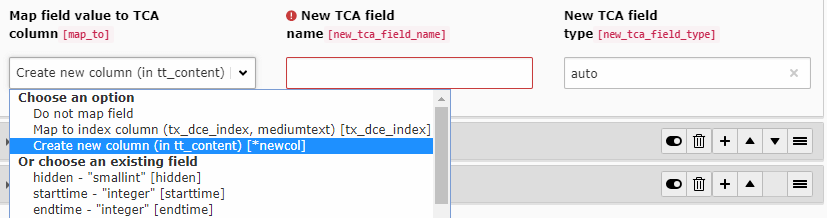
When creating new columns the following options have the following effect:
- New TCA field name:
Name of the column in database and TCA. You are free to choose the name. Nothing gets prepended.
It is recommended to
use_underscoresinstead ofusingCamelCase. - New TCA field type:
This is the type of field in the database. Example:
varchar(255) DEFAULT '' NOT NULL. You can also use the keywordauto. DCE will choose a proper SQL field type based on chosen configuration type in FlexForm.
Creating or changing a mapped column only adds the desired column to TYPO3's schema definition. Run the database schema analyzer and apply the proposed schema update before saving content into the new column. Afterwards, flush the system caches. Until the database column exists, saving mapped content results in an exception.
Of course, you can also choose an existing tt_content column. DCE introduced the tx_dce_index column which can get used to index content for search engines (like ke_search or solr).
Note
Since DCE 2.2, contents of DCE fields which has been mapped with "tx_dce_index", are also searched for when using the global LiveSearch in TYPO3 backend. Since TYPO3 9.2 the search in list view, also respects "tx_dce_index" contents.
When you point two or more DCE fields to the same TCA column, DCE checks the accumulated column value with PHP's
empty(). If it is not empty, the next value is appended with two PHP_EOL characters. If it is empty, including
the value "0", the next value replaces it.
Every time you change a content element based on DCE with TCA mappings, the TCA values will get written, when saving/creating the content element.
If you want to update the values, you can call an update script (Update TCA mappings) in DCE backend module.