
System maintainer area
In the User Management chapter we covered the Access and Backend Users module. In this section we take a look at the remaining modules.
The following modules are available in a full TYPO3 installation:
Accessing the system maintainer area
The system maintainer area can only be accessed from the backend if:
- typo3/cms-install is installed. This system extension is optional.
- The currently logged in backend user has admin privileges and is a system maintainer.
- On systems in the application context "Production" the user has to reconfirm their login.
If the TYPO3 backend is not accessible you can access the "Install Tool", which features the Admin Tool modules provided by typo3/cms-install :
Accessing the Install Tools without TYPO3 Backend access
On any TYPO3 installation with
typo3/cms-install
you can access the
Install Tools by calling the following URL: https://.
To prove that you have writing access to the file system where TYPO3 is installed
you have to create a file in path var/
or config/. The file can be empty, TYPO3 has to have
write access to the file. You can create it like this on:
touch config/ENABLE_INSTALL_TOOLSee also TYPO3 Explained, ENABLE_INSTALL_TOOL.
You must now enter the Install Tool password.
New in version 14.0
You can now set a new Install Tool password using the console command vendor/bin/typo3 install:password:set.
vendor/bin/typo3 install:password:settypo3/sysext/core/bin/typo3 install:password:setddev typo3 install:password:setOr you can set a new password by entering your desired password on the Install Tool login page, then copying the calculated hash:
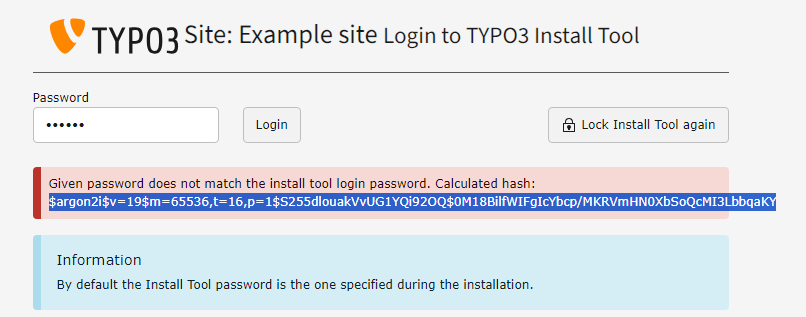
Copy the calculated hash
Open file config/ and adjust the Install tool
password like so:
 <?php
 return [
     'BE' => [
-        'installToolPassword' => '$argon2i$v=19$m=65536,t=16,p=1$Z1BRbnZDdGx4T3pJVmpLVw$Bjhz+rSW1Bps5hIdXUBXrtlZ52E4Qx4lw4NU0MiEUyg',
+        'installToolPassword' => '$argon2i$v=19$m=65536,t=16,p=1$Z0tiZjVVdzN5VUEuLzhmYw$xTalKXJVMCALCO+0OklDt24Y/7NkffNc1bOeg2jo00I',
         'passwordHashing' => [
             'className' => 'TYPO3\\CMS\\Core\\Crypto\\PasswordHashing\\Argon2iPasswordHash',
             'options' => [],
         ],
     ],
 ];