
selectCheckBox and type check fields compared
There is a subtle difference between select fields with the render type selectCheckBox and fields of the type check:
Select values from a checkbox list
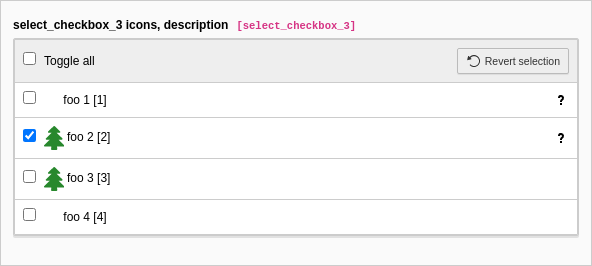
The select checkbox stores the values as comma separated values.
EXT:styleguide/Configuration/TCA/tx_styleguide_elements_select.php
[
    'columns' => [
        'select_checkbox_3' => [
            'label' => 'select_checkbox_3 icons, description',
            'config' => [
                'type' => 'select',
                'renderType' => 'selectCheckBox',
                'items' => [
                    [
                        'label' => 'foo 1',
                        'value' => 1,
                        'description' => [
                            'title' => 'optional title',
                            'description' => 'optional description',
                        ],
                    ],
                    [
                        'label' => 'foo 2',
                        'value' => 2,
                        'icon' => 'EXT:styleguide/Resources/Public/Icons/tx_styleguide.svg',
                        'description' => 'LLL:EXT:styleguide/Resources/Private/Language/locallang.xlf:translatedHelpTextForSelectCheckBox3',
                    ],
                    [
                        'label' => 'foo 3',
                        'value' => 3,
                        'icon' => 'EXT:styleguide/Resources/Public/Icons/tx_styleguide.svg',
                    ],
                    [
                        'label' => 'foo 4',
                        'value' => 4,
                    ],
                ],
            ],
        ],
    ],
]
Copied!
The field in the database is of type text or varchar.
Select values from a checkbox list
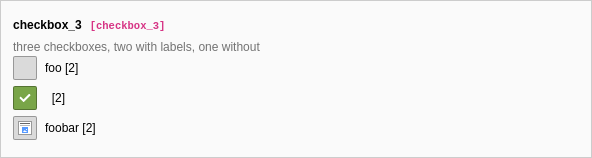
On the contrary the type check saves multiple values
as bits. Therefore if the first value is chosen it stores 1, if only the
second is chosen it stores 2 and if both are chosen 3.
EXT:styleguide/Configuration/TCA/tx_styleguide_elements_basic.php
[
    'columns' => [
        'checkbox_3' => [
            'label' => 'checkbox_3',
            'description' => 'three checkboxes, two with labels, one without',
            'config' => [
                'type' => 'check',
                'items' => [
                    [
                        'label' => 'foo',
                    ],
                    [
                        'label' => '',
                    ],
                    [
                        'label' => 'foobar',
                        'iconIdentifierChecked' => 'content-beside-text-img-below-center',
                        'iconIdentifierUnchecked' => 'content-beside-text-img-below-center',
                    ],
                ],
            ],
        ],
    ],
]
Copied!
The field in the database is of type int.