
Log In to the TYPO3 Backend
Tested in: TYPO3v13 TYPO3v14 Categories: Beginner Backend Editing Author: @mabolek
The backend of TYPO3 CMS is the password-protected area where editors and administrators log in to create pages, add content, manage users, and adjust how the website works.
Logging in to the backend gives you access to these features.
Learning objective
In this step-by-step guide you will learn how to log in to the TYPO3 backend using a username and password.
Prerequisites
Tools and technology
- A computer with a web browser
- A username and password for a TYPO3 backend account
Knowledge and skills
- Basic computer skills
Access the login page
Note
The login page is usually located at your website's domain name, appended with /typo3, for example www.example.com/typo3. For this guide, we will assume that this is true for your site. If the URL does not work, ask your site administrator for help.
- In your web browser's address bar, enter the domain of your website, followed by
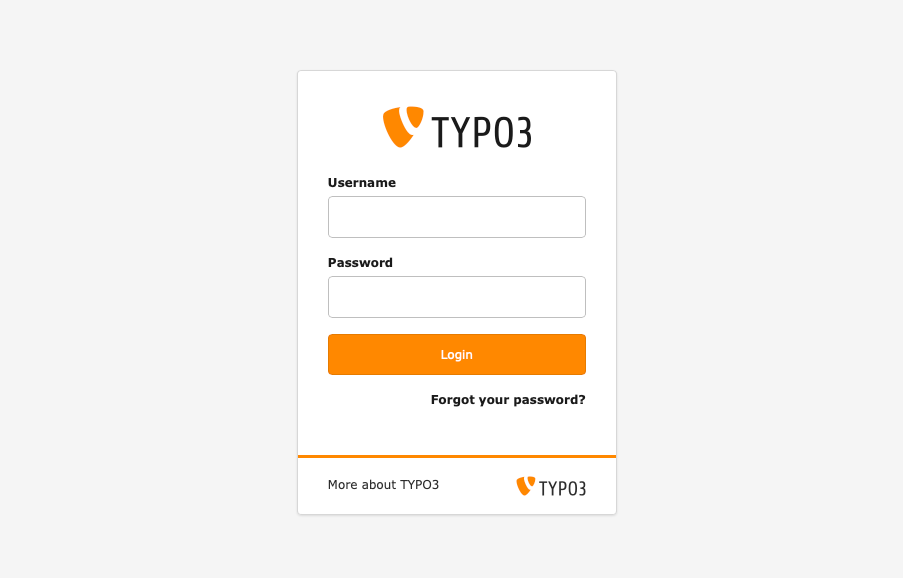
/typo3, for examplewww.example.com/typo3. - Press the enter or return key on your keyboard. The login page should appear.
Enter your login information
-
Enter your login information:
- Username in the Username field.
- Password in the Password field.
- Press the Login button. You should now be forwarded to the TYPO3 backend.
Note
If your username or password is incorrect, you will be prompted to try again. If you have forgotten your password, you can use the Forgot your password? link to reset it.
Summary
Congratulations! You have now logged in to the TYPO3 backend.
Next steps
Now that you have logged into TYPO3's backend, you might like to:
- Create a Page With Drag and Drop
- Add Content to a Page (CREATE)
- Modify the Page Properties