
Password generator examples
Include special characters
Example: qe8)i2W1it-

A password generator using special chars.
[
    'columns' => [
        'password_6' => [
            'label' => 'password_6',
            'description' => 'type=password fieldControl=passwordGenerator - all character sets',
            'config' => [
                'type' => 'password',
                'fieldControl' => [
                    'passwordGenerator' => [
                        'renderType' => 'passwordGenerator',
                        'options' => [
                            'title' => 'Create random password',
                            'passwordRules' => [
                                'specialCharacters' => true,
                            ],
                        ],
                    ],
                ],
            ],
        ],
    ],
]Only digits, length 8 (minimum length)
Example: 28233371

A generated 8 digit number
[
    'columns' => [
        'password_7' => [
            'label' => 'password_7',
            'description' => 'type=password fieldControl=passwordGenerator length=8 - only digits',
            'config' => [
                'type' => 'password',
                'fieldControl' => [
                    'passwordGenerator' => [
                        'renderType' => 'passwordGenerator',
                        'options' => [
                            'title' => 'Create random number',
                            'passwordRules' => [
                                'length' => 8,
                                'lowerCaseCharacters' => false,
                                'upperCaseCharacters' => false,
                            ],
                        ],
                    ],
                ],
            ],
        ],
    ],
]Hexadecimal random bytes, length 30
Example: 0d95c0936c54b97bf908a3c963b508.

A generated 30 characters long random hex string
The following example will generate a 30 characters long random hex string, which could be used for secret tokens or similar:
[
    'columns' => [
        'password_4' => [
            'label' => 'password_4',
            'description' => 'type=password fieldControl=passwordGenerator random=hex',
            'config' => [
                'type' => 'password',
                'fieldControl' => [
                    'passwordGenerator' => [
                        'renderType' => 'passwordGenerator',
                        'options' => [
                            'title' => 'Create random hex string',
                            'passwordRules' => [
                                'length' => 30,
                                'random' => 'hex',
                            ],
                        ],
                    ],
                ],
            ],
        ],
    ],
]Base64 random bytes, readonly
Example: zrt8s
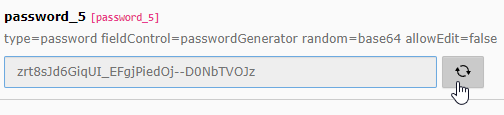
A password generator using base64 random bytes, readonly.
[
    'columns' => [
        'password_5' => [
            'label' => 'password_5',
            'description' => 'type=password fieldControl=passwordGenerator random=base64 allowEdit=false',
            'config' => [
                'type' => 'password',
                'fieldControl' => [
                    'passwordGenerator' => [
                        'renderType' => 'passwordGenerator',
                        'options' => [
                            'title' => 'Create random base64 string',
                            'allowEdit' => false,
                            'passwordRules' => [
                                'length' => 35,
                                'random' => 'base64',
                            ],
                        ],
                    ],
                ],
            ],
        ],
    ],
]Properties
Field control options
title
title
-
- Path
$GLOBALS['TCA'] [$table] ['columns'] [$field] ['config'] ['field Control'] ['password Generator'] ['options'] ['title'] - Type
- String / localized string
- Default
"LLL:EXT: core/ Resources/ Private/ Language/ locallang_ core. xlf: labels. generate Password"
Define a title for the control button.
allowEdit
allowEdit
-
- Path
$GLOBALS['TCA'] [$table] ['columns'] [$field] ['config'] ['field Control'] ['password Generator'] ['options'] ['allow Edit'] - Type
- boolean
- Default
true
If set to
false, the user cannot edit the generated password.
Password rules
Define rules for the password.
passwordRules.length
passwordRules.length
-
- Path
$GLOBALS['TCA'] [$table] ['columns'] [$field] ['config'] ['field Control'] ['password Generator'] ['options'] ['password Rules'] ['length'] - Type
- int
- Default
16- Minimum
8
Defines the amount of characters for the generated password.
passwordRules.random
passwordRules.random
-
- Path
$GLOBALS['TCA'] [$table] ['columns'] [$field] ['config'] ['field Control'] ['password Generator'] ['options'] ['password Rules'] ['random'] - Type
- String
- Values
"hex","base64"
Defines the encoding of random bytes. Overrules character definitions.
"hex"- Generates a random password in hexadecimal format. Example:
d0f4030d568ab483b8442735e9e3a7. "base64"- Generates a random password in base64 format. Example:
dtbpykd4vf1hda_.Ag9k G983y-_ N2zy LZzof
Note
Defining the
passwordpassword rule takes precedence over any character definition, which should therefore be omitted as soon asRules. random passwordis set to one of the available encodings:Rules. random hexorbase64.
passwordRules.digitCharacters
passwordRules.digitCharacters
-
- Path
$GLOBALS['TCA'] [$table] ['columns'] [$field] ['config'] ['field Control'] ['password Generator'] ['options'] ['password Rules'] ['digit Characters'] - Type
- boolean
- Default
true
If set to
false, the generated password contains no digit.
passwordRules.lowerCaseCharacters
passwordRules.lowerCaseCharacters
-
- Path
$GLOBALS['TCA'] [$table] ['columns'] [$field] ['config'] ['field Control'] ['password Generator'] ['options'] ['password Rules'] ['lower Case Characters'] - Type
- boolean
- Default
true
If set to
false, the generated password contains no lower case characters.
passwordRules.upperCaseCharacters
passwordRules.upperCaseCharacters
-
- Path
$GLOBALS['TCA'] [$table] ['columns'] [$field] ['config'] ['field Control'] ['password Generator'] ['options'] ['password Rules'] ['upper Case Characters'] - Type
- boolean
- Default
true
If set to
false, the generated password contains no upper case characters.
passwordRules.specialCharacters
passwordRules.specialCharacters
-
- Path
$GLOBALS['TCA'] [$table] ['columns'] [$field] ['config'] ['field Control'] ['password Generator'] ['options'] ['password Rules'] ['special Characters'] - Type
- boolean
- Default
false
If set to
true, the generated password also contains special characters (!"#$%&\'{|} `).()*+,-./:;<=>?@ [\]^_