
textTable
This page describes the text type with the
render.
The according database field is generated automatically.
The textTable render type triggers a view called "table wizard" to manage the frontend table display in the backend. It is used for the "Table" tt_content content element.
Table of contents:
Example: Text field with renderType textTable
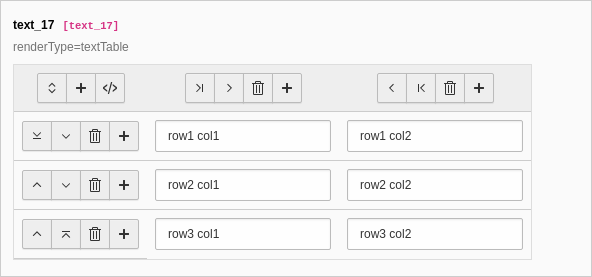
The table wizard allows to edit the code-like configuration of the tables with a visual editor.
[
    'columns' => [
        'text_17' => [
            'label' => 'text_17',
            'description' => 'renderType=textTable',
            'config' => [
                'type' => 'text',
                'renderType' => 'textTable',
            ],
        ],
    ],
]Properties of the TCA column type text, render type textTable
| Name | Type | Scope |
|---|---|---|
| boolean | Proc. | |
| string | Display / Proc. | |
| boolean | Display | |
| array | ||
| array | ||
| array | ||
| boolean | Display | |
| string | Display / Proc. | |
| integer | Display | |
| string | Display | |
| boolean | Display | |
| integer | Display | |
| boolean | Display | |
| string | Proc. | |
| string (keyword) | Display |
behaviour
-
allowLanguageSynchronization
-
- Type
- boolean
- Default
- false
- Path
- $GLOBALS['TCA'][$table]['columns'][$field]['config']['behaviour']['allowLanguageSynchronization']
- Scope
- Proc.
Allows an editor to select in a localized record whether the value is copied over from default or source language record, or if the field has an own value in the localization. If set to true and if the table supports localization and if a localized record is edited, this setting enables FieldWizard LocalizationStateSelector: Two or three radio buttons shown below the field input. The state of this is stored in a json encoded array in the database table called
l10n_. It tells the DataHandler which fields of the localization records should be kept in sync if the underlying default or source record changes.state EXT:my_extension/Configuration/TCA/Overrides/someTable.php
default
-
- Type
- string
- Path
- $GLOBALS['TCA'][$table]['columns'][$field]['config']['default']
- Scope
- Display / Proc.
Default value set if a new record is created.
enableTabulator
-
- Type
- boolean
- Path
- $GLOBALS['TCA'][$table]['columns'][$field]['config']
- Scope
- Display
- RenderType
- default, textTable
Enabling this allows to use tabs in a text field. This works well together with fixed-width fonts (monospace) for code editing.
Does not apply to RTE fields.
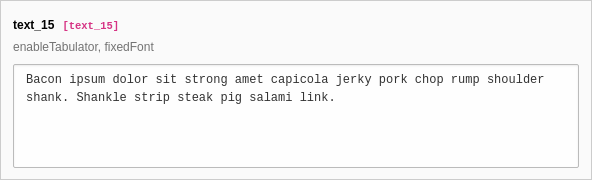
[
    'columns' => [
        'text_15' => [
            'label' => 'text_15',
            'description' => 'enableTabulator, fixedFont',
            'config' => [
                'type' => 'text',
                'enableTabulator' => true,
                'fixedFont' => true,
            ],
        ],
    ],
]fieldControl
-
For details see fieldControl.
fieldInformation
-
For details see fieldInformation.
fieldWizard
-
defaultLanguageDifferences
-
- Type
- array
- Path
- $GLOBALS['TCA'][$table]['columns'][$field]['config']['fieldWizard']['defaultLanguageDifferences']
For details see defaultLanguageDifferences.
localizationStateSelector
-
- Type
- array
- Path
- $GLOBALS['TCA'][$table]['columns'][$field]['config']['fieldWizard']['localizationStateSelector']
For details see localizationStateSelector.
otherLanguageContent
-
- Type
- array
- Path
- $GLOBALS['TCA'][$table]['columns'][$field]['config']['fieldWizard']['otherLanguageContent']
For details see otherLanguageContent.
fixedFont
[
    'columns' => [
        'text_15' => [
            'label' => 'text_15',
            'description' => 'enableTabulator, fixedFont',
            'config' => [
                'type' => 'text',
                'enableTabulator' => true,
                'fixedFont' => true,
            ],
        ],
    ],
]is_in
max
-
- Type
- integer
- Path
- $GLOBALS['TCA'][$table]['columns'][$field]['config']
- Scope
- Display
- RenderType
- textTable, default
Adds the HTML5 attribute "maxlength" to a textarea. Prevents the field from adding more than specified number of characters. This is a client side restriction, no server side length restriction is enforced.
Does not apply for RTE fields.
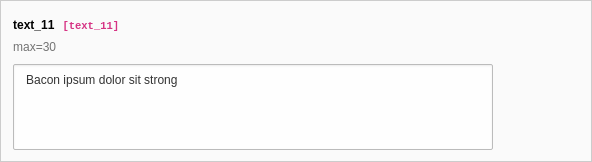
[
    'columns' => [
        'text_11' => [
            'label' => 'text_11',
            'description' => 'max=30',
            'config' => [
                'type' => 'text',
                'cols' => 30,
                'rows' => 4,
                'max' => 30,
            ],
        ],
    ],
]placeholder
-
- Type
- string
- Path
- $GLOBALS['TCA'][$table]['columns'][$field]['config']
- Scope
- Display
- Types
- input
Placeholder text for the field.
readOnly
-
- Type
- boolean
- Path
- $GLOBALS['TCA'][$table]['columns'][$field]['config']['readOnly']
- Scope
- Display
Renders the field in a way that the user can see the value but cannot edit it.
Warning
This property affects only the display. It is still possible to write to those fields when using the DataHandler.
rows
-
- Type
- integer
- Path
- $GLOBALS['TCA'][$table]['columns'][$field]['config']
- Scope
- Display
- RenderType
- textTable, codeEditor, default
The number of rows in the textarea. May be corrected for harmonization between browsers. Will also automatically be increased if the content in the field is found to be of a certain length, thus the field will automatically fit the content. Default is 5. Max value is 20.
Does not apply to RTE fields.
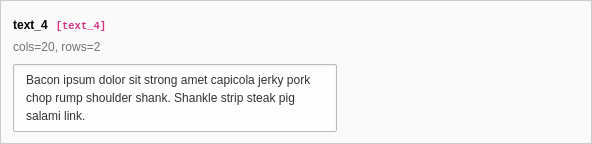
[
    'columns' => [
        'text_4' => [
            'label' => 'text_4',
            'description' => 'cols=20, rows=2',
            'config' => [
                'type' => 'text',
                'cols' => 20,
                'rows' => 2,
            ],
        ],
    ],
]Changed in version 14.0
The following TCA field level search configuration options have been removed:
search.case search.pidonly search.and Where
They have not been supported by the Core or common Extensions.
See: Breaking: #106976 - Removal of TCA search field configuration options
searchable
-
- Type
- boolean
- Path
- $GLOBALS['TCA'][$table]['columns'][$field]['config']['searchable']
- Scope
- Display
- Default
true
New in version 14.0
TYPO3 now automatically includes all fields of suitable types in backend search operations in the Content > Records module.
This option can be used to explicitly exclude fields from being searchable, instead of having to list them in the now removed option $GLOBALS['TCA'][$table]['ctrl']['searchFields'].
By default, all fields of type
textwith rendertypetableare considered searchable.To exclude a field from being searchable, set the following in the field's TCA configuration:
packages/my_extension/Configuration/TCA/Overrides/tx_my_table.php$GLOBALS['TCA']['tx_my_table']['columns']['my_field'] = [ 'label' => 'My field', 'config' => [ 'type' => 'text', 'renderType' => 'table', 'searchable' => false, ], ];Copied!
softref
-
- Type
- string
- Path
- $GLOBALS['TCA'][$table]['columns'][$field]['config']
- Scope
- Proc.
- Types
- input
Used to attach "soft reference parsers".
The syntax for this value is key1,key2[parameter1;parameter2;...],...
See Soft references of core API for more details about softref keys.
wrap
-
- Type
- string (keyword)
- Path
- $GLOBALS['TCA'][$table]['columns'][$field]['config']
- Scope
- Display
- RenderType
- textTable, default
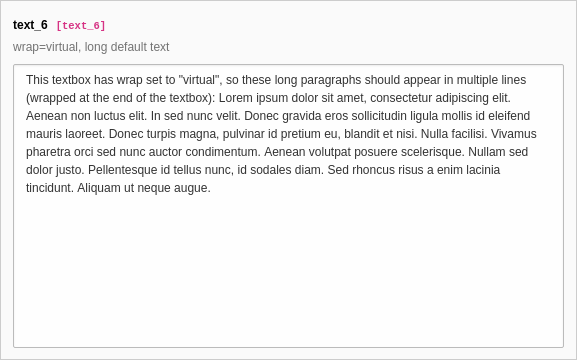
Determines the wrapping of the textarea field. Does not apply to RTE fields. There are two options:
- virtual (default)
- The textarea automatically wraps the lines like it would be expected for editing a text.
- off
- The textarea will not wrap the lines as you would expect when editing some kind of code.
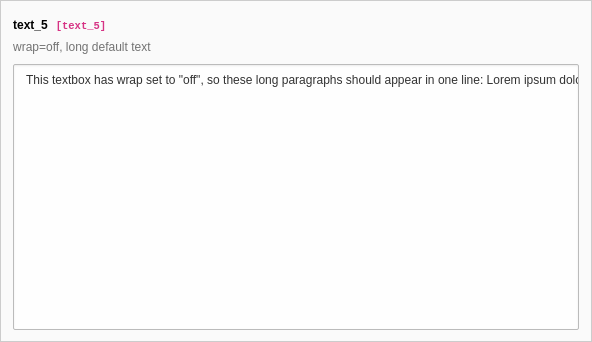
[
    'columns' => [
        'text_5' => [
            'label' => 'text_5',
            'description' => 'wrap=off, long default text',
            'config' => [
                'type' => 'text',
                'wrap' => 'off',
                'default' => 'This textbox has wrap set to "off", so these long paragraphs should appear in one line: Lorem ipsum dolor sit amet, consectetur adipiscing elit. Aenean non luctus elit. In sed nunc velit. Donec gravida eros sollicitudin ligula mollis id eleifend mauris laoreet. Donec turpis magna, pulvinar id pretium eu, blandit et nisi. Nulla facilisi. Vivamus pharetra orci sed nunc auctor condimentum. Aenean volutpat posuere scelerisque. Nullam sed dolor justo. Pellentesque id tellus nunc, id sodales diam. Sed rhoncus risus a enim lacinia tincidunt. Aliquam ut neque augue.',
            ],
        ],
    ],
]
[
    'columns' => [
        'text_6' => [
            'label' => 'text_6',
            'description' => 'wrap=virtual, long default text',
            'config' => [
                'type' => 'text',
                'wrap' => 'virtual',
                'default' => 'This textbox has wrap set to "virtual", so these long paragraphs should appear in multiple lines (wrapped at the end of the textbox): Lorem ipsum dolor sit amet, consectetur adipiscing elit. Aenean non luctus elit. In sed nunc velit. Donec gravida eros sollicitudin ligula mollis id eleifend mauris laoreet. Donec turpis magna, pulvinar id pretium eu, blandit et nisi. Nulla facilisi. Vivamus pharetra orci sed nunc auctor condimentum. Aenean volutpat posuere scelerisque. Nullam sed dolor justo. Pellentesque id tellus nunc, id sodales diam. Sed rhoncus risus a enim lacinia tincidunt. Aliquam ut neque augue.',
            ],
        ],
    ],
]