
Form editor
What does it do?
The form editor is a powerful graphical user interface in the TYPO3 backend
which allows editors to create form definitions without writing a single line
of code. These form definitions are used by the frontend process to
render beautiful forms.
The form editor is a modular interface which consists of the following
components:
- Stage: main visual component of the backend
form editorwhere displaying form elements in an abstract view or a frontend preview (in the middle of theform editor) - Tree: displays the structure of the form as a tree (on the left)
- Inspector: context specific toolbar which displays form element options and where options can be edited (on the right)
- Core: core functionality of the
form editor - ViewModel: defines and controls the visual display
- Mediator: delegates component events
- Modals: processes modals
- FormEditor: provides API functions
- Helper: helper functions for the manipulation of DOM elements
The Modals, Inspector, and Stage components
can be modified by configuration. The Inspector component
is modular and extremely flexible. Integrators can add
inspector editors (input fields of different types)
to allow backend editors to alter form element
options.
The diagram below shows Javascript module interaction between the form editor and the core, viewmodel and mediator.
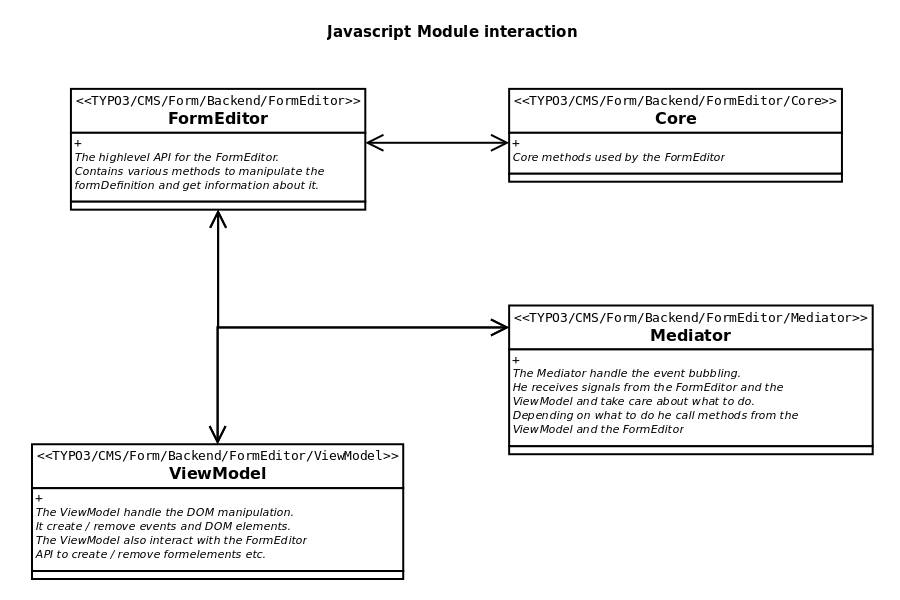
JavaScript module interaction
The form editor configuration is under the following configuration path:
prototypes:
  standard:
formEditor:Here you can configure different aspects of the form editor under the following
configuration paths:
prototypes:
  standard:
    formElementsDefinition:
      <formElementTypeIdentifier>:
        formEditor:
    finishersDefinition:
      <finisherIdentifier>
        formEditor:
    validatorsDefinition:
      <validatorIdentifier>
formEditor:Form editor components in detail
Stage
The Stage is the central visual component of the form editor and it
can display form elements in two different modes:
- abstract view: all the form elements on a
Page(a step) presented in an abstract way, - frontend preview: renders the form as it will be displayed in the frontend (to render the form exactly the same as in the frontend, make sure your frontend CSS is loaded in the backend)
By default, the frontend templates of EXT:form are based on Bootstrap. Since the backend of TYPO3 CMS also depends on Bootstrap, the corresponding CSS files will already loaded in the backend. Nevertheless, some CSS is overridden and extended in order to meet the specific needs of the TYPO3 backend, meaning frontend preview (in the backend) could differ compared to the "real" frontend.
If your frontend preview requires additional CSS or a CSS framework
then go ahead and configure a specific prototype accordingly.
Beside the frontend templates, there are also templates for the abstract view, i.e. you can customize the rendering of the abstract view for each form element. If you have created your own form elements, in most cases you will fall back to the already existing Fluid templates. But remember, you are always able to create your own Fluid templates and adapt the abstract view to suit your needs.
For more information, read the following chapter: 'Common abstract view form element templates'.
Inspector
The Inspector is on the right side of the form editor. It is a modular,
flexible, and context-specific toolbar
and depends on which form element is currently selected. The Inspector
is where you can edit form element options using inspector editors.
The interface is easily customized by YAML configuration. You can define form element
properties and how they can be edited.
You can edit form element properties (like properties.placeholder)
as well as property collections. They are defined at the form element level
in the YAML configuration file. There are two types of property collections:
- validators
- finishers
Property collections are also configured by inspector editors and this
allows you to do some cool stuff. Imagine that you have a "Number range" validator with
two validator options "Minimum" and "Maximum" and two form elements, "Age
spouse" and "Age infant". You could set the validator for both form elements,
but make "Minimum" non-editable and pre-fill "Maximum" with a value for the "Age
infant" form element only and not the "Age spouse" form element.
Translation of the form editor
All option values below the following configuration keys can be translated:
prototypes:
  standard:
    formEditor:
    formElementsDefinition:
      <formElementTypeIdentifier>:
        formEditor:
    finishersDefinition:
      <finisherIdentifier>
        formEditor:
    validatorsDefinition:
      <validatorIdentifier>
formEditor:The form editor translation files are loaded as follows:
prototypes:
  standard:
    formEditor:
      translationFiles:
        # custom translation file
20: 'EXT:my_site_package/Resources/Private/Language/Database.xlf'Option values are searched for in the defined translation files. If a translation is found, the translated option value will be used.
As an example, if the following option is defined:
...
label: 'formEditor.elements.Form.editor.finishers.label'
...The translation key formEditor.elements.Form.editor.finishers.label
is first searched for in the file
20: 'EXT:my_site_package/Resources/Private/Language/Database.xlf'
and then in the file 10: 'EXT:form/Resources/Private/Language/Database.xlf'
(loaded by default by EXT:form). If nothing is found, the option value will be
displayed unmodified.
Customization of the form editor
The form editor can be customized by YAML
configuration in the configuration. The configuration is not stored in one central configuration
file. Instead, configuration is defined for each form element (see
EXT:). In addition,
the
Form
element itself (see EXT:)
has some basic configuration.
A common customization is to remove form elements from the form
editor. Unlike other TYPO3 modules, the form editor cannot be configured
using backend user groups and Access Lists - it can only be done by YAML configuration.
Quite often, integrators tend to unset form elements as shown below.
In this example, the
Advanced form element is completely removed from
the form framework. Integrators and developers will no longer be able to use
the
Advanced element in their YAML form definitions or via API.
prototypes:
  standard:
    formElementsDefinition:
AdvancedPassword: nullThe correct way is to unset the group property.
This property defines which group in the form editor "new Element"
modal the form element should belong in. Unsetting this property will remove the
form element safely from the form editor:
prototypes:
  standard:
    formElementsDefinition:
      AdvancedPassword:
        formEditor:
group: nullExtending the form editor
Learn here how to make finishers configurable in the backend form editor.
Basic JavaScript concepts
The form framework was designed to be as extendable as possible. Sooner or
later, you will want to customize form editor components using
JavaScript. This is especially true if you want to create your own
inspector editors. In order to achieve this, you can implement your own
JavaScript modules. Those modules will include the required algorithms for
the inspector editors and the abstract view as well as your own
events.
Register custom JavaScript modules
You can use the following configuration YAML to register your JavaScript module.
prototypes:
  standard:
    formEditor:
      dynamicJavaScriptModules:
        additionalViewModelModules:
10: '@my-vendor/my-site-package/backend/form-editor/view-model.js'# Configuration/JavaScriptModules.php
<?php
return [
'dependencies' => ['form'],
'imports' => [
'@myvendor/my-site-package/' => 'EXT:my_site_package/Resources/Public/JavaScript/',
],
];In the configuration above, the JavaScript files have to be in the folder
my_site_package/Resources/Public/JavaScript/backend/form-editor/view-model.js.
The following example module is a template you can use containing the recommended setup.
/**
 * Module: @my-vendor/my-site-package/backend/form-editor/view-model.js
 */
import * as Helper from '@typo3/form/backend/form-editor/helper.js'

/**
 * @private
 *
 * @var object
 */
let _formEditorApp = null;

/**
 * @private
 *
 * @return object
 */
function getFormEditorApp() {
    return _formEditorApp;
};

/**
 * @private
 *
 * @return object
 */
function getPublisherSubscriber() {
    return getFormEditorApp().getPublisherSubscriber();
};

/**
 * @private
 *
 * @return object
 */
function getUtility() {
    return getFormEditorApp().getUtility();
};

/**
 * @private
 *
 * @param object
 * @return object
 */
function getHelper() {
    return Helper;
};

/**
 * @private
 *
 * @return object
 */
function getCurrentlySelectedFormElement() {
    return getFormEditorApp().getCurrentlySelectedFormElement();
};

/**
 * @private
 *
 * @param mixed test
 * @param string message
 * @param int messageCode
 * @return void
 */
function assert(test, message, messageCode) {
    return getFormEditorApp().assert(test, message, messageCode);
};

/**
 * @private
 *
 * @return void
 * @throws 1491643380
 */
function _helperSetup() {
    assert('function' === typeof Helper.bootstrap,
        'The view model helper does not implement the method "bootstrap"',
        1491643380
    );
    Helper.bootstrap(getFormEditorApp());
};

/**
 * @private
 *
 * @return void
 */
function _subscribeEvents() {
    getPublisherSubscriber().subscribe('some/eventName/you/want/to/handle', function(topic, args) {
        myCustomCode();
    });
};

/**
 * @private
 *
 * @return void
 */
function myCustomCode() {
};

/**
 * @public
 *
 * @param object formEditorApp
 * @return void
 */
export function bootstrap(formEditorApp) {
    _formEditorApp = formEditorApp;
    _helperSetup();
    _subscribeEvents();
};Events
Event handling in EXT:form is based on the Publish/Subscribe Pattern.
To learn more about this terrific pattern, see: https://addyosmani.com/resources/essentialjsdesignpatterns/book/.
Please note that the processing sequence of the subscribers cannot be
influenced. Furthermore, there is no information flow between the
subscribers. All events are asynchronous.
For more information, head to the API reference and read the section about 'Events'.
FormElement model
In the JavaScript code, each form element is represented by a
FormElement model. This model can be seen as a copy of the form definition
enriched with some additional data. The following example shows
you a form definition and, below it, the debug output of FormElement model.
identifier: javascript-form-element-model
label: 'JavaScript FormElement model'
type: Form
finishers:
  -
    identifier: EmailToReceiver
    options:
      subject: 'Your message: {subject}'
      recipients:
        your.company@example.com: 'Your Company name'
        ceo@example.com: 'CEO'
      senderAddress: '{email}'
      senderName: '{name}'
      replyToRecipients:
        replyTo.company@example.com: 'Your Company name'
      carbonCopyRecipients:
        cc.company@example.com: 'Your Company name'
      blindCarbonCopyRecipients:
        bcc.company@example.com: 'Your Company name'
      addHtmlPart: true
      attachUploads: 'true'
      translation:
        language: ''
      title: ''
renderables:
  -
    identifier: page-1
    label: 'Contact Form'
    type: Page
    renderables:
      -
        identifier: name
        label: Name
        type: Text
        properties:
          fluidAdditionalAttributes:
            placeholder: Name
        defaultValue: ''
        validators:
          -
identifier: NotEmpty{
"identifier": "javascript-form-element-model",
"label": "JavaScript FormElement model",
"type": "Form",
"prototypeName": "standard",
"__parentRenderable": null,
"__identifierPath": "example-form",
"finishers": [
{
"identifier": "EmailToReceiver",
"options": {
"subject": "Your message: {subject}",
"recipients": {
"your.company@example.com": "Your Company name",
"ceo@example.com": "CEO"
},
"senderAddress": "{email}",
"senderName": "{name}",
"replyToRecipients": {
"replyTo.company@example.com": "Your Company name"
},
"carbonCopyRecipients": {
"cc.company@example.com": "Your Company name"
},
"blindCarbonCopyRecipients": {
"bcc.company@example.com": "Your Company name"
},
"addHtmlPart": true,
"attachUploads": true,
"translation": {
"language": ""
},
"title": ""
}
}
],
"renderables": [
{
"identifier": "page-1",
"label": "Contact Form",
"type": "Page",
"__parentRenderable": "example-form (filtered)",
"__identifierPath": "example-form/page-1",
"renderables": [
{
"identifier": "name",
"defaultValue": "",
"label": "Name",
"type": "Text",
"properties": {
"fluidAdditionalAttributes": {
"placeholder": "Name"
}
},
"__parentRenderable": "example-form/page-1 (filtered)",
"__identifierPath": "example-form/page-1/name",
"validators": [
{
"identifier": "NotEmpty"
}
]
}
]
}
]
}For each form element which has child elements, there is a property
called renderables. renderables are arrays of FormElement models
of child elements.
The FormElement model is therefore a combination of the
of form definition data and some additional information:
- __parentRenderable
- __identifierPath
The following methods can be used to access FormElement model data:
- get()
- set()
- unset()
- on()
- off()
- getObjectData()
- toString()
- clone()
Head to the API reference to read more about the FormElement model.