
Frontend rendering
Templates
Fluid templates in the form framework are based on Bootstrap.
Custom templates
In order to use your own Fluid templates for frontend forms,
register your own template paths via YAML in the form configuration
(here under the default standard prototype).
prototypes:
  standard:
    formElementsDefinition:
      Form:
        renderingOptions:
          templateRootPaths:
            100: 'EXT:my_site_package/Resources/Private/Frontend/Templates/'
          partialRootPaths:
            100: 'EXT:my_site_package/Resources/Private/Frontend/Partials/'
          layoutRootPaths:
100: 'EXT:my_site_package/Resources/Private/Frontend/Layouts/'If your form definition then references the standard prototype, the form
framework will look for Fluid templates in
EXT:.
The Form element is the 'main' element. The framework will look for
Form. in template. For all other elements,
it will look in partial. A partial has the same name
as the form property, for example,
a Text template will be in a partial named Text. in
partial.
Form element values in finisher templates
Use the
Render to access form element values in your
finisher templates. This ViewHelper accepts a single form
element and renders it. The following example shows the
Render
being called with two parameters (renderable and as) to output the value of a
message field. The value
{form can then
be manipulated with Fluid, styled, etc.
<formvh:renderFormValue renderable="{form.formDefinition.elements.message}" as="formValue">
    {formValue.processedValue}
</formvh:renderFormValue>Names of your form elements can be found in your form definition (in your individual YAML files or in the System > Configuration module if you have the lowlevel extension installed). Or use the debug ViewHelper in Fluid to list all the form elements.
<f:debug>{page.rootForm.elements}</f:debug>Translation
Translate form definition
Translation of form definitions works differently to the usual translation
of the backend. Currently, there is no graphical user interface
for this translation process.
If form definition properties were translated in the same way as the rest of the backend,
a backend editor using the form editor to edit a form they would see long
unwieldy translation keys. In order to avoid this, form element properties are translated
instead of their values. The form framework does not look for translation keys
in a translation file. Instead, the system searches for translations
of the form element properties independent of their property values. The
property values are ignored if an entry is found in a
translation file. The form element property values are overridden by the
translated values.
This approach is a compromise between two scenarios: creating forms using the form editor
or creating form definitions (which could later be edited in the
form editor). An editor can create forms just using the form editor where
form element property values are displayed in the default language. An integrator
can provide additional language files which translate the form depending on the
prototype.
Add additional translation files to the form configuration as follows:
prototypes:
  standard:
    formElementsDefinition:
      Form:
        renderingOptions:
          translation:
            translationFiles:
              # custom translation file
20: 'EXT:my_site_package/Resources/Private/Language/Form/locallang.xlf'The translationFiles array is processed from the highest key to the lowest, i.e. your
translation file with key 20 is processed before translation files with key
'10' in EXT:form. If no key is found in the translation files, a
property value will be displayed unmodified.
The following properties can be translated:
- label
- defaultValue (scalar values only; array values, e.g. for
Multi, are not translated)Checkbox - properties.[*]
- properties.options.[*]
- properties.fluidAdditionalAttributes.[*]
- renderingOptions.[*]
The translation keys are put together based on a specific pattern and there is a order (fallback chain) for the translations that depends on translation scenarios. These are the translation scenarios:
- translation of a form element property for a specific form (
formElementIdentifier`)Definition Identifier) and form element ( - translation of a form element property for a specific form element (
form) and various formsElement Identifier - translation of a form element property for an element type (
element) and various forms, e.g. theType Pageelement
The look-up process searches for translation keys in all given translation files based on the following order (the same order as the translation scenarios above):
<formDefinition Identifier>. element.<element Identifier>. properties.<property Name> element.<formElement Identifier>. properties.<property Name> element.<elementType>. properties.<property Name>
Translation of options (properties.) in form elements, like the
Select element, have the following look-up order:
<formDefinition Identifier>. element.<element Identifier>. properties. options.<property Value> element.<elementIdentifier>. properties. options.<property Value>
Example Form Definition
identifier: ApplicationForm
type: Form
prototypeName: standard
label: 'Application form'

renderables:
  -
    identifier: GeneralInformation
    type: Page
    label: 'General information'

    renderables:
      -
        identifier: LastName
        type: Text
        label: 'Last name'
        properties:
          placeholder: 'Please enter your last name.'
        defaultValue: ''
      -
        identifier: Software
        type: MultiSelect
        label: 'Known software'
        properties:
          options:
            value1: TYPO3
value2: NeosIn order to translate the form element Last, the process will look for the following
translation keys in the translation files:
Application(<formDefinitionIdentifier>.element.<elementIdentifier>.properties.<propertyName>)Form. element. Last Name. properties. label element.(element.<formElementIdentifier>.properties.<propertyName>)Last Name. properties. label element.(element.<elementType>.properties.<propertyName>)Text. properties. label
If none of these keys exist, 'Last name' will be displayed.
The
default of Last can be translated with the same fallback chain,
using properties.defaultValue as the property name:
ApplicationForm. element. Last Name. properties. default Value element.Last Name. properties. default Value element.Text. properties. default Value
In order to translate the form element Software, the process will look for the following
translation keys in the translation files:
Application(<formDefinitionIdentifier>.element.<elementIdentifier>.properties.<propertyName>)Form. element. Software. properties. label element.(element.<formElementIdentifier>.properties.<propertyName>)Software. properties. label element.(element.<elementType>.properties.<propertyName>)Multi Select. properties. label
If none of the these keys exist, 'Known software' will be displayed. The option properties lookup process is as the following:
Application(<formDefinitionIdentifier>.element.<elementIdentifier>.properties.options.<propertyValue>)Form. element. Software. properties. options. value1 element.(element.<elementIdentifier>.properties.options.<propertyValue>)Software. properties. options. value1 Application(<formDefinitionIdentifier>.element.<elementIdentifier>.properties.options.<propertyValue>)Form. element. Software. properties. options. value2 element.(element.<elementIdentifier>.properties.options.<propertyValue>)Software. properties. options. value2
If none of the these keys exist, 'TYPO3' will be displayed as label for the first option and 'Neos' for the second option.
Translation of validation messages
The translation of validation messages is similar to the translation of
form definitions abpve. The same translation files can be used. If the look-up
process does not find a key within the files, an Extbase message will be displayed.
EXT:form translates validators by default.
The same as for form definitions, the translation keys are put together based on a
specific pattern. There is also a fallback chain.
The following translation scenarios are possible:
- translation of validation messages for a specific validator of a specific
form element (
element) and specific form (Identifier form)Definition Identifier - translation of validation messages for a specific validator of various
form elements within a specific form (
form)Definition Identifier - translation of validation messages for a specific validator of a specific
form element (
element) in various formsIdentifier - translation of validation messages for a specific validator in various forms
In Extbase, validation messages are identified by numerical codes (UNIX timestamps). Different codes can be used for the same validator. Read more about concrete validator configurations.
The look-up process searches for translation keys in the translation files in the following order (the same order as the translation scenarios above):
<formDefinition Identifier>. validation. error.<element Identifier>.<validation Error Code> <formDefinition Identifier>. validation. error.<validation Error Code> validation.error.<element Identifier>.<validation Error Code> validation.error.<validation Error Code>
Example Form Definition with Validator
identifier: ContactForm
type: Form
prototypeName: standard
label: 'Contact us'

renderables:
  -
    identifier: Page1
    type: Page
    label: 'Page 1'

    renderables:
      -
        identifier: LastName
        type: Text
        label: 'Last name'
        properties:
          fluidAdditionalAttributes:
            required: required
        validators:
          -
identifier: NotEmptyIf a user submits this form without providing a last name, the Not
validator (at the bottom of the example above) fails and
sends 1221560910 as a <validation. The system looks through the
translation keys in the following order searching for the Not validator for form element Last:
- ContactForm.validation.error.LastName.1221560910 (<formDefinitionIdentifier>.validation.error.<elementIdentifier>.<validationErrorCode>)
- ContactForm.validation.error.1221560910 (<formDefinitionIdentifier>.validation.error.<validationErrorCode>)
- validation.error.LastName.1221560910 (validation.error.<elementIdentifier>.<validationErrorCode>)
- validation.error.1221560910 (validation.error.<validationErrorCode>)
As mentioned above, if no translation key is available, a default Extbase framework message is displayed.
Translation of finisher options
The translation of finisher options is similar to the translation of
form definitions above. The same translation files can be used. If the look-up
process does not find a key in the provided translation files, the property value
will be displayed unmodified.
The same as for form definitions, the translation keys are put together based on a
specific pattern. There is also a fallback chain.
The following translation scenarios are possible:
- translation of finisher options for a specific finisher (
finisher) of a specific form (Identifier formbelow)Definition Identifier - translation of finisher options for a specific finisher (
finisher) of various formsIdentifier
The look-up process searches for translation keys in all the translation files based on the following order (the same order as the translation scenarios above):
<formDefinition Identifier>. finisher.<finisher Identifier>.<option Name> finisher.<finisherIdentifier>.<option Name>
The translation order is as follows:
- Default value from form definition
- Overridden value from a FlexForm (if any)
- Localized value provided by translation files (if any)
The
translation. option skips the
third step so that the translation resolves to a FlexForm value if one exists.
For an example see
Skip translation of overridden form finisher options.
Example Form Definition with Finisher
identifier: ContactForm
type: Form
prototypeName: standard
label: 'Contact us'

finishers:
  -
    identifier: Confirmation
    options:
      message: 'Thank you for your inquiry.'

renderables:
...The look-up process searches for the following translation keys for the 'Confirmation' finisher message option:
Contact(<formDefinitionIdentifier>.finisher.<finisherIdentifier>.<optionName>)Form. finisher. Confirmation. message finisher.(finisher.<finisherIdentifier>.<optionName>)Confirmation. message
If no translation key exists, the message 'Thank you for your inquiry.' will be displayed.
Form element translation arguments
Form element property translations and finisher option translations can have placeholders to output translation arguments. Translations can be enriched with variable values by passing arguments to form element properties. This feature was introduced in forge#81363.
Form element properties
In the YAML form configuration you can add simple literal values:
renderables:
  - identifier: field-with-translation-arguments
    type: Checkbox
    label: This is a %s feature
    renderingOptions:
      translation:
        translationFiles:
          10: path/to/locallang.xlf
        arguments:
          label:
- usefulThis will produce the label: This is a useful feature.
Alternatively, you can use
form in TypoScript to set
translation arguments. One use case is a checkbox for
user confirmation which links to further information. Here it makes sense to use
YAML hashes (key value pairs) instead of YAML lists so that sections have keys. This simplifies
references in TypoScript since named keys are easy to read and can easily be reordered. With lists and numeric
keys the TypoScript setup would also need to be updated in this case.
In the following form configuration example the list of
renderables
has been replaced with
a hash of
renderables
, and the field
field-
now has a named key
field. This key can be anything
as long as it is unique at its level in the YAML - here just the
identifier
in another form:
renderables:
  fieldWithTranslationArguments:
    identifier: field-with-translation-arguments
    type: Checkbox
    label: I agree to the <a href="%s">terms and conditions</a>
    renderingOptions:
      translation:
        translationFiles:
10: path/to/locallang.xlfIf the label contains HTML markup - like in the above example - it must
be wrapped in CDATA tags in the path/ translation file,
to prevent analysis of character data by the parser. Also, the
label should be rendered using the
<f:
ViewHelper in fluid templates, to prevent escaping of HTML tags:
<trans-unit id="<form-id>.element.field-with-translation-arguments.properties.label">
    <source><![CDATA[I agree to the <a href="%s">terms and conditions</a>]]></source>
</trans-unit>The TypoScript below can use the
field key to refer
to the field and adds a page URL as a translation argument for the link in the label:
plugin.tx_form {
  settings {
    formDefinitionOverrides {
      <form-id> {
        renderables {
          0 {
            # Page
              renderables {
                fieldWithTranslationArguments {
                  renderingOptions {
                    translation {
                      arguments {
                        label {
                          0 = TEXT
                          0.typolink {
                            # Terms and conditions page, could be
                            # set also via TypoScript constants
                            parameter = 42
                            returnLast = url
                          }
                        }
                      }
                    }
                  }
                }
              }
            }
          }
        }
      }
   }
}The
Page
element of the form definition is not registered with a named key so a numeric
key
0
is used which, as mentioned above, is prone to errors when more pages are added
or reordered.
Important
There must be at least one translation file with a translation for the form element property. Arguments are not inserted into default values in a form definition.
Finishers
The same mechanism (YAML, YAML + TypoScript) works for finisher options:
finishers:
  finisherWithTranslationArguments:
    identifier: EmailToReceiver
    options:
      subject: My %s subject
      recipients:
        your.company@example.com: 'Your Company name'
        ceo@example.com: 'CEO'
      senderAddress: bar@example.org
      translation:
        translationFiles:
          10: path/to/locallang.xlf
        arguments:
          subject:
- awesomeThis will produce My awesome subject.
Basic code components
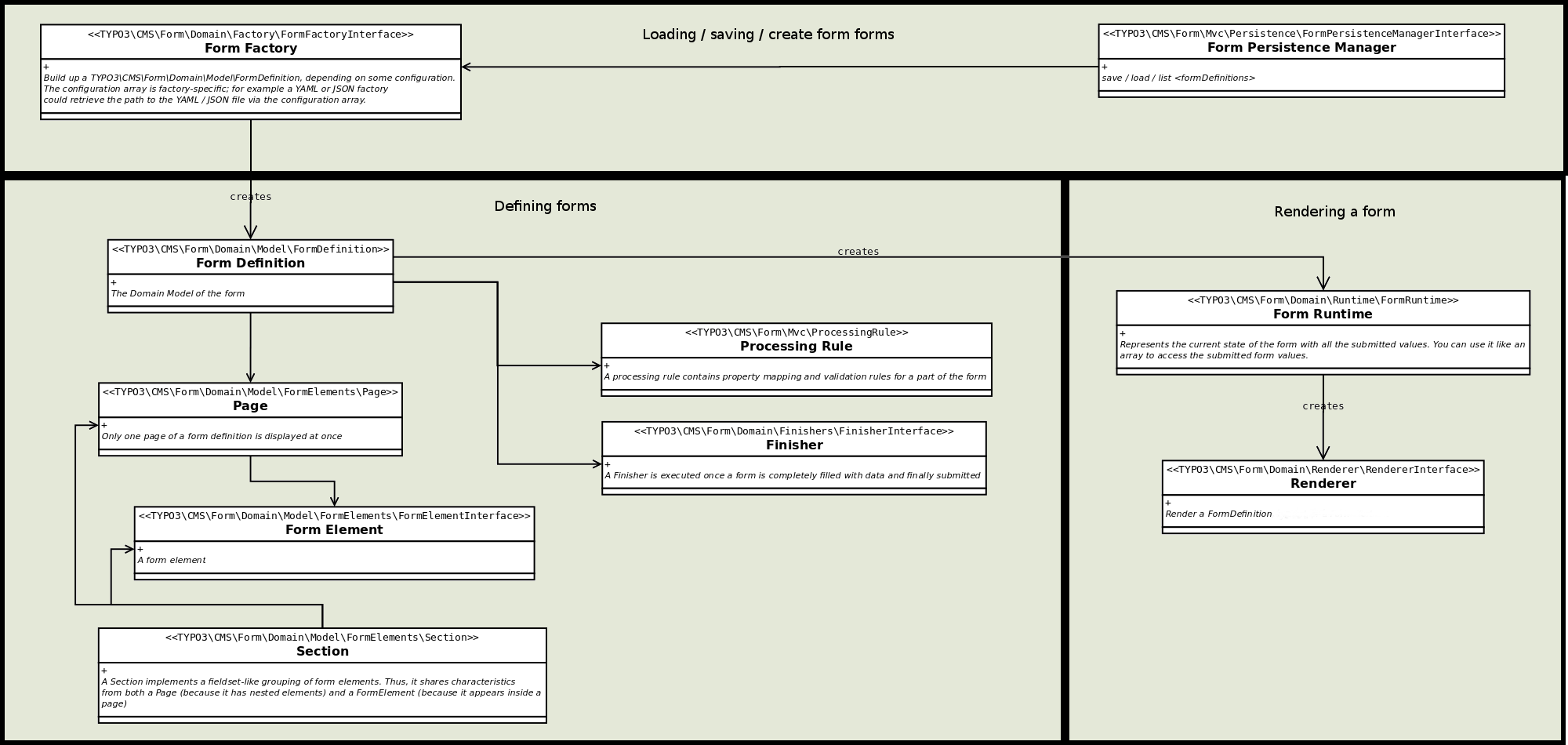
Basic code components
TYPO3\CMS\Form\Domain\Model\FormDefinition
The class
\TYPO3\ encapsulates
a complete form definition, with all of its
- pages,
- form elements,
- validation rules, and
- finishers which are executed when the form is submitted.
The FormDefinition domain model is not modified when the form is executed.
The anatomy of a form
A Form domain model consists of multiple Page objects.
When a form is displayed, only one Page is visible at a time.
However, you can navigate back and forth between the pages. A
Page consists of multiple Form which represent input
fields, textareas, checkboxes, etc, on a page. The Form
domain model, Page and Form objects have identifiers
which must be unique for each <form,
i.e. the Form domain model and a Form object may
have the same identifier but two Form objects cannot have the same
identifier.
Example
You can create a
Form domain model by calling the API methods
on it, or you can use a
Form to build the form from a different
representation format such as YAML. The example below calls API methods to
add a page to a
Form and then to add an element to the page:
$formDefinition = GeneralUtility::makeInstance(FormDefinition::class, 'myForm');

$page1 = GeneralUtility::makeInstance(Page::class, 'page1');
$formDefinition->addPage($page);

// second argument is the <formElementTypeIdentifier> of the form element
$element1 = GeneralUtility::makeInstance(GenericFormElement::class, 'title', 'Text');
$page1->addElement($element1);Creating a form using abstract form element types
You can use the
TYPO3\
and
TYPO3\ methods as above
and create the Page and Form objects manually, but it is often
better to use the corresponding create methods (
TYPO3\
and
TYPO3\).
You only need to pass them an abstract <form such as Text
or Page and EXT:form will resolve the classname and set default values.
The simple example shown above can then be rewritten as follows:
// we will come back to this later on
$prototypeConfiguration = [];

$formDefinition = GeneralUtility::makeInstance(FormDefinition::class, 'myForm', $prototypeConfiguration);
$page1 = $formDefinition->createPage('page1');
$element1 = $page1->addElement('title', 'Text');You might wonder how the system knows that the element Text is
implemented with a Generic. This is configured in the
$prototype. To make the example from above actually work,
we need to add some meaningful values to
$prototype:
$prototypeConfiguration = [
    'formElementsDefinition' => [
        'Page' => [
            'implementationClassName' => 'TYPO3\CMS\Form\Domain\Model\FormElements\Page'
        ],
        'Text' => [
            'implementationClassName' => 'TYPO3\CMS\Form\Domain\Model\FormElements\GenericFormElement'
        ],
    ],
];For each abstract <form, we have to add some
configuration. In the snippet above, we only define the implementation
class name. Apart from that, it is always possible to set default values
for all configuration options of such elements, as the following example
shows:
$prototypeConfiguration = [
    'formElementsDefinition' => [
        'Page' => [
            'implementationClassName' => 'TYPO3\CMS\Form\Domain\Model\FormElements\Page',
            'label' => 'This is the label of the page if nothing else is specified'
        ],
        'Text' => [
            'implementationClassName' => 'TYPO3\CMS\Form\Domain\Model\FormElements\GenericFormElement',
            'label' = >'Default Label',
            'defaultValue' => 'Default form element value',
            'properties' => [
                'placeholder' => 'Text that is shown if element is empty'
            ],
        ],
    ],
];Using pre-configured $prototypeConfiguration
Often, it does not make sense to manually create the $prototypeConfiguration
array. Bigger parts of this array are pre-configured in the extensions's
YAML settings. The
\TYPO3\
contains helper methods which return the ready-to-use :php$prototype.
Rendering a FormDefinition
To trigger the rendering of a
Form domain model, the current
\TYPO3\ needs to be bound to the
Form. This binding results in a
\TYPO3\
object which contains the Runtime State of the form. Among other things,
this object includes the currently inserted values:
// $currentRequest needs to be available.
// Inside a controller, you would use $this->request
$form = $formDefinition->bind($currentRequest);
// now, you can use the $form object to get information about the currently entered values, etc.TYPO3\CMS\Form\Domain\Runtime\FormRuntime
This class implements the runtime logic of a form, i.e. the class
- decides which page is currently shown,
- determines the current values of the form
- triggers validation and property mappings.
You generally receive an instance of this class by
calling
TYPO3\.
Rendering a form
Rendering a form is easy. Just call
render on the
Form:
$form = $formDefinition->bind($request);
$renderedForm = $form->render();Accessing form values
In order to get the values the user has entered into the form, you can
access the
Form object like an array. If a form element with the
identifier first exists, you can use
$form to
retrieve its current value. You can set values the same way.
Rendering internals
The
Form inquires the
Form domain model regarding
the configured renderer (
TYPO3\)
and then triggers
render on this Renderer.
This allows you to declaratively define how a form should be rendered.
prototypes:
  standard:
    formElementsDefinition:
      Form:
rendererClassName: 'TYPO3\CMS\Form\Domain\Renderer\FluidFormRenderer'TYPO3\CMS\Form\Domain\Renderer\FluidFormRenderer
This class is a
\TYPO3\
implementation which used to render a
Form domain model. It
is the default EXT:form renderer.
Learn more about the FluidFormRenderer Options.
Custom form element implementations
PSR-14 events are available at crucial points in the life cycle of a
Form. Most of the time, own class implementations are therefore
unnecessary. A custom form element can be defined by:
- writing some configuration, and
- utilizing the standard implementation of
\TYPO3\.CMS\ Form\ Domain\ Model\ Form Elements\ Generic Form Element
prototypes:
  standard:
    formElementsDefinition:
      CustomFormElementIdentifier:
implementationClassName: 'TYPO3\CMS\Form\Domain\Model\FormElements\GenericFormElement'With the provided PSR-14 events, this Form can now be manipulated at runtime.
See also
- PSR-14 events overview for EXT:form – tables of all events and registration instructions
- Runtime manipulation events
If you insist on your own implementation, the abstract class
\TYPO3\
offers a perfect entry point. In addition, we recommend checking-out
\TYPO3\.
All of your own form element implementations must be programmed to the
interface
\TYPO3\.
It is a good idea to derive your implementation from
\TYPO3\.
"render" viewHelper
The Render is the actual starting point for form rendering and
not the typical Extbase Controller as you may know it.
For more technical insights read more about the viewHelper's arguments.
Render through FLUIDTEMPLATE (without controller)
tt_content.custom_content_element = COA_INT
tt_content.custom_content_element {
  20 = FLUIDTEMPLATE
  20 {
    file = EXT:my_site_package/Resources/Private/Templates/CustomContentElement.html
    settings {
      persistenceIdentifier = EXT:my_site_package/Resources/Private/Forms/MyForm.yaml
    }
    extbase.pluginName = Formframework
    extbase.controllerExtensionName = Form
    extbase.controllerName = FormFrontend
    extbase.controllerActionName = perform
  }
}my_site_package/Resources/Private/Templates/CustomContentElement.html:
<formvh:render persistenceIdentifier="{settings.persistenceIdentifier}" />Render within your own Extbase extension
It is straight forward. Use the Render like this and you are
done:
<formvh:render persistenceIdentifier="EXT:my_site_package/Resources/Private/Forms/MyForm.yaml"/>Point the property controller to the desired action name and
provide values for the other parameters displayed below (you might need
those).
type: Form
identifier: 'example-form'
label: 'TYPO3 is cool'
prototypeName: standard
renderingOptions:
  controllerAction: perform
  addQueryString: false
  argumentsToBeExcludedFromQueryString: []
  additionalParams: []

renderables:
...Note
In general, you can override each and every form definition with the help
of TypoScript (see 'TypoScript overrides').
When using the Render, there is a second way:
The 'overrideConfiguration' parameter.
This way, you can override the form definition within your template.
Provide an according array as shown in the example below.
<formvh:render persistenceIdentifier="EXT:my_site_package/Resources/Private/Forms/MyForm.yaml" overrideConfiguration="{renderables: {0: {renderables: {0: {label: 'My shiny new label'}}}}}"/>Build forms programmatically
To learn more about this topic, head to the chapter 'Build forms programmatically' which is part of the API reference section.
Runtime manipulation
EXT:form implements a decent amount of events that allow the manipulation of your forms during runtime. In this way, it is possible to, for example,
- ... prefill form elements with values from your database,
- ... skip a whole page based on the value of a certain form element,
- ... mark a form element as mandatory depending of the chosen value of another form element.
Please check out the PSR-14 events overview for more details.
TypoScript overrides
Each and every form definition can be overridden via TypoScript if the
Form of EXT:form is used to render the form. Normally,
this is the case if the form has been added to the page using the form
plugin or when rendering the form via FLUIDTEMPLATE.
The overriding of settings with TypoScript's help takes place after the custom finisher settings
of the form plugin have been loaded. In this way, you are able to manipulate
the form definition for a single page. In doing so, the altered
form definition is passed to the
Render which then
generates the form programmatically. At this point, you can still change the
form elements using the above-mentioned concept of hooks.
plugin.tx_form {
  settings {
    formDefinitionOverrides {
      <formDefinitionIdentifier> {
        renderables {
          0 {
            renderables {
              0 {
                label = TEXT
                label.value = Overridden label
              }
            }
          }
        }
      }
    }
  }
}