
Indexing
ke_search fetches content from pages, news, files etc. and stores it into an index table. This process is called "indexing". For each content type (pages, news etc.) ke_search needs an "indexer" (see below, Available indexers).
Whenever the content in your website changes, the indexing process needs to be started to reflect that changes in the search results.
Create indexer configurations
You will have to create an indexer configuration for each content type you want to index (pages, news, ...). You may create more than one indexer configuration of one type, eg. two page indexer configurations for different page trees.
Indexer configurations can be stored either as database records (see Database Indexer Configuration) or, since version 7.2.0, as YAML configuration files (see YAML Indexer Configuration).
Full indexing and incremental indexing
There are two ways of indexing the data: full and incremental (see Full indexing and incremental indexing).
Starting the indexing process manually
You can start the indexing process in the Faceted Search backend module.
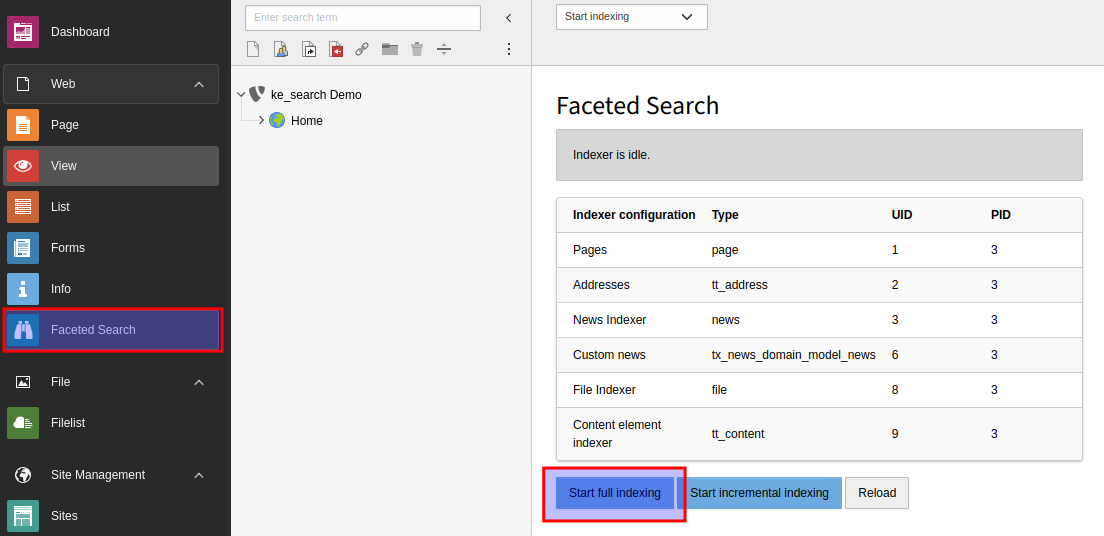
You can also start the indexer using the command line
vendor/bin/typo3 ke_search:indexingOr if you want to use the incremental mode
vendor/bin/typo3 ke_search:indexing --indexingMode=incrementalStarting the indexing process automatically
For keeping the index up-to-date it is recommended to use the TYPO3 scheduler.
You can execute the console command via scheduler.
- Create a task, choose "Execute console commands".
- Choose
ke_in the dropdown Schedulable command.search: indexing - After saving the form you can choose whether you want to do full indexing (default) or incremental indexing by setting
the option indexingMode to either
fullorincremental. - Deactivate the Allow Parallel Execution option (default).
Available indexers
ke_search comes with indexers for the most important content types.