TYPO3 v11 has reached end-of-life as of October 31th 2024 and
is no longer being maintained. Use the version switcher on the top
left of this page to select documentation for a supported version of TYPO3.
Need more time before upgrading?
You can purchase Extended Long Term Support (ELTS) for TYPO3 v11 here:
TYPO3 ELTS.
TYPO3 v11 has reached end-of-life as of October 31th 2024 and
is no longer being maintained. Use the version switcher on the top
left of this page to select documentation for a supported version of TYPO3.
Need more time before upgrading?
You can purchase Extended Long Term Support (ELTS) for TYPO3 v11 here:
TYPO3 ELTS.
Introduction
System Overview
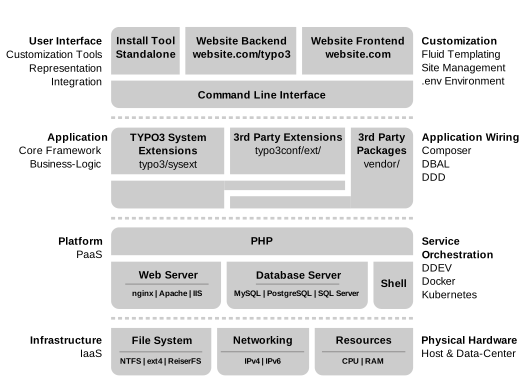
The TYPO3 system is multi-layered. The backend and frontend user interfaces
sit on top of the application layer, which in turn sits on the infrastructure
layer. The webserver, database and PHP in the infrastructure layer are
prerequisites for running TYPO3.
TYPO3 Core primarily consists of the API (Application Programming Interface),
which defines a framework for managing the project content. The base features
of the API include content storage, user permissions and access, content
editing, and file management. These features are delivered via system
extensions that use the API. All of the content is stored in a database
that TYPO3 then accesses via the API.
Extensions are clearly confined code additions, such as plugins, backend
modules, application logic, skins, and third-party apps.
The most important thing to note is that everything is an extension in TYPO3
CMS. Even the most basic functions are packaged in a system extension called
"core".
Diagram showing the layers of the TYPO3 system
Application layer
The TYPO3 Core framework interacts with system and 3rd party extensions via
the TYPO3 extension API.
The core and extensions interact with each other seamlessly and operate as a
single, unified system.
User interface layer
The backend is the content-creation side. It is the administrative area
where you manage content and configuration based on the extensions that are
installed.
The frontend is the content-delivery side. Typically a website, it is the
meeting place for templates, CSS, content, and logic from extensions,
delivering your project to the world.
The frontend doesn't have to be a website, it could be a native mobile
application, a web application built in a frontend framework, or an API to
interface with other systems.
A basic installation
To follow this document, it might help to have a totally trimmed down
installation of TYPO3 with only the Core and the required system
extensions at hand.
The installation process is covered in the Getting started
Guide.
You should perform the basic installation steps and not install any
distribution. This will give you the "lightest" possible version of TYPO3.
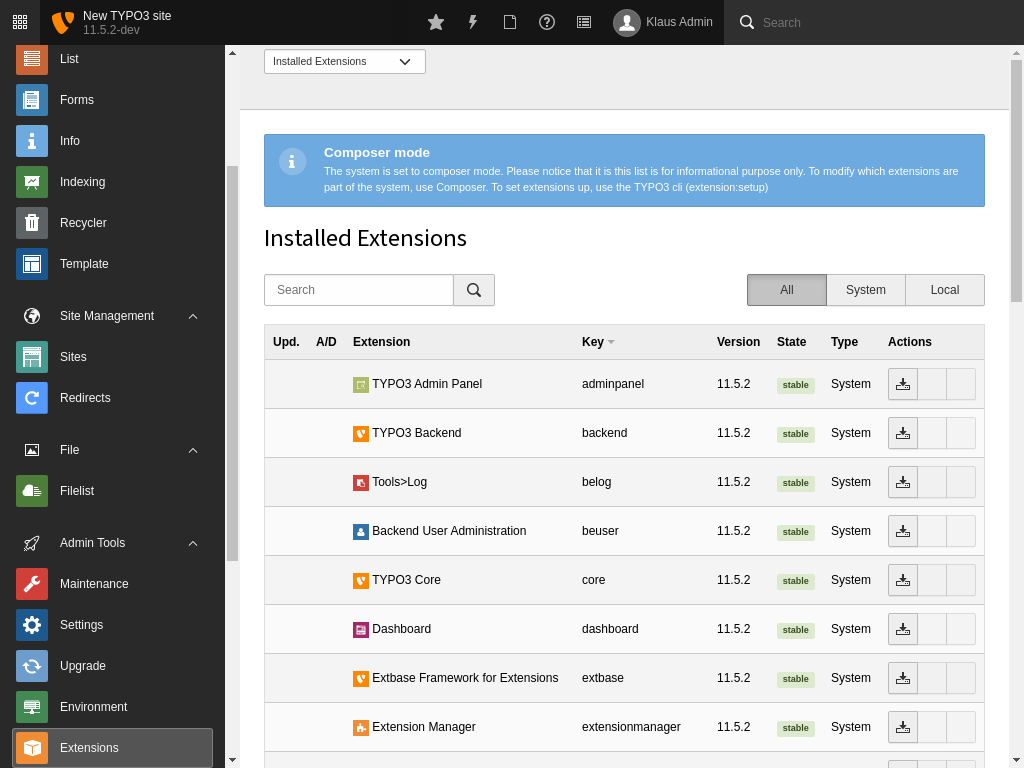
In your basic installation, go to the Admin Tools > Extensions
module. You will see all extensions installed by Composer are activated by
default.
Screenshot of the backend showing the Extensions module
Attention
TYPO3 v11 has reached end-of-life as of October 31th 2024 and
is no longer being maintained. Use the version switcher on the top
left of this page to select documentation for a supported version of TYPO3.
Need more time before upgrading?
You can purchase Extended Long Term Support (ELTS) for TYPO3 v11 here:
TYPO3 ELTS.
API A-Z
The TYPO3 APIs are first and foremost documented inside of the source
scripts. It would be impossible to maintain documentation at more than
one location given the fact that things change and sometimes fast.
This chapter describes the most important elements of the API.
The TYPO3 component responsible for rendering the HTML and adding assets to a
TYPO3 frontend or backend page is called
\TYPO3\CMS\Core\Page\PageRenderer .
The
PageRenderer collects all assets to be rendered, takes care of
options such as concatenation or compression and finally generates the necessary
tags.
There are multiple ways to add assets to the
PageRenderer in TYPO3.
For configuration options via TypoScript (usually used for the main theme files),
see the TypoScript Reference. In
extensions, both directly using the
PageRenderer as well as using the
more convenient
AssetCollector is possible.
Note
The
AssetCollector is available since TYPO3 v10.3.
Asset collector
With the
\TYPO3\CMS\Core\Page\AssetCollector class, CSS and JavaScript
code (inline or external) can be added multiple times, but rendered only once in
the output. The class may be used directly in PHP code or the assets can be
added via the
<f:asset.css> and
<f:asset.script> ViewHelpers.
The
priority flag (default:
false) controls where the asset is
inserted:
JavaScript will be output inside
<head> if
$priority == true,
or at the bottom of the
<body> tag if
$priority == false.
CSS will always be output inside
<head>, yet grouped by
$priority.
The asset collector helps to work with content elements as components,
effectively reducing the CSS to be loaded. It takes advantage of HTTP/2, which
removes the necessity to concatenate all files in one file.
The asset collector class is implemented as a singleton
(
\TYPO3\CMS\Core\SingletonInterface ). It replaces various other existing
options in TypoScript and methods in PHP for
inserting JavaScript and CSS code.
The asset collector also collects information about images on a page,
which can be used in cached and non-cached components.
The API
classAssetCollector
Fully qualified name
\TYPO3\CMS\Core\Page\AssetCollector
The Asset Collector is responsible for keeping track of
- everything within <script> tags: javascript files and inline javascript code
- inline CSS and CSS files
The goal of the asset collector is to:
- utilize a single "runtime-based" store for adding assets of certain kinds that are added to the output
- allow to deal with assets from non-cacheable plugins and cacheable content in the Frontend
- reduce the "power" and flexibility (I'd say it's a burden) of the "god class" PageRenderer.
- reduce the burden of storing everything in PageRenderer
As a side-effect this allows to:
- Add a single CSS snippet or CSS file per content block, but assure that the CSS is only added once to the output.
Note on the implementation:
- We use a Singleton to make use of the AssetCollector throughout Frontend process (similar to PageRenderer).
- Although this is not optimal, I don't see any other way to do so in the current code.
['priority' => true] means rendering before other tags
returntype
self
addMedia(array $additionalInformation)
param array $additionalInformation
One dimensional hash map (array with non numerical keys) with scalar values
returntype
self
removeJavaScript(string identifier)
param string $identifier
the identifier
returntype
self
removeInlineJavaScript(string identifier)
param string $identifier
the identifier
returntype
self
removeStyleSheet(string identifier)
param string $identifier
the identifier
returntype
self
removeInlineStyleSheet(string identifier)
param string $identifier
the identifier
returntype
self
removeMedia(string identifier)
param string $identifier
the identifier
returntype
self
getMedia()
returntype
array
getJavaScripts(bool priority = NULL)
param bool $priority
the priority, default: NULL
returntype
array
getInlineJavaScripts(bool priority = NULL)
param bool $priority
the priority, default: NULL
returntype
array
getStyleSheets(bool priority = NULL)
param bool $priority
the priority, default: NULL
returntype
array
getInlineStyleSheets(bool priority = NULL)
param bool $priority
the priority, default: NULL
returntype
array
hasJavaScript(string identifier)
param string $identifier
the identifier
returntype
bool
hasInlineJavaScript(string identifier)
param string $identifier
the identifier
returntype
bool
hasStyleSheet(string identifier)
param string $identifier
the identifier
returntype
bool
hasInlineStyleSheet(string identifier)
param string $identifier
the identifier
returntype
bool
hasMedia(string fileName)
param string $fileName
the fileName
returntype
bool
Note
If the same asset is registered multiple times using different attributes or
options, both sets are merged. If the same attributes or options are given
with different values, the most recently registered ones overwrite the
existing ones. The
has methods can be used to check if an asset
exists before generating it again, hence avoiding redundancy.
Viewhelper
There are also two ViewHelpers, the
f:asset.css and the
f:asset.script ViewHelper which
use the
AssetCollector API.
Rendering order
Currently, CSS and JavaScript registered with the asset collector will be
rendered after their page renderer counterparts. The order is:
<head>
page.includeJSLibs.forceOnTop
page.includeJSLibs
page.includeJS.forceOnTop
page.includeJS
AssetCollector::addJavaScript() with 'priority'
page.jsInline
AssetCollector::addInlineJavaScript() with 'priority'
Instead of using the global variable for retrieving the
TypoScriptFrontendController you should consider to use the
PSR-7 request attributefrontend.controller
wherever possible.
Attention
TYPO3 v11 has reached end-of-life as of October 31th 2024 and
is no longer being maintained. Use the version switcher on the top
left of this page to select documentation for a supported version of TYPO3.
Need more time before upgrading?
You can purchase Extended Long Term Support (ELTS) for TYPO3 v11 here:
TYPO3 ELTS.
Authentication
The TYPO3 Core uses Services for the authentication process.
This family of services (of type "auth") are the only Core usage that consumes the
Services API.
The aim of this chapter is to describe the authentication
services so that developers feel confident about writing
their own.
Why Use Services?
Services provide the flexibility needed for such a complex
process of authentication, where many methods may be desirable
(single sign-on, IP-based authentication, third-party servers
such as LDAP, etc.) depending on the context.
The ease with which such services can be developed is a strong
point in favor of TYPO3, especially in corporate environments.
Being able to toy with priority and quality allows for
precise fine-tuning of the authentication chain.
Alternative services are available in the TYPO3 Extension Repository.
It is thus possible to find solutions for using LDAP as an
authentication server, for example.
You can check which authentication services are installed
using the System > Reports > Installed Services
view:
All installed authentication services and their priority
Note
For the Reports module to be visible, the system extension
reports has to be installed. You can install it via Composer:
composer require typo3/cms-reports
Copied!
The Authentication Process
The authentication process is not managed entirely by services.
It is handled essentially by class
\TYPO3\CMS\Core\Authentication\BackendUserAuthentication
for the backend (BE) and by class
\TYPO3\CMS\Frontend\Authentication\FrontendUserAuthentication
for the frontend (FE), which both inherit from class
\TYPO3\CMS\Core\Authentication\AbstractUserAuthentication .
The objects for these classes are available via
$GLOBALS['BE_USER'] for
BackendUserAuthentication and
"frontend.user" request attribute for
FrontendUserAuthentication
These classes are called by the
bootstrapping process.
They manage the workflow of the authentication process.
Services are used strictly to identify and validate
users based on whatever form of credentials a given service
relies on (by default, a username and a password).
The authentication process kicks in on every page request,
be it in the FE or the BE. However if a valid session already exists,
that session is kept. Strictly speaking, no authentication
is performed in such a case.
Note
When no session exists, the authentication process is triggered
by a login request. In the frontend, this happens when a form field
called logintype is submitted with value login. The same
happens for the backend, but with a form field called login_status.
The login data
There is a typical set of data that is transmitted to authentication
service in order to enable them to do their work:
uname
This is the user name. This can be whatever makes sense for the
available authentication services. For the default service, this
will match data from the "username" column of the "be_users" or
"fe_users" table for BE or FE authentication respectively.
uident
This is the password, possibly encrypted.
uident_text
This is the clear text value of the password. If the password is
originally submitted in clear text, both "uident" and "uident_text"
contain the same value.
Inside an authentication service, this data is available in
$this->login.
The "auth" services API
The services of type "auth" are further divided into subtypes,
which correspond to various steps in the authentication process.
Most subtypes exist for both FE and BE and are differentiated
accordingly.
To each subtype corresponds a part of the "auth" services public
API. They are listed below in the order in which they are called
during the authentication process.
processLoginDataBE, processLoginDataFE
This subtype performs preprocessing on the submitted
login data.
The method to implement is
processLoginData().
It receives as argument the login data and the password
transmission strategy (which corresponds to the login security
level, where only 'normal' can be used.
It returns the boolean value
true,
when the login data has been successfully processed .
It may also return a numerical value equal to 200 or greater,
which indicates that no further login data processing should
take place (see The service chain).
In particular, this subtype is implemented by the TYPO3 Core
AuthenticationService, which trims the given login data.
getUserFE, getUserBE
This subtype corresponds to the operation of searching in the
database if the credentials that were given correspond to an
existing user. The method to implement is
getUser().
It is expected to return an array containing the user information
or
false if no user was found.
authUserFE, authUserBE
This subtype performs the actual authentication based on the
provided credentials. The method to implement is
authUser().
It receives the user information (as returned by
getUser())
as an input and is expected to return a numerical value,
which is described later.
Note
Before any of the above-mentioned methods are called, the authentication
process will call the
initAuth() method of each service. This
sets up a lot of data for the service. It also makes it possible to
override part of the default settings with
service-specific options.
This represents very advanced tuning and is not described here.
Please refer to
\TYPO3\CMS\Core\Authentication\AbstractAuthenticationService::initAuth()
to learn more about the possibilities offered during authentication services
initialization.
The service chain
No matter what subtype, authentication services are always called
in a chain. This means that
all registered "auth" services will be called, in order of
decreasing priority and quality.
However, for some subtypes, there are ways to stop the chain.
For "processLoginDataBE" and "processLoginDataFE" subtypes, the
processLoginData()
method may return a numerical value of 200 or more. In such a case
no further services are called and login data is not further
processed. This makes it possible for a service to perform
a form of final transformation on the login data.
For "authUserFE" and "authUserBE" subtypes, the
authUser() method may
return different values:
Warning
Previously, there was an error in the documentation. It did not match
the actual behaviour. This has now been fixed. For details, see
forge#91993.
a negative value or 0 (<=0) indicates that the authentication has
definitely failed and that no other "auth" service should be
called up.
a value larger than 0 and smaller than 100 indicates that the authentication
was successful, but that further services should also perform their
own authentication.
a value of 100 or more (>= 100) indicates that the user was not authenticated,
this service is not responsible for the authentication and that further
services should authenticate.
a value of 200 or more (>=200) indicates that the authentication was successful
and that no further tries should be made by other services down
the chain.
auth failed
auth success
no auth
continue
1..99
100..199
stop
<= 0
>= 200
For "getUserFE" and "getUserBE" subtypes, the logic is reversed.
The service chain will stop as soon as one user is found.
Developing an authentication service
When developing your own "auth" services, the chances are high
that you will want to implement only the "getUser*" and "authUser*"
subtypes.
There are several public extensions providing such services, so you should
be able to find examples to inspire and guide you. Anyway authentication
services can be very different from one another, so it wouldn't make much
sense to try and provide an example in this manual.
One important thing to know is that the TYPO3 authentication
process needs to have users inside database records ("fe_users" or
"be_users"). This means that if you interface with a third-party
server, you will need to create records on the TYPO3 side. It is
up to you to choose whether this process happens on the fly (during
authentication) or if you want to create an import process (as a
Scheduler task, for example) that will synchronize users between
TYPO3 and the remote system.
Note
You probably do not want to store the actual password of imported
users in the TYPO3 database. It is recommended to store
an arbitrary string in such case, making sure that such string
is random enough for security reasons. TYPO3 provides method
\TYPO3\CMS\Core\Crypto\Random::generateRandomHexString()
which can be used for such a purpose.
For the
authUser() method, you will want to take care
about the return values. If your service should be the final
authority for authentication, it should not only have a high priority,
but also return values which stop the service chain (i.e.
a negative value for failed authentication, 200 or more for a
successful one). On the other hand, if your service is an alternative
authentication, but should fall back on TYPO3 if unavailable,
you will want to return 100 on failure, so that the default service
can take over.
Things can get a bit hairy if you have a scenario with mixed sources,
for example some users come from a third-party server but others
exist only in TYPO3. In such a case, you want to make sure that
your service returns definite authentication failures only for those
users which depend on the remote system and let the default
authentication proceed for "local" TYPO3 users.
Advanced Options
There are some special configuration options which can be used
to modify the behaviour of the authentication process. Some
impact the inner working of the services themselves, others
influence when services are called.
It is possible to force TYPO3 to go through the
authentication process for every request no matter any
existing session. By setting the following local configuration
either for the FE or the BE:
This could be used in a scenario where users go through a login portal
and then choose to access the TYPO3 backend, for example. In such a case
we would want the users to be automatically authenticated, but would not
need to repeat the process upon each request.
The authentication process can also be forced to go through
all services for the "getUser*" subtype by setting:
TYPO3 v11 has reached end-of-life as of October 31th 2024 and
is no longer being maintained. Use the version switcher on the top
left of this page to select documentation for a supported version of TYPO3.
Need more time before upgrading?
You can purchase Extended Long Term Support (ELTS) for TYPO3 v11 here:
TYPO3 ELTS.
TYPO3 is capable of authentication via multiple factors, in short
"multi-factor authentication" or "MFA". This is sometimes also referred to
"2FA" as a 2-factor authentication process, where - in order to log in - the
user needs
"something to know" (= the password) and
"something to own" (= an authenticator device, or an authenticator app
on mobile phones or desktop devices).
TYPO3 ships with some built-in MFA providers by default. But more importantly,
TYPO3 provides an API to allow extension authors to integrate their own
MFA providers.
The API is designed in a way to allow providers to be used for TYPO3 backend
authentication or frontend authentication with a multi-factor step in-between.
Note
Currently, TYPO3 provides the integration for the TYPO3 backend. It is
planned to support multi-factor authentication for the frontend in the
future.
Managing MFA providers is currently possible via the User Settings
module in the tab called Account security.
Manage your MFA providers in the User Settings module
The Account security tab displays the current state:
whether MFA can be configured
whether MFA is activated or
whether some MFA providers are locked
Included MFA providers
TYPO3 Core includes two MFA providers:
Time-based one-time password (TOTP)
TOTP is the most common MFA implementation. A QR code is scanned (or alternatively,
a shared secret can be entered) to connect an authenticator app such as Google
Authenticator, Microsoft Authenticator, 1Password, Authly, or others to the
system and then synchronize a token, which changes every 30 seconds.
On each log-in, after successfully entering the password, the six-digit code
shown by the authenticator app must be entered.
Recovery codes
This is a special provider which can only be activated, if at least one other
provider is active. It is only meant as a fallback provider, in case the
authentication credentials for the "main" provider(s) are lost. It is encouraged
to activate this provider, and keep the codes at a safe place.
Each provider is displayed with its icon, the name and a short description in
the MFA configuration module. In case a provider is active, this is indicated by
a corresponding label, next to the provider's title. The same goes for a locked
provider - an active provider, which can currently not be used since the
provider-specific implementation detected some unusual behaviour, for example,
too many false authentication attempts. Additionally, the configured default
provider indicates this state with a "star" icon, next to the provider's title.
Each inactive provider contains a Setup button which opens the
corresponding configuration view. This view can be different depending on the
MFA provider.
MFA TOTP provider configuration screen
Each provider contains an Edit/Change button, which allows to adjust
the provider's settings. This view allows, for example, to set a provider as the
default (primary) provider, to be used on authentication.
Note
The default provider setting will be automatically applied on activation of
the first provider, or in case it is the recommended provider for this user.
In case the provider is locked, the Edit/Change button changes its button
title to Unlock. This button can be used to unlock the provider.
This, depending on the provider to unlock, may require further actions by the
user.
The Deactivate button can be used to deactivate the provider.
Depending on the provider, this will usually completely remove all
provider-specific settings.
The "Authentication view" is displayed as soon as a user
with at least one active provider has successfully passed the username and
password mask.
As for the other views, it is up to the specific provider, used for the current
multi-factor authentication attempt, what content is displayed in which view.
If the user has further active providers, the view displays them
as "Alternative providers" in the footer to allow the user to switch between all
activated providers on every authentication attempt.
All providers need to define a locking functionality. In case of the TOTP and
recovery code providers, this, for example, includes an attempts count. These
providers are locked in case a wrong OTP was entered three times in a
row. The count is automatically reset as soon as a correct OTP is
entered or the user unlocks the provider in the backend.
All TYPO3 Core providers also feature the "Last used" and "Last updated"
information which can be retrieved in the "Edit/Change" view.
By default, the field in the User Settings module is displayed for
every backend user. It is possible to
disable it for specific
users via user TSconfig:
setup.fields.mfaProviders.disabled = 1
Copied!
Administration of user's MFA providers
If a user is not able to access the backend anymore, for example, because all of
their active providers are locked, MFA needs to be disabled by an administrator
for this specific user.
Administrators are able to manage the user's MFA providers in the corresponding
user record. The new Multi-factor authentication field displays a
list of active providers and a button to deactivate MFA for the user, or
only a specific MFA provider.
Note
All of these deactivate buttons are executed immediately, after
confirming the dialog, and cannot be undone.
The listing of backend users in the System > Backend Users module
also displays for each user, whether MFA is enabled or currently locked. This
allows an administrator to analyze the MFA usage of their users at a glance.
The System > Configuration admininistration module shows an overview
of all currently registered providers in the installation. This is especially
helpful to find out the exact provider identifier, needed for some
user TSconfig options.
Do not require multi-factor authentication (default)
1
Require multi-factor authentication for all users
2
Require multi-factor authentication only for non-admin users
3
Require multi-factor authentication only for admin users
To set this requirement only for a specific user or user group, a user TSconfig
option auth.mfa.required <t3tsconfig:user-auth-mfa-required> is available.
The user TSconfig option overrules the global configuration.
auth.mfa.required = 1
Copied!
Allowed provider
It is possible to only allow a subset of the available providers for some users
or user groups.
A configuration option "Allowed multi-factor authentication providers" is
available in the user groups record in the "Access List" tab.
There may be use cases in which a single provider should be
disallowed for a specific user, which is configured to be allowed in
one of the assigned user groups. Therefore, the user TSconfig option
auth.mfa.disableProviders can
be used. It overrules the configuration from the "Access List": if a provider is
allowed in "Access List" but disallowed via user TSconfig, it will be disallowed
for the user or user group the TSconfig applies to.
This does not affect the remaining allowed providers from the "Access List".
To set a recommended provider on a per user or user group basis, the user
TSconfig option auth.mfa.recommendedProvider
can be used, which overrules the global configuration.
auth.mfa.recommendedProvider = totp
Copied!
TYPO3 integration and API
To register a custom MFA provider, the provider class has to implement the
EXT:core/Classes/Authentication/Mfa/MfaProviderInterface.php (GitHub), shipped via a
third-party extension. The provider then has to be configured in the extension's
Services.yaml or Services.php file with the
mfa.provider
tag.
EXT:my_extension/Configuration/Services.yaml
services:# Place here the default dependency injection configurationMyVender\MyExtension\Authentication\Mfa\MyProvider:tags:-name:mfa.provideridentifier:'my-provider'title:'LLL:EXT:my_extension/Resources/Private/Language/locallang.xlf:myProvider.title'description:'LLL:EXT:my_extension/Resources/Private/Language/locallang.xlf:myProvider.description'setupInstructions:'LLL:EXT:my_extension/Resources/Private/Language/locallang.xlf:myProvider.setupInstructions'icon:'tx-myextension-provider-icon'
This will register the provider
MyProvider with the
my-provider
identifier. To change the position of your provider the
before and
after arguments can be useful. This can be needed, for example, if you
like your provider to show up prior to any other provider in the MFA
configuration module. The ordering is also taken into account in the
authentication step while logging in. Note that the user-defined default
provider will always take precedence.
If you do not want your provider to be selectable as a default provider, set the
defaultProviderAllowed argument to false.
You can also completely deactivate existing providers with:
EXT:my_extension/Configuration/Services.yaml
services:# Place here the default dependency injection configurationTYPO3\CMS\Core\Authentication\Mfa\Provider\TotpProvider:~
Copied!
The
MfaProviderInterface contains a lot of methods to be implemented by
the providers. This can be split up into state-providing ones, for example,
isActive() or
isLocked(), and functional ones, for example,
activate() or
update().
Their exact task is explained in the corresponding PHPDoc of the interface files
and the Core MFA provider implementations.
All of these methods are receiving either the current
PSR-7 request object, the
\TYPO3\CMS\Core\Authentication\Mfa\MfaProviderPropertyManager or both.
The
MfaProviderPropertyManager can be used to retrieve and update the
provider-specific properties and also contains the
getUser() method,
providing the current user object.
To store provider-specific data, the MFA API uses a new database field
mfa,
which can be freely used by the providers. The field contains a JSON-encoded
array with the identifier of each provider as array key. Common properties of
such provider array could be active or lastUsed. Since the information is
stored in either the
be_users or the
fe_users table, the context
is implicit. Same goes for the user the providers deal with. It is important to
have such a generic field so providers are able to store arbitrary data, TYPO3
does not need to know about.
To retrieve and update the providers data, the already mentioned
MfaProviderPropertyManager, which is automatically passed to all
necessary provider methods, should be used. It is highly discouraged
to directly access the
mfa database field.
Attention
TYPO3 v11 has reached end-of-life as of October 31th 2024 and
is no longer being maintained. Use the version switcher on the top
left of this page to select documentation for a supported version of TYPO3.
Need more time before upgrading?
You can purchase Extended Long Term Support (ELTS) for TYPO3 v11 here:
TYPO3 ELTS.
Autoloading
The class autoloader takes care of finding classes in TYPO3.
About
makeInstance()
\TYPO3\CMS\Core\Utility\GeneralUtility::makeInstance() is a generic way
throughout Core and extensions to create objects. It takes care of singleton
and XCLASS handling.
Note
When dependent services are injected via Dependency Injection, there is no need for
makeInstance():
Injecting a different object is done by configuration - that's what
dependency injection is for.
A developer can instantiate classes using
makeInstance() - if dependency
injection cannot be used. There are some situations where
new is used
over
makeInstance(), effectively dropping especially the direct ability
to XCLASS:
Data transfer objects are often created with
new. A good example are
PSR-14 events: The calling class creates a data
transfer object that is hand over to the consumer. These DTOs must never be
changed by an extension, since they are a contract both caller and consumer
must stick to. They are thus created using
new to prevent XCLASSing.
Structures with a dedicated API that allows own implementations on a
configuration level sometimes do not use
makeInstance: Many Core
constructs come with an API to allow custom classes by dedicated
configuration. Those implement a factory pattern to deal with this. An
example is the PSR-15 middleware stack.
Autoloading classes
There is one autoloader used, the one of Composer. No matter if you run TYPO3 in
Composer mode or not (legacy mode), TYPO3 uses the Composer autoloader to
resolve all class file locations.
Loading classes with Composer mode
In Composer mode, the autoloader checks for (classmap and PSR-4) autoloading
information inside your extension's composer.json. If you do not provide
any information, the autoloader falls back to the classmap autoloading like in
non-Composer mode.
Troubleshooting
Dump the class loading information manually via composer dumpautoload and
check that the autoload information is updated. Typically you would check
vendor/composer/ to hold files like autoload_classmap.php and
autoload_psr4.php, etc.
This means, you did not install TYPO3 via a require statement inside your
composer.json. It's a regular old-school install where the TYPO3 source
and the symlinks (typo3/index.php) are setup manually.
In this case, every time you install an extension, the autoloader scans the
whole extension directory for classes. No matter if they follow any convention
at all. There is just one rule: put each class into its own file. This also
means that there can only be a single class per file.
You can also explicitly configure autoloading in the
ext_emconf.php.
The generated typo3conf/autoload_classmap.php is a large array with a
mapping of classnames to their location on the disk:
This method is failsafe unless the autoload information cannot be written. In
this case, check the Install Tool for warnings and make sure thattypo3temp/is writable.
Troubleshooting:
If your classes cannot be found, try the following approaches.
Dump the class loading information manually with the following command:
php typo3/sysext/core/bin/typo3 dumpautoload
Copied!
If that command itself fails, please (manually) uninstall the extension and
try reinstalling it (via the Extension Manager).
If you are still not lucky, the issue is definitely on your side and you
should double check the write permissions on typo3temp.
Best practices
If you didn't do so before, have a look at the PSR-4 standard. It defines
very good rules for naming classes and the files they reside in. Really,
read the specs and start using PSR-4 in your projects. It's unlikely that
there will be any other more advanced standard in the near future in the
PHP world. PSR-4 is the way to go and you should embrace it.
Even if you do not use Composer mode and the class mapping of the autoloader
allows you to use whatever you want, stick to PSR-4. It's not only a very
good standard to find classes, but it will also help organizing your code.
PSR-4 is all about namespaces. No matter if you like namespaces or not, use
them. Namespaces exist since PHP 5.3, so you will be able to use them in any
modern TYPO3 project due to the minimum PHP requirements of TYPO3 itself.
Tip
PSR-4 is a standard that has been developed by the PHP Framework Interop
Group (FIG). PSR-4 is an advanced standard for autoloading php classes and
replaces PSR-0. If you want to know more about the PHP FIG in general and
PSR-4 in specific, please visit https://www.php-fig.org/psr/psr-4/.
TYPO3 v11 has reached end-of-life as of October 31th 2024 and
is no longer being maintained. Use the version switcher on the top
left of this page to select documentation for a supported version of TYPO3.
Need more time before upgrading?
You can purchase Extended Long Term Support (ELTS) for TYPO3 v11 here:
TYPO3 ELTS.
ComposerClassLoader
Integrating Composer class loader into TYPO3
In our efforts to make TYPO3 faster and closer oriented
to common PHP standard systems, we looked into the integration of the
class loader that is used by all composer-based projects. We consider
this functionality a crucial feature for the future of TYPO3 on the
base level, but also as a dramatic increase of the overall performance
of every request inside TYPO3.
Understanding the TYPO3 class loader
The TYPO3 class loader is instantiated within the TYPO3 Bootstrap at
a very early point. It does a lot of logic (checking ext_autoload.php,
ClassAliasMap.php), and caches this logic away on a per-class basis by
default in typo3temp/Cache/ to store all information for a class. This
information contains: The full path to the class, the namespaced class
name itself and possible class aliases.
The latter part looks into all extensions and checks the
Migrations/ClassAliasMap.php file for any possible “legacy class” that
could be used (e.g. t3lib_extmgm). This way, all extensions still using
non-namespaced class that are shipped with the TYPO3 core are still made
available.
The information is stored in a SimpleFileBackend via the built-in
Caching Framework by default. At the early stage of the bootstrap
process some classes need to be included manually as the whole TYPO3
core engine has not been loaded yet. This is done for all PHP classes in
use, which may result in 500+ files inside typo3temp/Cache which are
created one by one on an initial request with no caches set up. This is
done by intention on a per-file-basis during runtime as a cache file is
only created if a PHP class is requested to be instantiated. On a second
hit, the caching framework does not create the cache files, but fetches
one by one for each class used in the request via a separate
file_get_contents() call.
When debugging TYPO3 on an initial request, there are a
lot of file_get_contents() and file_put_contents() calls to
store and fetch this information. This is quite a lot of overhead for loading
PHP classes. Even without a lot of class aliases (e.g. in CMS7) this
overhead of writing / storing the file caches still exists. Some
overhead however is already taken care, especially if a class is loaded
which is shipped with the core and no class alias is used.
This is all built in a way so a lot of backwards-compatibility can be
ensured.
Understanding the Composer class loader
Compared to the TYPO3 class loader, the composer class loader
concept differs in the following major points:
Caching on build stage
When setting up a project, like a TYPO3 project, Composer checks the
main composer.json of a project and builds a static file with all PSR-4
prefixes defined in that json file. Unless in a development environment
or when updating the source, this file does not need to be rebuilt as
the PHP classes of the loaded packages won’t change in a regular
instance. This way all classes available inside TYPO3 are always
available to the class loader.
Using PSR-4 compatible prefix-based resolving
Instead of looking up every single class and caching the information
away, composer works on a “prefix”-based resolution. As an example, the
Composer class loader only needs to know that all PHP classes starting
with
\TYPO3\CMS\Core are located within EXT:core/Classes. The
rest is done by a simple resolution to include the necessary PHP class
files. This means that the information to be cached away is only the
list of available namespace prefixes.
The definition of these prefixes is set inside the composer.json file of each
package or distribution / project.
Autoloading developer-specific data differently
The composer class loader checks the composer.json for a development
installation differently, including for example unit and functional tests
separately to the rest of the installation. The static map with all
namespaces are thus different when using Composer with composer
install or composer install --no-dev.
Integration Approach
The Composer class loader is injected inside the Bootstrap process of
TYPO3 and registered before the TYPO3 class loader. This means that
a lookup on a class name is first checked via the Composer logic, and if
none found, the regular TYPO3 class loader takes over.
The support for class aliases is quite important for TYPO3, but is
not supported by Composer by default. There is a separate Composer
package created by Helmut Hummel (available on GitHub) which serves as a facade
to the Composer class loader and creates not just the information for
the prefixes but also the available class aliases for a class and loads
them as well.
The necessary information about the “which namespaced classes can be
found at which place” is created before every release and shipped inside
the typo3_src directory. The generated class information is available
under typo3/contrib/vendor/composer/. For TYPO3 installations that are
set up with composer, the TYPO3 bootstrap checks
Packages/Libraries/autoload.php first which can be shipped with any
composer-based project and include many more PHP Composer packages than
just TYPO3 extensions. To ensure maximum backwards-compatibility, the
option to load from Packages/Library/autoload.php instead of the shipped
"required-core-packages-only" needs to be activated via an environment
variable called
TYPO3_COMPOSER_AUTOLOAD which needs to be set on
server-side level.
If the composer-based logic is not used in some legacy cases (for
extensions etc), the usual TYPO3 class loader comes into play and does
the same logic as before.
Project setup and extension considerations
If you already use Composer to set up your project, and the
composer.json and their extensions ship a valid composer.json, the
Composer class loader generates the valid PSR-4 cache file with all
prefixes on installation and update. Running "composer update" will
automatically re-generate the PSR-4 cache file.
The Composer class loader also supports PSR-0 and static inclusion of
files, which can be used as well.
As a base line: Any regular installation will see a proper speed
improvement after the update to the Composer class loader.
Attention
TYPO3 v11 has reached end-of-life as of October 31th 2024 and
is no longer being maintained. Use the version switcher on the top
left of this page to select documentation for a supported version of TYPO3.
Need more time before upgrading?
You can purchase Extended Long Term Support (ELTS) for TYPO3 v11 here:
TYPO3 ELTS.
Backend APIs
The following APIs are of interest if you want to configure or extend the
functionalities of the backend.
TYPO3 v11 has reached end-of-life as of October 31th 2024 and
is no longer being maintained. Use the version switcher on the top
left of this page to select documentation for a supported version of TYPO3.
Need more time before upgrading?
You can purchase Extended Long Term Support (ELTS) for TYPO3 v11 here:
TYPO3 ELTS.
TYPO3 v11 has reached end-of-life as of October 31th 2024 and
is no longer being maintained. Use the version switcher on the top
left of this page to select documentation for a supported version of TYPO3.
Need more time before upgrading?
You can purchase Extended Long Term Support (ELTS) for TYPO3 v11 here:
TYPO3 ELTS.
Users and groups
TYPO3 features an access control system based on users and groups.
Users
Each user of the backend must be represented with a single record in
the table "be_users". This record contains the username and password,
other meta data and some permissions settings.
Part of the editing form for user "simple_editor" of the Introduction Package
The above screenshot shows a part of the editing form for the backend
user "simple_editor" from the Introduction Package. If you have an Introduction
Package available, you can check further properties of that user. It is
part of the "Simple editors" group, has a name, an email address and
its default language for the backend is English.
It is possible to assign rights directly to a user, but it is much better
done using groups. Furthermore groups offer far more options.
Groups
Each user can also be a member of one or more groups (from the
"be_groups" table) and each group can include sub-groups. Groups
contain the main permission settings you can set for a user. Many
users can be a member of the same group and thus share permissions.
When a user is a member of many groups (including sub-groups) then the
permission settings are added together so that the more groups a user
is a member of, the more access is granted to him.
Part of the editing form for group "Simple editors" of the Introduction Package
This screenshot shows just an extract of the group editing form.
It contains many more fields!
The "admin" user
There is a special kind of backend users called "Admin".
When creating a backend user, just check the "Admin!" box in the
"General" tab and that user will become an administrator.
There's no need to set further access options for such a user:
an admin user can access every single feature of the TYPO3
backend, like the "root" user on a UNIX system.
All systems must have at least one "admin" user and most systems
should have only "admin" users for the developers - not for any
editor. Make sure to not share TYPO3 accounts with multiple users
but create dedicated accounts for everyone.
Not even "super users" should be allowed "admin" access since that
will most likely grant them access to more than they need.
Admin users are differentiated with an orange icon.
In Web > List view, the different icon for admin users
Note
There's no other level between admin and ordinary users.
This seems to be a strong limitation, especially
when you consider that ordinary users may not access TypoScript
templates.
However, there is a security reason for this. From a TypoScript template,
you can call a PHP script. So - in effect - a user with access to
TypoScript can run arbitrary PHP code on the server, for example
in order to create an admin account for himself. This type of escalation
cannot be allowed.
Location of users and groups
Since both backend users and backend groups are represented by records
in the database, they are edited just as any other record in the
system. However backend users and groups are configured to exist
only in the root of the page tree where only admin users have
access:
Users and groups reside on the root page
Records located in the page tree root are identified by having their
"pid" fields set to zero. The "pid" field normally contains the
relation to the page where a record belongs. Since no pages can have
the id of zero, this is the id of the root. Notice that only "admin"
users can edit records in the page root!
If you need non-admin users to create new backend users, have a look
at the TYPO3 system extension sys_action for a possible solution.
Attention
TYPO3 v11 has reached end-of-life as of October 31th 2024 and
is no longer being maintained. Use the version switcher on the top
left of this page to select documentation for a supported version of TYPO3.
Need more time before upgrading?
You can purchase Extended Long Term Support (ELTS) for TYPO3 v11 here:
TYPO3 ELTS.
Password reset functionality
TYPO3 backend users can reset their password if they use the default TYPO3 login
mechanism.
To display the reset link on the backend login page, the following criteria must
be met:
The user has a password entered previously (indicating that no third-party
login has been used).
The user has a valid email address added to their user record.
The user is neither deleted nor disabled.
The email address is used only once for all backend users of the instance.
Once the user has entered their email address, an email is sent with a link that
allows to set a new password, which must consist of at least eight characters.
The link is valid for 2 hours and a token is added to the link. If the password
is entered correctly, it will be updated for the user and they can log in.
Notes on security
When having multiple users with the same email address, no reset
functionality is provided.
No information disclosure is built-in, so if the email address is not in the
system, it is not disclosed to the outside.
Rate limiting is enabled so that three emails can be sent per email address
within 30 minutes.
Tokens are stored in the database but hashed again just like the password.
When a user has logged in successfully (for example, because they remembered
the password), the token is removed from the database, effectively
invalidating all existing email links.
Global configuration
The feature is enabled by default and can be deactivated entirely via the
system-wide configuration option:
Both options are available to be configured within the Admin Tools > Settings
module or in the Install Tool but can be set manually via typo3conf/LocalConfiguration.php or typo3conf/AdditionalConfiguration.php.
Reset password for user
Administrators can reset a user's password. This is useful primarily for
security reasons, so that an administrator does not have to send a password over
to a user in plain text (for example, by email).
The backend URL is necessary to generate the correct links to the TYPO3
instance from CLI context.
Attention
TYPO3 v11 has reached end-of-life as of October 31th 2024 and
is no longer being maintained. Use the version switcher on the top
left of this page to select documentation for a supported version of TYPO3.
Need more time before upgrading?
You can purchase Extended Long Term Support (ELTS) for TYPO3 v11 here:
TYPO3 ELTS.
Roles
Another popular approach to setting up users is roles. This
concept is basically about identifying certain roles that users can
take and then allow for a very easy application of these roles to
users.
TYPO3 access control is far more flexible and allows for such detailed
configuration that it lies very far from the simple and straight
forward concept of roles. This is necessary as the foundation of a
system like TYPO3 should fit many possible usages.
However it is perfectly possible to create groups that act like "roles".
This is what you should do:
Identify the roles you need; Developer, Administrator, Editor, Super
User, User, ... etc.
Configure a group for each role: attribute permissions needed to
fulfill each role.
Consider having a general group which all other groups include - this
would basically configure a shared set of permissions for all users.
Attention
TYPO3 v11 has reached end-of-life as of October 31th 2024 and
is no longer being maintained. Use the version switcher on the top
left of this page to select documentation for a supported version of TYPO3.
Need more time before upgrading?
You can purchase Extended Long Term Support (ELTS) for TYPO3 v11 here:
TYPO3 ELTS.
Access Control Options
The permissions of fully initialized backend users are the result of the
rights granted in their own user records and all the user groups they
belong to.
The permissions are divided into the following conceptual categories:
Access lists
These grant access to backend modules, database tables and fields.
Mounts
Parts of the page tree and server file system.
Page permissions
Access to work on individual pages based on the user id and group ids.
User TSconfig
A flexible and hierarchical configuration structure
defined by TypoScript syntax. This typically describes "soft"
permission settings and options for the user or group which can be used to
customize the backend and individual modules.
Access lists are defined at group-level. Usage of access lists for defining
user rights is described in the Getting Started tutorial.
The various access lists are described here for reference, with
additional technical details, where necessary.
Note
Access list don't apply to admin users. As mentioned before, admin
users have access to every single feature of the TYPO3 backend.
Modules
This is a list of submodules a user may be given access to. Access to a main
module is implicit, as soon as a user has access to at least one of its
submodules.
Not all submodules appear in this list. It is possible to restrict a
submodule to admin users only. This is the case, in particular, for all
Admin Tools and System modules, as well as the
Web > Template module.
Note
This is the only access list that is also available for definition
at user-level.
This section is only available with activated
dashboard system extension.
Tables for listing
A list of all tables a user may be allowed to read in the backend.
Again this in not a list of all tables in the database. Some tables
are low level and never appear in the backend at all, even for admin
users. Other tables are restricted to admin users and thus do not show
up in the access list.
All tables that are allowed for modification (see below) are
also allowed for read access, so no need to select them in this
list as well.
Tables for editing
This is exactly the same list of tables as before, but for granting
modification rights.
Page types
TYPO3 defines a number of page types. A user can be restricted
to access only some of them.
For a full discussion on page types, please refer to the
page types chapter.
Excludefields
When defining column tables in TCA, it is possible to set the
"exclude" property to "1".
This ensures that the field is hidden to users by default.
Access to it must be explicitly granted in this access list.
Explicitly allow/deny field values
When a field offers a list of options to select from, it is possible
to tell TYPO3 that access to these options is restricted and should
be granted explicitly. Such fields and their values appear here.
By default users can edit records regardless of what language they are assigned to.
Using this list it is possible to restrict users to working only in selected
languages.
When a user is a member of more than one group, the access lists for
the groups are "added" together.
Mounts
TYPO3 natively supports two kinds of hierarchical tree structures:
the page tree (typically visible in the Web module) and the folder
tree (typically visible in the File module). Each tree is
generated based on the mount points configured for the current user. So a
page tree is drawn from the DB Mounts which are one or more page ids
telling the Core from which "start page" to draw the tree(s). Likewise
is the folder tree drawn based on filemounts configured for the user.
DB mounts (page mounts) are set by pointing out the
page that should be mounted for the user (at user or group-level):
The DB mounts for group "Editors"
This is what the user will see:
Warning
A DB mount will appear only if the page permissions
allow the user at least read access to the mounted page (and subpages).
Otherwise nothing will appear at all!
File Mounts are a little more difficult to set up, as they
involve several steps. First of all, you need to have at least
one File Storage. By
default, you will always have one, pointing
to the fileadmin directory. It is created by TYPO3
upon installation.
Note
The fileadmin directory is the default place where
TYPO3 expects media resources to be located. It can be
changed using the global configuration option
$GLOBALS['TYPO3_CONF_VARS']['BE']['fileadminDir'].
A File Storage is essentially defined by a File Driver
and the path to which it points.
Next we can create a File Mount record (on the root page),
which refers to a File Storage:
A file mount pointing to the "user_upload" directory
When defining a File Mount, you can point to a specific folder
within the chosen File Storage. Finally the mount is assigned
to a user or group:
The file mount is assigned to the "Editors" group
After a successful configuration, the file mount will appear to
the user:
DB and File Mounts can be set for both the user and group records.
Having more than one DB or File Mount will just result in more than
one mount point appearing in the trees. However the backend users
records have two flags which determine whether the DB/File Mounts of
the groups the user belongs to will be mounted as well! This is
the default behaviour. So make sure to unset these flags if users
should see only their "private" mount points and not those from their
groups:
By default DB and File Mounts from groups are set for member users
"Admin" users do not need mount points. As always, they have access
to every part of the installation.
Page Permissions
Page permissions are designed to work like file permissions on UNIX
systems. Each page record has an owner user and group and
permission settings for the owner, the group and "everybody". This is
summarized here:
Every page has an owner, group and everybody-permission
The owner and group of a page can be empty. Nothing matches with an
empty user/group (except "admin" users).
Every page has permissions for owner, group and everybody in these
five categories (next to the label is the corresponding value):
Show (1)
See/Copy page and the page content.
Edit page content (16)
Change/Add/Delete/Move page content.
Edit page (2)
Change/Move the page, eg. change title, startdate, hidden flag.
Delete page (4)
Delete the page and page content.
New pages (8)
Create new pages under the page.
Note
Here "Page content" means all records related to that page,
except other pages.
Page permissions are set and viewed with the module System > Access
module:
The Access module and its overview of page rights and owners
A user must be "admin" or the owner of a page in order to edit its
permissions.
When a user creates new pages in TYPO3 they will by default get the
creating user as owner. The owner group will be set to the first
listed user group configured for the users record (if any). These defaults
can be changed through page TSconfig.
User TSconfig
User TSconfig is a hierarchical configuration structure entered in
plain text TypoScript. It can be used by all kinds of applications
inside of TYPO3 to retrieve customized settings for users which
relates to a certain module or part. The options available are
described in the document TSconfig .
Attention
TYPO3 v11 has reached end-of-life as of October 31th 2024 and
is no longer being maintained. Use the version switcher on the top
left of this page to select documentation for a supported version of TYPO3.
Need more time before upgrading?
You can purchase Extended Long Term Support (ELTS) for TYPO3 v11 here:
TYPO3 ELTS.
Other Options
This chapter presents a few more, miscellaneous options for
backend users and groups.
Backend users
Default language
This is the language in which the backend will be localized for the
user. The users can change the language themselves in the
User Settings
module.
Note
Language packs must be downloaded using the Admin Tools > Maintenance > Manage Language Packs
module. As long as the language packs are not available, the backend
will still display in English.
Fileoperation permissions
This is a complement to the File Mounts and defines exactly which operations
the user is allowed to perform on both files and folders.
Access options
A backend user can be disabled (first flag in the "General" tab). A disabled
user cannot log into the backend anymore. Furthermore, in the "Access" tab
a start and end time can be given, defining a time interval during which the
user will be allowed to log into the backend. Authentication before the start
time and after the end time will automatically fail.
Lock to domain
This setting constrains the user to use a specific domain for logging
into the TYPO3 backend. This is very useful in setups with multiple
sites.
Backend Groups
Disable
Setting this flag will immediately disable the group for
all members
Lock to domain
This restricts a group to a given domain. If a user logs in from another
domain, that group membership will be ignored.
Hide in lists
This flag will prevent the group from appearing in various
listings in TYPO3. This includes modules like System > Access.
Inherit settings from groups (Sub Groups)
Assigns sub-groups to this group. Sub-groups are
evaluated before the group including them. If a user is a member of
a group which includes one or more sub-groups, the user will also be
a member of the sub-groups.
Attention
TYPO3 v11 has reached end-of-life as of October 31th 2024 and
is no longer being maintained. Use the version switcher on the top
left of this page to select documentation for a supported version of TYPO3.
Need more time before upgrading?
You can purchase Extended Long Term Support (ELTS) for TYPO3 v11 here:
TYPO3 ELTS.
More about file mounts
File mounts require a little more description of the concepts provided
by TYPO3. All files are handled by an application layer called
the "File Abstraction Layer" (FAL). You can find more information
about the basic concepts of FAL.
The FAL is comprised of the following components:
Drivers
Drivers are what makes it possible to access a given type of media
storage. The Core provides a driver to access the local file system.
Extensions exist that provide a driver for remote systems, like SFTP
or platforms like Amazon S3.
Storages
A file storage uses a driver to connect to a given storage system.
It is defined by a path pointing into that storage system. There can
be several storages using the same driver and pointing to different
"directories". The storage configuration depends on the driver it uses.
Thanks to the storage and its driver, the user is able to browse
files from within the TYPO3 backend as if they were stored locally.
File mounts
As discussed before, a file mount is the element which is used to
actually give access to users to some directories. A file mount is always
related to a storage.
Create a new filemount
New in version 11.3
Starting with TYPO3 v11.3 it is possible to create a new filemount via
the context menu of the folder.
To create a new filemount go to the module Filelist and create the
folder for the mount if it didn't exist yet. Then open the context menu on that
folder and choose New Filemount, then give the new filemount a name.
storage and folder are already set.
It is also possible to create a filemount manually in the List
module by creating a record of type
Filemount. In this case you have
to choose the storage and folder manually.
Paths for local driver storage
The file storages based on the "local file system" driver have an
option for relative or absolute paths.
The paths options for a storage based on the local file system driver
"Relative" means that the given path is relative to the fileadmin/
folder (or whatever other folder was configured using
$GLOBALS['TYPO3_CONF_VARS']['BE']['fileadminDir'].
Absolute paths are full paths starting at the root of the file system
(i.e. / on Unix systems).
Important
If the fileadmin/ location is not changed, be aware
that all files beneath it will be accessible via a browser,
since this directory is located below the web root. This is
perfectly fine in most cases, and indeed generally a desired
behaviour. Just be careful what kind of files you store in that
place, as they will be publicly accessible.
Absolute paths outside of the web root
must be explicitly declared in the global configuration option
$GLOBALS['TYPO3_CONF_VARS']['BE']['lockRootPath']. Any absolute
path that you want to declare in a file storage needs to have its
first part match the value of $GLOBALS['TYPO3_CONF_VARS']['BE']['lockRootPath']
(or of the web root, which can be retrieved with \TYPO3\CMS\Core\Core\Environment::getPublicPath()).
As an example, let's say you want to define two storages, one
pointing to /home/foo/bar and one pointing to
/home/foo/baz. You could declare
$GLOBALS['TYPO3_CONF_VARS']['BE']['lockRootPath'] to be
equal to /home/foo/.
Home directories
TYPO3 also features the concept of "home directories". These are paths
that are automatically mounted if they are present at a path
configured in the global configuration. Thus they don't need to have a file
mount record representing them - they just need a properly named
directory to be present.
Note
That last sentence is important. The directories need to exist.
They are not created automatically.
The parent directory of user/group home directories is defined by
$GLOBALS['TYPO3_CONF_VARS']['BE']['userHomePath'] and
$GLOBALS['TYPO3_CONF_VARS']['BE']['groupHomePath']
respectively. Let's say we define the following:
The first part of the definition (before the colon :) is
the id of a file storage. The second part is a path relative to
that file storage. Assuming file storage with a uid of "1" is the
default one pointing to fileadmin/, the following path
needs to exist on the server: /path/to/web/root/fileadmin/user_homes/.
Then a directory needs to exist for each user. Again let's assume that
we have a user with a uid of "3" and a username of "editor", either
of those paths would have to exist:
/path/to/web/root/fileadmin/user_homes/3/
/path/to/web/root/fileadmin/user_homes/3_editor/
The second possibility is more explicit, but will break if the
username is changed.
The same goes for groups, but only using the uid.
Assuming a group called "editors" with a uid of "1",
and:
we have to create a directory /path/to/web/root/fileadmin/groups/1/.
Having set up all these properties and folders, the user
should see the following when moving to the FILE > Filelist
module:
where only the first mount was explicitly assigned to that user.
A different icon visually distinguishes automatic file mounts.
Note
If the $GLOBALS['TYPO3_CONF_VARS']['BE']['userUploadDir'] option is
also used, it is appended to the user home directory name. Thus a value
of _uploads would mean that our home directories become
/path/to/web/root/fileadmin/user_homes/3_uploads/
or /path/to/web/root/fileadmin/user_homes/3_editor_uploads/.
This does not apply to group home directories.
The concept of home directories can be efficiently combined with
the TSconfig defaultUploadFolder option,
which automatically directs all files uploaded by the user to the
given directory.
Attention
TYPO3 v11 has reached end-of-life as of October 31th 2024 and
is no longer being maintained. Use the version switcher on the top
left of this page to select documentation for a supported version of TYPO3.
Need more time before upgrading?
You can purchase Extended Long Term Support (ELTS) for TYPO3 v11 here:
TYPO3 ELTS.
Backend users module
The System > Backend users module offers a convenient way
of working with backend users and groups. It provides a list of both
users and groups. The users list can be searched and filtered.
Comparing Users or Groups
The Backend users module offers the possibility to compare users.
Just add users using the
"+ Compare" button and then hit the "Compare user list" button.
For example, this is the comparison of the three different editors
provided by the Introduction Package:
Comparing users in the Backers users module
The same functionality is available for user groups, including a comparison
of their inherited permissions.
Impersonating Users ("Switch to")
We can impersonate (switch) to a user by clicking the Switch to user
action icon:
The button to simulate another user
You will then be logged in as that user (note how the user name
is prefixed with "SU" for "Simulated User"). To "switch back",
use the "Exit" button (which replaces the usual "Logout"
button).
Backend with active simulate user
Attention
TYPO3 v11 has reached end-of-life as of October 31th 2024 and
is no longer being maintained. Use the version switcher on the top
left of this page to select documentation for a supported version of TYPO3.
Need more time before upgrading?
You can purchase Extended Long Term Support (ELTS) for TYPO3 v11 here:
TYPO3 ELTS.
Ajax in the Backend
An Ajax endpoint in the TYPO3 backend is usually implemented as a method in a regular controller. The method receives a
request object implementing the
\Psr\Http\Message\ServerRequestInterface , which allows to access all aspects of
the requests and returns an appropriate response in a normalized way. This approach is standardized as PSR-7.
By convention, a controller is placed within the extension's Controller directory, optionally in a subdirectory.
To have such controller, create a new
ExampleController in Classes/Controller/ExampleController.php
inside your extension.
The controller doesn't need that much logic right now. We'll create a method called
doSomethingAction() which
will be our Ajax endpoint.
In its current state, the method doesn't do anything yet. We can add a very generic handling that exponentiates an
incoming number by 2. The incoming value will be passed as a query string argument named input.
publicfunctiondoSomethingAction(ServerRequestInterface $request): ResponseInterface{
$input = $request->getQueryParams()['input'] ?? null;
if ($input === null) {
thrownew \InvalidArgumentException('Please provide a number', 1580585107);
}
$result = $input ** 2;
// TODO: return ResponseInterface
}
Copied!
Note
This is a really simple example. Something like this should not be used in production, as such feature is available
in JavaScript as well.
We have computed our result by using the exponentiation operator, but we don't do anything with it yet. It's time to
build a proper response. A response implements the
\Psr\Http\Message\ResponseInterface and its constructor
accepts the following arguments:
$body
|Condition: required
|Type: string
|
The content of the response.
$statusCode
|Condition: optional
|Type: int
|Default: 200
|
The HTTP status code of the response. The default of 200 means OK.
The endpoint must be registered as route. Create a file called Configuration/Backend/AjaxRoutes.php in your
extension. The file basically just returns an array of route definitions. Every route in this file will be exposed to
JavaScript automatically. Let's register our endpoint now:
The naming of the key example_dosomething and path /example/do-something are up to you, but should contain the
controller name and action name to avoid potential conflicts with other existing routes.
Flushing caches is mandatory after modifying any route definition.
Use in Ajax
Since the route is registered in AjaxRoutes.php its exposed to JavaScript now and stored in the global
TYPO3.settings.ajaxUrls object identified by the used key in the registration. In this example it's
TYPO3.settings.ajaxUrls.example_dosomething.
You are now free to use the endpoint in any of your Ajax calls. To complete this example, we'll ask the server to
compute our input and write the result into the console.
require(['TYPO3/CMS/Core/Ajax/AjaxRequest'], function (AjaxRequest) {
// Generate a random number between 1 and 32const randomNumber = Math.ceil(Math.random() * 32);
new AjaxRequest(TYPO3.settings.ajaxUrls.example_dosomething)
.withQueryArguments({input: randomNumber})
.get()
.then(asyncfunction (response) {
const resolved = await response.resolve();
console.log(resolved.result);
});
});
Copied!
Attention
TYPO3 v11 has reached end-of-life as of October 31th 2024 and
is no longer being maintained. Use the version switcher on the top
left of this page to select documentation for a supported version of TYPO3.
Need more time before upgrading?
You can purchase Extended Long Term Support (ELTS) for TYPO3 v11 here:
TYPO3 ELTS.
Ajax in the backend, client-side
TYPO3 Core ships an API to send Ajax requests to the server. This API is based on the fetch API, which is implemented
in every modern browser (e.g. Chrome, Safari, Firefox, Edge).
Note
TYPO3 ships jQuery as well, but is considered discouraged for new code.
Prepare a request
To be able to send a request, the module
TYPO3/CMS/Core/Ajax/AjaxRequest must be imported. To prepare a request,
create a new instance of
AjaxRequest per request and pass the url as the constructor argument:
let request = new AjaxRequest('https://example.org/my-endpoint');
Copied!
The API offers a method
withQueryArguments() which allows to attach a query string to the URL. This comes in handy if
the query string is programmatically generated. The method returns a clone of the
AjaxRequest object. It's possible
to pass either strings, arrays or objects as an argument.
Example:
const qs = {
foo: 'bar',
bar: {
baz: ['foo', 'bencer']
}
};
request = request.withQueryArguments(qs);
// The query string compiles to ?foo=bar&bar[baz][0]=foo&bar[baz][1]=bencer
Copied!
The method detects whether the URL already contains a query string and appends the new query string in a proper format.
Send a Request
The API offers some methods to actually send the request:
get()
post()
put()
delete()
Each of these methods set the corresponding request method (GET, POST, PUT, DELETE).
post(),
put() and
delete() accept the following arguments:
The API presets the request configuration with
{credentials: 'same-origin', signal: AbortController.signal}.
The body of the request is automatically converted to a FormData object, if the submitted payload is an object. To
send a JSON-encoded object instead, set the Content-Type header to application/json.
If the payload is a string, no conversion will happen, but it's still recommended to set proper headers.
response is an object of type
AjaxResponse shipped by TYPO3 (
TYPO3/CMS/Core/Ajax/AjaxResponse). The
object is a simple wrapper for the original Response object.
AjaxResponse exposes the following methods which
eases the handling with responses:
resolve() - returns the correct response based on the received Content-Type header, either plaintext or a JSON object
Of course a request may fail for various reasons. In such case, a second function may be passed to
then(), which
handles the exceptional case. The function may receive a
ResponseError object (
TYPO3/CMS/Core/Ajax/ResponseError)
which contains the received response.
promise.then(asyncfunction (response) {}, function (error) {
console.error(`The request failed with ${error.response.status}: ${error.response.statusText}`);
});
Copied!
Hint
The fetch API handles responses with faulty statuses like 404 or 500 still as "successful", but sets the response's
ok field to false. The Ajax API converts such responses into errors for convenience reasons.
Abort a request
In some cases it might be necessary to abort a running request. The Ajax API has you covered then, an instance of
AbortController is attached to each request. To abort the request, just call the
abort() method:
request.abort();
Copied!
Attention
TYPO3 v11 has reached end-of-life as of October 31th 2024 and
is no longer being maintained. Use the version switcher on the top
left of this page to select documentation for a supported version of TYPO3.
Need more time before upgrading?
You can purchase Extended Long Term Support (ELTS) for TYPO3 v11 here:
TYPO3 ELTS.
Backend layout
Backend layouts can be defined as database records or via page TSconfig.
Page TSconfig should be preferred as it can be stored in the file system and
be kept under version control.
Backend layout video
Benjamin Kott: How to implement frontend layouts in TYPO3 using backend layouts
Backend layout configuration
The backend layout to be used can be configurated for each page and/or a pages'
subpages in the Page properties > Appearance. Multiple backend
layouts are available if an
extension providing backend layouts is installed or
backend layouts have been
defined as records or page TSconfig.
Choose the backend layout in the page properties
The Info module gives an overview of the backend layouts configured or
inherited from a parent page at
Web > Info > Pagetree overview > Type: Layouts:
Overview of the backend layouts used
Backend layout definition
Backend layouts can be configured either as "backend layout" record in a sysfolder or as page TSconfig entry in
mod.web_layout.BackendLayouts. Each layout will be saved with a key. The "backend layout" records are
using their uid as a key, therefore layouts defined via page TSconfig should use a non-numeric string key. It is a good
practice to use a descriptive name as key.
The entries title and icon are being used to display the backend layout options in the page properties.
The overall grid size will be defined by
config.backend_layout.colCount and
rowCount.
Additional rows in the
rows array and additional columns in the each rows
columns section
will be ignored when they are greater then
rowCount or
colCount respectively.
Each column position can span several columns and or several rows. Each column position must have a distinct number
between 0 and n. It is best practice to always assign "0" to the main column if there is such a thing as a
main column. Multiple backend layouts that contain similar parts, i.e. header, footer, aside, ... should each have
assigned the same number within one project. This leads to a uniform position of the content, which makes it more clear
for further use.
Backend layout simple example
The following page TSconfig example creates a simple backend layout consisting of two rows and just one column.
The following page TSconfig example creates a 3x3 backend layout with 5 column position sections in total. The topmost
row (here called "header") spans all 3 columns. There is an "aside" spanning two rows on the right.
mod.web_layout.BackendLayouts {
exampleKey {
title = Example
icon = EXT:example_extension/Resources/Public/Images/BackendLayouts/default.gif
config {
backend_layout {
colCount = 3
rowCount = 3
rows {
1 {
columns {
1 {
name = Header
colspan = 3
colPos = 1
}
}
}
2 {
columns {
1 {
name = Main
colspan = 2
colPos = 0
}
2 {
name = Aside
rowspan = 2
colPos = 2
}
}
}
3 {
columns {
1 {
name = Main Left
colPos = 5
}
2 {
name = Main Right
colPos = 6
}
}
}
}
}
}
}
}
Copied!
Output of a backend layout in the frontend
The backend layout to be used on a certain page gets determined either by the backend layout being chosen directly and
stored in the pages field "backend_layout" or by the field "backend_layout_next_level" of a parent page up the rootline.
To avoid complex TypoScript for integrators, the handling of backend layouts has
been simplified for the frontend.
To get the correct backend layout, the following TypoScript code can be used:
In many cases besides defining fixed backend layouts a more modular approach with the possibility of combining different
backend layouts and frontend layouts may be feasible. The extension gridelements
integrates the grid layout concept also to regular content elements.
The extension content_defender offers advanced options to
the column positions i.e. allowed or disallowed content elements, a maximal number of content elements.
Attention
TYPO3 v11 has reached end-of-life as of October 31th 2024 and
is no longer being maintained. Use the version switcher on the top
left of this page to select documentation for a supported version of TYPO3.
Need more time before upgrading?
You can purchase Extended Long Term Support (ELTS) for TYPO3 v11 here:
TYPO3 ELTS.
Backend routing
Each request to the backend is eventually executed by a controller.
A list of routes is defined which maps a given request to a controller
and an action.
Routes are defined inside extensions, in the files
Configuration/Backend/Routes.php for general requests
Configuration/Backend/AjaxRoutes.php for Ajax calls
<?phpuseTYPO3\CMS\Backend\Controller;
return [
// Login screen of the TYPO3 Backend'login' => [
'path' => '/login',
'access' => 'public',
'target' => Controller\LoginController::class . '::formAction'
],
// Main backend rendering setup (previously called backend.php) for the TYPO3 Backend'main' => [
'path' => '/main',
'referrer' => 'required,refresh-always',
'target' => Controller\BackendController::class . '::mainAction'
],
// ...
];
Copied!
So, a route file essentially returns an array containing route mappings. A route
is defined by a key, a path, a referrer and a target. The "public"
access
property indicates that no authentication is required for that action.
Note
The current route object is available as route attribute in the PSR-7 request object of every
backend request. It is added through the PSR-15 middleware stack and can be
retrieved using
$request->getAttribute('route').
Backend routing and cross-site scripting
Public backend routes (those having option
'access' => 'public') do not
require any session token, but can be used to redirect to a route that requires
a session token internally. For this context, the backend user logged in must
have a valid session.
This scenario can lead to situations where an existing cross-site scripting
vulnerability (XSS) bypasses the mentioned session token, which can be
considered cross-site request forgery (CSRF). The difference in terminology is
that this scenario occurs on same-site requests and not cross-site - however,
potential security implications are still the same.
Backend routes can enforce the existence of an HTTP referrer header by adding a
referrer to routes to mitigate the described scenario.
Values for
referrer are declared as a comma-separated list:
required enforces existence of HTTP Referer header that has to match
the currently used backend URL (for example, https://example.org/typo3/),
the request will be denied otherwise.
refresh-empty triggers an HTML-based refresh in case HTTP Referer
header is not given or empty - this attempt uses an HTML refresh, since
regular HTTP Location redirect still would not set a referrer. It implies
this technique should only be used on plain HTML responses and will not have
any impact, for example, on JSON or XML response types.
This technique should be used on all public routes (without session token) that
internally redirect to a restricted route (having a session token). The goal is
to protect and keep information about the current session token internal.
The request sequence in the TYPO3 Core looks like this:
HTTP request to https://example.org/typo3/ having a valid user
session
Internally public backend route /login is processed
Internally redirects to restricted backend route /main since an
existing and valid backend user session was found
+ HTTP redirect to https://example.org/typo3/main?token=...
+ exposing the token is mitigated with referrer route option mentioned
above
Attention
Please keep in mind these steps are part of a mitigation strategy, which
requires to be aware of mentioned implications when implementing custom web
applications.
Generating backend URLs
Using the UriBuilder API, you can generate any kind of URL for the backend, may
it be a module, a typical route or an Ajax call. Therefore use either
buildUriFromRoute() or
buildUriFromRoutePath(). The
UriBuilder then returns a PSR-7 conform
Uri object that can be
cast to a string when needed. Furthermore, the
UriBuilder automatically
generates and applies the mentioned session token.
Example within a controller (we use here a non-Extbase controller):
TYPO3 v11 has reached end-of-life as of October 31th 2024 and
is no longer being maintained. Use the version switcher on the top
left of this page to select documentation for a supported version of TYPO3.
Need more time before upgrading?
You can purchase Extended Long Term Support (ELTS) for TYPO3 v11 here:
TYPO3 ELTS.
Backend user object
The backend user of a session is always available in extensions
as the global variable
$GLOBALS['BE_USER']. The object is created in
\TYPO3\CMS\Backend\Middleware\BackendUserAuthenticator middleware for a standard web request
and is an instance of the class
\TYPO3\CMS\Core\Authentication\BackendUserAuthentication
(which extends
\TYPO3\CMS\Core\Authentication\AbstractUserAuthentication ).
When working with CLI and commands you might initialize the backend user object with
\TYPO3\CMS\Core\Core\Bootstrap::initializeBackendUser().
Checking user access
The
$GLOBALS['BE_USER'] object is mostly used to check user access right,
but contains other helpful information. This is presented here by a few examples:
Checking access to current backend module
$MCONF is module configuration and the key
$MCONF['access'] determines
the access scope for the module. This function call will check if the
$GLOBALS['BE_USER'] is allowed to access the module and if not, the function
will exit with an error message.
Changing the "1" for other values will check other permissions:
use "2" for checking if the user may edit the page
use "4" for checking if the user may delete the page.
Is a page inside a DB mount?
Access to a page should not be checked only based on page permissions
but also if a page is found within a DB mount for ther user. This can
be checked by this function call (
$id is the page uid):
If you wish to make a SQL statement which selects pages from the
database and you want it to be only pages that the user has read
access to, you can have a proper WHERE clause returned by this
function call:
Again the number "1" represents the "read" permission; "2" is "edit"
and "4" is "delete" permission. The result from the above query could be this string:
Result of the above query
((pages.perms_everybody & 1 = 1)OR(pages.perms_userid = 2 AND pages.perms_user & 1 = 1)OR(pages.perms_groupid in (1) AND pages.perms_group & 1 = 1))
Copied!
Saving module data
This stores the input variable
$compareFlags (an array!) with the key
"tools_beuser/index.php/compare"
The internal
->uc array contains options which are managed by the
User Tools > User Settings module (extension "setup"). These values are accessible in
the
$GLOBALS['BE_USER']->uc array. This will return the current state of
"Notify me by email, when somebody logs in from my account" for the user:
TYPO3 v11 has reached end-of-life as of October 31th 2024 and
is no longer being maintained. Use the version switcher on the top
left of this page to select documentation for a supported version of TYPO3.
Need more time before upgrading?
You can purchase Extended Long Term Support (ELTS) for TYPO3 v11 here:
TYPO3 ELTS.
Broadcast channels
It is possible to send broadcast messages from anywhere in TYPO3 that are
listened to via JavaScript.
Warning
This API is considered internal and may change anytime until declared being stable.
Send a message
Any backend module may send a message using the
TYPO3/CMS/Backend/BroadcastService module.
The payload of such message is an object that consists at least of the following properties:
componentName - the name of the component that sends the message (e.g. extension name)
eventName - the event name used to identify the message
A message may contain any other property as necessary. The final event name to listen is a composition of "typo3", the
component name and the event name, e.g. typo3:my_extension:my_event.
Attention
Since a polyfill is in place to add support for Microsoft Edge, the payload
must contain JSON-serializable content only.
To send a message, the
post() method must be used.
To receive and thus react on a message, an event handler needs to be registered that listens to the composed event
name (e.g. typo3:my_component:my_event) sent to
document.
The event itself contains a property called detailexcluding the component name and event name.
define([], function() {
document.addEventListener('typo3:my_component:my_event', (e) => eventHandler(e.detail));
functioneventHandler(detail) {
console.log(detail); // contains 'hello' and 'foo' as sent in the payload
}
});
Copied!
Hook into
$GLOBALS['TYPO3_CONF_VARS']['SC_OPTIONS']['typo3/backend.php']['constructPostProcess']
to load a custom
BackendController hook that loads the event handler,
e.g. via RequireJS.
TYPO3 v11 has reached end-of-life as of October 31th 2024 and
is no longer being maintained. Use the version switcher on the top
left of this page to select documentation for a supported version of TYPO3.
Need more time before upgrading?
You can purchase Extended Long Term Support (ELTS) for TYPO3 v11 here:
TYPO3 ELTS.
Clipboard
Note
The class
\TYPO3\CMS\Backend\Clipboard\Clipboard is marked
@internal. It is a specific Backend implementation and is not
considered part of the Public TYPO3 API. It might change without notice.
You can easily access the internal clipboard in TYPO3 from your
backend modules:
useTYPO3\CMS\Backend\Clipboard\Clipboard;
useTYPO3\CMS\Core\Utility\DebugUtility;
useTYPO3\CMS\Core\Utility\GeneralUtility;
classModuleControllerextendsActionControllerimplementsLoggerAwareInterface{
protectedfunctiondebugClipboard(){
/** @var $clipboard Clipboard */
$clipboard = GeneralUtility::makeInstance(Clipboard::class);
// Read the clipboard content from the user session
$clipboard->initializeClipboard();
DebugUtility::debug($clipboard->clipData);
}
}
Copied!
In this simple piece of code we instantiate a clipboard object and make it
load its content. We then dump this content into the BE module's debug
window, with the following result:
A dump of the clipboard in the debug window
This tells us what objects are registered on the default tab ("normal")
(a content element with id 216 in "copy" mode) and the numeric tabs (which can
each contain more than one element). It also tells us that the current
tab is number 2. We can compare with the BE view of the clipboard:
The clipboard as seen in the backend
which indeed contains two files.
Clipboard content should not be accessed directly, but using the
elFromTable() method of the clipboard object:
useTYPO3\CMS\Backend\Clipboard\Clipboard;
useTYPO3\CMS\Core\Utility\GeneralUtility;
classModuleControllerextendsActionControllerimplementsLoggerAwareInterface{
protectedfunctiongetCurrentClipboard():array{
/** @var $clipboard Clipboard */
$clipboard = GeneralUtility::makeInstance(Clipboard::class);
// Read the clipboard content from the user session
$clipboard->initializeClipboard();
// Access files and pages content of current pad
$clipboardContent = [
'files' => $clipboard->elFromTable('_FILE'),
'pages' => $clipboard->elFromTable('pages'),
];
return $clipboardContent;
}
}
Copied!
Here we first try to get all files and then all page records on the
current pad (which is pad 2). Then we change to the "Normal" pad, call
the elFromTable() method again.
In the "examples" extension, this data is passed to a BE module view
for display, which is really just information:
Clipboard items
Attention
TYPO3 v11 has reached end-of-life as of October 31th 2024 and
is no longer being maintained. Use the version switcher on the top
left of this page to select documentation for a supported version of TYPO3.
Need more time before upgrading?
You can purchase Extended Long Term Support (ELTS) for TYPO3 v11 here:
TYPO3 ELTS.
Context-sensitive menus
Tip
Since TYPO3 v8.6 a new way of configuring and rendering context menu has
been introduced.
Both page tree context menu and list view context menu are generated and
configured in the same way.
Contextual menus exist in many places in the TYPO3 backend. Just try your
luck clicking on any icon that you see. Chances are good that a contextual
menu will appear, offering useful functions to execute.
The context menu shown after clicking on the Content Element icon
Context menu rendering flow
Markup
The context menu is shown after click on the HTML element which has
class="t3js-contextmenutrigger" together with
data-table,
data-uid and optional
data-context attributes.
The JavaScript click event handler is implemented in the
TYPO3/CMS/Backend/ContextMenu requireJS module. It takes the
data attributes mentioned above and executes an ajax call to the
\TYPO3\CMS\Backend\Controller\ContextMenuController->getContextMenuAction().
ContextMenuController
ContextMenuController asks
\TYPO3\CMS\Backend\ContextMenu\ContextMenu
to generate an array of items.
ContextMenu builds a list of available
item providers by asking each whether it can provide items
(
$provider->canHandle()), and what priority it has
(
$provider->getPriority()).
Item providers registration
Custom item providers can be registered in global array:
They must implement
\TYPO3\CMS\Backend\ContextMenu\ItemProviders\ProviderInterface and can
extend
\TYPO3\CMS\Backend\ContextMenu\ItemProviders\AbstractProvider .
There are two item providers which are always available (without registration):
A list of providers is sorted by priority, and then each provider is asked to
add items. The generated array of items is passed from an item provider with
higher priority to a provider with lower priority.
After that, a compiled list of items is returned to the
ContextMenuController which passes it back to the
ContextMenu.js as JSON.
Menu rendering in JavaScript
Based on the JSON data ContextMenu.js is rendering a context menu. If
one of the items is clicked, the according JavaScript
callbackAction is
executed on the
TYPO3/CMS/Backend/ContextMenuActions JavaScript module
or other modules defined in the JSON as
additionalAttributes['data-callback-module'].
Several TYPO3 Core modules are already using this API for adding or modifying
items. See following places for a reference:
EXT:beuser module adds an item with a link to the Access (page permissions)
module for pages context menu.
See item provider
\TYPO3\CMS\Beuser\ContextMenu\ItemProvider and
requireJS module
TYPO3/CMS/Beuser/ContextMenuActions
EXT:impexp module adds import and export options for pages, content elements
and other records. See item provider
\TYPO3\CMS\Impexp\ContextMenu\ItemProvider and requireJS module
TYPO3/CMS/Impexp/ContextMenuActions
EXT:filelist module provides several item providers for files, folders,
filemounts, filestorage, and drag-drop context menu for the folder tree.
See following item providers:
\TYPO3\CMS\Filelist\ContextMenu\ItemProviders\FileDragProvider,
\TYPO3\CMS\Filelist\ContextMenu\ItemProviders\FileProvider ,
\TYPO3\CMS\Filelist\ContextMenu\ItemProviders\FileStorageProvider,
\TYPO3\CMS\Filelist\ContextMenu\ItemProviders\FilemountsProvider
and requireJS module
TYPO3/CMS/Filelist/ContextMenuActions
Adding context menu to elements in your backend module
Enabling context menu in your own backend modules is quite straightforward.
The examples below are taken from the "beuser" system extension and
assume that the module is Extbase-based.
The first step is to include the needed JavaScript using the
includeRequireJsModules property
of the standard backend container Fluid view helper (or backend page
renderer view helper).
Doing so in your layout is sufficient (see
typo3/sysext/beuser/Resources/Private/Layouts/Default.html).
The second step is to activate the context menu on the icons. This kind of markup
is required (taken from
typo3/sysext/beuser/Resources/Private/Templates/BackendUser/Index.html):
the relevant line being highlighted. The class
t3js-contextmenutrigger
triggers a context menu functionality for the current element. The
data-table attribute contains a table name of the record and
data-uid the
uid of the record.
One additional data attribute can be used
data-context with
values being for example
tree for context menu triggered from
the page tree. Context is used to hide menu items independently for page tree
independently from other places (disabled items can be configured in TSconfig).
Note
In most cases the
data-uid attributes contain an integer value.
However in case of files and folders this attribute takes file/folder path
as a value like
data-uid="1:/some-folder/some-file.pdf"
Disabling Context Menu Items from TSConfig
Context menu items can be disabled in TSConfig by adding item name to the
options.contextMenu option corresponding to the table and context
you want to cover.
For example, disabling
edit and
new items for
table
pages use:
Follow these steps to add a custom menu item for pages records. You will add a
"Hello world" item which will show an info after clicking.
Context menu with custom item
Step 1: Item Provider Registration
First you need to add an item provider registration to the
ext_localconf.php of your extension.
<?php
defined('TYPO3') ordie();
// You should use current timestamp (not this very value) or leave it empty
$GLOBALS['TYPO3_CONF_VARS']['BE']['ContextMenu']['ItemProviders'][1488274371] =
\Vendor\ExtensionKey\ContextMenu\HelloWorldItemProvider::class;
Copied!
Step 2: Implementation of the item provider class
Second step is to implement your own item provider class. Provider must implement
\TYPO3\CMS\Backend\ContextMenu\ItemProviders\ProviderInterface and
can extend
\TYPO3\CMS\Backend\ContextMenu\ItemProviders\AbstractProvider
or any other provider from EXT:backend.
See comments in the following code snippet clarifying implementation details.
This file can be found in EXT:examples/Classes/ContextMenu/HelloWorldItemProvider.php
<?phpnamespaceT3docs\Examples\ContextMenu;
/**
* This file is part of the TYPO3 CMS project.
*
* It is free software; you can redistribute it and/or modify it under
* the terms of the GNU General Public License, either version 2
* of the License, or any later version.
*
* For the full copyright and license information, please read the
* LICENSE.txt file that was distributed with this source code.
*
* The TYPO3 project - inspiring people to share!
*/useTYPO3\CMS\Backend\ContextMenu\ItemProviders\AbstractProvider;
/**
* Item provider adding Hello World item
*/classHelloWorldItemProviderextendsAbstractProvider{
/**
* This array contains configuration for items you want to add
* @var array
*/protected $itemsConfiguration = [
'hello' => [
'type' => 'item',
'label' => 'Hello World', // you can use "LLL:" syntax here'iconIdentifier' => 'actions-document-info',
'callbackAction' => 'helloWorld'//name of the function in the JS file
]
];
/**
* Checks if this provider may be called to provide the list of context menu items for given table.
*
* @return bool
*/publicfunctioncanHandle(): bool{
// Current table is: $this->table// Current UID is: $this->identifier// return $this->table === 'pages';returntrue;
}
/**
* Returns the provider priority which is used for determining the order in which providers are processing items
* to the result array. Highest priority means provider is evaluated first.
*
* This item provider should be called after PageProvider which has priority 100.
*
* BEWARE: Returned priority should logically not clash with another provider.
* Please check @see \TYPO3\CMS\Backend\ContextMenu\ContextMenu::getAvailableProviders() if needed.
*
* @return int
*/publicfunctiongetPriority(): int{
return55;
}
/**
* Registers the additional JavaScript RequireJS callback-module which will allow to display a notification
* whenever the user tries to click on the "Hello World" item.
* The method is called from AbstractProvider::prepareItems() for each context menu item.
*
* @param string $itemName
* @return array
*/protectedfunctiongetAdditionalAttributes(string $itemName): array{
return [
// BEWARE!!! RequireJS MODULES MUST ALWAYS START WITH "TYPO3/CMS/" (and no "Vendor" segment here)'data-callback-module' => 'TYPO3/CMS/Examples/ContextMenuActions',
// Here you can also add any other useful "data-" attribute you'd like to use in your JavaScript (e.g. localized messages)
];
}
/**
* This method adds custom item to list of items generated by item providers with higher priority value (PageProvider)
* You could also modify existing items here.
* The new item is added after the 'info' item.
*
* @param array $items
* @return array
*/publicfunctionaddItems(array $items): array{
$this->initDisabledItems();
// renders an item based on the configuration from $this->itemsConfiguration
$localItems = $this->prepareItems($this->itemsConfiguration);
if (isset($items['info'])) {
//finds a position of the item after which 'hello' item should be added
$position = array_search('info', array_keys($items), true);
//slices array into two parts
$beginning = array_slice($items, 0, $position+1, true);
$end = array_slice($items, $position, null, true);
// adds custom item in the correct position
$items = $beginning + $localItems + $end;
} else {
$items = $items + $localItems;
}
//passes array of items to the next item providerreturn $items;
}
/**
* This method is called for each item this provider adds and checks if given item can be added
*
* @param string $itemName
* @param string $type
* @return bool
*/protectedfunctioncanRender(string $itemName, string $type): bool{
// checking if item is disabled through TSConfigif (in_array($itemName, $this->disabledItems, true)) {
returnfalse;
}
$canRender = false;
switch ($itemName) {
case'hello':
$canRender = $this->canSayHello();
break;
}
return $canRender;
}
/**
* Helper method implementing e.g. access check for certain item
*
* @return bool
*/protectedfunctioncanSayHello(): bool{
//usually here you can find more sophisticated condition. See e.g. PageProvider::canBeEdited()returntrue;
}
}
Copied!
Step 3: JavaScript actions
Third step is to provide a JavaScript file (RequireJS module) which will be
called after clicking on the context menu item.
This file can be found in EXT:examples/Resources/Public/JavaScript/ContextMenuActions.js
/**
* Module: TYPO3/CMS/Example/ContextMenuActions
*
* JavaScript to handle the click action of the "Hello World" context menu item
* @exports TYPO3/CMS/Example/ContextMenuActions
*/
define(function () {
'use strict';
/**
* @exports TYPO3/CMS/Example/ContextMenuActions
*/var ContextMenuActions = {};
/**
* Say hello
*
* @param {string} table
* @param {int} uid of the page
*/
ContextMenuActions.helloWorld = function (table, uid) {
if (table === 'pages') {
//If needed, you can access other 'data' attributes here from $(this).data('someKey')//see item provider getAdditionalAttributes method to see how to pass custom data attributes
top.TYPO3.Notification.error('Hello World', 'Hi there!', 5);
}
};
return ContextMenuActions;
});
Copied!
Attention
TYPO3 v11 has reached end-of-life as of October 31th 2024 and
is no longer being maintained. Use the version switcher on the top
left of this page to select documentation for a supported version of TYPO3.
Need more time before upgrading?
You can purchase Extended Long Term Support (ELTS) for TYPO3 v11 here:
TYPO3 ELTS.
Using Custom Permission Options
TYPO3 allows extension developers to register their own
permission options, managed automatically by the built-in user group
access lists. The options can be grouped in categories. A custom
permission option is always a checkbox (on/off).
The scope of such options is the backend only.
Registration
Options are configured in the global variable
$GLOBALS['TYPO3_CONF_VARS']['BE']['customPermOptions'] in
EXT:my_extension/ext_tables.php. The syntax is demonstrated in
the following example, which registers two custom permission options:
EXT:my_extension/ext_tables.php
// Register some custom permission options shown in BE group access lists
$GLOBALS['TYPO3_CONF_VARS']['BE']['customPermOptions']['tx_styleguide_custom'] = [
'header' => 'Custom styleguide permissions',
'items' => [
'key1' => [
'Option 1',
// Icon has been registered above'tcarecords-tx_styleguide_forms-default',
'Description 1',
],
'key2' => [
'Option 2',
],
],
];
Copied!
The result is that these options appear in the group access lists like
this:
The custom permissions appear in the Access List tab of backend user groups
As you can see it is possible to add both an icon and a description text.
If icons not provided by the Core are used, they need to be registered
with the Icon API.
Evaluation
To check if a custom permission option is set call the following API
function from the user object:
$catKey is the category in which the option resides. From the example
above this would be tx_examples_cat1.
$itemKey is the key of the item in the category you are evaluating.
From the example above this could be key1, key2 or key3
depending on which one of them you want to evaluate.
The function returns true if the option is set, otherwise false.
Keys for Options
It is good practice to use the extension keys prefixed with tx_ on
the first level of the array to avoid potential conflicts with other
custom options.
Important
Never pick a key containing any of the characters
",:\|". They are reserved delimiter characters.
Attention
TYPO3 v11 has reached end-of-life as of October 31th 2024 and
is no longer being maintained. Use the version switcher on the top
left of this page to select documentation for a supported version of TYPO3.
Need more time before upgrading?
You can purchase Extended Long Term Support (ELTS) for TYPO3 v11 here:
TYPO3 ELTS.
Backend login form API
Registering a login provider
The concept of the backend login is based on "login providers".
A login provider can be registered within your LocalConfiguration.php
or AdditionalConfiguration.php like this:
The option
iconIdentifier has been introduced. As FontAwesome will
be phased out developers are encouraged to use this option instead of
icon-class, which expects a FontAwesome class.
The settings are defined as:
provider
The login provider class name, which must implement
\TYPO3\CMS\Backend\LoginProvider\LoginProviderInterface .
sorting
The sorting is important for the ordering of the links to the possible
login providers on the login screen.
iconIdentifier
Accepts any icon identifier that is available in the Icon Registry.
label
The label for the login provider link on the login screen.
For a new login provider you have to register a new key - by best practice
the current unix timestamp - in
$GLOBALS['TYPO3_CONF_VARS']['EXTCONF']['backend']['loginProviders'] .
If your login provider extends another one, you may only overwrite necessary
settings. An example would be to extend an existing provider and
replace its registered
provider class with your custom class.
Implement this method and set the template for your form.
This is also the right place to assign data to the view
and add necessary JavaScript resources to the page renderer.
As mentioned above, the render method gets the Fluid StandaloneView as first parameter.
You have to set the template path and filename using the methods of this object.
The template file must only contain the form fields, not the form-tag.
Later on, the view renders the complete login screen.
View requirements:
The template must use the Login-layout provided by the Core <f:layout name="Login">.
Form fields must be provided within the section <f:section name="loginFormFields">.
TYPO3 v11 has reached end-of-life as of October 31th 2024 and
is no longer being maintained. Use the version switcher on the top
left of this page to select documentation for a supported version of TYPO3.
Need more time before upgrading?
You can purchase Extended Long Term Support (ELTS) for TYPO3 v11 here:
TYPO3 ELTS.
Links to Edit Records
It is often needed to create links to edit records in the TYPO3 backend.
The same syntax is also used for creating new records.
TYPO3 provides an API for creating such links, namely
\TYPO3\CMS\Backend\Routing\UriBuilder.
Hint
Make sure to use \TYPO3\CMS\Backend\Routing\UriBuilder to create
backend links and not \TYPO3\CMS\Extbase\Mvc\Web\Routing\UriBuilder.
The variable available as $this->uriBuilder in a controller is the
web routing UriBuilder and can only be used for frontend links.
When using Fluid templates, you cannot call PHP code directly. Therefore the uri
either has to be created via PHP in the controller or a viewhelper to be used.
Below are a different examples, how edit links can be output in the backend.
The examples above leads to the normal edit form for a page:
Page 1 ready for editing with the standard form
Additional options for editing records
When creating the link via php it is possible to add more options.
You can specify as many tables and uids you like and you will get them all in
one single form!
(short way of editing more records from the same table at once).
Also the fields to be displayed can be restricted.
The fields to be included can be listed in the "columnsOnly" parameter, as a comma-separated list.
The order of the fields doesn't matter, they get displayed in the order they appear in the TCA.
If a field is missing or access restricted in one of the tables it just doesn't appear.
However if one record to be edited is missing none of the records gets displayed.
The example above results in the following:
Editing of fields of two pages and one haiku at once
Display a Link to Create a New Record
There is a backend viewhelper to display a "create new record" link:
<f:comment>Would only output the uri: <be:uri.newRecordpid="1"table="tx_examples_haiku"returnUrl="foo/bar" /></f:comment><ahref="{be:uri.newRecord(pid:1, table:'tx_examples_haiku', returnUrl:'foo/bar')}"><core:iconidentifier="actions-document-new"/><f:translatekey="function_links_new_haiku"/></a>
Copied!
If you create the backend link via php it is possible to add more options like
default values for certain fields.
The link triggers the creation a new record for the table "tx_examples_haiku"
on page 1. It also sets a default value for the "title" field ("New haiku") and
selects the season "Spring". It only displays the fields defined by "columnsOnly".
Note the following things:
the first parameter is still called "edit" even if this is about creating a new record.
The creation of a record is indicated by the value "new".
the key of the entry with value "new" indicates the pid on which the record is to be created.
the values get automatically url-encoded so you can use any special char in the defaults
This results in the following new record form with a pre-filled
title and season field.
Form for creating a new haiku with pre-filled title and season and restricted columns
Attention
TYPO3 v11 has reached end-of-life as of October 31th 2024 and
is no longer being maintained. Use the version switcher on the top
left of this page to select documentation for a supported version of TYPO3.
Need more time before upgrading?
You can purchase Extended Long Term Support (ELTS) for TYPO3 v11 here:
TYPO3 ELTS.
Caching
Caching in TYPO3
TYPO3 uses multiple caching strategies to ensure fast content delivery. Depending
on the content a page contains, TYPO3 chooses the best caching strategy for that use case.
For example, you might have a fully-cacheable page, a page that is at least partially
cacheable or a page that is completely dynamic. Dynamic elements in TYPO3 are also known
as USER_INT or COA_INT objects - as these are the matching TypoScript objects used
to render non-cacheable content.
When visiting a TYPO3 web site, TYPO3 knows the following states:
first time hit, page has never been rendered ("cache miss")
consecutive hit, page has been rendered before ("cache hit")
In the first case, TYPO3 renders the complete page and writes cache entries as
configured. In the second case, TYPO3 fetches those entries from the cache and
delivers them to the user without re-triggering the rendering.
In that second case, either the page is fully cached and directly delivered from
the cache, or the page has non-cacheable elements on it. If a page has non-cacheable
elements, TYPO3 first fetches the cached part of the page and then renders all
dynamic parts.
Note
The cache contains placeholders for dynamic elements to tell TYPO3 where to render
dynamic parts.
Hint
For developers: If you are developing a plugin think about your plugin's cache lifetime.
Ideally, it can be fully cached, but if not, read the section about the caching framework
to learn how to leverage TYPO3's caching mechanism to cache your plugin for however long
you can - even 30 seconds might improve performance in some scenarios.
Caching variants - or: What is a "cache hash"?
TYPO3 ideally delivers fully cached pages for maximum performance. However, in scenarios where
the same page will deliver different content depending on URL parameters, TYPO3 needs a possibility
to identify these "variants" and cache each of them differently. For example, if you have a
news plugin and a detail page, the detail page is different for every news entry.
To identify the variant, TYPO3 combines a set of parameters and generates a hash value as identifier.
These parameters include by default:
id: The current page ID
type: The current page type (typeNum)
groupIds: The user groups of the logged in user (if no user is logged in: 0, -1 as default values)
MP: The mount point identifier
site: The current site and base URL
staticRouteArguments: Any route argument configured in the routing configuration and resolved in the current request
dynamicArguments: Any
$_GET parameters influencing the rendered page
Imagine the following URL https://example.org/news/?tx_example_news[id]=123 displaying the news with ID 123.
If TYPO3 would cache that page with that parameter without any security mechanisms, it would open a potential
denial of service attack as an unlimited amount of cache entries could be generated by adding arbitrary parameters.
To avoid that, TYPO3 generates a so-called cHash parameter, which is a hash that basically signs the valid parameters
for that request. So any parameter that validly influences the rendered page needs to be part of that cHash.
With Routing - "Speaking URLs" in TYPO3 you can configure TYPO3 not to display the cHash in your URLs in most cases.
Routing adds an explicit mapping of incoming readable URL slugs to internal parameter values.
This both adds an additional layer for validating slugs as well as reduces the parameters to a limited (and predictable) set of values.
Various configuration options exist to configure the cHash behavior via $GLOBALS['TYPO3_CONF_VARS']['FE']['cacheHash']
in the file LocalConfiguration.php or AdditionalConfiguration.php:
cachedParametersWhiteList
Only the given parameters will be evaluated in the cHash calculation. Example: tx_news_pi1[uid]
Attention
This option will lead to cache calculation being skipped for all parameters except the ones listed here.
Caching of pages will not be influenced by other parameters beyond the initial caching anymore.
requireCacheHashPresenceParameters
Configure Parameters that require a cHash. If no cHash is given but one of the parameters
are set, then TYPO3 triggers the configured cHash Error behavior
excludedParameters
excludedParameters
The given parameters will be ignored in the cHash calculation. Example: L,tx_search_pi1[query]
excludedParametersIfEmpty
Configure Parameters only being relevant for the cHash if there's an associated value available.
Set excludeAllEmptyParameters to true to skip all empty parameters.
excludeAllEmptyParameters
If true, all parameters which are relevant for cHash are only considered if they are non-empty.
enforceValidation
enforceValidation
New in version 10.4.35/11.5.23
If this option is enabled, the same validation is used to calculate a "cHash"
value as when a valid or invalid "cHash" parameter is given to a request,
even when no "cHash" is given.
All properties can be configured with an array of values. Besides exact matches (equals) it is possible to apply partial matches at
the beginning of a parameter (startsWith) or inline occurrences (contains).
URL parameter names are prefixed with the following indicators:
+
= (equals): exact match, default behavior if not given
+
^ (startsWith): matching the beginning of a parameter name
+
~ (contains): matching any inline occurrence in a parameter name
These indicators can be used for all previously existing sub-properties
cachedParametersWhiteList,
excludedParameters,
excludedParametersIfEmpty
and
requireCacheHashPresenceParameters.
partial matches allow to simplify the configuration and consider all items having
tx_my[data] (or
tx_my[data][ to be more specific) as prefix like
typo3conf/AdditionalConfiguration.php
'excludedParameters' => [
'^tx_my[data][',
...
],
Copied!
Clearing/flushing and warming up caches
TYPO3 provides different possibilities to clear all or specific caches.
Depending on the context, you might want to
clear the cache for a single page (for example to make changes visible)
clear the frontend cache (for example after templating changes)
clear all caches (for example during development, when making TypoScript changes)
clear all caches incl. dependency injection (mainly useful during development)
Clearing the cache for a single page is done by using the "clear cache button"
on that page in the backend (usually visualized with a "bolt" icon). Depending on
user rights this option is available for editors.
Clearing the frontend caches and all caches can be done via the system toolbar
in the TYPO3 backend. This option should only be available to administrators. Clearing
all caches can have a significant impact on the performance of the web site and
should be used sparingly on production systems.
The "fullest" option to clear all caches can be reached via the
System Tools > Maintenance section. In the development context when
new classes have been added to the system or in case of problems with the system
using this cache clearing option will clear all caches including compiled code
like the dependency injection container.
Clear cache command
In addition to the GUI options explained above, caches can also be cleared
via a CLI command:
./typo3/sysext/core/bin/typo3 cache:flush
Copied!
Specific cache groups can be defined via the group option.
The usage is described as this:
cache:flush [--group <all|system|di|pages|...>]
Copied!
All available cache groups can be supplied as option. The command defaults to
flush all available cache groups as the System Tools > Maintenance area
does.
Extensions that register custom caches may listen to the
via
\TYPO3\CMS\Core\Cache\Event\CacheFlushEvent , but usually the
cache flush via CacheManager groups will suffice to clear those caches, too.
Cache warmup
It is possible to warmup TYPO3 caches using the command line.
The administrator can use the following CLI command:
./typo3/sysext/core/bin/typo3 cache:warmup
Copied!
Specific cache groups can be defined via the group option.
The usage is described as this:
cache:warmup [--group <all|system|di|pages|...>]
Copied!
All available cache groups can be supplied as option. The command defaults to
warm all available cache groups.
Extensions that register custom caches are encouraged to implement cache warmers
via
\TYPO3\CMS\Core\Cache\Event\CacheWarmupEvent .
Note
TYPO3 frontend caches will not be warmed by TYPO3 core, such functionality
could be added by third party extensions with the help of
\TYPO3\CMS\Core\Cache\Event\CacheWarmupEvent .
Use Case - Deployment
It is often required to clear caches during deployment of TYPO3 instance.
The integrator may decide to flush all caches or may alternatively flush selected groups
(e.g. 'pages'). It is common practice to clear all caches during deployment of a
TYPO3 instance update. This means that the first request after a deployment
usually takes a major amount of time and blocks other requests due to cache-locks.
TYPO3 caches can now be warmed during deployment in release preparatory steps in
symlink based deployment/release procedures. The enables fast first requests
with all (or at least system) caches being prepared and warmed.
Caches are often filesystem relevant (filepaths are calculated into cache
hashes), therefore cache warmup should only be performed on the the live system,
in the final folder of a new release, and ideally before switching
to that new release (via symlink switch).
Warning
Caches that have been pre-created on the continuous integration server
will likely be useless as cache hashes will not match (as the final file system
path is relevant to the hash generation).
To summarize: Cache warmup is to be used during deployment, on the live system
server, inside the new release folder and before switching to the new release.
An example deployment could consist of:
Before the release:
git-checkout/rsync your codebase to the continuous integration / build server
composer install on the continuous integration / build server
`vendor/bin/typo3 cache:warmup --group system` (only* on the live system)
Change release symlink to the new release folder
After the release:
* vendor/bin/typo3 cache:flush --group pages
The conceptional idea is to warmup all file-related caches before (symlink)
switching to a new release and to only flush database and frontend (shared)
caches after the symlink switch. Database warmup could be implemented with
the help of the
\TYPO3\CMS\Core\Cache\Event\CacheWarmupEvent as an
additionally functionality by third party extensions.
Note that file-related caches (summarized into the group "system") can safely be
cleared before doing a release switch, as it is recommended to keep file caches
per release. In other words, share var/session, var/log,
var/lock and var/charset between releases, but keep
var/cache be associated only with one release.
Caching framework
Since TYPO3 v4.3, the Core contains a data caching framework
which supports a wide variety of storage solutions and options
for different caching needs. Each cache can be configured individually
and can implement its own specific storage strategy.
The caching framework exists to help speeding up TYPO3 sites, especially heavily loaded ones.
It is possible to move all caches to a dedicated cache server with specialized cache systems
like the Redis key-value store (a so called NoSQL database).
Major parts of the original caching framework were originally backported from TYPO3 Flow.
TYPO3 v11 has reached end-of-life as of October 31th 2024 and
is no longer being maintained. Use the version switcher on the top
left of this page to select documentation for a supported version of TYPO3.
Need more time before upgrading?
You can purchase Extended Long Term Support (ELTS) for TYPO3 v11 here:
TYPO3 ELTS.
Quick Start for Integrators
This section gives some simple instructions for getting started using
the caching framework without giving the whole details under the hood.
Change Specific Cache Options
By default, most Core caches use the database backend. Default cache configuration
is defined in typo3/sysext/core/Configuration/DefaultConfiguration.php
and can be overridden in LocalConfiguration.php.
If specific settings should be applied to the configuration, they should be added to LocalConfiguration.php.
All settings in LocalConfiguration.php will be merged with DefaultConfiguration.php. The easiest way to see
the final cache configuration is to use the TYPO3 backend module
System > Configuration > $GLOBALS['TYPO3_CONF_VARS']
(with installed lowlevel system extension).
Example for a configuration of redis cache backend on redis database number 42 instead of the default
database backend with compression for the pages cache:
Most cache backends do not have an internal system to remove old cache entries that exceeded their lifetime.
A cleanup must be triggered externally to find and remove those entries, otherwise caches could grow to
arbitrary size. This could lead to a slow website performance, might sum up to significant hard disk or
memory usage and could render the server system unusable.
It is advised to always enable the scheduler and run the "Caching framework garbage collection" task to retain
clean and small caches. This housekeeping could be done once a day when the system is otherwise mostly idle.
Attention
TYPO3 v11 has reached end-of-life as of October 31th 2024 and
is no longer being maintained. Use the version switcher on the top
left of this page to select documentation for a supported version of TYPO3.
Need more time before upgrading?
You can purchase Extended Long Term Support (ELTS) for TYPO3 v11 here:
TYPO3 ELTS.
Configuration
Caches are configured in the array $GLOBALS['TYPO3_CONF_VARS']['SYS']['caching'].
The basic structure is predefined in typo3/sysext/core/Configuration/DefaultConfiguration.php,
and consists of the single section:
cacheConfigurations: Registry of all configured caches. Each cache is identified
by its array key. Each cache can have the sub keys frontend, backend
and options to configure the used frontend, backend and possible backend options.
Cache Configurations
Unfortunately in TYPO3, all ext_localconf.php files of the extensions are loaded after the instance specific
configuration from LocalConfiguration.php and AdditionalConfiguration.php. This
enables extensions to overwrite cache configurations already done for the instance. All extensions
should avoid this situation and should define the very bare minimum of cache configurations. This
boils down to define the array key to populate a new cache to the system. Without further configuration,
the cache system falls back to the default backend and default frontend settings:
Extensions like Extbase define default caches this way, giving administrators full freedom for specific and
possibly quicker setups (eg. a memory driven cache for the Extbase reflection cache).
Administrators can overwrite specific settings of the cache configuration in LocalConfiguration.php,
example configuration to switch pages to the redis backend using database 3:
Some backends have mandatory as well as optional parameters (which are documented below).
If not all mandatory options are defined, the specific backend will throw an exception if accessed.
How to Disable Specific Caches
During development, it can be convenient to disable certain caches.
This is especially helpful for central caches like the language or autoloader cache.
This can be achieved by using the null backend (see below) as storage backend.
Warning
Do not use this in production, it will strongly slow down the system!
Example entry to switch the extbase_reflection cache to use the null backend:
TYPO3 v11 has reached end-of-life as of October 31th 2024 and
is no longer being maintained. Use the version switcher on the top
left of this page to select documentation for a supported version of TYPO3.
Need more time before upgrading?
You can purchase Extended Long Term Support (ELTS) for TYPO3 v11 here:
TYPO3 ELTS.
Caching Framework Architecture
Basic Knowhow
The caching framework can handle multiple caches with different configurations.
A single cache consists of any number of cache entries.
A single cache entry is defined by these fields:
identifier: A string as unique identifier within this cache. Used to store and retrieve entries.
data: The data to be cached.
lifetime: A lifetime in seconds of this cache entry. An entry can not be retrieved from cache if lifetime expired.
tags: Additional tags (an array of strings) assigned to the entry. Used to remove specific cache entries.
Tip
The difference between identifier and tags is quite simple: an identifier uniquely identifies a cache entry,
and a tag is additional data applied to an entry (used for cache eviction). Thus, an identifier refers to a
single cache entry to store and retrieve an entry, and a tag can refer to multiple cache entries.
About the Identifier
The identifier is used to store ("set") and retrieve ("get") entries
from the cache and holds all information to differentiate entries from each other.
For performance reasons, it should be quick to calculate.
Suppose there is a resource-intensive extension added as a plugin on two different pages.
The calculated content depends on the page on which it is inserted and if a user is logged in or not.
So, the plugin creates at maximum four different content outputs,
which can be cached in four different cache entries:
page 1, no user logged in
page 1, a user is logged in
page 2, no user logged in
page 2, a user is logged in
To differentiate all entries from each other, the identifier is built from the page ID
where the plugin is located, combined with the information whether a user is logged in.
These are concatenated and hashed. In PHP this could look like this:
sha1 is a good hash algorithm in this case, as collisions are extremely unlikely.
It scales O(n) with the input length.
When the plugin is accessed, the identifier is calculated early in the program flow.
Next, the plugin looks up for a cache entry with this identifier.
If such an entry exists, the plugin can return the cached content,
else it calculates the content and stores a new cache entry with this identifier.
In general, the identifier is constructed from all dependencies
which specify a unique set of data. The identifier should be based on
information which already exist in the system at the point of its calculation.
In the above scenario the page id and whether or not a user is logged in
are already determined during the frontend bootstrap and can be retrieved from the system quickly.
About Tags
Tags are used to drop specific cache entries when some information they are based on
is changed.
Suppose the above plugin displays content based on different news entries.
If one news entry is changed in the backend, all cache entries
which are compiled from this news row must be dropped to ensure that
the frontend renders the plugin content again and does not deliver old content
on the next frontend call.
If - for example - the plugin uses news number one and two on one page,
and news one on another page, the related cache entries should be tagged with these tags:
page 1, tags news_1, news_2
page 2, tag news_1
If entry 2 is changed, a simple backend logic (probably a hook in DataHandler) could be created,
which drops all cache entries tagged with news_2. In this case the first entry would be
invalidated while the second entry still exists in the cache after the operation.
While there is always exactly one identifier for each cache entry,
an arbitrary number of tags can be assigned to an entry and one specific tag
can be assigned to multiple cache entries. All tags a cache entry has are given to
the cache when the entry is stored ("set").
Caches in the TYPO3 Core
The TYPO3 Core defines and uses several caching framework caches by default.
This section gives an overview of default caches, its usage and behaviour. If not stated otherwise,
the default database backend with variable frontend is used.
Since TYPO3 v6.2, the various caches are organized in groups.
Three groups currently exist:
pages
Frontend-related caches.
system
System caches. Flushing system caches should be avoided as much
as possible, as rebuilding them requires significant resources.
lowlevel
Low-level caches. Flushing low-level caches manually should be avoided completely.
all
All other caches.
Cache clearing commands can be issued to target a particular group. If a cache
does not belong to a group, it will be flushed when the "all" group is flushed,
but such caches should normally be transient anyway.
Core cache for compiled php code. It should not be used by extensions.
Uses PhpFrontend with the SimpleFileBackend for maximum performance.
Stores Core internal compiled PHP code like concatenated ext_tables.php and ext_localconf.php
files, autoloader and sprite configuration PHP files.
This cache is instantiated very early during bootstrap and can not be re configured
by instance specific LocalConfiguration.php or similar.
Cache entries are located in directory typo3temp/var/cache/code/core or var/cache/code/core (for Composer installations). The full directory and any file
in this directory can be safely removed and will be re-created upon next request. This is especially useful during
development
group: system
hash
Stores several key-value based cache entries, mostly used during frontend rendering.
groups: all, pages
pages
The frontend page cache. Stores full frontend pages.
Content is compressed by default to reduce database memory and storage overhead.
groups: all, pages
pagesection
Used to store "parts of a page", for example used to store Typoscript snippets and
compiled frontend templates.
Content is compressed by default to reduce database memory and storage overhead.
groups: all, pages
runtime
Runtime cache to store data specific for current request.
Used by several Core parts during rendering to re-use already calculated data.
Valid for one request only.
Can be re-used by extensions that have similar caching needs.
rootline
Cache for rootline calculations.
Quick and simple cache dedicated for Core usage, Should not be re-used by extensions.
groups: all, pages
imagesizes
Cache for imagesizes.
Should _only_ be cleared manually, if you know what you are doing.
groups: lowlevel
assets
Cache for assets.
Examples: Backend Icons, RTE or RequireJS Configuration
groups: system
l10n
Cache for the localized labels.
groups: system
fluid_template
Cache for Fluid templates.
groups: system
Extbase
Contains detailed information about a class' member variables and methods.
group: system
dashboard_rss
Contains the contents of RSS-Feeds retrieved by RSS widgets on the dashboard.
This cache can be used by extension authors for their own RSS widgets.
Tip
In rare cases, for example when classes that are required during the
bootstrap process are introduced (usually when working on the TYPO3 Core ),
cache clearings requests themselves might throw fatal errors.
The solution here is to manually remove the cache files from
typo3temp/var/cache/code/ or var/cache/code/ (for Composer installations).
Garbage Collection Task
The Core system provides a Scheduler task to collect the garbage of all cache backends.
This is important for backends like the database backend that do not remove old cache entries
and tags internally. It is highly recommended to add this Scheduler task and run it once in a while
(maybe once a day at night) for all used backends that do not delete entries which exceeded
their lifetime on their own to free up memory or hard disk space.
Cache API
The caching framework architecture is based on the following classes:
\TYPO3\CMS\Core\Cache\Frontend\FrontendInterface : Main interface to handle cache entries of a specific cache.
Different frontends and further interfaces exist to handle different data types.
\TYPO3\CMS\Core\Cache\Backend\BackendInterface : Main interface that every valid storage backend must implement.
Several backends and further interfaces exist to specify specific backend capabilities. Some frontends require backends
to implement additional interfaces.
Note
The \TYPO3\CMS\Core\Cache\CacheManager was used before TYPO3 v10.1 to
retrieve an object implementing FrontendInterface. It is now recommended
to use dependency injection to retrieve
this object and no longer use the CacheManager directly.
Warning
Do not use the CacheManager in ext_localconf.php - instead load caches on demand at the place where they are needed.
Attention
TYPO3 v11 has reached end-of-life as of October 31th 2024 and
is no longer being maintained. Use the version switcher on the top
left of this page to select documentation for a supported version of TYPO3.
Need more time before upgrading?
You can purchase Extended Long Term Support (ELTS) for TYPO3 v11 here:
TYPO3 ELTS.
Cache frontends
Frontend API
All frontends must implement the API defined in interface TYPO3\CMS\Core\Cache\Frontend\FrontendInterface.
All operations on a specific cache must be done with these methods. The frontend object of a cache is the main object
any cache manipulation is done with, usually the assigned backend object should not be used directly.
Method
Description
getIdentifier
Returns the cache identifier.
getBackend
Returns the backend instance of this cache. It is seldom needed in usual code.
set
Sets/overwrites an entry in the cache.
get
Returns the cache entry for the given identifier.
has
Checks for existence of a cache entry.
Do no use this prior to get() since get()
returns NULL if an entry does not exist.
remove
Removes the entry for the given identifier from the cache.
flushByTag
Flushes all cache entries which are tagged with the given tag.
collectGarbage
Calls the garbage collection method of the backend.
This is important for backends which are unable to do this internally
(like the DB backend).
isValidEntryIdentifier
Checks if a given identifier is valid.
isValidTag
Checks if a given tag is valid.
requireOnce
PhpFrontend only Requires a cached PHP file directly.
Available Frontends
Currently two different frontends are implemented. The main difference are
the data types which can be stored using a specific frontend.
Variable Frontend
Strings, arrays and objects are accepted by this frontend.
Data is serialized before it is passed to the backend.
Tip
The variable frontend is the most frequently used frontend and handles
the widest range of data types.
PHP Frontend
This is a special frontend to cache PHP files. It extends the string frontend
with the method requireOnce() which allows PHP files to be require()'d
if a cache entry exists. This can be used by extensions to cache and speed up loading
of calculated PHP code and becomes handy if a lot of reflection and
dynamic PHP class construction is done.
A backend to be used in combination with the PHP frontend must implement the interface
TYPO3\CMS\Core\Cache\Backend\PhpCapableBackendInterface. Currently the file backend and
the simple file backend fulfill this requirement.
Note
The PHP frontend can only be used to cache PHP files.
It does not work with strings, arrays or objects.
It is not intended as a page content cache.
Cache backends
A variety of storage backends exists. They have different characteristics
and can be used for different caching needs. The best backend depends on
a given server setup and hardware, as well as cache type and usage.
A backend should be chosen wisely, as a wrong decision could end up actually
slowing down a TYPO3 installation.
Backend API
All backends must implement at least interface TYPO3\CMS\Core\Cache\Backend\BackendInterface.
All operations on a specific cache must be done with these methods. There are several further interfaces that can be
implemented by backends to declare additional capabilities. Usually, extension code should not handle cache backend operations
directly, but should use the frontend object instead.
Method
Description
setCache
Reference to the frontend which uses the backend. This method is mostly used internally.
set
Save data in the cache.
get
Load data from the cache.
has
Checks if a cache entry with the specified identifier exists.
remove
Remove a cache entry with the specified identifier.
flush
Remove all cache entries.
collectGarbage
Does garbage collection.
flushByTag
TaggableBackendInterface only Removes all cache entries which are tagged by the specified tag.
findIdentifiersByTag
TaggableBackendInterface only Finds and returns all cache entry identifiers which are tagged by the specified tag.
requireOnce
PhpCapableBackendInterface only Loads PHP code from the cache and require_onces it right away.
freeze
FreezableBackendInterface only Freezes this cache backend.
isFrozen
FreezableBackendInterface only Tells if this backend is frozen.
Common Options
Option
Description
Mandatory
Type
Default
defaultLifetime
Default lifetime in seconds of a cache entry if it is not specified for a specific entry on set()
No
integer
3600
Database Backend
This is the main backend suitable for most storage needs.
It does not require additional server daemons nor server configuration.
The database backend does not automatically perform garbage collection.
Instead the Scheduler garbage collection task should be used.
It stores data in the configured database (usually MySQL)
and can handle large amounts of data with reasonable performance.
Data and tags are stored in two different tables, every cache needs its own set of tables.
In terms of performance the database backend is already pretty well optimized
and should be used as default backend if in doubt. This backend is the default backend if no backend
is specifically set in the configuration.
The Core takes care of creating and updating required database tables "on the fly".
Note
However, caching framework tables which are not needed anymore are not deleted automatically. That is why the database analyzer in the Install Tool will propose you to rename/delete caching framework tables after you changed the caching backend to a non-database one.
For caches with a lot of read and write operations, it is important to tune the MySQL setup.
The most important setting is innodb_buffer_pool_size. A generic goal is to give MySQL
as much RAM as needed to have the main table space loaded completely in memory.
The database backend tends to slow down if there are many write operations
and big caches which do not fit into memory because of slow harddrive seek and write performance.
If the data table grows too big to fit into memory, it is possible to compress given data transparently
with this backend, which often shrinks the amount of needed space to 1/4 or less.
The overhead of the compress/uncompress operation is usually not high.
A good candidate for a cache with enabled compression is the Core pages cache:
it is only read or written once per request and the data size is pretty large.
The compression should not be enabled for caches which are read or written
multiple times during one request.
InnoDB Issues
The database backend for MySQL uses InnoDB tables. Due to the nature of InnoDB, deleting records
does not reclaim the actual disk space. E.g. if the cache uses 10GB,
cleaning it will still keep 10GB allocated on the disk even though phpMyAdmin will show 0 as the cache table size.
To reclaim the space, turn on the MySQL option file_per_table, drop the cache tables and re-create
them using the Install Tool.
This does not by any mean that you should skip the scheduler task. Deleting records still improves performance.
Options
Option
Description
Mandatory
Type
Default
compression
Whether or not data should be compressed with gzip.
This can reduce size of the cache data table, but incurs CPU overhead
for compression and decompression.
No
boolean
false
compressionLevel
Gzip compression level (if the compression option is set to true).
The default compression level is usually sufficient.
-1: Default gzip compression (recommended)
0: No compression
9: Maximum compression (costs a lot of CPU)
No
integer from -1 to 9
-1
Memcached Backend
Memcached is a simple, distributed key/value RAM database.
To use this backend, at least one memcached daemon must be reachable,
and the PECL module "memcache" must be loaded.
There are two PHP memcached implementations: "memcache" and "memcached".
Currently, only memcache is supported by this backend.
Warning and Design Constraints
Memcached is a simple key-value store by design . Since the caching framework
needs to structure it to store the identifier-data-tags relations, for each
cache entry it stores an identifier->data, identifier->tags and a
tag->identifiers entry.
This leads to structural problems:
If memcache runs out of memory but must store new entries,
it will toss some other entry out of the cache
(this is called an eviction in memcached speak).
If data is shared over multiple memcache servers and some server fails,
key/value pairs on this system will just vanish from cache.
Both cases lead to corrupted caches. If, for example, a tags->identifier entry is lost,
dropByTag() will not be able to find the corresponding identifier->data entries
which should be removed and they will not be deleted. This results in old data delivered by the cache.
Additionally, there is currently no implementation of the garbage collection that could rebuild cache integrity.
It is important to monitor a memcached system for evictions and server outages
and to clear caches if that happens.
Furthermore memcache has no sort of namespacing.
To distinguish entries of multiple caches from each other,
every entry is prefixed with the cache name.
This can lead to very long runtimes if a big cache needs to be flushed,
because every entry has to be handled separately and it is not possible
to just truncate the whole cache with one call as this would clear
the whole memcached data which might even hold non TYPO3 related entries.
Because of the mentioned drawbacks, the memcached backend should be used with care
or in situations where cache integrity is not important or if a cache has no need to use tags at all.
Currently, the memcache backend implements the TaggableBackendInterface, so the implementation does allow tagging,
even if it is not advised to used this backend together with heavy tagging.
Warning
Since memcached has no sort of namespacing and access control,
this backend should not be used if other third party systems have access
to the same memcached daemon for security reasons.
This is a typical problem in cloud deployments where access to memcache is cheap
(but could be read by third parties) and access to databases is expensive.
Options
Option
Description
Mandatory
Type
Default
servers
Array of used memcached servers. At least one server must be defined.
Each server definition is a string, allowed syntaxes:
hostname or IP: TCP connect to host on memcached default port
(usually 11211, defined by PHP ini variable memcache.default_port)
hostname:port: TCP connect to host on port
tcp://hostname:port: Same as above
unix:///path/to/memcached.sock: Connect to memcached server using unix sockets
Yes
array
compression
Enable memcached internal data compression.
Can be used to reduce memcached memory consumption,
but adds additional compression / decompression CPU overhead
on the related memcached servers.
No
boolean
false
Redis Backend
Redis is a key-value storage/database.
In contrast to memcached, it allows structured values.
Data is stored in RAM but it allows persistence to disk
and doesn't suffer from the design problems of the memcached backend implementation.
The redis backend can be used as an alternative to the database backend
for big cache tables and helps to reduce load on database servers this way.
The implementation can handle millions of cache entries each with hundreds of tags
if the underlying server has enough memory.
Redis is known to be extremely fast but very memory hungry.
The implementation is an option for big caches with lots of data
because most important operations perform O(1) in proportion to the number of (redis) keys.
This basically means that the access to an entry in a cache with a million entries
is not slower than to a cache with only 10 entries,
at least if there is enough memory available to hold the complete set in memory.
At the moment only one redis server can be used at a time per cache,
but one redis instance can handle multiple caches without performance loss when flushing a single cache.
Important
The scheduler garbage collection task should be run regularly to
find and delete old cache tags entries. These do not expire on their own and
would remain in memory indefinitely - unless cache is flushed.
The implementation is based on the PHP phpredis module,
which must be available on the system.
Warning
Please check the section on
configuration and monitor
memory usage (and eviction, if enabled). Otherwise, you may run into
problems, if not enough memory for the cache entries is reserved in the Redis
server (maxmemory).
Note
It is important to monitor the redis server and tune its settings
to the specific caching needs and hardware capabilities.
There are several articles on the net and the redis configuration file
contains some important hints on how to speed up the system if it reaches bounds.
A full documentation of available options is far beyond this documentation.
Redis example
The Redis caching backend configuration is very similar to that of other
backends, but there is one caveat.
TYPO3 caches should be separated in case the same keys are used.
This applies to the pages and pagesection caches.
Both use "tagIdents:pageId_21566" for a page with an id of 21566.
How you separate them is more of a system administrator decision. We provide
examples with several databases but this may not be the best option
in production where you might want to use multiple cores (which do not
support databases). The separation has the additional advantage that
caches can be flushed individually.
If you have several of your own caches which each use unique keys (for example
by using a different prefix for the cache identifier for each cache), you can
store them in the same database, but it is good practice to separate the core
caches.
Activate a persistent connection to redis server. This could be a benefit under high load cloud setups.
No
boolean
false
database
Number of the database to store entries. Each cache should use its own database,
otherwise all caches sharing a database are flushed if the flush operation
is issued to one of them. Database numbers 0 and 1 are used and flushed by the Core unit tests
and should not be used if possible.
No
integer
password
Password used to connect to the redis instance if the redis server needs authentication.
Warning
The password is sent to the redis server in plain text.
No
string
compression
Whether or not data compression with gzip should be enabled.
This can reduce cache size, but adds some CPU overhead for the compression
and decompression operations in PHP.
No
boolean
false
compressionLevel
Set gzip compression level to a specific value. The default compression level is usually sufficient.
-1: Default gzip compression (recommended)
0: No compression
9: Maximum compression (but more CPU overhead)
No
integer from -1 to 9
-1
Redis server configuration
This section is about the configuration on the Redis server, not the client.
For the flushing by cache tags to work, it is important that the integrity of
the cache entries and cache tags is maintained. This may not be the case,
depending on which eviction policy (maxmemory-policy) is used. For example,
for a page id=81712, the following entries may exist in the Redis page cache:
If entries are evicted (due to memory shortage), there is no mechanism in
place which ensures that all entries which are related, will be evicted. If
maxmemory-policy allkeys-lru is used, for example, this may
result in the situation that the cache entry (identData) still exists, but the
tag entry (tagIdents) does not. The tag entry reflects the relation
"cache tag => cache identifier" and is used for
RedisBackend::flushByTag()). If this entry is gone, the cache
can no longer be flushed if content is changed on the page or an explicit
flushing of the page cache for this page is requested. Once this is the case,
cache flushing (for this page) is only possible via other means (such as full
cache flush).
Because of this, the following recommendations apply:
Allocate enough memory (maxmemory) for the cache.
Use the maxmemory-policyvolatile-ttl. This will ensure
that no tagIdents entries are removed. (These have no expiration date).
Regularly run the TYPO3 scheduler garbage collection task for the Redis cache
backend.
Monitor evicted_keys in case an eviction policy is used.
Monitor used_memory if eviction policy noeviction is used. The
used_memory should always be less then maxmemory.
Tip
The information about evicted_keys etc. can be obtained via redis-cli and
the info command or via php-redis. Further information of the results of
info is in the documentation.
(recommended) Will flush only entries with an expiration date. Should be ok
with TYPO3.
noeviction
(Not recommended) Once memory is full, no new entries will be saved to cache.
Only use if you can ensure that there is always enough memory.
allkeys-lru, allkeys-lfu, allkeys-random
(Not recommended) This may result in tagIdents being removed, but not the
related identData entry, which makes it impossible to flush the cache
entries by tag (which is necessary for TYPO3 cache flushing on changes to
work and the flush page cache to work for specific pages).
Wincache is a PHP opcode cache similar to APC, but
dedicated to the Windows OS platform. Similar to APC, the cache can also be used as in-memory key/value cache.
File Backend
The file backend stores every cache entry as a single file to the file system.
The lifetime and tags are added after the data part in the same file.
This backend is the big brother of the Simple file backend and implements additional interfaces. Like the simple file
backend it also implements the PhpCapableInterface, so it can be used with PhpFrontend. In contrast to
the simple file backend it furthermore implements TaggableInterface and FreezableInterface.
A frozen cache does no lifetime check and has a list of all existing cache entries that is reconstituted during initialization.
As a result, a frozen cache needs less file system look ups and calculation time if accessing cache entries. On the other
hand, a frozen cache can not manipulate (remove, set) cache entries anymore. A frozen cache must flush the complete cache
again to make cache entries writable again. Freezing caches is currently not used in the TYPO3 Core. It can be an option
for code logic that is able to calculate and set all possible cache entries during some initialization phase, to then freeze
the cache and use those entries until the whole thing is flushed again. This can be useful especially if caching PHP code.
In general, the backend was specifically optimized to cache PHP code, the get and set operations have low
overhead. The file backend is not very good with tagging and does not scale well with the number of tags. Do not use this
backend if cached data has many tags.
Warning
The performance of flushByTag() is bad and scales just O(n).
On the contrary performance of get() and set() operations.
is good and scales well. Of course if many entries have to be handled, this might
still slow down after a while and a different storage strategy should be used
(e.g. RAM disks, battery backed up RAID systems or SSD hard disks).
Options
Option
Description
Mandatory
Type
Default
cacheDirectory
The directory where the cache files are stored. By default it is assumed that the directory is below
TYPO3_DOCUMENT_ROOT. However, an absolute path can be selected, too. Every cache should be assigned
its own directory, otherwise flushing of one cache would flush all other caches within the same directory as well.
No
string
typo3temp/cache/
Simple File Backend
The simple file backend is the small brother of the file backend. In contrast to most
other backends, it does not implement the TaggableInterface, so cache entries can not be tagged and flushed
by tag. This improves the performance if cache entries do not need such tagging. The TYPO3 Core uses this backend
for its central Core cache (that hold autoloader cache entries and other important cache entries). The Core cache is
usually flushed completely and does not need specific cache entry eviction.
PDO Backend
The PDO backend can be used as a native PDO interface to databases which are connected to PHP via PDO.
It is an alternative to the database backend if a cache should be stored in a database which is otherwise
only supported by TYPO3 dbal to reduce the parser overhead.
The garbage collection is implemented for this backend and should be called to clean up hard disk space or memory.
Note
There is currently very little production experience with this backend, especially not with a capable database like Oracle.
Any feedback for real life use cases of this cache is appreciated.
Options
Option
Description
Mandatory
Type
Default
dataSourceName
Data source name for connecting to the database. Examples:
mysql:host=localhost;dbname=test
sqlite:/path/to/sqlite.db
sqlite::memory
Yes
string
username
Username for the database connection.
No
string
password
Password to use for the database connection.
No
string
Transient Memory Backend
The transient memory backend stores data in a PHP array. It is only valid for one request. This becomes handy if code
logic needs to do expensive calculations or must look up identical information from a database over and over again
during its execution. In this case it is useful to store the data in an array once and lookup the entry from the
cache for consecutive calls to get rid of the otherwise additional overhead. Since caches are available system wide and
shared between Core and extensions they can profit from each other if they need the same information.
Since the data is stored directly in memory, this backend is the quickest backend available. The stored data adds to
the memory consumed by the PHP process and can hit the memory_limit PHP setting.
Null Backend
The null backend is a dummy backend which doesn't store any data and always returns false
on get(). This backend becomes handy in development context to practically "switch off" a cache.
Attention
TYPO3 v11 has reached end-of-life as of October 31th 2024 and
is no longer being maintained. Use the version switcher on the top
left of this page to select documentation for a supported version of TYPO3.
Need more time before upgrading?
You can purchase Extended Long Term Support (ELTS) for TYPO3 v11 here:
TYPO3 ELTS.
Developer Information
This chapter is targeted at extension authors who want to use the caching
framework for their needs. It is about how to use the framework properly. For
details about its inner working, please refer to the
section about architecture.
Example usages can be found throughout the TYPO3 Core, in particular in the system
extensions core and extbase.
Cache Registration
Registration of a new cache should be done in an extension's ext_localconf.php. The
example below defines an empty sub-array in cacheConfigurations. Neither
frontend nor backend are defined: The cache manager will choose
the default variable frontend and the
database backend by default.
The null coalescing assignment operator (??=) check is used to enable administrators to overwrite configuration of caches in
LocalConfiguration.php. During bootstrap, any ext_localconf.php is loaded afterDefaultConfiguration.php and AdditionalConfiguration.php are loaded, so it is
important to make sure that the administrator did not already set any configuration of the
extensions cache.
If special settings are needed, for example a specific backend (like the
transient memory backend), it can be defined with an additional line below the
cache array declaration. The extension documentation should hint an integrator
about specific caching needs or setups in this case.
Tip
Extensions should not force specific settings, therefore the null coalescing
assignment operator (??=) is used to allow administrators to
overwrite those settings. It is recommended to set up a cache configuration
with sane defaults, but administrators should always be able to overwrite
them for whatever reason.
EXT:my_extension/ext_localconf.php
// use \TYPO3\CMS\Core\Cache\Backend\TransientMemoryBackend;
$GLOBALS['TYPO3_CONF_VARS']['SYS']['caching']['cacheConfigurations']['myext_mycache']
??= [];
$GLOBALS['TYPO3_CONF_VARS']['SYS']['caching']['cacheConfigurations']['myext_mycache']['backend']
??= TransientMemoryBackend::class;
The name of the service for the injection configuration is
cache.myext_mycache, the name of the cache is myext_mycache (as
defined in
ext_localconf.php). Both can be anything you like, just make
sure they are unique and clearly hint at the purpose of your cache.
Note
Since TYPO3v10, you should prefer dependency injection to retrieve cache frontends whenever possible and no
longer use the
CacheManager directly.
Here is some example code which retrieves the cache via dependency injection:
EXT:my_extension/Classes/MyClass.php
namespaceVendor\MyExtension;
useTYPO3\CMS\Core\Cache\Frontend\FrontendInterface;
classMyClass{
private FrontendInterface $cache;
publicfunction__construct(FrontendInterface $cache){
$this->cache = $cache;
}
protectedfunctiongetCachedValue(){
$cacheIdentifier = /* ... logic to determine the cache identifier ... */;
// If $entry is false, it hasn't been cached. Calculate the value and store it in the cache:if (($value = $this->cache->get($cacheIdentifier)) === false) {
$value = /* ... Logic to calculate value ... */;
$tags = /* ... Tags for the cache entry ... */
$lifetime = /* ... Calculate/Define cache entry lifetime ... */// Save value in cache$this->cache->set($cacheIdentifier, $value, $tags, $lifetime);
}
return $value;
}
Copied!
Tip
It is not needed to call
$this->cache->has() before accessing cache
entries with
$this->cache->get() as the latter returns
false
if no entry exists.
Since the auto-wiring feature of the
dependency injection container cannot detect which cache configuration should be
used for the
$cache argument of
MyClass, the container
service configuration needs to
be extended:
EXT:my_extension/Configuration/Services.yaml
services:# other configurationsVendor\MyExtension\MyClass:arguments:$cache:'@cache.myext_mycache'
Copied!
Here
@cache.myext_mycache refers to the cache service we defined above.
This setup allows you to freely inject the very same cache into any class.
Note
After changes in the Services.yaml file flush the cache via
Admin Tools > Maintenance or the CLI commandcache:flush:
vendor/bin/typo3 cache:flush
Copied!
typo3/sysext/core/bin/typo3 cache:flush
Copied!
Attention
TYPO3 v11 has reached end-of-life as of October 31th 2024 and
is no longer being maintained. Use the version switcher on the top
left of this page to select documentation for a supported version of TYPO3.
Need more time before upgrading?
You can purchase Extended Long Term Support (ELTS) for TYPO3 v11 here:
TYPO3 ELTS.
System categories
TYPO3 provides a generic categorization system.
Categories can be created in the backend like any other type of record.
A TCA field of the column type category is
available.
Pages, content elements and files contain category fields by default.
Changed in version 11.4
Starting with v11.4 the formerly used PHP function
ExtensionManagementUtility::makeCategorizable() is deprecated and
removed with v12.0. Use a TCA field of the type
category instead.
Using Categories
Managing Categories
System categories are defined like any other record. Each category
can have a parent, making a tree-like structure.
A category with a parent defined
The Items tab shows all related records, for example all records
that have been marked as belonging to this category.
Adding categories to a table
Deprecated since version 11.4
Starting with v11.4 Defining category fields for tables with
$GLOBALS['TYPO3_CONF_VARS']['SYS']['defaultCategorizedTables'] or
by calling
ExtensionManagementUtility::makeCategorizable() is
deprecated.
Categories can be added to a table by defining a TCA field of the TCA column
type category. While using this type, TYPO3
takes care of generating the necessary TCA configuration and also adds
the database column automatically. Developers only have to configure the
TCA column and add it to the desired record types:
The newly added field to define relations to categories
Using categories in FlexForms
It is possible to create relations to categories also in
FlexForms.
Due to some limitations in FlexForm, the property
relationshipmanyToMany is not supported. Therefore, the default value for this property
is oneToMany.
Starting with v 11.4 the API function
ExtensionManagementUtility::makeCategorizable() and the class
CategoryRegistry have been deprecated.
Use a TCA field of the type category instead.
Category Collections
The
\TYPO3\CMS\Core\Category\Collection\CategoryCollection
class provides the API for retrieving records related
to a given category. It is extended by class
\TYPO3\CMS\Frontend\Category\Collection\CategoryCollection
which does the same job but in the frontend, i.e.
respecting all enable fields and performing version
and language overlays.
The main method is
load() which will return a
traversable list of items related to the given category.
Here is an example usage, taken from the RECORDS content object:
$collection = \TYPO3\CMS\Frontend\Category\Collection\CategoryCollection::load(
$aCategory,
true,
$table,
$relationField
);
if ($collection->count() > 0) {
// Add items to the collection of records for the current tableforeach ($collection as $item) {
$tableRecords[$item['uid']] = $item;
// Keep track of all categories a given item belongs toif (!isset($categoriesPerRecord[$item['uid']])) {
$categoriesPerRecord[$item['uid']] = [];
}
$categoriesPerRecord[$item['uid']][] = $aCategory;
}
}
Copied!
As all collection classes in the TYPO3 Core implement the
Iterator interface, it is also possible to use expected methods like
next(),
rewind(), etc. Note that methods such as
add() will only add items to the collection temporarily.
The relations are not persisted in the database.
Usage with TypoScript
In the frontend, it is possible to get collections of
categorized records loaded into a RECORDS content object
for rendering. Check out the
categories property.
In most aspects, system categories are treated like any other record. They can
be viewed or edited by editors if they are stored in a folder where the editor
has access to and if the table
sys_category is allowed in the field
Tables (listing) and Tables (modify) in the tab
Access Lists of the user group.
Additionally it is possible to set Mounts and Workspaces >
Category Mounts in the user group. If at
least one category is set in the category mounts only the chosen categories are
allowed to be attached to records.
Console commands (CLI)
It is possible to run TYPO3 scripts from the command line.
This functionality can be used to set up cron jobs, for example.
TYPO3 uses Symfony commands API for writing CLI (command line interface) commands.
These commands can also be run from the TYPO3
scheduler if this option is not
disabled in the Configuration/Services.yaml.
By default, it is possible to run a command from the TYPO3 scheduler as well. To do this, select the task Execute console commands
followed by your command in the Schedulable Command field.
Note
You need to save and reopen the task to define command arguments.
In order to prevent commands from being set up as scheduler tasks,
see 1. Register the command.
TYPO3 v11 has reached end-of-life as of October 31th 2024 and
is no longer being maintained. Use the version switcher on the top
left of this page to select documentation for a supported version of TYPO3.
Need more time before upgrading?
You can purchase Extended Long Term Support (ELTS) for TYPO3 v11 here:
TYPO3 ELTS.
Tutorial
Create a console command from scratch
A console command is always situated in an extension. If you want to create
one, kickstart a custom extension or use your
sitepackage extension.
Creating a basic command
The extension kickstarter "Make" offers a convenient
console command that creates a new command in an extension of your choice:
Create a new console command with "Make".
You can use "Make" to create a console command even if your extension was
created by different means.
Register the command in Configuration/Services.yaml by adding the service
definition for your class as tag
console.command:
EXT:examples/Configuration/Services.yaml
services:_defaults:autowire:trueautoconfigure:truepublic:falseT3docs\Examples\:resource:'../Classes/*'exclude:'../Classes/Domain/Model/*'T3docs\Examples\Command\DoSomethingCommand:tags:-name:console.commandcommand:'examples:dosomething'description:'A command that does nothing and always succeeds.'# Also an alias for the command can be configured-name:console.commandcommand:'examples:dosomethingalias'alias:true
Copied!
The following attributes are available:
command
The name under which the command is available.
description
Give a short description. It will be displayed in the list of commands and
the help information of the command.
schedulable
By default, a command can be used in the scheduler, too. This can be disabled by setting
schedulable to
false.
hidden
A command can be hidden from the command list by setting
hidden to
true.
alias
A command can be made available under a different name. Set to
true,
if your command name is an alias.
Note
Despite using autoconfigure: true the commands
have to be explicitly defined in Configuration/Services.yaml. It
is recommended to always supply a description, otherwise there is
an empty space in the list of commands.
2. Create the command class
Create a class called
DoSomethingCommand extending
\Symfony\Component\Console\Command\Command.
<?phpdeclare(strict_types=1);
namespaceT3docs\Examples\Command;
useSymfony\Component\Console\Command\Command;
useSymfony\Component\Console\Input\InputInterface;
useSymfony\Component\Console\Output\OutputInterface;
classDoSomethingCommandextendsCommand{
protectedfunctionconfigure(): void{
$this->setHelp('This command does nothing. It always succeeds.');
}
protectedfunctionexecute(InputInterface $input, OutputInterface $output): int{
// Do awesome stuffreturn Command::SUCCESS;
}
}
Copied!
The following two methods should be overridden by your class:
configure()
As the name would suggest, allows to configure the command.
The method allows to add a help text and/or define arguments and options.
execute()
Contains the logic when executing the command. Must
return an integer. It is considered best practice to
return the constants
Command::SUCCESS or
Command::FAILURE.
The command will return without a message as it does nothing but stating it
succeeded.
Note
If a newly created or changed command is not found, clear the cache:
vendor/bin/typo3 cache:flush
Copied!
Create a command with arguments and interaction
Passing arguments
Since a command extends
\Symfony\Component\Console\Command\Command,
it is possible to define arguments (ordered) and options (unordered) using the Symfony
command API. This is explained in depth on the following Symfony Documentation page:
useSymfony\Component\Console\Input\InputArgument;
useSymfony\Component\Console\Input\InputOption;
finalclassCreateWizardCommandextendsCommand{
protectedfunctionconfigure(): void{
$this
->setHelp('This command accepts arguments')
->addArgument(
'wizardName',
InputArgument::OPTIONAL,
'The wizard\'s name'
)
->addOption(
'brute-force',
'b',
InputOption::VALUE_NONE,
'Allow the "Wizard of Oz". You can use --brute-force or -b when running command'
);
}
}
Copied!
This command takes one optional argument
wizardName and one optional option,
which can be passed on the command line:
TYPO3 v11 has reached end-of-life as of October 31th 2024 and
is no longer being maintained. Use the version switcher on the top
left of this page to select documentation for a supported version of TYPO3.
Need more time before upgrading?
You can purchase Extended Long Term Support (ELTS) for TYPO3 v11 here:
TYPO3 ELTS.
Content Elements & Plugins
This chapter handles content elements & plugins: What they are, how they can be
created, how existing content elements or plugins can be customized etc.
TYPO3 v11 has reached end-of-life as of October 31th 2024 and
is no longer being maintained. Use the version switcher on the top
left of this page to select documentation for a supported version of TYPO3.
Need more time before upgrading?
You can purchase Extended Long Term Support (ELTS) for TYPO3 v11 here:
TYPO3 ELTS.
Introduction
What are content elements?
Content elements (often abbreviated as CE) are the building blocks
that make up a page in TYPO3.
Content elements are stored in the database table tt_content. Each content
element has a specific content element type, specified by the database field
tt_content.CType. A content element can be of a type
supplied by TYPO3, such as 'textmedia' (text with or without images or videos).
Or it can have a custom type supplied
by an extension such as 'carousel' provided by the bootstrap_package extension.
Content elements are one of the elements (along with pages) that can be filled
with content by editors and will be rendered in the frontend when a page is
generated.
Content elements are arranged on a page, depending on their
language (field: tt_content.sys_language_uid)
sorting (field: tt_content.sorting)
column (field: tt_content.colPos)
etc.
Note
Sometimes, the term "content element" is used to mean a content element type
which is not a plugin. On this page and in this chapter, "content element"
means any content element type including plugins.
What are plugins?
Plugins are a specific type of content elements. Typical characteristics of
plugins are:
Used if more complex functionality is required
Plugins can be created using the Extbase framework or as pibase (AbstractPlugin)
plugin.
tt_content.CType = list and tt_content.list_type contains the
plugin signature.
A typical extension with plugins is the 'news' extension which comes with plugins
to display news records in lists or as a single view. The news records are stored
in a custom database table and can be edited in the backend (in the list module).
Backend Layouts can be configured to define how content elements
are arranged in the TYPO3 backend (in rows, columns, grids). This can be used in
the frontend to determine how the content elements are to be arranged (e.g. in
the footer of the page, left column etc.).
Often content elements and plugins contain a number of fields. Not all of these may
be relevant for your site. It is good practice to configure which fields will be
displayed in the backend. There are a number of ways to do this:
TYPO3 v11 has reached end-of-life as of October 31th 2024 and
is no longer being maintained. Use the version switcher on the top
left of this page to select documentation for a supported version of TYPO3.
Need more time before upgrading?
You can purchase Extended Long Term Support (ELTS) for TYPO3 v11 here:
TYPO3 ELTS.
Create a custom content element type
This page explains how to create your own custom content element types. These
are comparable to the predefined content element types supplied by TYPO3. The latter
can be found in the system extension fluid_styled_content.
A content element can be based on fields already available in the tt_content
table.
It is also possible to add extra fields to the tt_content
table, see Extending tt_content.
The data of the content element is then passed to a TypoScript object, in most
cases to a FLUIDTEMPLATE.
First we need to define the key of the new content element type. We use
examples_newcontentelement throughout the simple example.
Next the key needs to be added to the select field CType. This will make it
available in Type dropdown in the backend.
The following call needs to be added to the file
Configuration/TCA/Overrides/tt_content.php.
<?php// Adds the content element to the "Type" dropdown
\TYPO3\CMS\Core\Utility\ExtensionManagementUtility::addTcaSelectItem(
'tt_content',
'CType',
[
// title'LLL:EXT:examples/Resources/Private/Language/locallang.xlf:examples_newcontentelement_title',
// plugin signature: extkey_identifier'examples_newcontentelement',
// icon identifier'content-text',
],
'textmedia',
'after'
);
// Adds the content element icon to TCA typeicon_classes
$GLOBALS['TCA']['tt_content']['ctrl']['typeicon_classes']['myextension_newcontentelement'] = 'content-text';
// ...
Copied!
Now the new content element is available in the backend form. However it
currently contains no fields but the CType field.
CType dropdown in tt_content
About the icon
You can either use an existing icon from the TYPO3 core or register your
own icon using the Icon API. In this example we use the icon
content-text, the same icon as the Regular Text Element uses.
Add it to the new content element wizard
Content elements in the New Content Element Wizard are easier
to find for editors. It is therefore advised to add the new content element
to this wizard (via page TSconfig).
EXT:examples/Configuration/page.tsconfig
mod.wizards.newContentElement.wizardItems {
// add the content element to the tab "common"
common {
elements {
examples_newcontentelement {
iconIdentifier = content-text
title = LLL:EXT:examples/Resources/Private/Language/locallang.xlf:examples_newcontentelement_title
description = LLL:EXT:examples/Resources/Private/Language/locallang.xlf:examples_newcontentelement_description
tt_content_defValues {
CType = examples_newcontentelement
}
}
}
show := addToList(examples_newcontentelement)
}
}
Copied!
Content element wizard with thCTypee new content element
The
lib.contentElement path is defined in file
EXT:fluid_styled_content/Configuration/TypoScript/Helper/ContentElement.typoscript.
and uses a FLUIDTEMPLATE.
We reference fluid_styled_contents
lib.contentElement from our new content element and only change
the Fluid template to be used.
The Fluid template is configured by the
Properties property as
NewContentElement.
This will load a NewContentElement.html template file from the path
defined at the
templateRootPaths.
In the example extension you can find the file at
EXT:examples/Resources/Private/Templates/NewContentElement.html
tt_content fields can now be used in the Fluid template by accessing them via the data variable.
The following example shows the text entered in the richtext enabled field bodytext, using the html
saved by the richtext editor:
<htmldata-namespace-typo3-fluid="true"xmlns:f="http://typo3.org/ns/TYPO3/CMS/Fluid/ViewHelpers"><h2>Data available to the content element: </h2><f:debuginline="true">{_all}</f:debug><h2>Output</h2><div><f:format.html>{data.bodytext}</f:format.html></div></html>
Copied!
All fields of the table
tt_content are now available in the variable
data. Since we saved the content of bodytext in the richt text editor we
have to run it through f:format.html to resolve all links and other
formatting. Read more about Fluid.
Tip
During development you can output all available variables in a Fluid
template by adding
<f:debug>{_all}</f:debug>.
Even more convenient:
<f:if condition="{condition}"><f:debug>{_all}</f:debug></f:if>
lets you easily turn debugging on or off, depending on whether you
fill in "1" or "0" for condition.
Below you can see the example output of the new content element and a
dump of all available data:
Extended example: Extend tt_content and use data processing
You can find the complete example in the TYPO3 Documentation Team extension
examples. The steps for
creating a simple new content element as above need to be repeated. We use the
key examples_newcontentcsv in this example.
We want to output comma separated values (CSV) stored in the field bodytext.
As different programs use different separators to store CSV we want to make
the separator configurable.
Extending tt_content
If the available fields in the table tt_content are not sufficient you can add
your own fields. In this case we need a field
tx_examples_separator from
which to choose the desired separator.
Extending the database schema
First we extend the database schema by adding the following to the file
ext_tables.sql:
You can read more about defining fields via TCA in the TCA Reference.
Now the new field can be used in your Fluid template just like any other
tt_content field.
Another example shows the connection to a foreign table. This allows you to be
more flexible with the possible values in the select box. The new field
tx_examples_main_category is a connection to the TYPO3 system category
table
sys_category:
An individual modification of the newly added field tx_examples_main_category
to the TCA definition of the table tt_content can be done in the TCE
(TYPO3 Core Engine) TSConfig. In most cases it is necessary to set the page
id of the general storage folder. Then the examples extension will only use
the content records from the given page id.
If more than one page id is allowed, this configuration must be used instead
(and the above TCA must be modified to use the marker ###PAGE_TSCONFIG_IDLIST###
instead of ###PAGE_TSCONFIG_ID###):
<htmldata-namespace-typo3-fluid="true"xmlns:f="http://typo3.org/ns/TYPO3/CMS/Fluid/ViewHelpers"><h2>Data in variable "myTable"</h2><f:debuginline="true">{myTable}</f:debug><h2>Output, {data.imagecols} columns separated by char {data.tx_examples_separator}</h2><tableclass="table table-hover"><f:foreach="{myTable}"as="columns"iteration="i"><tr><thscope="row">{i.cycle}</th><f:foras="column"each="{columns}"><td>{column}</td></f:for><tr></f:for></table></html>
Copied!
The output would look like this (we added a debug of the variable myTable):
Attention
TYPO3 v11 has reached end-of-life as of October 31th 2024 and
is no longer being maintained. Use the version switcher on the top
left of this page to select documentation for a supported version of TYPO3.
Need more time before upgrading?
You can purchase Extended Long Term Support (ELTS) for TYPO3 v11 here:
TYPO3 ELTS.
Custom data processors
When there is no suitable data processor that
prepares the variables needed for your content element or template, you can
define a custom data processor by implementing
\TYPO3\CMS\Frontend\ContentObject\DataProcessorInterface .
You can find the example below in the TYPO3 Documentation Team extension
examples.
Using a custom data processor in TypoScript
The data processor can be configured through a TypoScript setup configuration. A
custom data processor can be used in the definition of a "new custom content
element" as follows:
In the extension examples you can find the code in
EXT:examples/Configuration/TypoScript/setup.typoscript.
In the field
tx_examples_main_category the comma-separated
categories are stored.
Note
The custom data processor described here should serve as a simple example.
It can therefore only work with comma-separated values, not with an m:n
relationship as used in the field
categories of tables like
tt_content. For that, further logic would need to be implemented.
Implementing the custom data processor
The custom data processor must implement
\TYPO3\CMS\Frontend\ContentObject\DataProcessorInterface .
The main method
process() gets called with the following parameters:
ContentObjectRenderer $cObj
Receives the data of the current TypoScript context, in this case the
data of the calling content element.
array $contentObjectConfiguration
Contains the configuration of the calling content element. In this example
all configuration of
tt_content.examples_dataproccustom
array $processorConfiguration
Contains the configuration of the currently called data processor. In this
case the value of
as and the
stdWrap
configuration of the
categoryList
array $processedData
On calling, contains the processed data of all previously called data
processors on this content element. Your custom data processor also stores
the variables to be send to Fluid here.
This is an example implementation of a custom data processor:
namespaceT3docs\Examples\DataProcessing;
useTYPO3\CMS\Core\Utility\GeneralUtility;
useTYPO3\CMS\Frontend\ContentObject\ContentObjectRenderer;
useTYPO3\CMS\Frontend\ContentObject\DataProcessorInterface;
useTYPO3\CMS\Extbase\Domain\Repository\CategoryRepository;
classCustomCategoryProcessorimplementsDataProcessorInterface{
publicfunctionprocess(
ContentObjectRenderer $cObj,
array $contentObjectConfiguration,
array $processorConfiguration,
array $processedData
) : array{
if (isset($processorConfiguration['if.']) && !$cObj->checkIf($processorConfiguration['if.'])) {
// leave $processedData unchanged in case there were previous other processorsreturn $processedData;
}
// categories by comma-separated list
$categoryIdList = $cObj->stdWrapValue('categoryList', $processorConfiguration ?? []);
if ($categoryIdList) {
$categoryIdList = GeneralUtility::intExplode(',', (string)$categoryIdList, true);
}
/** @var CategoryRepository $categoryRepository */
$categoryRepository = GeneralUtility::makeInstance(CategoryRepository::class);
$categories = [];
foreach ($categoryIdList as $categoryId) {
$categories[] = $categoryRepository->findByUid($categoryId);
}
// set the categories into a variable, default "categories"
$targetVariableName = $cObj->stdWrapValue('as', $processorConfiguration, 'categories');
$processedData[$targetVariableName] = $categories;
return $processedData;
}
}
Copied!
In the extension examples you can find the code in
typo3conf/ext/examples/Classes/DataProcessing/CustomCategoryProcessor.php.
On being called, the
CustomCategoryProcessor runs
stdWrap
on the calling ContentObjectRenderer, which has the data of the table
tt_content in the calling content element.
Since the field
categoryList got configured in TypoScript as follows:
categoryList.field = tx_examples_main_category
Copied!
stdWrap fetches the value of
categoryList from
tt_content.tx_examples_main_category of the currently calling content
element.
Now the custom data processor processes the comma-separated values into an array
of integers that represent uids of the table
sys_category. It then
fetches the category data from the
CategoryRepository by calling
findByUid.
The data of the category records then gets stored in the desired key in the
$processedData array.
To make the data processor more configurable, we test for a TypoScript
if condition at the beginning, and make the name of the key
we use to store the data configurable by the configuration
as.
Attention
TYPO3 v11 has reached end-of-life as of October 31th 2024 and
is no longer being maintained. Use the version switcher on the top
left of this page to select documentation for a supported version of TYPO3.
Need more time before upgrading?
You can purchase Extended Long Term Support (ELTS) for TYPO3 v11 here:
TYPO3 ELTS.
Create plugins
How to create plugins with the Extbase framework and Fluid templating engine
is handled in depth in the chapter
Registration of frontend plugins.
There are basically three ways to create plugins in TYPO3:
With the Extbase framework using
configurePlugin() in the file
ext_localconf.php and
registerPlugin() in the file
Configuration/TCA/Overrides/tt_content.php
Create a frontend plugin using Core functionality and a custom controller
Generally speaking, if you already use Extbase, it is good practice to
create your plugins using the Extbase framework. This also involves:
creating controller actions
create a domain model and repository (if your plugin requires records
that are persisted in the database)
create a view using Fluid templates
Attention
TYPO3 v11 has reached end-of-life as of October 31th 2024 and
is no longer being maintained. Use the version switcher on the top
left of this page to select documentation for a supported version of TYPO3.
Need more time before upgrading?
You can purchase Extended Long Term Support (ELTS) for TYPO3 v11 here:
TYPO3 ELTS.
Configure custom backend preview for content element
To allow editors a smoother experience, all custom content elements and plugins
should be configured with a corresponding backend preview that shows an
approximation of the element's appearance in the TYPO3 page module. The
following sections describe how to achieve that.
A preview renderer is used to facilitate (record) previews in TYPO3. This
class is responsible for generating the preview and the wrapping.
The default preview renderer is
\TYPO3\CMS\Backend\Preview\StandardContentPreviewRenderer
and handles the Core's built-in content types (field
CType in table
tt_content).
Extend the default preview renderer
There are two ways to provide previews for your custom content types:
via page TSconfig or hook.
Page TSconfig
This is the "integrator" way, no PHP coding is required. Just some page TSconfig
and a Fluid template.
Contract for classes capable of rendering previews of a given record
from a table. Responsible for rendering preview header, preview content
and wrapping of those two values.
Responsibilities are segmented into three methods, one for each responsibility,
which is done in order to allow overriding classes to change those parts
individually without having to replace other parts. Rather than relying on
implementations to be friendly and divide code into smaller pieces and
give them (at least) protected visibility, the key methods are instead required
on the interface directly.
Callers are then responsible for calling each method and combining/wrapping
the output appropriately.
Dedicated method for rendering preview header HTML for
the page module only. Receives the the GridColumnItem
that contains the record for which a preview header
should be rendered and returned.
Dedicated method for rendering preview body HTML for
the page module only. Receives the the GridColumnItem
that contains the record for which a preview should be
rendered and returned.
Dedicated method for wrapping a preview header and body
HTML. Receives $item, an instance of GridColumnItem holding
among other things the record, which can be used to determine
appropriate wrapping.
Implementing these methods allows you to control the exact composition of the
preview.
This means assuming your preview renderer returns
<h4>Header</h4>
from the header render method and
<p>Body</p> from the preview content
rendering method and your wrapping method does
return '<div>' . $previewHeader . $previewContent . '</div>'; then the
entire output becomes
<div><h4>Header</h4><p>Body</p></div> when
combined.
Should you wish to reuse parts of the default preview rendering and only change,
for example, the method that renders the preview body content, you can extend
\TYPO3\CMS\Backend\Preview\StandardContentPreviewRenderer in your custom
preview renderer class - and selectively override the methods from the API
displayed above.
Configuring the implementation
Individual preview renderers can be defined by using one of the following
approaches:
This specifies the preview renderer only for records of type
$type as
determined by the type field of your table.
Table and field have a
subtype_value_field TCA setting
If your table and field have a
subtype_value_field TCA setting (like
tt_content.list_type for example) and you want to register a preview
renderer that applies only when that value is selected (assume, when a
certain plugin type is selected and you can't match it with the "type" of
the record alone):
Where
$type is, for example,
list (indicating a plugin) and
$subType is the value of the
list_type field when the type of
plugin you want to target is selected as plugin type.
Note
The recommended location is in the
ctrl array in your extension's Configuration/TCA/$table.php
or Configuration/TCA/Overrides/$table.php file. The former is used
when your extension is the one that creates the table, the latter is used
when you need to override TCA properties of tables added by the Core or
other extensions.
Note
The content elements
text,
textpic,
textmedia and
image have their own
PreviewRenderer. Therefore it's not
sufficient to overwrite the
StandardContentPreviewRenderer but
you need to use the second approach from above for every single of
these content elements.
Attention
TYPO3 v11 has reached end-of-life as of October 31th 2024 and
is no longer being maintained. Use the version switcher on the top
left of this page to select documentation for a supported version of TYPO3.
Need more time before upgrading?
You can purchase Extended Long Term Support (ELTS) for TYPO3 v11 here:
TYPO3 ELTS.
Add content elements to the Content Element Wizard
The content elements wizard is opened when a new content element is
created.
The content element wizard can be fully configured using TSConfig.
Our extension key is example and the name of the content element or
plugin is registration.
<?phpreturn [
// use same identifier as used in TSconfig for icon'example-registration' => [
'provider' => \TYPO3\CMS\Core\Imaging\IconProvider\SvgIconProvider::class,
'source' => 'EXT:example/Resources/Public/Icons/example-registration.svg',
],
];
Copied!
After clearing cache, create a new content element
You should now see the icon, title and description you just added!
Content element wizard with thCTypee new content element
Add your plugin or content element to a different tab
The above example adds your plugin to the tab "Plugin" in the content element wizard.
You can add it to one of the other existing tabs or create a new one.
Tip
Look in the Info module > page TSconfig for existing
configuration of mod.wizards.newContentElement.wizardItems.
If you add it to any of the other tabs (other than plugins), you must add
the name to show as well:
mod.wizards.newContentElement.wizardItems.common {
elements {
example_registration {
iconIdentifier = example-registration
title = Example title
description = Example description
tt_content_defValues {
CType = list
list_type = example_registration
}
}
}
show := addToList(example_registration)
}
Copied!
When you look at existing page TSconfig in the Info module, you may
notice that show has been set to include all for the "plugins" tab:
show = *
Copied!
Create a new tab
See bootstrap_package
for example of creating a new tab "interactive" and adding
elements to it:
TYPO3 v11 has reached end-of-life as of October 31th 2024 and
is no longer being maintained. Use the version switcher on the top
left of this page to select documentation for a supported version of TYPO3.
Need more time before upgrading?
You can purchase Extended Long Term Support (ELTS) for TYPO3 v11 here:
TYPO3 ELTS.
Best practices
Following are some good practices for creating custom content element types and
plugins and for customizing content elements for usage in the backend.
Use a sitepackage extension to maintain your site customization (such as
backend layouts, custom content elements etc.)
How you structure your extensions depends a little on the use case and if
they will be reused in several projects and / or made public. If you create one
extension for every custom content element, you may want to think about
whether they might be merged into one extension.
Do not use deprecated functionality. Read the Core Changelog
to check for deprecations and breaking changes between TYPO3 versions.
Some naming conventions are described in the chapter Naming conventions.
Make it easier for your editors by hiding the following by
configuration
content elements that should not be used in the "Content Element Wizard"
fields that should not be filled out in the backend forms.
Attention
TYPO3 v11 has reached end-of-life as of October 31th 2024 and
is no longer being maintained. Use the version switcher on the top
left of this page to select documentation for a supported version of TYPO3.
Need more time before upgrading?
You can purchase Extended Long Term Support (ELTS) for TYPO3 v11 here:
TYPO3 ELTS.
Context API and aspects
Introduction
The Context API encapsulates various information for data retrieval (for
example, inside the database) and analysis of current permissions and caching
information.
Previously, various information was distributed inside globally accessible
objects (
$TSFE or
$GLOBALS['BE_USER']) like the current workspace
ID or if a frontend or backend user is authenticated. Having a global object
available was also dependent on the current request type (frontend or backend),
instead of having one consistent place where all this data is located.
The context is set up at the very beginning of each TYPO3 entry point, keeping
track of the current time (formally known as
$GLOBALS['EXEC_TIME']),
if a user is logged in (formerly known as
$GLOBALS['TSFE']->loginUser ),
and which workspace is currently accessed.
The
\TYPO3\CMS\Core\Context\Context object can be retrieved via
dependency injection:
This property is kept for compatibility reasons. Do not use, if not really
necessary, the option will be removed rather sooner than later.
Overlay types
LanguageAspect::OVERLAYS_OFF
Just fetch records from the selected language as given by
$GLOBALS['TSFE']->sys_language_content . No overlay will happen, no
fetching of the records from the default language. This boils down to
"free mode" language handling. Records without a default language parent are
included.
LanguageAspect::OVERLAYS_MIXED
Fetch records from the default language and overlay them with translations.
If a record is not translated, the default language will be used.
LanguageAspect::OVERLAYS_ON
Fetch records from the default language and overlay them with translations.
If a record is not translated, it will not be displayed.
LanguageAspect::OVERLAYS_ON_WITH_FLOATING
Fetch records from the default language and overlay them with translations.
If a record is not translated, it will not be shown. Records without a
default language parent are included.
The preview aspect may be used to indicate that the frontend is in preview mode
(for example, in case a workspace is previewed or hidden pages or records should
be shown).
The preview aspect,
\TYPO3\CMS\Frontend\Aspect\PreviewAspect , contains
the following property:
TYPO3 v11 has reached end-of-life as of October 31th 2024 and
is no longer being maintained. Use the version switcher on the top
left of this page to select documentation for a supported version of TYPO3.
Need more time before upgrading?
You can purchase Extended Long Term Support (ELTS) for TYPO3 v11 here:
TYPO3 ELTS.
Context Sensitive Help (CSH)
TYPO3 offers a full API for adding Context Sensitive Help to
backend modules and - especially - to all database tables and fields.
CSH then appears either as a help icon in the docheader (for modules)
or as a popup on field labels when editing database records.
The text is meant to help the user understand what the module does
or what the database field means.
Viewing the context sensitive help of the "Title" field of the "pages" table
When hovering over a help icon or a field label with CSH,
the cursor transforms into a question mark. Clicking on the
element triggers the appearance of the popup window.
If the CSH contains more information, the bubble help displays a small
icon after the text (as in the screenshot above). Clicking on that icon
opens a popup window with lengthier explanations, possible enriched
with images.
Popup help window for the "Subtitle" field of the "pages" table
Clicking on the "Back" icon at the top of the popup window leads
to a table of contents of all the available CSH.
Popup help window with the table of contents of all available help topics
TYPO3 v11 has reached end-of-life as of October 31th 2024 and
is no longer being maintained. Use the version switcher on the top
left of this page to select documentation for a supported version of TYPO3.
Need more time before upgrading?
You can purchase Extended Long Term Support (ELTS) for TYPO3 v11 here:
TYPO3 ELTS.
The $TCA_DESCR Array
The global array
$TCA_DESCR is reserved to contain CSH labels. CSH
labels are loaded as they are needed. Thus the class rendering the
form will make an API call to the global language object to have the
CSH labels loaded - if any - for the relevant table.
Basically, the
$TCA_DESCR array contains references to the
registered language files. As it gets used, it is filled with the
actual labels. This task is performed by method
\TYPO3\CMS\Core\Localization\LanguageService::loadSingleTableDescription().
The content of the
$TCA_DESCR array can be reviewed in the
System > Configuration module:
List of file references for the CSH labels of the "pages" table
As can be seen, several files can be registered for the same table.
This makes it possible to:
override existing CSH labels (e.g. for providing more dedicated help)
extending existing labels
add CSH labels for fields added by the extension
Keys in $TCA_DESCR
Each file is registered with
$TCA_DESCR using a key. For a
database table, this is simple the table name. For backend modules you
can use the following syntax:
_MOD_[main module]_[module name]
Copied!
For the Web > Info module, the key is:
_MOD_web_info
Copied!
The loaded labels will be available in
$TCA_DESCR[(key)]['columns'].
Attention
TYPO3 v11 has reached end-of-life as of October 31th 2024 and
is no longer being maintained. Use the version switcher on the top
left of this page to select documentation for a supported version of TYPO3.
Need more time before upgrading?
You can purchase Extended Long Term Support (ELTS) for TYPO3 v11 here:
TYPO3 ELTS.
The Language Files for CSH
The files used for storing CSH data are standard
language files, in XLIFF format and stored in an extension's
Resources/Private/Language/ folder.
The files are typically named locallang_csh_(key).xlf,
where "key" is either the table name or the module key.
This is an extract of a typical file
(typo3/sysext/lang/locallang_csh_pages.xlf):
<?xml version="1.0" encoding="UTF-8"?><xliffversion="1.0"xmlns:t3="http://typo3.org/schemas/xliff"><filet3:id="1415814856"source-language="en"datatype="plaintext"original="messages"date="2011-10-17T20:22:33Z"product-name="lang"><header/><body><trans-unitid=".description"><source>A 'Page' record usually represents a webpage in TYPO3. All pages have an ID number (UID) by which they can be linked and referenced. The 'Page' record itself does not contain the content of the page. 'Page Content' records (Content Elements) are used for this.</source></trans-unit><trans-unitid=".details"xml:space="preserve"><source>The 'pages' table is the backbone of TYPO3. All records editable by the main modules in TYPO3 must belong to a page. It's exactly like files and folders on your computer's hard drive.
<b>The Page Tree</b>
The pages are organized in a tree structure that reflects the organization of your website.
<b>UID, PID and the page tree root</b>
All database elements have a field 'uid' which is a unique identification number. They also have a field 'pid' (page id) which holds the ID number of the page to which they belong. If the 'pid' field is zero, the record is found in the 'root.' Only administrators are allowed access to the root. Table records must be configured to either belong to a page or be found in the root.
<b>Storage of Database Records</b>
Depending on the 'Type', a page may also represent general storage for database elements in TYPO3. In this case, it is not available as a webpage but is used internally in the page tree as a place to store items such as users, subscriptions, etc. Such pages are typically of the type "Folder".</source></trans-unit><trans-unitid="_.seeAlso"xml:space="preserve"><source>xMOD_csh_corebe:pagetree,
tt_content,
About pages | https://docs.typo3.org/typo3cms/GettingStartedTutorial/GeneralPrinciples/PageTree/</source><notefrom="developer">A part of this string is an internal text, which must not be changed. Just copy this part into the translation field and do not change it. For more information have a look at the Tutorial.</note></trans-unit><trans-unitid="_.image"xml:space="preserve"><source>EXT:core/Resources/Public/Images/cshimages/pages_1.png,
EXT:core/Resources/Public/Images/cshimages/pages_2.png,</source><notefrom="developer">This string contains an internal text, which must not be changed. Just copy the original text into the translation field. For more information have a look at the Tutorial.</note></trans-unit><trans-unitid=".image_descr"xml:space="preserve"><source>The most basic fields on a page are the 'Disable Page' option, the 'Type' of page ("doktype") and the 'Page Title'.
Pages are arranged in a page tree in TYPO3. The page from the editing form in the previous screenshot was the "Intro" page from this page tree. As you can see it belongs in the root of the page tree and has a number of subpages pages under it.</source></trans-unit><trans-unitid="title.description"><source>Enter the title of the page or folder. This field is required.</source></trans-unit><trans-unitid="title.details"xml:space="preserve"><source>The 'Page Title' is used to represent the page visually in the system, for example in the page tree. Also the 'Page Title' is used by default for navigation links on webpages.
You can always change the 'Page Title' without affecting links to a page. This is because pages are always referenced by ID number, not their title.
You can use any characters in the 'Page Title'.</source></trans-unit><trans-unitid="_title.image"><source>EXT:core/Resources/Public/Images/cshimages/pages_3.png</source><notefrom="developer">This string contains an internal text, which must not be changed. Just copy the original text into the translation field. For more information have a look at the Tutorial.</note></trans-unit><trans-unitid="title.image_descr"><source>The field for the 'Page Title' has a small "Required" icon next to it; You must supply a 'Page Title'. You cannot save the new page unless you enter a title for it.</source></trans-unit>
// ...
</body></file></xliff>
Copied!
As you can see, the names of the keys inside the language file
(the "id" attribute) follow strict conventions. Each key is
divided into two parts, separated by a dot (.). For
a database table, the first part is the name of the field
(for a backend module, an arbitrary but significant string).
The second part is a so-called "type key". The list of
type keys and their syntax is described below.
The first part of the key may be absent (as in the first entries
in the above example). This represents a general help text. This
text is never displayed directly as inline help, but appears in
the popup window when a user accesses the full CSH for a given
table or module (by selecting it from the CSH table of contents).
Note
Some fields are prefixed with an underscore (_).
This is historical and has no meaning anymore.
Syntax for Type Keys
Note
When it is mentioned that an item may contain "escaped HTML", it
means that any tag must be written with entities. Example: do not
write <strong> but <strong>.
description
A short description of the table field or module feature.
This is the text that appears in the help tool tip.
May contained escaped HTML.
details
A longer text detailing the table field or module feature.
This text does not appear in the help tool tip but in the
full popup window.
May contained escaped HTML.
syntax
Similar to details, but meaning to explicit the syntax to use
in the given field.
May contained escaped HTML.
alttitle
Alternative title shown in CSH pop-up window.
For database tables and fields the title from TCA is fetched by
default, however overridden by this value if it is not blank.
For modules you must specify this value, otherwise you will see the bare module key.
image
Reference to an image (gif,png,jpg) which will be shown below the
"details" and "syntax" field (but before "seeAlso").
The reference must use the "EXT:" syntax.
You can supply a comma-separated list of image references in order to show more
than one image.
image_descr
A description displayed below the image. If several images were
referenced, the "image_descr" value will be split on linebreaks
and shown under each image.
seeAlso
Internal hyperlink system for related elements. References to other
$TCA_DESCR elements or URLs.
Syntax:
Separate references by comma (,) or line breaks.
A reference can be:
either a URL (identified by the 'second part' being prefixed "http",
see below)
or a [table]:[field] pair
If the reference is an external URL, then the reference is split on the pipe
character (|). The first part is the link label, while the
second part is a fully qualified URL.
If the reference is to another internal $TCA_DESCR element, the
reference is split on the colon (:). The first part is the table
while the second is the field.
External URLs will open in a blank window. Internal references will open in the same window.
For internal references the permission for table/field read access
will be checked and if it fails, the reference will not be shown.
Example:
pages:starttime , pages:endtime , tt\_content:header , Link to TYPO3.org \| https://typo3.org/
Copied!
Extending an Existing Label
It is also possible to extend an existing label. Here is an extract from
typo3/sysext/core/Resources/Private/Language/locallang_csh_pages.xlf:
<trans-unitid="title.description.+"><source>This is normally shown in the website navigation.</source></trans-unit>
Copied!
This file also targets the "pages" table. The key title.description.+
(note the trailing + sign) means that this label will be added to the
existing description for the "title" field.
Thus extensions can enhance existing labels for their special purpose while
retaining the original CSH content.
Attention
TYPO3 v11 has reached end-of-life as of October 31th 2024 and
is no longer being maintained. Use the version switcher on the top
left of this page to select documentation for a supported version of TYPO3.
Need more time before upgrading?
You can purchase Extended Long Term Support (ELTS) for TYPO3 v11 here:
TYPO3 ELTS.
Implementing CSH
For new Tables and Fields
Create a language file following the
explanations given in this chapter and register it in your
extension's ext_tables.php file:
The rest of the work is automatically handled by the TYPO3
form engine.
Adding CSH for Fields Added to Existing Tables
Create a language file in your extension
using the name of the table that you are extending. Inside the file,
place labels only for the fields that you have added. Register the file
as usual, but for the table that you are extending:
The example assumes that you are extending the "pages" table.
For Modules
Implementing CSH for your backend module requires a bit more work,
because you don't have the form engine doing everything for you.
The start of the process is the same: create your language file
and register it.
The main method that renders a help button is
\TYPO3\CMS\Backend\Utility\BackendUtility::cshItem(). This renders
the question mark icon and the necessary markup for the JavaScript
that takes care of the tool tip display. To make the markup
into a button some wrapping must be added around it:
This code is taken from class \TYPO3\CMS\Filelist\Controller\FileListController
and takes care about adding the help button on the right-hand side of the module's
docheader. The argument passed to setModuleName() is the key
with which the CSH file was registered, the one passe to setFieldName
is whatever field name is used in the file.
To place a help button at some arbitrary location in your module,
you can rely on a Fluid view helper (which - again - needs some
wrapping to create a true button):
TYPO3 v11 has reached end-of-life as of October 31th 2024 and
is no longer being maintained. Use the version switcher on the top
left of this page to select documentation for a supported version of TYPO3.
Need more time before upgrading?
You can purchase Extended Long Term Support (ELTS) for TYPO3 v11 here:
TYPO3 ELTS.
General Configuration
The following examples are meant to add one single
cropping configuration to sys_file_reference, which will then apply to every
record referencing images.
In this example we configure two crop variants, one with the id "mobile",
one with the id "desktop". The array key defines the crop variant id, which will be used
when rendering an image with the image view helper.
For each crop variant there's at least one ratio configuration defined as allowedAspectRatios:
its key must not contain the dot character (.):
good examples: NaN, 4:3 or other-format
bad example: 1:1.441
its value is an array consisting of two keys:
title: should be a string (or even better: a LLL reference)
It is also possible to define an initial crop area. If no initial crop area is defined, the default selected crop area will cover the complete image.
Crop areas are defined relatively with floating point numbers. The x and y coordinates and width and height must be specified for that.
The below example has an initial crop area in the size the previous image cropper provided by default.
Users can also select a focus area, when configured. The focus area is always inside
the crop area and marks the area of the image which must be visible for the image to transport
its meaning. The selected area is persisted to the database but will have no effect on image processing.
The data points are however made available as data attribute when using the <f:image /> view helper and
can be used by Javascript libraries.
The below example adds a focus area, which is initially one third of the size of the image
and centered.
Images are often used in a context where they are overlaid with other DOM elements
like a headline. To give editors a hint which area of the image is affected, when selecting a crop area,
it is possible to define multiple so-called cover areas. These areas are shown inside
the crop area. The focus area cannot intersect with any of the cover areas.
TYPO3 v11 has reached end-of-life as of October 31th 2024 and
is no longer being maintained. Use the version switcher on the top
left of this page to select documentation for a supported version of TYPO3.
Need more time before upgrading?
You can purchase Extended Long Term Support (ELTS) for TYPO3 v11 here:
TYPO3 ELTS.
Crop variants configuration per content element
It is possible to provide a configuration per content element. If you want a different
cropping configuration for tt_content images, then you can add the following to
your image field configuration of tt_content records:
Please note, you need to specify the target column name as array key. Most of the time this will be crop
as this is the default field name for image manipulation in sys_file_reference
It is also possible to set the cropping configuration only for a specific tt_content element type by using the
columnsOverrides feature:
Please note, as the array for overrideChildTca is merged with the child TCA, so are the crop variants that are defined
in the child TCA (most likely sys_file_reference). Because you cannot remove crop variants easily, it is possible to disable them
for certain field types by setting the array key for a crop variant disabled to the value true as you can see in the
example above for the default variant.
TYPO3 v11 has reached end-of-life as of October 31th 2024 and
is no longer being maintained. Use the version switcher on the top
left of this page to select documentation for a supported version of TYPO3.
Need more time before upgrading?
You can purchase Extended Long Term Support (ELTS) for TYPO3 v11 here:
TYPO3 ELTS.
Introduction
TYPO3 relies on storing its data in a relational database management
system (RDBMS). The Doctrine DBAL component is used to enable connecting to
different database management systems. Most used is still MySQL / MariaDB, but
thanks to Doctrine others like PostgreSQL and SQLServer are also an option.
The corresponding DBMS can be selected during installation.
Note
At the time of writing the installation process does not fully work for
SQL Server, the connection settings have to be manually configured in that case.
This chapter gives an overview of the basic TYPO3 database table structure,
followed by some information on upgrading and maintaining table and field
consistency, and then deep dives into the programming API.
Doctrine DBAL
Database queries in TYPO3 are done with an API based on Doctrine DBAL.
The API is provided by the system extension core, which is always loaded and
thus always available.
Extension authors can use this low-level API to manage query operations
directly on the configured DBMS.
Doctrine DBAL is rich in features. Drivers for various target systems enable
TYPO3 to run on a long list of ANSI SQL-compatible DBMSes. If used properly,
queries created with this API are translated to the specific database engine by
Doctrine without an extension developer taking care of that specifically.
The API provided by the Core is basically a pretty small and lightweight facade
in front of Doctrine DBAL that adds some convenient methods as well as some
TYPO3-specific sugar. The facade additionally provides methods to retrieve
specific connection objects per configured database connection based on the
table that is queried. This enables instance administrators to configure
different database engines for different tables, while being transparent to
extension developers.
This document does not outline every single method that the API provides. It
sticks to those that are commonly used in extensions, and some parts like the
rewritten schema migrator are omitted as they are usually of little to no
interest to extensions.
Understanding Doctrine DBAL and Doctrine ORM
Doctrine is a two-part project, with Doctrine DBAL being the low-level
database abstraction and the interface for building queries to specific database
engines, while Doctrine ORM is a high-level object relational mapping on top
of Doctrine DBAL.
The TYPO3 Core implements - only - the DBAL part. Doctrine ORM is neither
required nor implemented nor used.
Low-level and high-level database calls
This documentation focuses on low-level database calls. In many cases, it is
better to use higher level APIs such as the DataHandler or Extbase repositories and
to let the framework handle persistence details internally.
Tip
Always remember the high-level database calls and use them when
appropriate!
Credits
Implementing the Doctrine DBAL API into TYPO3 has been a huge project in
2016. Special thanks goes to awesome Mr. Morton Jonuschat for the initial
design, integration and support and to more than 40 different people who
actively contributed to migrate more than 1700 calls from TYPO3_DB-style to
Doctrine within half a year.
This was a huge community achievement, thanks everyone involved!
Attention
TYPO3 v11 has reached end-of-life as of October 31th 2024 and
is no longer being maintained. Use the version switcher on the top
left of this page to select documentation for a supported version of TYPO3.
Need more time before upgrading?
You can purchase Extended Long Term Support (ELTS) for TYPO3 v11 here:
TYPO3 ELTS.
Configuration
The configuration of Doctrine DBAL for TYPO3 is about specifying the single
database endpoints and passing the connection credentials. The framework
supports the parallel usage of multiple database connections, a specific
connection is mapped depending on its table name. The table space can be seen as
a transparent layer that determines which specific connection is chosen for a
query to a single or a group of tables: It allows "swapping out" single tables
from the Default connection to point them to a different database endpoint.
As with other central configuration options, the database endpoint and mapping
configuration is done in typo3conf/LocalConfiguration.php and ends up in
$GLOBALS['TYPO3_CONF_VARS'] after the Core bootstrap. The specific sub-array is
$GLOBALS['TYPO3_CONF_VARS']['DB'] .
Example: one connection
A typical basic example using only the Default connection with a single
database endpoint:
The Default connection must be configured, this can not be left out or
renamed.
For the
mysqli driver: If the
host is set to
localhost
and if the default PHP options in this area are not changed, the connection
will be socket-based. This saves a little overhead. To force a TCP/IP-based
connection even for
localhost, the IPv4 address 127.0.0.1 or IPv6
address ::1/128 respectively must be used as
host value.
The connection options are passed to Doctrine DBAL without much
manipulation from TYPO3 side. Please refer to the
doctrine connection docs for a full overview of the settings.
If the
charset option is not specified, it defaults to
utf8.
The option
wrapperClass is used by TYPO3 to insert the extended
Connection class
\TYPO3\CMS\Core\Database\Connection as main facade around Doctrine DBAL.
Example: two connections
Another example with two connections, where the
be_sessions table is
mapped to a different endpoint:
The array key
Sessions is just a name. It can be different, but it is
good practice to give it a useful, descriptive name.
It is possible to map multiple tables to a different endpoint by adding
further table name / connection name pairs to
TableMapping.
However, this "connection per table" approach is limited: In the above
example, if a join query is executed that spans different connections, an
exception will be thrown. It is up to the administrator to group the
affected tables to the same connection in those cases, or a developer should
implement fallback logic to suppress the
join().
Attention
Connections to MariaDB, MySQL, PostgreSQL and SQLiteare actively tested.
However, SQL Server is currently not actively tested.
The TYPO3 installer supports only a single MariaDB or MySQL connection at
the moment.
TYPO3 v11 has reached end-of-life as of October 31th 2024 and
is no longer being maintained. Use the version switcher on the top
left of this page to select documentation for a supported version of TYPO3.
Need more time before upgrading?
You can purchase Extended Long Term Support (ELTS) for TYPO3 v11 here:
TYPO3 ELTS.
Database structure
Types of tables
The database tables used by TYPO3 can be roughly divided into two categories:
Internal tables
Tables that are used internally by the system and are invisible to backend users
(for example,
be_sessions,
sys_registry, cache-related tables). In
the Core extension, there are often dedicated PHP APIs for managing entries in
these tables, for instance, the caching framework API.
Managed tables
Tables that can be managed via the TYPO3 backend are shown in the
Web > List module and can be edited using the FormEngine.
Requirements
There are certain requirements for such managed tables:
The table must be configured in the global TCA array,
for example:
table name
features that are required
fields of the table and how they should be rendered in the backend
relations to other tables
and so on.
The table must contain at least these fields:
uid - an auto-incremented integer and primary key for the table,
containing the unique ID of the record in the table.
pid - an integer pointing to the
uid of the page (record
from
pages table) to which the record belongs.
The fields are created automatically when the table is associated
with a TCA configuration.
Typical fields
A
title field holding the title of the record as seen in the backend.
A
description field holding a description displayed in the
Web > List view.
A
crdate field holding the creation time of the record.
A
tstamp field holding the last modification time of the record.
A
sorting field holding an order when records are sorted manually.
A
deleted field which tells TYPO3 that the record is deleted
(actually implementing a "soft delete" feature; records with a
deleted field are not truly deleted from the database).
A
hidden or
disabled field for records which exist but should
not be used (for example, disabled backend users, content not visible in the
frontend).
Note
With the exception of the
uid and
pid fields, all other fields
do not automatically fill a role as soon as they exist. Their existence must
be declared in the TCA configuration. This means that
such fields can also be named freely, the above are the default names TYPO3
uses - for consistency reasons it is recommended to name them that way.
The "pages" table
The
pages table has a special status: It is the backbone of TYPO3, as it
provides the hierarchical page structure into which all other records managed by
TYPO3 are placed. All other managed tables in TYPO3 have a
pid
field that points to a
uid record in this table. Thus, each managed table
record in TYPO3 is always placed on exactly one page in the page tree. This
makes the
pages table the mother of all other managed tables. It can be
seen as a directory tree with all other table records as files.
Standard pages are literally website pages in the frontend. But they can also be
storage spaces in the backend, similar to folders on a hard disk. For each
record, the
pid field contains a reference to the page where that
record is stored. For pages, the
pid fields behaves as a reference to
their parent pages.
The special "root" page has some unique properties: its
pid is 0 (zero),
it does not exist as a row in the
pages table, only users with
administrative rights can access records on it, and these records must be
explicitly configured to reside in the root page - usually, table records can only be created
on a real page.
MM relations
When tables are connected via a many-to-many relationship, another table must
store these relations. Examples are the table storing relations between
categories and categorized records
(
sys_category_record_mm) or the table storing relations between files
and their various usages in pages, content elements, etc.
(
sys_file_reference). The latter is an interesting example, because it
actually appears in the backend, although only as part of
inline records.
Other tables
The internal tables which are not managed through the TYPO3 backend serve
various purposes. Some of the most common are:
Cache: If a cache is defined to use the database as a
cache backend, TYPO3 automatically creates and
manages the relevant cache tables.
System information: There are tables that store information about
sessions, both frontend and backend (
fe_sessions
and be_sessions respectively), a table for a central registry
(
sys_registry) and some others.
All these tables are not subject to the
uid/
pid constraint
mentioned above, but they may have such fields if it is convenient for some
reason.
There is no way to manage such tables through the TYPO3 backend, unless a
specific module provides some form of access to them. For example, the
System > Log module provides an interface for browsing records
from the
sys_log table.
Attention
TYPO3 v11 has reached end-of-life as of October 31th 2024 and
is no longer being maintained. Use the version switcher on the top
left of this page to select documentation for a supported version of TYPO3.
Need more time before upgrading?
You can purchase Extended Long Term Support (ELTS) for TYPO3 v11 here:
TYPO3 ELTS.
Upgrade table and field definitions
Each extension in TYPO3 can provide the ext_tables.sql file that defines
which tables and fields the extension needs. Gathering all
ext_tables.sql files thus defines the complete set of tables, fields and
indexes of a TYPO3 instance to unfold its full functionality. The
Analyze Database Structure section in the
Admin Tools > Maintenance backend module can compare the defined set
with the current active database schema and shows options to align these two by
adding fields, removing fields and so on.
When you upgrade to newer versions of TYPO3 or upgrade an extension, the data
definition of tables and fields may have changed. The database structure
analyzer detects such changes.
When you install a new extension, any change to the database is performed
automatically. When upgrading to a new major version of TYPO3, you should
normally go through the upgrade wizard, whose first step is to perform all
necessary database changes:
The Upgrade Wizard indicating that the database needs updates
If you want to perform minor updates, update extensions or generally check the
functionality of your system, you can go to
Admin Tools > Maintenance > Analyze Database Structure:
The Database analyzer is part of the maintenance area
This tool collects the information from all ext_tables.sql files of all
active extensions and compares them with the current database structure. Then it
proposes to perform the necessary changes, grouped by type:
creating new tables
adding new fields to existing tables
altering existing fields
dropping unused tables and fields
You can choose which updates you want to perform. You can even decide not to
create new fields and tables, although that will very likely break your
installation.
Analyze the database structure
See also
For more information about the process of upgrading TYPO3, see the
Upgrade Guide.
The ext_tables.sql files
As mentioned above, all data definition statements are stored in files named
ext_tables.sql, which may exist in any extension.
The peculiarity is that these files may not always contain a complete and valid
SQL data definition. For example, the "dashboard" system extension defines a new
table for storing dashboards:
EXT:dashboard/ext_tables.sql
CREATETABLE be_dashboards (
identifier varchar(120) DEFAULT''NOTNULL,
title varchar(120) DEFAULT''NOTNULL,
widgets text
);
Copied!
This is a complete and valid SQL data definition. However, the community
extension "news" extends the
tt_content table with additional fields. It
also provides these changes in the form of a SQL
CREATE TABLE statement:
The classes which take care of assembling the complete SQL data definition will
compile all the
CREATE TABLE statements for a given table and turn them
into a single
CREATE TABLE statement. If the table already exists,
missing fields are isolated and
ALTER TABLE statements are proposed
instead.
This means that as an extension developer you should always only have
CREATE TABLE statements in your ext_tables.sql files, the system
will handle them as needed.
Attention
TYPO3 v11 has reached end-of-life as of October 31th 2024 and
is no longer being maintained. Use the version switcher on the top
left of this page to select documentation for a supported version of TYPO3.
Need more time before upgrading?
You can purchase Extended Long Term Support (ELTS) for TYPO3 v11 here:
TYPO3 ELTS.
Basic create, read, update, and delete operations (CRUD)
This section provides a list of basic usage examples of the query API. This is
just a starting point. Details about the single methods can be found in the
following chapters, especially QueryBuilder and
Connection.
The engine encloses field names in quotes, adds default TCA restrictions such as
deleted=0, and prepares a query to be executed with this final statement:
SELECT`uid`, `pid`, `bodytext`FROM`tt_content`WHERE (`uid` = '4')
AND ((`tt_content`.`deleted` = 0)
AND (`tt_content`.`hidden` = 0)
AND (`tt_content`.`starttime` <= 1669838885)
AND ((`tt_content`.`endtime` = 0) OR (`tt_content`.`endtime` > 1669838885)))
Copied!
Note
The default restrictions
deleted,
hidden,
startime and
endtime based on the TCA setting of a table are
only applied to
select() calls, they are not added for
delete() or other query types.
Select multiple rows with some "where" magic
Advanced query using the
QueryBuilder and manipulating the default
restrictions:
TYPO3 v11 has reached end-of-life as of October 31th 2024 and
is no longer being maintained. Use the version switcher on the top
left of this page to select documentation for a supported version of TYPO3.
Need more time before upgrading?
You can purchase Extended Long Term Support (ELTS) for TYPO3 v11 here:
TYPO3 ELTS.
Class overview
Doctrine DBAL provides a set of PHP objects to represent, create and handle SQL
queries and their results. The basic class structure has been slightly enriched
by TYPO3 to add CMS-specific features. Extension authors will usually interact
with these classes and objects:
\TYPO3\CMS\Core\Database\Connection
This object represents a specific connection to
one connected database. It provides "shortcut" methods for simple standard
queries like
SELECT or
UPDATE. To create more complex queries,
an instance of the QueryBuilder can be
retrieved.
\TYPO3\CMS\Core\Database\ConnectionPool
The ConnectionPool is the main entry point
for extensions to retrieve a specific connection over which to execute a
query. Usually it is used to return a Connection or a QueryBuilder
object.
The ExpressionBuilder object is used to
model complex expressions. It is mainly used for
WHERE and
JOIN conditions.
\TYPO3\CMS\Core\Database\Query\QueryBuilder
With the help of the QueryBuilder one can
create all sort of complex queries executed on a specific connection. It
provides the main CRUD methods for
select(),
delete() and friends.
TYPO3\CMS\Core\Database\Query\Restriction\...
Restrictions are a set of classes that
add expressions like
deleted=0 to a query, based on the
TCA settings of a table. They automatically adds
TYPO3-specific restrictions like start time and end time, as well as deleted
and hidden flags. Further restrictions for language overlays and workspaces
are available. In this documentation, these classes are referred as
RestrictionBuilder.
\Doctrine\DBAL\Driver\Statement
This result object is returned when a
SELECT or
COUNT query was executed. Single rows are returned
as an array by calling
->fetchAssociative() until the method
returns
false.
Attention
TYPO3 v11 has reached end-of-life as of October 31th 2024 and
is no longer being maintained. Use the version switcher on the top
left of this page to select documentation for a supported version of TYPO3.
Need more time before upgrading?
You can purchase Extended Long Term Support (ELTS) for TYPO3 v11 here:
TYPO3 ELTS.
ConnectionPool
TYPO3's interface for executing queries via Doctrine DBAL starts with
a request to the
ConnectionPool for a
QueryBuilder or a
Connection object and passing the table name to be queried:
<?phpdeclare(strict_types=1);
namespaceMyVendor\MyExtension\Domain\Repository;
useTYPO3\CMS\Core\Database\ConnectionPool;
finalclassMyTableRepository{
privateconst TABLE_NAME = 'tx_myextension_domain_model_mytable';
private ConnectionPool $connectionPool;
publicfunction__construct(ConnectionPool $connectionPool){
$this->connectionPool = $connectionPool;
}
publicfunctionfindSomething(){
// Get a query builder for a table
$queryBuilder = $this->connectionPool
->getQueryBuilderForTable(self::TABLE_NAME);
// Or get a connection for a table
$connection = $this->connectionPool
->getConnectionForTable(self::TABLE_NAME);
}
}
Copied!
The
QueryBuilder is the default object used by extension
authors to express complex queries, while a
Connection instance can be
used as a shortcut to handle some simple query cases.
Pooling
TYPO3 can handle multiple connections to different database endpoints at the
same time. This can be configured for each individual table in
$GLOBALS['TYPO3_CONF_VARS'] (see database configuration for details). This makes it possible to run tables on
different databases without an extension developer having to worry about it.
The
ConnectionPool implements this feature: It looks for configured
table-to-database mapping and can return a
Connection or a
QueryBuilder instance for that specific connection. These objects know
internally which target connection they are dealing with and will quote field
names accordingly, for instance.
Beware
However, the transparency of tables for different database endpoints is limited.
Executing a table
JOIN between two tables that reference different
connections will result in an exception. This restriction may in practice lead
to implicit "groups" of tables that must to point to a single connection when an
extension or the TYPO3 Core joins these tables.
This can be problematic when several different extensions use, for instance, the
Core category or collection API with their mm table joins between Core internal
tables and their extension counterparts.
That situation is not easy to deal with. At the time of writing the Core
development will implement eventually some non-join fallbacks for typical cases
that would be good to decouple, though.
Tip
In the case joins cannot be decoupled, but still need to run affected tables
on different databases, and when the code can not be easily adapted, some
DBMS like PostgreSQL allow these queries to be executed by having their own
connection handlers to various other endpoints.
Attention
TYPO3 v11 has reached end-of-life as of October 31th 2024 and
is no longer being maintained. Use the version switcher on the top
left of this page to select documentation for a supported version of TYPO3.
Need more time before upgrading?
You can purchase Extended Long Term Support (ELTS) for TYPO3 v11 here:
TYPO3 ELTS.
The query builder provides a set of methods to create queries
programmatically.
This chapter provides examples of the most common queries.
Warning
From a security point of view, the documentation of
->createNamedParameter()
and ->quoteIdentifier() are
an absolute must read and follow section. Make very sure you understand
this and use it for each and every query to prevent SQL
injections!
The query builder comes with a happy little list of small methods:
Set type of query:
->select(),
->count(),
->update(),
->insert() and
->delete()
Prepare
WHERE conditions
Manipulate default
WHERE restrictions added by TYPO3 for
->select()
Add
LIMIT,
GROUP BY and other SQL functions
executeQuery() executes a
SELECT query and returns a result,
a
\Doctrine\DBAL\Result object
executeStatement() executes an
INSERT,
UPDATE or
DELETE statement and returns the number of affected rows.
Most of the query builder methods provide a fluent interface, return
an instance of the current query builder itself, and can be chained:
$queryBuilder
->select('uid')
->from('pages');
Copied!
Instantiation
To create an instance of the query builder, call
ConnectionPool::getQueryBuilderForTable() and pass the table as an
argument. The ConnectionPool object can be
injected via dependency injection.
Never instantiate and initialize the query builder manually using
dependency injection or
GeneralUtility::makeInstance(), otherwise you
will miss essential dependencies and runtime setup.
Warning
The QueryBuilder holds internal state and must not be reused for
different queries. In addition, a reuse comes with a
significant performance penalty and memory consumption.
Use one query builder per query. Get a fresh one by calling
$connection->createQueryBuilder() if the same table is
involved, or use
$connectionPool->getQueryBuilderForTable() for a
query to a different table. Do not worry, creating those object instances
is quite fast.
->select() and a number of other methods of the query builder
are variadic
and can handle any number of arguments. In
->select() each argument
is interpreted as a single field name to be selected:
// SELECT `tt_content`.`bodytext` AS `t1`.`text`
$queryBuilder->select('tt_content.bodytext AS t1.text')
Copied!
With
->select() the list of fields to be selected is specified, and with
->addSelect() further elements can be added to an existing list.
Mind that
->select()replaces any formerly registered list instead of
appending it. Thus, it is not very useful to call
select() twice in a
code flow or after an
->addSelect(). The methods
->where() and
->andWhere() share the same behavior:
->where() replaces all
formerly registered constraints,
->andWhere() appends additional
constraints.
A useful combination of
->select() and
->addSelect() can be:
$queryBuilder->select(...$defaultList);
if ($needAdditionalFields) {
$queryBuilder->addSelect(...$additionalFields);
}
Copied!
Calling the
executeQuery() function on a
->select() query returns
a result object of type
\Doctrine\DBAL\Result. To receive single rows, a
->fetchAssociative() loop is used on that object, or
->fetchAllAssociative() to return a single array with all rows. A typical
code flow of a
SELECT query looks like this:
->select() and
->count() queries trigger TYPO3 magic that adds
further default where clauses if the queried table is also registered via
$GLOBALS['TCA'] . See the RestrictionBuilder section for details on that topic.
Similar to the
->select() query type,
->count() automatically
triggers the magic of the RestrictionBuilder that adds default restrictions such as
deleted,
hidden,
starttime and
endtime when
defined in TCA.
Similar to
->select() query types,
->executeQuery() with
->count() returns a result object of type
\Doctrine\DBAL\Result.
To fetch the number of rows directly, use
->fetchOne().
The first argument to
->count() is required, typically
->count(*) or
->count('uid') is used, the field name is
automatically quoted.
There is no support for
DISTINCT, instead a
->groupBy() has to
be used, for example:
If
->count() is combined with
->groupBy(), the result may
return multiple rows. The order of those rows depends on the used
DBMS. Therefore, to ensure the same
order of result rows on multiple different databases, a
->groupBy()
should always be combined with an
->orderBy().
delete()
Create a
DELETE FROM query. The method requires the table name from which
data is to be deleted. Classic usage:
For simple cases it is often easier to write and read using the
->delete() method of the Connection
object.
In contrast to
->select(),
->delete() does not
automatically add
WHERE restrictions like AND `deleted` = 0.
->delete() does not magically transform a
DELETE FROM `tt_content` WHERE `uid` = 4711 into something like
UPDATE `tt_content` SET `deleted` = 1 WHERE `uid` = 4711 internally.
A soft-delete must be handled at application level with a dedicated
lookup in
$GLOBALS['TCA']['theTable']['ctrl']['delete'] to check if
a specific table can handle the soft-delete, together with an
->update() instead.
Deleting from multiple tables at once is not supported:
DELETE FROM `table1`, `table2` can not be created.
->delete() ignores
->join()
->delete() ignores
setMaxResults():
DELETE with
LIMIT does not work.
->update() requires the table to update as the first argument and a table
alias (for example,
t) as optional second argument. The table alias can
then be used in
->set() and
->where() expressions:
->set() requires a field name as the first argument and automatically
quotes it internally. The second mandatory argument is the value to set a field
to. The value is automatically transformed to a named parameter of a prepared
statement. This way,
->set() key/value pairs are automatically SQL
protected from injection by default.
If a field should be set to the value of another field from the row, quoting
must be turned off and
->quoteIdentifier() and
false have to
be used:
->values() expects an array of key/value pairs. Both keys (field
names / identifiers) and values are automatically quoted. In rare cases,
quoting of values can be turned off by setting the second argument to
false. Then quoting must be done manually, typically by using
->createNamedParameter() on the values.
->executeStatement() after
->insert() returns the number of
inserted rows, which is typically 1.
An alternative to using the query builder for inserting data is using the
Connection object with its
->insert()
method.
The query builder does not provide a method for inserting multiple rows
at once, use
->bulkInsert() of the Connection
object instead to achieve that.
from()
->from() is essential for
->select() and
->count() query
types.
->from() requires a table name and an optional alias name. The
method is usually called once per query creation and the table name is usually
the same as the one passed to
->getQueryBuilderForTable(). If the query
joins multiple tables, the argument should be the name of the first table within
the
->join() chain:
// FROM `myTable`
$queryBuilder->from('myTable');
// FROM `myTable` AS `anAlias`
$queryBuilder->from('myTable', 'anAlias');
Copied!
->from() can be called multiple times and will create the Cartesian
product of tables if not constrained by a respective
->where() or
->andWhere() expression. In general, it is a good idea to use
->from() only once per query and instead model the selection of multiple
tables with an explicit
->join().
where(), andWhere() and orWhere()
The three methods are used to create
WHERE restrictions for
SELECT,
COUNT,
UPDATE and
DELETE query types. Each argument is
usually an ExpressionBuilder object that
is converted to a string on
->executeQuery() or
->executeStatement():
The three methods are variadic.
They can handle any number of arguments. For instance, if
->where()
receives four arguments, they are handled as single expressions, all
combined with
AND.
createNamedParameter
is used to create a placeholder for a field value of a prepared statement.
Always use this when dealing with user input in expressions to protect
the statement from SQL injections.
->where() should be called only once per query and resets all
previously set
->where(),
->andWhere() and
->orWhere()
expressions. A
->where() call after a previous
->where(),
->andWhere() or
->orWhere() usually indicates a bug or a
rather weird code flow. Doing so is discouraged.
When creating complex
WHERE restrictions,
->getSQL() and
->getParameters() are helpful debugging tools to verify parenthesis
and single query parts.
If only
->eq() expressions are used, it is often easier to switch to
the according method of the Connection object
to simplify quoting and improve readability.
It is possible to feed the methods directly with strings, but this is
discouraged and usually used only in rare cases where expression strings
are created in a different place that can not be easily resolved.
join(), innerJoin(), rightJoin() and leftJoin()
Joining multiple tables in a
->select() or
->count() query is done
with one of these methods. Multiple joins are supported by calling the methods
more than once. All methods require four arguments: The name of the table on the
left (or its alias), the name of the table on the right, an alias for the name
of the table on the right, and the join restriction as fourth argument:
The query operates with the
sys_language table as the main table,
this table name is given to
getQueryBuilderForTable().
The query joins the
pages table as
INNER JOIN and gives it the
alias
p.
The join condition is `p`.`sys_language_uid` = `sys_language`.`uid`. It
would have been identical to swap the expression arguments of the fourth
->join() argument
->eq('sys_language.uid', $queryBuilder->quoteIdentifier('p.sys_language_uid')).
The second argument of the join expression instructs the
ExpressionBuilder to quote the value as
a field identifier (a field name, here a combination of table and field
name). Using createNamedParameter
would lead in quoting as value (' instead of ` in MySQL) and the query
would fail.
The alias
p - the third argument of the
->join() call - does
not necessarily have to be set to a different name than the table name
itself here. It is sufficient to use
pages as third argument and not
to specify any other name. Aliases are mostly useful when a join to the same
table is needed:
SELECT `something` FROM `tt_content` JOIN `tt_content` `content2` ON ....
Aliases are also useful to increase the readability of ->where()
expressions.
The RestrictionBuilder has added
additional
WHERE conditions for both tables involved! The
sys_language table obviously only specifies a
'disabled' => 'hidden' as
enableColumns in its
TCA ctrl section, while the
pages table
specifies the fields
deleted,
hidden,
starttime and
stoptime.
A more complex example with two joins. The first join points to the first table,
again using an alias to resolve a language overlay scenario. The second join
uses the alias of the first join target as left side:
->join() and innerJoin are identical. They create an
INNER JOIN query, this is identical to a
JOIN query.
->leftJoin() creates a
LEFT JOIN query, this is identical to
a
LEFT OUTER JOIN query.
->rightJoin() creates a
RIGHT JOIN query, this is identical to
a
RIGHT OUTER JOIN query.
Calls to
join() methods are only considered for
->select() and
->count() type queries.
->delete(),
->insert()
and
update() do not support joins, these query parts are ignored and
do not end up in the final statement.
The argument of
->getQueryBuilderForTable() should be the leftmost
main table.
Joining two tables that are configured to different connections will throw
an exception. This restricts the tables that can be configured for different
database endpoints. It is possible to test the connection objects of the
involved tables for equality and implement a fallback logic in PHP if they
are different.
Doctrine DBAL does not support the use of join methods in combination with
->update(),
->insert() and
->delete() methods, because
such a statement is not cross-platform compatible.
orderBy() and addOrderBy()
Add
ORDER BY to a
->select() statement. Both
->orderBy() and
->addOrderBy() require a field name as first argument:
->orderBy() resets all previously specified orders. It makes no sense
to call this function again after a previous
->orderBy() or
->addOrderBy().
Both methods need a field name or a
table.fieldName or a
tableAlias.fieldName as first argument. In the example above the call
to
->orderBy('sys_language.sorting') would have been identical. All
identifiers are quoted automatically.
The second, optional argument of both methods specifies the sort order. The
two allowed values are
'ASC' and
'DESC', where
'ASC'
is default and can be omitted.
To create a chain of orders, use
->orderBy() and then multiple
->addOrderBy() calls. The call to
->orderBy('header')->addOrderBy('bodytext')->addOrderBy('uid', 'DESC')
creates ORDER BY `header` ASC, `bodytext` ASC, `uid` DESC
To add more complex sorting you can use
->add('orderBy', 'FIELD(eventtype, 0, 4, 1, 2, 3)', true),
remember to quote properly!
groupBy() and addGroupBy()
Add
GROUP BY to a
->select() statement. Each argument of the
methods is a single identifier:
// GROUP BY `pages`.`sys_language_uid`, `sys_language`.`uid`
->groupBy('pages.sys_language_uid', 'sys_language.uid');
Copied!
Remarks:
Similar to
->select() and
->where(), both methods are variadic
and take any number of arguments, argument unpacking is supported:
->groupBy(...$myGroupArray)
Each argument is either a direct field name GROUP BY `bodytext`,
a
table.fieldName or a
tableAlias.fieldName and is properly
quoted.
->groupBy() resets all previously defined group specification and
should only be called once per statement.
For more complex statements you can use
->add('groupBy', $sql, $append), remember to quote properly!
setMaxResults() and setFirstResult()
Add
LIMIT to restrict the number of records and
OFFSET for
pagination of query parts. Both methods should be called only once per
statement:
It is allowed to call
->setMaxResults() without calling
->setFirstResult().
It is possible to call
->setFirstResult() without calling
setMaxResults(): This is equivalent to "Fetch everything, but leave
out the first n records". Internally,
LIMIT will be added by
Doctrine DBAL and set to a very high value.
Use
->setMaxResults(null) to retrieve all results.
add()
The
->add() method appends or replaces a single, generic query part. It
can be used as a low level call when more specific calls do not provide enough
freedom to express parts of statements:
The first argument is the SQL part. One of:
select,
from,
set,
where,
groupBy,
having or
orderBy.
The second argument is the (properly quoted!) SQL segment of this part.
The optional third boolean argument specifies whether the SQL fragment
should be appended (
true) or replace a possibly existing SQL part of
this name (
false, default).
getSQL()
The
->getSQL() method returns the created query statement as string. It
is incredibly useful during development to verify that the final statement is
executed exactly as a developer expects:
This is debugging code. Take proper actions to ensure that these calls do
not end up in production!
The method is usually called directly before
->executeQuery() or
->executeStatement() to output the final statement.
Casting a query builder object to
(string) has the same effect as
calling
->getSQL(), but the explicit call using the method should be
preferred to simplify a search operation for this kind of debugging
statements.
The method is a simple way to see what restrictions the
RestrictionBuilder has added.
Doctrine DBAL always creates prepared statements: Each value added via
createNamedParameter
creates a placeholder that is later replaced when the real query is
triggered via
->executeQuery() or
->executeStatement().
->getSQL() does not show these values, instead it displays the
placeholder names, usually with a string like :dcValue1. There is no
simple solution to show the fully replaced query within the framework, but
you can use getParameters to
see the array of parameters used to replace these placeholders within the
query. On the frontend, the queries and parameters are available in the
admin panel.
getParameters()
The
->getParameters() method returns the values for the placeholders of
the prepared statement in an array. This is incredibly useful during development
to verify that the final statement is executed as a developer expects:
This is debugging code. Take proper actions to ensure that these calls do
not end up in production!
The method is usually called directly before
->executeQuery() or
->executeStatement() to output the final statement.
Doctrine DBAL always creates prepared statements: Each value added via
createNamedParameter
creates a placeholder that is later replaced when the real query is
triggered via
->executeQuery() or
->executeStatement().
->getParameters() does not show the statement or the placeholders,
instead the values are displayed, usually an array using keys like
:dcValue1. There is no simple solution to show the fully replaced query
within the framework, but you can use getSql to see the string with placeholders, which
is used as a prepared statement.
execute(), executeQuery() and executeStatement()
Changed in version 11.5
The widely used
->execute() method has been split into:
->executeQuery() returning a
\Doctrine\DBAL\Result instead of
a
\Doctrine\DBAL\Statement and
->executeStatement() returning the number of affected rows.
Although
->execute() still works for backwards compatibility, you
should prefer to use
->executeQuery() for
SELECT and
COUNT statements and
->executeStatement() for
INSERT,
UPDATE and
DELETE queries.
executeQuery()
This method compiles and fires the final query statement. This is usually the
last call on a query builder object. It can be called for
SELECT and
COUNT queries.
On success, it returns a result object of type
\Doctrine\DBAL\Result
representing the result set. The
Result object can then be used by
fetchAssociative(),
fetchAllAssociative() and
fetchOne().
executeQuery() returns a
\Doctrine\DBAL\Result and not a
\Doctrine\DBAL\Statement anymore.
Note
It is not possible to rebind placeholder values on the result and execute
another query, as was sometimes done with the
Statement returned by
execute().
If the query fails for some reason (for instance, if the database connection
was lost or if the query contains a syntax error), an
\Doctrine\DBAL\Exception is thrown. It is usually bad habit to catch and
suppress this exception, as it indicates a runtime error a program error. Both
should bubble up. For more information on proper exception handling, see the
coding guidelines.
executeStatement()
The
executeStatement() method can be used for
INSERT,
UPDATE and
DELETE statements. It returns the number of affected
rows as an integer.
expr()
This method returns an instance of the ExpressionBuilder. It is used to create complex
WHERE query
parts and
JOIN expressions:
This object is stateless and can be called and worked on as often as needed.
However, it is bound to the specific connection for which a statement is
created and therefore only available through the query builder, which is
specific to a connection.
Never reuse the ExpressionBuilder,
especially not between multiple query builder objects, but always get an
instance of the expression builder by calling
->expr().
createNamedParameter()
Note
Doctrine DBAL v4 (used with TYPO3 v13) dropped the support for using the
\PDO::PARAM_*
constants in favor of the enum types. Be aware of this and use
\TYPO3\CMS\Core\Database\Connection::PARAM_*, which can already be
used in TYPO3 v12 and v11 (like in the examples below).
This method creates a placeholder for a field value of a prepared statement.
Always use this when dealing with user input in expressions to protect the
statement from SQL injections:
The above example shows the importance of using
->createNamedParameter():
The search word kl'aus is "tainted" and would break the query if not
channeled through
->createNamedParameter(), which quotes the backtick and
makes the value SQL injection-safe.
Not convinced? Suppose the code would look like this:
// NEVER EVER DO THIS!
$_POST['searchword'] = "'foo' UNION SELECT username FROM be_users";
$searchWord = GeneralUtility::_GP('searchword');
$queryBuilder = $this->connectionPool->getQueryBuilderForTable('tt_content');
$queryBuilder->getRestrictions()->removeAll();
this fails with syntax error to prevent copy and paste
$queryBuilder
->select('uid')
->from('tt_content')
->where(
// MASSIVE SECURITY ISSUE DEMONSTRATED HERE// USE ->createNamedParameter() ON $searchWord!
$queryBuilder->expr()->eq('bodytext', $searchWord)
);
Mind the missing
->createNamedParameter() method call in the
->eq() expression for a given value! This code would happily execute
the statement
SELECT uid FROM `tt_content` WHERE `bodytext` = 'foo' UNION SELECT username FROM be_users;
returning a list of backend user names!
Note
->set() automatically converts the second mandatory parameter into
a named parameter of a prepared statement. If the second parameter is
wrapped in a
->createNamedParameter() call, this will result in an
error during execution. This behaviour can be disabled by passing
false as third parameter to
->set().
Always use
->createNamedParameter() for any input, no matter
where it comes from.
The second argument of
->expr() is always either a call to
->createNamedParameter() or
->quoteIdentifier().
The second argument of
->createNamedParameter() specifies the type of
input. For string, this can be omitted, but it is good practice to add
\TYPO3\CMS\Core\Database\Connection::PARAM_INT for integers or similar for
other field types. This is not strict rule currently, but if you follow it
you will have fewer headaches in the future, especially with DBMSes that are not as relaxed as MySQL when it
comes to field types. The
Connection constants can be used for simple
types like bool, string, null, lob and integer. Additionally, the
two constants Connection::PARAM_INT_ARRAY and Connection::PARAM_STR_ARRAY
can be used when handling an array of strings or integers, for instance in
an IN() expression.
Keep the
->createNamedParameter() method as close to the expression
as possible. Do not structure your code in a way that it quotes something
first and only later stuffs the already prepared names into the expression.
Having
->createNamedParameter() directly within the created
expression, is much less error-prone and easier to review. This is a general
rule: Sanitizing input must be done as close as possible to the "sink" where
a value is passed to a lower part of the framework. This paradigm should
also be followed for other quote operations like
htmlspecialchars()
or
GeneralUtility::quoteJSvalue(). Sanitization should be obvious
directly at the very place where it is important:
->quoteIdentifier() must be used when not a value but a field name is
handled. The quoting is different in those cases and typically ends up with
backticks ` instead of ticks ':
// SELECT `uid` FROM `tt_content` WHERE (`header` = `bodytext`)// Return list of rows where header and bodytext values are identical
$queryBuilder = $this->connectionPool->getQueryBuilderForTable('tt_content');
$queryBuilder
->select('uid')
->from('tt_content')
->where(
$queryBuilder->expr()->eq(
'header',
$queryBuilder->quoteIdentifier('bodytext')
)
);
The method quotes single field names or combinations of table names or table
aliases with field names:
Some quote examples
// Single field name: `bodytext`
->quoteIdentifier('bodytext');
// Table name and field name: `tt_content`.`bodytext`
->quoteIdentifier('tt_content.bodytext')
// Table alias and field name: `foo`.`bodytext`
->from('tt_content', 'foo')->quoteIdentifier('foo.bodytext')
Copied!
Remarks:
Similar to ->createNamedParameter() this method is crucial to
prevent SQL injections. The same rules apply here.
The ->set() method for
UPDATE statements expects its second argument to be a field value by
default, and quotes it internally using
->createNamedParameter(). If
a field should be set to the value of another field, this quoting can be
turned off and an explicit call to
->quoteIdentifier() must be added.
Internally,
->quoteIdentifier() is automatically called on all method
arguments that must be a field name. For instance,
->quoteIdentifier()
is called for all arguments of ->select().
->quoteIdentifiers() (mind the plural) can be used to quote multiple
field names at once. While that method is "public" and thus exposed as an
API method, this is mostly useful internally only.
escapeLikeWildcards()
Helper method to quote % characters within a search string. This is helpful in
->like() and
->notLike() expressions:
Even when using
->escapeLikeWildcards() the value must be
encapsulated again in a
->createNamedParameter() call. Only calling
->escapeLikeWildcards() does not make the value SQL injection
safe!
TYPO3 v11 has reached end-of-life as of October 31th 2024 and
is no longer being maintained. Use the version switcher on the top
left of this page to select documentation for a supported version of TYPO3.
Need more time before upgrading?
You can purchase Extended Long Term Support (ELTS) for TYPO3 v11 here:
TYPO3 ELTS.
The
\TYPO3\CMS\Core\Database\Connection class extends the basic Doctrine
DBAL
\Doctrine\DBAL\Connection class and is mainly used internally in
TYPO3 to establish, maintain and terminate connections to single database
endpoints. These internal methods are not the scope of this documentation, since
an extension developer usually does not have to deal with them.
However, for an extension developer, the class provides a list of short-hand
methods that allow you to deal with query cases without the complexity
of the query builder. Using these methods
usually ends up in rather short and easy-to-read code. The methods have in common
that they only support "equal" comparisons in
WHERE conditions, that all
fields and values are automatically fully quoted, and that the created queries
are executed right away.
Note
The
Connection object is designed to work on a single table only. If
queries are performed on multiple tables, the object must not be reused.
Instead, a single
Connection instance per target table should be
retrieved via ConnectionPool. However, it
is allowed to use one
Connection object for multiple queries on the
same table.
Instantiation
Using the connection pool
An instance of the
\TYPO3\CMS\Core\Database\Connection class is retrieved
from the ConnectionPool by calling
->getConnectionForTable() and passing the table name for which a query
should be executed. The
ConnectionPool can be injected via constructor:
The name of the table the row should be inserted. Required.
An associative array containing field/value pairs. The key is a field name,
the value is the value to be inserted. All keys are quoted to field names
and all values are quoted to string values. Required.
Specify how single values are quoted. This is useful if a date, number or
similar should be inserted. Optional.
The example below quotes the first value to an integer and the second one to
a string:
The name of the table the row should be inserted. Required.
An array of the values to be inserted. Required.
An array containing the column names of the data which should be inserted.
Optional.
Specify how single values are quoted. Similar to insert(); if omitted, everything will be quoted
to strings. Optional.
The number of inserted rows are returned. If something goes wrong, a
\Doctrine\DBAL\DBALException is thrown.
Note
MySQL is quite forgiving when it comes to insufficient field quoting:
Inserting a string into an
int field does not cause an error and
MySQL adjusts internally. However, other DBMSes are not that relaxed and may raise errors. It is good practice to
specify field types for each field, especially if they are not strings.
Doing this immediately will reduce the number of bugs that occur when people
run your extension an anything else than MySQL.
update()
Create an
UPDATE statement and execute it. The example from FAL's
ResourceStorage sets a storage to offline:
An associative array containing field/value pairs to be updated. The key is
a field name, the value is the value. In SQL they are mapped to the
SET keyword. Required.
The update criteria as an array of key/value pairs. The key is the field
name, the value is the value. In SQL they are mapped in a
WHERE
keyword combined with
AND. Required.
Specify how single values are quoted. Similar to insert(); if omitted, everything will be quoted
to strings. Optional.
The method returns the number of updated rows. If something goes wrong, a
\Doctrine\DBAL\DBALException is thrown.
Note
The third argument WHERE `foo` = 'bar' supports only equal =. For more
complex stuff the query builder must be used.
delete()
Execute a
DELETE query using equal conditions in
WHERE, example
from
BackendUtility, to mark rows as no longer locked by a user:
The delete criteria as an array of key/value pairs. The key is the field
name, the value is the value. In SQL they are mapped in a
WHERE
keyword combined with
AND. Required.
Specify how single values are quoted. Similar to insert(); if omitted, everything will be quoted
to strings. Optional.
The method returns the number of deleted rows. If something goes wrong, a
\Doctrine\DBAL\DBALException is thrown.
Note
TYPO3 uses a "soft delete" approach for
many tables. Instead of deleting a row directly in the database, a field -
often called
deleted - is set from 0 to 1. Executing a
DELETE
query circumvents this and really removes rows from a table. For most
tables, it is better to use the DataHandler API
to handle deletions instead of executing such low-level queries directly.
truncate()
This method empties a table, removing all rows. It is usually much faster than
a delete() of all rows. This typically
resets "auto increment primary keys" to zero. Use with care:
The argument is the name of the table to be truncated. If something goes wrong,
a
\Doctrine\DBAL\DBALException is thrown.
count()
This method executes a
COUNT query. Again, this becomes useful when very
simple
COUNT statements are to be executed. The example below returns the
number of active rows from the table
tt_content whose
bodytext
field set to lorem:
The select criteria as an array of key/value pairs. The key is the field
name, the value is the value. In SQL they are mapped in a
WHERE
keyword combined with
AND. Required.
The method returns the counted rows.
Remarks:
Connection::count() returns the number directly as an integer, unlike
the method of the query builder it is not
necessary to call
->fetchColumns(0) or similar.
The third argument expects all
WHERE values to be strings, each
single expression is combined with
AND.
The restriction builder kicks in and
adds additional
WHERE conditions based on TCA settings.
Field names and values are quoted automatically.
If anything more complex than a simple equal condition on
WHERE is
needed, the query builder methods are the
better choice: next to select(),
the
->count() query is often the least useful method of the
Connection object.
select()
This method creates and executes a simple
SELECT query based on equal
conditions. Its usage is limited, the restriction builder kicks in and key/value pairs are automatically
quoted:
The columns of the table which to select as an array. Required.
The name of the table. Required.
The select criteria as an array of key/value pairs. The key is the field
name, the value is the value. In SQL they are mapped in a
WHERE
keyword combined with
AND. Optional.
The columns to group the results by as an array. In SQL they are mapped
in a
GROUP BY keyword. Optional.
An associative array of column name/sort directions pairs. In SQL they are
mapped in an
ORDER BY keyword. Optional.
The maximum number of rows to return. In SQL it is mapped in a
LIMIT
keyword. Optional.
The first result row to select (when used the maximum number of rows). In
SQL it is mapped in an
OFFSET keyword. Optional.
In contrast to the other short-hand methods,
->select() returns a
Result object ready for
->fetchAssociative() to
get single rows or for
->fetchAllAssociative() to get all rows at once.
Remarks:
For non-trivial
SELECT queries it is often better to switch to the
according method of the query builder
object.
The restriction builder adds default
WHERE restrictions. If these restrictions do not match the query
requirements, it is necessary to switch to the
QueryBuilder->select()
method for fine-grained
WHERE manipulation.
lastInsertId()
This method returns the
uid of the last insert() statement. This is useful if the id is to be used
directly afterwards:
->lastInsertId($tableName) takes the table name as first argument.
Although it is optional, you should always specify the table name for
Doctrine DBAL compatibility with engines like PostgreSQL.
If the name of the auto increment field is not
uid, the second
argument must be specified with the name of that field. For simple TYPO3
tables,
uid is fine and the argument can be omitted.
createQueryBuilder()
The query builder should not be reused for
multiple different queries. However, sometimes it is convenient to first fetch a
connection object for a specific table and execute a simple query, and later
create a query builder for a more complex query from that connection object. The
usefulness of this method is limited, however, and at the time of writing no
good example could be found in the Core.
The method can also be useful in loops to save some precious code characters:
TYPO3 v11 has reached end-of-life as of October 31th 2024 and
is no longer being maintained. Use the version switcher on the top
left of this page to select documentation for a supported version of TYPO3.
Need more time before upgrading?
You can purchase Extended Long Term Support (ELTS) for TYPO3 v11 here:
TYPO3 ELTS.
The
\TYPO3\CMS\Core\Database\Query\Expression\ExpressionBuilder class is
responsible for dynamically creating SQL query parts for
WHERE and
JOIN ON conditions. Functions like
->min() may also be used in
SELECT parts.
It takes care of building query conditions and ensures that table and column
names are quoted within the created expressions / SQL fragments. It is a facade
to the actual Doctrine DBAL
ExpressionBuilder.
The expression builder is used in the context of the query builder to ensure that queries are built based on the
requirements of the database platform being used.
Basic usage
An instance of the
ExpressionBuilder is retrieved from the
QueryBuilder object:
It is good practice not to assign an instance of the
ExpressionBuilder to
a variable, but to use it directly within the code flow of the query builder
context:
It is of crucial importance to quote values correctly to not introduce SQL
injection attack vectors into your application. See the according
section of the query builder
for details.
Junctions
Changed in version 11.5.10
The
andX() and
orX() methods are deprecated and replaced by
and() and
or() to match with Doctrine DBAL, which deprecated
these methods.
->and() conjunction
->or() disjunction
Combine multiple single expressions with
AND or
OR. Nesting is
possible, both methods are variadic and accept any number of arguments, which
are all combined. However, it usually makes little sense to pass zero or only
one argument.
->like() and
->notLike() values must be additionally
quoted with a call to $queryBuilder->escapeLikeWildcards($value) to suppress the special
meaning of % characters from $value.
Aggregate functions used in
SELECT parts, often combined with
GROUP BY. The first argument is the field name (or table name / alias
with field name), the second argument is an optional alias.
// Calculate the average creation timestamp of all rows from tt_content// SELECT AVG(`crdate`) AS `averagecreation` FROM `tt_content`
$queryBuilder = $this->connectionPool->getQueryBuilderForTable('tt_content');
$result = $queryBuilder
->addSelectLiteral(
$queryBuilder->expr()->avg('crdate', 'averagecreation')
)
->from('tt_content')
->executeQuery()
->fetchAssociative();
// Distinct list of all existing endtime values from tt_content// SELECT `uid`, MAX(`endtime`) AS `maxendtime` FROM `tt_content` GROUP BY `endtime`
$statement = $queryBuilder
->select('uid')
->addSelectLiteral(
$queryBuilder->expr()->max('endtime', 'maxendtime')
)
->from('tt_content')
->groupBy('endtime')
->executeQuery();
Using the
->trim() expression ensures that the fields are trimmed at the
database level. The following examples give a better idea of what is possible:
The call to
$queryBuilder->expr()-trim() can be one of the following:
trim('fieldName')
results in TRIM("tableName"."fieldName")
trim('fieldName', TrimMode::LEADING, 'x')
results in TRIM(LEADING "x" FROM "tableName"."fieldName")
trim('fieldName', TrimMode::TRAILING, 'x')
results in TRIM(TRAILING "x" FROM "tableName"."fieldName")
trim('fieldName', TrimMode::BOTH, 'x')
results in TRIM(BOTH "x" FROM "tableName"."fieldName")
length()
The
->length() string function can be used to return the length of a
string in bytes. The signature of the method signature is
$fieldName
with an optional alias
->length(string $fieldName, string $alias = null):
TYPO3 v11 has reached end-of-life as of October 31th 2024 and
is no longer being maintained. Use the version switcher on the top
left of this page to select documentation for a supported version of TYPO3.
Need more time before upgrading?
You can purchase Extended Long Term Support (ELTS) for TYPO3 v11 here:
TYPO3 ELTS.
Database tables in TYPO3 that can be managed in the backend have TCA definitions that specify how single fields and rows of the table
should be handled and displayed by the framework.
The ctrl section of a table's TCA array specifies optional framework-internal
handling of soft deletes and language overlays: For instance, when a row is
deleted in the backend using the page or list module, many tables are configured
to not drop that row entirely from the table, but to set a field (often
deleted) for that row from 0 to 1. Similar mechanisms apply for start and
end times, and to language and workspace overlays as well. See the
Table properties (ctrl) chapter in the TCA reference for details on this topic.
However, these mechanisms come at a price: developers of extensions dealing with
low-level queries must take care that overlaid or deleted rows are not included
in the result set of a simple query.
This is where this "automatic restriction" enters the picture: The construct is
created on top of native Doctrine DBAL as a
TYPO3-specific extension. It automatically adds WHERE expressions that
suppress rows which are marked as deleted or have exceeded their "active"
lifecycle. All this is based on the TCA configuration of the affected table.
Rationale
A developer might ask why they need to do all this to themselves, and why this
extra material is added on top of a low-level query layer when "just a simple
query" should be fired. The construct implements some important design goals:
Simple:
Query creation should be easy to handle without a developer having to deal too
much with the tedious TCA details..
Cope with developer laziness:
If the framework would force a developer to always add casual restrictions
for every single query, this is easy to forget. We are all lazy, aren't we?
Security:
When in doubt, it is better to show a little too little than too much. It is
much better to deal with a customer complaining that some records are not
displayed than to show too many records. The former is "just a bug", while
the latter can easily lead to a serious privilege escalation security issue.
Automatic query upgrades:
If a table was originally designed without a soft delete and a delete flag
is later added and registered in TCA, queries executed on that table will
automatically upgrade and the according
deleted = 0 restriction will
be added.
Handing over restriction details to the framework:
Having the restriction expressions handled by the framework gives it the
ability to change details without breaking the extension code. This may well
happen in the future, and a happy little upgrade path for such cases may
prove very useful later.
Flexibility:
The class construct is designed in a way so that developers can extend or
or substitute it with their own restrictions if that makes sense for
modeling the domain in question.
Main construct
The restriction builder is called whenever a
SELECT or
COUNT
query is executed using either
\TYPO3\CMS\Core\Database\Query\QueryBuilder
or
\TYPO3\CMS\Core\Database\Connection . The QueryBuilder allows manipulation of those restrictions, while the
simplified Connection class does not. When a query
deals with multiple tables in a join, restrictions are added for all affected
tables.
Each single restriction such as a
\TYPO3\CMS\Core\Database\Query\Restriction\DeletedRestriction or a
\TYPO3\CMS\Core\Database\Query\Restriction\StartTimeRestriction is modeled
as a single class that implements the
\TYPO3\CMS\Core\Database\Query\Restriction\QueryRestrictionInterface . Each
restriction looks up in TCA whether it should be applied. If so, the
according expressions are added to the
WHERE clause when compiling the
final statement.
Multiple restrictions can be grouped into containers which implement the
\TYPO3\CMS\Core\Database\Query\Restriction\QueryRestrictionContainerInterface .
The
\TYPO3\CMS\Core\Database\Query\Restriction\DefaultRestrictionContainer
is always added by default: It adds the
Note that this applies to all contexts in which a query is executed: It does not
matter whether a query is created from a frontend, a backend, or a
CLI call, they all add the
DefaultRestrictionContainer unless explicitly stated otherwise by an
extension developer.
Note
Having this
DefaultRestrictionContainer used everywhere is the second
iteration of this code construct:
The first variant automatically added contextual restrictions. For instance,
a query triggered by a call in the backend did not add the hidden flag,
while a query triggered in the frontend did. We quickly figured out that
this leads to a huge mess: The distinction between frontend, backend and CLI
is not that sharp in TYPO3, so for example the frontend behaves much more
like a backend call when using the admin panel.
The currently active variant is much easier: It always adds sane defaults
everywhere, a developer only has to deal with details if they do not fit.
The Core Team hopes that this approach is a good balance between hidden
magic, security, transparency, and convenience.
Determines the current workspace a backend user is working in and adds
a couple of restrictions to select only records of that workspace if the
table supports workspace-enabled records.
WorkspaceRestriction has been added to overcome downsides of
FrontendWorkspaceRestriction and
BackendWorkspaceRestriction.
The workspace restriction limits an SQL query to only select records which
are "online" and in live or current workspace.
Note
As an important note and limitation of any workspace-related restrictions,
fetching the exact records need to be handled after the SQL results are
fetched, by overlaying the records with
\TYPO3\CMS\Backend\Utility\BackendUtility::getRecordWSOL(),
\TYPO3\CMS\Core\Domain\Repository\PageRepository->versionOL() or
\TYPO3\CMS\Core\DataHandling\PlainDataResolver .
When a restriction needs to be enforced, a restriction could implement the
interface \TYPO3\CMS\Core\Database\Query\Restriction\EnforceableQueryRestrictionInterface.
If a restriction implements
EnforceableQueryRestrictionInterface, the
following applies:
->removeAll() will remove all restrictions except the ones that
implement the interface
EnforceableQueryRestrictionInterface.
->removeByType() will remove a restriction completely, also
restrictions that implement the interface
EnforceableQueryRestrictionInterface.
This container should be added by a developer to a query when creating
query statements in frontend context or when handling frontend stuff from
within CLI calls.
This restriction container applies added restrictions only to the given
table aliases. See Limit restrictions to tables for more
information. Enforced restrictions are treated equally to all other
restrictions.
Limit restrictions to tables
With
\TYPO3\CMS\Core\Database\Query\Restriction\LimitToTablesRestrictionContainer
it is possible to apply restrictions to a query only for a given set of tables,
or - to be precise - table aliases. Since it is a restriction container, it can
be added to the restrictions of the query builder and can hold restrictions
itself.
Examples
If you want to apply one or more restrictions to only one table, that is
possible as follows. Let us say you have content in the
tt_content table
with a relation to categories. Now you want to get all records with their
categories except those that are hidden. In this case, the hidden restriction
should apply only to the
tt_content table, not to the
sys_category
or
sys_category_*_mm table.
SELECT"c1".*
FROM"tt_content""c1"LEFTJOIN"tt_content""c2"ON c1.parent_field = c2.uid
WHERE (("c2"."uid"ISNULL) OR ("c2"."pid" = 1))
AND ("c2"."hidden" = 0))
Copied!
Custom restrictions
It is possible to add additional query restrictions by adding class names as key
to
$GLOBALS['TYPO3_CONF_VARS']['DB']['additionalQueryRestrictions'] .
These restriction objects will be added to any select query executed using the
QueryBuilder.
If these added restriction objects additionally implement
\TYPO3\CMS\Core\Database\Query\Restriction\EnforceableQueryRestrictionInterface
and return
true in the to be implemented method
isEnforced(),
calling
$queryBuilder->getRestrictions()->removeAll() such restrictions
will still be applied to the query.
If an enforced restriction must be removed, it can still be removed with
$queryBuilder->getRestrictions()->removeByType(SomeClass::class).
Implementers of custom restrictions can therefore have their restrictions always
enforced, or even not applied at all, by returning an empty expression in certain cases.
To add a custom restriction class, use the following snippet:
EXT:my_extension/ext_localconf.php
useMyVendor\MyExtension\Database\Query\Restriction\CustomRestriction;
if (!isset($GLOBALS['TYPO3_CONF_VARS']['DB']['additionalQueryRestrictions'][CustomRestriction::class])) {
$GLOBALS['TYPO3_CONF_VARS']['DB']['additionalQueryRestrictions'][CustomRestriction::class] = [];
}
Copied!
Note
The class name must be the array key and the value must always be an array,
which is reserved for options given to the restriction objects.
Important
Restrictions added by third-party extensions will impact the whole system.
Therefore this API does not allow removing restrictions added by the system
and adding restrictions should be handled with care.
Removing third party restrictions is possible, by setting the option
disabled for a restriction to
true in global TYPO3 configuration
or ext_localconf.php of an extension:
Often the default restrictions are sufficient. Nothing needs to be done in those
cases.
However, many backend modules still want to show disabled records and remove the
start time and end time restrictions to allow administration of those records
for an editor. A typical setup from within a backend module:
EXT:some_extension/Classes/SomeClass.php
// use TYPO3\CMS\Core\Utility\GeneralUtility;// use TYPO3\CMS\Core\Database\Connection;// use TYPO3\CMS\Core\Database\ConnectionPool;// use TYPO3\CMS\Core\Database\Query\Restriction\DeletedRestriction// SELECT `uid`, `bodytext` FROM `tt_content` WHERE (`pid` = 42) AND (`tt_content`.`deleted` = 0)
$queryBuilder = $this->connectionPool->getQueryBuilderForTable('tt_content');
// Remove all restrictions but add DeletedRestriction again
$queryBuilder
->getRestrictions()
->removeAll()
->add(GeneralUtility::makeInstance(DeletedRestriction::class));
$result = $queryBuilder
->select('uid', 'bodytext')
->from('tt_content')
->where($queryBuilder->expr()->eq(
'pid',
$queryBuilder->createNamedParameter($pid, Connection::PARAM_INT)
))
->executeQuery()
->fetchAllAssociative(();
The
DeletedRestriction should be kept in almost all cases. Usually, the
only extension that dismisses that flag is the recycler module to list and
resurrect deleted records. Any object implementing the
QueryRestrictionInterface can be given to
->add(). This allows
extensions to deliver own restrictions.
An alternative to the recommended way of first removing all restrictions and
then adding needed ones again (using
->removeAll(), then
->add())
is to kick specific restrictions with a call to
->removeByType():
EXT:some_extension/Classes/SomeClass.php
// use TYPO3\CMS\Core\Utility\GeneralUtility;// use TYPO3\CMS\Core\Database\ConnectionPool;// use TYPO3\CMS\Core\Database\Query\Restriction\StartTimeRestriction// use TYPO3\CMS\Core\Database\Query\Restriction\EndTimeRestriction// Remove starttime and endtime, but keep hidden and deleted
$queryBuilder = $this->connectionPool->getQueryBuilderForTable('tt_content');
$queryBuilder
->getRestrictions()
->removeByType(StartTimeRestriction::class)
->removeByType(EndTimeRestriction::class);
In the frontend it is often needed to swap the
DefaultRestrictionContainer
with the
FrontendRestrictionContainer:
EXT:some_extension/Classes/SomeClass.php
// use TYPO3\CMS\Core\Database\Query\Restriction\FrontendRestrictionContainer// Remove default restrictions and add list of default frontend restrictions
$queryBuilder->setRestrictions(GeneralUtility::makeInstance(FrontendRestrictionContainer::class));
Copied!
Note that
->setRestrictions() resets any previously specified
restrictions. Any class instance implementing
QueryRestrictionContainerInterface can be given to
->setRestrictions(). This allows extensions to deliver and use an custom
set of restrictions for own query statements if needed.
Tip
It can be very helpful to debug the final statements created by the
RestrictionBuilder using
debug($queryBuilder->getSQL()) right
before the final call to
$queryBuilder->executeQuery(). Just take
care these calls do notend up in production code.
Attention
TYPO3 v11 has reached end-of-life as of October 31th 2024 and
is no longer being maintained. Use the version switcher on the top
left of this page to select documentation for a supported version of TYPO3.
Need more time before upgrading?
You can purchase Extended Long Term Support (ELTS) for TYPO3 v11 here:
TYPO3 ELTS.
Unlike
\Doctrine\DBAL\Statement returned formerly by ->execute(), a single prepared statement with different
values cannot be executed multiple times.
Warning
The return type of single field values is not type safe! If you select a
value from a field that is defined as
INT, the
Result result
may very well return that value as a PHP
string. This is also true
for other database column types like
FLOAT,
DOUBLE and others.
This is an issue with the database drivers used underneath. It may happen
that MySQL returns an integer value for an
INT field, while others
may return a string. In general, the application itself must take care of an
according type cast to achieve maximum DBMS compatibility.
fetchAssociative()
This method fetched the next row from the result. It is usually used in
while() loops. This is the recommended way of accessing the result in
most use cases.
// use TYPO3\CMS\Core\Database\Connection// Fetch all records from tt_content on page 42
$queryBuilder = $this->connectionPool->getQueryBuilderForTable('tt_content');
$result = $queryBuilder
->select('uid', 'bodytext')
->from('tt_content')
->where(
$queryBuilder->expr()->eq(
'pid',
$queryBuilder->createNamedParameter(42, Connection::PARAM_INT)
)
)
->executeQuery();
while ($row = $result->fetchAssociative()) {
// Do something useful with that single $row
}
->fetchAssociative() returns an array reflecting one result row with
field/value pairs in one call and retrieves the next row with the next call.
It returns
false when no more rows can be found.
fetchAllAssociative()
This method returns an array containing all rows of the result set by internally
implementing the same while loop as above. Using that method saves some precious
code characters, but is more memory intensive if the result set is large and
contains many rows and data, since large arrays are carried around in PHP:
The method returns a single column from the next row of a result set, other
columns from this result row are discarded. It is especially handy for
QueryBuilder->count() queries:
// use TYPO3\CMS\Core\Database\Connection;// Get the number of tt_content records on pid 42 into variable $numberOfRecords
$queryBuilder = $this->connectionPool->getQueryBuilderForTable('tt_content');
$numberOfRecords = $queryBuilder
->count('uid')
->from('tt_content')
->where(
$queryBuilder->expr()->eq(
'pid',
$queryBuilder->createNamedParameter(42, Connection::PARAM_INT)
)
)
->executeQuery()
->fetchOne();
The Connection->count() implementation
does exactly that to return the number of rows directly.
rowCount()
This method returns the number of rows affected by the last execution of this
statement. Use this method instead of counting the number of records in a
->fetchAssociative() loop manually.
Warning
->rowCount() works well with
DELETE,
UPDATE and
INSERT queries. However, it does not return a valid number for
SELECT queries on some DBMSes.
Never use
->rowCount() on
SELECT queries. This may work with
MySQL, but will fail with other databases like SQLite.
Reuse prepared statement
Doctrine DBAL usually prepares a statement first and then executes it with the
given parameters. The implementation of prepared statements depends on the
particular database driver. A driver that does not implement prepared
statements properly falls back to a direct execution of a given query.
There is an API that allows to make real use of prepared statements. This is
handy when the same query is executed over and over again with different
arguments. The example below prepares a statement for the
pages table
and executes it twice with different arguments.
// use TYPO3\CMS\Core\Database\Connection;
$queryBuilder = $this->connectionPool->getQueryBuilderForTable('pages');
$statement = $queryBuilder
->select('uid')
->from('pages')
->where(
$queryBuilder->expr()->eq(
'uid',
$queryBuilder->createPositionalParameter(0, Connection::PARAM_INT)
)
)
->prepare();
$pages = [];
foreach ([24, 25] as $pageId) {
// Bind $pageId value to the first (and in this case only) positional parameter
$statement->bindValue(1, $pageId, Connection::PARAM_INT);
$result = $statement->executeQuery();
$pages[] = $result->fetchAssociative();
$result->free(); // free the resources for this result
}
Prepare SELECT `uid` FROM `pages` WHERE `uid` = ?
Execute SELECT `uid` FROM `pages` WHERE `uid` = '24'
Execute SELECT `uid` FROM `pages` WHERE `uid` = '25'
Copied!
The log shows one statement preparation with two executions.
Attention
TYPO3 v11 has reached end-of-life as of October 31th 2024 and
is no longer being maintained. Use the version switcher on the top
left of this page to select documentation for a supported version of TYPO3.
Need more time before upgrading?
You can purchase Extended Long Term Support (ELTS) for TYPO3 v11 here:
TYPO3 ELTS.
Migrating from TYPO3_DB
This chapter is for those poor souls who want to migrate old and busted
$GLOBALS['TYPO3_DB']
calls to new hotness Doctrine DBAL based API.
It tries to give some hints on typical pitfalls and areas a special eye should be kept on.
Migration of a single extension is finished if a search for
$GLOBALS['TYPO3_DB'] does
not return hits anymore. This search is the most simple entry point to see which areas need work.
Compare Raw Queries
The main goal during migration is usually to fire a logically identical query. One recommended
and simple approach to verify this is to note down and compare the queries at the lowest possible
layer. In
$GLOBALS['TYPO3_DB'], the final query statement is usually retrieved by removing the
exec_ part from the method name, in doctrine method
QueryBuilder->getSQL() can be used:
EXT:some_extension/Classes/SomeClass.php
// use TYPO3\CMS\Core\Database\Connection;// Initial code:
$res = $GLOBALS['TYPO3_DB']->exec_SELECTquery('*', 'index_fulltext', 'phash=' . (int)$phash);
// Remove 'exec_' and debug SQL:
debug($GLOBALS['TYPO3_DB']->SELECTquery('*', 'index_fulltext', 'phash=' . (int)$phash));
// Returns:'SELECT * FROM index_fulltext WHERE phash=42'// Migrate to doctrine and debug SQL:// 'SELECT * FROM index_fulltext WHERE phash=42'
$queryBuilder->select('*')
->from('index_fulltext')
->where(
$queryBuilder->expr()->eq('phash', $queryBuilder->createNamedParameter($phash, Connection::PARAM_INT))
);
debug($queryBuilder->getSQL());
Copied!
The above example returns the exact same query as before. This is not always as trivial to see
since WHERE clauses are often in a different order. This especially happens if the
RestrictionBuilder is involved. Since the restrictions
are crucial and can easily go wrong it is advised to keep an eye on those where parts during
transition.
enableFields() and deleteClause()
BackendUtility::deleteClause() adds deleted=0 if ['ctrl']['deleted'] is specified in the
table's TCA. The method call should be removed during migration. If there is no other restriction
method involved in the old call like enableFields(), the migrated code typically removes all
doctrine default restrictions and just adds the DeletedRestriction again:
BackendUtility::versioningPlaceholderClause('pages') is typically substituted with the
BackendWorkspaceRestriction. Example very similar to the above one:
BackendUtility::BEenableFields() in combination with
BackendUtility::deleteClause() adds the same
calls as the DefaultRestrictionContainer. No further configuration needed:
If switching from
exec_UPDATEquery() to update, the
order of arguments change, where and values are swapped!
Result Set Iteration
The exec_* calls return a resource object that is typically iterated over using
sql_fetch_assoc().
This is typically changed to
->fetchAssociative() on the Statement object:
EXT:some_extension/Classes/SomeClass.php
// Before:
$res = $GLOBALS['TYPO3_DB']->exec_SELECTquery(...);
while ($row = $GLOBALS['TYPO3_DB']->sql_fetch_assoc($res)) {
// Do something
}
// After:
$statement = $queryBuilder->execute();
while ($row = $statement->fetchAssociative()) {
// Do something
}
Copied!
sql_insert_id()
It is sometimes needed to fetch the new uid of a just added record to further work with that row.
In TYPO3_DB this was done with a call to
->sql_insert_id() after a
->exec_INSERTquery() call
on the same resource.
->lastInsertId() can be used instead:
$GLOBALS['TYPO3_DB']->escapeStrForLike() is replaced by
$queryBuilder->escapeLikeWildcards().
ext_tables.sql
The schema migrator that compiles ext_tables.sql files from all loaded extensions and compares them with
current schema definitions in the database has been fully rewritten. It mostly should work as before, some
specific fields however tend to grow a little larger on mysql platforms than before. This usually
shouldn't have negative side effects, typically no ext_tables.sql changes are needed when migrating an
extension to the new query API.
TCA and TypoScript
TCA and TypoScript needs to be adapted at places where SQL fragments are specified. Table and field
names are quoted differently on different platforms and extension developers should never hard code
quoting for specific target platforms, but let the Core quote the field according to the currently used
platform. This leads to a new syntax in various places, for instance in TCA property
foreign_table_where. In general it applies to all
places where SQL fragments are specified:
If using MySQL, this fragment will be parsed to AND `tx_some_foreign_table_name`.`pid` = 42 (note the backticks)
with the help of
QueryHelper::quoteDatabaseIdentifiers().
Extbase QueryBuilder
The extbase internal QueryBuilder used in Repositories still exists and works a before. There is
usually no manual migration needed. It is theoretically possible to use the doctrine based query builder
object in Extbase which can become handy since the new one is much more feature rich, but that topic
didn't yet fully settle in the Core and no general recommendation can be given yet.
Attention
TYPO3 v11 has reached end-of-life as of October 31th 2024 and
is no longer being maintained. Use the version switcher on the top
left of this page to select documentation for a supported version of TYPO3.
Need more time before upgrading?
You can purchase Extended Long Term Support (ELTS) for TYPO3 v11 here:
TYPO3 ELTS.
Various tips and tricks
Use Find usages of PhpStorm for examples! The source code of the
Core is a great way to learn how specific methods of the API are used. In
PhpStorm it is extremely helpful to right-click on a single method and list
all method usages with Find usages. This is especially handy
to quickly see usage examples for complex methods like
join()
from the query builder.
INSERT,
UPDATE and
DELETE statements are often better
to read and write using the Connection object
instead of the query builder.
SELECT DISTINCT aField is not supported but can be substituted with a
->groupBy('aField').
Doctrine DBAL throws exceptions if something goes wrong when calling
executeQuery() or
executeStatement(). The
exception type is
\Doctrine\DBAL\Exception, which can be caught and
transferred to a better error message if the application should expect
query errors. Note that this is not good habit and often indicates an
architectural flaw in the application at a different layer.
count() <database-query-builder-count> query types using the
query builder normally call
->fetchOne() to receive the count value.
The count() method of the
Connection object does this automatically and
returns the result of the count value directly.
Attention
TYPO3 v11 has reached end-of-life as of October 31th 2024 and
is no longer being maintained. Use the version switcher on the top
left of this page to select documentation for a supported version of TYPO3.
Need more time before upgrading?
You can purchase Extended Long Term Support (ELTS) for TYPO3 v11 here:
TYPO3 ELTS.
TYPO3 v11 has reached end-of-life as of October 31th 2024 and
is no longer being maintained. Use the version switcher on the top
left of this page to select documentation for a supported version of TYPO3.
Need more time before upgrading?
You can purchase Extended Long Term Support (ELTS) for TYPO3 v11 here:
TYPO3 ELTS.
Introduction
Database
The DataHandler is the class that handles alldata
writing to database tables configured in TCA. In addition the class handles
commands such as copy, move, delete. It will handle
undo/history and versioning of records and everything will be logged
to the
sys_log table. It will make sure that write permissions are
evaluated correctly for the user trying to write to the database. Generally,
any processing specific option in the
$GLOBALS['TCA'] array is handled
by DataHandler.
Using DataHandler for manipulation of the database content in the TCA-configured
tables guarantees that the data integrity of TYPO3 is
respected. This cannot be safely guaranteed, if you write to TCA-configured
database tables directly. It will also manage the relations
to files and other records.
DataHandler requires a backend login to work. This is due to the fact that
permissions are observed (of course) and thus DataHandler needs a backend user
to evaluate against. This means you cannot use DataHandler from the
frontend scope. Thus writing to tables (such as a guestbook) will have
to be done from the frontend without DataHandler.
See also
The features of TCA are described in the TCA Reference.
Files
DataHandler can also handle files. The file operations are normally
performed in the File > Filelist module where you can manage a
directory on the server by copying, moving, deleting and editing files
and directories. The file operations are managed by two Core classes,
\TYPO3\CMS\Core\Utility\File\BasicFileUtility and
\TYPO3\CMS\Core\Utility\File\ExtendedFileUtility .
Attention
TYPO3 v11 has reached end-of-life as of October 31th 2024 and
is no longer being maintained. Use the version switcher on the top
left of this page to select documentation for a supported version of TYPO3.
Need more time before upgrading?
You can purchase Extended Long Term Support (ELTS) for TYPO3 v11 here:
TYPO3 ELTS.
When you are using DataHandler from your backend applications you need to
prepare two arrays of information which contain the instructions to
DataHandler (
\TYPO3\CMS\Core\DataHandling\DataHandler )
of what actions to perform. They fall into two categories:
data and commands.
"Data" is when you want to write information to a database table or
create a new record.
"Commands" is when you want to move, copy or delete a record in the
system.
The data and commands are created as multidimensional arrays, and to
understand the API of DataHandler you need to understand the
hierarchy of these two arrays.
Caution
The DataHandler needs a properly configured TCA. If
your field is not configured in the TCA the DataHandler will not be able to
interact with it. This also is the case if you configured
"type"="none" (which is in fact a valid type) or if an invalid
type is specified. In that case, the DataHandler is not
able to determine the correct value of the field.
Basic usage
EXT:my_extension/Classes/DataHandling/MyClass.php
<?phpdeclare(strict_types=1);
namespaceMyVendor\MyExtension\DataHandling;
useTYPO3\CMS\Core\DataHandling\DataHandler;
useTYPO3\CMS\Core\Utility\GeneralUtility;
finalclassMyClass{
publicfunctionbasicUsage(): void{
/** @var DataHandler $dataHandler */// Do not inject or reuse the DataHander as it holds state!// Do not use `new` as GeneralUtility::makeInstance handles dependencies
$dataHandler = GeneralUtility::makeInstance(DataHandler::class);
$cmd = [];
$data = [];
$dataHandler->start($data, $cmd);
// ... do something more ...
}
}
Copied!
After this initialization you usually want to perform the actual operations by
calling one (or both) of these two methods:
Any error that might have occurred during your DataHandler operations can be
accessed via its public property
$this->dataHandler->errorLog.
See Error handling.
Commands array
Syntax:
$cmd[ tablename ][ uid ][ command ] = value
Copied!
Description of keywords in syntax:
tablename
tablename
Data type
string
Name of the database table. It must be configured in the
$GLOBALS['TCA'] array, otherwise it cannot be processed.
uid
uid
Data type
integer
The UID of the record that is manipulated. This is always an integer.
command
command
Data type
string (command keyword)
The command type you want to execute.
Note
Only one command can be executed at a time for each
record! The first command in the array will be taken.
The significance of the value depends on whether it is positive or
negative:
Positive value
The value points to a page UID. A copy of the record
(and possibly child elements/tree below) will be inserted inside that
page as the first element.
Negative value
The (absolute) value points to another record from the
same table as the record being copied. The new record will be inserted
on the same page as that record and if
$GLOBALS['TCA'][$table]['ctrl']['sortby']
is set, then it will be positioned after.
Zero value
Record is inserted on tree root level.
array
The array has to contain the integer value as in examples above and
may contain field => value pairs for updates. The array is structured
like:
[
'action' => 'paste', // 'paste' is used for both move and copy commands'target' => $pUid, // Defines the page to insert the record, or record uid to copy after'update' => $update, // Array with field => value to be updated.
]
Copied!
move
move
DataType
integer
Works like copy but moves the record instead of
making a copy.
This action will set the "deleted" flag back to 0.
localize
localize
Data type
integer
The value is the
languageId (defined in the
site configuation) to localize the
record into. Basically a localization of a record is making a copy of the
record (possibly excluding certain fields defined with
l10n_mode) but
changing relevant fields to point to the right language ID.
Requirements for a successful localization is this:
A
languageId must be configured in the site configuration.
The record to be localized by currently be set to default language
and not have any value set for the TCA
transOrigPointerField either.
There cannot exist another localization to the given language for the
record (looking in the original record PID).
Apart from this, ordinary permissions apply as if the user wants to
make a copy of the record on the same page.
The
localize DataHandler command should be used when translating
records in "connected mode"
(strict translation of records from the default language). This command is
used when selecting the "Translate" strategy in the content elements
translation wizard.
copyToLanguage
copyToLanguage
Data type
integer
It behaves like localize command (both record and
child records are copied to given language), but does not set
transOrigPointerField
fields (for example,
l10n_parent).
The
copyToLanguage command should be used when localizing records in
the "free mode". This
command is used when localizing content elements using translation wizard's
"Copy" strategy.
Deprecated since version 11.5
Legacy syntax as comma-separated value for IRRE localize synchronize
command in DataHandler was removed.
inlineLocalizeSynchronize
Data type
array
Performs localization or synchronization of child records.
The command structure is like:
$cmd['tt_content'][13]['inlineLocalizeSynchronize'] = [ // 13 is a parent record uid'field' => 'tx_myfieldname', // field we want to synchronize'language' => 2, // uid of the target language// either the key 'action' or 'ids' must be set'action' => 'localize'// or 'synchronize''ids' => [1, 2, 3] // array of child IDs to be localized
]
Copied!
version
version
Data type
array
Versioning action.
Note
This section is currently outdated.
Keys:
[action]
Keyword determining the versioning action. Options are:
"new"
Indicates that a new version of the record should be
created. Additional keys, specific for "new" action:
[treeLevels]
(Only pages) Integer, -1 to 4, indicating the number of levels
of the page tree to version together with a page. This is also
referred to as the versioning type:
-1 ("element") means only the page record gets versioned
(default)
0 ("page") means the page + content tables (defined by ctrl
flag versioning_followPages )
>0 ("branch") means the the whole branch is versioned
(full copy of all tables), down to the level indicated by
the value (1 = 1 level down, 2 = 2 levels down, etc.). The
treeLevel is recorded in the field t3ver_swapmode
and will be observed when the record is swapped during
publishing.
[label]
Indicates the version label to apply. If not given, a standard
label including version number and date is added.
"swap"
Indicates that the current online version should be swapped
with another. Additional keys, specific for "swap" action:
[swapWith]
Indicates the uid of the record to swap current version with!
[swapIntoWS]
Boolean, indicates that when a version is published it should be
swapped into the workspace of the offline record.
"clearWSID"
Indicates that the workspace of the record should be set to zero
(0). This removes versions out of workspaces without publishing
them.
"flush"
Completely deletes a version without publishing it.
"setStage"
Sets the stage of an element. Special feature: The id key in the
array can be a comma-separated list of ids in order to perform the
stageChange over a number of records. Also, the internal variable
->generalComment (also available through `/record/commit` route as
`&generalComment`) can be used to set a default comment for all
stage changes of an instance of the data handler. Additional keys
for this action are:
[stageId]
Values are:
-1 (rejected)
0 (editing, default)
1 (review),
10 (publish)
[comment]
Comment string that goes into the log.
Examples of commands
EXT:my_extension/Classes/DataHandling/MyClass.php
$cmd['tt_content'][54]['delete'] = 1; // Deletes tt_content record with uid=54
$cmd['tt_content'][1203]['copy'] = -303; // Copies tt_content uid=1203 to the position after tt_content uid=303 (new record will have the same pid as tt_content uid=1203)
$cmd['tt_content'][1203]['copy'] = 400; // Copies tt_content uid=1203 to first position in page uid=400
$cmd['tt_content'][1203]['move'] = 400; // Moves tt_content uid=1203 to the first position in page uid=400
Copied!
Accessing the uid of copied records
The
DataHandler keeps track of records created by copy
operations in its
$copyMappingArray_merged property. This
property is public but marked as
@internal. So it is subject to change
in future TYPO3 versions without notice.
The
$copyMappingArray_merged property can be used to determine the UID
of a record copy based on the UID of the copied record.
Caution
The
$copyMappingArray_merged property should not be mixed up with
the
$copyMappingArray property which contains only information
about the last copy operation and is cleared between each operation.
The structure of the
$copyMappingArray_merged property looks like this:
The property contains the names of the manipulated tables as keys and a map
of original record UIDs and UIDs of record copies as values.
EXT:my_extension/Classes/DataHandling/MyClass.php
$cmd['tt_content'][1203]['copy'] = 400; // Copies tt_content uid=1203 to first position in page uid=400$this->dataHandler->start([], $cmd);
$this->dataHandler->process_cmdmap();
$uid = $this->dataHandler->copyMappingArray_merged['tt_content'][1203];
Name of the database table. There must be a configuration for the table in
$GLOBALS['TCA'] array, otherwise it cannot be processed.
uid
uid
Data type
string|int
The UID of the record that is modified. If the record already exists,
this is an integer.
If you are creating new records, use a random string prefixed with NEW,
for example, NEW7342abc5e6d. You can use static strings (NEW1, NEW2,
...) or generate them using
\TYPO3\CMS\Core\Utility\StringUtility::getUniqueId('NEW').
fieldname
fieldname
Data type
string
Name of the database field you want to set a value for. The columns of the
table must be configured in
$GLOBALS['TCA'][$table]['columns'].
value
value
Data type
string
Value for "fieldname".
For fields of type inline this is a
comma-separated list of UIDs of referenced records.
Note
For FlexForms the data array of the FlexForm field is
deeper than three levels. The number of possible levels for FlexForms
is infinite and defined by the data structure of the FlexForm. But
FlexForm fields always end with a "regular value" of course.
Caution
Changed in version 11.5.35
Modifying the
sys_file table using DataHandler is blocked since TYPO3
version 11.5.35, 12.4.11, and 13.0.1. The table
should not be extended and additional fields should be added to
sys_file_metadata. See security advisory TYPO3-CORE-SA-2024-006
for more information.
Examples of data submission
This creates a new page titled "The page title" as the first page
inside page id 45:
EXT:my_extension/Classes/DataHandling/MyClass.php
$data['pages']['NEW9823be87'] = [
'title' => 'The page title',
'subtitle' => 'Other title stuff',
'pid' => '45'
];
Copied!
This creates a new page titled "The page title" right after page id 45
in the tree:
EXT:my_extension/Classes/DataHandling/MyClass.php
$data['pages']['NEW9823be87'] = [
'title' => 'The page title',
'subtitle' => 'Other title stuff',
'pid' => '-45'
];
Copied!
This creates two new pages right after each other, located right after
the page id 45:
Notice how the second "pid" value points to the "NEW..." id
placeholder of the first record. This works because the new id of the
first record can be accessed by the second record. However it works
only when the order in the array is as above since the processing
happens in that order!
This creates a new content record with references to existing and
one new system category:
EXT:my_extension/Classes/DataHandling/MyClass.php
$data['sys_category']['NEW9823be87'] = [
'title' => 'New category',
'pid' => 1,
];
$data['tt_content']['NEWbe68s587'] = [
'header' => 'Look ma, categories!',
'pid' => 45,
'categories' => [
1,
2,
'NEW9823be87', // You can also use placeholders here
],
];
Copied!
Note
To get real uid of the record you have just created use DataHandler's
substNEWwithIDs property like:
$uid = $this->dataHandler->substNEWwithIDs['NEW9823be87'];
This updates the page with uid=9834 to a new title, "New title for
this page", and no_cache checked:
EXT:my_extension/Classes/DataHandling/MyClass.php
$data['pages'][9834] = [
'title' => 'New title for this page',
'no_cache' => '1'
];
Copied!
Clear cache
DataHandler also has an API for clearing the cache tables of TYPO3:
EXT:my_extension/Classes/DataHandling/MyClass.php
$this->dataHandler->clear_cacheCmd($cacheCmd);
Copied!
Values for the
$cacheCmd argument:
[integer]
[integer]
Clear the cache for the page ID given.
"all"
"all"
Clears all cache tables (cache_pages, cache_pagesection,
cache_hash).
Only available for admin-users unless explicitly allowed by User
TSconfig "options.clearCache.all".
"pages"
"pages"
Clears all pages from cache_pages.
Only available for admin-users unless explicitly allowed by User
TSconfig "options.clearCache.pages".
Clear cache using cache tags
Every processing of data or commands is finalized with flushing a few caches in
the
pages group. Cache tags are used to specifically flush the the
relevant cache entries instead of the cache as whole.
By default the following cache tags are flushed:
The table name of the updated record, for example,
pages when
updating a page or
tx_myextension_mytable when updating a record of
this table.
A combination of table name and record UID, for example,
pages_10
when updating the page with UID 10 or
tx_myextension_mytable_20 when
updating the record with UID 20 of this table.
A page UID prefixed with
pageID_ (
pageId_<page-uid>), for
example,
pageId_10 when updating a page with UID 10 (additionally all
related pages, see
clearcache-pagegrandparent
and
clearcache-pagesiblingchildren)
and
pageId_10 when updating a record if a record of any table placed
on the page with UID 10 (
<table>.pid = 10) is updated.
Notice that you can also use the
TypoScriptFrontendController->addCacheTags()
method to register additional tags for the cache entry of the current page while
it is rendered. This way you can implement an elaborate caching behavior which
ensures that every record update in the TYPO3 backend (which is processed by the
DataHandler) automatically flushes the cache of all pages where that
record is displayed.
Following the rules mentioned above you could register cache tags
from within your Extbase plugin (for example, controller or a
custom ViewHelper):
You can configure cache post-processing with a user defined PHP
function. Configuration of the hook can be done from
ext_localconf.php. An example might look like:
There are a few internal variables you can set prior to executing
commands or data submission. These are the most significant:
->copyTree
->copyTree
Data type
integer
Default
0
Sets the number of branches on a page tree to copy.
0
Branch is not copied
1
Pages on the first level are copied.
2
Pages on the second level are copied.
And so on.
->reverseOrder
->reverseOrder
Data type
boolean
Default
false
If set, the data array is reversed in the order, which is a nice thing
if you are creating a whole bunch of new records.
->copyWhichTables
->copyWhichTables
Data type
list of strings (tables)
Default
"*"
This list of tables decides which tables will be copied. If empty then
none will. If "*" then all will (that the user has permission to, of
course).
Attention
TYPO3 v11 has reached end-of-life as of October 31th 2024 and
is no longer being maintained. Use the version switcher on the top
left of this page to select documentation for a supported version of TYPO3.
Need more time before upgrading?
You can purchase Extended Long Term Support (ELTS) for TYPO3 v11 here:
TYPO3 ELTS.
Using the DataHandler in scripts
You can use the class
\TYPO3\CMS\Core\DataHandling\DataHandler in your
own scripts: Inject the
DataHandler class, build a
$data/
$cmd array you want to pass to the class, and call a few
methods.
Attention
Mind that these scripts have to be run in the
backend scope! There must be a global
$GLOBALS['BE_USER'] object.
It is possible to use the DataHandler for scripts started from the command line
or by the scheduler as well. You can do this by
creating a Symfony Command.
These scripts use the _cli_ backend user. Before using the DataHandler in your
execute() method, you should make sure that this user is initialized like
this:
If you forget to add the backend user authentication, an error similar to this
will occur:
[1.2.1]: Attempt to modify table "pages" without permission
Copied!
DataHandler examples
What follows are a few code listings with comments which will provide you with
enough knowledge to get started. It is assumed that you have populated
the
$data and
$cmd arrays correctly prior to these chunks of code.
The syntax for these two arrays is explained in the
DataHandler basics chapter.
Warning
A new
DataHandler object should be created using
GeneralUtility::makeInstance(DataHandler::class) before each use.
It is a stateful service and has to be considered polluted after use. Do not
call
DataHandler::start() or
DataHandler::process_datamap()
multiple time on the same instance.
The
DataHandler class must not be injected into the constructor via
dependency injection. This can cause unexpected
side effects.
Submitting data
This is the most basic example of how to submit data into the database.
EXT:my_extension/Classes/DataHandling/MyClass.php
<?phpdeclare(strict_types=1);
namespaceMyVendor\MyExtension\Classes\DataHandling;
useTYPO3\CMS\Core\DataHandling\DataHandler;
useTYPO3\CMS\Core\Utility\GeneralUtility;
finalclassMyClass{
publicfunctionsubmitData(): void{
// Prepare the data array
$data = [
// ... the data ...
];
/** @var DataHandler $dataHandler */// Do not inject or reuse the DataHander as it holds state!// Do not use `new` as GeneralUtility::makeInstance handles dependencies
$dataHandler = GeneralUtility::makeInstance(DataHandler::class);
// Register the $data array inside DataHandler and initialize the// class internally.
$dataHandler->start($data, []);
// Submit data and have all records created/updated.
$dataHandler->process_datamap();
}
}
Copied!
Executing commands
The most basic way of executing commands:
EXT:my_extension/Classes/DataHandling/MyClass.php
<?phpdeclare(strict_types=1);
namespaceMyVendor\MyExtension\Classes\DataHandling;
useTYPO3\CMS\Core\DataHandling\DataHandler;
useTYPO3\CMS\Core\Utility\GeneralUtility;
finalclassMyClass{
publicfunctionexecuteCommands(): void{
/** @var DataHandler $dataHandler */// Do not inject or reuse the DataHander as it holds state!// Do not use `new` as GeneralUtility::makeInstance handles dependencies
$dataHandler = GeneralUtility::makeInstance(DataHandler::class);
// Prepare the cmd array
$cmd = [
// ... the cmd structure ...
];
// Registers the $cmd array inside the class and initialize the// class internally.
$dataHandler->start([], $cmd);
// Execute the commands.
$dataHandler->process_cmdmap();
}
}
Copied!
Clearing cache
In this example the cache clearing API is used. No data is submitted, no
commands are executed. Still you will have to initialize the class by
calling the
start() method (which will initialize internal state).
Note
Clearing a given cache is possible only for users that are
"admin" or have specific permissions to do so.
EXT:my_extension/Classes/MyClass.php
<?phpdeclare(strict_types=1);
namespaceMyVendor\MyExtension\Classes\DataHandling;
useTYPO3\CMS\Core\DataHandling\DataHandler;
useTYPO3\CMS\Core\Utility\GeneralUtility;
finalclassMyClass{
publicfunctionclearCache(): void{
/** @var DataHandler $dataHandler */// Do not inject or reuse the DataHander as it holds state!// Do not use `new` as GeneralUtility::makeInstance handles dependencies
$dataHandler = GeneralUtility::makeInstance(DataHandler::class);
$dataHandler->start([], []);
$dataHandler->clear_cacheCmd('all');
}
}
Copied!
Caches are organized in groups. Clearing "all" caches will actually clear caches
from the "all" group and not really all caches. Check the
caching framework architecture section
for more details about available caches and groups.
Complex data submission
Imagine the
$data array contains something like this:
This aims to create two new pages in the page with uid "456". In the
following code this is submitted to the database. Notice the reversing of
the order of the array: This is done because otherwise "page 1" is created
first, then "page 2" in the same PID meaning that "page 2" will end up
above "page 1" in the order. Reversing the array will create "page 2" first and
then "page 1" so the "expected order" is preserved.
To insert a record after a given record, set the other record's negative
uid as pid in the new record you're setting as data.
Apart from this a "signal" will be send that the page tree should
be updated at the earliest occasion possible. Finally, the cache for
all pages is cleared.
EXT:my_extension/Classes/DataHandling/MyClass.php
<?phpdeclare(strict_types=1);
namespaceMyVendor\MyExtension\Classes\DataHandling;
useTYPO3\CMS\Backend\Utility\BackendUtility;
useTYPO3\CMS\Core\DataHandling\DataHandler;
useTYPO3\CMS\Core\Utility\GeneralUtility;
finalclassMyClass{
publicfunctionsubmitComplexData(): void{
$data = [
'pages' => [
'NEW_1' => [
'pid' => 456,
'title' => 'Title for page 1',
],
'NEW_2' => [
'pid' => 456,
'title' => 'Title for page 2',
],
],
];
/** @var DataHandler $dataHandler */// Do not inject or reuse the DataHander as it holds state!// Do not use `new` as GeneralUtility::makeInstance handles dependencies
$dataHandler = GeneralUtility::makeInstance(DataHandler::class);
$dataHandler->reverseOrder = true;
$dataHandler->start($data, []);
$dataHandler->process_datamap();
BackendUtility::setUpdateSignal('updatePageTree');
$dataHandler->clear_cacheCmd('pages');
}
}
Copied!
Both data and commands executed with alternative user object
In this case it is shown how you can use the same object instance to
submit both data and execute commands if you like. The order will
depend on the order in the code.
First the
start() method is called, but this time with the third
possible argument which is an alternative
$GLOBALS['BE_USER'] object.
This allows you to force another backend user account to create stuff in the
database. This may be useful in certain special cases. Normally you
should not set this argument since you want DataHandler to use the global
$GLOBALS['BE_USER'].
EXT:my_extension/Classes/DataHandling/MyClass.php
<?phpdeclare(strict_types=1);
namespaceMyVendor\MyExtension\Classes\DataHandling;
useTYPO3\CMS\Core\Authentication\BackendUserAuthentication;
useTYPO3\CMS\Core\DataHandling\DataHandler;
useTYPO3\CMS\Core\Utility\GeneralUtility;
finalclassMyClass{
publicfunctionuseAlternativeUser(BackendUserAuthentication $alternativeBackendUser): void{
// Prepare the data array
$data = [
// ... the data ...
];
// Prepare the cmd array
$cmd = [
// ... the cmd structure ...
];
/** @var DataHandler $dataHandler */// Do not inject or reuse the DataHander as it holds state!// Do not use `new` as GeneralUtility::makeInstance handles dependencies
$dataHandler = GeneralUtility::makeInstance(DataHandler::class);
$dataHandler->start($data, $cmd, $alternativeBackendUser);
$dataHandler->process_datamap();
$dataHandler->process_cmdmap();
}
}
Copied!
Error handling
The data handler has a property errorLog as an array.
In this property, the data handler collects all errors.
You can use these, for example, for logging or other error handling.
EXT:my_extension/Classes/DataHandling/MyClass.php
<?phpdeclare(strict_types=1);
namespaceMyVendor\MyExtension\Classes\DataHandling;
usePsr\Log\LoggerInterface;
useTYPO3\CMS\Core\DataHandling\DataHandler;
useTYPO3\CMS\Core\Utility\GeneralUtility;
finalclassMyClass{
publicfunction__construct(
private readonly LoggerInterface $logger,
){}
publicfunctionhandleError(): void{
/** @var DataHandler $dataHandler */// Do not inject or reuse the DataHander as it holds state!// Do not use `new` as GeneralUtility::makeInstance handles dependencies
$dataHandler = GeneralUtility::makeInstance(DataHandler::class);
// ... previous call of DataHandler's process_datamap() or process_cmdmap()if ($dataHandler->errorLog !== []) {
$this->logger->error('Error(s) while creating content element');
foreach ($dataHandler->errorLog as $log) {
// handle error, for example, in a log$this->logger->error($log);
}
}
}
}
Copied!
Attention
TYPO3 v11 has reached end-of-life as of October 31th 2024 and
is no longer being maintained. Use the version switcher on the top
left of this page to select documentation for a supported version of TYPO3.
Need more time before upgrading?
You can purchase Extended Long Term Support (ELTS) for TYPO3 v11 here:
TYPO3 ELTS.
The "/record/commit" route
This route is a gateway for posting form data to the
\TYPO3\CMS\Backend\Controller\SimpleDataHandlerController .
You can send data to this file either as GET or POST vars where POST
takes precedence. The variable names you can use are:
data
data
Data type
array
Data array on the form [tablename][uid][fieldname] = value.
Typically it comes from a POST form which submits a form field like
<input name="data[tt_content][123][header]" value="This is the
headline">.
cmd
cmd
Data type
array
Command array on the form [tablename][uid][command] = value. This
array may get additional data set internally based on clipboard
commands send in CB var!
Typically this comes from GET vars passed to the script like
&cmd[tt_content][123][delete]=1 which will delete the content
element with UID 123.
cacheCmd
cacheCmd
Data type
string
Cache command sent to
DataHandler->clear_cacheCmd().
redirect
redirect
Data type
string
Redirect URL. The script will redirect to this location after performing
operations (unless errors has occurred).
flags
flags
Data type
array
Accepts options to be set in DataHandler object. Currently, it supports
"reverseOrder" (boolean).
mirror
mirror
Data type
array
Example: [mirror][table][11] = '22,33' will look for content in
[data][table][11] and copy it to [data][table][22] and
[data][table][33].
CB
CB
Data type
array
Clipboard command array. May trigger changes in "cmd".
vC
vC
Data type
string
Verification code.
Attention
TYPO3 v11 has reached end-of-life as of October 31th 2024 and
is no longer being maintained. Use the version switcher on the top
left of this page to select documentation for a supported version of TYPO3.
Need more time before upgrading?
You can purchase Extended Long Term Support (ELTS) for TYPO3 v11 here:
TYPO3 ELTS.
To display additional debug information in the backend, set
$GLOBALS['TYPO3_CONF_VARS']['BE']['debug']
in config/system/settings.php and log in with an administrator
account.
It shows for example the names of fields and in case of select, radio and
checkbox fields the values in addition, which are generated by the
FormEngine. These can be used to set access permissions or
configuration using TSconfig.
If EXT:lowlevel is installed, the name of the
database table or field is appended to the select options in the
System > DB Check > Full Search module.
Additionally, in debug mode, the page renderer does not compress or concatenate
JavaScript or CSS resources.
DebugUtility::debug()
The TYPO3 Core provides a simple
debug() (defined in
EXT:core/Classes/Core/GlobalDebugFunctions.php). It wraps around
\TYPO3\CMS\Core\Utility\DebugUtility::debug() and will output debug
information only if it matches a set of IP addresses (defined in
$GLOBALS['TYPO3_CONF_VARS']['SYS']['devIPmask']).
In general, look at class
\TYPO3\CMS\Core\Utility\DebugUtility for useful
debugging tools.
Extbase DebuggerUtility
Extbase's DebuggerUtility::var_dump() is a debugging function in TYPO3 that outputs detailed, human-readable information about variables, including their type and structure. It offers features like depth control and optional backtrace information to assist developers in effectively debugging complex data structures.
You can also use the Extbase DebuggerUtility to debug SQL Querys for example. To do so, put the following code snippet before the execute function of your SQL query:
The Fluid Debug ViewHelper is a part of the Fluid template engine and generates a HTML dump of the tagged variable. The ViewHelper can be used in any Fluid template to output the value of variables or objects in a human-readable format.
Example:
<f:debug>{myVariable}</f:debug>
To display all available variables in your Fluid template, you can use the _all placeholder:
<f:debug>{_all}</f:debug>
Note
If you are debugging in a Fluid partial or a Fluid section, make sure that all variables you want to analyse are passed (defined in the arguments attribute of the render tag).
The TYPO3 Core provides a simple
debug() (defined in
EXT:core/Classes/Core/GlobalDebugFunctions.php). It wraps around
\TYPO3\CMS\Core\Utility\DebugUtility::debug() and will output debug
information only if it matches a set of IP addresses (defined in
$GLOBALS['TYPO3_CONF_VARS']['SYS']['devIPmask']).
In general, look at class
\TYPO3\CMS\Core\Utility\DebugUtility for useful
debugging tools.
TYPO3 backend debug mode
To display additional debug information in the backend, set
$GLOBALS['TYPO3_CONF_VARS']['BE']['debug']
in LocalConfiguration.php and log in with an administrator
account.
It shows for example the names of fields and in case of select, radio and
checkbox fields the values in addition, which are generated by the
FormEngine. These can be used to set access permissions or
configuration using TSconfig.
If EXT:lowlevel is installed, the name of the
database table or field is appended to the select options in the
System > DB Check > Full Search module.
Additionally, in debug mode, the page renderer does not compress or concatenate
JavaScript or CSS resources.
Backend language debug
Setting $GLOBALS['TYPO3_CONF_VARS']['BE']['languageDebug']
in the LocalConfiguration.php displays the language labels (with
file and key) in the TYPO3 backend FormEngine.
Attention
TYPO3 v11 has reached end-of-life as of October 31th 2024 and
is no longer being maintained. Use the version switcher on the top
left of this page to select documentation for a supported version of TYPO3.
Need more time before upgrading?
You can purchase Extended Long Term Support (ELTS) for TYPO3 v11 here:
TYPO3 ELTS.
The class
\TYPO3\CMS\Extbase\Object\ObjectManager has been deprecated
with TYPO3 v11.4. Classes should be updated to avoid both,
\TYPO3\CMS\Extbase\Object\ObjectManager and
\TYPO3\CMS\Core\Utility\GeneralUtility::makeInstance() whenever
possible for resolving service dependencies.
This chapter explains "Dependency Injection (DI)" as used in TYPO3. Readers
interested in the general concepts and principles may want to look at, for
example, Dependency Injection in "PHP The Right Way" or
What is dependency injection? by Fabien
Potencier. Whenever a class has a service dependency to another class the
technique of dependency injection should be used to satisfy that need. TYPO3
uses a Symfony component for dependency injection. The component is PSR-11 compliant, and it is used throughout
Core and extensions to standardize object initialization. By default all API
services shipped with the TYPO3 Core system extensions offer dependency
injection. The recommended usage is constructor injection. Available as well are method injection and interface injection.
To activate the Symfony component for dependency injection a few lines of
configuration are necessary.
Introduction
The title of this chapter is "dependency injection" (DI), but the scope is a bit
broader: In general, this chapter is about TYPO3 object lifecycle management and
how to obtain objects, with one sub-part of it being dependency injection.
This chapter not only talks about Symfony DI and its configuration via Services.yaml,
but also a bit about services in general, about
GeneralUtility::makeInstance() and the
SingletonInterface. And since the TYPO3 core already had an object lifecycle management
solution with the extbase
ObjectManager before Symfony services were implemented, we'll
also talk about how to transition away from it towards the core-wide Symfony solution.
Background and history
Obtaining object instances in TYPO3 has always been straightforward: Call
GeneralUtility::makeInstance(\MyVendor\MyExtension\Some\Class::class) and hand over
mandatory and optional
__construct() arguments as additional arguments.
There are two quirks to that:
First, a class instantiated through makeInstance() can implement
SingletonInterface.
This empty interface definition tells makeInstance() to instantiate the object exactly once
for this request, and if another makeInstance() call asks for it, the same object instance
is returned - otherwise makeInstance() always creates a new object instance and returns it.
Second,
makeInstance() allows "XCLASSing". This is a - rather dirty -
way to substitute a class with a custom implementation. XCLASS'ing in general is
brittle and seen as a last resort hack if no better solution is available. In connection
with Symfony containers, XCLASSing services should be avoided in general and service
overrides should be used instead. Replacing the XCLASS functionality in TYPO3 is still work in progress.
In contrast, XCLASSing is still useful for data objects, and there is no good other solution yet.
Using
makeInstance() worked very well for a long time. It however lacked a feature
that has been added to the PHP world after
makeInstance() had been invented: Dependency injection.
There are lots of articles about dependency injection on the net, so we won't go too deep
here but rather explain the main idea: The general issue appears when classes follow the
separation of concerns
principle.
One of the standard examples is logging. Let's say a class's responsibility is the
creation of users - it checks everything and finally writes a row to database. Now, since
this is an important operation, the class wants to log an information like "I just created user 'foo'".
And this is where dependency injection enters the game: Logging is a huge topic, there are
various levels of error, information can be written to various destinations and so on. The
little class does not want to deal with all those details, but just wants to tell the framework: "Please
give me some logger I can use and that takes care of all details, I don't want to know about details". This
separation is the heart of single responsibility and separation of concerns.
Dependency injection does two things for us here: First, it allows separating concerns, and second,
it hands the task of finding an appropriate implementation of a dependency over to the framework,
so the framework decides - based on configuration - which specific instance is given to the
consumer. Note in our example, the logging instance itself may have dependencies again - the process
of object creation and preparation may be further nested.
In more abstract software engineering terms: Dependency injection
is a pattern used to delegate the task of resolving class dependencies away from a consumer
towards the underlying framework.
Back to history: After
makeInstance() has been around for quite a while and lacked an
implementation of dependency injection, Extbase appeared in 2009. Extbase brought a first container
and dependency injection solution, it's main interface being the Extbase
ObjectManager.
The Extbase object manager has been widely used for a long time, but suffered from some
issues younger approaches don't face. One of the main drawbacks of Extbase object manager
is the fact that it's based on runtime reflection: Whenever an object is to be instantiated,
the object manager scans the class for needed injections and prepares dependencies to be
injected. This process is quite slow though mitigated by various caches. And these also
come with costs. In the end, these issues have been the main reason the object manager
was never established as a main core concept but only lived in Extbase scope.
The object lifecycle and dependency injection solution based on Symfony DI has been
added in TYPO3v10 and is a general core concept: Next to the native
dependency injection, it is also wired into
makeInstance() as a long living
backwards compatibility solution, and it fully substitutes the Extbase object manager. In
contrast to the Extbase solution, Symfony based object management does not have the
overhead of
expensive runtime calculations. Instead it is an instance wide build-time solution: When
TYPO3 bootstraps, all object creation details of all classes are read from
a single cache file just once, and afterwards no expensive calculation is required
for actual creation.
Symfony based DI was implemented in TYPO3 v10 and usage of the Extbase
ObjectManager was discouraged. With TYPO3 v11 the core doesn't use the
ObjectManager any more. It is actively deprecated in v11 and thus leads to
'deprecation' level log entries.
With TYPO3 v12 the Extbase ObjectManager is actually gone. Making use of
Symfony DI integration still continues. There
are still various places in the core to be improved. Further streamlining will
be done over time. For instance, the final fate of
makeInstance()
and the
SingletonInterface has not fully been decided on yet. Various
tasks remain to be solved in younger TYPO3 developments to further improve the
object lifecycle management provided by the core.
Build-time caches
To get a basic understanding of the core's lifecycle management it is helpful to
get a rough insight on the main construct. As already mentioned, object lifecycle
management is conceptualized as steps to take place at build-time.
It is done very early and only once during the TYPO3
bootstrap process. All calculated
information is written to a special cache that can not be reconfigured and is available
early. On subsequent requests the cache file is loaded.
Extensions can not mess with the construct if they adhere to the core API.
Besides being created early, the state of the container is independent and
exactly the same in frontend, backend and CLI scope. The same container instance may
even be used for multiple requests. This is becoming more and more important nowadays with the
core being able to execute sub requests. The only exception to this is the
Install Tool: It uses a more basic container that "cannot fail". This difference
is not important for extension developers however since they can't hook into the Install Tool
at those places anyways.
The Symfony container implementation is usually configured to actively scan the
extension classes for needed injections. All it takes are just a couple
of lines within the Services.yaml file. This should be done within all extensions that
contain PHP classes and it is the fundamental setup we will outline in the following sections.
For developers, it is important to understand that dealing with Symfony DI is
an early core bootstrap thing. The system will fail upon misconfiguration, so
frontend and backend may be unreachable.
Attention
Errors in the DI cache may block frontend and backend!
The DI cache does not heal by itself but needs to be cleared manually!
The container cache entry (at the time of this writing) is not deleted when a
backend admin user clicks "Clear all cache" in the backend top toolbar. The only
way to force a DI recalculation is using the "Admin tools" -> "Maintenance" -> "Flush Caches"
button of the backend embedded Install Tool or the standalone Install Tool (/typo3/install.php) itself. This
means: Whenever core or an extension fiddles with DI (or more general "Container") configuration,
this cache has to be manually emptied for a running instance by clicking this button.
The backend Extension Manager however does empty the cache automatically when loading or unloading extensions.
Another way to quickly drop this cache during development is to remove all
var/cache/code/di/* files, which reside in typo3temp/ in Legacy Mode
instances or elsewhere in Composer Mode instances (see Environment). TYPO3 will
then recalculate the cache upon the next access, no matter if it's a frontend, a backend
or a CLI request.
The main takeaway is: When a developer fiddles with container configuration,
the cache needs to be manually cleared. And if some configuration issue slipped in,
which made the container or DI calculation fail, the system does not heal itself and
needs both a fix of the configuration plus probably a cache removal. The standalone Install
Tool however should always work, even if the backend breaks down, so the "Flush caches"
button is always reachable. Note that if the container calculation fails, the
var/log/typo3_* files contain the exception with backtrace!
Important terms
We will continue to use a couple of technical terms in this chapter, so let's quickly
define them to align. Some of them are not precisely used in our world, for
instance some Java devs may stumble upon "our" understanding of a prototype.
Prototype
The broad understanding of a prototype within the TYPO3 community is
that it's simply an object that is created anew every time. Basically the direct
opposite of a singleton. In fact, the prototype pattern describes a base object that
is created once, so
__construct() is called to set it up, after that it is
cloned each time one wants to have a new instance of it. The community isn't well aware
of that, and the core provides no "correct" prototype API, so the word prototype is
often misused for an object that is always created anew when the framework is
asked to create one.
Singleton
A singleton is an object that is instantiated
exactly once within one request. If an instance is requested and the object has been
created once already, the same instance is returned. Codewise, this is sometimes done by
implementing a static
getInstance() method that parks the instance in a property.
In TYPO3, this can also be achieved by implementing the
SingletonInterface,
where
makeInstance() then stores the object internally. Within containers, this can be done
by declaring the object as shared (
shared: true), which is the default. We'll come back to
details later. Singletons must not have state - they must act the same way each time
they're used, no matter where, how often or when they've been used before. Otherwise the behavior of a singleton
object is undefined and will lead to obscure errors.
Service
This is another "not by the book" definition. We use the understanding
"What is a service?" from Symfony: In Symfony, everything that is instantiated through
the service container (both directly via
$container->get() and indirectly via DI)
is a service. These are many things - for instance controllers are services, as well as
- non static - utilities, repositories and obvious classes like mailers and similar. To emphasize:
Not only classes named with a
*Service suffix are services but basically anything. It
does not matter much if those services are stateless or not. Controllers, for instance,
are usually not stateless. (This is just a configuration detail from this point of view.)
Note: The TYPO3 Core does not strictly follow this behavior in all cases yet, but it strives
to get this more clean over time.
Data object
Data objects are the opposite of services. They are not available
through service containers. Here calling
$container->has() returns
false and they can not be
injected. They are instantiated either with
new() or
GeneralUtility::makeInstance().
Domain models or DTO are a typical example of data objects.
Note:Data objects are not "service container aware"
and do not support DI. Although the TYPO3 core does not strictly follow this rule in all cases
until now the ambition is to get this done over time.
Using DI
Now that we have a general understanding of what a service and what a data
object is, let's turn to usages of services. We will mostly use examples for
this.
The general rule is: Whenever your class has a service dependency to another class,
one of the following solutions should be used.
When to use Dependency Injection in TYPO3
Class dependencies to services should be injected via constructor injection or
setter methods. Where possible, Symfony dependency injection should be used for
all cases where DI is required.
Non-service "data objects" like Extbase domain model instances or DTOs should
be instantiated via
\TYPO3\CMS\Core\Utility\GeneralUtility::makeInstance()
if they are non-final and support XCLASSing. For final classes without
dependencies plain instantiation via the new keyword must be used.
In some APIs dependency injection cannot be used yet. This applies to classes that need
specific data in their constructors or classes that are serialized and deserialized as, for
example, scheduler tasks.
When dependency injection cannot be used directly yet, create a service class and make it public
in the Configuration/Services.yaml. Create an instance of the service class via
GeneralUtility::makeInstance(...) you can then use dependency injection in the service class.
Constructor injection
Assume we're writing a controller that renders a list of users. Those users are
found using a custom
UserRepository, so the repository service is a direct dependency of the
controller service. A typical constructor dependency injection to resolve the
dependency by the framework looks like this:
Here the Symfony container sees a dependency to
UserRepository when scanning
__construct()
of the
UserController. Since autowiring is enabled by default (more on that below), an instance of the
UserRepository is created and provided when the controller is created.
Method injection
A second way to get services injected is by using
inject*() methods:
This ends up with the basically the same result as above: The controller instance has
an object of type
UserRepository in class property
$userRepository.
The injection via methods was introduced by Extbase and TYPO3 core implemented it in addition to
the default Symfony constructor injection. Why did we do that, you may ask? Both
strategies have subtle differences: First, when using
inject*() methods, the type
hinted class property needs to be nullable, otherwise PHP >= 7.4 throws a warning
since the instance is not set during
__construct(). But that's just an
implementation detail. More important is an abstraction scenario. Consider this case:
We have an abstract constroller service with a dependency plus a controller service that extends
the abstract and has further dependencies.
Now assume the abstract class is provided by TYPO3 core and the consuming class
is provided by an extension. If the abstract class would use constructor injection,
the consuming class would need to know the dependencies of the abstract, add its
own dependency to the constructor, and then call
parent::__construct($logger) to
satisfy the dependency of the abstract. This would hardcode all dependencies
of the abstract into extending classes. If later the abstract is changed and
another dependency is added to the constructor, this would break consuming
classes since they did not know that.
Differently put: When core classes "pollute"
__construct() with dependencies,
the core can not add dependencies without being breaking. This is the reason why
for example the extbase
AbstractController uses
inject*() methods for its
dependencies: Extending classes can then use constructor injection, do not need
to call
parent::__construct(), and the core is free to change dependencies of
the abstract.
In general, when the core provides abstract classes that are expected to be
extended by extensions, the abstract class should use
inject*() methods instead of
constructor injection. Extensions of course can follow this idea in similar
scenarios.
This construct has some further implications: Abstract classes should
think about making their dependency properties
private, so extending classes
can not rely on them. Furthermore, classes that should not be extended by extensions
are free to use constructor injection and should be marked
final, making
sure they can't be extended to allow internal changes.
As a last note on method injection, there is another way to do it: It is possible
to use a
setFooDependency() method if it has the annotation
@required.
This second way of method injection however is not used within the TYPO3
framework, should be avoided in general, and is just mentioned here for completeness.
Interface injection
Apart from constructor injection and
inject*() method injection, there is another
useful dependency injection scenario. Look at this example:
See the difference? We're requesting the injection of an interface and not a class!
It works for both constructor and method injection. It forces the service container
to look up which specific class is configured as implementation of the interface and
inject an instance of it. This is the true heart of dependency injection: A consuming
class no longer codes on a specific implementation, but on the signature of the interface.
The framework makes sure something is injected that satisfies the interface,
the consuming class does not care, it just knows about the interface methods. An
instance administrator can decide to configure the framework to inject some
different implementation than the default, and that's fully transparent
for consuming classes.
Here's an example scenario that demonstrates how you can define the specific
implementations that shall be used for an interface type hint:
services:_defaults:autowire:trueautoconfigure:truepublic:false# Define the default implementation of an interfaceMyVendor\MyExtension\Service\MyServiceInterface:'@MyVendor\MyExtension\Service\MyDefaultService'# Within MySecond- and MyThirdController different implementations for said# interface shall be used instead.# Version 1: when working with constructor injectionMyVendor\MyExtension\Controller\MySecondController:arguments:$service:'@MyVendor\MyExtension\Service\MySecondService'# Version 2: when working with method injectionMyVendor\MyExtension\Controller\MyThirdController:calls:-method:'injectMyService'arguments:$service:'@MyVendor\MyExtension\Service\MyThirdService'
Copied!
Using container->get()
[WIP] Service containers provide two methods to obtain objects, first via
$container->get(),
and via DI. This is only available for services itself: Classes that are registered
as a service via configuration can use injection or
$container->get(). DI is
supported in two ways: As constructor injection, and as
inject*() method injection.
They lead to the same result, but have subtle differences. More on that later.
In general, services should use DI (constructor or method injection) to obtain dependencies.
This is what you'll most often find when looking at core implementations. However, it
is also possible to get the container injected and then use
$container->get()
to instantiate services. This is useful for factory-like services where the exact name of classes is determined at runtime.
Configuration
Configure dependency injection in extensions
Extensions have to configure their classes to make use of the
dependency injection. This can be done in Configuration/Services.yaml.
Alternatively, Configuration/Services.php can also be used.
A basic Services.yaml file of an extension looks like the following.
Note
Whenever the service configuration or class dependencies change, the Core
cache must be flushed in the Admin Tools > Maintenance or via the CLI
command cache:flush to rebuild the compiled Symfony container. Flushing
all caches from the Clear cache menu does not flush the compiled Symfony
container.
autowire: true instructs the dependency injection component to
calculate the required dependencies from type declarations. This works for
constructor injection and
inject*() methods. The calculation
generates a service initialization code which is cached in the TYPO3 Core
cache.
Attention
An extension does not have to use autowiring, but can wire
dependencies manually in the service configuration file.
autoconfigure
It is suggested to enable
autoconfigure: true as this
automatically adds Symfony service tags based on implemented interfaces or
base classes. For example, autoconfiguration ensures that classes
implementing
\TYPO3\CMS\Core\SingletonInterface are publicly
available from the Symfony container and marked as shared
(
shared: true).
Model exclusion
The path exclusion
exclude: '../Classes/Domain/Model/*' excludes
your models from the dependency injection container, which means you cannot inject them
nor inject dependencies into them. Models are not services and therefore
should not require dependency injection. Also, these objects are created by
the Extbase persistence layer, which does not support the DI container.
Arguments
In case you turned off
autowire or need special arguments, you can
configure those as well. This means that you can set
autowire: false for
an extension, but provide the required arguments via config specifically for
the desired classes. This can be done in chronological order or by naming.
Now you can access the
Connection instance within
ClassA. This
allows you to execute your queries without further instantiation. For example,
this method of injecting objects also works with extension configurations and
with TypoScript settings.
Public
public: false is a performance optimization and should therefore be set
in extensions. This settings controls which services are available through the
dependency injection container used internally by
GeneralUtility::makeInstance(). However, some classes that need to be
public are automatically marked as public due to
autoconfigure: true
being set. These classes include singletons, as they must be shared with code
that uses
GeneralUtility::makeInstance() and Extbase controllers.
What to make public
Every class that is instantiated using
GeneralUtility::makeInstance()and requires dependency injection must be marked as public. The same goes
for instantiation via
GeneralUtility::makeInstance() using constructor
arguments.
Any other class which requires dependency injection and is retrieved by
dependency injection itself can be private.
Instances of
\TYPO3\CMS\Core\SingletonInterface and Extbase controllers
are automatically marked as public. This allows them to be retrieved using
GeneralUtility::makeInstance() as done by TYPO3 internally.
More examples of classes that must be marked as public:
With this configuration, you can use dependency injection in
\MyVendor\MyExtension\UserFunction\ClassA when it is created, for example
in the context of a
USER TypoScript object, which would not be
possible if this class were private.
If objects that use dependency injection are not configured properly, one or
more of the following issues may result. In such a case, check whether the
class has to be configured as
public: true.
ArgumentCountError is raised on missing dependency injection for
Constructor injection:
(1/1) ArgumentCountError
Too few arguments to function MyVendor\MyExtension\Namespace\Class::__construct(),
0 passed in typo3/sysext/core/Classes/Utility/GeneralUtility.php on line 3461 and exactly 1 expected
Copied!
An
Error is thrown on missing dependency injection for
Method injection, once the dependency is used within the code:
(1/1) Error
Call to a member function methodName() on null
Copied!
User functions and their restrictions
It is possible to use dependency injection when calling custom user functions,
for example .userFunc within TypoScript or
in (legacy) hooks, usually via
\TYPO3\CMS\Core\Utility\GeneralUtility::callUserFunction().
This method
callUserFunction() internally uses the dependency-injection-aware
helper
GeneralUtility::makeInstance(), which can recognize and inject
classes/services that are marked public.
Attention
The backend module Admin Tools > Extensions > Configuration is also
able to specify user functions for input options provided via an
ext_conf_template.txt (see Configuration).
However, this backend module is executed in a special low-level context
that disables some functionality for failsafe-reasons. Specifically,
this prevents dependency injection from being used in this scenario.
If you need to utilize services and other classes inside user functions
that are called there, you need to perform custom
GeneralUtility::makeInstance()
calls inside your own user function method to initialize those needed classes/services.
Dependency injection in a XCLASSed class
When extending an existing class (for example, an Extbase controller) using
XCLASS and injecting additional dependencies using constructor
injection, ensure that a reference to the extended class is added in the
Configuration/Services.yaml file of the extending extension, as shown in
the example below:
TYPO3 v11 has reached end-of-life as of October 31th 2024 and
is no longer being maintained. Use the version switcher on the top
left of this page to select documentation for a supported version of TYPO3.
Need more time before upgrading?
You can purchase Extended Long Term Support (ELTS) for TYPO3 v11 here:
TYPO3 ELTS.
Calls to deprecated functions are logged to track usage of deprecated/outdated
methods in the TYPO3 Core. Developers have to make sure to adjust their code to
avoid using this old functionality since deprecated methods will be removed in
future TYPO3 releases.
Deprecations use the PHP method
trigger_error('a message', E_USER_DEPRECATED)
and run through the logging and exception stack of the TYPO3 Core. There are
several methods that help extension developers in dispatching deprecation
errors. In the development context, deprecations are turned into exceptions by
default and ignored in the production context.
TYPO3 ships with a default configuration, in which deprecation logging is
disabled. If you upgrade to the latest TYPO3 version, you need to change
your development configuration to enable deprecation logging in case you need
it.
Via GUI
Enabling the deprecation log can be done in the
Admin Tools > Settings backend module. Click on
Choose Preset in the Configuration Presets pane, open
Debug settings, activate the Debug option and submit
with Activate preset. Disabling the deprecation log can be done by
selecting the Live preset instead.
Enabling the debug preset
The debug preset enables also some other debug settings.
Note
These steps only enable/disable the FileWriter,
which comes with the TYPO3 default configuration. If you manually configured
additional writers for the TYPO3.CMS.deprecations logger, you need to
manually remove them to completely disable deprecation logging.
Via configuration file directly
Instead of using the GUI you can also enable
or disable the deprecation log with the
disabled option:
For more information on how to configure the writing of deprecation logs see
Writer configuration.
Find calls to deprecated functions
The extension scanner provides an interactive
interface to scan extension code for usage of removed or deprecated TYPO3 Core
API.
It is also possible to do a file search for
@deprecated and
E_USER_DEPRECATED . Using an IDE you can find all calls to the affected
methods.
The deprecations are also listed in the changelog of the
corresponding TYPO3 version.
Deprecate functions in extensions
Methods that will be removed in future versions of your extension should be
marked as deprecated by both the doc comment and a call to the PHP error method:
Excerpt of EXT:my_extension/Classes/MyClass.php
/**
* @deprecated since version 3.0.4, will be removed in version 4.0.0
*/publicfunctiondecreaseColPosCountByRecord(array $record, int $dec = 1): int{
trigger_error(
'Method "decreaseColPosCountByRecord" is deprecated since version 3.0.4, will be removed in version 4.0.0',
E_USER_DEPRECATED
);
// ... more logic
}
TYPO3 v11 has reached end-of-life as of October 31th 2024 and
is no longer being maintained. Use the version switcher on the top
left of this page to select documentation for a supported version of TYPO3.
Need more time before upgrading?
You can purchase Extended Long Term Support (ELTS) for TYPO3 v11 here:
TYPO3 ELTS.
Directory structure
The overview below describes the directory structure in a typical
Composer-based TYPO3 installation. For the structure in a legacy installation
see Legacy installations: Directory structure.
Also see Environment for further information, especially how to retrieve
the paths within PHP code.
Files on project level
On the top-most level, the project level, you can find the files
composer.json which contains requirements for the TYPO3 installation
and the composer.lock which contains information about the concrete
installed versions of each package.
TYPO3 configuration directory. This directory
contains installation-wide configuration.
config/sites/
The folder config/sites contains
subfolders for each site configuration.
local_packages/
Each web site which is run on TYPO3 should
have a sitepackage, an extension with a special purpose containing all
templates, styles, images, etc. needed for the theme.
It is usually stored locally and then symlinked into the vendor/
folder. Many projects also need custom extensions that can be stored here.
The folder for local packages has to be defined in the project's composer.json
to be used:
We assume here that your web root points to a folder called public in
a Composer-based installation as is commonly done.
Otherwise, replace public with the path to your web root.
This is a directory in which editors store files. Typically images,
PDFs or video files appear in this directory and/or its subdirectories.
Note this is only the default editor's file storage. This directory
is handled via the FAL API internally, there may be
further storage locations configured outside of fileadmin/, even
pointing to different servers or using 3rd party digital asset management
systems.
This directory is meant for editors! Integrators should
not locate frontend website layout related files in here: Storing
HTML templates, logos, Css and similar files used to build the website
layout in here is considered bad practice. Integrators should locate
and ship these files within a project specific extension.
public/typo3/
TYPO3 Backend directory. This directory contains most of the files
coming with the TYPO3 Core. The files are arranged logically in the
different system extensions in the sysext/ directory,
according to the application area of the particular file. For example,
the "frontend" extension amongst other things contains the
"TypoScript library", the code for generating the Frontend website. In
each system extension the PHP files are located in the folder
Classes/. See extension files locations
for more information on how single extensions are structured.
Directory for temporary files. It contains subdirectories (see below)
for temporary files of extensions and TYPO3 components.
Attention
Although it is a most common understanding in the TYPO3 world that
public/typo3temp/ can be removed at any time, it is considered
bad practice to remove the whole folder. Developers should selectively
remove folders relevant to the changes made.
public/typo3temp/assets/
Directory for temporary files that should be public available
(e.g. generated images).
var/
Directory for temporary files that contains private files (e.g.
cache and logs files) and should not be publicly available.
Attention
Although it is a most common understanding in the TYPO3 world that
var/ can be removed at any time, it is considered
bad practice to remove the whole folder. Developers should selectively
remove folders relevant to the changes made.
var/cache/
This directory contains internal files needed for the cache.
var/labels/
The directory var/labels/ is for extension
localizations. It contains all downloaded translation files.
This path can be retrieved from the Environment API, see
getLabelsPath().
var/log/
This directory contains log files like the
TYPO3 log, the deprecations log and logs generated by extensions.
vendor/
In this directory, which lies outside of
the webroot, third-party dependencies that are not TYPO3 extensions are
installed.
TYPO3 requires the Composer plugin typo3/cms-composer-installers which
takes care of moving extensions to the right folders upon installation:
public/typo3/ and public/typo3conf/ext/.
TYPO3 v11 uses version 3 of the Composer plugin by default.
With the new major version 4 extensions are installed always in the
vendor/ folder. The directory structure of the TYPO3
project is similar to the directory structure of TYPO3 v12. Most notably public assets provided by
extensions will be available in public/_assets/.
At time of writing the usage of version 4 is available as release candidate and
therefore optional. To use it right now in a TYPO3 v11 installation require
the new version in your project's composer.json:
This directory includes symlinks to public resources of extensions, as consequence
of this and further structure changes the folder typo3conf/ext/ is
not created or used anymore.
So all files like CSS, JavaScript, Icons, Fonts, Images, etc. of extensions
which are stored in the folder Resources/Public/ are not available anymore directly to the extension folders but linked into the directory
_assets/.
vendor/ (Composer installer v4)
In this directory, which lies outside of
the webroot, all extensions (system, third-party and custom) are installed
as Composer packages.
The directory contains folders for each required vendor and inside each
vendor directory there is a folder with the different project names.
For example the system extension core has the complete package name
typo3/cms-core and will therefore be installed into the directory
vendor/typo3/cms-core. The extension news, package name
georgringer/news will be installed into the folder
vendor/georgringer/news.
Never put or symlink your extensions manually into this directory as it is
managed by Composer and any manual changes are getting lost,
for example on deployment. Local extensions and sitepackages
should be kept in a separate folder outside the web root, for example
local_packages.
Upon installation , Composer creates a symlink from local_packages to
vendor/myvendor/my-extension.
Attention
TYPO3 v11 has reached end-of-life as of October 31th 2024 and
is no longer being maintained. Use the version switcher on the top
left of this page to select documentation for a supported version of TYPO3.
Need more time before upgrading?
You can purchase Extended Long Term Support (ELTS) for TYPO3 v11 here:
TYPO3 ELTS.
Legacy installations: Directory structure
The structure below describes the directory structure in a legacy
TYPO3 installation without Composer. For the structure in a Composer-based installation
see Composer-based installations: Directory structure.
Files on project level
This folder contains the main entry script index.php and might contain
publicly available files like a robots.txt and files needed for the
server configuration like a .htaccess file.
This is a directory in which editors store files.
It is used for the same files like
public/fileadmin/ in the Composer-based directory
structure.
typo3/
Among others, this directory contains the two PHP files for accessing the TYPO3
backend (typo3/index.php) and install tool (typo3/install.php).
typo3/sysext/
All system extensions, supplied by the TYPO3 Core, are stored here.
typo3_source/
It is a common practice in legacy installations to use symlinks to quickly
change between TYPO3 Core versions. In many installations you will find a symlink or folder
called typo3_source that contains the folders typo3/,
and vendor/ and the file index.php. In this case,
those directories and files only symlink to typo3_source. This way
the Core can be updated quickly by changing the symlink.
Assuming your webroot is a directory called public you could have
the following symlink structure:
typo3_src-12.0.0
typo3
vendor
index.php
public
fileadmin
typo3 -> typo3_src/typo3
typo3_src -> ../typo3_src-12.0.0
typo3conf
typo3temp
vendor -> typo3_src/vendor
index.php -> typo3_src/index.php
typo3conf/
Amongst others, this directory contains the files LocalConfiguration.php and
AdditionalConfiguration.php. See chapter
Configuration files for details.
This path can be retrieved from the Environment API, see getConfigPath().
typo3conf/autoload/
Contains autoloading information.
The files are updated each time an extension is installed via the
Extension Manager.
typo3conf/ext/
Directory for third-party and custom TYPO3 extensions. Each subdirectory
contains one extension. The name of each directory must be the extension
key or the extension will not be loaded directly. You can put or symlink
custom extensions and sitepackages here.
Directory for temporary files. It contains subdirectories (see below)
for temporary files of extensions and TYPO3 components.
Attention
Although it is a most common understanding in the TYPO3 world that
typo3temp/ can be removed at any time, it is considered
bad practice to remove the whole folder. Developers should selectively
remove folders relevant to the changes made.
typo3temp/assets/
Directory for temporary files that should be publicly available
(e.g. generated images).
typo3temp/var/
Directory for temporary files that should not be accessed through the web
(cache, log, etc).
vendor/
This directory contains third-party packages that are required by the
TYPO3 Core.
Attention
TYPO3 v11 has reached end-of-life as of October 31th 2024 and
is no longer being maintained. Use the version switcher on the top
left of this page to select documentation for a supported version of TYPO3.
Need more time before upgrading?
You can purchase Extended Long Term Support (ELTS) for TYPO3 v11 here:
TYPO3 ELTS.
Enumerations & bitsets
Use an enumeration, if you have a fixed list of values.
Use a bitset, if you have a list of boolean flags.
Do not use PHP constants directly, if your code is meant to be extendable,
as constants cannot be deprecated, but the values of an enumeration or
methods of a bitset can.
Before version 8.1, PHP had no enumeration concept as part of the language.
Therefore the TYPO3 Core includes a custom enumeration implementation.
In TYPO3, enumerations are implemented by extending the abstract class
\TYPO3\CMS\Core\Type\Enumeration . It was originally implemented similar
to
\SplEnum which is unfortunately part of the unmaintained package
PECL spl_types.
With PHP version 8.1, an enumeration concept was implemented (see the
Enumeration documentation for more details). This makes it possible to drop
the custom enumeration concept from the Core in a future TYPO3 version.
Attention
TYPO3 v11 has reached end-of-life as of October 31th 2024 and
is no longer being maintained. Use the version switcher on the top
left of this page to select documentation for a supported version of TYPO3.
Need more time before upgrading?
You can purchase Extended Long Term Support (ELTS) for TYPO3 v11 here:
TYPO3 ELTS.
How to use enumerations
Create an enumeration
To create a new enumeration you have to extend the class
\TYPO3\CMS\Core\Type\Enumeration . Make sure your enumeration is marked as
final, this ensures your code only receives a known set of values.
Otherwise adding more values by extension will lead to undefined behavior in
your code.
Values are defined as constants in your implementation. The names of the
constants must be given in uppercase.
A special, optional constant
__default represents the default value of
your enumeration, if it is present. In that case the enumeration can be
instantiated without a value and will be set to the default.
<?phpdeclare(strict_types=1);
namespaceMyVendor\MyExtension\Enumerations;
useTYPO3\CMS\Core\Type\Enumeration;
finalclassLikeWildcardextendsEnumeration{
publicconst __default = self::BOTH;
/**
* @var int Do not use any wildcard
*/publicconst NONE = 0;
/**
* @var int Use wildcard on left side
*/publicconst LEFT = 1;
/**
* @var int Use wildcard on right side
*/publicconst RIGHT = 2;
/**
* @var int Use wildcard on both sides
*/publicconst BOTH = 3;
}
Copied!
Use an enumeration
You can create an instance of the
Enumeration class like you would
usually do, or you can use the
Enumeration::cast() method for
instantiation. The
Enumeration::cast() method can handle:
Enumeration instances (where it will simply return the value) and
simple types with a valid
Enumeration value,
whereas the "normal"
__construct() will always try to create a new
instance.
That allows to deprecate enumeration values or do special value
casts before finding a suitable value in the enumeration.
Example:
EXT:my_extension/Classes/SomeClass.php
<?phpdeclare(strict_types=1);
namespaceMyVendor\MyExtension;
useMyVendor\MyExtension\Enumerations\LikeWildcard;
finalclassSomeClass{
publicfunctiondoSomething(){
// ...
$likeWildcardLeft = LikeWildcard::cast(LikeWildcard::LEFT);
$valueFromDatabase = 1;
// will cast the value automatically to an enumeration.// Result is true.
$likeWildcardLeft->equals($valueFromDatabase);
$enumerationWithValueFromDb = LikeWildcard::cast($valueFromDatabase);
// Remember to always use ::cast and never use the constant directly
$enumerationWithValueFromDb->equals(LikeWildcard::cast(LikeWildcard::RIGHT));
// ...
}
// ...
}
Copied!
Exceptions
If the enumeration is instantiated with an invalid value, a
\TYPO3\CMS\Core\Type\Exception\InvalidEnumerationValueException is thrown.
This exception must be caught, and you have to decide what the appropriate
behavior should be.
Attention
Always be prepared to handle exceptions when instantiating
enumerations from user defined values!
Sometimes it makes sense to not only validate a value, but also to
have custom logic as well.
For example, the
\TYPO3\CMS\Core\Versioning\VersionState enumeration
contains values of version states. Some of the values indicate that the state is
a "placeholder". This logic can be implemented by a custom method:
<?phpdeclare(strict_types=1);
namespaceMyVendor\MyExtension;
finalclassSomeClass{
publicfunctiondoSomething(){
// ...
$myVersionState = VersionState::cast($versionStateValue);
if ($myVersionState->indicatesPlaceholder()) {
echo'The state indicates that this is a placeholder';
}
// ...
}
// ...
}
Copied!
Attention
TYPO3 v11 has reached end-of-life as of October 31th 2024 and
is no longer being maintained. Use the version switcher on the top
left of this page to select documentation for a supported version of TYPO3.
Need more time before upgrading?
You can purchase Extended Long Term Support (ELTS) for TYPO3 v11 here:
TYPO3 ELTS.
How to use bitsets
Bitsets are used to handle boolean flags efficiently.
The class
\TYPO3\CMS\Core\Type\BitSet provides a TYPO3 implementation of
a bitset. It can be used standalone and accessed from the outside, but we
recommend creating specific bitset classes that extend the TYPO3
BitSet class.
The functionality is best described by an example:
TYPO3 v11 has reached end-of-life as of October 31th 2024 and
is no longer being maintained. Use the version switcher on the top
left of this page to select documentation for a supported version of TYPO3.
Need more time before upgrading?
You can purchase Extended Long Term Support (ELTS) for TYPO3 v11 here:
TYPO3 ELTS.
Environment
Since version 9.x the TYPO3 Core includes an environment class.
This class contains all environment-specific information, e.g. paths within the
filesystem. This implementation replaces previously used global variables and
constants like
PATH_site.
The fully qualified class name is
\TYPO3\CMS\Core\Core\Environment . The
class provides static methods to access the necessary information.
To simulate environments in testing scenarios, the
initialize()-method can
be called to adjust the information.
Environment PHP API
Tip
A comprehensive list of methods can be found in the
Class Reference.
getProjectPath()
The environment provides the path to the folder containing the composer.json.
For projects without Composer setup, this is equal to getPublicPath().
getPublicPath()
The environment provides the path to the public web folder with
index.php for the TYPO3 frontend. This was previously
PATH_site.
For projects without Composer setup, this is equal to getProjectPath().
getVarPath()
The environment provides the path to the var folder. This folder contains
data like logs, sessions, locks, and cache files.
For projects with Composer setup, the value is
getProjectPath() . '/var',
so it is outside of the web document root - not within
getPublicPath().
Without Composer, the value is
getPublicPath() . '/typo3temp/var', so within
the web document root - a situation that is not optimal from a security point of view.
getConfigPath()
The environment provides the path to typo3conf. This folder contains TYPO3
global configuration files and folders, e.g. LocalConfiguration.php.
For projects with Composer setup, the value is
getProjectPath() . '/config',
so it is outside of the web document root - not within
getPublicPath().
Without Composer, the value is
getPublicPath() . '/typo3conf', so within
the web document root - a situation that is not optimal from a security point of view.
getLabelsPath()
The environment provides the path to labels, respective l10n
folder. This folder contains downloaded translation files.
For projects with Composer setup, the value is
getVarPath() . '/labels',
so it is outside of the web document root - not within
getPublicPath().
Without Composer, the value is
getPublicPath() . '/typo3conf/l10n', so within
the web document root - a situation that is not optimal from a security point of view.
getCurrentScript()
Returns the path and filename to the current PHP script.
getContext()
Returns the current Application context, usually defined via the TYPO3_CONTEXT environment variable.
May be one of Production, Testing, or Development with optional sub-contexts like Production/Staging.
Example, test for production context:
typo3conf/AdditionalConfiguration.php
// use \TYPO3\CMS\Core\Core\Environment;
$applicationContext = Environment::getContext();
if ($applicationContext->isProduction()) {
// do something only when in production context
}
Copied!
Attention
TYPO3 v11 has reached end-of-life as of October 31th 2024 and
is no longer being maintained. Use the version switcher on the top
left of this page to select documentation for a supported version of TYPO3.
Need more time before upgrading?
You can purchase Extended Long Term Support (ELTS) for TYPO3 v11 here:
TYPO3 ELTS.
Error and exception handling
TYPO3 has a built-in error and exception handling system. Administrators can
configure how errors and exceptions are displayed in both the backend and the
frontend.
TYPO3 v11 has reached end-of-life as of October 31th 2024 and
is no longer being maintained. Use the version switcher on the top
left of this page to select documentation for a supported version of TYPO3.
Need more time before upgrading?
You can purchase Extended Long Term Support (ELTS) for TYPO3 v11 here:
TYPO3 ELTS.
It is also possible to write changes manually into the configuration file
config/system/settings.php or
config/system/additional.php.
Most configuration options related to error and exception handling are
part of
$GLOBALS['TYPO3_CONF_VARS']['SYS'] .
The following configuration values are of interest:
Defines a list of IP addresses which will allow development output to
display. Setting to "*" will allow all. Setting it to an empty string
allows none.
The default debug exception handler displays
the complete stack trace of any encountered
exception. The error message and the stack trace is logged to the
configured logs.
Exception handler for rendering TypoScript content objects
Exceptions which occur during rendering of content objects (typically plugins)
will be caught by default in production context and an error message is shown
along with the rendered output. For more information and examples have a look
into the TypoScript reference for
config.contentObjectExceptionHandler.
Attention
TYPO3 v11 has reached end-of-life as of October 31th 2024 and
is no longer being maintained. Use the version switcher on the top
left of this page to select documentation for a supported version of TYPO3.
Need more time before upgrading?
You can purchase Extended Long Term Support (ELTS) for TYPO3 v11 here:
TYPO3 ELTS.
Error Handler
Class
\TYPO3\CMS\Core\Error\ErrorHandler is the default error handler in
TYPO3.
Functions:
Can be registered for all PHP errors or for only a subset of the PHP errors
which will then be handled by an error handler.
Displays error messages as flash messages in the Backend (if
exceptionHandler is set to
\TYPO3\CMS\Core\Error\DebugExceptionHandler ).
Since flash messages are integrated in the Backend template, PHP messages
will not destroy the Backend layout.
Displays errors as TsLog messages in the adminpanel.
Logs error messages to the sys_log table. Logged errors are displayed
in the belog extension (Admin Tools > Log). This will work only with an
existing DB connection.
Attention
TYPO3 v11 has reached end-of-life as of October 31th 2024 and
is no longer being maintained. Use the version switcher on the top
left of this page to select documentation for a supported version of TYPO3.
Need more time before upgrading?
You can purchase Extended Long Term Support (ELTS) for TYPO3 v11 here:
TYPO3 ELTS.
Production exception handler
Functionality of the
\TYPO3\CMS\Core\Error\ProductionExceptionHandler :
Shows brief exception message ("Oops, an error occurred!") using
\TYPO3\CMS\Core\Controller\ErrorPageController and its attendant template.
Logs exception messages to the sys_log table. Logged errors are displayed
in the belog extension (Admin Tools > Log). This will only work with an
existing DB connection.
Depending on the Logging writer configuration
the exception output can be found for example in the following locations:
\TYPO3\CMS\Core\Log\Writer\FileWriter
In Composer-based installations the information can be found in directory
var/logs/. In legacy installations in typo3temp/var/logs/.
\TYPO3\CMS\Core\Log\Writer\SyslogWriter
Logs exception messages to the
sys_log table. Logged errors are displayed
in the backend module Admin Tools > Log.
The generic error message "Oops, an error occurred!" is displayed when an
exception or error happens within a TypoScript content object like
FLUIDTEMPLATE or a plugin. When the exception
affects only one content element or plugin it is displayed in place of that
elements. However, if it affects the content element representing the whole page
like FLUIDTEMPLATE only a plain page with this text on
it is displayed.
This message is displayed in production context
instead of a more detailed exception message. The detailed message can then be
found in the log.
Show detailed exception output
When the frontend debugging is activated, a detailed exception message is output
instead of the generic "Oops, an error occurred!" message.
TYPO3 v11 has reached end-of-life as of October 31th 2024 and
is no longer being maintained. Use the version switcher on the top
left of this page to select documentation for a supported version of TYPO3.
Need more time before upgrading?
You can purchase Extended Long Term Support (ELTS) for TYPO3 v11 here:
TYPO3 ELTS.
Debug exception handler
Functions of
\TYPO3\CMS\Core\Error\DebugExceptionHandler :
Shows detailed exception messages and full trace of an exception.
Logs exception messages to the sys_log table. Logged errors are displayed
in the belog extension (Admin Tools > Log). This will work only if there is
an existing DB connection.
Attention
TYPO3 v11 has reached end-of-life as of October 31th 2024 and
is no longer being maintained. Use the version switcher on the top
left of this page to select documentation for a supported version of TYPO3.
Need more time before upgrading?
You can purchase Extended Long Term Support (ELTS) for TYPO3 v11 here:
TYPO3 ELTS.
Examples
Debugging and development setup
Important
Do not use debug / development setup in production. This setup generates error
messages in the Frontend and a number of log messages for low severity errors.
The messages in the Frontend will be visible to the user, give a potential attacker
more information about your system and the logging will fill your filesystem / DB,
which degrades performance and can potentially be used to bring down your system
by filling storage with log messages. See Use staging servers for developments and tests for more
information.
Very verbose configuration which logs and displays all errors and
exceptions.
In LocalConfiguration.php or AdditionalConfiguration.php:
Use this setting, to get more context and a stacktrace in the Frontend in case of an exception.
Important
Do not set config.contentObjectExceptionHandler to 0 in production. It will
display a complete stack dump in the Frontend, when an exception occurs. Use
config.contentObjectExceptionHandler = 1, which is the default, in production.
Example for a production configuration which displays only errors and
exceptions, if the devIPmask setting
matches. Errors and exceptions are only logged, if their
log level is at least
\Psr\Log\LogLevel::WARNING.
In LocalConfiguration.php or AdditionalConfiguration.php:
Since the error and exception handling and also the logging need some
performance, here's an example how to disable error and exception
handling completely.
In LocalConfiguration.php or AdditionalConfiguration.php:
php_flag display_errors offphp_flag log_errors off
Copied!
Attention
TYPO3 v11 has reached end-of-life as of October 31th 2024 and
is no longer being maintained. Use the version switcher on the top
left of this page to select documentation for a supported version of TYPO3.
Need more time before upgrading?
You can purchase Extended Long Term Support (ELTS) for TYPO3 v11 here:
TYPO3 ELTS.
How to extend the error and exception handling
If you want to register your own error or exception handler:
Create a corresponding class in your extension
Override the Core defaults for productionExceptionHandler, debugExceptionHandler
or errorHandler in typo3conf/AdditionalConfiguration.php:
We use typo3conf/AdditionalConfiguration.php and notext_localconf.php
in the extension (as previously documented) because that will be executed
after the error / exception handlers are initialized in the bootstrap process.
An error or exception handler class must register an error (exception)
handler in its constructor. Have a look at the files in EXT:core/Classes/Error/
to see how this should be done.
If you want to use the built-in error and exception handling but
extend it with your own functionality, derive your class from the
error and exception handling classes shipped with TYPO3.
Example Debug Exception Handler
This uses the default Core exception handler DebugExceptionHandler and overrides some
of the functionality:
TYPO3 v11 has reached end-of-life as of October 31th 2024 and
is no longer being maintained. Use the version switcher on the top
left of this page to select documentation for a supported version of TYPO3.
Need more time before upgrading?
You can purchase Extended Long Term Support (ELTS) for TYPO3 v11 here:
TYPO3 ELTS.
Events, signals and hooks
Events, signals and hooks provide an easy way to extend the functionality of the TYPO3 Core and
its extensions without blocking others to do the same.
TYPO3 v11 has reached end-of-life as of October 31th 2024 and
is no longer being maintained. Use the version switcher on the top
left of this page to select documentation for a supported version of TYPO3.
Need more time before upgrading?
You can purchase Extended Long Term Support (ELTS) for TYPO3 v11 here:
TYPO3 ELTS.
Extending the TYPO3 Core
Events, Hooks and Signals provide an easy way to extend the functionality of the TYPO3 Core and
its extensions without blocking others to do the same.
Events are being emitted by the TYPO3 Core or an Extension via the
EventDispatcher. The Event
will be received by all implemented Event Listeners for the Event in question. Events are strongly
typed. Events only allow changes to variables that are intended to be changed by the Event.
Hooks are basically places in the source code where a user function will be called for processing
if such has been configured.
Signals roughly follow the observer pattern.
Signals and Slots decouple the sender (sending a signal) and the receiver(s)
(called slots). The sender sends a signal - like "database updated" - and all
receivers listening to that signal will be executed.
TYPO3 Extending Mechanisms Video
Lina Wolf: Extending Extensions @ TYPO3 Developer Days 2019
Events, Signals and Hooks vs. XCLASS Extensions
Events, Signals and Hooks are the recommended way of extending TYPO3 compared to
extending PHP classes with a child class (see XCLASS extensions). Because
only one extension of a PHP class can exist at a time while hooks and signals
may allow many different user-designed processor functions to be executed.
With TYPO3 v10 the EventDispatcher was introduced. It is a strongly typed method of
extending TYPO3 and therefore recommended to use wherever available.
However, Events have to be emitted, Hooks and Signals have to be implemented,
in the TYPO3 Core or an Extension before you can use them, while extending a
PHP class via the XCLASS method allows you to extend any class you like.
Proposing Events
If you need to extend something which has no event, hook or signal yet, then you
should suggest emitting an event. Normally that is rather easily done by the
author of the source you want to extend.
Attention
TYPO3 v11 has reached end-of-life as of October 31th 2024 and
is no longer being maintained. Use the version switcher on the top
left of this page to select documentation for a supported version of TYPO3.
Need more time before upgrading?
You can purchase Extended Long Term Support (ELTS) for TYPO3 v11 here:
TYPO3 ELTS.
Event dispatcher (PSR-14 events)
The event dispatcher system was added to extend TYPO3's Core behaviour in
TYPO3 v10.0. In the past, this was done via Extbase's signal/slot and TYPO3's
custom hook system. The event dispatcher system is a fully-capable replacement
for new code in TYPO3, as well as a possibility to migrate away from previous
TYPO3 solutions.
Don't get hooked, listen to events! PSR-14 within TYPO3 v10.
-- Benni Mack @ TYPO3 Developer Days 2019
For a basic example on listening to an event, see the chapter
Listen to an event in the
extension development how-to section.
An event class is basically a plain PHP object with getters for immutable
properties and setters for mutable properties. It contains a constructor
for all properties:
PSR-14 is a lean solution that builds upon wide-spread solutions for hooking
into existing PHP code (Frameworks, CMS, and the like).
PSR-14 consists of the following four components:
The event dispatcher object
The
EventDispatcher object is used to trigger an event. TYPO3 has a
custom event dispatcher implementation. In PSR-14 all event dispatchers of all
frameworks are implementing
\Psr\EventDispatcher\EventDispatcherInterface , thus it is possible to
replace the event dispatcher with another. The
EventDispatcher's main
method
dispatch() is called in TYPO3 Core or extensions. It receives a
PHP object which will then be handed to all available listeners.
The listener provider
A
ListenerProvider object that contains all listeners which have been
registered for all events. TYPO3 has a custom listener provider that collects
all listeners during compile time. This component is not exposed outside of
TYPO3's Core Framework.
The events
An
Event object can be any PHP object and is called from TYPO3 Core or
an extension ("emitter") containing all information to be transported to the
listeners. By default, all registered listeners get triggered by an event,
however, if an event has the interface
\Psr\EventDispatcher\StoppableEventInterface implemented, a listener can
stop further execution of other event listeners. This is especially useful, if
the listeners are candidates to provide information to the emitter. This allows
to finish event dispatching, once this information has been acquired.
If an event can be modified, appropriate methods should be available, although
due to PHP's nature of handling objects and the PSR-14 listener signature, it
cannot be guaranteed to be immutable.
Extensions and PHP packages can add listeners that are registered via YAML. They
are usually associated to
Event objects by the fully-qualified class name
of the event to be listened on. It is the task of the listener provider to
provide configuration mechanisms to represent this relationship.
Advantages of the EventDispatcher over hooks and signals and slots
The main benefits of the EventDispatcher approach over Hooks and Extbase's SignalSlot dispatcher
is an implementation which helps extension authors to better understand the possibilities
by having a strongly typed system based on PHP. In addition, it serves as a bridge to also
incorporate other events provided by frameworks that support PSR-14.
Impact on TYPO3 Core development in the future
TYPO3's event dispatcher serves as the basis to replace all signal/slots and hooks in the future,
however for the time being, hooks and registered Slots work the same way as before, unless migrated
to an event dDispatcher-like code, whereas a PHP
E_USER_DEPRECATED error can be triggered.
Some hooks / signal/slots might not be replaced 1:1 to event dispatcher, but rather superseded
with a more robust or future-proof API.
Implementing an event listener in your extension
Hint
For a basic example on listening to an event, see the chapter
Listen to an event in the
extension development how-to section.
Registering the event listener
If an extension author wants to provide a custom event listener, an according
entry with the tag
event.listener can be added to the
Configuration/Services.yaml file of that extension.
EXT:my_extension/Configuration/Services.yaml
services:# Place here the default dependency injection configurationMyVendor\MyExtension\EventListener\NullMailer:tags:-name:event.listenermethod:handleEventidentifier:'myListener'before:'redirects, anotherIdentifier'event:TYPO3\CMS\Core\Mail\Event\AfterMailerInitializationEvent
The tag name
event.listener identifies that a listener should be registered.
The custom PHP class
\MyVendor\MyExtension\EventListener\NullMailer
serves as the listener whose
handleEvent() method is called, once the
event is dispatched. The
identifier is a common name, so
orderings can be built upon the identifier, the optional
before and
after attributes allow for custom sorting against the
identifier
of other listeners.
If no attribute
method is given, the class is treated as invokable, thus
its
__invoke() method will be called:
EXT:my_extension/Configuration/Services.yaml
services:# Place here the default dependency injection configurationMyVendor\MyExtension\EventListener\NullMailer:tags:-name:event.listeneridentifier:'myListener'before:'redirects, anotherIdentifier'event:TYPO3\CMS\Core\Mail\Event\AfterMailerInitializationEvent
The
event tag can be omitted if the listener implementation has a corresponding
event type in the method signature. In that case the event class is automatically derived
from the method signature of the listener implementation.
The event listener class
An example listener, which hooks into the Mailer API to modify mailer settings
to not send any emails, could look like this:
Once the emitter is triggering an event, this listener is called automatically.
Be sure to inspect the event's PHP class to fully understand the capabilities
provided by an event.
Best practices
When configuring listeners, it is recommended to add one listener class per
event type, and have it called via
__invoke().
When creating a new event PHP class, it is recommended to add an
Event suffix to the PHP class, and to move it into an appropriate
folder like
Classes/Event to easily discover events provided by a
package. Be careful about the context that should be exposed.
Emitters (TYPO3 Core or extension authors) should always use
Dependency Injection to receive the event
dispatcher object as a constructor argument, where possible, by adding a
type declaration for
\Psr\EventDispatcher\EventDispatcherInterface .
Any kind of event provided by TYPO3 Core falls under TYPO3's Core API
deprecation policy, except for its constructor arguments, which may vary. Events
that should only be used within TYPO3 Core, are marked as
@internal, just
like other non-API parts of TYPO3. Events marked as
@internal should be
avoided whenever technically possible.
Debugging event handling
A complete list of all registered event listeners can be viewed in the the
module System > Configuration > Event Listeners (PSR-14). The
system extension lowlevel has to be installed for this module to be available.
To debug all events that are actually dispatched during a frontend request you
can use the admin panel:
Go to Admin Panel > Debug > Events and see all dispatched events.
The system extension adminpanel has to be installed for this module to be
available.
Attention
TYPO3 v11 has reached end-of-life as of October 31th 2024 and
is no longer being maintained. Use the version switcher on the top
left of this page to select documentation for a supported version of TYPO3.
Need more time before upgrading?
You can purchase Extended Long Term Support (ELTS) for TYPO3 v11 here:
TYPO3 ELTS.
Event list
The following list contains PSR-14 events
in the TYPO3 Core .
TYPO3 v11 has reached end-of-life as of October 31th 2024 and
is no longer being maintained. Use the version switcher on the top
left of this page to select documentation for a supported version of TYPO3.
Need more time before upgrading?
You can purchase Extended Long Term Support (ELTS) for TYPO3 v11 here:
TYPO3 ELTS.
Backend
The following list contains PSR-14 events
in EXT:backend.
TYPO3 v11 has reached end-of-life as of October 31th 2024 and
is no longer being maintained. Use the version switcher on the top
left of this page to select documentation for a supported version of TYPO3.
Need more time before upgrading?
You can purchase Extended Long Term Support (ELTS) for TYPO3 v11 here:
TYPO3 ELTS.
AfterFormEnginePageInitializedEvent
Event to listen to after the form engine has been initialized (= all data has been persisted).
TYPO3 v11 has reached end-of-life as of October 31th 2024 and
is no longer being maintained. Use the version switcher on the top
left of this page to select documentation for a supported version of TYPO3.
Need more time before upgrading?
You can purchase Extended Long Term Support (ELTS) for TYPO3 v11 here:
TYPO3 ELTS.
AfterHistoryRollbackFinishedEvent
This event is fired after a history record rollback finished.
TYPO3 v11 has reached end-of-life as of October 31th 2024 and
is no longer being maintained. Use the version switcher on the top
left of this page to select documentation for a supported version of TYPO3.
Need more time before upgrading?
You can purchase Extended Long Term Support (ELTS) for TYPO3 v11 here:
TYPO3 ELTS.
AfterPageColumnsSelectedForLocalizationEvent
Event to listen to after the form engine has been initialized (and all data has been persisted).
The PSR-14 event
\TYPO3\CMS\Backend\Controller\Event\AfterPageColumnsSelectedForLocalizationEvent
will be dispatched after records and columns are collected in the
LocalizationController.
The event receives:
The default columns and columns list built by
LocalizationController
The list of records that were analyzed to create the columns manifest
The parameters received by the
LocalizationController
The event allows changes to:
the columns
the columns list
This allows third party code to read or manipulate the "columns manifest" that gets displayed in the
translation modal when a user has clicked the Translate button in the page module, by implementing a listener for the event.
This event triggers after the LocalizationController (AJAX) has
selected page columns to be translated. Allows third parties to
add to or change the columns and content elements withing those
columns which will be available for localization through the
"translate" modal in the page module.
TYPO3 v11 has reached end-of-life as of October 31th 2024 and
is no longer being maintained. Use the version switcher on the top
left of this page to select documentation for a supported version of TYPO3.
Need more time before upgrading?
You can purchase Extended Long Term Support (ELTS) for TYPO3 v11 here:
TYPO3 ELTS.
BeforeFormEnginePageInitializedEvent
Event to listen to before the form engine has been initialized (= before all data will be persisted).
TYPO3 v11 has reached end-of-life as of October 31th 2024 and
is no longer being maintained. Use the version switcher on the top
left of this page to select documentation for a supported version of TYPO3.
Need more time before upgrading?
You can purchase Extended Long Term Support (ELTS) for TYPO3 v11 here:
TYPO3 ELTS.
BeforeHistoryRollbackStartEvent
This event is fired before a history record rollback starts.
TYPO3 v11 has reached end-of-life as of October 31th 2024 and
is no longer being maintained. Use the version switcher on the top
left of this page to select documentation for a supported version of TYPO3.
Need more time before upgrading?
You can purchase Extended Long Term Support (ELTS) for TYPO3 v11 here:
TYPO3 ELTS.
ModifyClearCacheActionsEvent
New in version 11.4
The
ModifyClearCacheActionsEvent is fired in the
ClearCacheToolbarItem
class and allows extensions to modify the clear cache actions, shown
in the TYPO3 backend top toolbar.
The event can be used to change or remove existing clear cache
actions, as well as to add new actions. Therefore the event also
contains, next to the usual "getter" and "setter" methods, the convenience
method
add for the
cacheActions and
cacheActionIdentifiers arrays.
TYPO3 v11 has reached end-of-life as of October 31th 2024 and
is no longer being maintained. Use the version switcher on the top
left of this page to select documentation for a supported version of TYPO3.
Need more time before upgrading?
You can purchase Extended Long Term Support (ELTS) for TYPO3 v11 here:
TYPO3 ELTS.
ModifyPageLayoutOnLoginProviderSelectionEvent
Allows to modify variables for the view depending
on a special login provider set in the controller.
Allows to modify variables for the view depending on a special login provider set in the controller.
getController()
returntype
TYPO3\CMS\Backend\Controller\LoginController
getView()
returntype
TYPO3\CMS\Fluid\View\StandaloneView
getPageRenderer()
returntype
TYPO3\CMS\Core\Page\PageRenderer
Attention
TYPO3 v11 has reached end-of-life as of October 31th 2024 and
is no longer being maintained. Use the version switcher on the top
left of this page to select documentation for a supported version of TYPO3.
Need more time before upgrading?
You can purchase Extended Long Term Support (ELTS) for TYPO3 v11 here:
TYPO3 ELTS.
SwitchUserEvent
This event is dispatched when a "SU" (switch user) action has been triggered.
This event is triggered when a "SU" (switch user) action has been triggered
getSessionId()
returntype
string
getTargetUser()
returntype
array
getCurrentUser()
returntype
array
Attention
TYPO3 v11 has reached end-of-life as of October 31th 2024 and
is no longer being maintained. Use the version switcher on the top
left of this page to select documentation for a supported version of TYPO3.
Need more time before upgrading?
You can purchase Extended Long Term Support (ELTS) for TYPO3 v11 here:
TYPO3 ELTS.
SystemInformationToolbarCollectorEvent
An event to enrich the system information toolbar in the TYPO3 Backend top toolbar
with various information.
TYPO3 v11 has reached end-of-life as of October 31th 2024 and
is no longer being maintained. Use the version switcher on the top
left of this page to select documentation for a supported version of TYPO3.
Need more time before upgrading?
You can purchase Extended Long Term Support (ELTS) for TYPO3 v11 here:
TYPO3 ELTS.
Core
The following list contains PSR-14 events
in EXT:core .
TYPO3 v11 has reached end-of-life as of October 31th 2024 and
is no longer being maintained. Use the version switcher on the top
left of this page to select documentation for a supported version of TYPO3.
Need more time before upgrading?
You can purchase Extended Long Term Support (ELTS) for TYPO3 v11 here:
TYPO3 ELTS.
Authentication
The following list contains PSR-14 events
in EXT:core, namespace Authentication.
TYPO3 v11 has reached end-of-life as of October 31th 2024 and
is no longer being maintained. Use the version switcher on the top
left of this page to select documentation for a supported version of TYPO3.
Need more time before upgrading?
You can purchase Extended Long Term Support (ELTS) for TYPO3 v11 here:
TYPO3 ELTS.
AfterGroupsResolvedEvent
When user groups are loaded, for example when a backend editor's groups and permissions
are calculated, a new PSR-14 event AfterGroupsResolvedEvent is fired.
This event contains a list of retrieved groups from the database which can
be modified via event listeners. For example, more groups might be added when a
particular user logs in or is seated at a special location.
Hint
This event acts as a substitution for the removed TYPO3 Hook
$GLOBALS['TYPO3_CONF_VARS']['SC_OPTIONS']['t3lib/class.t3lib_userauthgroup.php']['fetchGroups_postProcessing'] .
Event fired after user groups have been resolved for a specific user
getSourceDatabaseTable()
returntype
string
Returns
'be_groups' or 'fe_groups' depending on context.
getGroups()
List of group records including sub groups as resolved by core.
Note order is important: A user with main groups "1,2", where 1 has sub group 3,
results in "3,1,2" as record list array - sub groups are listed before the group
that includes the sub group.
returntype
array
setGroups(array $groups)
List of group records as manipulated by the event.
param array $groups
the groups
getOriginalGroupIds()
List of group uids directly attached to the user
returntype
array
getUserData()
Full user record with all fields
returntype
array
Attention
TYPO3 v11 has reached end-of-life as of October 31th 2024 and
is no longer being maintained. Use the version switcher on the top
left of this page to select documentation for a supported version of TYPO3.
Need more time before upgrading?
You can purchase Extended Long Term Support (ELTS) for TYPO3 v11 here:
TYPO3 ELTS.
Cache
The following list contains PSR-14 events
in EXT:core, namespace Cache.
TYPO3 v11 has reached end-of-life as of October 31th 2024 and
is no longer being maintained. Use the version switcher on the top
left of this page to select documentation for a supported version of TYPO3.
Need more time before upgrading?
You can purchase Extended Long Term Support (ELTS) for TYPO3 v11 here:
TYPO3 ELTS.
CacheFlushEvent
New in version 11.4
The PSR-14 event
\TYPO3\CMS\Core\Cache\Event\CacheFlushEvent is
fired when caches are to be cleared.
Example
Note
Currently, we do not have an example for this event. If you can provide a
useful one, please open an issue with your code snippets or
a pull request.
API
classCacheFlushEvent
Fully qualified name
\TYPO3\CMS\Core\Cache\Event\CacheFlushEvent
Event fired when caches are to be cleared
getGroups()
returntype
array
hasGroup(string $group)
param string $group
the group
returntype
bool
getErrors()
returntype
array
addError(string $error)
param string $error
the error
Attention
TYPO3 v11 has reached end-of-life as of October 31th 2024 and
is no longer being maintained. Use the version switcher on the top
left of this page to select documentation for a supported version of TYPO3.
Need more time before upgrading?
You can purchase Extended Long Term Support (ELTS) for TYPO3 v11 here:
TYPO3 ELTS.
CacheWarmupEvent
New in version 11.4
The PSR-14 event
\TYPO3\CMS\Core\Cache\Event\CacheWarmupEvent is
fired when caches are to be warmed up.
Example
Note
Currently, we do not have an example for this event. If you can provide a
useful one, please open an issue with your code snippets or
a pull request.
API
classCacheWarmupEvent
Fully qualified name
\TYPO3\CMS\Core\Cache\Event\CacheWarmupEvent
Event fired when caches are to be warmed up
getGroups()
returntype
array
hasGroup(string $group)
param string $group
the group
returntype
bool
getErrors()
returntype
array
addError(string $error)
param string $error
the error
Attention
TYPO3 v11 has reached end-of-life as of October 31th 2024 and
is no longer being maintained. Use the version switcher on the top
left of this page to select documentation for a supported version of TYPO3.
Need more time before upgrading?
You can purchase Extended Long Term Support (ELTS) for TYPO3 v11 here:
TYPO3 ELTS.
Configuration
The following list contains PSR-14 events
in EXT:core, namespace Configuration.
TYPO3 v11 has reached end-of-life as of October 31th 2024 and
is no longer being maintained. Use the version switcher on the top
left of this page to select documentation for a supported version of TYPO3.
Need more time before upgrading?
You can purchase Extended Long Term Support (ELTS) for TYPO3 v11 here:
TYPO3 ELTS.
AfterTcaCompilationEvent
Event after $GLOBALS['TCA'] is built to allow to further manipulate the TCA.
Note
Side note: It is possible to check against the original TCA as this is stored within $GLOBALS['TCA']
before this event is fired.
Event after $GLOBALS['TCA'] is built to allow to further manipulate $tca.
Side note: It is possible to check against the original TCA as this is stored within $GLOBALS['TCA']
before this event is fired.
getTca()
returntype
array
setTca(array $tca)
param array $tca
the tca
Attention
TYPO3 v11 has reached end-of-life as of October 31th 2024 and
is no longer being maintained. Use the version switcher on the top
left of this page to select documentation for a supported version of TYPO3.
Need more time before upgrading?
You can purchase Extended Long Term Support (ELTS) for TYPO3 v11 here:
TYPO3 ELTS.
ModifyLoadedPageTsConfigEvent
Extensions can modify Page TSConfig entries that can be overridden or added, based on the root line.
Extensions can modify pageTSConfig entries that can be overridden or added, based on the root line
getTsConfig()
returntype
array
addTsConfig(string $tsConfig)
param string $tsConfig
the tsConfig
setTsConfig(array $tsConfig)
param array $tsConfig
the tsConfig
getRootLine()
returntype
array
Attention
TYPO3 v11 has reached end-of-life as of October 31th 2024 and
is no longer being maintained. Use the version switcher on the top
left of this page to select documentation for a supported version of TYPO3.
Need more time before upgrading?
You can purchase Extended Long Term Support (ELTS) for TYPO3 v11 here:
TYPO3 ELTS.
Core
The following list contains PSR-14 events
in EXT:core, namespace Core.
TYPO3 v11 has reached end-of-life as of October 31th 2024 and
is no longer being maintained. Use the version switcher on the top
left of this page to select documentation for a supported version of TYPO3.
Need more time before upgrading?
You can purchase Extended Long Term Support (ELTS) for TYPO3 v11 here:
TYPO3 ELTS.
BootCompletedEvent
New in version 11.4
The
BootCompletedEvent is fired on every request when TYPO3 has been
fully booted, right after all configuration files have been added.
This new event complements the AfterTcaCompilationEvent which
is executed after TCA configuration has been assembled.
Use cases for this event include running extensions'
code which needs to be executed at any time, and needs
TYPO3's full configuration including all loaded extensions.
finalclassMyEventListener{
publicfunction__invoke(BootCompletedEvent $e): void{
// do your magic
}
}
Copied!
API
classBootCompletedEvent
Fully qualified name
\TYPO3\CMS\Core\Core\Event\BootCompletedEvent
Executed when TYPO3 has fully booted (after all ext_tables.php files have been processed)
isCachingEnabled()
returntype
bool
Attention
TYPO3 v11 has reached end-of-life as of October 31th 2024 and
is no longer being maintained. Use the version switcher on the top
left of this page to select documentation for a supported version of TYPO3.
Need more time before upgrading?
You can purchase Extended Long Term Support (ELTS) for TYPO3 v11 here:
TYPO3 ELTS.
Database
The following list contains PSR-14 events
in EXT:core, namespace Database.
TYPO3 v11 has reached end-of-life as of October 31th 2024 and
is no longer being maintained. Use the version switcher on the top
left of this page to select documentation for a supported version of TYPO3.
Need more time before upgrading?
You can purchase Extended Long Term Support (ELTS) for TYPO3 v11 here:
TYPO3 ELTS.
AlterTableDefinitionStatementsEvent
Event to intercept the
CREATE TABLE statement from all loaded extensions.
Event to intercept the "CREATE TABLE" statement from all loaded extensions.
addSqlData(mixed $data)
param mixed $data
the data
getSqlData()
returntype
array
setSqlData(array $sqlData)
param array $sqlData
the sqlData
Attention
TYPO3 v11 has reached end-of-life as of October 31th 2024 and
is no longer being maintained. Use the version switcher on the top
left of this page to select documentation for a supported version of TYPO3.
Need more time before upgrading?
You can purchase Extended Long Term Support (ELTS) for TYPO3 v11 here:
TYPO3 ELTS.
DataHandling
The following list contains PSR-14 events
in EXT:core, namespace Database.
TYPO3 v11 has reached end-of-life as of October 31th 2024 and
is no longer being maintained. Use the version switcher on the top
left of this page to select documentation for a supported version of TYPO3.
Need more time before upgrading?
You can purchase Extended Long Term Support (ELTS) for TYPO3 v11 here:
TYPO3 ELTS.
AppendLinkHandlerElementsEvent
Event fired so listeners can intercept add elements when checking
links within the soft reference parser.
Event fired so listeners can intercept add elements when checking links within the SoftRef parser
getLinkParts()
returntype
array
getContent()
returntype
string
getElements()
returntype
array
getIdx()
returntype
int
getTokenId()
returntype
string
setLinkParts(array $linkParts)
param array $linkParts
the linkParts
setContent(string $content)
param string $content
the content
setElements(array $elements)
param array $elements
the elements
addElements(array $elements)
param array $elements
the elements
isResolved()
returntype
bool
Attention
TYPO3 v11 has reached end-of-life as of October 31th 2024 and
is no longer being maintained. Use the version switcher on the top
left of this page to select documentation for a supported version of TYPO3.
Need more time before upgrading?
You can purchase Extended Long Term Support (ELTS) for TYPO3 v11 here:
TYPO3 ELTS.
IsTableExcludedFromReferenceIndexEvent
Event to intercept if a certain table should be excluded from the Reference Index.
There is no need to add tables without a definition in
$GLOBALS['TCA']
since ReferenceIndex only handles those.
Event to intercept if a certain table should be excluded from the Reference Index.
There is no need to add tables without a definition in $GLOBALS['TCA'] since
ReferenceIndex only handles those.
getTable()
returntype
string
markAsExcluded()
isTableExcluded()
returntype
bool
isPropagationStopped()
returntype
bool
Attention
TYPO3 v11 has reached end-of-life as of October 31th 2024 and
is no longer being maintained. Use the version switcher on the top
left of this page to select documentation for a supported version of TYPO3.
Need more time before upgrading?
You can purchase Extended Long Term Support (ELTS) for TYPO3 v11 here:
TYPO3 ELTS.
Html
The following list contains PSR-14 events
in EXT:core, namespace Html.
TYPO3 v11 has reached end-of-life as of October 31th 2024 and
is no longer being maintained. Use the version switcher on the top
left of this page to select documentation for a supported version of TYPO3.
Need more time before upgrading?
You can purchase Extended Long Term Support (ELTS) for TYPO3 v11 here:
TYPO3 ELTS.
BrokenLinkAnalysisEvent
A PSR-14-based event
\TYPO3\CMS\Core\Html\Event\BrokenLinkAnalysisEvent
can be used to get information about broken links set in the rich text editor (RTE).
The procedure for marking the broken links in the RTE is as follow:
RTE content is fetched from the database. Before it is displayed in
the edit form, RTE transformations are performed.
The transformation function parses the text and detects links.
For each link, a new PSR-14 event is dispatched.
If a listener is attached, it may set the link as broken and will set
the link as "checked".
If a link is detected as broken, RTE will mark it as broken.
This functionality is implemented in the system extension "linkvalidator".
Other extensions can use the event to override the default behaviour.
Event that is fired to validate if a link is valid or not.
isPropagationStopped()
returntype
bool
getLinkType()
returntype
string
getLinkData()
returntype
array
markAsCheckedLink()
markAsBrokenLink(string $reason = '')
param string $reason
the reason, default: ''
isBrokenLink()
returntype
bool
getReason()
returntype
string
Attention
TYPO3 v11 has reached end-of-life as of October 31th 2024 and
is no longer being maintained. Use the version switcher on the top
left of this page to select documentation for a supported version of TYPO3.
Need more time before upgrading?
You can purchase Extended Long Term Support (ELTS) for TYPO3 v11 here:
TYPO3 ELTS.
Mail
The following list contains PSR-14 events
in EXT:core, namespace Mail.
TYPO3 v11 has reached end-of-life as of October 31th 2024 and
is no longer being maintained. Use the version switcher on the top
left of this page to select documentation for a supported version of TYPO3.
Need more time before upgrading?
You can purchase Extended Long Term Support (ELTS) for TYPO3 v11 here:
TYPO3 ELTS.
AfterMailerInitializationEvent
This event is fired once a new Mailer is instantiated with specific transport settings.
So it is possible to add custom mailing settings.
Example
An example listener, which hooks into the Mailer API to modify Mailer settings to not send any emails,
could look like this:
This event is fired once a new Mailer is instantiated with specific transport settings.
So it is possible to add custom mailing settings.
getMailer()
returntype
Symfony\Component\Mailer\MailerInterface
Attention
TYPO3 v11 has reached end-of-life as of October 31th 2024 and
is no longer being maintained. Use the version switcher on the top
left of this page to select documentation for a supported version of TYPO3.
Need more time before upgrading?
You can purchase Extended Long Term Support (ELTS) for TYPO3 v11 here:
TYPO3 ELTS.
Package
The following list contains PSR-14 events
in EXT:core, namespace Package.
TYPO3 v11 has reached end-of-life as of October 31th 2024 and
is no longer being maintained. Use the version switcher on the top
left of this page to select documentation for a supported version of TYPO3.
Need more time before upgrading?
You can purchase Extended Long Term Support (ELTS) for TYPO3 v11 here:
TYPO3 ELTS.
AfterPackageActivationEvent
New in version 10.3
The event was introduced to replace the Signal/Slot
\TYPO3\CMS\Extensionmanager\Utility\InstallUtility::afterExtensionInstall.
The PSR-14 event
\TYPO3\CMS\Core\Package\Event\AfterPackageActivationEvent
is triggered after a package has been activated.
Attention
This event is dispatched when an extension is activated in the
Extension Manager, therefore starting with TYPO3 v11 this
event is only dispatched in legacy installations, not in Composer-based
installations. Use
installer events by Composer
for Composer-based installations.
Example
Registration of the event listener in the extension's Services.yaml:
Event that is triggered after a package has been activated
getPackageKey()
returntype
string
getType()
returntype
string
getEmitter()
returntype
object
Attention
TYPO3 v11 has reached end-of-life as of October 31th 2024 and
is no longer being maintained. Use the version switcher on the top
left of this page to select documentation for a supported version of TYPO3.
Need more time before upgrading?
You can purchase Extended Long Term Support (ELTS) for TYPO3 v11 here:
TYPO3 ELTS.
AfterPackageDeactivationEvent
New in version 10.3
The event was introduced to replace the Signal/Slot
\TYPO3\CMS\Extensionmanager\Utility\InstallUtility::afterExtensionUninstall.
The PSR-14 event
\TYPO3\CMS\Core\Package\Event\AfterPackageDeactivationEvent
is triggered after a package has been deactivated.
Attention
This event is dispatched when an extension is deactivated in the
Extension Manager, therefore starting with TYPO3 v11 this
event is only dispatched in legacy installations, not in Composer-based
installations. Use
installer events by Composer
for Composer-based installations.
Event that is triggered after a package has been de-activated
getPackageKey()
returntype
string
getType()
returntype
string
getEmitter()
returntype
object
Attention
TYPO3 v11 has reached end-of-life as of October 31th 2024 and
is no longer being maintained. Use the version switcher on the top
left of this page to select documentation for a supported version of TYPO3.
Need more time before upgrading?
You can purchase Extended Long Term Support (ELTS) for TYPO3 v11 here:
TYPO3 ELTS.
BeforePackageActivationEvent
The PSR-14 event
\TYPO3\CMS\Core\Package\Event\BeforePackageActivationEvent
is triggered before a number of packages should become active.
Attention
This event is dispatched before an extension is activated in the
Extension Manager, therefore starting with TYPO3 v11 this
event is only dispatched in legacy installations, not in Composer-based
installations. Use
installer events by Composer
for Composer-based installations.
Event that is triggered before a number of packages should become active
getPackageKeys()
returntype
array
Attention
TYPO3 v11 has reached end-of-life as of October 31th 2024 and
is no longer being maintained. Use the version switcher on the top
left of this page to select documentation for a supported version of TYPO3.
Need more time before upgrading?
You can purchase Extended Long Term Support (ELTS) for TYPO3 v11 here:
TYPO3 ELTS.
PackagesMayHaveChangedEvent
New in version 10.3
The event was introduced to replace the Signal/Slot
\TYPO3\CMS\Core\Package\PackageManager::packagesMayHaveChanged.
The PSR-14 event
\TYPO3\CMS\Core\Package\Event\PackagesMayHaveChangedEvent
is a marker event to ensure that Core is re-triggering the package ordering and
package listings.
Attention
This event is dispatched when an extension is changed in the
Extension Manager, therefore starting with TYPO3 v11 this
event is only dispatched in legacy installations, not in Composer-based
installations. Use
installer events by Composer
for Composer-based installations.
Marker event to ensure that Core is re-triggering the package ordering and package listings
Attention
TYPO3 v11 has reached end-of-life as of October 31th 2024 and
is no longer being maintained. Use the version switcher on the top
left of this page to select documentation for a supported version of TYPO3.
Need more time before upgrading?
You can purchase Extended Long Term Support (ELTS) for TYPO3 v11 here:
TYPO3 ELTS.
Page
The following list contains PSR-14 events
in EXT:core, namespace Page.
TYPO3 v11 has reached end-of-life as of October 31th 2024 and
is no longer being maintained. Use the version switcher on the top
left of this page to select documentation for a supported version of TYPO3.
Need more time before upgrading?
You can purchase Extended Long Term Support (ELTS) for TYPO3 v11 here:
TYPO3 ELTS.
BeforeJavaScriptsRenderingEvent
New in version 10.4
This event is fired once before
\TYPO3\CMS\Core\Page\AssetRenderer::render[Inline]JavaScript renders the output.
This event is fired once before TYPO3CMSCorePageAssetRenderer::render[Inline]JavaScript renders the output.
getAssetCollector()
returntype
TYPO3\CMS\Core\Page\AssetCollector
isInline()
returntype
bool
isPriority()
returntype
bool
Attention
TYPO3 v11 has reached end-of-life as of October 31th 2024 and
is no longer being maintained. Use the version switcher on the top
left of this page to select documentation for a supported version of TYPO3.
Need more time before upgrading?
You can purchase Extended Long Term Support (ELTS) for TYPO3 v11 here:
TYPO3 ELTS.
BeforeStylesheetsRenderingEvent
New in version 10.4
This event is fired once before
\TYPO3\CMS\Core\Page\AssetRenderer::render[Inline]Stylesheets renders the output.
This event is fired once before TYPO3CMSCorePageAssetRenderer::render[Inline]Stylesheets renders the output.
getAssetCollector()
returntype
TYPO3\CMS\Core\Page\AssetCollector
isInline()
returntype
bool
isPriority()
returntype
bool
Attention
TYPO3 v11 has reached end-of-life as of October 31th 2024 and
is no longer being maintained. Use the version switcher on the top
left of this page to select documentation for a supported version of TYPO3.
Need more time before upgrading?
You can purchase Extended Long Term Support (ELTS) for TYPO3 v11 here:
TYPO3 ELTS.
Resource
The following list contains PSR-14 events
in EXT:core, namespace Resource.
TYPO3 v11 has reached end-of-life as of October 31th 2024 and
is no longer being maintained. Use the version switcher on the top
left of this page to select documentation for a supported version of TYPO3.
Need more time before upgrading?
You can purchase Extended Long Term Support (ELTS) for TYPO3 v11 here:
TYPO3 ELTS.
AfterFileAddedEvent
This event is fired after a file was added to the Resource Storage / Driver.
Use case: Using listeners for this event allows to e.g. post-check permissions or
specific analysis of files like additional metadata analysis after adding them to TYPO3.
This event is fired after a file was added to the Resource Storage / Driver.
Use case: Using listeners for this event allows to e.g. post-check permissions or
specific analysis of files like additional metadata analysis after adding them to TYPO3.
getFile()
returntype
TYPO3\CMS\Core\Resource\FileInterface
getFolder()
returntype
TYPO3\CMS\Core\Resource\Folder
Attention
TYPO3 v11 has reached end-of-life as of October 31th 2024 and
is no longer being maintained. Use the version switcher on the top
left of this page to select documentation for a supported version of TYPO3.
Need more time before upgrading?
You can purchase Extended Long Term Support (ELTS) for TYPO3 v11 here:
TYPO3 ELTS.
AfterFileAddedToIndexEvent
This event is fired once an index was just added to the database (= indexed).
Examples:
Allows to additionally populate custom fields of the
sys_file/
sys_file_metadata database records.
This event is fired once an index was just added to the database (= indexed).
Examples: Allows to additionally populate custom fields of the sys_file/sys_file_metadata database records.
getFileUid()
returntype
int
getRecord()
returntype
array
Attention
TYPO3 v11 has reached end-of-life as of October 31th 2024 and
is no longer being maintained. Use the version switcher on the top
left of this page to select documentation for a supported version of TYPO3.
Need more time before upgrading?
You can purchase Extended Long Term Support (ELTS) for TYPO3 v11 here:
TYPO3 ELTS.
AfterFileCommandProcessedEvent
New in version 11.4
The
AfterFileCommandProcessedEvent can be used to perform additional tasks for specific file commands. For example, trigger a custom indexer after a file has been uploaded.
The AfterFileCommandProcessedEvent is fired in the
ExtendedFileUtility
class.
Event that is triggered after a file command has been processed. Can be used
to perform additional tasks for specific commands. For example, trigger a
custom indexer after a file has been uploaded.
getCommand()
A single command, e.g.:
'upload' => [
'target' => '1:/some/folder/'
'data' => '1'
]
returntype
array
getResult()
getConflictMode()
returntype
string
Returns
The current conflict mode
Attention
TYPO3 v11 has reached end-of-life as of October 31th 2024 and
is no longer being maintained. Use the version switcher on the top
left of this page to select documentation for a supported version of TYPO3.
Need more time before upgrading?
You can purchase Extended Long Term Support (ELTS) for TYPO3 v11 here:
TYPO3 ELTS.
AfterFileContentsSetEvent
The PSR-14 event
\TYPO3\CMS\Core\Resource\Event\AfterFileContentsSetEvent
is fired after the contents of a file got set / replaced.
Example: Listeners can analyze content for AI
purposes within extensions.
Examples: Listeners can analyze content for AI purposes within extensions.
This event is fired after the contents of a file got set / replaced.
Examples: Listeners can analyze content for AI purposes within Extensions.
getFile()
returntype
TYPO3\CMS\Core\Resource\FileInterface
getContent()
returntype
string
Attention
TYPO3 v11 has reached end-of-life as of October 31th 2024 and
is no longer being maintained. Use the version switcher on the top
left of this page to select documentation for a supported version of TYPO3.
Need more time before upgrading?
You can purchase Extended Long Term Support (ELTS) for TYPO3 v11 here:
TYPO3 ELTS.
AfterFileCopiedEvent
This event is fired after a file was copied within a Resource Storage / Driver.
The folder represents the "target folder".
Example: Listeners can sign up for listing duplicates using this event.
This event is fired after a file was copied within a Resource Storage / Driver.
The folder represents the "target folder".
Example: Listeners can sign up for listing duplicates using this event.
getFile()
returntype
TYPO3\CMS\Core\Resource\FileInterface
getFolder()
returntype
TYPO3\CMS\Core\Resource\Folder
getNewFileIdentifier()
returntype
string
getNewFile()
returntype
TYPO3\CMS\Core\Resource\FileInterface
Attention
TYPO3 v11 has reached end-of-life as of October 31th 2024 and
is no longer being maintained. Use the version switcher on the top
left of this page to select documentation for a supported version of TYPO3.
Need more time before upgrading?
You can purchase Extended Long Term Support (ELTS) for TYPO3 v11 here:
TYPO3 ELTS.
AfterFileCreatedEvent
This event is fired before a file was created within a Resource Storage / Driver.
The folder represents the "target folder".
Example: This allows to modify a file or check for an appropriate signature after a file was created in TYPO3.
This event is fired before a file was created within a Resource Storage / Driver.
The folder represents the "target folder".
Example: This allows to modify a file or check for an appropriate signature after a file was created in TYPO3.
getFileName()
returntype
string
getFolder()
returntype
TYPO3\CMS\Core\Resource\Folder
Attention
TYPO3 v11 has reached end-of-life as of October 31th 2024 and
is no longer being maintained. Use the version switcher on the top
left of this page to select documentation for a supported version of TYPO3.
Need more time before upgrading?
You can purchase Extended Long Term Support (ELTS) for TYPO3 v11 here:
TYPO3 ELTS.
AfterFileDeletedEvent
This event is fired after a file was deleted.
Example: If an extension provides additional functionality (e.g. variants),
this event allows listener to also clean
up their custom handling. This can also be used for versioning of files.
Example: If an extension provides additional functionality (e.g. variants), this event allows listener to also clean
up their custom handling. This can also be used for versioning of files.
getFile()
returntype
TYPO3\CMS\Core\Resource\FileInterface
Attention
TYPO3 v11 has reached end-of-life as of October 31th 2024 and
is no longer being maintained. Use the version switcher on the top
left of this page to select documentation for a supported version of TYPO3.
Need more time before upgrading?
You can purchase Extended Long Term Support (ELTS) for TYPO3 v11 here:
TYPO3 ELTS.
AfterFileMarkedAsMissingEvent
This event is fired once a file was just marked as missing in the database (sys_file).
Example: If a file is marked as missing, listeners can try to recover a file. This can happen on specific setups
where editors also work via FTP.
This event is fired once a file was just marked as missing in the database (sys_file).
Example: If a file is marked as missing, listeners can try to recover a file. This can happen on specific setups
where editors also work via FTP.
getFileUid()
returntype
int
Attention
TYPO3 v11 has reached end-of-life as of October 31th 2024 and
is no longer being maintained. Use the version switcher on the top
left of this page to select documentation for a supported version of TYPO3.
Need more time before upgrading?
You can purchase Extended Long Term Support (ELTS) for TYPO3 v11 here:
TYPO3 ELTS.
AfterFileMetaDataCreatedEvent
This event is fired once metadata of a file was added to the database,
so it can be enriched with more information.
This event is fired once metadata of a file was added to the database, so it can be
enriched with more information.
getFileUid()
returntype
int
getMetaDataUid()
returntype
int
getRecord()
returntype
array
setRecord(array $record)
param array $record
the record
Attention
TYPO3 v11 has reached end-of-life as of October 31th 2024 and
is no longer being maintained. Use the version switcher on the top
left of this page to select documentation for a supported version of TYPO3.
Need more time before upgrading?
You can purchase Extended Long Term Support (ELTS) for TYPO3 v11 here:
TYPO3 ELTS.
AfterFileMetaDataDeletedEvent
This event is fired once all metadata of a file was removed, in order to manage custom metadata that was
added previously.
This event is fired once all metadata of a file was removed, in order to manage custom metadata that was
added previously
getFileUid()
returntype
int
Attention
TYPO3 v11 has reached end-of-life as of October 31th 2024 and
is no longer being maintained. Use the version switcher on the top
left of this page to select documentation for a supported version of TYPO3.
Need more time before upgrading?
You can purchase Extended Long Term Support (ELTS) for TYPO3 v11 here:
TYPO3 ELTS.
AfterFileMetaDataUpdatedEvent
This event is fired once metadata of a file was updated, in order to update custom metadata fields accordingly.
This event is fired once metadata of a file was updated, in order to update custom metadata fields accordingly
getFileUid()
returntype
int
getMetaDataUid()
returntype
int
getRecord()
returntype
array
Attention
TYPO3 v11 has reached end-of-life as of October 31th 2024 and
is no longer being maintained. Use the version switcher on the top
left of this page to select documentation for a supported version of TYPO3.
Need more time before upgrading?
You can purchase Extended Long Term Support (ELTS) for TYPO3 v11 here:
TYPO3 ELTS.
AfterFileMovedEvent
This event is fired after a file was moved within a Resource Storage / Driver.
The folder represents the "target folder".
Examples: Use this to update custom third party handlers that rely on specific paths.
This event is fired after a file was moved within a Resource Storage / Driver.
The folder represents the "target folder".
Examples: Use this to update custom third party handlers that rely on specific paths.
getFile()
returntype
TYPO3\CMS\Core\Resource\FileInterface
getFolder()
returntype
TYPO3\CMS\Core\Resource\Folder
getOriginalFolder()
returntype
TYPO3\CMS\Core\Resource\FolderInterface
Attention
TYPO3 v11 has reached end-of-life as of October 31th 2024 and
is no longer being maintained. Use the version switcher on the top
left of this page to select documentation for a supported version of TYPO3.
Need more time before upgrading?
You can purchase Extended Long Term Support (ELTS) for TYPO3 v11 here:
TYPO3 ELTS.
AfterFileProcessingEvent
This event is fired after a file object has been processed.
This allows to further customize a file object's processed file.
TYPO3 v11 has reached end-of-life as of October 31th 2024 and
is no longer being maintained. Use the version switcher on the top
left of this page to select documentation for a supported version of TYPO3.
Need more time before upgrading?
You can purchase Extended Long Term Support (ELTS) for TYPO3 v11 here:
TYPO3 ELTS.
AfterFileRemovedFromIndexEvent
This event is fired once a file was just removed in the database (
sys_file).
Example can be to further handle files and manage them separately outside of TYPO3's index.
This event is fired once a file was just removed in the database (sys_file).
Example can be to further handle files and manage them separately outside of TYPO3's index.
getFileUid()
returntype
int
Attention
TYPO3 v11 has reached end-of-life as of October 31th 2024 and
is no longer being maintained. Use the version switcher on the top
left of this page to select documentation for a supported version of TYPO3.
Need more time before upgrading?
You can purchase Extended Long Term Support (ELTS) for TYPO3 v11 here:
TYPO3 ELTS.
AfterFileRenamedEvent
This event is fired after a file was renamed in order to further process a file or filename
or update custom references to a file.
This event is fired after a file was renamed in order to further process a file or filename
or update custom references to a file.
getFile()
returntype
TYPO3\CMS\Core\Resource\FileInterface
getTargetFileName()
returntype
string
Attention
TYPO3 v11 has reached end-of-life as of October 31th 2024 and
is no longer being maintained. Use the version switcher on the top
left of this page to select documentation for a supported version of TYPO3.
Need more time before upgrading?
You can purchase Extended Long Term Support (ELTS) for TYPO3 v11 here:
TYPO3 ELTS.
AfterFileReplacedEvent
This event is fired after a file was replaced.
Example: Further process a file or create variants, or index the
contents of a file for AI analysis etc.
Example: Further process a file or create variants, or index the contents of a file for AI analysis etc.
getFile()
returntype
TYPO3\CMS\Core\Resource\FileInterface
getLocalFilePath()
returntype
string
Attention
TYPO3 v11 has reached end-of-life as of October 31th 2024 and
is no longer being maintained. Use the version switcher on the top
left of this page to select documentation for a supported version of TYPO3.
Need more time before upgrading?
You can purchase Extended Long Term Support (ELTS) for TYPO3 v11 here:
TYPO3 ELTS.
AfterFileUpdatedInIndexEvent
This event is fired once an index was just updated inside the database (= indexed).
Custom listeners can update further index values when a file was updated.
This event is fired once an index was just updated inside the database (= indexed).
Custom listeners can update further index values when a file was updated.
getFile()
returntype
TYPO3\CMS\Core\Resource\File
getRelevantProperties()
returntype
array
getUpdatedFields()
returntype
array
Attention
TYPO3 v11 has reached end-of-life as of October 31th 2024 and
is no longer being maintained. Use the version switcher on the top
left of this page to select documentation for a supported version of TYPO3.
Need more time before upgrading?
You can purchase Extended Long Term Support (ELTS) for TYPO3 v11 here:
TYPO3 ELTS.
AfterFolderAddedEvent
This event is fired after a folder was added to the Resource Storage / Driver.
This allows to customize permissions or set up editor permissions automatically via listeners.
This event is fired after a folder was added to the Resource Storage / Driver.
This allows to customize permissions or set up editor permissions automatically via listeners.
getFolder()
returntype
TYPO3\CMS\Core\Resource\Folder
Attention
TYPO3 v11 has reached end-of-life as of October 31th 2024 and
is no longer being maintained. Use the version switcher on the top
left of this page to select documentation for a supported version of TYPO3.
Need more time before upgrading?
You can purchase Extended Long Term Support (ELTS) for TYPO3 v11 here:
TYPO3 ELTS.
AfterFolderCopiedEvent
This event is fired after a folder was copied to the Resource Storage / Driver.
Example: Custom listeners can analyze contents of a file or add custom permissions to a folder automatically.
This event is fired after a folder was copied to the Resource Storage / Driver.
Example: Custom listeners can analyze contents of a file or add custom permissions to a folder automatically.
getFolder()
returntype
TYPO3\CMS\Core\Resource\Folder
getTargetParentFolder()
returntype
TYPO3\CMS\Core\Resource\Folder
getTargetFolder()
returntype
TYPO3\CMS\Core\Resource\FolderInterface
Attention
TYPO3 v11 has reached end-of-life as of October 31th 2024 and
is no longer being maintained. Use the version switcher on the top
left of this page to select documentation for a supported version of TYPO3.
Need more time before upgrading?
You can purchase Extended Long Term Support (ELTS) for TYPO3 v11 here:
TYPO3 ELTS.
AfterFolderDeletedEvent
This event is fired after a folder was deleted.
Custom listeners can then further clean up permissions or
third-party processed files with this event.
This event is fired after a folder was deleted. Custom listeners can then further clean up permissions or
third-party processed files with this event.
getFolder()
returntype
TYPO3\CMS\Core\Resource\Folder
isDeleted()
returntype
bool
Attention
TYPO3 v11 has reached end-of-life as of October 31th 2024 and
is no longer being maintained. Use the version switcher on the top
left of this page to select documentation for a supported version of TYPO3.
Need more time before upgrading?
You can purchase Extended Long Term Support (ELTS) for TYPO3 v11 here:
TYPO3 ELTS.
AfterFolderMovedEvent
This event is fired after a folder was moved within the Resource Storage / Driver.
Custom references can be updated via listeners of this event.
This event is fired after a folder was moved within the Resource Storage / Driver.
Custom references can be updated via listeners of this event.
getFolder()
returntype
TYPO3\CMS\Core\Resource\Folder
getTargetParentFolder()
returntype
TYPO3\CMS\Core\Resource\Folder
getTargetFolder()
returntype
TYPO3\CMS\Core\Resource\FolderInterface
Attention
TYPO3 v11 has reached end-of-life as of October 31th 2024 and
is no longer being maintained. Use the version switcher on the top
left of this page to select documentation for a supported version of TYPO3.
Need more time before upgrading?
You can purchase Extended Long Term Support (ELTS) for TYPO3 v11 here:
TYPO3 ELTS.
AfterFolderRenamedEvent
This event is fired after a folder was renamed.
Examples: Add custom processing of folders or adjust permissions.
This event is also used by TYPO3 itself to synchronize folder relations in
records (for example in
sys_filemounts) after renaming of folders.
Examples: Add custom processing of folders or adjust permissions.
getFolder()
returntype
TYPO3\CMS\Core\Resource\Folder
getSourceFolder()
returntype
TYPO3\CMS\Core\Resource\Folder
Attention
TYPO3 v11 has reached end-of-life as of October 31th 2024 and
is no longer being maintained. Use the version switcher on the top
left of this page to select documentation for a supported version of TYPO3.
Need more time before upgrading?
You can purchase Extended Long Term Support (ELTS) for TYPO3 v11 here:
TYPO3 ELTS.
AfterResourceStorageInitializationEvent
This event is fired after a resource object was built/created.
Custom handlers can be initialized at this moment for any kind of resource as well.
TYPO3 v11 has reached end-of-life as of October 31th 2024 and
is no longer being maintained. Use the version switcher on the top
left of this page to select documentation for a supported version of TYPO3.
Need more time before upgrading?
You can purchase Extended Long Term Support (ELTS) for TYPO3 v11 here:
TYPO3 ELTS.
BeforeFileAddedEvent
This event is fired before a file is about to be added to the Resource Storage / Driver.
This allows to do custom checks to a file or restrict access to a file before the file is added.
This event is fired before a file is about to be added to the Resource Storage / Driver.
This allows to do custom checks to a file or restrict access to a file before the file is added.
getFileName()
returntype
string
setFileName(string $fileName)
param string $fileName
the fileName
getSourceFilePath()
returntype
string
getTargetFolder()
returntype
TYPO3\CMS\Core\Resource\Folder
getStorage()
returntype
TYPO3\CMS\Core\Resource\ResourceStorage
getDriver()
returntype
TYPO3\CMS\Core\Resource\Driver\DriverInterface
Attention
TYPO3 v11 has reached end-of-life as of October 31th 2024 and
is no longer being maintained. Use the version switcher on the top
left of this page to select documentation for a supported version of TYPO3.
Need more time before upgrading?
You can purchase Extended Long Term Support (ELTS) for TYPO3 v11 here:
TYPO3 ELTS.
BeforeFileContentsSetEvent
This event is fired before the contents of a file gets set / replaced.
This allows to further analyze or modify the content of a file before it is written by the driver.
This event is fired before the contents of a file gets set / replaced.
This allows to further analyze or modify the content of a file before it is written by the driver.
getFile()
returntype
TYPO3\CMS\Core\Resource\FileInterface
getContent()
returntype
string
setContent(string $content)
param string $content
the content
Attention
TYPO3 v11 has reached end-of-life as of October 31th 2024 and
is no longer being maintained. Use the version switcher on the top
left of this page to select documentation for a supported version of TYPO3.
Need more time before upgrading?
You can purchase Extended Long Term Support (ELTS) for TYPO3 v11 here:
TYPO3 ELTS.
BeforeFileCopiedEvent
This event is fired before a file is about to be copied within a Resource Storage / Driver.
The folder represents the "target folder".
This allows to further analyze or modify the file or metadata before it is written by the driver.
This event is fired before a file is about to be copied within a Resource Storage / Driver.
The folder represents the "target folder".
This allows to further analyze or modify the file or metadata before it is written by the driver.
getFile()
returntype
TYPO3\CMS\Core\Resource\FileInterface
getFolder()
returntype
TYPO3\CMS\Core\Resource\Folder
Attention
TYPO3 v11 has reached end-of-life as of October 31th 2024 and
is no longer being maintained. Use the version switcher on the top
left of this page to select documentation for a supported version of TYPO3.
Need more time before upgrading?
You can purchase Extended Long Term Support (ELTS) for TYPO3 v11 here:
TYPO3 ELTS.
BeforeFileCreatedEvent
This event is fired before a file is about to be created within a Resource Storage / Driver.
The folder represents the "target folder".
This allows to further analyze or modify the file or filename before it is written by the driver.
This event is fired before a file is about to be created within a Resource Storage / Driver.
The folder represents the "target folder".
This allows to further analyze or modify the file or filename before it is written by the driver.
getFileName()
returntype
string
getFolder()
returntype
TYPO3\CMS\Core\Resource\Folder
Attention
TYPO3 v11 has reached end-of-life as of October 31th 2024 and
is no longer being maintained. Use the version switcher on the top
left of this page to select documentation for a supported version of TYPO3.
Need more time before upgrading?
You can purchase Extended Long Term Support (ELTS) for TYPO3 v11 here:
TYPO3 ELTS.
BeforeFileDeletedEvent
This event is fired before a file is about to be deleted.
Event listeners can clean up third-party references with this event.
This event is fired before a file is about to be deleted.
Event listeners can clean up third-party references with this event.
getFile()
returntype
TYPO3\CMS\Core\Resource\FileInterface
Attention
TYPO3 v11 has reached end-of-life as of October 31th 2024 and
is no longer being maintained. Use the version switcher on the top
left of this page to select documentation for a supported version of TYPO3.
Need more time before upgrading?
You can purchase Extended Long Term Support (ELTS) for TYPO3 v11 here:
TYPO3 ELTS.
BeforeFileMovedEvent
This event is fired before a file is about to be moved within a Resource Storage / Driver.
The folder represents the "target folder".
This event is fired before a file is about to be moved within a Resource Storage / Driver.
The folder represents the "target folder".
getFile()
returntype
TYPO3\CMS\Core\Resource\FileInterface
getFolder()
returntype
TYPO3\CMS\Core\Resource\Folder
getTargetFileName()
returntype
string
Attention
TYPO3 v11 has reached end-of-life as of October 31th 2024 and
is no longer being maintained. Use the version switcher on the top
left of this page to select documentation for a supported version of TYPO3.
Need more time before upgrading?
You can purchase Extended Long Term Support (ELTS) for TYPO3 v11 here:
TYPO3 ELTS.
BeforeFileProcessingEvent
This event is fired before a file object is processed.
Allows to add further information or enrich the file before the processing is kicking in.
TYPO3 v11 has reached end-of-life as of October 31th 2024 and
is no longer being maintained. Use the version switcher on the top
left of this page to select documentation for a supported version of TYPO3.
Need more time before upgrading?
You can purchase Extended Long Term Support (ELTS) for TYPO3 v11 here:
TYPO3 ELTS.
BeforeFileRenamedEvent
This event is fired before a file is about to be renamed. Custom listeners can further rename the file
according to specific guidelines based on the project.
This event is fired before a file is about to be renamed. Custom listeners can further rename the file
according to specific guidelines based on the project.
getFile()
returntype
TYPO3\CMS\Core\Resource\FileInterface
getTargetFileName()
returntype
string
Attention
TYPO3 v11 has reached end-of-life as of October 31th 2024 and
is no longer being maintained. Use the version switcher on the top
left of this page to select documentation for a supported version of TYPO3.
Need more time before upgrading?
You can purchase Extended Long Term Support (ELTS) for TYPO3 v11 here:
TYPO3 ELTS.
BeforeFileReplacedEvent
This event is fired before a file is about to be replaced.
Custom listeners can check for file integrity or analyze the content of the file before it gets added.
This event is fired before a file is about to be replaced.
Custom listeners can check for file integrity or analyze the content of the file before it gets added.
getFile()
returntype
TYPO3\CMS\Core\Resource\FileInterface
getLocalFilePath()
returntype
string
Attention
TYPO3 v11 has reached end-of-life as of October 31th 2024 and
is no longer being maintained. Use the version switcher on the top
left of this page to select documentation for a supported version of TYPO3.
Need more time before upgrading?
You can purchase Extended Long Term Support (ELTS) for TYPO3 v11 here:
TYPO3 ELTS.
BeforeFolderAddedEvent
This event is fired before a folder is about to be added to the Resource Storage / Driver.
This allows to further specify folder names according to regulations for a specific project.
This event is fired before a folder is about to be added to the Resource Storage / Driver.
This allows to further specify folder names according to regulations for a specific project.
getParentFolder()
returntype
TYPO3\CMS\Core\Resource\Folder
getFolderName()
returntype
string
Attention
TYPO3 v11 has reached end-of-life as of October 31th 2024 and
is no longer being maintained. Use the version switcher on the top
left of this page to select documentation for a supported version of TYPO3.
Need more time before upgrading?
You can purchase Extended Long Term Support (ELTS) for TYPO3 v11 here:
TYPO3 ELTS.
BeforeFolderCopiedEvent
This event is fired before a folder is about to be copied to the Resource Storage / Driver.
Listeners could add deferred processing / queuing of large folders.
This event is fired before a folder is about to be copied to the Resource Storage / Driver.
Listeners could add deferred processing / queuing of large folders.
getFolder()
returntype
TYPO3\CMS\Core\Resource\Folder
getTargetParentFolder()
returntype
TYPO3\CMS\Core\Resource\Folder
getTargetFolderName()
returntype
string
Attention
TYPO3 v11 has reached end-of-life as of October 31th 2024 and
is no longer being maintained. Use the version switcher on the top
left of this page to select documentation for a supported version of TYPO3.
Need more time before upgrading?
You can purchase Extended Long Term Support (ELTS) for TYPO3 v11 here:
TYPO3 ELTS.
BeforeFolderDeletedEvent
This event is fired before a folder is about to be deleted.
Listeners can use this event to clean up further external references
to a folder / files in this folder.
This event is fired before a folder is about to be deleted.
Listeners can use this event to clean up further external references to a folder / files in this folder.
getFolder()
returntype
TYPO3\CMS\Core\Resource\Folder
Attention
TYPO3 v11 has reached end-of-life as of October 31th 2024 and
is no longer being maintained. Use the version switcher on the top
left of this page to select documentation for a supported version of TYPO3.
Need more time before upgrading?
You can purchase Extended Long Term Support (ELTS) for TYPO3 v11 here:
TYPO3 ELTS.
BeforeFolderMovedEvent
This event is fired before a folder is about to be moved to the Resource Storage / Driver.
Listeners can be used to modify a folder name before it is actually moved or to ensure consistency
or specific rules when moving folders.
This event is fired before a folder is about to be moved to the Resource Storage / Driver.
Listeners can be used to modify a folder name before it is actually moved or to ensure consistency
or specific rules when moving folders.
getFolder()
returntype
TYPO3\CMS\Core\Resource\Folder
getTargetParentFolder()
returntype
TYPO3\CMS\Core\Resource\Folder
getTargetFolderName()
returntype
string
Attention
TYPO3 v11 has reached end-of-life as of October 31th 2024 and
is no longer being maintained. Use the version switcher on the top
left of this page to select documentation for a supported version of TYPO3.
Need more time before upgrading?
You can purchase Extended Long Term Support (ELTS) for TYPO3 v11 here:
TYPO3 ELTS.
BeforeFolderRenamedEvent
This event is fired before a folder is about to be renamed.
Listeners can be used to modify a folder name before it is actually moved or to ensure consistency
or specific rules when renaming folders.
This event is fired before a folder is about to be renamed.
Listeners can be used to modify a folder name before it is actually moved or to ensure consistency
or specific rules when renaming folders.
getFolder()
returntype
TYPO3\CMS\Core\Resource\Folder
getTargetName()
returntype
string
Attention
TYPO3 v11 has reached end-of-life as of October 31th 2024 and
is no longer being maintained. Use the version switcher on the top
left of this page to select documentation for a supported version of TYPO3.
Need more time before upgrading?
You can purchase Extended Long Term Support (ELTS) for TYPO3 v11 here:
TYPO3 ELTS.
BeforeResourceStorageInitializationEvent
This event is fired before a resource object is actually built/created.
Example: A database record can be enriched to add dynamic values to each resource (file/folder) before
creation of a storage.
This event is fired before a resource object is actually built/created.
Example: A database record can be enriched to add dynamic values to each resource (file/folder) before
creation of a storage
getStorageUid()
returntype
int
setStorageUid(int $storageUid)
param int $storageUid
the storageUid
getRecord()
returntype
array
setRecord(array $record)
param array $record
the record
getFileIdentifier()
returntype
string
setFileIdentifier(string $fileIdentifier)
param string $fileIdentifier
the fileIdentifier
Attention
TYPO3 v11 has reached end-of-life as of October 31th 2024 and
is no longer being maintained. Use the version switcher on the top
left of this page to select documentation for a supported version of TYPO3.
Need more time before upgrading?
You can purchase Extended Long Term Support (ELTS) for TYPO3 v11 here:
TYPO3 ELTS.
EnrichFileMetaDataEvent
Event that is called after a record has been loaded from database
Allows other places to do extension of metadata at runtime or
for example translation and workspace overlay.
Event that is called after a record has been loaded from database
Allows other places to do extension of metadata at runtime or
for example translation and workspace overlay.
getFileUid()
returntype
int
getMetaDataUid()
returntype
int
getRecord()
returntype
array
setRecord(array $record)
param array $record
the record
Attention
TYPO3 v11 has reached end-of-life as of October 31th 2024 and
is no longer being maintained. Use the version switcher on the top
left of this page to select documentation for a supported version of TYPO3.
Need more time before upgrading?
You can purchase Extended Long Term Support (ELTS) for TYPO3 v11 here:
TYPO3 ELTS.
GeneratePublicUrlForResourceEvent
This event is fired before TYPO3 FAL's native URL generation for a Resource is instantiated.
This allows for listeners to create custom links to certain files (e.g. restrictions) for creating
authorized deeplinks.
This event is fired before TYPO3 FAL's native URL generation for a Resource is instantiated.
This allows for listeners to create custom links to certain files (e.g. restrictions) for creating
authorized deeplinks.
getResource()
returntype
TYPO3\CMS\Core\Resource\ResourceInterface
getStorage()
returntype
TYPO3\CMS\Core\Resource\ResourceStorage
getDriver()
returntype
TYPO3\CMS\Core\Resource\Driver\DriverInterface
isRelativeToCurrentScript()
returntype
bool
getPublicUrl()
returntype
string
setPublicUrl(string $publicUrl)
param string $publicUrl
the publicUrl
Attention
TYPO3 v11 has reached end-of-life as of October 31th 2024 and
is no longer being maintained. Use the version switcher on the top
left of this page to select documentation for a supported version of TYPO3.
Need more time before upgrading?
You can purchase Extended Long Term Support (ELTS) for TYPO3 v11 here:
TYPO3 ELTS.
ModifyFileDumpEvent
New in version 11.4
The ModifyFileDumpEvent is fired in the
FileDumpController and allows extensions
to perform additional access / security checks before dumping a file. The
event does not only contain the file to dump but also the PSR-7 Request.
In case the file dump should be rejected, the event has to set a PSR-7
response, usually with a 403 status code. This will then immediately
stop the propagation.
With the event, it's not only possible to reject the file dump request,
but also to replace the file, which should be dumped.
Event that is triggered when a file should be dumped to the browser, allowing to perform custom
security/access checks when accessing a file through a direct link, and returning an alternative
Response.
It is also possible to replace the file during this event, but not setting a response.
As soon as a custom Response is added, the propagation is stopped.
TYPO3 v11 has reached end-of-life as of October 31th 2024 and
is no longer being maintained. Use the version switcher on the top
left of this page to select documentation for a supported version of TYPO3.
Need more time before upgrading?
You can purchase Extended Long Term Support (ELTS) for TYPO3 v11 here:
TYPO3 ELTS.
ModifyIconForResourcePropertiesEvent
This is an event every time an icon for a resource (file or folder) is fetched, allowing
to modify the icon or overlay in an event listener.
This is an Event every time an icon for a resource (file or folder) is fetched, allowing
to modify the icon or overlay in an event listener.
getResource()
returntype
TYPO3\CMS\Core\Resource\ResourceInterface
getSize()
returntype
string
getOptions()
returntype
array
getIconIdentifier()
returntype
string
setIconIdentifier(string $iconIdentifier)
param string $iconIdentifier
the iconIdentifier
getOverlayIdentifier()
returntype
string
setOverlayIdentifier(string $overlayIdentifier)
param string $overlayIdentifier
the overlayIdentifier
Attention
TYPO3 v11 has reached end-of-life as of October 31th 2024 and
is no longer being maintained. Use the version switcher on the top
left of this page to select documentation for a supported version of TYPO3.
Need more time before upgrading?
You can purchase Extended Long Term Support (ELTS) for TYPO3 v11 here:
TYPO3 ELTS.
SanitizeFileNameEvent
This event is fired once an index was just added to the database (= indexed), so it is possible
to modify the file name, and name the files according to naming conventions of a specific project.
This event is fired once an index was just added to the database (= indexed), so it is possible
to modify the file name, and name the files according to naming conventions of a specific project.
getFileName()
returntype
string
setFileName(string $fileName)
param string $fileName
the fileName
getTargetFolder()
returntype
TYPO3\CMS\Core\Resource\Folder
getStorage()
returntype
TYPO3\CMS\Core\Resource\ResourceStorage
getDriver()
returntype
TYPO3\CMS\Core\Resource\Driver\DriverInterface
Attention
TYPO3 v11 has reached end-of-life as of October 31th 2024 and
is no longer being maintained. Use the version switcher on the top
left of this page to select documentation for a supported version of TYPO3.
Need more time before upgrading?
You can purchase Extended Long Term Support (ELTS) for TYPO3 v11 here:
TYPO3 ELTS.
Tree
The following list contains PSR-14 events
in EXT:core, namespace Tree.
TYPO3 v11 has reached end-of-life as of October 31th 2024 and
is no longer being maintained. Use the version switcher on the top
left of this page to select documentation for a supported version of TYPO3.
Need more time before upgrading?
You can purchase Extended Long Term Support (ELTS) for TYPO3 v11 here:
TYPO3 ELTS.
TYPO3 v11 has reached end-of-life as of October 31th 2024 and
is no longer being maintained. Use the version switcher on the top
left of this page to select documentation for a supported version of TYPO3.
Need more time before upgrading?
You can purchase Extended Long Term Support (ELTS) for TYPO3 v11 here:
TYPO3 ELTS.
Extbase
The following list contains PSR-14 events
in EXT:extbase.
TYPO3 v11 has reached end-of-life as of October 31th 2024 and
is no longer being maintained. Use the version switcher on the top
left of this page to select documentation for a supported version of TYPO3.
Need more time before upgrading?
You can purchase Extended Long Term Support (ELTS) for TYPO3 v11 here:
TYPO3 ELTS.
Mvc
The following list contains PSR-14 events
in EXT:extbase, namespace Mvc.
TYPO3 v11 has reached end-of-life as of October 31th 2024 and
is no longer being maintained. Use the version switcher on the top
left of this page to select documentation for a supported version of TYPO3.
Need more time before upgrading?
You can purchase Extended Long Term Support (ELTS) for TYPO3 v11 here:
TYPO3 ELTS.
Event which is fired after the dispatcher has successfully dispatched a request to a controller/action.
getRequest()
returntype
TYPO3\CMS\Extbase\Mvc\RequestInterface
getResponse()
returntype
Psr\Http\Message\ResponseInterface
Attention
TYPO3 v11 has reached end-of-life as of October 31th 2024 and
is no longer being maintained. Use the version switcher on the top
left of this page to select documentation for a supported version of TYPO3.
Need more time before upgrading?
You can purchase Extended Long Term Support (ELTS) for TYPO3 v11 here:
TYPO3 ELTS.
Event that is triggered before any Extbase Action is called within the ActionController or one
of its subclasses.
getControllerClassName()
returntype
string
getActionMethodName()
returntype
string
getPreparedArguments()
returntype
array
Attention
TYPO3 v11 has reached end-of-life as of October 31th 2024 and
is no longer being maintained. Use the version switcher on the top
left of this page to select documentation for a supported version of TYPO3.
Need more time before upgrading?
You can purchase Extended Long Term Support (ELTS) for TYPO3 v11 here:
TYPO3 ELTS.
Persistence
The following list contains PSR-14 events
in EXT:extbase, namespace Persistence.
TYPO3 v11 has reached end-of-life as of October 31th 2024 and
is no longer being maintained. Use the version switcher on the top
left of this page to select documentation for a supported version of TYPO3.
Need more time before upgrading?
You can purchase Extended Long Term Support (ELTS) for TYPO3 v11 here:
TYPO3 ELTS.
TYPO3 v11 has reached end-of-life as of October 31th 2024 and
is no longer being maintained. Use the version switcher on the top
left of this page to select documentation for a supported version of TYPO3.
Need more time before upgrading?
You can purchase Extended Long Term Support (ELTS) for TYPO3 v11 here:
TYPO3 ELTS.
EntityAddedToPersistenceEvent
Event which is fired after an object/entity was persisted on add.
The event is dispatched after persisting the object, before updating the reference index and adding the object to the persistence session.
TYPO3 v11 has reached end-of-life as of October 31th 2024 and
is no longer being maintained. Use the version switcher on the top
left of this page to select documentation for a supported version of TYPO3.
Need more time before upgrading?
You can purchase Extended Long Term Support (ELTS) for TYPO3 v11 here:
TYPO3 ELTS.
EntityPersistedEvent
Event which is fired after an object was pushed to the storage backend.
TYPO3 v11 has reached end-of-life as of October 31th 2024 and
is no longer being maintained. Use the version switcher on the top
left of this page to select documentation for a supported version of TYPO3.
Need more time before upgrading?
You can purchase Extended Long Term Support (ELTS) for TYPO3 v11 here:
TYPO3 ELTS.
EntityRemovedFromPersistenceEvent
Event which is fired after an object/entity was sent to persistence layer to be removed.
TYPO3 v11 has reached end-of-life as of October 31th 2024 and
is no longer being maintained. Use the version switcher on the top
left of this page to select documentation for a supported version of TYPO3.
Need more time before upgrading?
You can purchase Extended Long Term Support (ELTS) for TYPO3 v11 here:
TYPO3 ELTS.
EntityUpdatedInPersistenceEvent
Event which is fired after an object/entity was persisted on update.
TYPO3 v11 has reached end-of-life as of October 31th 2024 and
is no longer being maintained. Use the version switcher on the top
left of this page to select documentation for a supported version of TYPO3.
Need more time before upgrading?
You can purchase Extended Long Term Support (ELTS) for TYPO3 v11 here:
TYPO3 ELTS.
TYPO3 v11 has reached end-of-life as of October 31th 2024 and
is no longer being maintained. Use the version switcher on the top
left of this page to select documentation for a supported version of TYPO3.
Need more time before upgrading?
You can purchase Extended Long Term Support (ELTS) for TYPO3 v11 here:
TYPO3 ELTS.
ModifyResultAfterFetchingObjectDataEvent
Event which is fired after the storage backend has pulled results from a given query.
getQuery()
returntype
TYPO3\CMS\Extbase\Persistence\QueryInterface
getResult()
returntype
array
setResult(array $result)
param array $result
the result
Attention
TYPO3 v11 has reached end-of-life as of October 31th 2024 and
is no longer being maintained. Use the version switcher on the top
left of this page to select documentation for a supported version of TYPO3.
Need more time before upgrading?
You can purchase Extended Long Term Support (ELTS) for TYPO3 v11 here:
TYPO3 ELTS.
ExtensionManager
The following list contains PSR-14 events
in EXT:extension_manager.
TYPO3 v11 has reached end-of-life as of October 31th 2024 and
is no longer being maintained. Use the version switcher on the top
left of this page to select documentation for a supported version of TYPO3.
Need more time before upgrading?
You can purchase Extended Long Term Support (ELTS) for TYPO3 v11 here:
TYPO3 ELTS.
AfterExtensionDatabaseContentHasBeenImportedEvent
New in version 10.3
The event was introduced to replace the Signal/Slot
\TYPO3\CMS\Extensionmanager\Utility\InstallUtility::afterExtensionStaticSqlImport.
Event that is triggered after a package has imported the database file shipped
within a t3d/xml import file.
Event that is triggered after a package has imported the database file shipped within a t3d/xml import file
getPackageKey()
returntype
string
getImportFileName()
returntype
string
getImportResult()
returntype
int
getEmitter()
returntype
TYPO3\CMS\Extensionmanager\Utility\InstallUtility
Attention
TYPO3 v11 has reached end-of-life as of October 31th 2024 and
is no longer being maintained. Use the version switcher on the top
left of this page to select documentation for a supported version of TYPO3.
Need more time before upgrading?
You can purchase Extended Long Term Support (ELTS) for TYPO3 v11 here:
TYPO3 ELTS.
AfterExtensionFilesHaveBeenImportedEvent
New in version 10.3
The event was introduced to replace the Signal/Slot
\TYPO3\CMS\Extensionmanager\Utility\InstallUtility::afterExtensionFileImport.
Event that is triggered after a package has imported all extension files
(from Initialisation/Files/).
Event that is triggered after a package has imported all extension files (from Initialisation/Files)
getPackageKey()
returntype
string
getDestinationAbsolutePath()
returntype
string
getEmitter()
returntype
TYPO3\CMS\Extensionmanager\Utility\InstallUtility
Attention
TYPO3 v11 has reached end-of-life as of October 31th 2024 and
is no longer being maintained. Use the version switcher on the top
left of this page to select documentation for a supported version of TYPO3.
Need more time before upgrading?
You can purchase Extended Long Term Support (ELTS) for TYPO3 v11 here:
TYPO3 ELTS.
Event that is triggered after a package has imported the database file shipped within "ext_tables_static+adt.sql"
getPackageKey()
returntype
string
getSqlFileName()
returntype
string
getEmitter()
returntype
TYPO3\CMS\Extensionmanager\Utility\InstallUtility
Attention
TYPO3 v11 has reached end-of-life as of October 31th 2024 and
is no longer being maintained. Use the version switcher on the top
left of this page to select documentation for a supported version of TYPO3.
Need more time before upgrading?
You can purchase Extended Long Term Support (ELTS) for TYPO3 v11 here:
TYPO3 ELTS.
AvailableActionsForExtensionEvent
New in version 10.3
The event was introduced to replace the Signal/Slot
\TYPO3\CMS\Extensionmanager\ViewHelper\ProcessAvailableActionsViewHelper::processActions.
Event that is triggered when rendering an additional action (currently within
a Fluid ViewHelper) in the extension manager.
Event that is triggered when rendering an additional action (currently within a Fluid ViewHelper).
getPackageKey()
returntype
string
getPackageData()
returntype
array
getActions()
returntype
array
addAction(string $actionKey, string $content)
param string $actionKey
the actionKey
param string $content
the content
setActions(array $actions)
param array $actions
the actions
Attention
TYPO3 v11 has reached end-of-life as of October 31th 2024 and
is no longer being maintained. Use the version switcher on the top
left of this page to select documentation for a supported version of TYPO3.
Need more time before upgrading?
You can purchase Extended Long Term Support (ELTS) for TYPO3 v11 here:
TYPO3 ELTS.
Filelist
The following list contains PSR-14 events
in EXT:filelist.
TYPO3 v11 has reached end-of-life as of October 31th 2024 and
is no longer being maintained. Use the version switcher on the top
left of this page to select documentation for a supported version of TYPO3.
Need more time before upgrading?
You can purchase Extended Long Term Support (ELTS) for TYPO3 v11 here:
TYPO3 ELTS.
ProcessFileListActionsEvent
New in version 11.4
The PSR-14 event
\TYPO3\CMS\Core\Configuration\Event\ProcessFileListActionsEvent
is fired after generating the actions for the files and folders listing in the
File > Filelist module.
This event can be used to manipulate the icons/actions, used for the edit control
section in the files and folders listing within the File > Filelist
module.
Example
Registration of the event in the extension's Services.yaml:
Event fired to modify icons rendered for the file listings
getResource()
returntype
TYPO3\CMS\Core\Resource\ResourceInterface
isFile()
returntype
bool
getActionItems()
returntype
array
setActionItems(array $actionItems)
param array $actionItems
the actionItems
Attention
TYPO3 v11 has reached end-of-life as of October 31th 2024 and
is no longer being maintained. Use the version switcher on the top
left of this page to select documentation for a supported version of TYPO3.
Need more time before upgrading?
You can purchase Extended Long Term Support (ELTS) for TYPO3 v11 here:
TYPO3 ELTS.
Frontend
The following list contains PSR-14 events
in the TYPO3 Core .
TYPO3 v11 has reached end-of-life as of October 31th 2024 and
is no longer being maintained. Use the version switcher on the top
left of this page to select documentation for a supported version of TYPO3.
Need more time before upgrading?
You can purchase Extended Long Term Support (ELTS) for TYPO3 v11 here:
TYPO3 ELTS.
ModifyHrefLangTagsEvent
New in version 10.3
Event to alter the hreflang tags just before they get rendered.
The class
\TYPO3\CMS\Seo\HrefLang\HrefLangGenerator has been
refactored to be a listener (identifier 'typo3-seo/hreflangGenerator') to the
newly introduced event. This way the system extension seo still provides
hreflang tags but it is now possible to register after or instead
of the implementation.
namespaceVendor\MyExtension\HrefLang\EventListener;
useTYPO3\CMS\Frontend\Event\ModifyHrefLangTagsEvent;
finalclassOwnHrefLang{
publicfunction__invoke(ModifyHrefLangTagsEvent $event): void{
$hrefLangs = $event->getHrefLangs();
$request = $event->getRequest();
// Do anything you want with $hrefLangs
$hrefLangs = [
'en-US' => 'https://example.org',
'nl-NL' => 'https://example.org/nl'
];
// Override all hrefLang tags
$event->setHrefLangs($hrefLangs);
// Or add a single hrefLang tag
$event->addHrefLang('de-DE', 'https://example.org/de');
}
}
Copied!
API
classModifyHrefLangTagsEvent
Fully qualified name
\TYPO3\CMS\Frontend\Event\ModifyHrefLangTagsEvent
Listeners to this Event will be able to modify the hreflang tags that will be generated. You can use this when you
have an edge case language scenario and need to alter the default hreflang tags.
getHrefLangs()
returntype
array
getRequest()
returntype
Psr\Http\Message\ServerRequestInterface
setHrefLangs(array $hrefLangs)
Set the hreflangs. This should be an array in format:
TYPO3 v11 has reached end-of-life as of October 31th 2024 and
is no longer being maintained. Use the version switcher on the top
left of this page to select documentation for a supported version of TYPO3.
Need more time before upgrading?
You can purchase Extended Long Term Support (ELTS) for TYPO3 v11 here:
TYPO3 ELTS.
TYPO3 v11 has reached end-of-life as of October 31th 2024 and
is no longer being maintained. Use the version switcher on the top
left of this page to select documentation for a supported version of TYPO3.
Need more time before upgrading?
You can purchase Extended Long Term Support (ELTS) for TYPO3 v11 here:
TYPO3 ELTS.
FrontendLogin
The following list contains PSR-14 events
in EXT:frontend, the frontend login .
TYPO3 v11 has reached end-of-life as of October 31th 2024 and
is no longer being maintained. Use the version switcher on the top
left of this page to select documentation for a supported version of TYPO3.
Need more time before upgrading?
You can purchase Extended Long Term Support (ELTS) for TYPO3 v11 here:
TYPO3 ELTS.
BeforeRedirectEvent
New in version 10.4
This event replaces the
$GLOBALS['TYPO3_CONF_VARS']['EXTCONF']['felogin']['beforeRedirect']
hook from the pibase plugin.
The notification event is triggered before a redirect is made.
New in version 11.5.26
The methods
setRedirectUrl() and
getRequest() are available.
Notification before a redirect is made, which also allows to modify
the actual redirect URL. Setting the redirect to an empty string
will avoid triggering a redirect.
getLoginType()
returntype
string
getRedirectUrl()
returntype
string
setRedirectUrl(string $redirectUrl)
param string $redirectUrl
the redirectUrl
getRequest()
returntype
Psr\Http\Message\ServerRequestInterface
Attention
TYPO3 v11 has reached end-of-life as of October 31th 2024 and
is no longer being maintained. Use the version switcher on the top
left of this page to select documentation for a supported version of TYPO3.
Need more time before upgrading?
You can purchase Extended Long Term Support (ELTS) for TYPO3 v11 here:
TYPO3 ELTS.
LoginConfirmedEvent
New in version 10.4
This event replaces the
$GLOBALS['TYPO3_CONF_VARS']['EXTCONF']['felogin']['login_confirmed']
hook from the pibase plugin.
The notification event is triggered when a login was successful.
A notification when a log in has successfully arrived at the plugin, via the view and the controller, multiple
information can be overridden in Event Listeners.
TYPO3 v11 has reached end-of-life as of October 31th 2024 and
is no longer being maintained. Use the version switcher on the top
left of this page to select documentation for a supported version of TYPO3.
Need more time before upgrading?
You can purchase Extended Long Term Support (ELTS) for TYPO3 v11 here:
TYPO3 ELTS.
LoginErrorOccurredEvent
New in version 10.4
This event replaces the
$GLOBALS['TYPO3_CONF_VARS']['EXTCONF']['felogin']['login_error']
hook from the pibase plugin.
The notification event is triggered when an error occurs while trying to log in
a user.
A notification if something went wrong while trying to log in a user.
Attention
TYPO3 v11 has reached end-of-life as of October 31th 2024 and
is no longer being maintained. Use the version switcher on the top
left of this page to select documentation for a supported version of TYPO3.
Need more time before upgrading?
You can purchase Extended Long Term Support (ELTS) for TYPO3 v11 here:
TYPO3 ELTS.
LogoutConfirmedEvent
New in version 10.4
This event replaces the
$GLOBALS['TYPO3_CONF_VARS']['EXTCONF']['felogin']['logout_confirmed']
hook from the pibase plugin.
The event is triggered when a logout was successful.
A notification when a log out has successfully arrived at the plugin, via the view and the controller, multiple
information can be overridden in Event Listeners.
TYPO3 v11 has reached end-of-life as of October 31th 2024 and
is no longer being maintained. Use the version switcher on the top
left of this page to select documentation for a supported version of TYPO3.
Need more time before upgrading?
You can purchase Extended Long Term Support (ELTS) for TYPO3 v11 here:
TYPO3 ELTS.
ModifyLoginFormViewEvent
New in version 10.4
This event replaces the
$GLOBALS['TYPO3_CONF_VARS']['EXTCONF']['felogin']['loginFormOnSubmitFuncs']
hook from the pibase plugin.
Allows to inject custom variables into the login form.
Deprecated since version 11.5
The interface
\TYPO3\CMS\Extbase\Mvc\View\ViewInterface has been deprecated
with v11.5 and will be removed with v12. This class's signature is set to change
to
\TYPO3Fluid\Fluid\View\ViewInterface with the release v12.
Allows to inject custom variables into the login form.
getView()
returntype
TYPO3\CMS\Extbase\Mvc\View\ViewInterface
Attention
TYPO3 v11 has reached end-of-life as of October 31th 2024 and
is no longer being maintained. Use the version switcher on the top
left of this page to select documentation for a supported version of TYPO3.
Need more time before upgrading?
You can purchase Extended Long Term Support (ELTS) for TYPO3 v11 here:
TYPO3 ELTS.
PasswordChangeEvent
New in version 10.4
This event replaces the
$GLOBALS['TYPO3_CONF_VARS']['EXTCONF']['felogin']['password_changed']
hook from the pibase plugin.
The event contains information about the password that has been set and will be
stored in the database shortly. It allows to mark the password as invalid.
Note
You can find a basic example implementation of a listener to this event
in the chapter Listen to an event.
Event that contains information about the password which was set, and is about to be stored in the database.
Additional validation can happen here.
getUser()
returntype
array
getHashedPassword()
returntype
string
setHashedPassword(string $passwordHash)
param string $passwordHash
the passwordHash
getRawPassword()
returntype
string
setAsInvalid(string $message)
param string $message
the message
getErrorMessage()
returntype
string
isPropagationStopped()
returntype
bool
Attention
TYPO3 v11 has reached end-of-life as of October 31th 2024 and
is no longer being maintained. Use the version switcher on the top
left of this page to select documentation for a supported version of TYPO3.
Need more time before upgrading?
You can purchase Extended Long Term Support (ELTS) for TYPO3 v11 here:
TYPO3 ELTS.
SendRecoveryEmailEvent
New in version 10.4
This event replaces the
$GLOBALS['TYPO3_CONF_VARS']['EXTCONF']['felogin']['forgotPasswordMail']
hook from the pibase plugin.
The event contains the email to be sent and additional information about the
user who requested a new password.
Event that contains the email to be sent to the user when they request a new password.
More
Additional validation can happen here.
getUserInformation()
returntype
array
getEmail()
returntype
Symfony\Component\Mime\Email
Attention
TYPO3 v11 has reached end-of-life as of October 31th 2024 and
is no longer being maintained. Use the version switcher on the top
left of this page to select documentation for a supported version of TYPO3.
Need more time before upgrading?
You can purchase Extended Long Term Support (ELTS) for TYPO3 v11 here:
TYPO3 ELTS.
Impexp
The following list contains PSR-14 events
in the TYPO3 Core .
TYPO3 v11 has reached end-of-life as of October 31th 2024 and
is no longer being maintained. Use the version switcher on the top
left of this page to select documentation for a supported version of TYPO3.
Need more time before upgrading?
You can purchase Extended Long Term Support (ELTS) for TYPO3 v11 here:
TYPO3 ELTS.
BeforeImportEvent
The PSR-14 event
\TYPO3\CMS\Impexp\Event\BeforeImportEvent is triggered
when an import file is about to be imported.
API
classBeforeImportEvent
Fully qualified name
\TYPO3\CMS\Impexp\Event\BeforeImportEvent
This event is triggered when an import file is about to be imported
getImport()
returntype
TYPO3\CMS\Impexp\Import
Attention
TYPO3 v11 has reached end-of-life as of October 31th 2024 and
is no longer being maintained. Use the version switcher on the top
left of this page to select documentation for a supported version of TYPO3.
Need more time before upgrading?
You can purchase Extended Long Term Support (ELTS) for TYPO3 v11 here:
TYPO3 ELTS.
Install
The following list contains PSR-14 events
in the TYPO3 Core .
TYPO3 v11 has reached end-of-life as of October 31th 2024 and
is no longer being maintained. Use the version switcher on the top
left of this page to select documentation for a supported version of TYPO3.
Need more time before upgrading?
You can purchase Extended Long Term Support (ELTS) for TYPO3 v11 here:
TYPO3 ELTS.
ModifyLanguagePackRemoteBaseUrlEvent
The PSR-14 event
\TYPO3\CMS\Install\Service\Event\ModifyLanguagePackRemoteBaseUrlEvent
allows to modify the main URL of a language pack.
Registration of the event listener in the extension's Services.yaml:
EXT:my_extension/Configuration/Services.yaml
services:# Place here the default dependency injection configurationMyVendor\MyExtension\EventListener\CustomMirror:tags:-name:event.listeneridentifier:'my-extension/custom-mirror'
TYPO3 v11 has reached end-of-life as of October 31th 2024 and
is no longer being maintained. Use the version switcher on the top
left of this page to select documentation for a supported version of TYPO3.
Need more time before upgrading?
You can purchase Extended Long Term Support (ELTS) for TYPO3 v11 here:
TYPO3 ELTS.
Linkvalidator
The following list contains PSR-14 events
in EXT:linkvalidator .
TYPO3 v11 has reached end-of-life as of October 31th 2024 and
is no longer being maintained. Use the version switcher on the top
left of this page to select documentation for a supported version of TYPO3.
Need more time before upgrading?
You can purchase Extended Long Term Support (ELTS) for TYPO3 v11 here:
TYPO3 ELTS.
BeforeRecordIsAnalyzedEvent
Event that is fired to modify results (= add results) or modify the record before the linkanalyzer analyzes
the record.
Example
In this example we are checking if there are external links containing the URL
of the project itself as editors tend to set external links on internal pages
at times.
The following code can be put in a custom
minimal extension. You find a live example in
our example extension
EXT:examples.
Create a class that works as event listener. This class does not implement or
extend any class. It has to provide a method that accepts an event of type
\TYPO3\CMS\Linkvalidator\Event\BeforeRecordIsAnalyzedEvent . By default
the method is called
__invoke:
Class T3docs\Examples\EventListener\LinkValidator\CheckExternalLinksToLocalPagesEventListener
For the implementation we need the
BrokenLinkRepository to register
additional link errors and the
SoftReferenceParserFactory so we can
automatically parse for links. These two classes have to be injected via
dependency injection:
Class T3docs\Examples\EventListener\LinkValidator\CheckExternalLinksToLocalPagesEventListener
Now we use the
SoftReferenceParserFactory to find all registered link
parsers for soft reference. Then we apply each of these parsers in turn to
the configured field in the current record. For each link found we can now
match if it is an external link to an internal page.
Class T3docs\Examples\EventListener\LinkValidator\CheckExternalLinksToLocalPagesEventListener
If the URL found in the matching is external and contains the local domain name
we add the an entry to the
BrokenLinkRepository and to the result set of
BeforeRecordIsAnalyzedEvent.
Class T3docs\Examples\EventListener\LinkValidator\CheckExternalLinksToLocalPagesEventListener
The
BrokenLinkRepository is not an Extbase repository but a repository
based on the Doctrine database abstraction (DBAL).
It therefore expects an array with the names of the table fields as argument and
not an Extbase model. The method internally uses
TYPO3\CMS\Core\Database\Connection::insert. This method automatically
quotes all identifiers and values, we therefore do not worry about escaping here.
Tip
It is recommended to always use a unique error number. An easy way to ensure
the error number to be unique is to use the current Unix timestamp of the
time of writing the code.
Event that is fired to modify results (= add results) or modify the record before the linkanalyzer analyzes
the record.
getTableName()
returntype
string
getRecord()
returntype
array
setRecord(array $record)
param array $record
the record
getFields()
returntype
array
getResults()
returntype
array
setResults(array $results)
param array $results
the results
getLinkAnalyzer()
returntype
TYPO3\CMS\Linkvalidator\LinkAnalyzer
Attention
TYPO3 v11 has reached end-of-life as of October 31th 2024 and
is no longer being maintained. Use the version switcher on the top
left of this page to select documentation for a supported version of TYPO3.
Need more time before upgrading?
You can purchase Extended Long Term Support (ELTS) for TYPO3 v11 here:
TYPO3 ELTS.
Recordlist
The following list contains PSR-14 events
in EXT:recordlist.
TYPO3 v11 has reached end-of-life as of October 31th 2024 and
is no longer being maintained. Use the version switcher on the top
left of this page to select documentation for a supported version of TYPO3.
Need more time before upgrading?
You can purchase Extended Long Term Support (ELTS) for TYPO3 v11 here:
TYPO3 ELTS.
ModifyRecordListHeaderColumnsEvent
New in version 11.4
An event to modify the header columns for a table in the record list.
Add a new column or override an existing one. Latter is only possible,
in case $columnName is given. Otherwise, the column will be added with
a numeric index, which is generally not recommended.
Note: Due to the behaviour of DatabaseRecordList, just adding a column
does not mean that it is also displayed. The internal $fieldArray needs
to be adjusted as well. This method only adds the column to the data array.
Therefore, this method should mainly be used to edit existing columns, e.g.
change their label.
param string $column
the column
param string $columnName
the columnName, default: ''
hasColumn(string $columnName)
Whether the column exists
param string $columnName
the columnName
returntype
bool
getColumn(string $columnName)
Get column by its name
param string $columnName
the columnName
returntype
string
Returns
The column or NULL if the column does not exist
removeColumn(string $columnName)
Remove column by its name
param string $columnName
the columnName
returntype
bool
Returns
Whether the column could be removed - Will therefore return FALSE if the column to remove does not exist.
TYPO3 v11 has reached end-of-life as of October 31th 2024 and
is no longer being maintained. Use the version switcher on the top
left of this page to select documentation for a supported version of TYPO3.
Need more time before upgrading?
You can purchase Extended Long Term Support (ELTS) for TYPO3 v11 here:
TYPO3 ELTS.
ModifyRecordListRecordActionsEvent
New in version 11.4
An event to modify the displayed record actions (for example
edit, copy, delete) for a table in
the record list.
Add a new action or override an existing one. Latter is only possible,
in case $columnName is given. Otherwise, the column will be added with
a numeric index, which is generally not recommended. It's also possible
to define the position of an action with either the "before" or "after"
argument, while their value must be an existing action.
Note: In case non or an invalid $group is provided, the new action will
be added to the secondary group.
param string $action
the action
param string $actionName
the actionName, default: ''
param string $group
the group, default: ''
param string $before
the before, default: ''
param string $after
the after, default: ''
hasAction(string $actionName, string $group = '')
Whether the action exists in the given group. In case non or
an invalid $group is provided, both groups will be checked.
param string $actionName
the actionName
param string $group
the group, default: ''
returntype
bool
getAction(string $actionName, string $group = '')
Get action by its name. In case the action exists in both groups
and non or an invalid $group is provided, the action from the
"primary" group will be returned.
Remove action by its name. In case the action exists in both groups
and non or an invalid $group is provided, the action will be removed
from both groups.
param string $actionName
the actionName
param string $group
the group, default: ''
returntype
bool
Returns
Whether the action could be removed - Will therefore return FALSE if the action to remove does not exist.
TYPO3 v11 has reached end-of-life as of October 31th 2024 and
is no longer being maintained. Use the version switcher on the top
left of this page to select documentation for a supported version of TYPO3.
Need more time before upgrading?
You can purchase Extended Long Term Support (ELTS) for TYPO3 v11 here:
TYPO3 ELTS.
ModifyRecordListTableActionsEvent
New in version 11.4
An event to modify the multi record selection actions (for example
edit, copy to clipboard) for a table in the record list.
Add a new action or override an existing one. Latter is only possible,
in case $actionName is given. Otherwise, the action will be added with
a numeric index, which is generally not recommended. It's also possible
to define the position of an action with either the "before" or "after"
argument, while their value must be an existing action.
param string $action
the action
param string $actionName
the actionName, default: ''
param string $before
the before, default: ''
param string $after
the after, default: ''
hasAction(string $actionName)
Whether the action exists
param string $actionName
the actionName
returntype
bool
getAction(string $actionName)
Get action by its name
param string $actionName
the actionName
returntype
string
Returns
The action or NULL if the action does not exist
removeAction(string $actionName)
Remove action by its name
param string $actionName
the actionName
returntype
bool
Returns
Whether the action could be removed - Will therefore return FALSE if the action to remove does not exist.
setActions(array $actions)
param array $actions
the actions
getActions()
returntype
array
setNoActionLabel(string $noActionLabel)
param string $noActionLabel
the noActionLabel
getNoActionLabel()
Get the label, which will be displayed, in case no
action is available for the current user. Note: If
this returns an empty string, this only means that
no other listener set a label before. TYPO3 will
always fall back to a default if this remains empty.
usePsr\Log\LoggerInterface;
useTYPO3\CMS\Recordlist\Event\ModifyRecordListHeaderColumnsEvent;
useTYPO3\CMS\Recordlist\Event\ModifyRecordListRecordActionsEvent;
useTYPO3\CMS\Recordlist\Event\ModifyRecordListTableActionsEvent;
finalclassMyEventListener{
protected LoggerInterface $logger;
publicfunction__construct(LoggerInterface $logger){
$this->logger = $logger;
}
publicfunctionmodifyRecordActions(ModifyRecordListRecordActionsEvent $event): void{
$currentTable = $event->getTable();
// Add a custom action for a custom table in the secondary action bar, before the "move" actionif ($currentTable === 'my_custom_table' && !$event->hasAction('myAction')) {
$event->setAction(
'<button>My Action</button>',
'myAction',
'secondary',
'move'
);
}
// Remove the "viewBig" action in case more than 4 actions exist in the groupif (count($event->getActionGroup('secondary')) > 4 && $event->hasAction('viewBig')) {
$event->removeAction('viewBig');
}
// Move the "delete" action after the "edit" action
$event->setAction('', 'delete', 'primary', '', 'edit');
}
publicfunctionmodifyHeaderColumns(ModifyRecordListHeaderColumnsEvent $event): void{
// Change label of "control" column
$event->setColumn('Custom Controls', '_CONTROL_');
// Add a custom class for the table header row
$event->setHeaderAttributes(['class' => 'my-custom-class']);
}
publicfunctionmodifyTableActions(ModifyRecordListTableActionsEvent $event): void{
// Remove "edit" action and log, if this failed
$actionRemoved = $event->removeAction('unknown');
if (!$actionRemoved) {
$this->logger->warning('Action "unknown" could not be removed');
}
// Add a custom clipboard action after "copyMarked"
$event->setAction('<button>My action</button>', 'myAction', '', 'copyMarked');
// Set a custom label for the case, no actions are available for the user
$event->setNoActionLabel('No actions available due to missing permissions.');
}
}
Copied!
Attention
TYPO3 v11 has reached end-of-life as of October 31th 2024 and
is no longer being maintained. Use the version switcher on the top
left of this page to select documentation for a supported version of TYPO3.
Need more time before upgrading?
You can purchase Extended Long Term Support (ELTS) for TYPO3 v11 here:
TYPO3 ELTS.
Add content above or below the main content of the record list
getRequest()
returntype
Psr\Http\Message\ServerRequestInterface
addContentAbove(string $contentAbove)
param string $contentAbove
the contentAbove
addContentBelow(string $contentBelow)
param string $contentBelow
the contentBelow
getAdditionalContentAbove()
returntype
string
getAdditionalContentBelow()
returntype
string
Attention
TYPO3 v11 has reached end-of-life as of October 31th 2024 and
is no longer being maintained. Use the version switcher on the top
left of this page to select documentation for a supported version of TYPO3.
Need more time before upgrading?
You can purchase Extended Long Term Support (ELTS) for TYPO3 v11 here:
TYPO3 ELTS.
Seo
The following list contains PSR-14 events
in EXT:seo.
TYPO3 v11 has reached end-of-life as of October 31th 2024 and
is no longer being maintained. Use the version switcher on the top
left of this page to select documentation for a supported version of TYPO3.
Need more time before upgrading?
You can purchase Extended Long Term Support (ELTS) for TYPO3 v11 here:
TYPO3 ELTS.
ModifyUrlForCanonicalTagEvent
With the PSR-14 event \TYPO3\CMS\Seo\Event\ModifyUrlForCanonicalTagEvent
the URL for the
href attribute of the canonical tag can be altered or
emptied.
PSR-14 to alter (or empty) a canonical URL for the href="" attribute of a canonical URL.
getUrl()
returntype
string
setUrl(string $url)
param string $url
the url
Attention
TYPO3 v11 has reached end-of-life as of October 31th 2024 and
is no longer being maintained. Use the version switcher on the top
left of this page to select documentation for a supported version of TYPO3.
Need more time before upgrading?
You can purchase Extended Long Term Support (ELTS) for TYPO3 v11 here:
TYPO3 ELTS.
Setup
The following list contains PSR-14 events
in EXT:setup.
TYPO3 v11 has reached end-of-life as of October 31th 2024 and
is no longer being maintained. Use the version switcher on the top
left of this page to select documentation for a supported version of TYPO3.
Need more time before upgrading?
You can purchase Extended Long Term Support (ELTS) for TYPO3 v11 here:
TYPO3 ELTS.
AddJavaScriptModulesEvent
JavaScript events in custom User Settings Configuration options should no longer be placed as inline JavaScript. Instead, use a dedicated JavaScript module to handle custom events.
Example
A listener using mentioned PSR-14 event could look like the following.
Implement Listener to load JavaScript module TYPO3/CMS/MyExtension/CustomUserSettingsModule
namespaceMyVendor\MyExtension\EventListener;
useTYPO3\CMS\Setup\Event\AddJavaScriptModulesEvent;
finalclassCustomUserSettingsListener{
// name of JavaScript module to be loadedprivateconst MODULE_NAME = 'TYPO3/CMS/MyExtension/CustomUserSettingsModule';
publicfunction__invoke(AddJavaScriptModulesEvent $event): void{
$javaScriptModuleName = 'TYPO3/CMS/MyExtension/CustomUserSettings';
if (in_array(self::MODULE_NAME, $event->getModules(), true)) {
return;
}
$event->addModule(self::MODULE_NAME);
}
}
Copied!
API
classAddJavaScriptModulesEvent
Fully qualified name
\TYPO3\CMS\Setup\Event\AddJavaScriptModulesEvent
Collects additional JavaScript modules to be loaded in SetupModuleController.
addModule(string $moduleName)
param string $moduleName
the moduleName
getModules()
returntype
array
Attention
TYPO3 v11 has reached end-of-life as of October 31th 2024 and
is no longer being maintained. Use the version switcher on the top
left of this page to select documentation for a supported version of TYPO3.
Need more time before upgrading?
You can purchase Extended Long Term Support (ELTS) for TYPO3 v11 here:
TYPO3 ELTS.
Workspaces
The following list contains PSR-14 events
in EXT:workspaces.
TYPO3 v11 has reached end-of-life as of October 31th 2024 and
is no longer being maintained. Use the version switcher on the top
left of this page to select documentation for a supported version of TYPO3.
Need more time before upgrading?
You can purchase Extended Long Term Support (ELTS) for TYPO3 v11 here:
TYPO3 ELTS.
AfterCompiledCacheableDataForWorkspaceEvent
Used in the workspaces module to find all chacheable data of versions of a workspace.
getGridService()
returntype
TYPO3\CMS\Workspaces\Service\GridDataService
getData()
returntype
array
setData(array $data)
param array $data
the data
getVersions()
returntype
array
setVersions(array $versions)
param array $versions
the versions
Attention
TYPO3 v11 has reached end-of-life as of October 31th 2024 and
is no longer being maintained. Use the version switcher on the top
left of this page to select documentation for a supported version of TYPO3.
Need more time before upgrading?
You can purchase Extended Long Term Support (ELTS) for TYPO3 v11 here:
TYPO3 ELTS.
AfterDataGeneratedForWorkspaceEvent
Used in the workspaces module to find all data of versions of a workspace.
getGridService()
returntype
TYPO3\CMS\Workspaces\Service\GridDataService
getData()
returntype
array
setData(array $data)
param array $data
the data
getVersions()
returntype
array
setVersions(array $versions)
param array $versions
the versions
Attention
TYPO3 v11 has reached end-of-life as of October 31th 2024 and
is no longer being maintained. Use the version switcher on the top
left of this page to select documentation for a supported version of TYPO3.
Need more time before upgrading?
You can purchase Extended Long Term Support (ELTS) for TYPO3 v11 here:
TYPO3 ELTS.
GetVersionedDataEvent
Used in the workspaces module to find all data of versions of a workspace.
In comparison to AfterDataGeneratedForWorkspaceEvent, this one contains the
cleaned / prepared data with an optional limit applied depending on the view.
API
classGetVersionedDataEvent
Fully qualified name
\TYPO3\CMS\Workspaces\Event\GetVersionedDataEvent
Used in the workspaces module to find all data of versions of a workspace.
In comparison to AfterDataGeneratedForWorkspaceEvent, this one contains the
cleaned / prepared data with an optional limit applied depending on the view.
getGridService()
returntype
TYPO3\CMS\Workspaces\Service\GridDataService
getData()
returntype
array
setData(array $data)
param array $data
the data
getDataArrayPart()
returntype
array
setDataArrayPart(array $dataArrayPart)
param array $dataArrayPart
the dataArrayPart
getStart()
returntype
int
getLimit()
returntype
int
Attention
TYPO3 v11 has reached end-of-life as of October 31th 2024 and
is no longer being maintained. Use the version switcher on the top
left of this page to select documentation for a supported version of TYPO3.
Need more time before upgrading?
You can purchase Extended Long Term Support (ELTS) for TYPO3 v11 here:
TYPO3 ELTS.
SortVersionedDataEvent
Used in the workspaces module after sorting all data for versions of a workspace.
getGridService()
returntype
TYPO3\CMS\Workspaces\Service\GridDataService
getData()
returntype
array
setData(array $data)
param array $data
the data
getSortColumn()
returntype
string
setSortColumn(string $sortColumn)
param string $sortColumn
the sortColumn
getSortDirection()
returntype
string
setSortDirection(string $sortDirection)
param string $sortDirection
the sortDirection
Attention
TYPO3 v11 has reached end-of-life as of October 31th 2024 and
is no longer being maintained. Use the version switcher on the top
left of this page to select documentation for a supported version of TYPO3.
Need more time before upgrading?
You can purchase Extended Long Term Support (ELTS) for TYPO3 v11 here:
TYPO3 ELTS.
Signals and slots (deprecated)
Warning
The extbase
SignalSlotDispatcher and the concept of using signals and slots
has been superseded by PSR-14 events
Signals and slots provide a way to extend TYPO3s Core functionality or the functionality of Extensions. Signals roughly
follow the observer pattern.
Signals and slots decouple the sender (sending a signal) and the receiver(s)
(called slots). Hooks depend on directly calling functions in the implementing class.
Concept of signals and slots
Whenever the sender (i.e. a Core class or the class of an extension) wants to send a signal it calls
dispatch on
the SignalSlot
Dispatcher. The sender does not have or need any information about the receivers (slots). (See
Dispatching Signals)
The receiver generates a slot by calling
connect on the SignalSlot
Dispatcher on startup. A slot always listens for
signals with name i.e. "afterExtensionUninstall" on a certain class, i.e. "InstallUtility::class". (See Using Signals
<signals-basics>)
The function representing the slot will be called automatically by the SignalSlot
Dispatcher whenever a signal gets
dispatched. The slot will be called with one array parameter. If several slots registered for a
signal all of them will be called. However the order in which they are being called cannot be defined or depended upon.
The slot may provide an array as return value that may or may not be used be the dispatching class depending on its
implementation. In the case of several slots being connected to the signal and one or all of them have return values the
return value of the previous slot will be fed into the next slot as input data. As there is no way of knowing in which
order the slots will be called, several slots manipulations of the same part of the array might override each other.
As the data returned by a slot will be used as input for the next slot it must forward the entire information
from the input data plus the changes being made by this slot.
Slots should never take the content of the input data array for granted, because
there is no programmatic way of ensuring the returned array contains all expected data, .
Dispatching signals
Emitting a signal is a mere call of the function
dispatch on the SignalSlot
Dispatcher:
# use TYPO3\CMS\Core\Utility\GeneralUtility;
# use TYPO3\CMS\Extbase\Object\ObjectManager;
# use TYPO3\CMS\Extbase\SignalSlot\Dispatcher;
$signalSlotDispatcher = GeneralUtility::makeInstance(ObjectManager::class)->get(Dispatcher::class);
$signalArguments = [
'someData' => $someData,
'otherData' => $otherData,
'caller' => $this
];
$signalArguments = $signalSlotDispatcher->dispatch(__CLASS__, 'signalName', $signalArguments);
Copied!
The data returned by the dispatch should not be taken for granted. Always perform sanity checks before using it.
Using signals
To connect a slot to a signal, use the
\TYPO3\CMS\Extbase\SignalSlot\Dispatcher::connect() method.
This method accepts the following arguments:
$signalClassName: Name of the class containing the signal
$signalName: Name of the class containing the signal
$slotClassNameOrObject: Name of the class containing the slot or the instantiated class or a
\Closure object
$slotMethodName: Name of the method to be used as a slot. If
$slotClassNameOrObject is a
\Closure object, this parameter is ignored and can be skipped
$passSignalInformation: If set to
true, the last argument passed to the slot will be information about the signal (
EmitterClassName::signalName)
Usage example:
$signalSlotDispatcher = \TYPO3\CMS\Core\Utility\GeneralUtility::makeInstance(\TYPO3\CMS\Extbase\SignalSlot\Dispatcher::class);
$signalSlotDispatcher->connect(
\TYPO3\CMS\Extensionmanager\Utility\InstallUtility::class, // Signal class name'afterExtensionUninstall', // Signal name
\TYPO3\CMS\Core\Core\ClassLoadingInformation::class, // Slot class name'dumpClassLoadingInformation'// Slot name
);
Copied!
In this example, we define that we want to call the method
dumpClassLoadingInformation of the class
\TYPO3\CMS\Core\Core\ClassLoadingInformation::class when the signal
afterExtensionUninstall of the class
\TYPO3\CMS\Extensionmanager\Utility\InstallUtility::class is dispatched.
To find out which parameters/variables are available, open the signal's class
and take a look at the dispatch call:
TYPO3 v11 has reached end-of-life as of October 31th 2024 and
is no longer being maintained. Use the version switcher on the top
left of this page to select documentation for a supported version of TYPO3.
Need more time before upgrading?
You can purchase Extended Long Term Support (ELTS) for TYPO3 v11 here:
TYPO3 ELTS.
Hooks
Hooks are basically places in the source code where a user function will be called for processing
if such has been configured. While there are conventions and best practises of how hooks should be
implemented the Hook Concept itself doesn't prevent it from being used in any way.
Using hooks
The two lines of code below are an example of how a hook is used for
clear-cache post-processing. The objective of this could be to perform
additional actions whenever the cache is cleared for a specific page:
This registers the class/method name to a hook inside of
\TYPO3\CMS\Core\DataHandling\DataHandler . The hook will call the user
function after the clear-cache command has been executed. The user function
will receive parameters which allows it to see what clear-cache action was
performed and typically also an object reference to the parent object. Then the
user function can take additional actions as needed.
The class has to be declared with the TYPO3 autoloader.
If we take a look inside of \TYPO3\CMS\Core\DataHandling\DataHandler we
find the hook to be activated like this:
// Call post processing function for clear-cache:if (is_array($GLOBALS['TYPO3_CONF_VARS']['SC_OPTIONS']['t3lib/class.t3lib_tcemain.php']['clearCachePostProc'])) {
$_params = array('cacheCmd' => $cacheCmd);
foreach($GLOBALS['TYPO3_CONF_VARS']['SC_OPTIONS']['t3lib/class.t3lib_tcemain.php']['clearCachePostProc'] as $_funcRef) {
\TYPO3\CMS\Core\Utility\GeneralUtility::callUserFunction($_funcRef, $_params, $this);
}
}
Copied!
This is how hooks are typically constructed. The main action happens in line 5
where the function \TYPO3\CMS\Core\Utility\GeneralUtility::callUserFunction()
is called. The user function is called with two arguments, an array with
variable parameters and the parent object.
In line 3 the contents of the parameter array is prepared. This is of
high interest to you because this is where you see what data is passed
to you and what data might be passed by reference and thereby
could be manipulated from your hook function.
Finally, notice how the array
$GLOBALS['TYPO3_CONF_VARS']['SC_OPTIONS']['t3lib/class.t3lib\_tcemain.php']['clearCachePostProc']
is traversed and for each entry the value is expected to be a function
reference which will be called. This allows many hooks to be called at once.
The hooks can even rearrange the calling order if they dare.
The syntax of a function reference can be seen in the API documentation of
\TYPO3\CMS\Core\Utility\GeneralUtility .
Note
The example hook shown above refers to old class names. All these old class
names were left in hooks, for obvious reasons of backwards-compatibility.
Creating hooks
You are encouraged to create hooks in your extensions if they seem
meaningful. Typically someone would request a hook somewhere. Before
you implement it, consider if it is the right place to put it. On
the one hand we want to have many hooks but not more than needed.
Redundant hooks or hooks which are implemented in the wrong context is
just confusing. So put a little thought into it first, but be
generous.
There are two main methods of calling a user defined function in
TYPO3.
\TYPO3\CMS\Core\Utility\GeneralUtility::callUserFunction() - The classic way. Takes a
file/class/method reference as value and calls that function. The
argument list is fixed to a parameter array and a parent object. So
this is the limitation. The freedom is that the reference defines the
function name to call. This method is mostly useful for small-scale
hooks in the sources.
\TYPO3\CMS\Core\Utility\GeneralUtility::makeInstance() - Create an
object from a user defined
file/class. The method called in the object is fixed by the hook, so
this is the non-flexible part. But it is cleaner in other ways, in
particular that you can even call many methods in the object and you
can pass an arbitrary argument list which makes the API cleaner.
You can also define the objects to be singletons,
instantiated only once in the global scope.
Here are some examples:
Using \TYPO3\CMS\Core\Utility\GeneralUtility::makeInstance()
Data submission to extensions:
EXT:some_extension/Classes/SomeClass.php
// Hook for processing data submission to extensionsforeach ($GLOBALS['TYPO3_CONF_VARS']['SC_OPTIONS']['tslib/class.tslib_fe.php']
['checkDataSubmission'] ?? [] as $className) {
$_procObj = GeneralUtility::makeInstance($className);
$_procObj->checkDataSubmission($this);
}
Copied!
Using with \TYPO3\CMS\Core\Utility\GeneralUtility::callUserFunction()
Constructor post-processing:
EXT:some_extension/Classes/SomeClass.php
use \YPO3\CMS\Core\Utility\GeneralUtility;
// Call post-processing function for constructor:if (is_array($this->TYPO3_CONF_VARS['SC_OPTIONS']['tslib/class.tslib_fe.php']['tslib_fe-PostProc'])) {
$_params = array('pObj' => &$this);
foreach($this->TYPO3_CONF_VARS['SC_OPTIONS']['tslib/class.tslib_fe.php']['tslib_fe-PostProc'] as $_funcRef) {
GeneralUtility::callUserFunction($_funcRef,$_params, $this);
}
}
Copied!
Hook configuration
There is no complete index of hooks in the Core. But they are easy to
search for and find. And typically it comes quite naturally since you
will find the hooks in the code you want to extend - if they exist.
This index will list the main variable spaces for configuration of
hooks. By the names of these you can easily scan the source code to
find which hooks are available or might be interesting for you.
The index below also includes some variable spaces which not only
carry hook configuration but might be used for other purposes as well.
$GLOBALS['TYPO3_CONF_VARS']['EXTCONF']
Configuration space for extensions.
This will contain all kinds of configuration options for specific
extensions including possible hooks in them! What options are
available to you will depend on a search in the documentation for that
particular extension.
<sub\_key> : Whatever the script defines. Typically it identifies
the context of the hook
<value> : It is up to the extension what the values mean, if they
are mere configuration options or hooks or whatever and how deep the
arrays go. Read the source code where the options are implemented to
see. Or the documentation of the extension, if available.
Note
$GLOBALS['TYPO3_CONF_VARS']['EXTCONF'] was the recommended place where to
put hook configurations inside third party extensions. It is not recommended anymore
to introduce news hooks. Events should be used instead.
$GLOBALS['TYPO3_CONF_VARS']['SC_OPTIONS']
Configuration space for Core scripts.
This array is created as an ad hoc space for creating hooks from any
script. This will typically be used from the Core scripts of TYPO3
which do not have a natural identifier like extensions have their
extension keys.
<main\_key> : The relative path of a script (for output scripts it
should be the "script ID" as found in a comment in the HTML header )
<sub\_key> : Whatever the script defines. Typically it identifies
the context of the hook.
<index> : Integer index typically. Can be unique string if you have
a reason to use that. Normally it has no greater significance since
the value of the key is not used. The hooks normally traverse over the
array and uses only the value (function reference)
<function\_reference> : A function reference using the syntax of
\TYPO3\CMS\Core\Utility\GeneralUtility::callUserFunction() as a function
or
\TYPO3\CMS\Core\Utility\GeneralUtility::makeInstance() as a class name
depending on implementation of the hook.
A namespace function has the quoted string format
'Foo\\Bar\\MyClassName->myUserFunction'
or a format using an unquoted class name
\Foo\Bar\MyClassName::class . '->myUserFunction'.
The latter is available since PHP 5.5.
A namespace class name can be in the FQCN quoted string format
'Foo\\Bar\\MyClassName',
or in the unquoted form
\Foo\Bar\MyClassName::class. The called function name
is determined by the hook itself.
Leading backslashes for class names are not allowed and lead to an error.
The above syntax is how a hook is typically defined but it might
differ and it might not be a hook at all, but just configuration.
Depends on implementation in any case.
The following example shows a hook from
\TYPO3\CMS\Frontend\Controller\TypoScriptFrontendController . In this case the
function
\TYPO3\CMS\Core\Utility\GeneralUtility::makeInstance() is used for the hook. The
function_reference is referring to the class name only since the
function returns an object instance of that class. The method name to
call is predefined by the hook, in this case
sendFormmail_preProcessVariables(). This method allows to pass any
number of variables along instead of the limited
$params and
$pObj
variables from
\TYPO3\CMS\Core\Utility\GeneralUtility::callUserFunction().
typo3/sysext/some_extension/ext_localconf.php
useTYPO3\CMS\Core\Utility\GeneralUtility
// Hookforpreprocessingofthecontentforformmails:
if (is_array($this->TYPO3_CONF_VARS['SC_OPTIONS']['tslib/class.tslib_fe.php']['sendFormmail-PreProcClass'])) {
foreach($this->TYPO3_CONF_VARS['SC_OPTIONS']['tslib/class.tslib_fe.php']['sendFormmail-PreProcClass'] as $_classRef) {
$_procObj = GeneralUtility::makeInstance($_classRef);
$EMAIL_VARS = $_procObj->sendFormmail_preProcessVariables($EMAIL_VARS, $this);
}
}
Copied!
In this example we are looking at a special hook, namely the one for
RTE transformations. It is not a "hook" in the strict
sense, but the same principles are used. In this case the "index" key
is defined to be the transformation key name, not a random integer
since we do not iterate over the array as usual.
\TYPO3\CMS\Core\Utility\GeneralUtility::makeInstance() is also used.
A classic hook also from
\TYPO3\CMS\Frontend\Controller\TypoScriptFrontendController . This one is based on
\TYPO3\CMS\Core\Utility\GeneralUtility::callUserFunction() and it passes a reference to
$this
along to the function via
$_params. In the user-defined function
$_params['pObj']->content is meant to be manipulated in some way. The
return value is insignificant - everything works by the reference to
the parent object.
typo3/sysext/some_extension/ext_localconf.php
useTYPO3\CMS\Core\Utility\GeneralUtility
// Hookforpost-processingofpagecontentcached/non-cached:
if (is_array($this->TYPO3_CONF_VARS['SC_OPTIONS']['tslib/class.tslib_fe.php']['contentPostProc-all'])) {
$_params = array('pObj' => &$this);
foreach($this->TYPO3_CONF_VARS['SC_OPTIONS']['tslib/class.tslib_fe.php']['contentPostProc-all'] as $_funcRef) {
GeneralUtility::callUserFunction($_funcRef, $_params, $this);
}
}
Copied!
$GLOBALS['TYPO3_CONF_VARS']['TBE_MODULES_EXT']
Configuration space for backend modules.
Among these configuration options you might find entry points for
hooks in the backend. This somehow overlaps the intention of
SC_OPTIONS above but this array is an older invention and slightly
outdated.
<backend\_module\_key> : The backend module key for which the
configuration is used.
<sub\_key> : Whatever the backend module defines.
<value> : Whatever the backend module defines.
The following example shows
TBE_MODULES_EXT being used for adding
items to the Context Sensitive Menus (Clickmenu) in the backend. The
hook value is an array with a key pointing to a file reference to
class file to include. Later each class is instantiated and a fixed
method inside is called to do processing on the array of menu items.
This kind of hook is non-standard in the way it is made.
EXT:some_extension/ext_localconf.php
// Setting internal array of classes for extending the clickmenu:$this->extClassArray = $GLOBALS['TBE_MODULES_EXT']['xMOD_alt_clickmenu']['extendCMclasses'];
// Traversing that array and setting files for inclusion:if (is_array($this->extClassArray)) {
foreach($this->extClassArray as $extClassConf) {
if ($extClassConf['path']) $this->include_once[]=$extClassConf['path'];
}
}
Copied!
The following code listings works in the same way. First, a list of
class files to include is registered. Then in the second code listing
the same array is traversed and each class is instantiated and a fixed
function name is called for processing.
TYPO3 v11 has reached end-of-life as of October 31th 2024 and
is no longer being maintained. Use the version switcher on the top
left of this page to select documentation for a supported version of TYPO3.
Need more time before upgrading?
You can purchase Extended Long Term Support (ELTS) for TYPO3 v11 here:
TYPO3 ELTS.
The Event API in TYPO3 incorporates different techniques to handle JavaScript events in an easy, convenient and
performant manner. Event listeners may be bound directly to an element or to multiple elements using event delegation.
TYPO3 ships different event strategies, implementing the same interface which makes all strategies API-wise
interchangeable.
Bind to an element
To bind an event listener to an element directly, the API method
bindTo() must be used. The method takes one
argument that describes the element to which the event listener is bound. Accepted is any
Node element,
document or
window.
Example:
// AnyEventStrategy is a placeholder, concrete implementations are handled in the following chaptersnew AnyEventStrategy('click', callbackFn).bindTo(document.getElementById('foobar'));
Copied!
Important
Event delegation needs a bubbling event which is not the default case for
CustomEvent(). Define the option
in the event initialization as follows:
new CustomEvent('my-event', {bubbles: true});.
Bind to multiple elements
To bind an event listener to multiple elements, the so-called "event delegation" may be used. An event listener is
attached to a super element (e.g. a table) but reacts on events triggered by child elements within that super element.
This approach reduces the overhead in the browser as no listener must be installed for each element.
To make use of this approach the method
delegateTo() must be used which accepts two arguments:
element - any
Node element,
document or
window
selector - the selector to match any element that triggers the event listener execution
In the following example all elements matching .any-class within #foobar execute the event listener when clicked:
// AnyEventStrategy is a placeholder, concrete implementations are handled in the following chaptersnew AnyEventStrategy('click', callbackFn).delegateTo(document.getElementById('foobar'), '.any-class');
Copied!
To access the element that triggered the event,
this may be used.
Release an event
If an event listener is not required anymore, it may be removed from the element it's attached. To release a registered
event, the method
release() must be used. This method takes no arguments.
Example:
// AnyEventStrategy is a placeholder, concrete implementations are handled in the following chaptersconst event = new AnyEventStrategy('click', callbackFn);
event.delegateTo(document.getElementById('foobar'), '.any-class');
// Release the event
event.release();
TYPO3 v11 has reached end-of-life as of October 31th 2024 and
is no longer being maintained. Use the version switcher on the top
left of this page to select documentation for a supported version of TYPO3.
Need more time before upgrading?
You can purchase Extended Long Term Support (ELTS) for TYPO3 v11 here:
TYPO3 ELTS.
Regular event
A "regular event" is a very simple mechanism to bind an event listener to an element. The event listener is executed
every time the event is triggered.
To construct the event listener, the module
TYPO3/CMS/Core/Event/RegularEvent must be imported. The constructor
accepts the following arguments:
eventName (string) - the event to listen on
callback (function) - the executed event listener when the event is triggered
new RegularEvent('click', function (e) {
console.log('Clicked element:', e.target);
}).bindTo(document.getElementById('#'));
Copied!
Attention
TYPO3 v11 has reached end-of-life as of October 31th 2024 and
is no longer being maintained. Use the version switcher on the top
left of this page to select documentation for a supported version of TYPO3.
Need more time before upgrading?
You can purchase Extended Long Term Support (ELTS) for TYPO3 v11 here:
TYPO3 ELTS.
Debounce event
A "debounced event" executes its handler only once in a series of the same events. If the event listener is configured
to execute immediately, it's executed right after the first event is fired until a period of time passed since the last
event. If its not configured to execute immediately, which is the default setting, the event listener is executed after
the period of time passed since the last event fired.
This type of event listening is suitable when a series of the same event is fired, e.g. the mousewheel or resize
events.
To construct the event listener, the module
TYPO3/CMS/Core/Event/DebounceEvent must be imported. The constructor
accepts the following arguments:
eventName (string) - the event to listen on
callback (function) - the executed event listener when the event is triggered
wait (number) - the amount of milliseconds to wait the event listener is either executed or locked
immediate (boolean) - defined whether the event listener is executed before or after the waiting time
new DebounceEvent('mousewheel', function (e) {
console.log('Executed 200ms after the last mousewheel event was fired');
}, 200).bindTo(document.body);
new DebounceEvent('mousewheel', function (e) {
console.log('Executed right after the first 200ms after the last mousewheel event was fired');
}, 200, true).bindTo(document.body);
Copied!
Attention
TYPO3 v11 has reached end-of-life as of October 31th 2024 and
is no longer being maintained. Use the version switcher on the top
left of this page to select documentation for a supported version of TYPO3.
Need more time before upgrading?
You can purchase Extended Long Term Support (ELTS) for TYPO3 v11 here:
TYPO3 ELTS.
Throttle event
A "throttled event" executes its handler after a configured waiting time over a time span. This event type is similar to
the debounced event, where the major difference is that a throttled event executes its listeners multiple times.
To construct the event listener, the module
TYPO3/CMS/Core/Event/ThrottleEvent must be imported. The constructor
accepts the following arguments:
eventName (string) - the event to listen on
callback (function) - the executed event listener when the event is triggered
limit (number) - the amount of milliseconds to wait until the event listener is executed again
Hint
If an event spans over 2000ms and the wait time is configured to be 100ms,
the event listener gets called up to 20 times in total ().
new ThrottleEvent('mousewheel', function (e) {
console.log('Executed every 50ms during the overall event time span');
}, 50).bindTo(document.body);
Copied!
Attention
TYPO3 v11 has reached end-of-life as of October 31th 2024 and
is no longer being maintained. Use the version switcher on the top
left of this page to select documentation for a supported version of TYPO3.
Need more time before upgrading?
You can purchase Extended Long Term Support (ELTS) for TYPO3 v11 here:
TYPO3 ELTS.
RequestAnimationFrame event
A "request animation frame event" is similar to using
ThrottleEvent with a limit of 16, as this event type
incorporates the browser's RequestAnimationFrame API (rAF) which aims to run at 60 fps () but
decides internally the best timing to schedule the rendering.
The best suited use-case for this event type is on "paint jobs", e.g. calculating the size of an element or move
elements around.
Important
Due to the behavior of rAF, any event listener is not executed if the browser's tab is not active.
To construct the event listener, the module
TYPO3/CMS/Core/Event/RequestAnimationFrameEvent must be imported.
The constructor accepts the following arguments:
eventName (string) - the event to listen on
callback (function) - the executed event listener when the event is triggered
const el = document.querySelector('.item');
new RequestAnimationFrameEvent('scroll', function () {
el.target.style.width = window.scrollY + 100 + 'px';
}).bindTo(window);
Content related assets - mostly videos and images - are accessible through
a file abstraction layer API and never referenced directly throughout
the system.
The API abstracts physical file assets storage within the system. It allows to
store, manipulate and access assets with different Digital Assets Management Systems
transparently within the system, allows high availability cloud storages
and assets providers. Assets can be enriched with meta data like description information,
authors, and copyright. This information is stored in local database tables.
All access to files used in content elements should use the FAL API.
This chapter provides a number of examples showing how to use the
file abstraction layer in your own code.
TYPO3 v11 has reached end-of-life as of October 31th 2024 and
is no longer being maintained. Use the version switcher on the top
left of this page to select documentation for a supported version of TYPO3.
Need more time before upgrading?
You can purchase Extended Long Term Support (ELTS) for TYPO3 v11 here:
TYPO3 ELTS.
Basic concepts
This chapter presents the general concepts underlying the TYPO3
file abstraction layer (FAL). The whole point of FAL - as its name
implies - is to provide information about files abstracted with
regards to their actual nature and storage.
Information about files is stored inside database tables and
using a given file is mostly about creating a database relation
to the record representing that file.
Storages and drivers
Every file belongs to a storage, which is a very general concept
encompassing any kind of place where a file can be stored: a local
file system, a remote server or a cloud-based resource. Accessing
these different places requires an appropriate driver.
Each storage relies on a driver to provide the user with the
ability to use and manipulate the files that exist in the storage.
By default, TYPO3 provides only a local file system driver.
A new TYPO3 installation comes with a predefined storage,
using the local file system driver and pointing to the
fileadmin/ directory, located in your public folder.
If it is missing or offline after installation, you can create it yourself.
Files and metadata
For each available file in all present storages, there exists a
corresponding database record in the table
sys_file, which
contains basic information about the file (name, path, size, etc.),
and an additional record in the table
sys_file_metadata, designed
to hold a large variety of additional information about the file
(metadata such as title, description, width, height, etc.).
Tip
Although FAL is part of the TYPO3 Core, there is a
system extension called filemetadata, which is not installed
by default. It extends the
sys_file_metadata table with
fields such as copyright notice, author name, location, etc.
File references
Whenever a file is used - for example, an image attached to a
content element - a reference is created in the database
between the file and the content element. This reference can
hold additional information like an alternative title to
use for this file just for this reference.
This central reference table (
sys_file_reference) makes
it easy to track every place where a file is used inside a
TYPO3 installation.
All these elements are explored in greater depth in the chapter
about FAL components.
Attention
TYPO3 v11 has reached end-of-life as of October 31th 2024 and
is no longer being maintained. Use the version switcher on the top
left of this page to select documentation for a supported version of TYPO3.
Need more time before upgrading?
You can purchase Extended Long Term Support (ELTS) for TYPO3 v11 here:
TYPO3 ELTS.
Architecture
This chapter provides an in-depth look into the
architecture of FAL.
TYPO3 v11 has reached end-of-life as of October 31th 2024 and
is no longer being maintained. Use the version switcher on the top
left of this page to select documentation for a supported version of TYPO3.
Need more time before upgrading?
You can purchase Extended Long Term Support (ELTS) for TYPO3 v11 here:
TYPO3 ELTS.
Overview
The file abstraction layer (FAL) architecture consists of three layers:
Usage layer
This layer is comprised of the
file references, which
represent relations to files from any structure that may use them (pages,
content elements or any custom structure defined by extensions).
Storage layer
This layer is made of several parts. First of all there are the
files
and their associated
metadata. Then each
file is associated with
a storage.
Driver layer
This layer is the deepest one. It consists of the
drivers, managing
the actual access to and manipulation of the files. It is invisible
from both the frontend and the backend, as it works just in the
background.
Indeed drivers are explicitly not part of the public interface.
Developers will only interact with
file, folder,
file reference or
storage objects, but never with
a driver object, unless actually developing one.
This layered architecture makes it easy to use different drivers for accessing files,
while maintaining a consistent interface for both developers (in terms of API)
and end users (via the backend).
Attention
TYPO3 v11 has reached end-of-life as of October 31th 2024 and
is no longer being maintained. Use the version switcher on the top
left of this page to select documentation for a supported version of TYPO3.
Need more time before upgrading?
You can purchase Extended Long Term Support (ELTS) for TYPO3 v11 here:
TYPO3 ELTS.
Folders
The actual storage structure depends on which
driver each
storage
is based on. When using the local file system driver provided by
the TYPO3 Core, a storage will correspond to some existing
folder on the local storage system (for example, on the hard drive). Other
drivers may use virtual structures.
By default, a storage pointing to the fileadmin/ folder
is created automatically in every TYPO3 installation.
Processed files
Inside each storage there will be a folder named _processed_/
which contains all resized images, be they rendered in the frontend
or thumbnails from the backend. The name of this folder is not
hard-coded. It can be defined as a property of the storage.
It may even point to a different storage.
Special properties in the "Access capabilities" tab of a File storage
Attention
TYPO3 v11 has reached end-of-life as of October 31th 2024 and
is no longer being maintained. Use the version switcher on the top
left of this page to select documentation for a supported version of TYPO3.
Need more time before upgrading?
You can purchase Extended Long Term Support (ELTS) for TYPO3 v11 here:
TYPO3 ELTS.
Database structure
This chapter lists the various tables related to the file abstraction layer
(FAL) and highlights some of their important fields.
This table is used to store basic information about each file.
Some important fields:
storage
ID of the storage where the file is stored.
type
The type of the file represented by an integer defined in
\TYPO3\CMS\Core\Resource\AbstractFile .
identifier
A string which should uniquely identify a file within its
storage.
Duplicate identifiers are possible, but will create a confusion.
For the local file system driver,
the identifier is the path to the file, relative to the storage root
(starting with a slash and using a slash as directory delimiter).
name
The name of the file. For the local file system driver, this will be
the current name of the file in the file system.
sha1
A hash of the file's content. This is used to detect whether a file
has changed or not.
metadata
Foreign side of the sys_file_metadata
relation. Always
0 in the database, but necessary for the
TCA of the
sys_file table.
Caution
Changed in version 13.0.1/12.4.11/11.5.35
Modifying the
sys_file table using DataHandler is blocked since TYPO3
version 11.5.35, 12.4.11, and 13.0.1. The table
should not be extended and additional fields should be added to
sys_file_metadata. See security advisory TYPO3-CORE-SA-2024-006
for more information.
sys_file_metadata
This table is used to store metadata about each file. It has a one-to-one
relationship with table sys_file.
Contrary to the basic information stored in
sys_file, the content of the
table
sys_file_metadata can be translated.
Most fields are really just additional information. The most
important one is:
file
ID of the
sys_file record of the file the metadata is related to.
The
sys_file_metadata table is extended by the system extension
filemetadata. In particular, it adds the necessary definitions
to categorize files with system categories.
Also some other helpful metadata attributes are provided (and some of them
can be automatically inferred from the file). Most of these attributes
are self-explanatory; this list may not reflect the most recent TYPO3
version, so it is recommended to inspect the actual TCA configuration
of that table:
:sql:caption
:sql:color_space
:sql:content_creation_date - Refers to when the contents of the file were created (retrievable for images through EXIF metadata)
:sql:content_modification_date
:sql:copyright
:sql:creator
:sql:creator_tool - Name of a tool that was used to create the file (for example for auto-generated files)
:sql:download_name - An alternate name of a file when being downloaded (to protect actual file name security relevance)
:sql:duration - length of audio/video files, or "reading time"
:sql:height
:sql:keywords
:sql:language - file content language
:sql:latitude
:sql:location_city
:sql:location_country
:sql:location_region
:sql:longitude
:sql:note
:sql:pages - Related pages
:sql:publisher
:sql:ranking - Information on prioritizing files (like "star ratings")
:sql:source - Where a file was fetched from (for example from libraries, clients, remote storage, ...)
:sql:status - indicate whether a file may need metadata update based on differences between locally cached metadata and remote/actual file metadata
:sql:unit - measurement units
:sql:visible
:sql:width
sys_file_reference
This table is used to store all references between files and
whatever other records they are used in, typically pages and
content elements. The most important fields are:
uid_local
ID of the file.
uid_foreign
ID of the related record.
tablenames
Name of the table containing the related record.
fieldname
Name of the field of the related record where the relation was created.
table_local
Always
sys_file.
title
When a file is referenced, normally its title is used (for
whatever purpose, like displaying a caption for example). However it is
possible to define a title in the reference, which will be used instead
of the original file's title.
The fields
description,
alternative and
downloadname
obey the same principle.
sys_file_processedfile
This table is similar to sys_file,
but for "temporary" files, like image previews. This table does not have a
TCA representation, as it is only written for using
direct SQL queries in the source code.
sys_file_collection
FAL offers the possibility to create File Collections,
which can then be used for various purposes. By default,
they can be used with the "File links" content element.
The most important fields are:
type
The type of the collection. A collection can be based on hand-picked files,
a folder or categories.
files
The list of selected files. The relationship between files and their collection
is also stored in sys_file_reference.
The storage configuration with regards to its driver. This is a
FlexForm field and the current options
depend on the selected driver.
sys_filemounts
File mounts are not specifically part of FAL (they existed long
before), but their definition is based on
storages. Each file mount is
related to a specific storage. The most important fields are:
base
Id of the storage the #file mount is related to.
path
Folder which will actually be mounted (absolute path, considering
that / is the root of the selected storage).
Attention
TYPO3 v11 has reached end-of-life as of October 31th 2024 and
is no longer being maintained. Use the version switcher on the top
left of this page to select documentation for a supported version of TYPO3.
Need more time before upgrading?
You can purchase Extended Long Term Support (ELTS) for TYPO3 v11 here:
TYPO3 ELTS.
Components
The file abstraction layer (FAL) consists of a number of components that
interact with each other. Each component has a clear role in the architecture,
which is detailed in this section.
Files and folders
The files and folders are facades representing files and folders
or whatever equivalent there is in the system the
driver is connecting to
(it could be categories from a digital asset management tool, for example).
They are tightly coupled with the
storage, which they use to actually
perform any actions. For example a copying action (
$file->copyTo($targetFolder))
is technically not implemented by the
\TYPO3\CMS\Core\Resource\File
object itself but in the storage and Driver.
Apart from the shorthand methods to the action methods of the storage,
the files and folders are pretty lightweight objects with properties
(and related getters and setters) for obtaining information
about their respective file or folder on the file system, such as name or size.
A file can be indexed, which makes it possible to reference the file
from any database record in order to use it, but also speeds up obtaining
cached information such as various metadata or other file properties like size
or file name.
A file may be referenced by its uid in the sys_file table,
but is often referred to by its identifier, which is the path to the
file from the root of the storage the file belongs to. The
combined identifier includes the file's identifier prepended
by the storage's uid and a colon (:). Example:
1:/path/to/file/filename.foo.
File references
A
\TYPO3\CMS\Core\Resource\FileReference basically
represents a usage of a file in a specific location, for example,
as an image attached to a content element (
tt_content) record.
A file reference always references a real, underlying file,
but can add context-specific information such as a caption text for an image
when used at a specific location.
In the database, each file reference is represented by a record in the
sys_file_reference table.
Creating a reference to a file requires the file to be indexed first,
as the reference is done through the normal record relation handling of TYPO3.
Note
Technically, the
\TYPO3\CMS\Core\Resource\FileReference implements
the same interface as the
\TYPO3\CMS\Core\Resource\File itself.
So you have all the methods and properties of a file available in the
FileReference as well. This makes it possible to use both files and
references to them.
Additionally, there is a property
originalFile on the
FileReference which lets you get information about the underlying
file (for example,
$fileReference->getOriginalFile()->getName()).
Storage
The storage is the focal point of the FAL architecture. Although it does not
perform the actual low-level actions on a file (that is up to the
driver), it still does most of the
logic.
Among the many things done by the storage layer are:
the capabilities check (is the driver capable of writing a file to the
target location?)
the action permission checks (is the user allowed to do file actions at all?)
the user mount permission check (do the user's file mount restrictions allow
reading the target file and writing to the target folder?)
communication with the driver (it is the ONLY object that does so)
logging and throwing of exceptions for successful and unsuccessful file
operations (although some exceptions are also thrown in other layers if
necessary, of course)
The storage essentially works with
\TYPO3\CMS\Core\Resource\File
and
\TYPO3\CMS\Core\Resource\Folder objects.
The driver does the actual actions on a file (for example, moving, copying,
etc.). It can rely on the storage having done all the necessary checks
beforehand, so it doesn't have to worry about permissions and other rights.
In the communication between storage and driver, the storage hands over identifiers
to the driver where appropriate. For example, the
copyFileWithinStorage()
method of the driver API has the following method signature:
Excerpt from EXT:core/Classes/Resource/Driver/DriverInterface.php
/**
* Copies a file *within* the current storage.
* Note that this is only about an inner storage copy action,
* where a file is just copied to another folder in the same storage.
*
* @param string $fileIdentifier
* @param string $targetFolderIdentifier
* @param string $fileName
* @return string the Identifier of the new file
*/publicfunctioncopyFileWithinStorage($fileIdentifier, $targetFolderIdentifier, $fileName);
Copied!
The file index
Indexing a file creates a database record for the file, containing
meta information both about the file (filesystem properties) and from the
file (for example, EXIF information for
images). Collecting filesystem data is done by the
driver, while all additional
properties have to be fetched by additional services.
This distinction is important because it makes clear that FAL does in fact two
things:
It manages files in terms of assets we use in our content management system.
In that regard, files are not different from any other content, like texts.
On the other hand, it also manages files in terms of a representation of
such an asset. While the former thing only uses the contents, the latter
heavily depends on the file itself and thus is considered low-level,
driver-dependent stuff.
Managing the asset properties of a file (related to its contents) is not done
by the storage/driver combination, but by services that build on these low-level
parts.
Technically, both indexed and non-indexed files are represented by the same
object type (
\TYPO3\CMS\Core\Resource\File ), but being indexed is
nevertheless an important step for a file.
Note
An object of an indexed file could theoretically even live without
its storage as long as it is only about querying the object for file
properties, as all these properties reside in the database and are read from
there when constructing the object. This is currently not the case, as files
are always retrieved via storages.
Collections
Collections are groups of files defined in various
ways. They can be picked up individually, by the selection of a folder or by the
selection of one or more categories. Collections can be used
by content elements or plugins for various needs.
The TYPO3 Core makes usage of collections for the "File Links" content object
type.
Services
The File abstraction layer also comes with a number of services:
This service processes files to generate previews or scaled/cropped images.
These two functions are known as task types and are identified by class
constants.
The task which generates preview images is used in most places in the backend
where thumbnails are called for. It is identified by constant
\TYPO3\CMS\Core\Resource\ProcessedFile::CONTEXT_IMAGEPREVIEW.
The other task is about cropping and scaling an image, typically for frontend
output. It is dentified by constant
\TYPO3\CMS\Core\Resource\ProcessedFile::CONTEXT_IMAGECROPSCALEMASK).
The configuration for
\TYPO3\CMS\Core\Resource\ProcessedFile::CONTEXT_IMAGECROPSCALEMASK
is the one used for the imgResource function,
but only taking the crop, scale and mask settings into account.
This service provides a single public method which builds a list of
folders (and subfolders, recursively) inside any given storage. It is
used when defining file mounts.
Attention
TYPO3 v11 has reached end-of-life as of October 31th 2024 and
is no longer being maintained. Use the version switcher on the top
left of this page to select documentation for a supported version of TYPO3.
Need more time before upgrading?
You can purchase Extended Long Term Support (ELTS) for TYPO3 v11 here:
TYPO3 ELTS.
PSR-14 events
The file abstraction layer (FAL) comes with a series of
PSR-14 events that offer the opportunity to
hook into FAL processes at a variety of points.
They are listed below with some explanation, in particular when
they are sent (if the name is not explicit enough) and what
parameters the corresponding event will receive. They are grouped
by emitting class.
Most events exist in pairs, one being sent before a given
operation, the other one after.
Note
Unless communicated otherwise, mentions of the
File class below
actually refer to the
\TYPO3\CMS\Core\Resource\FileInterface interface.
Folder objects actually refer to the
\TYPO3\CMS\Core\Resource\Folder class.
The sanitize file name operation aims to remove characters from
filenames which are not allowed by the underlying
driver. The event receives the
filename and the target folder.
Receives references to the folder to copy and the parent target folder
(both as
\TYPO3\CMS\Core\Resource\FolderInterface instances)
and the sanitized name for the copy.
Receives references to the original folder and the parent target folder
(both as
\TYPO3\CMS\Core\Resource\FolderInterface instances)
and the identifier of the newly copied folder.
Receives references to the folder to move and the parent target folder
(both as
Folder instances), the identifier of the moved folder
and a reference to the original parent folder (as a
Folder instance).
This event makes it possible to influence the construction of the public URL
of a resource. If the event defines the URL, it is kept as is and the rest
of the URL generation process is ignored.
It receives a reference to the instance for which the URL should be generated
(as a
\TYPO3\CMS\Core\Resource\ResourceInterface instance),
a boolean flag indicating whether the URL should be relative to the current
script or absolute and a reference to the public URL (which is null at
this point, but can be then modified by the event).
This event is dispatched by the method
\TYPO3\CMS\Core\Resource\StorageRepository::getStorageObject()
before a storage object has
been fetched. The event receives a reference to the storage.
This event is dispatched by the method
\TYPO3\CMS\Core\Resource\StorageRepository::getStorageObject()
after a storage object has
been fetched. The event receives a reference to the storage.
This event is dispatched after metadata for a given file has been
updated. The event receives the metadata as an array containing all
metadata fields (and not just the updated ones).
This event is dispatched before a file is processed. The event receives
a reference to the processed file and to the original file (both as
File instances), a string defining the type of task being
executed and an array containing the configuration for that task.
This event is dispatched after a file has been processed. The event receives
a reference to the processed file and to the original file (both as
File instances), a string defining the type of task being
executed and an array containing the configuration for that task.
The event can be used to perform additional tasks for specific file
commands. For example, trigger a custom indexer after a file has been
uploaded.
Attention
TYPO3 v11 has reached end-of-life as of October 31th 2024 and
is no longer being maintained. Use the version switcher on the top
left of this page to select documentation for a supported version of TYPO3.
Need more time before upgrading?
You can purchase Extended Long Term Support (ELTS) for TYPO3 v11 here:
TYPO3 ELTS.
TYPO3 v11 has reached end-of-life as of October 31th 2024 and
is no longer being maintained. Use the version switcher on the top
left of this page to select documentation for a supported version of TYPO3.
Need more time before upgrading?
You can purchase Extended Long Term Support (ELTS) for TYPO3 v11 here:
TYPO3 ELTS.
Permissions
Permissions in the file abstraction layer are the result of a
combination of various mechanisms.
System permissions are strictly enforced and may prevent an action
no matter what component triggered them.
Administrators always have full access. The only reason they might not
have access is that the underlying file system or storage service does
not allow access to a resource (for example, some file is read-only in the
local file system).
File mounts
File mounts
restrict users to a certain folder in a certain storage. This is
an obvious permission restriction: users will never be able to act
on a file or folder outside of their allotted file mounts.
It is also possible to set permissions using user TSconfig,
defined either at backend user or backend user group level. The TSconfig way is
recommended because it allows for more flexibility. See some examples below and
read on in the section about permissions
in the user TSconfig reference.
The default permissions for backend users and backend user groups
are read-only:
If no permissions are defined in TSconfig, the settings in the backend user
and in the backend user group record are taken into account and treated as
default permissions for all storages.
User permissions per storage
Using user TSconfig it is possible to set
different permissions for different
storages. This syntax uses the uid
of the targeted storage record.
The following example grants all permission for the storage with uid "1":
Configured permissions for a specific storage take precedence over
default permissions.
User permissions details
This model for permissions behaves very similar to permission systems
on Unix and Linux systems. Folders are seen as a collection of files and
folders. If you want to change that collection by adding, removing or renaming
files or folders you need to have write permissions for the folder as well.
If you only want to change the content of a file you need write permissions
for the file but not for the containing folder.
Here is the detail of what the various permission options mean:
addFile
Create new files, upload files.
readFile
Show content of files.
writeFile
Edit or save contents of files, even if NO write permissions to folders are granted.
copyFile
Allow copying of files; needs writeFolder permissions for the target folder.
moveFile
Allow moving files; needs writeFolder permissions for source and target folders.
Add or create new folders; needs writeFolder permissions for the parent folder.
readFolder
List contents of folder.
writeFolder
Permission to change contents of folder (add files, rename files, add folders,
rename folders). Changing contents of existing files is not governed by this
permission!
copyFolder
Needs writeFolder permissions for the target folder.
moveFolder
Needs writeFolder permissions for both target and source folder (because it is
removed from the latter, which changes the folder).
renameFolder
Needs writeFolder permissions (because it changes the folder itself and also
the containing folder's contents).
deleteFolder
Remove an (empty) folder; needs write folder permissions.
recursivedeleteFolder
Remove a folder even if it has contents; needs write folder permissions.
Default upload folder
When nothing else is defined, any file uploaded by a user will end up
in fileadmin/user_upload/. The user TSconfig property
defaultUploadFolder, allows
to define a different default upload folder on a backend user or backend user
group level, for example:
There are a number of circumstances where it might be convenient
to change the default upload folder. The hook
$GLOBALS['TYPO3_CONF_VARS']['SC_OPTIONS']['t3lib/class.t3lib_userauthgroup.php']['getDefaultUploadFolder']
exists to provide maximum flexibility in that regard. For example, take a look
at the extension default_upload_folder, which makes it possible to define a
default upload folder for a given field of a given table (using custom TSconfig).
Frontend permissions
The system extension filemetadata adds a
fe_groups field to the
sys_file_metadata table.
This makes it possible to attach frontend permissions to files. However, these
permissions are not enforced in any way by the TYPO3 Core. It is up to extension
developers to create tools which make use of these permissions.
As an example, you may want to take a look at extension
fal_securedownload
which also makes use of the "Is publicly available?" property of
File storages.
Attention
TYPO3 v11 has reached end-of-life as of October 31th 2024 and
is no longer being maintained. Use the version switcher on the top
left of this page to select documentation for a supported version of TYPO3.
Need more time before upgrading?
You can purchase Extended Long Term Support (ELTS) for TYPO3 v11 here:
TYPO3 ELTS.
File storages
File storages can be administered
through the Web > List module. They have a few properties which
deserve further explanation.
Special properties in the "Access capabilities" tab of a File storage
Is browsable?
If this box is not checked, the storage will not be browsable by
users via the File > Filelist module, nor via the link browser
window.
Is publicly available?
When this box is unchecked, the
publicUrl property of files is
replaced by an eID call pointing to a file dumping script provided
by the TYPO3 Core. The public URL looks something like
index.php?eID=dumpFile&t=f&f=1230&token=135b17c52f5e718b7cc94e44186eb432e0cc6d2f.
Behind the scenes, the class
\TYPO3\CMS\Core\Controller\FileDumpController
is invoked to manage the download. The class itself does not implement
any access checks, but provides the PSR-14 event ModifyFileDumpEvent
for doing so.
Warning
This does not protect your files, if the configured storage folder is
within your web root. They will still be available to anyone who knows
the path to the file. To implement a strict access restriction, the
storage must point to some path outside the web root. Alternatively, the
folder it points to must contain web server restrictions to block direct
access to the files it contains (for example, in an Apache
.htaccess file).
Is writable?
When this box is unchecked, the storage is read-only.
Is online?
A storage that is not online cannot be accessed in the backend. This flag is
set automatically when files are not accessible (for example, when a
third-party storage service is not available) and the underlying driver
detects someone trying to access files in that storage.
The important thing to note is that a storage must be turned online again
manually.
Warning
This does not protect your files, if the configured storage folder is
within your web root or accessible via a third-party storage service
which is publicly available. The files will still be available to anyone
who knows the path to the file.
Changed in version 11.5.35
Assuming that a web project is located in the directory
/var/www/example.org/ (the "project root path" for Composer-based
projects) and the publicly accessible directory is located at
/var/www/example.org/public/ (the "public root path" or "web root"), accessing
resources via the File Abstraction Layer component is limited to the
mentioned directories and its sub-directories.
To grant additional access to directories, they must be explicitly
configured in the system settings of
$GLOBALS['TYPO3_CONF_VARS']['BE']['lockRootPath']
- either using the Install Tool or according to deployment techniques.
Example:
typo3conf/LocalConfiguration.php
// Configure additional directories outside of the project's folder// as absolute paths
$GLOBALS['TYPO3_CONF_VARS']['BE']['lockRootPath'] = [
‘/var/shared/documents/’,
‘/var/shared/images/’,
];
Copied!
Storages that reference directories not explicitly granted will be marked as
"offline" internally - no resources can be used in the website's frontend
and backend context.
TYPO3 v11 has reached end-of-life as of October 31th 2024 and
is no longer being maintained. Use the version switcher on the top
left of this page to select documentation for a supported version of TYPO3.
Need more time before upgrading?
You can purchase Extended Long Term Support (ELTS) for TYPO3 v11 here:
TYPO3 ELTS.
Maintenance
There are various maintenance tasks which can be performed
to maintain a healthy TYPO3 installation with the
file abstraction layer.
Scheduler tasks
Two base tasks provided by the scheduler are
related to the file abstraction layer.
File abstraction layer: Update storage index
This task goes through a storage
and makes sure that each file is properly indexed. If files are only
manipulated via the TYPO3 backend, they are always indexed. However, if
files are added by other means (for example, FTP), or if some storages are
based on drivers accessing
remote systems, it is essential to run this task regularly so that the TYPO3
installation knows about all the existing files and can make them available
to users.
This task is defined per storage.
File abstraction layer: Extract metadata in storage
This task goes through all files in a
storage and updates their
metadata. Again, this is especially important when files can be manipulated
by other means or actually reside on external systems.
This task is defined per storage.
Processed files
If you change some graphics-related settings, it may be necessary
to force a regeneration of all processed files. This can be achieved
by deleting all existing processed files in
Admin Tools > Maintenance > Remove Temporary Assets.
Removing all processed files in the Maintenance Tool
Here you can choose to delete all files in fileadmin/_processed_/
This cleanup is also a good idea if you have been accumulating files for a long
time. Many of them may be obsolete.
Attention
If you delete processed files, you should flush the page cache immediately
afterwards. If pages are cached and the page uses processed images, these
will not be regenerated on the fly when a page is loaded. Ideally, make sure
the removal of the processed files and flushing of page cache is one atomic
operation which is performed as quickly as possible.
After flushing page cache, it is a good idea to warmup the page cache. Generating
the pages for the first time may take longer than usual because the processed
files need to be regenerated. There is currently no Core functionality to warmup
the page cache for all pages, but there are a number of extensions which
provide this functionality. Alternatively, one can use the sitemap and a tool
such as wget for this.
Also, deleting processed files while editors are active is not ideal.
Preferably, lock the TYPO3 backend before you remove the processed files.
Attention
TYPO3 v11 has reached end-of-life as of October 31th 2024 and
is no longer being maintained. Use the version switcher on the top
left of this page to select documentation for a supported version of TYPO3.
Need more time before upgrading?
You can purchase Extended Long Term Support (ELTS) for TYPO3 v11 here:
TYPO3 ELTS.
Using FAL
This chapter explains the principles on how to use FAL in
various contexts, like the frontend or during extension
or TYPO3 Core development, by the way of references
or useful examples for common use cases.
TYPO3 v11 has reached end-of-life as of October 31th 2024 and
is no longer being maintained. Use the version switcher on the top
left of this page to select documentation for a supported version of TYPO3.
Need more time before upgrading?
You can purchase Extended Long Term Support (ELTS) for TYPO3 v11 here:
TYPO3 ELTS.
Using FAL relations in the frontend via
TypoScript is achieved using the
FILES content object, which is
described in detail in the TypoScript Reference.
If you are in Extbase context, you usually have a
\TYPO3\CMS\Extbase\Domain\Model\FileReference domain model instead of a "pure"
\TYPO3\CMS\Core\Resource\FileReference object. In order to get the
meta data, you need to resolve the
\TYPO3\CMS\Core\Resource\FileReference
first by accessing the
originalResource property:
The system extension filemetadata (if installed) provides some additional
meta data fields for files, for example
creator,
publisher,
copyright and others. To access those fields
(see list) in the frontend, you
have to use the
getProperties() proxy method, which makes all keys
available via
fileReference.properties.XXX:
The additional fields provided by the "filemetadata" extension are not
listed as properties when you use
<f:debug> on a
\TYPO3\CMS\Core\Resource\FileReference object.
Some metadata fields, like title and description, can be entered either
in the referenced file itself or in the reference or both. TYPO3 automatically
merges both sources when you access
originalResource in Fluid. So
originalResource returns the merged value. Values which are entered in
the reference will override values from the file itself.
FLUIDTEMPLATE
More often the file reference information will not be available explicitly. The
FLUIDTEMPLATE content object has a
dataProcessing
property which can be used to call the
\TYPO3\CMS\Frontend\DataProcessing\FilesProcessor class, whose task is to
load all media referenced for the current database record being processed.
This will fetch all files related to the content element being rendered
(referenced in the
image field) and make them available in a
variable called
images. This can then be used in the Fluid
template:
TYPO3 v11 has reached end-of-life as of October 31th 2024 and
is no longer being maintained. Use the version switcher on the top
left of this page to select documentation for a supported version of TYPO3.
Need more time before upgrading?
You can purchase Extended Long Term Support (ELTS) for TYPO3 v11 here:
TYPO3 ELTS.
TCA Definition
This chapter explains how to create a field that makes it possible to
create relations to files.
TYPO3 provides a convenient API for this.
Let's look at the TCA configuration the image field of the tt_content
table for example (with some parts skipped).
'image' => [
'label' => 'LLL:EXT:core/Resources/Private/Language/locallang_general.xlf:LGL.images',
'config' => \TYPO3\CMS\Core\Utility\ExtensionManagementUtility::getFileFieldTCAConfig('image', [
'appearance' => [
'createNewRelationLinkTitle' => 'LLL:EXT:frontend/Resources/Private/Language/locallang_ttc.xlf:images.addFileReference'
],
// custom configuration for displaying fields in the overlay/reference table// to use the imageoverlayPalette instead of the basicoverlayPalette'foreign_types' => [
// ...
]
], $GLOBALS['TYPO3_CONF_VARS']['GFX']['imagefile_ext'])
],
Copied!
The API call is
\TYPO3\CMS\Core\Utility\ExtensionManagementUtility::getFileFieldTCAConfig().
The first argument is the name of the current field, the second argument is an override
configuration array, the third argument is the list of allowed file extensions and the
fourth argument is the list of disallowed file extensions. All arguments but the first
are optional.
A call to
\TYPO3\CMS\Core\Utility\ExtensionManagementUtility::getFileFieldTCAConfig()
will generate a standard TCA configuration for an inline-type field,
with relation to the sys_file table via the sys_file_reference
table as "MM" table.
The override configuration array (the second argument) can be used to tweak
this default TCA definition. Any valid property from the config section
of inline-type fields can be used.
Additionally, there is an extra section for providing media sources, that come as three buttons per default.
A typical FAL relation field
Which ones should appear for the editor to use, can be configures using TCA
appearance settings:
TYPO3 v11 has reached end-of-life as of October 31th 2024 and
is no longer being maintained. Use the version switcher on the top
left of this page to select documentation for a supported version of TYPO3.
Need more time before upgrading?
You can purchase Extended Long Term Support (ELTS) for TYPO3 v11 here:
TYPO3 ELTS.
The StorageRepository class
The
\TYPO3\CMS\Core\Resource\StorageRepository is the
main class for creating and retrieving
file storage objects.
It contains a number of utility methods, some of
which are described here, some others which appear in the
other code samples provided in this chapter.
Getting the default storage
Of all available storages, one may be marked as default. This
is the storage that will be used for any operation whenever
no storage has been explicitly chosen or defined (for example,
when not using a combined identifier).
<?phpdeclare(strict_types=1);
namespaceMyVendor\MyExtension\Classes\Resource;
useTYPO3\CMS\Core\Resource\ResourceStorage;
useTYPO3\CMS\Core\Resource\StorageRepository;
finalclassGetDefaultStorageExample{
private StorageRepository $storageRepository;
publicfunction__construct(StorageRepository $storageRepository){
$this->storageRepository = $storageRepository;
}
publicfunctiondoSomething(): void{
$defaultStorage = $this->storageRepository->getDefaultStorage();
// getDefaultStorage() may return null, if no default storage is configured.// Therefore, we check if we receive a ResourceStorage objectif ($defaultStorage instanceof ResourceStorage) {
// ... do something with the default storage
}
// ... more logic
}
}
Copied!
Getting any storage
The
StorageRepository class should be used for retrieving any storage.
TYPO3 v11 has reached end-of-life as of October 31th 2024 and
is no longer being maintained. Use the version switcher on the top
left of this page to select documentation for a supported version of TYPO3.
Need more time before upgrading?
You can purchase Extended Long Term Support (ELTS) for TYPO3 v11 here:
TYPO3 ELTS.
<?phpdeclare(strict_types=1);
namespaceMyVendor\MyExtension\Classes;
useTYPO3\CMS\Core\Resource\Exception\FileDoesNotExistException;
useTYPO3\CMS\Core\Resource\File;
useTYPO3\CMS\Core\Resource\ResourceFactory;
finalclassMyClass{
private ResourceFactory $resourceFactory;
publicfunction__construct(ResourceFactory $resourceFactory){
$this->resourceFactory = $resourceFactory;
}
publicfunctiondoSomething(): void{
// Get the file object with uid=4try {
/** @var File $file */
$file = $this->resourceFactory->getFileObject(4);
} catch (FileDoesNotExistException $e) {
// ... do some exception handling
}
// ... more logic
}
}
Copied!
By its combined identifier
EXT:my_extension/Classes/MyClass.php
<?phpdeclare(strict_types=1);
namespaceMyVendor\MyExtension\Classes;
useTYPO3\CMS\Core\Resource\File;
useTYPO3\CMS\Core\Resource\ProcessedFile;
useTYPO3\CMS\Core\Resource\ResourceFactory;
finalclassMyClass{
private ResourceFactory $resourceFactory;
publicfunction__construct(ResourceFactory $resourceFactory){
$this->resourceFactory = $resourceFactory;
}
publicfunctiondoSomething(): void{
// Get the file object by combined identifier "1:/foo.txt"/** @var File|ProcessedFile|null $file */
$file = $this->resourceFactory->getFileObjectFromCombinedIdentifier('1:/foo.txt');
// ... more logic
}
}
Copied!
The syntax of argument 1 for
getFileObjectFromCombinedIdentifier() is
[[storage uid]:]<file identifier>
Copied!
The storage uid is optional. If it is not specified, the default storage "0"
will be assumed initially. The default storage is virtual with
$uid === 0
in its class
\TYPO3\CMS\Core\Resource\ResourceStorage . In this case the
local filesystem is checked for the given file. The file identifier is the local
path and filename relative to the TYPO3 fileadmin/ folder.
Example: /some_folder/some_image.png, if the file
/absolute/path/to/fileadmin/some_folder/some_image.png exists on the
file system.
The file can be accessed from the default storage, if it exists under the given
local path in fileadmin/. In case the file is not found, a search for
another storage best fitting to this local path will be started. Afterwards, the
file identifier is adapted accordingly inside of TYPO3 to match the new
storage's base path.
In this example, the file path would likely be
<document-root>/fileadmin/some/nested/folder/final_file_name.ext
Creating a file reference
In backend context
In the backend or command line context, it is
possible to create file references using the DataHandler
(
\TYPO3\CMS\Core\DataHandling\DataHandler ).
Assuming you have the "uid" of both the
File and whatever other item
you want to create a relation to, the following code will create
the sys_file_reference
entry and the relation to the other item (in this case a
tt_content
record):
EXT:my_extension/Classes/MyClass.php
<?phpdeclare(strict_types=1);
namespaceMyVendor\MyExtension\Classes;
useTYPO3\CMS\Backend\Utility\BackendUtility;
useTYPO3\CMS\Core\DataHandling\DataHandler;
useTYPO3\CMS\Core\Resource\ResourceFactory;
useTYPO3\CMS\Core\Utility\GeneralUtility;
finalclassMyClass{
publicfunction__construct(
private readonly ResourceFactory $resourceFactory,
){}
publicfunctiondoSomething(): void{
// Get file object with uid=42
$fileObject = $this->resourceFactory->getFileObject(42);
// Get content element with uid=21
$contentElement = BackendUtility::getRecord('tt_content', 21);
// Assemble DataHandler data
$newId = 'NEW1234';
$data = [];
$data['sys_file_reference'][$newId] = [
'table_local' => 'sys_file',
'uid_local' => $fileObject->getUid(),
'tablenames' => 'tt_content',
'uid_foreign' => $contentElement['uid'],
'fieldname' => 'assets',
'pid' => $contentElement['pid'],
];
$data['tt_content'][$contentElement['uid']] = [
'assets' => $newId, // For multiple new references $newId is a comma-separated list
];
/** @var DataHandler $dataHandler */// Do not inject or reuse the DataHander as it holds state!// Do not use `new` as GeneralUtility::makeInstance handles dependencies
$dataHandler = GeneralUtility::makeInstance(DataHandler::class);
// Process the DataHandler data
$dataHandler->start($data, []);
$dataHandler->process_datamap();
// Error or success reportingif ($dataHandler->errorLog === []) {
// ... handle success
} else {
// ... handle errors
}
}
}
In a frontend context, the
\TYPO3\CMS\Core\DataHandling\DataHandler
class cannot be used and there is no specific API to create a file reference.
You are on your own.
where
$uid is the ID of some page. The return value is an array
of
\TYPO3\CMS\Core\Resource\FileReference objects.
Get files in a folder
These would be the shortest steps to get the list of files in a given
folder: get the storage, get
a folder object for some path in that storage (path relative to storage root),
finally retrieve the files:
TYPO3 registers an eID script that allows dumping / downloading / referencing
files via their FAL IDs. Non-public storages use this script to make their files
available to view or download. File retrieval is done via PHP and delivered
through the eID script.
An example URL looks like this:
index.php?eID=dumpFile&t=f&f=1230&token=135b17c52f5e718b7cc94e44186eb432e0cc6d2f.
Following URI parameters are available:
t (Type): Can be one of f (sys_file),
r (sys_file_reference) or p (sys_file_processedfile)
f (File): UID of table
sys_file
r (Reference): UID of table
sys_file_reference
p (Processed): UID of table
sys_file_processedfile
s (Size): Size (width and height) of the file
cv (CropVariant): In case of
sys_file_reference, you can
assign a cropping variant
You have to choose one of these parameters: f, r or p.
It is not possible to combine them in one request.
The parameter s has following syntax: width:height:minW:minH:maxW:maxH.
You can leave this parameter empty to load the file in its original size.
The parameters width and height can feature the trailing
c or m indicator, as known from TypoScript.
The PHP class responsible for handling the file dumping is the
FileDumpController, which you may also use in your code.
See the following example on how to create a URI using the
FileDumpController for a
sys_file record with a fixed image size:
You cannot assign any size parameter to processed files, as they are already
resized.
You cannot apply crop variants to
sys_file and
sys_file_processedfile records, only to
sys_file_reference
Attention
TYPO3 v11 has reached end-of-life as of October 31th 2024 and
is no longer being maintained. Use the version switcher on the top
left of this page to select documentation for a supported version of TYPO3.
Need more time before upgrading?
You can purchase Extended Long Term Support (ELTS) for TYPO3 v11 here:
TYPO3 ELTS.
Working with collections
The
\TYPO3\CMS\Core\Resource\ResourceFactory class
provides a convenience method to retrieve a
File Collection.
EXT:my_extension/Classes/CollectionExample.php
<?phpdeclare(strict_types=1);
namespaceMyVendor\MyExtension;
useTYPO3\CMS\Core\Resource\ResourceFactory;
finalclassCollectionExample{
private ResourceFactory $resourceFactory;
publicfunction__construct(ResourceFactory $resourceFactory){
$this->resourceFactory = $resourceFactory;
}
publicfunctiondoSomething(): void{
// Get collection with uid 1
$collection = $this->resourceFactory->getCollectionObject(1);
// Load the contents of the collection
$collection->loadContents();
}
}
Copied!
In this example, we retrieve and load the content from the
File Collection with a uid of "1". Any collection
implements the
\Iterator interface, which means that a collection
can be looped over (once its content has been loaded). Thus,
if the above code passed the
$collection variable to
a Fluid view, you could do the following:
TYPO3 v11 has reached end-of-life as of October 31th 2024 and
is no longer being maintained. Use the version switcher on the top
left of this page to select documentation for a supported version of TYPO3.
Need more time before upgrading?
You can purchase Extended Long Term Support (ELTS) for TYPO3 v11 here:
TYPO3 ELTS.
Searching for files
An API is provided by the file abstraction layer (FAL) to search for files in a
storage or folder. It includes matches in meta data of those files. The given
search term is looked for in all
search fields defined in TCA of
sys_file and
sys_file_metadata tables.
It is possible to further limit the result set, by adding additional
restrictions to the
FileSearchDemand. Please note, that
FileSearchDemand is an immutable value object, but allows chaining
methods for ease of use:
There is also a driver capability
\TYPO3\CMS\Core\Resource\ResourceStorageInterface::CAPABILITY_HIERARCHICAL_IDENTIFIERS
to allow implementing an optimized search with good performance. Drivers can
optionally add this capability in case the identifiers that are constructed by
the driver include the directory structure. Adding this capability to drivers
can provide a big performance boost when it comes to recursive search (which is
default in the file list and file browser UI).
Attention
TYPO3 v11 has reached end-of-life as of October 31th 2024 and
is no longer being maintained. Use the version switcher on the top
left of this page to select documentation for a supported version of TYPO3.
Need more time before upgrading?
You can purchase Extended Long Term Support (ELTS) for TYPO3 v11 here:
TYPO3 ELTS.
File collections
File collections are collections of
file references.
They are used by the "File links" (download) content element.
A "File links" content element referencing a file collection
Note that a file collection may also reference a folder, in which case
all files inside the folder will be returned when calling that collection.
A file collection referencing a folder
Collections API
The TYPO3 Core provides an API to enable usage of collections
inside extensions. The most important classes are:
\TYPO3\CMS\Core\Resource\FileCollectionRepository
Used to retrieve collections. It is not exactly an
Extbase repository but works in a similar way.
The default "find" methods refer to the
sys_file_collection
table and will fetch "static"-type collections.
This class models the static file collection. It is important to note
that collections returned by the repository (described above) are "empty".
If you need to access their records, you need to load them first, using
method loadContents(). On top of some specific API methods,
this class includes all setters and getters that you may need to access
the collection's data. For accessing the selected files, just loop
on the collection (see example).
<?phpdeclare(strict_types=1);
namespaceCollections;
usePsr\Http\Message\ResponseInterface;
useTYPO3\CMS\Core\Resource\FileCollectionRepository;
useTYPO3\CMS\Extbase\Mvc\Controller\ActionController;
finalclassMyControllerextendsActionController{
private FileCollectionRepository $collectionRepository;
publicfunction__construct(FileCollectionRepository $collectionRepository){
$this->collectionRepository = $collectionRepository;
}
/**
* Renders the list of all existing collections and their content
*/publicfunctionlistAction(): ResponseInterface{
// Get all existing collections
$collections = $this->collectionRepository->findAll() ?? [];
// Load the records in each collectionforeach ($collections as $aCollection) {
$aCollection->loadContents();
}
// Assign the "loaded" collections to the view$this->view->assign('collections', $collections);
return$this->htmlResponse();
}
}
Copied!
All collections are fetched and passed
to the view. The one specific step is the loop over all collections to load
their referenced records. Remember that a collection is otherwise "empty".
In the view we can then either use collection member variables as usual
(like their title) or put them directly in a loop to iterate over the
record selection:
<f:sectionname="main"><ulclass="collection with-header"><f:foreach="{collections}"as="collection"><liclass="collection-header"><h4>{collection.title} (Records from <code>{collection.itemTableName}</code>)</h4></li><f:foreach="{collection}"as="record"><liclass="collection-item">{record.name}</li></f:for></f:for></ul></f:section>
Copied!
Here is what the result may look like (the exact result will obviously
depend on the content of the selection):
Typical output from the "Collections" plugin
Attention
TYPO3 v11 has reached end-of-life as of October 31th 2024 and
is no longer being maintained. Use the version switcher on the top
left of this page to select documentation for a supported version of TYPO3.
Need more time before upgrading?
You can purchase Extended Long Term Support (ELTS) for TYPO3 v11 here:
TYPO3 ELTS.
Custom file processors
For custom needs in terms of file processing, registration of custom file processors is available.
Create a new processor class
The file must implement the
\TYPO3\CMS\Core\Resource\Processing\ProcessorInterface and two required methods.
canProcessTask()
Will decide whether the given file should be handled at all. The expected return type is boolean.
processTask()
Will then do whatever needs to be done to process the given file.
Register the file processor
To register a new processor, add the following code to ext_localconf.php
With the before and after options, priority can be defined.
Note
Only one file processor will handle any given file. Once the first match for
canProcessTask() has been found, this is the
processor that will handle the file. There is no cascading or sequence possible, so make sure your processor does all the work
necessary.
Attention
TYPO3 v11 has reached end-of-life as of October 31th 2024 and
is no longer being maintained. Use the version switcher on the top
left of this page to select documentation for a supported version of TYPO3.
Need more time before upgrading?
You can purchase Extended Long Term Support (ELTS) for TYPO3 v11 here:
TYPO3 ELTS.
Flash messages
There exists a generic system to show users that an action
was performed successfully, or more importantly, failed. This system
is known as "flash messages". The screenshot below shows the various
severity levels of messages that can be emitted.
The "EXT:examples" backend module shows one of each type of flash message
The different severity levels are described below:
Notifications are used to show very low severity information. Such
information usually is so unimportant that it can be left out, unless
running in some kind of debug mode.
Information messages are to give the user some information that might
be good to know.
OK messages are to signal a user about a successfully executed action.
Warning messages show a user that some action might be dangerous,
cause trouble or might have partially failed.
Error messages are to signal failed actions, security issues, errors
and the like.
Flash messages API
Creating a flash message is achieved by simply instantiating an object
of class
\TYPO3\CMS\Core\Messaging\FlashMessage
[optional] the severity (default:
FlashMessage::OK)
$storeInSession:
[optional]
true: store in the session or
false: store
only in the
\TYPO3\CMS\Core\Messaging\FlashMessageQueue object. Storage
in the session should be used if you need the message to be still present after
a redirection (default:
false).
Flash messages severities
The severity is defined by using class constants provided by
\TYPO3\CMS\Core\Messaging\FlashMessage :
FlashMessage::NOTICE for notifications
FlashMessage::INFO for information messages
FlashMessage::OK for success messages
FlashMessage::WARNING for warnings
FlashMessage::ERROR for errors
In backend modules you can then make that message appear on top of the
module after a page refresh or the rendering of the next page request
or render it on your own where ever you want.
This example adds the flash message at the top of modules when
rendering the next request:
The message is added to the queue and then the template class calls
\TYPO3\CMS\Core\Messaging\FlashMessageQueue::renderFlashMessages() which renders all
messages from the queue. Here's how such a message looks like in a module:
A typical (success) message shown at the top of a module
The recommend way to show flash messages is to use the Fluid Viewhelper
<f:flashMessages />.
This Viewhelper works in any context because it use the
FlashMessageRendererResolver class
to find the correct renderer for the current context.
Flash messages renderer
The implementation of rendering FlashMessages in the Core has been optimized.
A new class called
FlashMessageRendererResolver has been introduced.
This class detects the context and renders the given FlashMessages in the correct output format.
It can handle any kind of output format.
The Core ships with the following FlashMessageRenderer classes:
\TYPO3\CMS\Core\Messaging\Renderer\BootstrapRenderer
This renderer is used by default in the TYPO3 backend.
The output is based on Bootstrap markup
\TYPO3\CMS\Core\Messaging\Renderer\ListRenderer
This renderer is used by default in the TYPO3 frontend.
The output is a simple <ul> list
\TYPO3\CMS\Core\Messaging\Renderer\PlaintextRenderer
This renderer is used by default in the CLI context.
The output is plain text
All new rendering classes have to implement the
\TYPO3\CMS\Core\Messaging\Renderer\FlashMessageRendererInterface interface.
If you need a special output format, you can implement your own renderer class and use it:
The Core has been modified to use the new
FlashMessageRendererResolver.
Any third party extension should use the provided
FlashMessageViewHelper
or the new
FlashMessageRendererResolver class:
$this->addFlashMessage('This is a simple success message');
Copied!
Warning
You cannot call this function in the constructor of a Controller
or in an initialize Action as it needs some internal data
structures to be initialized.
$this->addFlashMessage(
'This message is forced to be NOT stored in the session by setting the fourth argument to FALSE.',
'Success',
FlashMessage::OK,
false
);
Copied!
The messages are then displayed by Fluid with the relevant Viewhelper
as shown in this excerpt of EXT:examples/Resources/Private/Layouts/Module.html:
The notification API is designed for TYPO3 Backend purposes only.
The TYPO3 Core provides a JavaScript-based API to trigger flash messages ("Notifications") that appear on the upper
right corner of the TYPO3 backend. To use the notification API, load the
TYPO3/CMS/Backend/Notification module and
use one of its methods:
notice()
info()
success()
warning()
error()
All methods accept the same arguments.
title
|Condition: required
|Type: string
|
Contains the title of the notification.
message
|Condition: optional
|Type: string
|Default: ''
|
The actual message that describes the purpose of the notification.
duration
|Condition: optional
|Type: number
|Default: '5 (0 for
error())'
|
The amount of seconds how long a notification will stay visible. A value of 0 disables the timer.
Contains all actions that get rendered as buttons inside the notification.
Example:
require(['TYPO3/CMS/Backend/Notification'], function(Notification) {
Notification.success('Well done', 'Whatever you did, it was successful.');
});
Copied!
Actions
Since TYPO3 v10.1 the notification API may bind actions to a notification that execute certain tasks when invoked. Each
action item is an object containing the fields
label and
action:
An instance of either
ImmediateAction or
DeferredAction.
Important
Any action must be optional to be executed. If triggering an action is mandatory, consider using Modals instead.
Immediate action
An action of type
ImmediateAction (
TYPO3/CMS/Backend/ActionButton/ImmediateAction) is executed directly on
click and closes the notification. This action type is suitable for e.g. linking to a backend module.
The class accepts a callback method executing very simple logic.
Example:
require(['TYPO3/CMS/Backend/Notification', 'TYPO3/CMS/Backend/ActionButton/ImmediateAction'], function(Notification, ImmediateAction) {
const immediateActionCallback = new ImmediateAction(function () {
require(['TYPO3/CMS/Backend/ModuleMenu'], function (ModuleMenu) {
ModuleMenu.showModule('web_layout');
});
});
Notification.info('Nearly there', 'You may head to the Page module to see what we did for you', 10, [
{
label: 'Go to module',
action: immediateActionCallback
}
]);
});
Copied!
Deferred action
An action of type
DeferredAction (
TYPO3/CMS/Backend/ActionButton/DeferredAction) is recommended when a
long-lasting task is executed, e.g. an AJAX request.
This class accepts a callback method which must return a
Promise (read more at developer.mozilla.org).
The
DeferredAction replaces the action button with a spinner icon to indicate a task will take some time. It's
still possible to dismiss a notification, which will not stop the execution.
Example:
require(['jquery', 'TYPO3/CMS/Backend/Notification', 'TYPO3/CMS/Backend/ActionButton/DeferredAction'], function($, Notification, DeferredAction) {
const deferredActionCallback = new DeferredAction(function () {
returnPromise.resolve($.ajax(/* AJAX configuration */));
});
Notification.warning('Goblins ahead', 'It may become dangerous at this point.', 10, [
{
label: 'Delete the internet',
action: deferredActionCallback
}
]);
});
Copied!
Attention
TYPO3 v11 has reached end-of-life as of October 31th 2024 and
is no longer being maintained. Use the version switcher on the top
left of this page to select documentation for a supported version of TYPO3.
Need more time before upgrading?
You can purchase Extended Long Term Support (ELTS) for TYPO3 v11 here:
TYPO3 ELTS.
FlexForms
FlexForms can be used to store data within an XML structure inside a single DB
column.
More information on this data structure is available in the section
T3DataStructure.
FlexForms can be used to configure content elements (CE) or plugins, but they are optional so you can create plugins or
content elements without using FlexForms.
Most of the configuration below is the same, whether you are adding configuration
for a plugin or content element. The main difference is how
addPiFlexFormValue()
is used.
You may want to configure
individual plugins or content elements differently, depending on where they are added. The
configuration set via the FlexForm mechanism applies to only the content
record it has been configured for. The FlexForms configuration for a plugin or CE
can be changed by editors in the backend. This gives editors more control
over plugin features and what is to be rendered.
Using FlexForms you have all the features of TCA, so it is possible
to use input fields, select lists, show options conditionally and more.
Example use cases
The bootstrap_package
uses FlexForms to configure rendering options,
e.g. a transition interval and transition type (slide, fade)
for the carousel content element.
The carousel content element of EXT:bootstrap_package
blog: This has a very small and
basic FlexForm, so it might be a good starting point to look at.
How it works
In the extension, a configuration schema is defined and attached to
one or more content elements or plugins.
When the CE or plugin is added to a page, it can be configured as defined
by the configuration
schema.
The configuration for this content element is automatically saved to tt_content.pi_flexform.
The extension can read current configuration and act according to
the configuration.
Tip
The data structure of a FlexForm may change over time. Also, when switching
from one plugin with a FlexForm to another plugin with a FlexForm in an
element, the old values are not removed in the FlexForm field. This
may cause problems and errors. You can avoid this by calling the
CLI command cleanup:flexforms which is
provided by the lowlevel system extension. It
updates all database records which have a FlexForm field and the XML data
does not match the chosen data structure.
<?xml version="1.0" encoding="utf-8" standalone="yes" ?><T3DataStructure><sheets><sDEF><ROOT><TCEforms><sheetTitle>LLL:EXT:example/Resources/Private/Language/Backend.xlf:settings.registration.title</sheetTitle></TCEforms><type>array</type><el><!-- Add settings here ... --><!-- Example setting: input field with name settings.includeCategories --><settings.includeCategories><TCEforms><label>LLL:EXT:example/Resources/Private/Language/Backend.xlf:settings.registration.includeCategories</label><config><type>check</type><default>0</default><itemstype="array"><numIndexindex="0"type="array"><numIndexindex="0">LLL:EXT:example/Resources/Private/Language/Backend.xlf:setting.registration.includeCategories.title</numIndex></numIndex></items></config></TCEforms></settings.includeCategories><!-- end of settings --></el></ROOT></sDEF></sheets></T3DataStructure>
Copied!
The configuration schema is attached to one or more plugins
The vendor name is Myvendor, the extension key is example
and the plugin name is Registration.
In Configuration/TCA/Overrides/tt_content.php add the following:
// plugin signature: <extension key without underscores> '_' <plugin name in lowercase>
$pluginSignature = 'example_registration';
$GLOBALS['TCA']['tt_content']['types']['list']['subtypes_addlist'][$pluginSignature] = 'pi_flexform';
\TYPO3\CMS\Core\Utility\ExtensionManagementUtility::addPiFlexFormValue(
$pluginSignature,
// FlexForm configuration schema file'FILE:EXT:example/Configuration/FlexForms/Registration.xml'
);
Copied!
Tip
The plugin signature is used in the database field tt_content.list_type
as well, when the tt_content record is saved. If you are confused about
how to handle underscores and upper / lowercase, check there to see
what your plugin signature is.
Populate a select field with a PHP Function (itemsProcFunc)
<settings.orderBy><TCEforms><label>LLL:EXT:example/Resources/Private/Language/Backend.xlf:settings.registration.orderBy</label><config><type>select</type><itemsProcFunc>MyVendor\Example\Backend\ItemsProcFunc->user_orderBy</itemsProcFunc><renderType>selectSingle</renderType><items><!-- empty by default --></items></config></TCEforms></settings.orderBy>
Copied!
The function
user_orderBy populates the select field in
Backend/ItemsProcFunc.php:
classItemsProcFunc{
/**
* Modifies the select box of orderBy-options.
*
* @param array &$config configuration array
*/publicfunctionuser_orderBy(array &$config){
// simple and stupid example// change this to dynamically populate the list!
$config['items'] = [
// label, value
['Timestamp', 'timestamp'],
['Title', 'title']
];
}
// ...
}
Some settings may only make sense, depending on other settings.
For example in one setting you define a sorting order (by date, title etc.)
and all sort orders except "title" have additional settings. These
should only be visible, if sort order "title" was not selected.
You can define conditions using displayCond. This dynamically defines
whether a setting should be displayed when the plugin is configured.
The conditions may for example depend on one or more other settings in the FlexForm,
on database fields of current record or be defined by a user function.
<config><type>select</type></config><!-- Hide field if value of neighbour field "settings.orderBy" on same sheet is not "title" --><displayCond>FIELD:settings.orderBy:!=:title</displayCond>
Copied!
Again, the syntax and available fields and comparison operators is documented
in the TCA reference:
It is no longer considered best practice to use
switchableControllerActions in a Flexform. The reasons
for the deprecation and possible alternatives are outlined
in the changelog Deprecation: #89463 - Switchable Controller Actions.
Reload on change
Especially in combination with conditionally displaying settings with
displayCond, you may want to trigger
a reloading of the form when specific settings are changed. You
can do that with:
If you wish to access a setting from your controller via
$this->settings, the name of the setting must be prefixed with settings.,
so literally settings directly followed by a dot (.).
Read FlexForms values in PHP
You can use the
FlexFormService to read the content of a FlexForm field:
The result of
GeneralUtility::xml2array() preserves the internal
structure of the XML FlexForm, and is usually used to modify a FlexForm
string. See section How to modify FlexForms from PHP for an example.
Some situation make it necessary to modify FlexForms via PHP.
In order to convert a FlexForm to a PHP array, preserving the structure,
the
xml2array method in
GeneralUtility can be used to read
the FlexForm data, then the
FlexFormTools can be used to write back the
changes.
use \TYPO3\CMS\Core\Utility\GeneralUtility;
use \TYPO3\CMS\Core\Configuration\FlexForm\FlexFormTools;
$flexFormArray = GeneralUtility::xml2array($flexFormString);
$changedFlexFormArray = $this->doSomething($flexFormArray);
$flexFormTools = new FlexFormTools();
$flexFormString = $flexFormTools->flexArray2Xml($changedFlexFormArray, addPrologue: true);
Copied!
How to access FlexForms From TypoScript
It is possible to read FlexForm properties from TypoScript:
lib.flexformContent = CONTENT
lib.flexformContent {
table = tt_content
select {
pidInList = this
}
renderObj = COA
renderObj {
10 = TEXT10 {
data = flexform: pi_flexform:settings.categories
}
}
}
Copied!
The key flexform is followed by the field which holds the FlexForm data
(pi_flexform) and the name of the property whose content should be retrieved
(settings.categories).
When a new content element with an attached FlexForm is created, the
default values for each FlexForm attribute is fetched from the
<default> XML attribute within the specification of each
FlexForm attribute. If that is missing, an empty value will be
shown in the backend (FormEngine)
fields.
While you can use page TSconfig's TCAdefaults to
modify defaults of usual TCA-based attributes, this is not
possible on FlexForms. This is because the values are calculated
at an earlier step in the Core workflow, where FlexForm values
have not yet been extracted.
In order to have all FlexForm fields available, you can add a custom DataProcessor.
This example would make your FlexForm data available as Fluid variable
{flexform}:
TYPO3 v11 has reached end-of-life as of October 31th 2024 and
is no longer being maintained. Use the version switcher on the top
left of this page to select documentation for a supported version of TYPO3.
Need more time before upgrading?
You can purchase Extended Long Term Support (ELTS) for TYPO3 v11 here:
TYPO3 ELTS.
T3DataStructure
TYPO3 offers an XML format, T3DataStructure, which defines a
hierarchical data structure. In itself the data structure definition
does not do much - it is only a back bone for higher level applications
which can add their own configuration inside.
The T3DataStructure could be used for different applications in theory, however it
is commonly only used in the context of FlexForms.
FlexForms are used in the contexts:
TCA form type FlexForms:
The type allows users to build
information hierarchies (in XML) according to the data structure. In
this sense the Data Structure is like a DTD (Document Type
Definition) for the backend which can render a dynamic form based on
the Data Structure.
The configuration of plugins of many common extensions with FlexForms like
news.
FlexForms can be used for containers created by the extensions like
container or
gridelements
dce an an extension to
create content elements based on FlexForms.
This documentation of a data structure will document the general
aspects of the XML format and leave the details about FlexForms and
TemplaVoila to be documented elsewhere.
Some other facts about Data Structures (DS):
A Data Structure is defined in XML with the document tag named
"<T3DataStructure>"
The XML format generally complies with what can be converted into a
PHP array by
GeneralUtility::xml2array() - thus it directly reflects how a
multidimensional PHP array is constructed.
A Data Structure can be arranged in a set of "sheets". The purpose of
sheets will depend on the application. Basically sheets are like a
one-dimensional internal categorization of Data Structures.
Parsing a Data Structure into a PHP array can be achieved by passing it to
GeneralUtility::xml2array() (see the Parsing a Data Structure section).
"DS" is sometimes used as short for Data Structure
TYPO3 v11 has reached end-of-life as of October 31th 2024 and
is no longer being maintained. Use the version switcher on the top
left of this page to select documentation for a supported version of TYPO3.
Need more time before upgrading?
You can purchase Extended Long Term Support (ELTS) for TYPO3 v11 here:
TYPO3 ELTS.
Elements
This is the list of elements and their nesting in the Data Structure.
Elements Nesting Other Elements ("Array" Elements)
All elements defined here cannot contain any string value but must
contain another set of elements.
(In a PHP array this corresponds to saying that all these elements
must be arrays.)
Element
Description
Child elements
<T3DataStructure>
Document tag
<meta>
<ROOT> or <sheets>
<meta>
Can contain application specific meta settings
(depends on application)
<ROOT>
<[field name]>
Defines an "object" in the Data Structure
<ROOT> is reserved as tag for the first element in the Data
Structure.The <ROOT> element must have a <type> tag with the value
"array" and then define other objects nested in <el> tags.
[field name] defines the objects name
<type>
<section>
<el>
<[application tag]>
<sheets>
Defines a collection of "sheets" which is like a one-dimensional list
of independent Data Structures
<[sheet name]>
<TCEforms>
Contains details about visual representation of sheets. If there is
only a single sheet, applies to implicit single sheet.
<sheetTitle>
<displayCond>
<sheetTitle>
Title of the sheet. Mandatory for any sheet except the first (which
gets "General" in this case). Can be a plain string or a reference to
language file using standard LLL syntax. Ignored if sheets are not
defined for the flexform.
<displayCond>
Condition that must be met in order for the sheet to be displayed.
If the condition is not met, the sheet is hidden.
For more details refer to the description of the "displayCond" property
in the TCA Reference.
<[sheet ident]>
Defines an independent data structure starting with a <ROOT> tag.
Note
Alternatively it can be a plain value referring to another
XML file which contains the <ROOT> structure. See example later.
<ROOT>
<el>
Contains a collection of Data Structure "objects"
<[field name]>
Elements can use the attribute
type to define their type, for example explicitly use boolean.
An example would look like:
<requiredtype="boolean">1</required>
Copied!
Elements Containing Values ("Value" Elements)
All elements defined here must contain a string value and no other XML
tags whatsoever!
(In a PHP array this corresponds to saying that all these elements
must be strings or integers.)
Element
Format
Description
<type>
Keyword string:
"array", [blank] (=default)
Defines the type of object.
"array" means that the object contains a collection of other
objects defined inside the <el> tag on the same level. If the value is
"array" you can use the boolean "<section>". See below.
Default value means that the object does not contain sub objects. The
meaning of such an object is determined by the application using the
data structure. For FlexForms this object would draw a form element.
Note
If the object was <ROOT> this tag must have the value "array"
<section>
Boolean
Defines for an object of the type <array> that it must contain other
"array" type objects in each item of <el>. The meaning of this is application specific. For
FlexForms it will allow the user to select between possible arrays of
objects to create in the form. For TemplaVoila it will select a
"container" element for another set of elements inside. This is quite
fuzzy unless you understand the contexts.
Example
Below is the (truncated) structure for the plugin options of
system extension "felogin". It shows an example of relative complex
data structure used in a FlexForm. More information about such usage
of FlexForms can be found in the relevant section of the TCA reference.
TYPO3 v11 has reached end-of-life as of October 31th 2024 and
is no longer being maintained. Use the version switcher on the top
left of this page to select documentation for a supported version of TYPO3.
Need more time before upgrading?
You can purchase Extended Long Term Support (ELTS) for TYPO3 v11 here:
TYPO3 ELTS.
Sheet References
If Data Structures are arranged in a collection of sheets you can
choose to store one or more sheets externally in separate files. This
is done by setting the value of the <[sheet ident]> tag to a relative
file reference instead of being a definition of the <ROOT> element.
Example
Taking the Data Structure from the previous example
we could rearrange it in separate files:
and the same for the other sheet welcome_sheet.xml.
Attention
TYPO3 v11 has reached end-of-life as of October 31th 2024 and
is no longer being maintained. Use the version switcher on the top
left of this page to select documentation for a supported version of TYPO3.
Need more time before upgrading?
You can purchase Extended Long Term Support (ELTS) for TYPO3 v11 here:
TYPO3 ELTS.
Parsing a Data Structure
You can convert a Data Structure XML document into a PHP array by using the
function
\TYPO3\CMS\Core\Utility\GeneralUtility::xml2array().
The reverse transformation is achieved using
\TYPO3\CMS\Core\Utility\GeneralUtility::array2xml().
If the Data Structure uses referenced sheets, for example
Additional operations must be performed to resolve the sheet's content. See
class
FlexFormTools.
Attention
TYPO3 v11 has reached end-of-life as of October 31th 2024 and
is no longer being maintained. Use the version switcher on the top
left of this page to select documentation for a supported version of TYPO3.
Need more time before upgrading?
You can purchase Extended Long Term Support (ELTS) for TYPO3 v11 here:
TYPO3 ELTS.
Fluid
Sitepackage
In TYPO3, (almost) everything is an extension. If you want to create a theme, override
some configuration or add custom content elements you will do this in a custom TYPO3
extension. A sitepackage is an extension that contains the foundation (in particular,
the visual appearance) of a website: The configuration, necessary assets for a theme
(images, css etc.) and a combination of TypoScript and Fluid.
You can use Fluid in TYPO3 to do one of the following:
Create a template (theme) using a combination of TypoScript
FLUIDTEMPLATE and Fluid.
Check out the TYPO3 Sitepackage Tutorial which walks you through the
creation of a sitepackage extension.
The previous point describes the lightweight components which
are created using a combination of TypoScript and Fluid. If you need more functionality
or flexibility in your content element, you can create a content plugin using
a combination of Extbase and Fluid.
TYPO3 v11 has reached end-of-life as of October 31th 2024 and
is no longer being maintained. Use the version switcher on the top
left of this page to select documentation for a supported version of TYPO3.
Need more time before upgrading?
You can purchase Extended Long Term Support (ELTS) for TYPO3 v11 here:
TYPO3 ELTS.
Introduction to Fluid
Fluid is TYPO3’s default rendering engine but can also be used in standalone PHP projects.
The Fluid source code is being developed as an
independent project outside of the TYPO3 Core.
Fluid is based on XML and you can use HTML markup in Fluid.
Fluid ViewHelpers can be used for various purposes. Some transform data, some include
Partials, some loop over data or even set variables. You can find a complete list of
them in the ViewHelper Reference.
<h4>This is your headline</h4><p><f:ifcondition="{myExpression}"><f:then>
{somevariable}
</f:then><f:else>
{someothervariable}
</f:else></f:if></p>
Copied!
The resulting HTML may look like this:
Example frontend output
<h4>This is your headline</h4><p>This is the content of variable "somevariable"</p>
Copied!
The above Fluid snippet contains:
ViewHelpers:
The XML elements that start with f: like <f:if> etc. are standard ViewHelpers.
It is also possible to define custom ViewHelpers, for example
<foo:bar foo="bar">. A corresponding file ViewHelpers/BarViewHelper.php
with the methods initializeArguments and render contains the HTML generation logic.
ViewHelpers are Fluid components which make a function call to PHP from inside of a template.
TYPO3 adds some more ViewHelpers for TYPO3 specific functionality.
Fluid uses placeholders to fill content in specified areas in the template
where the result is rendered when the template is evaluated. Content within
braces (for example
{somevariable}) can contain variables or expressions.
Conditions:
The conditions are supplied here by the if / then / else ViewHelpers.
Directory structure
In your extension, the following directory structure should be used for Fluid files:
This directory structure is the convention used by TYPO3. When using Fluid outside of
TYPO3 you can use any folder structure you like.
If you are using Extbase controller actions in combination with Fluid,
Extbase defines how files and directories should be named within these directories.
Extbase uses sub directories located within the "Templates" directory to group
templates by controller name and the filename of templates to correspond to a
certain action on that controller.
If you don't use Extbase you can still use this convention, but it is not a
requirement to use this structure to group templates into logical groups, such
as "Page" and "Content" to group different types of templates.
In Fluid, the location of these paths is defined with
\TYPO3Fluid\Fluid\Core\Rendering\RenderingContext->setTemplatePaths().
TYPO3 provides the possibility to set the paths using TypoScript.
Templates
The template contains the main Fluid template.
Layouts
optional
Layouts serve as a wrapper for a web page or a specific block of content. If using Fluid
for a sitepackage, a single layout file will often contain multiple components such as your
sites menu, footer, and any other items that are reused throughout your website.
Templates can be used with or without a Layout.
With a Layout anything that's not inside a section is ignored. When a
Layout is used, the Layout determines which sections will be rendered
from the template through the use of
<f:render> in the Layout file.
Without a Layout anything that's not inside a section is rendered. You
can still use sections of course, but you then must use f:render in the
template file itself, outside of a section, to render a section.
The layout defines which sections are rendered and in which order. It can
contain additional arbitrary Fluid / HTML. How you name the sections and which
sections you use is up to you.
The corresponding template should include the sections which are to be rendered.
<f:layoutname="Default" /><f:sectionname="Header"><!-- add header here ! --></f:section><f:sectionname="Main"><!-- add main content here ! --></f:section>
Copied!
Partials
optional
Some parts within different templates might be the same. To not repeat this part
in multiple templates, Fluid offers so-called partials. Partials are small pieces
of Fluid template within a separate file that can be included in multiple templates.
Partials are stored, by convention, within Resources/Private/Partials/.
The Sitepackage Tutorial walks you through the creation of a sitepackage
(theme) using Fluid. In our simplified example, the overall structure of
a page is defined by a layout "Default". We show an example of a three
column layout. Further templates can be added later, using the same layout.
<f:layoutname="Default" /><f:sectionname="Header"><!-- add header here ! --></f:section><f:sectionname="Main"><f:renderpartial="Jumbotron" /><divclass="container"><divclass="row"><divclass="col-md-4"><f:cObjecttyposcriptObjectPath="lib.dynamicContent"data="{colPos: '1'}" /></div><divclass="col-md-4"><f:cObjecttyposcriptObjectPath="lib.dynamicContent"data="{colPos: '0'}" /></div><divclass="col-md-4"><f:cObjecttyposcriptObjectPath="lib.dynamicContent"data="{colPos: '2'}" /></div></div></div></f:section><f:sectionname="Footer"><!-- add footer here ! --></f:section>
Copied!
The template uses the layout "Default". It must then define all sections that the layout
requires: "Header", "Main" and "Footer".
In the section "Main", a partial "Jumbotron" is used.
The template makes use of column positions (colPos). The content elements for each section
on the page will be rendered into the correct div. Find out more about this in Backend layout.
Again, we are using Object Accessors to access data (e.g. {colPos: '2'}) that has been
generated elsewhere.
Resources/Private/Partials/Page/Jumbotron.html
<divclass="jumbotron"><divclass="container"><h1class="display-3">Hello, world!</h1><p> some text </p></div></div>
Copied!
Attention
TYPO3 v11 has reached end-of-life as of October 31th 2024 and
is no longer being maintained. Use the version switcher on the top
left of this page to select documentation for a supported version of TYPO3.
Need more time before upgrading?
You can purchase Extended Long Term Support (ELTS) for TYPO3 v11 here:
TYPO3 ELTS.
Fluid syntax
Variables
Assign a variable in PHP:
$this->view->assign('title', 'An example title');
Copied!
Output it in a Fluid template:
<h1>{title}</h1>
Copied!
The result:
<h1>An example title</h1>
Copied!
In the template's HTML code, wrap the variable name into curly
braces to output it:
Within Fluid, the ViewHelper is used as a special HTML element with a namespace
prefix, for example the namespace prefix "f" is used for ViewHelpers from the
Fluid namespace:
Here, we are using a custom ViewHelper within the namespace "blog". The namespace
must be registered explicitly, see the next section.
Import ViewHelper namespaces
There are 3 ways to import ViewHelper namespaces in TYPO3. In all three examples
blog is the namespace available within the Fluid template and
MyVendor\BlogExample\ViewHelpers is the PHP namespace to import into Fluid.
This is useful for various IDEs and HTML auto-completion. The
<html>
element itself will not be rendered if the attribute
data-namespace-typo3-fluid="true" is specified.
The namespace is built using the fixed http://typo3.org/ns prefix followed
by the vendor name, package name and the fixed ViewHelpers suffix.
Important
Do not use https://typo3.org (HTTPS instead of HTTP). Fluid would not be
able to detect this namespace to convert it to PHP class name prefixes.
Remember: This is a unique XML namespace, it does not need to contain a valid URI.
Each of the rows will result in a blank line. Multiple import statements can go
into a single or multiple lines.
Global namespace import
Fluid allows to register global namespaces. This is already done for
typo3/cms-fluid and typo3fluid/fluid ViewHelpers. Therefore they are always
available via the f namespace.
Custom ViewHelpers, for example for a site package, can be registered the same way.
Namespaces are registered within
$GLOBALS['TYPO3_CONF_VARS']['SYS']['fluid']['namespaces'] , for example:
<!-- tag based notation --><f:translatekey="LLL:EXT:core/Resources/Private/Language/locallang_misc.xlf:bookmark_inactive"/><!-- inline notation -->
{f:translate(key: 'LLL:EXT:core/Resources/Private/Language/locallang_misc.xlf:bookmark_inactive')}
Copied!
Tag based notation and inline notation can be freely mixed within one Fluid
template.
Inline notation is often a better choice if HTML tags are nested, for example:
<!-- tag based notation --><spantitle="<f:translate key='LLL:EXT:core/Resources/Private/Language/locallang_misc.xlf:bookmark_inactive'/>"><--inlinenotation--><spantitle="{f:translate(key: 'LLL:EXT:core/Resources/Private/Language/locallang_misc.xlf:bookmark_inactive')}">
<!--<![CDATA[
This will be ignored by the Fluid parser and by the browser
]]>-->
Copied!
Note: This way the content will still be transferred to the browser! If
you want to completely skip parts of your template, you can make use of
the f:comment view helper. To disable parsing you best combine it
with CDATA tags:
<f:comment><![CDATA[
This will be ignored by the Fluid parser and won't appear in the source code of the rendered template
]]></f:comment>
Copied!
Attention
TYPO3 v11 has reached end-of-life as of October 31th 2024 and
is no longer being maintained. Use the version switcher on the top
left of this page to select documentation for a supported version of TYPO3.
Need more time before upgrading?
You can purchase Extended Long Term Support (ELTS) for TYPO3 v11 here:
TYPO3 ELTS.
Using Fluid in TYPO3
Here are some examples of how Fluid can be used in TYPO3:
Create a template (theme) using a combination of TypoScript
FLUIDTEMPLATE and Fluid.
Check out the TYPO3 Sitepackage Tutorial which walks you through the
creation of a sitepackage extension.
The previous point describes the lightweight components which
are created using a combination of TypoScript and Fluid. If you need more
functionality or flexibility in your content element, you can create a
content plugin using a combination of Extbase and Fluid.
Use Fluid in backend modules, either with or
without Extbase.
Attention
TYPO3 v11 has reached end-of-life as of October 31th 2024 and
is no longer being maintained. Use the version switcher on the top
left of this page to select documentation for a supported version of TYPO3.
Need more time before upgrading?
You can purchase Extended Long Term Support (ELTS) for TYPO3 v11 here:
TYPO3 ELTS.
cObject ViewHelper
The cObject ViewHelper combines Fluid with TypoScript.
The following line in the HTML template will be replaced with the referenced
TypoScript object.
TypoScript is a flexible configuration language, which can control
the rendering of a page in much detail. It consists of TypoScript objects
(also known as
Content object or
cObject) and
their configuration options.
The simplest
Content object is
TEXT
which outputs unmodified text. The TypoScript object
IMAGE
can be used to generate images, and database entries can be outputted
with
CONTENT.
So far, it's not a "real world" example because no data is
being passed from Fluid to the TypoScript. We'll demonstrate how to pass
a parameter to the TypoScript with the example of a user counter. The value
of our user counter should come from the Blog-Post. (Every Blog-Post should
count how many times it's been viewed in this example).
Now we still have to evaluate the passed value in our TypoScript
template. We can use the
stdWrap attribute
current
to achieve this. It works like a switch: If set to 1, the value, which we
passed to the TypoScript object in the Fluid template will be used. In our
example, it looks like this:
At the moment, we're only passing a single value to the TypoScript.
It's more versatile, though, to pass multiple values to the TypoScript object
because then you can select which value to use in the TypoScript, and the
values can be concatenated. You can also pass whole objects to the
ViewHelper in the template:
lib.myCounter = COA
lib.myCounter {
10 = TEXT10.field = title
20 = TEXT20.field = viewCount
wrap = (<strong>|</strong>)
}
Copied!
Now we always output the title of the blog, followed by the amount of
page visits in parenthesis in the example above.
You can also combine the
field based approach with
current: If you set the property
currentValueKey
in the cObject ViewHelper, this value will be available in
the TypoScript template with
current. That is especially useful
when you want to emphasize that the value is very
important for the TypoScript template. For example, the
amount of visits is significant in our view
counter:
In the TypoScript template you can now use both,
current
and
field, and have therefor the maximum flexibility with the
greatest readability. The following TypoScript snippet outputs the same
information as the previous example:
lib.myCounter = COA
lib.myCounter {
10 = TEXT10.field = title
20 = TEXT20.current = 1
wrap = (<strong>|</strong>)
}
Copied!
The cObject ViewHelper is a powerful option to use the
best advantages of both worlds by making it possible to embed TypoScript
expressions in Fluid templates.
Attention
TYPO3 v11 has reached end-of-life as of October 31th 2024 and
is no longer being maintained. Use the version switcher on the top
left of this page to select documentation for a supported version of TYPO3.
Need more time before upgrading?
You can purchase Extended Long Term Support (ELTS) for TYPO3 v11 here:
TYPO3 ELTS.
Property additionalAttributes
All Fluid ViewHelper that create exactly one HTML tag, tag-based ViewHelpers,
can get passed the property
additionalAttributes.
A tag-based Fluid ViewHelper generally supports most attributes that are
also available in HTML. There are, for example, the attributes class and
id, which exists in all tag-based ViewHelpers.
Sometimes attributes are needed that are not provided by the
ViewHelper. A common example are data attributes.
The property additionalAttributes are especially helpful if only a
few of these additional attributes are needed. Otherwise, it is often
reasonable to write an own ViewHelper which extends the corresponding
ViewHelper.
The property additionalAttributes is provided by the
TagBasedViewHelper so it is also available to custom ViewHelpers
based on this class. See chapter Developing a custom ViewHelper.
Attention
TYPO3 v11 has reached end-of-life as of October 31th 2024 and
is no longer being maintained. Use the version switcher on the top
left of this page to select documentation for a supported version of TYPO3.
Need more time before upgrading?
You can purchase Extended Long Term Support (ELTS) for TYPO3 v11 here:
TYPO3 ELTS.
Developing a custom ViewHelper
This chapter will demonstrate how to write a custom Fluid ViewHelper in TYPO3.
A "Gravatar" ViewHelper is created, which uses an email address as parameter
and shows the picture from gravatar.com if it exists.
The official documentation of Fluid for writing custom ViewHelpers can be found
within Fluid documentation at Creating ViewHelpers.
The custom ViewHelper is not part of the default distribution. Therefore a
namespace import is necessary to use this ViewHelper. In the following example,
the namespace
\MyVendor\BlogExample\ViewHelpers is imported with the
prefix blog. Now, all tags starting with blog: are interpreted as
ViewHelper from within this namespace:
<?phpnamespaceMyVendor\BlogExample\ViewHelpers;useTYPO3Fluid\Fluid\Core\Rendering\RenderingContextInterface;useTYPO3Fluid\Fluid\Core\ViewHelper\AbstractViewHelper;finalclassGravatarViewHelperextendsAbstractViewHelper
{useCompileWithRenderStatic;protected $escapeOutput = false;publicfunctioninitializeArguments(){// registerArgument($name, $type, $description, $required, $defaultValue, $escape)$this->registerArgument('emailAddress', 'string', 'The email address to resolve the gravatar for', true); }publicstaticfunctionrenderStatic( array $arguments, \Closure $renderChildrenClosure, RenderingContextInterface $renderingContext ){// this is improved with the TagBasedViewHelper (see below)return'<img src="http://www.gravatar.com/avatar/' . md5($arguments['emailAddress']) .'" />'; }}
Copied!
AbstractViewHelper
line 7
Every ViewHelper must inherit from the class
\TYPO3Fluid\Fluid\Core\ViewHelper\AbstractViewHelper .
A ViewHelper can also inherit from subclasses of
AbstractViewHelper, e.g.
from
\TYPO3Fluid\Fluid\Core\ViewHelper\AbstractTagBasedViewHelper .
Several subclasses are offering additional functionality. The
TagBasedViewHelper will be explained later on in this chapter in detail.
Escaping of output
line 11
By default, all output is escaped by
htmlspecialchars to prevent cross
site scripting.
Setting the property
$escapeOutput to false is necessary to prevent
escaping of ViewHelper output.
By setting the property
$escapeChildren to false, escaping of the tag
content (its child nodes) can be disabled. If this is not set explicitly,
the value will be determined automatically: If
$escapeOutput: is true,
$escapeChildren will be disabled to prevent double escaping. If
$escapeOutput: is false,
$escapeChildren will be enabled unless
disabled explicitly.
The
Gravatar ViewHelper must hand over the email address which
identifies the Gravatar. Every ViewHelper has to declare which parameters are
accepted explicitly. The registration happens inside
initializeArguments().
In the example above, the ViewHelper receives the argument emailAddress of
type string. These arguments can be accessed
through the array
$arguments, which is passed into the
renderStatic()
method (see next section).
Tip
Sometimes arguments can take various types. In this case, the type mixed
should be used.
renderStatic()
line 19
The method
renderStatic() is called once the ViewHelper is rendered. The
return value of the method is rendered directly.
line 9*
The trait
CompileWithRenderStatic must be used if the class implements
renderStatic().
Creating HTML/XML tags with the
AbstractTagBasedViewHelper
For ViewHelpers which create HTML/XML tags, Fluid provides an enhanced base
class:
\TYPO3Fluid\Fluid\Core\ViewHelper\AbstractTagBasedViewHelper . This
base class provides an instance of
\TYPO3Fluid\Fluid\Core\ViewHelper\TagBuilder that can be used to create
HTML-tags. It takes care of the syntactically correct creation and, for example,
escapes single and double quotes in attribute values.
Attention
Correctly escaping the attribute values is mandatory as it affects security
and prevents cross-site scripting attacks.
Because the Gravatar ViewHelper creates an
img tag the use of the
\TYPO3Fluid\Fluid\Core\ViewHelper\TagBuilder is advised:
<?phpnamespaceMyVendor\BlogExample\ViewHelpers;useTYPO3Fluid\Fluid\Core\ViewHelper\AbstractTagBasedViewHelper;classGravatarViewHelperextendsAbstractTagBasedViewHelper
{protected $tagName = 'img';publicfunctioninitializeArguments(){parent::initializeArguments();$this->registerUniversalTagAttributes();$this->registerTagAttribute('alt', 'string', 'Alternative Text for the image');$this->registerArgument('emailAddress', 'string', 'The email address to resolve the gravatar for', true); }publicfunctionrender(){$this->tag->addAttribute('src','http://www.gravatar.com/avatar/' . md5($this->arguments['emailAddress']) );return$this->tag->render(); }}
Copied!
What is different in this code?
The attribute
$escapeOutput is no longer necessary.
AbstractTagBasedViewHelper
line 6
The ViewHelper does not inherit directly from
AbstractViewHelper but
from
AbstractTagBasedViewHelper, which provides and initializes the tag builder.
$tagName
line 8
There is a class property
$tagName which stores the name of the tag to be
created (
<img>).
$this->tag->addAttribute()
line 20
The tag builder is available at property
$this->tag. It offers the method
addAttribute() to add new tag attributes. In our example the attribute
src is added to the tag.
$this->tag->render()
line 24
The GravatarViewHelper creates an img tag builder, which has a method named
render(). After configuring the tag builder instance, the rendered tag
markup is returned.
Note
As
$this->tag is an object property,
render() is used to
generate the output.
renderStatic() would have no access. For further
information take a look at The different render methods.
$this->registerTagAttribute()
Furthermore the
TagBasedViewHelper offers assistance for ViewHelper
arguments that should recur directly and unchanged as tag attributes. These
must be registered with the method
$this->registerTagAttribute()
within
initializeArguments.
If support for the
<img> attribute
alt
should be provided in the ViewHelper, this can be done by initializing this in
initializeArguments() in the following way:
publicfunctioninitializeArguments(){
// registerTagAttribute($name, $type, $description, $required = false)$this->registerTagAttribute('alt', 'string', 'Alternative Text for the image');
}
Copied!
For registering the universal attributes id, class, dir, style, lang, title,
accesskey and tabindex there is a helper method
registerUniversalTagAttributes() available.
If support for universal attributes should be provided and in addition to the
alt attribute in the Gravatar ViewHelper the following
initializeArguments() method will be necessary:
publicfunctioninitializeArguments(){
parent::initializeArguments();
$this->registerUniversalTagAttributes();
$this->registerTagAttribute('alt', 'string', 'Alternative Text for the image');
}
Copied!
Insert optional arguments
An optional size for the image can be provided to the Gravatar ViewHelper. This
size parameter will determine the height and width in pixels of the
image and can range from 1 to 512. When no size is given, an image of 80px is
generated.
publicfunctioninitializeArguments(){
$this->registerArgument('emailAddress', 'string', 'The email address to resolve the gravatar for', true);
$this->registerArgument('size', 'integer', 'The size of the gravatar, ranging from 1 to 512', false, 80);
}
publicfunctionrender(){
$this->tag->addAttribute(
'src',
'http://www.gravatar.com/avatar/' .
md5($this->arguments['emailAddress']) .
'?s=' . urlencode($this->arguments['size'])
);
return$this->tag->render();
}
Copied!
With this setting of a default value and setting the fourth argument to false,
the size attribute becomes optional.
Prepare ViewHelper for inline syntax
So far, the Gravatar ViewHelper has focused on the tag structure of the
ViewHelper. The call to render the ViewHelper was written with tag syntax, which
seemed obvious because it itself returns a tag:
This syntax places focus on the variable that is passed to the ViewHelper as it
comes first.
The syntax {post.author.emailAddress -> blog:gravatar()} is an alternative
syntax for <blog:gravatar>{post.author.emailAddress}</blog:gravatar>. To
support this, the email address comes either from the argument emailAddress
or, if it is empty, the content of the tag should be interpreted as email
address.
This is typically used with formatting ViewHelpers. These ViewHelpers all
support both tag mode and inline syntax.
Depending on the implemented method for rendering, the implementation is
different:
With
renderStatic()
To fetch the content of the ViewHelper, the argument
$renderChildrenClosure is available. This returns the evaluated object
between the opening and closing tag.
Lets have a look at the new code of the
renderStatic() method:
To fetch the content of the ViewHelper the method
renderChildren() is
available in the
AbstractViewHelper. This returns the evaluated object
between the opening and closing tag.
Lets have a look at the new code of the
render() method:
If a ViewHelper allows further arguments which have not been explicitly
configured, the
handleAdditionalArguments() method can be implemented.
The
\TYPO3Fluid\Fluid\Core\ViewHelper\AbstractTagBasedViewHelper makes use
of this, to allow setting any data- argument for tag based ViewHelpers.
The method will receive an array of all arguments, which are passed in addition
to the registered arguments. The array uses the argument name as the key and the
argument value as the value. Within the method, these arguments can be handled.
For example, the
AbstractTagBasedViewHelper implements the following:
To keep the default behavior, all unwanted arguments should be passed to the
parent method call
parent::handleAdditionalArguments($unassigned);, to
throw exceptions accordingly.
The different render methods
ViewHelpers can have one or more of the following three methods for
implementing the rendering. The following section will describe the differences
between all three implementations.
compile()-Method
This method can be overwritten to define how the ViewHelper should be compiled.
That can make sense if the ViewHelper itself is a wrapper for another native PHP
function or TYPO3 function. In that case, the method can return the call to this
function and remove the need to call the ViewHelper as a wrapper at all.
The
compile() has to return the compiled PHP code for the ViewHelper.
Also the argument
$initializationPhpCode can be used to add further PHP
code before the execution.
Note
The
renderStatic() method still has to be implemented for the non
compiled version of the ViewHelper. In the future, this should no longer be
necessary.
Most of the time, this method is implemented. It's the one that is called by
default from within the compiled Fluid.
It is, however, not called on AbstractTagBasedViewHelper implementations. With these classes
you still need to use the
render() method since that is the only way you can access
$this->tag
which contains the tag builder that generates the actual XML tag.
As this method has to be static, there is no access to object properties such as
$this->tag (in a subclass of
AbstractTagBasedViewHelper) from within
renderStatic.
Note
This method can not be used when access to child nodes is necessary. This is
the case for ViewHelpers like if or switch which need to access their
children like then or else. In that case,
render() has to be used.
render()-Method
This method is the slowest one. Only use this method if it is necessary, for
example if access to properties is necessary.
Attention
TYPO3 v11 has reached end-of-life as of October 31th 2024 and
is no longer being maintained. Use the version switcher on the top
left of this page to select documentation for a supported version of TYPO3.
Need more time before upgrading?
You can purchase Extended Long Term Support (ELTS) for TYPO3 v11 here:
TYPO3 ELTS.
FormEngine
FormEngine renders records in the backend. This chapter explains the main code logics behind and how the rendering
can be influenced and extended on a PHP developer level. Record editing can also be configured and fine tuned by
integrators using page TSconfig, see the according section of the page TSconfig reference
for details.
TYPO3 v11 has reached end-of-life as of October 31th 2024 and
is no longer being maintained. Use the version switcher on the top
left of this page to select documentation for a supported version of TYPO3.
Need more time before upgrading?
You can purchase Extended Long Term Support (ELTS) for TYPO3 v11 here:
TYPO3 ELTS.
Introduction
Looking at TYPO3's main constructs from an abstract position, the system splits into three most important pillars:
DataHandler
TYPO3\CMS\Core\DataHandling\...: Construct taking care of persisting data into the database.
The DataHandler takes an array representing one or more records, inserts, deletes or updates them in the database
and takes care of relations between multiple records. If editing content in the backend, this construct does
all main database munging. DataHandler is fed by some controller that most often gets GET
or POST data from FormEngine.
FormEngine
TYPO3\CMS\Backend\Form\...: FormEngine renders records, usually in the backend. It creates all the HTML
needed to edit complex data and data relations. Its GET or POST data is then fed to the DataHandler
by some controller.
Frontend rendering
TYPO3\CMS\Frontend\...: Renders the website frontend. The frontend rendering, usually based on
\TYPO3\CMS\Frontend\Controller\TypoScriptFrontendController uses TypoScript and / or Fluid
to process and render database content into the frontend.
The glue between these three pillars is TCA (Table Configuration Array): It defines how
database tables are constructed, which localization or workspace facilities exist, how it should be displayed in the
backend, how it should be written to the database, and - next to TypoScript - which behaviour it has in the frontend.
This chapter is about FormEngine. It is important to understand this construct is based on TCA and is usually
used in combination with the DataHandler. However, FormEngine is constructed in a way that it can work without
DataHandler: A controller could use the FormEngine result and process it differently. Furthermore, all dependencies of
FormEngine are abstracted and may come from "elsewhere", still leading to the form output known for casual records.
This makes FormEngine an incredible flexible construct. The basic idea is "feed something that looks like TCA
and render forms that have the full power of TCA but look like all other parts of the backend".
This chapter explains the main constructs of
FormEngine and gives an insight on how to re-use, adapt and extend it with extensions. The Core Team expects to see more
usages of FormEngine within the Core itself and within extensions in the future, and encourages developers to solve
feature needs based on FormEngine. With the ongoing changes, those areas that may need code adaptions in the
foreseeable future have notes within the documentation and developers should be available to adapt with younger
cores. Watch out for breaking changes if using FormEngine and updating the Core.
Attention
TYPO3 v11 has reached end-of-life as of October 31th 2024 and
is no longer being maintained. Use the version switcher on the top
left of this page to select documentation for a supported version of TYPO3.
Need more time before upgrading?
You can purchase Extended Long Term Support (ELTS) for TYPO3 v11 here:
TYPO3 ELTS.
Main rendering workflow
This is done by example. The details to steer and how to use only sub-parts of the rendering chain are
explained in more detail in the following sections.
Editing a record in the backend - often from within the Page or List module - triggers the
EditDocumentController by routing definitions using
UriBuilder->buildUriFromRoute($moduleIdentifier)
and handing over which record of which table should be edited. This can be an existing record, or it could be a command
to create the form for a new record. The EditDocumentController is the main logic triggered whenever
an editor changes a record!
The
EditDocumentController has two main jobs: Trigger rendering of one or multiple records
via FormEngine, and hand over any given data by a FormEngine POST result over to the DataHandler
to persist stuff in the database.
The rendering part of the
EditDocumentController job splits into these parts:
Initialize main FormEngine data array using POST or GET data to specify which specific record(s)
should be edited.
Select which group of DataProviders should be used.
Trigger FormEngine DataCompiler to enrich the initialized data array with further data by calling all data
providers specified by selected data provider group.
Hand over DataCompiler result to an entry "render container" of FormEngine and receive a result array.
Take result array containing HTML, CSS and JavaScript details and put them into
FormResultCompiler which
hands them over to the
PageRenderer.
Let the
PageRenderer output its compiled result.
The controller does two distinct things here: First, it initializes a data array and lets it get enriched by
data providers of FormEngine which add all information needed for the rendering part. Then feed this data array
to the rendering part of FormEngine to end up with a result array containing all HTML, CSS and JavaScript.
This basically means the main FormEngine concept is a two-fold process: First create an array to gather all
render-relevant information, then call the render engine using this array to come up with output.
This two-fold process has a number of advantages:
The data compiler step can be regulated by a controller to only enrich with stuff that is needed in any given context.
This part is supported by encapsulating single data providers in data groups, single data providers can be omitted if
not relevant in given scope.
Data providing and rendering is split: Controllers could re-use the rendering part of FormEngine while
all or parts of the data providers are omitted, or their data comes from "elsewhere". Furthermore, controllers can
re-use the data providing part of FormEngine and output the result in an entirely different way than HTML. The
latter is for instance used when FormEngine is triggered for a TCA tree by an Ajax call and thus outputs a JSON array.
The code constructs behind "data providing" and "rendering" can be different to allow higher re-use and more
flexibility with having the "data array" as main communication base in between. This will become more obvious
in the next sections where it is shown that data providers are a linked list, while rendering is a tree.
Attention
TYPO3 v11 has reached end-of-life as of October 31th 2024 and
is no longer being maintained. Use the version switcher on the top
left of this page to select documentation for a supported version of TYPO3.
Need more time before upgrading?
You can purchase Extended Long Term Support (ELTS) for TYPO3 v11 here:
TYPO3 ELTS.
Data compiling
This is the first step of FormEngine. The data compiling creates an array containing all data
the rendering needs to come up with a result.
The above code is a simplified version of the relevant part of the
EditDocumentController. This controller
knows by its GET or POST parameters which record ("vanillaUid") of which specific table ("tableName")
should be edited (command="edit") or created (command="new"), and sets this as init data to the DataCompiler. The
controller also knows that it should render a full database record and not only parts of it, so it uses the
TcaDatabaseRecord data provider group to trigger all data providers relevant for this case. By calling
->compile()
on this data group, all providers configured for this group are called after each other, and
formData ends up
with a huge array of data record details.
So, what happens here in detail?
Variable
$formDataCompilerInput maps input values to keys specified by
FormDataCompiler as "init" data.
FormDataCompiler returns a unified array of data. This array is enriched by single data providers.
A data provider group is a list of single data providers for a specific scope and enriches the array with information.
Each data provider is called by the DataGroup to add or change data in the array.
The variable
$formData roughly consists of this data after calling
$formDataCompiler->compile():
A validated and initialized list of current database row field variables.
A processed version of
$TCA['givenTable'] containing only those column fields a current user has access to.
A processed list of items for single fields like select and group types.
A list of relevant localizations.
Information of expanded inline record details if needed.
Resolved flex form data structures and data.
A lot more
Basic goal of this step is to create an array in a specified format with all data needed by the render-part of FormEngine.
A controller initializes this with init data, and then lets single data providers fetch additional data and write it
to the main array. The deal is here that the data within that array is not structured in an arbitrary way, and each single
data provider only adds data the render part of FormEngine understands and needs later. This is why the main array keys are restricted:
The main array is initialized by
FormDataCompiler, and each
DataProvider can only add data to sub-parts of that array.
Note
The main data array is prepared by
FormDataCompiler, each key is well documented in this class. To find out
which data is expected to reside in this array, those comments are worth a look.
Data Groups and Providers
So we have this empty data array, pre-set with data by a controller and then initialized by
FormDataCompiler,
which in turn hands over the data array to a specific
FormDataGroup. What are these data providers now? Data providers are
single classes that add or change data within the data array. They are called in a chain after each other. A
FormDataGroup
has the responsibility to find out, which specific single data providers should be used, and calls them in a specific order.
Why do we need this?
Which data providers are relevant depends on the specific scope: For instance, if editing a full database based record,
one provider fetches the according row from the database and initializes
$data['databaseRow'] . But if flex form
data is calculated, the flex form values are fetched from table fields directly. So, while the
DatabaseEditRow data
provider is needed in the first case, it's not needed or even counter productive in the second case.
The
FormDataGroup's are used to manage providers for specific scopes.
FormDataGroups know which providers should be used in a specific scope. They usually fetch a list of providers from
some global configuration array. Extensions can add own providers to this configuration array for further data munging.
Single data providers have dependencies to each other and must be executed in a specific order. For instance, the
page TSconfig of a record can only be determined, if the rootline of a record has been determined, which can only happen
after the pid of a given record has been consolidated, which relies on the record being fetched from the database.
This makes data providers a linked list and it is the task of a
FormDataGroup to manage the correct order.
Main data groups:
TcaDatabaseRecord
List of providers used if rendering a database based record.
FlexFormSegment
List of data providers used to prepare flex form data and flex form section container data.
TcaInputPlaceholderRecord
List of data providers used to prepare placeholder values for
type=input and
type=text fields.
InlineParentRecord
List of data providers used to prepare data needed if an inline record is opened from within an Ajax call.
OnTheFly
A special data group that can be initialized with a list of to-execute data providers directly. In contrast to the
others, it does not resort the data provider list by its dependencies and does not fetch the list of data providers
from a global config. Used in the Core at a couple of places, where a small number of data providers should be called
right away without being extensible.
Note
It is a good idea to set a breakpoint at the form data result returned by the DataCompiler and to have a look at
the data array to get an idea of what this array contains after compiling.
Let's have a closer look at the data providers. The main
TcaDatabaseRecord group consists mostly of three parts:
Main record data and dependencies:
Fetch record from DB or initialize a new row depending on
$data['command'] being "new" or "edit", set row as
$data['databaseRow']
Add user TSconfig and page TSconfig to data array
Add table TCA as
$data['processedTca']
Determine record type value
Fetch record translations and other details and add to data array
Single field processing:
Process values and items of simple types like
type=input,
type=radio,
type=check and so on. Validate
their
databaseRow values and validate and sanitize their
processedTca settings.
Process more complex types that may have relations to other tables like
type=group and
type=select, set
possible selectable items in
$data['processedTca'] of the according fields, sanitize their TCA settings.
Process
type=inline and
type=flex fields and prepare their child fields by using new instances of
FormDataCompiler and adding their results to
$data['processedTca'].
Post process after single field values are prepared:
Execute display conditions and remove fields from
$data['processedTca'] that shouldn't be shown.
Determine main record title and set as
$data['recordTitle']
Extending Data Groups With Own Providers
The base set of DataProviders for all DataGroups is defined within typo3/sysext/core/Configuration/DefaultConfiguration.php
in section
['SYS']['formEngine']['formDataGroup'], and ends up in variable
$GLOBALS['TYPO3_CONF_VARS'] after Core
bootstrap. The provider list can be read top-down, so the
DependencyOrderingService typically does not resort this
list to a different order.
Adding an own provider to this list means adding an array key to that array having a specification where the new data provider
should be added in the list. This is done by the arrays
depends and
before.
As an example, the extension "news" uses an own data provider to do additional flex form data structure preparation. The Core internal
flex preparation is already split into two providers:
TcaFlexPrepare determines the data structure and parses
it,
TcaFlexProcess uses the prepared data structure, processes values and applies defaults if needed. The data provider
from the extension "news" hooks in between these two to add some own preparation stuff. The registration happens with this
code in ext_localconf.php:
// Modify flexform fields since Core 8.5 via formEngine: Inject a data provider// between TcaFlexPrepare and TcaFlexProcessif (\TYPO3\CMS\Core\Utility\VersionNumberUtility::convertVersionNumberToInteger(TYPO3_version) >= 8005000) {
$GLOBALS['TYPO3_CONF_VARS']['SYS']['formEngine']['formDataGroup']['tcaDatabaseRecord']
[\GeorgRinger\News\Backend\FormDataProvider\NewsFlexFormManipulation::class] = [
'depends' => [
\TYPO3\CMS\Backend\Form\FormDataProvider\TcaFlexPrepare::class,
],
'before' => [
\TYPO3\CMS\Backend\Form\FormDataProvider\TcaFlexProcess::class,
],
];
}
Copied!
This is pretty powerful since it allows extensions to hook in additional stuff at any point of the processing chain, and
it does not depend on the load order of extensions.
Limitations:
It is not easily possible to "kick out" an existing provider if other providers have dependencies to them - which is
usually the case.
It is not easily possible to substitute an existing provider with an own one.
Note
It may happen that the Core splits or deletes the one or the other DataProvider in the future. If then an extension
has a dependency to a removed provider, the
DependencyOrderingService, which takes care of the sorting, throws
an exception. There is currently no good solution in the Core on how to mitigate this issue.
Note
Data providers in general should not know about
renderType, but only about
type. Their goal is to prepare
and sanitize data independent of a specific
renderType. At the moment, the Core data provider just has one
or two places, where specific
renderType's are taken into account to process data, and those show that these areas
are a technical debt that should be changed.
Adding Data to Data Array
Most custom data providers change or add existing data within the main data array. A typical use case is an additional
record initialization for specific fields in
$data['databaseRow'] or additional items somewhere within
$data['processedTca']. The main data array is documented in
FormDataCompiler->initializeResultArray().
Sometimes, own DataProviders need to add additional data that does not fit into existing places. In those cases they
can add stuff to
$data['customData']. This key is not filled with data by Core DataProviders and serves as a place
for extensions to add things. Those data components can be used in own code parts of the rendering later. It is advisable
to prefix own data in
$data['customData'] with some unique key (for instance the extension name) to not collide
with other data that a different extension may add.
Disable Single FormEngine Data Provider
Single data providers used in the FormEngine data compilation step can be disabled to allow extension authors to substitute
existing data providers with their solutions.
As an example, if editing a full database record, the default TcaCheckboxItems could be removed by setting
disabled in the
tcaDatabaseRecord group in an extension's ext_localconf.php file:
Extension authors can then add an own data provider, which
depends
on the disabled one and is configured as
before the
next one. Therefore effectively substituting single providers with their
solution if needed.
Attention
TYPO3 v11 has reached end-of-life as of October 31th 2024 and
is no longer being maintained. Use the version switcher on the top
left of this page to select documentation for a supported version of TYPO3.
Need more time before upgrading?
You can purchase Extended Long Term Support (ELTS) for TYPO3 v11 here:
TYPO3 ELTS.
Rendering
This is the second step of the processing chain: The rendering part gets the data array prepared
by
FormDataCompiler and creates a result array containing HTML, CSS and JavaScript. This
is then post-processed by a controller to feed it to the
PageRenderer or to create an Ajax
response.
The rendering is a tree: The controller initializes this by setting one
container as
renderType
entry point within the data array, then hands over the full data array to the
NodeFactory which looks
up a class responsible for this
renderType, and calls render() on it. A container class creates only
a fraction of the full result, and delegates details to another container. The second one does another detail
and calls a third one. This continues to happen until a single field should be rendered, at which point an
element class is called taking care of one element.
Each container creates some "outer" part of the result, calls some sub-container or element, merges the
sub-result with its own content and returns the merged array up again. The data array is given to each sub class
along the way, and containers can add further render relevant data to it before giving it "down". The data array
can not be given "up" in a changed way again. Inheritance of a data array is always top-bottom. Only HTML, CSS
or JavaScript created by a sub-class is returned by the sub-class "up" again in a "result" array of a specified
format.
Above example lets
NodeFactory find and compile some data from "subContainer", and merges the child result
with its own. The helper methods
initializeResultArray() and
mergeChildReturnIntoExistingResult()
help with combining CSS and JavaScript.
An upper container does not directly create an instance of a sub node (element or container) and never calls it
directly. Instead, a node that wants to call a sub node only refers to it by a name, sets this name into the data
array as
$data['renderType'] and then gives the data array to the
NodeFactory which determines
an appropriate class name, instantiates and initializes the class, gives it the data array, and calls
render()
on it.
Class Inheritance
All classes must implement
NodeInterface to be routed through the
NodeFactory. The
AbstractNode
implements some basic helpers for nodes, the two classes
AbstractContainer and
AbstractFormElement
implement helpers for containers and elements respectively.
The call concept is simple: A first container is called, which either calls a container below or a single element. A
single element never calls a container again.
NodeFactory
The
NodeFactory plays an important abstraction role within the render chain: Creation of child nodes is
always routed through it, and the NodeFactory takes care of finding and validating the according class that
should be called for a specific
renderType. This is supported by an API that allows registering new
renderTypes and overriding existing renderTypes with own implementations. This is true for all classes,
including containers, elements, fieldInformation, fieldWizards and fieldControls. This means the child routing
can be fully adapted and extended if needed. It is possible to transparently "kick-out" a Core container and to
substitute it with an own implementation.
As example, the TemplaVoila implementation needs to add additional render capabilities of the flex form rendering
to add for instance an own multi-language rendering of flex fields. It does that by overriding the default
flex container with own implementation:
// Default registration of "flex" in NodeFactory:// 'flex' => \TYPO3\CMS\Backend\Form\Container\FlexFormEntryContainer::class,// Register language aware flex form handling in FormEngine
$GLOBALS['TYPO3_CONF_VARS']['SYS']['formEngine']['nodeRegistry'][1443361297] = [
'nodeName' => 'flex',
'priority' => 40,
'class' => \TYPO3\CMS\Compatibility6\Form\Container\FlexFormEntryContainer::class,
];
Copied!
This re-routes the
renderType "flex" to an own class. If multiple registrations for a single renderType exist,
the one with highest priority wins.
Note
The
NodeFactory uses
$data['renderType'].
A couple of TCA fields actively use this renderType. However, it is important to understand the renderType is only
used within the FormEngine and
type is still a must-have setting for columns fields in TCA. Additionally,
type can not be overridden in
columnsOverrides. Basically,
type specifies how the DataHandler
should put data into the database, while
renderType specifies how a single field is rendered. This additionally
means there can exist multiple different renderTypes for a single type, and it means it is possible to invent a new
renderType to render a single field differently, but still let the DataHandler persist it the usual way.
Adding a new renderType in ext_localconf.php
// Add new field type to NodeFactory
$GLOBALS['TYPO3_CONF_VARS']['SYS']['formEngine']['nodeRegistry'][1487112284] = [
'nodeName' => 'selectTagCloud',
'priority' => '70',
'class' => \MyVendor\CoolTagCloud\Form\Element\SelectTagCloudElement::class,
];
Copied!
And use it in TCA for a specific field, keeping the full database functionality in DataHandler together with the
data preparation of FormDataCompiler, but just routing the rendering of that field to the new element:
The above examples are a static list of nodes that can be changed by settings in ext_localconf.php. If that
is not enough, the
NodeFactory can be extended with a resolver that is called dynamically for specific renderTypes.
This resolver gets the full current data array at runtime and can either return
NULL saying "not my job", or return
the name of a class that should handle this node.
An example of this are the Core internal rich text editors. Both "ckeditor" and "rtehtmlarea" register a resolver class
that are called for node name "text", and if the TCA config enables the editor, and if the user has enabled rich text
editing in his user settings, then the resolvers return their own
RichTextElement class names to render a given text
field:
// Register FormEngine node type resolver hook to render RTE in FormEngine if enabled
$GLOBALS['TYPO3_CONF_VARS']['SYS']['formEngine']['nodeResolver'][1480314091] = [
'nodeName' => 'text',
'priority' => 50,
'class' => \TYPO3\CMS\RteCKEditor\Form\Resolver\RichTextNodeResolver::class,
];
Copied!
The trick is here that "ckeditor" registers his resolver with ah higher priority (50) than "rtehtmlarea" (40), so the
"ckeditor" resolver is called first and wins if both extensions are loaded and if both return a valid class name.
Result Array
Each node, no matter if it is a container, an element, or a node expansion,
must return an array with specific data keys it wants to add. It is the job of the parent node that calls the sub node to
merge child node results into its own result. This typically happens by merging
$childResult['html']
into an appropriate position of own HTML, and then calling
$this->mergeChildReturnIntoExistingResult() to add
other array child demands like
stylesheetFiles into its own result.
Container and element nodes should use the helper method
$this->initializeResultArray() to
have a result array initialized that is understood by a parent node.
Only if extending existing element via node expansion, the result array
of a child can be slightly different. For instance, a
FieldControl "wizards" must have a
iconIdentifier
result key key. Using
$this->initializeResultArray() is not appropriate in these cases but depends on the specific
expansion type. See below for more details on node expansion.
The result array for container and element nodes looks like this.
$resultArray = $this->initializeResultArray()
takes care of basic keys:
CSS and language labels (which can be used in JS) are added with their file names in format
EXT:extName/path/to/file.
Note
The result array handled by
$this->mergeChildReturnIntoExistingResult() contains a couple of more keys, those
will vanish with further FormEngine refactoring steps. If using them, be prepared to adapt extensions later.
Note
Nodes must never add JavaScript or CSS or similar stuff using the
PageRenderer. This fails as soon
as this container / element / wizard is called via AJAX, for instance within inline. Instead, those resources
must be registered via the result array only, using
stylesheetFiles and
requireJsModules.
Adding RequireJS modules
Deprecated since version 11.5
Using callback functions is deprecated and shall be replaced with new
JavaScriptModuleInstruction declarations. In FormEngine, loading the RequireJS
module via arrays is deprecated and has to be migrated as well.
JavaScript is added via RequireJS modules using the
function
JavaScriptModuleInstruction::forRequireJS.
JavaScriptModuleInstruction allows the following
aspects to be declared when loading RequireJS modules:
$instruction = JavaScriptModuleInstruction::forRequireJS('TYPO3/CMS/Module')
creates corresponding loading instruction that can be enriched with following declarations
$instruction->assign(['key' => 'value']) allows to assign key-value pairs
directly to the loaded RequireJS module object or instance
$instruction->invoke('method', 'value-a', 'value-b') allows to invoke
a particular method of the loaded RequireJS instance with given argument values
$instruction->instance('value-a', 'value-b') allows to invoke the
constructor of the loaded RequireJS class with given argument values
Initializations other than the provided aspects have to be implemented in
custom module implementations, for example triggered by corresponding on-ready handlers.
Node Expansion
The "node expansion" classes
FieldControl,
FieldInformation and
FieldWizard are called by containers
and elements and allow "enriching" containers and elements. Which enrichments are called can be configured via TCA.
FieldInformation
Additional information. In elements, their output is shown between the field label and the element itself. They can
not add functionality, but only simple and restricted HTML strings. No buttons, no images. An example usage could be
an extension that auto-translates a field content and outputs an information like "Hey, this field was auto-filled
for you by an automatic translation wizard. Maybe you want to check the content".
FieldWizard
Wizards shown below the element. "enrich" an element with additional functionality. The localization wizard and
the file upload wizard of
type=group fields are examples of that.
FieldControl
"Buttons", usually shown next to the element. For
type=group the "list" button and the "element browser" button
are examples. A field control must return an icon identifier.
Currently, all elements usually implement all three of these, except in cases where it does not make sense. This API allows
adding functionality to single nodes, without overriding the whole node. Containers and elements can come with default
expansions (and usually do). TCA configuration can be used to add own stuff. On container side the implementation is still
basic, only
OuterWrapContainer and
InlineControlContainer currently implement FieldInformation and FieldWizard.
See the TCA reference ctrl section for more information on how to configure these
for containers in TCA.
Example. The
InputTextElement (standard input element) defines a couple of default wizards and embeds them in its
main result HTML:
This element defines three wizards to be called by default. The
renderType concept is re-used, the
values
localizationStateSelector are registered within the
NodeFactory and resolve to class names. They
can be overridden and extended like all other nodes. The
$defaultFieldWizards are merged with TCA settings
by the helper method
renderFieldWizards(), which uses the
DependencyOrderingService again.
It is possible to:
Override existing expansion nodes with own ones from extensions, even using the resolver mechanics is possible.
It is possible to disable single wizards via TCA
It is possible to add own expansion nodes at any position relative to the other nodes by specifying "before" and
"after" in TCA.
Add fieldControl Example
To illustrate the principals discussed in this chapter see the following
example which registers a fieldControl (button) next to a field in the pages
table to trigger a data import via Ajax.
TYPO3 v11 has reached end-of-life as of October 31th 2024 and
is no longer being maintained. Use the version switcher on the top
left of this page to select documentation for a supported version of TYPO3.
Need more time before upgrading?
You can purchase Extended Long Term Support (ELTS) for TYPO3 v11 here:
TYPO3 ELTS.
Form protection tool
The TYPO3 Core provides a generic way of protecting forms against cross-site
request forgery (CSRF).
Attention
This requires a logged-in user whether in frontend or backend. CSRF
protection is not supported for anonymous users. Without a logged-in user
the token will always be
dummyToken. See 77403 for details.
For each form in the BE (or link that changes some data), create a token and
insert it as a hidden form element. The name of the form element does not
matter; you only need it to get the form token for verifying it.
// use TYPO3\CMS\Core\FormProtection\FormProtectionFactory;
$formToken = FormProtectionFactory::get()
->generateToken('BE user setup', 'edit');
$this->content .= '<input type="hidden" name="formToken" value="' . $formToken . '">';
Copied!
The three parameters
$formName,
$action (optional) and
$formInstanceName (optional) can be arbitrary strings, but they should
make the form token as specific as possible. For different forms (for example,
BE user setup and editing a
tt_content record) or different records (with
different UIDs) from the same table, those values should be different.
For editing a
tt_content record, the call could look like this:
// use TYPO3\CMS\Core\FormProtection\FormProtectionFactory;
$formToken = FormProtectionFactory::get()
->generateToken('tt_content', 'edit', $uid);
Copied!
Finally, you need to persist the tokens. This makes sure that
generated tokens get saved, and also that removed tokens stay removed:
// use TYPO3\CMS\Core\FormProtection\FormProtectionFactory;
FormProtectionFactory::get()
->persistTokens();
Copied!
In backend lists, it might be necessary to generate hundreds of tokens.
So, the tokens are not automatically persisted after creation for performance
reasons.
When processing the data that has been submitted by the form,
you can check that the form token is valid like this:
// use TYPO3\CMS\Core\FormProtection\FormProtectionFactory;// use TYPO3\CMS\Core\Utility\GeneralUtility;if ($dataHasBeenSubmitted &&
FormProtectionFactory::get()->validateToken(
(string) GeneralUtility::_POST('formToken'),
'BE user setup',
'edit'
) ) {
// process the data
} else {
// No need to do anything here, as the backend form protection will// create a flash message for an invalid token
}
Copied!
Note
The
validateToken() method invalidates the token with the token ID.
So calling the validation with the same parameters twice in a row will
always return
false for the second call.
Attention
The tokens must be validated before the tokens are persisted. This
makes sure that the tokens, that get invalidated by
validateToken()
cannot be used again.
// use TYPO3\CMS\Core\FormProtection\FormProtectionFactory;// use TYPO3\CMS\Core\Utility\GeneralUtility;
$formToken = FormProtectionFactory::get()
->generateToken('news', 'edit', $uid);
if ($dataHasBeenSubmitted
&& FormProtectionFactory::get()->validateToken(
GeneralUtility::_POST('formToken'),
'news',
'edit',
$uid
)
) {
// process the data
} else {
// Create a flash message for the invalid token// or just discard this request
}
Copied!
Note
The
validateToken() invalidates the token with the token ID. So,
calling the validation with the same parameters twice in a row will always
return
false for the second call.
Attention
The tokens must be validated before the tokens are persisted. This makes
sure that the tokens that get invalidated by
validateToken() cannot
be used again.
Attention
TYPO3 v11 has reached end-of-life as of October 31th 2024 and
is no longer being maintained. Use the version switcher on the top
left of this page to select documentation for a supported version of TYPO3.
Need more time before upgrading?
You can purchase Extended Long Term Support (ELTS) for TYPO3 v11 here:
TYPO3 ELTS.
TYPO3 v11 has reached end-of-life as of October 31th 2024 and
is no longer being maintained. Use the version switcher on the top
left of this page to select documentation for a supported version of TYPO3.
Need more time before upgrading?
You can purchase Extended Long Term Support (ELTS) for TYPO3 v11 here:
TYPO3 ELTS.
Constants
Constants in TYPO3 define paths and database information. These values
are global and cannot be changed.
Constants are defined at various points during the bootstrap sequence.
To make the information below a bit more compact, namespaces were left out. Here
are the fully qualified class names referred to below:
Check
\TYPO3\CMS\Core\Core\SystemEnvironmentBuilder::defineBaseConstants()
method for more constants.
This is the directory of the backend administration for the sites of
this TYPO3 installation. Hardcoded to typo3/. Must be a subdirectory
to the website.
TYPO3 still has some extension PHP script files executed in global context
without class or callable encapsulation, namely ext_localconf.php,
ext_tables.php and files within Configuration/TCA/Overrides/.
When those files are located within the public document root of an instance and
called via HTTP directly, they may error out and render error messages. This can
be a security risk. To prevent this, those files must have a security gate
as first line:
TYPO3 v11 has reached end-of-life as of October 31th 2024 and
is no longer being maintained. Use the version switcher on the top
left of this page to select documentation for a supported version of TYPO3.
Need more time before upgrading?
You can purchase Extended Long Term Support (ELTS) for TYPO3 v11 here:
TYPO3 ELTS.
Icon API
TYPO3 provides an icon API for all icons in the TYPO3 backend.
Registration
All icons must be registered in the icon registry.
To register icons for your own extension, create a file called
Configuration/Icons.php in your extension - for example:
typo3conf/ext/my_extension/Configuration/Icons.php.
Note
In versions below TYPO3 v11.4 the configuration was done in the
ext_localconf.php file.
The file needs to return a PHP configuration array with the following keys:
EXT:my_extension/Configuration/Icons.php
<?phpreturn [
// icon identifier'mysvgicon' => [
// icon provider class'provider' => \TYPO3\CMS\Core\Imaging\IconProvider\SvgIconProvider::class,
// the source SVG for the SvgIconProvider'source' => 'EXT:my_extension/Resources/Public/Icons/mysvg.svg',
],
'mybitmapicon' => [
'provider' => \TYPO3\CMS\Core\Imaging\IconProvider\BitmapIconProvider::class,
// the source bitmap file'source' => 'EXT:my_extension/Resources/Public/Icons/mybitmap.png',
],
'myfontawesomeicon' => [
'provider' => \TYPO3\CMS\Core\Imaging\IconProvider\FontawesomeIconProvider::class,
// the fontawesome icon name'name' => 'spinner',
// all icon providers provide the possibility to register an icon that spins'spinning' => true,
],
];
Copied!
IconProvider
The TYPO3 Core ships three icon providers which can be used:
BitmapIconProvider – For all kinds of bitmap icons (GIF, PNG, JPEG, etc.)
SvgIconProvider – For SVG icons
FontawesomeIconProvider – For all icons which can be found in the fontawesome.io icon font
In case you need a custom icon provider, you can add your own by writing a
class which implements the
IconProviderInterface.
Using icons in your code
You can use the Icon API to receive icons in your PHP
code or directly in Fluid.
The PHP way
You can use the
IconFactory to request an icon:
EXT:my_extension/Classes/MyClass.php
<?phpdeclare(strict_types=1);
namespaceMyVendor\MyExtension;
useTYPO3\CMS\Core\Imaging\Icon;
useTYPO3\CMS\Core\Imaging\IconFactory;
finalclassMyClass{
private IconFactory $iconFactory;
publicfunction__construct(IconFactory $iconFactory){
$this->iconFactory = $iconFactory;
}
publicfunctiondoSomething(){
$icon = $this->iconFactory->getIcon(
'tx-myext-action-preview',
Icon::SIZE_SMALL,
'overlay-identifier'
);
// Do something with the icon, for example, assign it to the view// $this->view->assign('icon', $icon);
}
}
This will render the desired icon using an
img tag. If you prefer having
the SVG inlined into your HTML (for example, for being able to change colors
with CSS), you can set the optional
alternativeMarkupIdentifier
attribute to
inline. By default, the icon will pick up the font color of
its surrounding element if you use this option.
In JavaScript, icons can be only fetched from the Icon Registry. To achieve this,
add the following dependency to your RequireJS module:
TYPO3/CMS/Backend/Icons.
In this section, the module is known as Icons.
The module has a single public method
getIcon() which accepts up to five arguments:
identifier
|Condition: required
|Type: string
|
Identifier of the icon as registered in the Icon Registry.
size
|Condition: required
|Type: string
|
Desired size of the icon. All values of the
Icons.sizes enum are allowed, these are: small, default, large and overlay.
overlayIdentifier
|Condition: optional
|Type: string
|
Identifier of an overlay icon as registered in the Icon Registry.
state
|Condition: optional
|Type: string
|
Sets the state of the icon. All values of the
Icons.states enum are allowed, these are: default and disabled.
markupIdentifier
|Condition: optional
|Type: string
|
Defines how the markup is returned. All values of the
Icons.markupIdentifiers enum are allowed, these are: default and inline. Please note that inline is only meaningful for SVG icons.
The method
getIcon() returns a jQuery Promise object, as internally an Ajax request is done.
The icons are cached in the local storage of the client to reduce the workload off the server.
Here is an example code how a usage of the JavaScript Icon API may look like:
Here's an example code how a usage of the JavaScript Icon API may look like:
define(['jquery', 'TYPO3/CMS/Backend/Icons'], function($, Icons) {
// Get a single icon
Icons.getIcon('spinner-circle-light', Icons.sizes.small).done(function(spinner) {
console.log(spinner);
});
});
Copied!
Available icons
The TYPO3 Core comes with a number of icons that may be used in your extensions.
To search for available icons, you can use one of these possibilities:
Install styleguide extension
Install the extension styleguide as described in the Readme in the installation section.
Once, installed, you can view available icons by selecting help (?) on the top in the
TYPO3 backend, then Styleguide and then Icons, All Icons.
There, browse through existing icons. Use the name under the icon (for example
actions-add) as first parameter for
IconFactory::getIcon() in PHP or as value for
the argument identifier in Fluid (see code examples above).
Use TYPO3.Icons
An alternative way to look for existing icons is to browse through
TYPO3.Icons.
For manual migration remove all calls
to
\TYPO3\CMS\Core\Imaging\IconRegistry::registerIcon() from
your EXT:my_extension/ext_localconf.php and move the content to
Configuration/Icons.php instead.
Attention
TYPO3 v11 has reached end-of-life as of October 31th 2024 and
is no longer being maintained. Use the version switcher on the top
left of this page to select documentation for a supported version of TYPO3.
Need more time before upgrading?
You can purchase Extended Long Term Support (ELTS) for TYPO3 v11 here:
TYPO3 ELTS.
JavaScript in TYPO3 Backend
Some third-party JavaScript libraries are packaged with the TYPO3 source code.
The TYPO3 backend itself relies on quite a lot of JavaScript to do its job.
The topic of this chapter is to present how to use JavaScript properly
with TYPO3, in particular in the backend. It presents the most important
APIs in that regard.
TYPO3 v11 has reached end-of-life as of October 31th 2024 and
is no longer being maintained. Use the version switcher on the top
left of this page to select documentation for a supported version of TYPO3.
Need more time before upgrading?
You can purchase Extended Long Term Support (ELTS) for TYPO3 v11 here:
TYPO3 ELTS.
RequireJS in the TYPO3 Backend
Since TYPO3 v7 it is possible to use RequireJS in the backend.
A short explanation: RequireJS enables developers to have some kind of
dependency handling for JavaScript. The JavaScript is written as so-called
"Asynchronous Module Definition" (AMD).
Some libraries delivered with TYPO3 are written as modules.
TYPO3 v11 has reached end-of-life as of October 31th 2024 and
is no longer being maintained. Use the version switcher on the top
left of this page to select documentation for a supported version of TYPO3.
Need more time before upgrading?
You can purchase Extended Long Term Support (ELTS) for TYPO3 v11 here:
TYPO3 ELTS.
Use RequireJS in your own extension
To be able to use RequireJS at all, some prerequisites must be fulfilled:
Your extension must have a Resources/Public/JavaScript directory. That directory is used for autoloading the modules stored in your extension.
Each module has a namespace and a module name. The namespace is TYPO3/CMS/<EXTKEY>, <EXTKEY> is your extension key in UpperCamelCase, e.g. foo_bar = FooBar
The namespace maps automatic to your Resources/Public/JavaScript directory
The filename is the modulename + .js
Think about what's the purpose of the module. You can only write one module per file (anything else is bad practice anyway)
A complete example: TYPO3/CMS/FooBar/MyMagicModule is resided in EXT:foo_bar/Resources/Public/JavaScript/MyMagicModule.js
Every AMD (Asynchronous Module Definition) is wrapped in the same construct:
define([], function() {
// your module logic here
});
Copied!
This is the "container" of the module. It holds the module logic and takes care of dependencies.
TYPO3 defines in its own modules an object to hold the module logic in properties and methods.
The object has the same name as the module. In our case "MyMagicModule":
define([], function() {
var MyMagicModule = {
foo: 'bar'
};
MyMagicModule.init = function() {
// do init stuff
};
// To let the module be a dependency of another module, we return our objectreturn MyMagicModule;
});
Copied!
Attention
TYPO3 v11 has reached end-of-life as of October 31th 2024 and
is no longer being maintained. Use the version switcher on the top
left of this page to select documentation for a supported version of TYPO3.
Need more time before upgrading?
You can purchase Extended Long Term Support (ELTS) for TYPO3 v11 here:
TYPO3 ELTS.
Dependency handling
Let us try to explain the dependency handling with the most used JS lib: jQuery
To prevent the "$ is undefined" error, you should use the dependency handling of RequireJS.
To get jQuery working in your code, use the following line:
define(['jquery'], function($) {
// in this callback $ can be used
});
Copied!
The code above is very easy to understand:
every dependency in the array of the first argument
will be injected in the callback function at the same position
Let us combine jQuery with our own module from the Extension example
define(['jquery', 'TYPO3/CMS/FooBar/MyMagicModule'], function($, MyMagicModule) {
// $ is our jQuery object// MyMagicModule is the object, which is returned from our own moduleif(MyMagicModule.foo == 'bar'){
MyMagicModule.init();
}
});
Copied!
Attention
TYPO3 v11 has reached end-of-life as of October 31th 2024 and
is no longer being maintained. Use the version switcher on the top
left of this page to select documentation for a supported version of TYPO3.
Need more time before upgrading?
You can purchase Extended Long Term Support (ELTS) for TYPO3 v11 here:
TYPO3 ELTS.
Loading your own or other RequireJS modules
In case you use the ready event, you may wonder how to use the module.
Answer: it depends! If you use Fluid's
f:be.pageRenderer view helper
add the argument
includeRequireJsModules:
Bonus:
loadRequireJsModule takes a second argument
$callBackFunction which is executed right after the module
was loaded. The callback function must be wrapped within
function() {}:
$pageRenderer->loadRequireJsModule(
'TYPO3/CMS/FooBar/MyMagicModule',
'function() { console.log("Loaded own module."); }'
);
Copied!
Attention
TYPO3 v11 has reached end-of-life as of October 31th 2024 and
is no longer being maintained. Use the version switcher on the top
left of this page to select documentation for a supported version of TYPO3.
Need more time before upgrading?
You can purchase Extended Long Term Support (ELTS) for TYPO3 v11 here:
TYPO3 ELTS.
Shim Library to Use it as Own RequireJS Modules
Not all javascript libraries are compatible with RequireJS. In the rarest cases, you can
adjust the library code to be AMD or UMD compatible. So you need to configure RequireJS to
accept the library.
In RequireJS you can use
requirejs.config({}) to shim a library. In
TYPO3 the RequireJS config will be defined in the
PageRenderer:
TYPO3 v11 has reached end-of-life as of October 31th 2024 and
is no longer being maintained. Use the version switcher on the top
left of this page to select documentation for a supported version of TYPO3.
Need more time before upgrading?
You can purchase Extended Long Term Support (ELTS) for TYPO3 v11 here:
TYPO3 ELTS.
Client-side templating
To avoid custom jQuery template building a slim client-side templating
engine lit-html together with lit-element is used in the TYPO3 Core.
This templating engine supports conditions, iterations, events, virtual DOM,
data-binding and mutation/change detections in templates.
Individual client-side templates can be processed in JavaScript directly
using modern web technologies like template-strings and template-elements.
The
${...} literal used in template tags can basically contain any
JavaScript instruction - as long as their result can be casted to string
again or is of type lit-html.TemplateResult. This allows to
make use of custom conditions as well as iterations:
The result won't look much different than the first example - however the
custom attribute
@click will be transformed into an according event
listener bound to the element where it has been declared.
Custom HTML elements
A web component based on the W3C custom elements ("web-components_") specification
can be implemented using lit-element.
import {LitElement, html, customElement, property} from'lit-element';
@customElement('my-element')
class MyElement extends LitElement {
// Declare observed properties@property()
value: string = 'awesome';
// Avoid Shadow DOM so global styles apply to the element contents
createRenderRoot(): Element|ShadowRoot {
returnthis;
}
// Define the element's template
render() {
return html`<p>Hello ${this.value}!</p>`;
}
}
TYPO3 v11 has reached end-of-life as of October 31th 2024 and
is no longer being maintained. Use the version switcher on the top
left of this page to select documentation for a supported version of TYPO3.
Need more time before upgrading?
You can purchase Extended Long Term Support (ELTS) for TYPO3 v11 here:
TYPO3 ELTS.
Various JavaScript modules
The following APIs are usually used in the TYPO3 backend by the Core itself but may also
be used by extensions.
TYPO3 v11 has reached end-of-life as of October 31th 2024 and
is no longer being maintained. Use the version switcher on the top
left of this page to select documentation for a supported version of TYPO3.
Need more time before upgrading?
You can purchase Extended Long Term Support (ELTS) for TYPO3 v11 here:
TYPO3 ELTS.
Modals
Actions that require a user's attention must be visualized by modal windows.
TYPO3 provides an API as basis to create modal windows with severity
representation. For better UX, if actions (buttons) are attached to the modal,
one button must be a positive action. This button should get a btnClass
to highlight it.
Modals should be used rarely and only for confirmations. For information that
does not require a confirmation
the Notification API (flash message) should be used.
For complex content, like forms or a lot of information, use normal pages.
A basic modal (without anything special) can be created this way:
TYPO3.Modal.confirm('The title of the modal', 'This the the body of the modal');
Copied!
A modal as warning with button:
TYPO3.Modal.confirm('Warning', 'You may break the internet!', TYPO3.Severity.warning, [
{
text: 'Break it',
active: true,
trigger: function() {
// break the net
}
}, {
text: 'Abort!',
trigger: function() {
TYPO3.Modal.dismiss();
}
}
]);
Copied!
A modal as warning:
TYPO3.Modal.confirm('Warning', 'You may break the internet!', TYPO3.Severity.warning);
Copied!
Action buttons in modals created by the
TYPO3/CMS/Backend/Modal module may
make use of
TYPO3/CMS/Backend/ActionButton/ImmediateAction and
TYPO3/CMS/Backend/ActionButton/DeferredAction.
As an alternative to the existing
trigger option, the option
action may be used with an instance of the previously mentioned modules.
Modal.confirm('Header', 'Some content', Severity.error, [
{
text: 'Based on trigger()',
trigger: function () {
console.log('Vintage!');
}
},
{
text: 'Based on action',
action: new DeferredAction(() => {
returnnew AjaxRequest('/any/endpoint').post({});
})
}
]);
Copied!
Activating any action disables all buttons in the modal. Once the action is
done, the modal disappears automatically.
Buttons of the type
DeferredAction render a spinner on activation
into the button.
Attention
TYPO3 v11 has reached end-of-life as of October 31th 2024 and
is no longer being maintained. Use the version switcher on the top
left of this page to select documentation for a supported version of TYPO3.
Need more time before upgrading?
You can purchase Extended Long Term Support (ELTS) for TYPO3 v11 here:
TYPO3 ELTS.
Multi-step wizard
The JavaScript module
MultiStepWizard can be used to show a modal multi-step
wizard with the following features:
Navigation to previous / next steps
Steps may have descriptive labels like "Start" or "Finish!"
Steps may require actions before becoming available.
Code examples:
// Show/ hide the wizard
MultiStepWizard.show();
MultiStepWizard.dismiss();
// Add a slide to the wizard
MultiStepWizard.addSlide(
identifier,
stepTitle,
content,
severity,
progressBarTitle,
function() {
...
}
);
// Lock/ unlock navigation buttons
MultiStepWizard.lockNextStep();
MultiStepWizard.unlockNextStep();
MultiStepWizard.lockPrevStep();
MultiStepWizard.unlockPrevStep();
Copied!
Attention
TYPO3 v11 has reached end-of-life as of October 31th 2024 and
is no longer being maintained. Use the version switcher on the top
left of this page to select documentation for a supported version of TYPO3.
Need more time before upgrading?
You can purchase Extended Long Term Support (ELTS) for TYPO3 v11 here:
TYPO3 ELTS.
DocumentService (jQuery.ready substitute)
The module
TYPO3/CMS/Core/DocumentService provides native JavaScript
functions to detect DOM ready-state returning a
Promise<Document>.
Internally the Promise is resolved when native
DOMContentLoaded event has
been emitted or when
document.readyState is defined already. It means
the initial HTML document has been completely loaded and parsed, without
waiting for stylesheets, images, and sub-frames to finish loading.
$(document).ready(() => {
// your application code
});
Copied!
Above jQuery code can be transformed into the following using
DocumentService:
require(['TYPO3/CMS/Core/DocumentService'], function (DocumentService) {
DocumentService.ready().then(() => {
// your application code
});
});
Copied!
Attention
TYPO3 v11 has reached end-of-life as of October 31th 2024 and
is no longer being maintained. Use the version switcher on the top
left of this page to select documentation for a supported version of TYPO3.
Need more time before upgrading?
You can purchase Extended Long Term Support (ELTS) for TYPO3 v11 here:
TYPO3 ELTS.
SessionStorage wrapper
TYPO3 ships a module acting as a wrapper for
sessionStorage. It
behaves similar to the
localStorage, except that the stored data is dropped
after the browser session has ended.
The module
TYPO3/CMS/Core/Storage/BrowserSession allows
to store data in the
sessionStorage.
API methods
get(key)
Fetches the data behind the key.
set(key, value)
Sets/overrides a key with any arbitrary content.
isset(key) (bool)
Checks if the key is in use.
unset(key)
Removes a key from the storage.
clear()
Empties all data inside the storage.
unsetByPrefix(prefix)
Empties all data inside the storage with their keys
starting with a prefix.
Attention
TYPO3 v11 has reached end-of-life as of October 31th 2024 and
is no longer being maintained. Use the version switcher on the top
left of this page to select documentation for a supported version of TYPO3.
Need more time before upgrading?
You can purchase Extended Long Term Support (ELTS) for TYPO3 v11 here:
TYPO3 ELTS.
Event Api
The TYPO3 JavaScript Event API enables JavaScript developers to have a stable event listening
interface. The API takes care of common pitfalls like event delegation and clean
event unbinding.
Event Binding
Each event strategy (see below) has two ways to bind a listener to an event:
Direct Binding
The event listener is bound to the element that triggers the event. This is done
by using the method
bindTo(), which accepts any element,
document and
window.
Example:
require(['TYPO3/CMS/Core/Event/RegularEvent'], function (RegularEvent) {
new RegularEvent('click', function (e) {
// Do something
}).bindTo(document.querySelector('#my-element'));
});
Copied!
Event Delegation
The event listener is called if the event was triggered to any matching element
inside its bound element.
Example:
require(['TYPO3/CMS/Core/Event/RegularEvent'], function (RegularEvent) {
new RegularEvent('click', function (e) {
// Do something
}).delegateTo(document, 'a[data-action="toggle"]');
});
Copied!
The event listener is now called every time the element matching the selector
a[data-action="toggle"] within
document is clicked.
Release an event
Since each event is an object instance, it's sufficient to call
release() to
detach the event listener.
Example:
require(['TYPO3/CMS/Core/Event/RegularEvent'], function (RegularEvent) {
const clickEvent = new RegularEvent('click', function (e) {
// Do something
}).delegateTo(document, 'a[data-action="toggle"]');
// Do more stuff
clickEvent.release();
});
Copied!
Event Strategies
The Event API brings several strategies to handle event listeners:
RegularEvent
The
RegularEvent attaches a simple event listener to an event and element
and has no further tweaks. This is the common use-case for event handling.
Arguments:
eventName (string) - the event to listen on
callback (function) - the event listener
Example:
require(['TYPO3/CMS/Core/Event/RegularEvent'], function (RegularEvent) {
new RegularEvent('click', function (e) {
e.preventDefault();
window.location.reload();
}).bindTo(document.querySelector('#my-element'));
});
Copied!
DebounceEvent
The
DebounceEvent is most suitable if an event is triggered quite often
but executing the event listener is called only after a certain wait time.
Arguments:
eventName (string) - the event to listen on
callback (function) - the event listener
wait (number) - the amount of milliseconds to wait before the event listener is called
immediate (boolean) - if true, the event listener is called right when the event started
Example:
require(['TYPO3/CMS/Core/Event/DebounceEvent'], function (DebounceEvent) {
new DebounceEvent('mousewheel', function (e) {
console.log('Triggered once after 250ms!');
}, 250).bindTo(document);
});
Copied!
ThrottleEvent
Arguments:
eventName (string) - the event to listen on
callback (function) - the event listener
limit (number) - the amount of milliseconds to wait before the event listener is called
The
ThrottleEvent is similar to the
DebounceEvent. The important
difference is that the event listener is called after the configured wait time
during the overall event time.
If an event time is about 2000ms and the wait time is configured to be 100ms,
the event listener gets called up to 20 times in total (2000 / 100).
Example:
require(['TYPO3/CMS/Core/Event/ThrottleEvent'], function (ThrottleEvent) {
new ThrottleEvent('mousewheel', function (e) {
console.log('Triggered every 100ms!');
}, 100).bindTo(document);
});
Copied!
RequestAnimationFrameEvent
The
RequestAnimationFrameEvent binds its execution to the browser's
RequestAnimationFrame API. It is suitable for event listeners that
manipulate the DOM.
Arguments:
eventName (string) - the event to listen on
callback (function) - the event listener
Example:
require(['TYPO3/CMS/Core/Event/RequestAnimationFrameEvent'], function (RequestAnimationFrameEvent) {
new RequestAnimationFrameEvent('mousewheel', function (e) {
console.log('Triggered every 16ms (= 60 FPS)!');
});
});
Copied!
Attention
TYPO3 v11 has reached end-of-life as of October 31th 2024 and
is no longer being maintained. Use the version switcher on the top
left of this page to select documentation for a supported version of TYPO3.
Need more time before upgrading?
You can purchase Extended Long Term Support (ELTS) for TYPO3 v11 here:
TYPO3 ELTS.
Navigation via JavaScript
Navigate to URL
Navigate to a URL once selected drop-down is changed:
$data refers to value of
data-navigate-value, $value to selected value,
$data=~s/$value/ replaces literal ${value} with selected value in :html:data-navigate-value`
Show Info Popup
Invoke
TYPO3.InfoWindow.showItem module function to display details for a given
record:
Shows the info popup of database table tt_content, having uid=123 in the example above.
Attention
TYPO3 v11 has reached end-of-life as of October 31th 2024 and
is no longer being maintained. Use the version switcher on the top
left of this page to select documentation for a supported version of TYPO3.
Need more time before upgrading?
You can purchase Extended Long Term Support (ELTS) for TYPO3 v11 here:
TYPO3 ELTS.
Checkboxes used to send a particular value when unchecked can be achieved by using
data-empty-value="0". If this attribute is omitted, an empty string '' is sent.
Submitting a Form on Change
<inputtype="checkbox"data-global-event="change"data-action-submit="$form"><!-- ... or (using CSS selector) ... --><inputtype="checkbox"data-global-event="change"data-action-submit="#formIdentifier">
Copied!
Submits a form once a value has been changed.
($form refers to parent form element, using CSS selectors like #formIdentifier
is possible as well)
Attention
TYPO3 v11 has reached end-of-life as of October 31th 2024 and
is no longer being maintained. Use the version switcher on the top
left of this page to select documentation for a supported version of TYPO3.
Need more time before upgrading?
You can purchase Extended Long Term Support (ELTS) for TYPO3 v11 here:
TYPO3 ELTS.
Link handling
Links entered in the backend in TYPO3 are stored in an internal format in the
database.
Input of different link formats in the backend. The rich-text editor
is disabled for demonstration of these formats.
For example, a link to the page with uid 42 is stored in a backend field as
t3://page?uid=42 and in the rich-text editor (RTE) as
<a href="t3://page?uid=1">test</a>.
Such links must be converted before they are output as HTML in the frontend.
For example, in Fluid all input from the RTE should be output by the ViewHelper
Format.html ViewHelper <f:format.html>:
TYPO3 v11 has reached end-of-life as of October 31th 2024 and
is no longer being maintained. Use the version switcher on the top
left of this page to select documentation for a supported version of TYPO3.
Need more time before upgrading?
You can purchase Extended Long Term Support (ELTS) for TYPO3 v11 here:
TYPO3 ELTS.
Link handler configuration
Link browser tabs are registered in page TSconfig like this:
Due to the integration of EXT:recordlist into EXT:backend the namespace of
link handlers has changed from
\TYPO3\CMS\Recordlist\LinkHandler
to
\TYPO3\CMS\Backend\LinkHandler.
For TYPO3 v12 the moved classes are available as an alias under the old
namespace to allow extensions to be compatible with TYPO3 v11 and v12.
Possible options are:
handler
The fully-qualified classname of the link handler.
label
The name displayed on the tab button in the link browser.
displayAfter /
displayBefore
Can be used to decide the order of the tabs.
scanAfter /
scanBefore
The first backend link handler who determines that it can handle the link may edit a link. Most
likely your links will start with a specific prefix to identify them.
You should register your tab at least before the url link handler.
The url link handler treats all links, that no other handler can treat.
configuration
Some custom configuration, available to the backend link handler.
Record link handler configuration
Record link handlers have the following additional options:
configuration.hidePageTree = 1
Hide the page tree in the link browser
configuration.storagePid = 84
The link browser starts with the given page
configuration.pageTreeMountPoints = 123,456
Only records on these pages and their children will be displayed
Page link handler configuration
configuration.pageIdSelector.enabled
Enable an additional field in the link browser to enter the uid of a page.
Enable the field with the following page TSConfig:
TYPO3 v11 has reached end-of-life as of October 31th 2024 and
is no longer being maintained. Use the version switcher on the top
left of this page to select documentation for a supported version of TYPO3.
Need more time before upgrading?
You can purchase Extended Long Term Support (ELTS) for TYPO3 v11 here:
TYPO3 ELTS.
LinkBrowser API
Description
Each tab rendered in the link browser has an associated link handler,
responsible for rendering the tab and for creating and editing of
links belonging to this tab.
Here is an example for a custom link handler in the link browser:
The options displayBefore and displayAfter define the order how the various tabs are displayed in the LinkBrowser.
The options scanBefore and scanAfter define the order in which handlers are queried when determining the responsible
tab for an existing link.
Most likely your links will start with a specific prefix to identify them.
Therefore you should register your tab at least before the 'url' handler, so your handler can advertise itself as responsible for the given link.
The 'url' handler should be treated as last resort as it will work with any link.
Hooks
You may have the need to modify the list of available LinkHandlers based on some dynamic value.
For this purpose you can register hooks.
The registration of a LinkBrowser hook generally happens in your
ext_tables.php and looks like:
May modify the list of available LinkHandlers and has to return the final list.
modifyAllowedItems(allowedTabs, currentLinkParts)
May modify the list of available tabs and has to return the final list.
Attention
TYPO3 v11 has reached end-of-life as of October 31th 2024 and
is no longer being maintained. Use the version switcher on the top
left of this page to select documentation for a supported version of TYPO3.
Need more time before upgrading?
You can purchase Extended Long Term Support (ELTS) for TYPO3 v11 here:
TYPO3 ELTS.
The LinkHandler API
The LinkHandler API currently consists of 7 LinkHandler classes and the
\TYPO3\CMS\Recordlist\LinkHandler\LinkHandlerInterface . The
LinkHandlerInterface can be implemented to create custom LinkHandlers.
Most LinkHandlers cannot receive additional configuration, they are marked as
@internal and contain neither hooks nor events. They are therefore
of interest to Core developers only.
In the system extension core there are also classes ending on
"LinkHandler". However those implement the
interface LinkHandlingInterface
and are part of the LinkHandling API, not the LinkHandler API.
The links are now stored in the database with the syntax
<a href="t3://record?identifier=anIdentifier&uid=456">A link</a>.
TypoScript is used to generate the actual link in the frontend.
config.recordLinks.anIdentifier {
// Do not force link generation when the record is hidden
forceLink = 0
typolink {
parameter = 123
additionalParams.data = field:uid
additionalParams.wrap = &tx_example_pi1[item]=|&tx_example_pi1[controller]=Item&tx_example_pi1[action]=show
}
}
Copied!
Important
Do not change the identifier after links have been created using the LinkHandler. The identifier will be
stored as part of the link in the database.
The PageTSconfig of the LinkHandler is being used in sysext recordlist
in class
\TYPO3\CMS\Recordlist\LinkHandler\RecordLinkHandler
which does not contain Hooks or Slots.
Once more if the book reports that are also saved as tx_news_domain_model_news record should be displayed on their own
detail page you can do it like this:
TYPO3 v11 has reached end-of-life as of October 31th 2024 and
is no longer being maintained. Use the version switcher on the top
left of this page to select documentation for a supported version of TYPO3.
Need more time before upgrading?
You can purchase Extended Long Term Support (ELTS) for TYPO3 v11 here:
TYPO3 ELTS.
The PageLinkHandler
The PageLinkHandler enables editors to link to pages and content.
It is implemented in class
\TYPO3\CMS\Recordlist\LinkHandler\PageLinkHandler
of the system extension recordlist. The class is marked as
@internal and contains neither hooks nor events.
The PageLinkHandler is preconfigured in the page TSconfig as:
It is possible to enable an additional field in the link browser to enter the uid of a page.
The uid will be used directly instead of selecting it from the page tree.
Enable the field with the following page TSConfig:
TYPO3 v11 has reached end-of-life as of October 31th 2024 and
is no longer being maintained. Use the version switcher on the top
left of this page to select documentation for a supported version of TYPO3.
Need more time before upgrading?
You can purchase Extended Long Term Support (ELTS) for TYPO3 v11 here:
TYPO3 ELTS.
The RecordLinkHandler
The
RecordLinkHandler enables editors to link to single records, for
example the detail page of a news record.
The handler is implemented in class
\TYPO3\CMS\Backend\LinkHandler\RecordLinkHandler
of the system extension backend. The class is marked as
@internal and contains neither hooks nor events.
In order to use the RecordLinkHandler it can be configured as following:
Page TSconfig is used to create a new tab in the LinkBrowser to
be able to select records.
You can position your own handlers in order as defined in the LinkBrowser API.
The links are now stored in the database with the syntax
<a href="t3://record?identifier=anIdentifier&uid=456">A link</a>.
TypoScript configures how the link will be displayed in the frontend.
config.recordLinks.anIdentifier {
// Do not force link generation when the record is hidden
forceLink = 0
typolink {
parameter = 123
additionalParams.data = field:uid
additionalParams.wrap = &tx_example_pi1[item]=|&tx_example_pi1[controller]=Item&tx_example_pi1[action]=show
}
}
Copied!
Important
Do not change the identifier after links have been created using the
RecordLinkHandler. The identifier will be stored as part of the link in the
database.
The TypoScript Configuration of the LinkHandler is being used in sysext frontend
in class
\TYPO3\CMS\Frontend\Typolink\DatabaseRecordLinkBuilder .
Attention
TYPO3 v11 has reached end-of-life as of October 31th 2024 and
is no longer being maintained. Use the version switcher on the top
left of this page to select documentation for a supported version of TYPO3.
Need more time before upgrading?
You can purchase Extended Long Term Support (ELTS) for TYPO3 v11 here:
TYPO3 ELTS.
Implementing a custom LinkHandler
It is possible to implement a custom LinkHandler if links are to be created
and handled that cannot be handled by any of the Core LinkHandlers.
The example below is part of the TYPO3 Documentation Team extension examples.
Implementing the LinkHandler
You can have a look at the existing LinkHandler in the system Extension
recordlist, found at typo3/sysext/recordlist/Classes/LinkHandler.
However please note that all these extensions extend the
AbstractLinkHandler,
which is marked as
@internal and subject to change without further notice.
You should therefore implement the
interface LinkHandlerInterface in your
own custom LinkHandlers:
Which could, for example, be interpreted by a custom protocol handler on a
company computer's operating system.
Attention
TYPO3 v11 has reached end-of-life as of October 31th 2024 and
is no longer being maintained. Use the version switcher on the top
left of this page to select documentation for a supported version of TYPO3.
Need more time before upgrading?
You can purchase Extended Long Term Support (ELTS) for TYPO3 v11 here:
TYPO3 ELTS.
Core link handler
The Core link handler, implementing the
\TYPO3\CMS\Core\LinkHandling\LinkHandlingInterface described here
matches between different internal representations of a link. It is not
to be mixed up with the backend link handler, commonly
also just called link handler. The latter implements the
\TYPO3\CMS\Backend\LinkHandler\LinkHandlerInterface and renders a
tab in the link browser.
You can find the built-in Core link handlers in
EXT:core/Classes/LinkHandling.
TYPO3 v11 has reached end-of-life as of October 31th 2024 and
is no longer being maintained. Use the version switcher on the top
left of this page to select documentation for a supported version of TYPO3.
Need more time before upgrading?
You can purchase Extended Long Term Support (ELTS) for TYPO3 v11 here:
TYPO3 ELTS.
Frontend link builder
A link builder, a class extending the abstract class
\TYPO3\CMS\Frontend\Typolink\AbstractTypolinkBuilder , is called whenever
a link is rendered in the frontend.
There are specific link builders for each type of link. Which link to
call is determined by the class configured in global configuration,
see typolinkBuilder.
You can register a custom link builder in your extension's
ext_localconf.php:
The link builders provided by the Core can be found in namespace
\TYPO3\CMS\Frontend\Typolink. It is possible to also create a
custom link builder.
The main method of a link builder is the function
AbstractTypolinkBuilder::build(). It is called with
with the parameter array provided by the
Core link handler.
If the link can be rendered,
it returns a new link result. The
actual rendering of the link depends on the context the link is rendered in
(for example HTML or JSON).
If the link cannot be built it should throw a
\TYPO3\CMS\Frontend\Typolink\UnableToLinkException .
Attention
TYPO3 v11 has reached end-of-life as of October 31th 2024 and
is no longer being maintained. Use the version switcher on the top
left of this page to select documentation for a supported version of TYPO3.
Need more time before upgrading?
You can purchase Extended Long Term Support (ELTS) for TYPO3 v11 here:
TYPO3 ELTS.
TYPO3 v11 has reached end-of-life as of October 31th 2024 and
is no longer being maintained. Use the version switcher on the top
left of this page to select documentation for a supported version of TYPO3.
Need more time before upgrading?
You can purchase Extended Long Term Support (ELTS) for TYPO3 v11 here:
TYPO3 ELTS.
Browse records of a table
This tutorial explains how to create a link browser to the records of a table.
It can be used to create links to a news detail page (See also the
Link browser example in tutorial in the news extension manual)
or to the record of another third-party extension.
In our example extension t3docs/examples
we demonstrate creating a custom record link browser by linking to the single
view of a haiku poem.
A link browser for records of the custom table 'haiku'
Backend: Configure the link browser with page TSconfig
The following configuration displays an additional tab in the link browser
window in the backend.
When an editor now selects a haiku poem as link it will then be saved
as t3://record?identifier=haiku&uid=1 in backend link
fields and as
<a href="t3://record?identifier=haiku&uid=1">Look at this Haiku!</a>
in the rich text editor (RTE).
The output of the link needs still to be configured or the
link will be removed upon rendering. See the next step:
Frontend: Configure the detail link to the record with TypoScript
For the frontend output of a haiku record link we have to configure the
page on which the plugin handling the detail view is displayed and the
parameters this plugin expects:
config.recordLinks.haiku {
// Do not force link generation when the record is hidden
forceLink = 0
typolink {
parameter = {$plugin.tx_examples_haiku.settings.singlePid}
additionalParams.data = field:uid
additionalParams.wrap = &tx_examples_haiku[action]=show&tx_examples_haiku[haiku]=|
}
}
TYPO3 v11 has reached end-of-life as of October 31th 2024 and
is no longer being maintained. Use the version switcher on the top
left of this page to select documentation for a supported version of TYPO3.
Need more time before upgrading?
You can purchase Extended Long Term Support (ELTS) for TYPO3 v11 here:
TYPO3 ELTS.
Create a custom link browser
In this tutorial we create a custom link browser and the associated
backend link handler.
We create a new tab in the link browser window in the TYPO3 backend:
A custom link browser to link to GitHub issues
Tip
If you want to link to a record in a custom table, configure the
RecordLinkBrowser. You do not
need a custom link browser in that scenario.
We introduce a custom link format to store
the links in this format: t3://github?issue=123.
This enables us to edit an existing link in the
link browser or to change parts of the GitHub URI programmatically later.
Some configuration, available to the backend link handler. This information
is not available in the frontend. Therefore in the frontend
rendering of the link the information must be
stored in another way. In this example we hardcoded it. But you could also
make it available by TypoScript Setup or as part of the link that is saved.
To create a link browser tab we implement the interface
\TYPO3\CMS\Backend\LinkHandler\LinkHandlerInterface.
All backend link handlers provided by the Core extend the abstract class
\TYPO3\CMS\Backend\LinkHandler\AbstractLinkHandler. However, this class is
marked as
@internal and therefore can be changed by the Core Team at any time.
You have the choice of implementing the
LinkHandlerInterface yourself by
having a look at the
AbstractLinkHandler for best practices or to extend
the
AbstractLinkHandler. In the latter case your code might break on
updates though.
In this tutorial, we implement the
LinkHandlerInterface directly, as it is
best practice not to rely on internal classes.
You can find the complete class in the extension EXT:examples on GitHub:
GitHubLinkHandler.
We will explain some of the important methods below:
Initialization and dependencies
Class T3docs\Examples\LinkHandler\GitHubLinkHandler
For technical reasons, not all dependencies needed by the backend link handler can
be acquired by Dependency injection. Therefore the following two methods
are called by Core classes once the dependencies are available:
LinkHandlerInterface::initialize() takes care of setting the
\TYPO3\CMS\Backend\Controller\AbstractLinkBrowserController, the identifier and
the configuration information. In this example we only need the configuration,
the other parameters might be needed in different scenarios.
AbstractLinkBrowserController $linkBrowser
Is the surrounding class calling the link handler. This class stores
configuration information of the complete link browser window.
string $identifier
Contains the key of the page TSconfig configuration of the link browser tab
this instance renders.
array $configuration
Contains the page TSconfig configuration as array of the link browser tab
this instance renders.
The method
setView() is called by the
AbstractLinkBrowserController
once the view is available and contains the necessary information to render
the link browser window.
Note
setView() is not part of the
LinkHandlerInterface
and its call is an implementation detail that might be
changed in the future.
Enable dependency injection
Backend link handlers are called internally in the TYPO3 Core by
GeneralUtility::makeInstance(). Therefore dependency injection needs
to be enabled by marking the class as public in the extension's
Configuration/Services.yaml. As we keep internal states in the link
handler class (for example
$linkParts) it cannot be a singleton and must
be marked as
shared: false:
EXT:examples/Configuration/Services.yaml
services:_defaults:autowire:trueautoconfigure:truepublic:falseT3docs\Examples\LinkHandler\GitHubLinkHandler:public:true# The link handler keeps a state and can therefore be no singletonshared:false
Copied!
Render the link browser tab
The method
LinkHandlerInterface::render() is called when the tab should
be rendered. It registers the required JavaScript in the page renderer, assigns
variables to the view and returns the rendered HTML.
Class T3docs\Examples\LinkHandler\GitHubLinkHandler
/*
* This file is part of the TYPO3 CMS project.
*
* It is free software; you can redistribute it and/or modify it under
* the terms of the GNU General Public License, either version 2
* of the License, or any later version.
*
* For the full copyright and license information, please read the
* LICENSE.txt file that was distributed with this source code.
*
* The TYPO3 project - inspiring people to share!
*//**
* Module: TYPO3/CMS/Examples/GitHubLinkHandler
* Github issue link interaction
*/
define(['jquery', 'TYPO3/CMS/Recordlist/LinkBrowser'], function($, LinkBrowser) {
'use strict';
/**
*
* @type {{}}
* @exports T3docs/Examples/GitHubLinkHandler
*/var GitHubLinkHandler = {};
$(function() {
$('#lgithubform').on('submit', function(event) {
event.preventDefault();
var value = $(this).find('[name="lgithub"]').val();
if (value === 'github:') {
return;
}
if (value.indexOf('github:') === 0) {
value = value.substr(7);
}
LinkBrowser.finalizeFunction('github:' + value);
});
});
return GitHubLinkHandler;
});
Copied!
It is important that the JavaScript function calls
LinkBrowser.finalizeFunction(). Otherwise no link will be set.
Can we handle this link?
The method
LinkHandlerInterface::canHandleLink() is called when the
user edits an existing link in the link browser. All backend link handlers will
be called and can decide if they can handle that link. If so, they should store
the provided information to be used in rendering (for example, to fill an input
field with the old value).
Class T3docs\Examples\LinkHandler\GitHubLinkHandler
The function
LinkHandlerInterface::formatCurrentUrl() is used to preview
what the link will look like in the backend, for example, in the upper part of
the link browser window.
Attention
LinkHandlerInterface::formatCurrentUrl() is not used to render the
link in the frontend.
3. Introduce the custom link format
You can find the complete class in the extension EXT:examples on GitHub:
GitHubLinkHandling.
This format is only an arbitrary string until we tell TYPO3 how to handle links
of the new format by a second class which implements the
\TYPO3\CMS\Core\LinkHandling\LinkHandlingInterface .
Note
There are two interfaces with very similar names and very different
functionality involved here. The
\TYPO3\CMS\Backend\LinkHandler\LinkHandlerInterface renders a tab in
the link browser window in the backend. Its implementing class is commonly
called a "(backend) link handler". Classes implementing the interface
\TYPO3\CMS\Core\LinkHandling\LinkHandlingInterface handle the
introduced link format. Such a class is called a "(core) link handler".
Class T3docs\Examples\LinkHandler\GitHubLinkHandling
The method
LinkHandlingInterface::asString() creates a string
representation from the parameter array.
LinkHandlingInterface::resolveHandlerData() receives
the string representation of the link and creates the parameter array from it.
For convenience the parameters are already parsed and stored as key-value pairs
in an array for you. You can perform further processing here if needed.
4. Render the custom link format in the frontend
The link builder, a class extending the abstract class
\TYPO3\CMS\Frontend\Typolink\AbstractTypolinkBuilder is called whenever
a link is rendered in the frontend, for example via
TypoScript
.typolink, by the
\TYPO3\CMS\Frontend\ContentObject\ContentObjectRenderer::typoLink
function or by the
\TYPO3\CMS\Extbase\Mvc\Web\Routing\UriBuilder .
Class T3docs\Examples\LinkHandler\GithubLinkBuilder
useTYPO3\CMS\Frontend\Typolink\LinkResult;
useTYPO3\CMS\Frontend\Typolink\LinkResultInterface;
useTYPO3\CMS\Frontend\Typolink\UnableToLinkException;
/**
* Builds a TypoLink to a GitHub issue
*/finalclassGitHubLinkBuilderextendsAbstractTypolinkBuilder{
privateconst TYPE_GITHUB = 'github';
publicfunctionbuild(
array &$linkDetails,
string $linkText,
string $target,
array $conf
): LinkResultInterface{
$issueId = trim($linkDetails['value']);
$issueId = ltrim($issueId, '#');
$issueId = (int) $issueId;
if ($issueId < 1) {
thrownew UnableToLinkException(
'"' . $linkDetails['value'] . '" is not a valid GitHub issue number.',
// Use the Unix timestamp of the time of creation of this message1665304602,
null,
$linkText
);
}
$url = self::URL_TEMPLATE . $issueId;
return (new LinkResult(self::TYPE_GITHUB, $url))
->withTarget($target)
->withLinkConfiguration($conf)
->withLinkText($linkText);
}
}
Copied!
The link builder must be registered in ext_localconf.php, so that
the correct link builder for the new type can be determined by the calling API:
The function
AbstractTypolinkBuilder::build() is called with the link
configuration and data from the typolink function. If the link can be rendered,
it returns a new
\TYPO3\CMS\Frontend\Typolink\LinkResultInterface . The
actual rendering of the link depends on the context the link is rendered in
(for example HTML or JSON).
If the link cannot be built it should throw a
\TYPO3\CMS\Frontend\Typolink\UnableToLinkException .
Attention
The configuration from the :ref:`page TSconfig
configuration <tutorial_backend_link_handler-tsconfig>` (step 1)
is not available in the frontend. Therefore the information which
repository to use must be stored in another way. In this example we
hardcoded it. But you could also make it available by TypoScript
setup or as part of the link format that is saved.
Attention
TYPO3 v11 has reached end-of-life as of October 31th 2024 and
is no longer being maintained. Use the version switcher on the top
left of this page to select documentation for a supported version of TYPO3.
Need more time before upgrading?
You can purchase Extended Long Term Support (ELTS) for TYPO3 v11 here:
TYPO3 ELTS.
TYPO3 v11 has reached end-of-life as of October 31th 2024 and
is no longer being maintained. Use the version switcher on the top
left of this page to select documentation for a supported version of TYPO3.
Need more time before upgrading?
You can purchase Extended Long Term Support (ELTS) for TYPO3 v11 here:
TYPO3 ELTS.
Introduction
Except for some low level functions, TYPO3 exclusively uses localizable
strings for all labels displayed in the backend. This means that the whole user
interface may be translated. The encoding is strictly UTF-8.
The default language is English, and the Core ships only with such labels (and
so should extensions).
All labels are stored in XLIFF format, generally located in the
Resources/Private/Language/ folder of an extension (old locations
may still be found in some places).
The format, TYPO3 specific details and managing interfaces of XLIFF are
outlined in detail in this chapter.
Attention
TYPO3 v11 has reached end-of-life as of October 31th 2024 and
is no longer being maintained. Use the version switcher on the top
left of this page to select documentation for a supported version of TYPO3.
Need more time before upgrading?
You can purchase Extended Long Term Support (ELTS) for TYPO3 v11 here:
TYPO3 ELTS.
Supported languages
The list of supported languages is defined in
\TYPO3\CMS\Core\Localization\Locales::$languages.
Locale in TYPO3
Name
af
Afrikaans
ar
Arabic
bs
Bosnian
bg
Bulgarian
ca
Catalan
ch
Chinese (Simple)
cs
Czech
da
Danish
de
German
el
Greek
eo
Esperanto
es
Spanish
et
Estonian
eu
Basque
fa
Persian
fi
Finnish
fo
Faroese
fr
French
fr_CA
French (Canada)
gl
Galician
he
Hebrew
hi
Hindi
hr
Croatian
hu
Hungarian
is
Icelandic
it
Italian
ja
Japanese
ka
Georgian
kl
Greenlandic
km
Khmer
ko
Korean
lt
Lithuanian
lv
Latvian
mi
Maori
mk
Macedonian
ms
Malay
nl
Dutch
no
Norwegian
pl
Polish
pt
Portuguese
pt_BR
Brazilian Portuguese
ro
Romanian
ru
Russian
rw
Kinyarwanda
sk
Slovak
sl
Slovenian
sn
Shona
sq
Albanian
sr
Serbian
sv
Swedish
th
Thai
tr
Turkish
uk
Ukrainian
vi
Vietnamese
zh
Chinese (Trad)
Tip
If you need additional languages there are two possible options:
Take a look at the section Custom languages to solve it in your project.
Attention
TYPO3 v11 has reached end-of-life as of October 31th 2024 and
is no longer being maintained. Use the version switcher on the top
left of this page to select documentation for a supported version of TYPO3.
Need more time before upgrading?
You can purchase Extended Long Term Support (ELTS) for TYPO3 v11 here:
TYPO3 ELTS.
Managing translations
This sections highlights the different ways to translate and manage XLIFF files.
Fetching translations
The backend module Admin Tools > Maintenance > Manage Language Packs
allows to manage the list of available languages to your users and can fetch and
update language packs of TER and Core extensions from the official translation server.
The module is rather straightforward to use and should be pretty much self-explanatory.
Downloaded language packs are stored in the environment's
getLabelsPath().
The Languages module with some active languages and status of extensions language packs
Language packs can also be fetched using the command line:
vendor/bin/typo3 language:update
Copied!
typo3/sysext/core/bin/typo3 language:update
Copied!
Local translations
With t3ll it is possible to translate
XLIFF files locally. t3ll is an open source, cross-platform application and runs
on console under Linux, MacOS and Windows. It opens its editor inside a Google
Chrome or Chromium window.
Translating files locally is useful for extensions which should not be published
or for creating custom translations.
Custom translations
$GLOBALS['TYPO3_CONF_VARS']['SYS']['locallangXMLOverride'] allows to
override XLIFF files. Actually, this is not just about translations. Default
language files can also be overridden. The syntax is as follows:
EXT:examples/ext_localconf.php
// Override a file in the default language
$GLOBALS['TYPO3_CONF_VARS']['SYS']['locallangXMLOverride']['EXT:frontend/Resources/Private/Language/locallang_tca.xlf'][]
= 'EXT:examples/Resources/Private/Language/custom.xlf';
// Override a German ("de") translation
$GLOBALS['TYPO3_CONF_VARS']['SYS']['locallangXMLOverride']['de']['EXT:news/Resources/Private/Language/locallang_modadministration.xlf'][]
= 'EXT:examples/Resources/Private/Language/Overrides/de.locallang_modadministration.xlf';
<?xml version="1.0" encoding="utf-8" standalone="yes" ?><xliffversion="1.0"><filesource-language="en"datatype="plaintext"date="2013-03-09T18:44:59Z"product-name="examples"><body><trans-unitid="pages.title_formlabel"resname="pages.title_formlabel"approved="true"><source>Most important title</source><target>Wichtigster Titel</target></trans-unit></body></file></xliff>
Copied!
and the result can be easily seen in the backend:
Custom translation in the TYPO3 backend
Important
You do not have to copy the full reference file, but only the labels you
want to translate.
The path to the file to be overridden must be specified as
EXT:my_extension/... and have the extension xlf.
Attention
The following is a bug but must be taken as a constraint for now:
The files containing the custom labels must be located inside an
extension. Other locations will not be considered.
The original translation needs to exist in the environment's
getLabelsPath() or next to the base translation file in
extensions, for example in
my_extension/Resources/Private/Language/.
Custom languages
TYPO3 supports many languages by default. But it is also
possible to add custom languages and create the translations locally using XLIFF
files.
Define the language
As example, we "gsw_CH" (the official code for “Schwiizertüütsch” - that is
"Swiss German") as additional language:
This new language does not have to be translated entirely. It can be defined
as a fallback to another language, so that only differing labels have to be
translated:
In this case, we define that "gsw_CH" can fall back on "de_AT" (another
custom translation) and then on "de".
Add translation files
The translations for system extensions and extensions from TER must be stored in the appropriate labels path
sub-folder (getLabelsPath()), in this case gsw_CH.
The least you need to do is to translate the label with the name of the language
itself so that it appears in the user settings. In our example, this would be in
the file gsw_CH/setup/Resources/Private/Language/gsw_CH.locallang.xlf.
The custom language is now available in the user settings:
The new language appears in the user preferences
For translations in own extensions you can provide the custom language files
in the Resources/Private/Language/ folder of the extension, for
example gsw_CH.locallang_db.xlf.
Note
Each language will always fall back on the default one (i.e. English) if no
a translation is found. A custom language will fall back on its "parent"
language automatically. Thus, in our second example of "de_AT" (German for
Austria), there would be no need to define a fallback for "de_AT" if it fell
back to "de".
See also
Configure
typo3Language to use custom languages in the frontend,
see Adding Languages for details.
Attention
TYPO3 v11 has reached end-of-life as of October 31th 2024 and
is no longer being maintained. Use the version switcher on the top
left of this page to select documentation for a supported version of TYPO3.
Need more time before upgrading?
You can purchase Extended Long Term Support (ELTS) for TYPO3 v11 here:
TYPO3 ELTS.
TYPO3 v11 has reached end-of-life as of October 31th 2024 and
is no longer being maintained. Use the version switcher on the top
left of this page to select documentation for a supported version of TYPO3.
Need more time before upgrading?
You can purchase Extended Long Term Support (ELTS) for TYPO3 v11 here:
TYPO3 ELTS.
LanguageService
This class is used to translate strings in plain PHP. For examples
see Localization in PHP. A
LanguageServiceshould not
be created directly, therefore its constructor is internal. Create a
LanguageService with the LanguageServiceFactory.
In the backend context a
LanguageService is stored in the global
variable
$GLOBALS['LANG'].
classLanguageService
Fully qualified name
\TYPO3\CMS\Core\Localization\LanguageService
Main API to fetch labels from XLF (label files) based on the current system
language of TYPO3. It is able to resolve references to files + their pointers to the
proper language. If you see something about "LLL", this class does the trick for you. It
is not related for language handling of content, but rather of labels for plugins.
Usually this is injected into $GLOBALS['LANG'] when in backend or CLI context, and
populated by the current backend user. Don't rely on $GLOBAL['LANG'] in frontend, as it is only
available in certain circumstances!
In Frontend, this is also used to translate "labels", see TypoScriptFrontendController->sL()
for that.
As TYPO3 internally does not match the proper ISO locale standard, the "locale" here
is actually a list of supported language keys, (see Locales class), whereas "english"
has the language key "default".
lang
This is set to the language that is currently running for the user
debugKey
If TRUE, will show the key/location of labels in the backend.
getLL(string $index)
Returns the label with key $index from the globally loaded $LOCAL_LANG array.
Mostly used from modules with only one LOCAL_LANG file loaded into the global space.
param string $index
Label key
sL(string $input)
splitLabel function
All translations are based on $LOCAL_LANG variables.
'language-splitted' labels can therefore refer to a local-lang file + index.
Refer to 'Inside TYPO3' for more details
param string $input
Label key/reference
returntype
string
includeLLFile(string $fileRef)
Includes locallang file (and possibly additional localized version if configured for)
Read language labels will be merged with $LOCAL_LANG (if $setGlobal = TRUE).
param string $fileRef
$fileRef is a file-reference
create(string $locale)
Factory method to create a language service object.
TYPO3 v11 has reached end-of-life as of October 31th 2024 and
is no longer being maintained. Use the version switcher on the top
left of this page to select documentation for a supported version of TYPO3.
Need more time before upgrading?
You can purchase Extended Long Term Support (ELTS) for TYPO3 v11 here:
TYPO3 ELTS.
LanguageServiceFactory
This factory class is for retrieving the LanguageService at runtime, which then is used to translate strings in plain PHP. For examples
see Localization in PHP. Creates a LanguageService
that can then be used for localizations.
TYPO3 v11 has reached end-of-life as of October 31th 2024 and
is no longer being maintained. Use the version switcher on the top
left of this page to select documentation for a supported version of TYPO3.
Need more time before upgrading?
You can purchase Extended Long Term Support (ELTS) for TYPO3 v11 here:
TYPO3 ELTS.
LocalizationUtility (Extbase)
This class is used to translate strings within Extbase context. For an example
see Localization in Extbase.
classLocalizationUtility
Fully qualified name
\TYPO3\CMS\Extbase\Utility\LocalizationUtility
Localization helper which should be used to fetch localized labels.
Returns the localized label of the LOCAL_LANG key, $key.
param string $key
The key from the LOCAL_LANG array for which to return the value.
param string $extensionName
The name of the extension, default: NULL
param array $arguments
The arguments of the extension, being passed over to sprintf, default: NULL
param string $languageKey
The language key or null for using the current language from the system, default: NULL
param array $alternativeLanguageKeys
The alternative language keys if no translation was found., default: NULL
returntype
string
Returns
The value from LOCAL_LANG or null if no translation was found.
Attention
TYPO3 v11 has reached end-of-life as of October 31th 2024 and
is no longer being maintained. Use the version switcher on the top
left of this page to select documentation for a supported version of TYPO3.
Need more time before upgrading?
You can purchase Extended Long Term Support (ELTS) for TYPO3 v11 here:
TYPO3 ELTS.
Translation servers
A translation server holds all translations which can be fetched by multiple
TYPO3 installations. The translations for the TYPO3 Core and several third-party
extensions are managed via Crowdin. But it is also possible to operate your own
translation server and connect it with a TYPO3 installation for custom
extensions.
TYPO3 v11 has reached end-of-life as of October 31th 2024 and
is no longer being maintained. Use the version switcher on the top
left of this page to select documentation for a supported version of TYPO3.
Need more time before upgrading?
You can purchase Extended Long Term Support (ELTS) for TYPO3 v11 here:
TYPO3 ELTS.
Localization with Crowdin
What is Crowdin?
Crowdin is a cloud-based localization management platform and offers features
essential for delivering great translation:
Single source
Translate text once that is used in different versions and parts of the
software.
Machine translation
Let machines do the first pass and then human-translators can edit the
suggestions.
Glossary
We can use our own TYPO3 glossary to make sure specific words are properly
translated (for example, "Template" in German, "TypoScript" or "SEO").
Translation memory
We can reuse existing translations, no matter if done for the TYPO3 Core or
an extension.
Contribute translations
There are basically two cases where you can provide a helping hand:
Join the Localization Team and help where you can. This can be the translation of a whole extension into your language or the revision of a part of the Core.
Contribution to the general translation of the TYPO3 Core and extensions:
As TYPO3 is growing in features and functionality, the need for translating
new labels grows as well. You can contribute with help while TYPO3 is
growing. Join in and give a hand where you can. This can be the translation
of a whole extension into your language or the revision of a part of the
Core.
If you develop extensions, you can make the extension available for
translation. Just follow Extension integration to make it
available to the translation team.
Even if you do not see yourself as a translator, you can still participate. In
case you stumble across a typo, an error or an untranslated term in your
language in TYPO3: Log in to Crowdin, join the project where you found the typo
and make a suggestion for the label in your language.
The quality of your work is more important than its quantity. Ensure correct
spelling (for example, capitalization), grammar, and punctuation. Use only
terminology that is consistent with the rest of the language pack. Do not make
mistakes in the technical parts of the strings, such as variable placeholders,
HTML, etc. For these reasons, using an automatic translation (e.g. Google Translate) is never good enough.
For these reasons, using automatic translation (for example, Google Translate or
DeepL) is never good enough.
All services and documents that are visible to the user are translated by the
translation team. It does not matter which language you speak. We already have
many language teams that are very active. Our goal is more diversity to help us
with our work on internationalization.
TYPO3 v11 has reached end-of-life as of October 31th 2024 and
is no longer being maintained. Use the version switcher on the top
left of this page to select documentation for a supported version of TYPO3.
Need more time before upgrading?
You can purchase Extended Long Term Support (ELTS) for TYPO3 v11 here:
TYPO3 ELTS.
Extension integration
This section describes how an extension author can get his extension set up at
Crowdin.
Note
Your extension must be on GitHub, GitLab
(SaaS or self-managed) or BitBucket.
Currently, TYPO3 can only handle one branch/version for languages.
Typically you should select the "main" branch.
Setup
Get in contact with the team in the TYPO3 Slack channel
#cig-crowdin-localization with the following information:
Extension name
Your email address for an invitation to Crowdin, so you will get the correct
role for your project.
Integration
In a next step you need to configure the integration of your Git provider into
Crowdin. Have a look at the documentation on how to connect your repository with
Crowdin:
TYPO3 v11 has reached end-of-life as of October 31th 2024 and
is no longer being maintained. Use the version switcher on the top
left of this page to select documentation for a supported version of TYPO3.
Need more time before upgrading?
You can purchase Extended Long Term Support (ELTS) for TYPO3 v11 here:
TYPO3 ELTS.
Online translation with Crowdin
Tip
Crowdin provides you with a well-written and extended knowledge base on all
questions regarding how to use the platform. You can find it here:
https://support.crowdin.com/.
Using Crowdin is free for Open Source projects. For private projects, Crowdin's
pricing model is based on projects and not on individual users.
To help you get started, Tom Warwick has created a short tutorial video for you:
Teams and roles
When you sign up for an account at Crowdin for the first time, you will be
awarded with the role "Translator" and you can start translating.
Find the project via the search and click on the Join button. Click
on the language/flag you want to translate. Go ahead and translate!
All translated strings are considered translated, but not proofread. When
the strings have been proofread by team members with the "Proofreader" role,
the translation will be available for all TYPO3 instances via the
"Managing Language Packs" section in the TYPO3 backend.
The language files in Core
In Crowdin, the TYPO3 Core is divided into system extensions and their
underlying language files. Each system extension contains one or more files, and
the structure reflects the actual structure, but only for the
XLIFF files.
While you translate an XLIFF file, Crowdin supports you with valuable
information:
You get a clear overview on the progress. A grey bar means that work needs
to be done, the blue bar shows how many words have been translated and the
green bar shows how many words have been approved.
The system offers you suggestions on terms and translations from the
Translation Memory (TM) and Machine Translation (MT).
You can sort and order the labels in different ways; show only untranslated,
unresolved, commented, and so on. And all the labels as well.
You can start discussions about a specific string.
You can search the Translation Memory.
You can improve the Translation Memory by adding new terms.
You can easily get in contact with the language manager and team members.
Preconditions
You need a detailed understanding of how TYPO3 works. You have preferably worked
with TYPO3 for some years as developer, administrator, integrator or senior
editor. You know your way around in the backend and you are familiar with most
of the functionality and features. If you are more focused in translating
extensions, you will need to understand all the parts of the extension before
you start translating.
What skills are needed
You need to be bilingual: fluent in both English and the language you are
translating into. It would be hard work if you only had casual knowledge of the
target language or English. And we would (probably) end up with a confusing
localization.
A good understanding of how a language is constructed in terms of nouns, verbs,
punctuation and grammar in general will be necessary.
How to create (good) translations
Stay true to the source labels you work with. Given that the developer of
the code, who made the English text, understands the functionality best,
please try to translate the meaning of the sentences.
Translate organically, not literally. The structure or your target language
is important. English often has a different structure and tone, so you must
adapt the equal text but the equivalent. So please do not replicate, but
replace.
Use the same level of formality. The cultural context can be very different
from different languages. What works in English may be way far too informal
in your language and vice versa. Try to find a good level of (in)formality
and stick to it. And be open to discuss it with your fellow team translators.
Look into other localized projects in your language. There are tons of Open
Source projects being translated, also into your language. Be curious and
look at how the localization is done – there might be things to learn and
adapt.
Be consistent. Localization of high quality is characterised by the
consistency. Make extensive use of the terms and glossary.
Use machine translation carefully. It is tempting but dangerous to do
a quick translation with one of the common machine translation tools and
sometimes it can help you to get a deeper understanding of the meaning of a
text. But very often a machine-translated text breaks all the above rules
unless you rework the text carefully afterwards.
Work together. As in all other aspects of Open Source, things get so much
better when we work together. So, reach out for help when you get stuck. Or
offer your knowledge if someone ask for it. Crowdin provides a good platform
for collaborating with your team translators, and please join the
Translation Slack channel #typo3-translations.
Translation styles
In general, and where it makes sense, we follow the
Writing Style Guide from the Content Team.
In the future (when translation teams start getting bigger), it might be a good
idea to develop local style guides.
Become a proofreader
Community-driven translations form the backbone of the translation of TYPO3.
Huge thanks to all translators and proofreaders for their invaluable contributions!
Please contact the Localization Team via email at localization@typo3.org to request the role of a proofreader.
There are many good resources when it comes to translation, language,
dictionaries, etc. Feel free to suggest your favorite websites, when you work
with language.
The main branch is the leading version. Any string that is also present in the
previous version is automatically filled during export and only needs to be
localized if it is different in the previous version.
Strings are translated, but when are they taken into account and available for download?
As soon as a string is proofread, it will be taken into account at the next export.
The export is done every two hours.
How can I be sure what way a word, term or string is to be translated?
There are several ways to get help: In the left panel you can either search
the translation memory (TM) or the term base. You can also drop a comment to
start a discussion or ask for advice.
TYPO3 v11 has reached end-of-life as of October 31th 2024 and
is no longer being maintained. Use the version switcher on the top
left of this page to select documentation for a supported version of TYPO3.
Need more time before upgrading?
You can purchase Extended Long Term Support (ELTS) for TYPO3 v11 here:
TYPO3 ELTS.
Workflow
The following workflow is used to bring a translation into a TYPO3 installation.
English sources
The sources in English are maintained in the project itself.
The translations can be downloaded within a TYPO3 installation.
This is described under Fetching translations.
Chart
+--------------+ +----------------+
| 1) GitHub | | 2) Crowdin.com |
|--------------| |----------------|
| | Automated Sync |- Translate |
| TYPO3 Core |+----------------> |- Proofread |
| and | | |
| Extensions | | in all |
| | | languages |
+--------------+ +----------------+
^
|
+---------------------------------------+
|Triggered via GitHub actions
v
+-------------------+ +-----------------------+
| 3) Crowdin Bridge | | 4) Translation Server |
|-------------------| |-----------------------|
|- Build projects | |- Serves l10n zip |
|- Download | rsync to | files, requested |
| translations |+--------------->| by TYPO3 sites |
|- Create zips | |- Hosts status page |
|- Status pages | +-----------------------+
+-------------------+
Copied!
Attention
TYPO3 v11 has reached end-of-life as of October 31th 2024 and
is no longer being maintained. Use the version switcher on the top
left of this page to select documentation for a supported version of TYPO3.
Need more time before upgrading?
You can purchase Extended Long Term Support (ELTS) for TYPO3 v11 here:
TYPO3 ELTS.
If you miss an extension on Crowdin, contact the extension owner to create a
project on Crowdin.
It is important that they follow the description on the page
Extension integration.
The setup is a simple process and done within minutes.
My favorite language is not available for an extension
If you are missing the support for a specific language in an extension on
Crowdin please contact either the maintainer of the extension or the
Localization Team.
See also
The language needs to be supported by TYPO3 itself as well, see
Supported languages for a list of all languages.
Will the old translation server be disabled?
The old translation server under https://translation.typo3.org/ has been
turned off in July 2023.
The existing and exported translations which are downloaded within the Install
Tool will be available for longer time.
How to convert to the new language XLIFF file format
If you have downloaded an XLIFF file from the
deactivated Pootle language server or an old version of an extension, then it
does not have the correct format. You need to remove some attributes. And you
need to add the
resname attribute. For this you can use a Linux tool or a
sophisticated editor to copy the
id attribute into the
resname of
the XLIFF file based on regular expressions.
In most editors you can use regular expressions, for example, in PhpStorm:
Open the XLIFF file in the editor.
Press Ctrl + R to open the search and replace pane
Find: id="(.+?)" / Replace: id="$1" resname="$1"
Click the regex icon (.*) to enable regular expressions.
Click on button Replace All
Questions about extension integration
Why does Crowdin show me translations in source language?
If you have just set up Crowdin and ship translated XLIFF files in your
extension, they will also show up as files to be translated.
You need to exclude them in your crowdin.yml configuration, which is
located in the extension root directory.
Yes, you can! Switch to the settings area of your project (you need to have the
proper permissions for that) and you can upload XLIFF files or even ZIP files
containing the XLIFF files.
Upload translations
After triggering the upload, Crowdin tries to find the matching source files and
target languages. You may have to accept both if they are not found
automatically.
How can I disable the pushing of changes?
By default, Crowdin pushes changes made in translations back to the
repository. This is not necessary, as the translation server provided by TYPO3
handles the distribution of translations, so your extension does not need to
ship the translations.
You can disable the pushing of changes back into your repository in the
Crowdin configuration. Navigate in your Crowdin project to
Integrations and select your integration (for example, GitHub). Then
click on the Edit button and disable the Push Sources
checkbox.
How can I migrate translations from Pootle?
If there were already translations on the old, discontinues translation server
powered by Pootle, you do not need to translate everything again on Crowdin -
you can import them.
Fetch translations:
Download the translations you need. You will need to download them directly
from the TER with the following URL
pattern:
Open and Cleanup:
Unzip the translations and switch to, for example,
Resources/Private/Language/ which is the typical directory
of translations. Remove the .xml files as only the .xlf
files are important.
Match the files
The attribute
original of the translations must match the ones of the
default translations.
Example: The file Resources/Private/Language/locallang.xlf
starts with the following snippet:
TYPO3 v11 has reached end-of-life as of October 31th 2024 and
is no longer being maintained. Use the version switcher on the top
left of this page to select documentation for a supported version of TYPO3.
Need more time before upgrading?
You can purchase Extended Long Term Support (ELTS) for TYPO3 v11 here:
TYPO3 ELTS.
Custom translation servers
With the usage of XLIFF and the freely available Pootle
translation server, companies and individuals may easily set up a custom
translation server for their extensions.
The event ModifyLanguagePackRemoteBaseUrlEvent can be caught to change
the translation server URL. The first step is to register your custom listener
for the event. Such code would be placed in an extension's Services.yml
file:
EXT:my_extension/Configuration/Services.yaml
services:# Place here the default dependency injection configurationMyVendor\MyExtension\EventListener\CustomMirror:tags:-name:event.listeneridentifier:'my-extension/custom-mirror'
https://example.org/typo3-packages/
`-- m
`-- y
`-- my_extension-l10n
|-- my_extension-l10n-de.zip
|-- my_extension-l10n-fr.zip
`-- my_extension-l10n-it.zip
Copied!
Attention
TYPO3 v11 has reached end-of-life as of October 31th 2024 and
is no longer being maintained. Use the version switcher on the top
left of this page to select documentation for a supported version of TYPO3.
Need more time before upgrading?
You can purchase Extended Long Term Support (ELTS) for TYPO3 v11 here:
TYPO3 ELTS.
In a nutshell, an XLIFF document contains one or more
<file> elements.
Each file element usually corresponds to a source (file or database table) and
contains the source of the localizable data. Once translated, the corresponding
localized data is added for one, and only one, locale.
Localizable data is stored in
<trans-unit> elements.
<trans-unit>
contains a
<source> element to store the source text and a
(non-mandatory)
<target> element to store the translated text.
The default language is always English, even if you have changed your TYPO3
backend to another language. It is mandatory to set
source-language="en".
Note
Having several
<file> elements in the same XLIFF document is not
supported by the TYPO3 Core.
<?xml version="1.0" encoding="UTF-8"?><xliffversion="1.2"xmlns="urn:oasis:names:tc:xliff:document:1.2"><filesource-language="en"datatype="plaintext"original="EXT:my_ext/Resources/Private/Language/Modules/<file-name>.xlf"date="2020-10-18T18:20:51Z"product-name="my_ext"><header/><body><trans-unitid="headerComment"resname="headerComment"><source>The default Header Comment.</source></trans-unit><trans-unitid="generator"resname="generator"><source>The "Generator" Meta Tag.</source></trans-unit></body></file></xliff>
Copied!
The following attributes should be populated properly in order to get the
best support in external translation tools:
original (in
<file> tag)
This property contains the path to the xlf file.
resname (in
<trans-unit> tag)
Its content is shown to translators. It should be a copy of the
id property.
The translated file is very similar. If the original file was named
locallang.xlf, the translated file for German (code "de") will be named
de.locallang.xlf.
Note
The original file must always be in English, so it is not allowed to create
a file with the prefix "en", for example en.locallang.xlf.
In the file itself, a
target-language attribute is added to the
<file> tag to indicate the translation language ("de" in our example).
TYPO3 does not consider the
target-language attribute for its own processing
of translations, but the filename prefix instead. The attribute might be useful
though for human translators or tools.
Then, for each
<source> tag there is a sibling
<target> tag
that contains the translated string.
This is how the translation of our sample file might look like:
Only one language can be stored per file, and each translation into another
language is placed in an additional file.
Note
The optional
approved attribute in a
<trans-unit> tag
indicates whether the translation has been approved by a reviewer.
Crowdin supports this attribute.
Currently, only approved translations are exported and available via the
TYPO3 translation server.
File locations and naming
In the TYPO3 Core, XLIFF files are located in the various system extensions
as needed and are expected to be located in Resources/Private/Language.
In Extbase, the main file (locallang.xlf) is loaded
automatically and is available in the controller and Fluid views without any
further work. Other files must be explicitly referenced with the syntax
LLL:EXT:extkey/Resources/Private/Language/myfile.xlf:my.label.
As mentioned above, the translation files
follow the same naming conventions, but are prepended with the language code and
a dot. They are stored alongside the default language files.
ID naming
It is recommended to apply the following rules for defining identifiers (the
id attribute).
Separate by dots
Use dots to separate logical parts of the identifier.
Good example:
CType.menuAbstract
Copied!
Bad examples:
CTypeMenuAbstract
CType-menuAbstract
Copied!
Namespace
Group identifiers together with a useful namespace.
Good example:
CType.menuAbstract
Copied!
This groups all available content types for content elements by using
the same prefix CType..
Bad example:
menuAbstract
Copied!
Namespaces should be defined by context.
menuAbstract.CType could also be a reasonable namespace
if the context is about menuAbstract.
lowerCamelCase
Generally, lowerCamelCase should be used:
Good example:
frontendUsers.firstName
Copied!
Note
For some specific cases where the referenced identifier is in a format
other than lowerCamelCase, that format can be used:
For example, database table or column names often are written in snake_case,
and the XLIFF key then might be something like fe_users.first_name.
Attention
TYPO3 v11 has reached end-of-life as of October 31th 2024 and
is no longer being maintained. Use the version switcher on the top
left of this page to select documentation for a supported version of TYPO3.
Need more time before upgrading?
You can purchase Extended Long Term Support (ELTS) for TYPO3 v11 here:
TYPO3 ELTS.
Working with XLIFF files
Access labels
Label access in PHP
In PHP, a typical call in the Backend to fetch a string in the language selected by a user
looks like this:
getLanguageService() is a call to a helper method that accesses
$GLOBALS['LANG']. In the Backend, the bootstrap
parks an initialized instance of
\TYPO3\CMS\Core\Localization\LanguageService at this place. This may change in the
future, but for now the LanguageService can be reliably fetched from this global.
Note
The
->sL() API does not apply a
htmlspecialchars() call to the translated string. If the string
is returned in a web context, it must be added manually.
If additional placeholders are used in a translation source, they must be injected, a call then typically looks like this:
// Text string in .xlf file has a placeholder:// <trans-unit id="message.description.fileHasBrokenReferences">// <source>The file has %1s broken reference(s) but it will be deleted regardless.</source>// </trans-unit>
sprintf($this->getLanguageService()->sL(
'LLL:EXT:core/Resources/Private/Language/locallang_core.xlf:message.description.fileHasBrokenReferences'),
count($brokenReferences)
);
Copied!
Various classes are involved in the localization process, with
\TYPO3\CMS\Core\Localization\LanguageService providing the actual
methods to retrieve a localized label.
sL() loads a language file if needed first, and then
returns a label from it (using a string with the
LLL:EXT:... syntax as argument).
Extbase class
\TYPO3\CMS\Extbase\Utility\LocalizationUtility is essentially a
convenience wrapper around the
\TYPO3\CMS\Core\Localization\LanguageService class,
whose
translate() method also takes an array as argument and runs PHP's
vsprintf() on the localized string. However, in the future it is expected this Extbase
specific class will melt down and somehow merged into the Core API classes to get rid of this
duplication.
Label access in Fluid
In Fluid, a typical call to fetch a string in the language selected by a user looks like this:
<f:translatekey="key1"extensionName="SomeExtensionName" />
// or inline notation
{f:translate(key: 'someKey', extensionName: 'SomeExtensionName')}
Copied!
If the correct context is set, the current extension name and language is provided by the request. Otherwise it must be provided.
TYPO3 v11 has reached end-of-life as of October 31th 2024 and
is no longer being maintained. Use the version switcher on the top
left of this page to select documentation for a supported version of TYPO3.
Need more time before upgrading?
You can purchase Extended Long Term Support (ELTS) for TYPO3 v11 here:
TYPO3 ELTS.
Locking API
TYPO3 uses the locking API in the Core. You can do the same in your extension
for operations which require locking. This is the case if you use a resource,
where concurrent access can be a problem. For example if you are getting a
cache entry, while another process sets the same entry. This may
result in incomplete or corrupt data, if locking is not used.
Important
The TYPO3 Caching Framework does not use locking internally.
If you use the Caching Framework to cache entries in your extension, you may
want to use the locking API as well.
Locking strategies
A locking strategy must implement the
LockingStrategyInterface. Several locking strategies
are shipped with the Core. If a locking strategy uses a mechanism
or function, that is not available on your system, TYPO3 will automatically detect this and
not use this mechanism and respective locking strategy (e.g. if function
sem_get() is not
available,
SemaphoreLockStrategy will not be used).
FileLockStrategy: uses the PHP function flock()
and creates a file in typo3temp/var/lock
The directory can be overwritten by configuration:
typo3conf/AdditionalConfiguration.php
useTYPO3\CMS\Core\Locking\FileLockStrategy;
// The directory specified here must exist und must be a subdirectory of `Environment::getProjectPath()`
$GLOBALS['TYPO3_CONF_VARS']['SYS']['locking']['strategies'][FileLockStrategy::class]['lockFileDir'] = 'mylockdir';
Copied!
SemaphoreLockStrategy: uses the PHP function sem_get()
SimpleLockStrategy is a simple method of file locking. It also uses the folder
typo3temp/var/lock.
Extensions can add a locking strategy by providing a class which
implements the LockingStrategyInterface.
If a function requires a lock, the locking API is asked for the best fitting mechanism matching
the requested capabilities. This is done by a combination of:
capabilities
The capability of the locking strategy and the requested capability must
match (e.g. if you need a non-blocking lock, only the locking strategies that support
acquiring a lock without blocking are available for this lock).
priority
Each locking strategy assigns itself a priority. If more than one strategy is available
for a specific capability (e.g. exclusive lock), the one with the highest priority is chosen.
locking strategy supported on system
Some locking strategies do basic checks, e.g. semaphore locking is only available
on Linux systems.
In general, the concept of locking, using shared or exclusive + blocking or non-blocking
locks is not TYPO3-specific. You can find more resources under Related Information.
LOCK_CAPABILITY_EXCLUSIVE
A lock can only be acquired exclusively once and is then locked (in use). If another
process or thread tries to acquire the same lock, it will:
If locking strategy withoutLOCK_CAPABILITY_NOBLOCK is used either:
block or
throw
LockAcquireException, if the lock could not be acquired - even with blocking
If locking strategy withLOCK_CAPABILITY_NOBLOCK is used, this should not block and do either:
return false or
throw
LockAcquireWouldBlockException, if trying to acquire lock would block
throw
LockAcquireException, if the lock could not be acquired
LOCK_CAPABILITY_SHARED
A lock can be acquired by multiple processes, if it has this capability and the lock is
acquired with LOCK_CAPABILITY_SHARED. The lock cannot be acquired shared, if it has
already been acquired exclusively, until the exclusive lock is released.
LOCK_CAPABILITY_NOBLOCK
If a locking strategy includes this as capability, it should be capable of acquiring
a lock without blocking. The function
acquire() can pass the non-blocking requirement
by adding LOCK_CAPABILITY_NOBLOCK to the first argument $mode.
Every locking strategy must have a priority. This is returned by the function
LockingStrategyInterface::getPriority() which must be implemented in each
locking strategy.
Currently, these are the priorities of the locking strategies supplied by the Core:
FileLockStrategy: 75
SimpleLockStrategy: 50
SemaphoreLockStrategy: 25
To change the locking strategy priority, the priority can be overwritten by configuration,
for example in additional configuration:
useTYPO3\CMS\Core\Locking\LockingStrategyInterface;
useTYPO3\CMS\Core\Locking\LockFactory;
// ...
$lockFactory = GeneralUtility::makeInstance(LockFactory::class);
// createLocker will return an instance of class which implements// LockingStrategyInterface, according to required capabilities.// Here, we are asking for an exclusive, blocking lock. This is the default,// so the second parameter could be omitted.
$locker = $lockFactory->createLocker('someId', LockingStrategyInterface::LOCK_CAPABILITY_EXCLUSIVE);
// now use the locker to lock something exclusively, this may block (wait) until lock is free, if it// has been used alreadyif ($locker->acquire(LockingStrategyInterface::LOCK_CAPABILITY_EXCLUSIVE)) {
// do some work that required exclusive locking here ...// after you did your stuff, you must release
$locker->release();
}
useTYPO3\CMS\Core\Locking\LockingStrategyInterface;
useTYPO3\CMS\Core\Locking\LockFactory;
// ...
$lockFactory = GeneralUtility::makeInstance(LockFactory::class);
// get lock strategy that supports exclusive, shared and non-blocking
$locker = $lockFactory->createLocker('id',
LockingStrategyInterface::LOCK_CAPABILITY_EXCLUSIVE | LockingStrategyInterface::LOCK_CAPABILITY_NOBLOCK);
// now use the locker to lock something exclusively, this will not block, so handle retry / abort yourself,// e.g. by using a loopif ($locker->acquire(LockingStrategyInterface::LOCK_CAPABILITY_EXCLUSIVE)) {
// ... some work to be done that requires locking// after you did your stuff, you must release
$locker->release();
}
Copied!
Usage in the Core
The locking API is used in the Core for caching, see
TypoScriptFrontendController.
Each locking strategy has a set of capabilities (getCapabilities()), and a
priority (getPriority()), so give your strategy a priority higher than 75
if it should override the current top choice
FileLockStrategy by default.
If you want to release your file locking strategy extension, make sure to make the priority configurable,
as is done in the TYPO3 Core:
The FileLockStrategy uses
flock(). This will create a file in typo3temp/var/lock.
Because of its capabilities (LOCK_CAPABILITY_EXCLUSIVE, LOCK_CAPABILITY_SHARED
and LOCK_CAPABILITY_NOBLOCK) and priority (75), FileLockStrategy is used as
first choice for most locking operations in TYPO3.
Multiple servers & Cache locking
Since the Core uses the locking API for some cache operations (see for
example
TypoScriptFrontendController), make sure that you correctly
setup your caching and locking if you share your TYPO3 instance on multiple
servers for load balancing or high availability.
Specifically, this may be a problem:
Do not use a local locking mechanism (e.g. semaphores or file locks
in typo3temp/var, iftypo3temp/var is mapped to local storage and
not shared) in combination with a central cache mechanism (e.g. central Redis
or DB used for page caching in TYPO3)
Related Information
Some of these resources are for specific systems. We link to these, if the
general concepts are explained quite well. Not everything will apply to
locking in TYPO3 though.
If you do find better resources, feel free to make changes or add to this list!
TYPO3 v11 has reached end-of-life as of October 31th 2024 and
is no longer being maintained. Use the version switcher on the top
left of this page to select documentation for a supported version of TYPO3.
Need more time before upgrading?
You can purchase Extended Long Term Support (ELTS) for TYPO3 v11 here:
TYPO3 ELTS.
TYPO3 v11 has reached end-of-life as of October 31th 2024 and
is no longer being maintained. Use the version switcher on the top
left of this page to select documentation for a supported version of TYPO3.
Need more time before upgrading?
You can purchase Extended Long Term Support (ELTS) for TYPO3 v11 here:
TYPO3 ELTS.
Values in the message string that should vary based on the error (such as
specifying an invalid value) should use placeholders, denoted by
{ }. Provide the value for that placeholder in the context array.
$this->logger->warning() etc. are only shorthands - you can also call
$this->logger->log() directly and pass the severity level:
EXT:my_extension/Classes/MyClass.php
// use TYPO3\CMS\Core\Log\LogLevel;$this->logger->log(LogLevel::CRITICAL, 'This is an utter failure!');
Copied!
Set logging output
TYPO3 has the FileWriter enabled by default
for warnings (
LogLevel::WARNING) and higher severity, so all matching log
entries are written to a file.
If the filename is not set, then the file will contain a hash like
var/log/typo3_<hash>.log, for example
var/log/typo3_7ac500bce5.log.
typo3temp/var/log/typo3_<hash>.log, for example
typo3temp/var/log/typo3_7ac500bce5.log.
A sample output looks like this:
Fri, 19 Jul 2023 09:45:00 +0100 [WARNING] request="5139a50bee3a1" component="TYPO3.Examples.Controller.DefaultController": Something went awry, check your configuration!
Fri, 19 Jul 2023 09:45:00 +0100 [ERROR] request="5139a50bee3a1" component="TYPO3.Examples.Controller.DefaultController": Passing someValue was unwise. - {"value":"someValue","other_data":{}}
Fri, 19 Jul 2023 09:45:00 +0100 [CRITICAL] request="5139a50bee3a1" component="TYPO3.Examples.Controller.DefaultController": This is an utter failure!
Copied!
Attention
TYPO3 v11 has reached end-of-life as of October 31th 2024 and
is no longer being maintained. Use the version switcher on the top
left of this page to select documentation for a supported version of TYPO3.
Need more time before upgrading?
You can purchase Extended Long Term Support (ELTS) for TYPO3 v11 here:
TYPO3 ELTS.
For examples of instantiation with
LoggerAwareTrait or
GeneralUtility::makeInstance(), switch to an older TYPO3 version for
this page. Instantiation with dependency injection
is now the recommended procedure. Also see the section on
channels for information on grouping classes in
channels.
The log() method
The
\TYPO3\CMS\Core\Log\Logger class provides a central point for
submitting log messages, the
log() method:
Optional parameter, it can contain additional data, which is added to the
log record in the form of an array.
An early return in the
log() method prevents unneeded computation work to
be done. So you are safe to call the logger with the debug log level frequently
without slowing down your code too much. The logger will know by its
configuration, what the most explicit severity level is.
As a next step, all registered processors are
notified. They can modify the log records or add extra information.
The logger then forwards the log records to all of its configured
writers, which will then persist the log record.
Log levels and shorthand methods
The log levels - according to RFC 3164 - start from the lowest level.
For each of the severity levels mentioned below, a shorthand method exists in
\TYPO3\CMS\Core\Log\Logger :
Debug
Class constant
\TYPO3\CMS\Core\Log\LogLevel::DEBUG
Shorthand method
$this->logger->debug($message, $context);
For debug information: give detailed status information during the
development of PHP code.
Informational
Class constant
\TYPO3\CMS\Core\Log\LogLevel::INFO
Shorthand method
$this->logger->info($message, $context);
For informational messages, some examples:
A user logs in.
Connection to third-party system established.
Logging of SQL statements.
Notice
Class constant
\TYPO3\CMS\Core\Log\LogLevel::NOTICE
Shorthand method
$this->logger->notice($message, $context);
For significant conditions. Things you should have a look at, nothing to
worry about though. Some examples:
A user logs in.
Logging of SQL statements.
Warning
Class constant
\TYPO3\CMS\Core\Log\LogLevel::WARNING
Shorthand method
$this->logger->warning($message, $context);
For warning conditions. Some examples:
Use of a deprecated method.
Undesirable events that are not necessarily wrong.
Error
Class constant
\TYPO3\CMS\Core\Log\LogLevel::ERROR
Shorthand method
$this->logger->error($message, $context);
For error conditions. Some examples:
A runtime error occurred.
Some PHP coding error has happened.
A white screen is shown.
Critical
Class constant
\TYPO3\CMS\Core\Log\LogLevel::CRITICAL
Shorthand method
$this->logger->critical($message, $context);
For critical conditions. Some examples:
An unexpected exception occurred.
An important file has not been found.
Data is corrupt or outdated.
Alert
Class constant
\TYPO3\CMS\Core\Log\LogLevel::ALERT
Shorthand method
$this->logger->alert($message, $context);
For blocking conditions, action must be taken immediately. Some examples:
The entire website is down.
The database is unavailable.
Emergency
Class constant
\TYPO3\CMS\Core\Log\LogLevel::EMERGENCY
Shorthand method
$this->logger->emergency($message, $context);
Nothing works, the system is unusable. You will likely not be able to reach
the system. You better have a system administrator reachable when this
happens.
Channels
It is possible to group several classes into channels, regardless of the
PHP namespace.
Services are able to control the component name that an injected logger is
created with. This allows to group logs of related classes and is basically
a channel system as often used in Monolog.
The
\TYPO3\CMS\Core\Log\Channel attribute is supported for
constructor argument injection as a class and
parameter-specific attribute and for
\Psr\Log\LoggerAwareInterface
dependency injection services as a class attribute.
This feature is only available with PHP 8. The channel attribute will be
gracefully ignored in PHP 7, and the classic component name will be used
instead.
Registration via class attribute for
\Psr\Log\LoggerInterface injection:
The instantiated logger will now have the channel "security",
instead of the default one, which would be a combination of namespace and class
of the instantiating class, such as MyVendor.MyExtension.Service.MyClass.
Using the channel
The channel "security" can then be used in the logging configuration:
$this->logger->alert(
'Password reset requested for email "'
. $emailAddress . '" but was requested too many times.'
);
Copied!
Good example:
$this->logger->alert(
'Password reset requested for email "{email}" but was requested too many times.',
['email' => $emailAddress]
);
Copied!
The first argument is the message, the second (optional) argument is a context.
A message can use
{placeholders}. All Core provided log writers will
substitute placeholders in the message with data from the context array,
if a context array key with same name exists.
Meaningful message
The message itself has to be meaningful, for example, exception messages.
Bad example:
"Something went wrong"
Copied!
Good example:
"Could not connect to database"
Copied!
Searchable message
Most of the times log entries will be stored.
They are most important, if something goes wrong within the system.
In such situations people might search for specific issues or situations,
considering this while writing log entries will reduce debugging time in future.
Messages should therefore contain keywords that might be used in searches.
Good example:
"Connection to MySQL database could not be established"
Copied!
This includes "connection", "mysql" and "database" as possible keywords.
Distinguishable and grouped
Log entries might be collected and people might scroll through them.
Therefore it is helpful to write log entries that are distinguishable,
but are also grouped.
Bad examples:
"Database not reached"
"Could not establish connection to memcache"
Copied!
Good examples:
"Connection to MySQL database could not be established"
"Connection to memcache could not be established"
Copied!
This way the same issue is grouped by the same structure,
and one can scan the same position for either "MySQL" or "memcache".
Provide useful information
TYPO3 already uses the component of the logger to give some context.
Still further individual context might be available that should be added.
In case of an exception, the code, stacktrace, file and line number would be
helpful.
Keep in mind that it is hard to add information afterwards.
Logging is there to get information if something got wrong.
All necessary information should be available to get the state of the system
and why something happened.
Attention
TYPO3 v11 has reached end-of-life as of October 31th 2024 and
is no longer being maintained. Use the version switcher on the top
left of this page to select documentation for a supported version of TYPO3.
Need more time before upgrading?
You can purchase Extended Long Term Support (ELTS) for TYPO3 v11 here:
TYPO3 ELTS.
Configuration of the logging system
The instantiation of loggers is configuration-free, as
the log manager automatically applies its configuration.
The logger configuration is read from
$GLOBALS['TYPO3_CONF_VARS']['LOG'] ,
which contains an array reflecting the namespace and class hierarchy of your
TYPO3 project.
For example, to apply a configuration for all loggers within the
\TYPO3\CMS\Core\Cache namespace, the configuration is read from
$GLOBALS['TYPO3_CONF_VARS']['LOG']['TYPO3']['CMS']['Core']['Cache'] .
So every logger requested for classes like
\TYPO3\CMS\Core\Cache\CacheFactory,
\TYPO3\CMS\Core\Cache\Backend\NullBackend , etc. will get this
configuration applied.
Configuring the logging for extensions works the same.
Writer configuration
The log writer configuration is read from the sub-key
writerConfiguration of the configuration array:
typo3conf/AdditionalConfiguration.php
$GLOBALS['TYPO3_CONF_VARS']['LOG']['writerConfiguration'] = [
// Configuration for ERROR level log entries
\TYPO3\CMS\Core\Log\LogLevel::ERROR => [
// Add a FileWriter
\TYPO3\CMS\Core\Log\Writer\FileWriter::class => [
// Configuration for the writer'logFile' => \TYPO3\CMS\Core\Core\Environment::getVarPath() . '/log/typo3_7ac500bce5.log'
],
],
];
Copied!
The above configuration applies to all log entries of level "ERROR" or above.
Note
The default folder for log files is <var-path>/log.
The <var-path> is <project-root>/var/ for Composer-based
installations and typo3temp/var/ for legacy installations.
To apply a special configuration for the controllers of the examples extension,
use the following configuration:
typo3conf/AdditionalConfiguration.php
$GLOBALS['TYPO3_CONF_VARS']['LOG']['T3docs']['Examples']['Controller']['writerConfiguration'] = [
// Configuration for WARNING severity, including all// levels with higher severity (ERROR, CRITICAL, EMERGENCY)
\TYPO3\CMS\Core\Log\LogLevel::WARNING => [
// Add a SyslogWriter
\TYPO3\CMS\Core\Log\Writer\SyslogWriter::class => [],
],
];
Copied!
This overwrites the default configuration shown in the first example for classes
located in the namespace
\T3docs\Examples\Controller.
One more example:
typo3conf/AdditionalConfiguration.php
// Configure logging ...// For class \T3docs\Examples\Controller\FalExampleController
$GLOBALS['TYPO3_CONF_VARS']['LOG']
['T3docs']['Examples']['Controller']['FalExampleController']
['writerConfiguration'] = [
// ...
];
// For channel "security"
$GLOBALS['TYPO3_CONF_VARS']['LOG']['security']['writerConfiguration'] = [
// ...
];
Copied!
For more information about channels, see Channels.
An arbitrary number of writers can be added for every severity level (INFO,
WARNING, ERROR, ...). The configuration is applied to log entries of the
particular severity level plus all levels with a higher severity. Thus, a log
message created with
$logger->warning() will be affected by the
writer configuration for the log levels:
LogLevel::DEBUG
LogLevel::INFO
LogLevel::NOTICE
LogLevel::WARNING
For the above example code that means:
Calling
$logger->warning($msg); will result in
$msg being
written to the computer's syslog on top of the default configuration.
Calling
$logger->debug($msg); will result in
$msg being
written only to the default log file (var/log/typo3_<hash>.log).
For a list of writers shipped with the TYPO3 Core see the section about
Log writers.
Processor configuration
Similar to the writer configuration, log record processors
can be configured on a per-class and per-namespace basis with the sub-key
processorConfiguration:
For a list of processors shipped with the TYPO3 Core, see the section about
Log processors.
Disable all logging
In some setups it is desirable to disable all logs and to only enable them on demand.
You can disable all logs by unsetting
$GLOBALS['TYPO3_CONF_VARS']['LOG'] at the
end of your AdditionalConfiguration.php:
typo3conf/AdditionalConfiguration.php
// disable all loggingunset($GLOBALS['TYPO3_CONF_VARS']['LOG']);
Copied!
You can then temporarily enable logging by commenting out this line:
typo3conf/AdditionalConfiguration.php
// unset($GLOBALS['TYPO3_CONF_VARS']['LOG']);// By commenting out the line above you can enable logging again.
Copied!
Attention
TYPO3 v11 has reached end-of-life as of October 31th 2024 and
is no longer being maintained. Use the version switcher on the top
left of this page to select documentation for a supported version of TYPO3.
Need more time before upgrading?
You can purchase Extended Long Term Support (ELTS) for TYPO3 v11 here:
TYPO3 ELTS.
The LogRecord model
All logging data is modeled using
\TYPO3\CMS\Core\Log\LogRecord .
This model has the following properties:
requestId
A unique identifier for each request which is created by the
TYPO3 bootstrap.
created
The timestamp with microseconds when the record is created.
component
The name of the logger which created the log record,
usually the fully-qualified class name where the logger has been
instantiated.
Any additional data, encapsulated within an array.
The API to create a new instance of LogRecord is
\TYPO3\CMS\Core\Log\Logger:log() or one of the
shorthand methods.
The
LogRecord class implements the
\ArrayAccess interface so that
the properties can be accessed like a native array, for example:
$logRecord['requestId'].
It also implements a
__toString() method for your convenience,
which returns the log record as a simplified string.
A log record can be processed using log processors
or log writers. Log processors are meant to add
values to the
data property of a log record. For example,
if you would like to add a stack trace, use
\TYPO3\CMS\Core\Log\Processor\IntrospectionProcessor .
Log writers are used to write a log record to a particular target,
for example, a log file.
Attention
TYPO3 v11 has reached end-of-life as of October 31th 2024 and
is no longer being maintained. Use the version switcher on the top
left of this page to select documentation for a supported version of TYPO3.
Need more time before upgrading?
You can purchase Extended Long Term Support (ELTS) for TYPO3 v11 here:
TYPO3 ELTS.
Log writers
The purpose of a log writer is (usually) to save all log records into a
persistent storage, like a log file, a database table, or to a remote syslog
server.
Different log writers offer possibilities to log into different targets.
Custom log writers can extend the functionality
shipped with TYPO3 Core.
This section describes the log writers shipped with the TYPO3 Core.
Some writers have options to allow customization of the particular writer.
See the configuration section on how to
use these options.
DatabaseWriter
The database writer logs into a database table. This table has to reside
in the database used by TYPO3 and is not automatically created.
The following option is available:
logTable
logTable
Type
string
Mandatory
no
Default
sys_log
The database table to write to.
Warning
The Admin Tools > Log module is not adapted to the records
written by the
DatabaseWriter into the
sys_log table. If
you write such records there, you will not be able to see them using
that module.
Tip
There is the third-party extension EXT:logs available for viewing
such records in the TYPO3 backend.
Example of a
CREATE TABLE statement for
logTable:
EXT:my_extension/ext_tables.sql
## Table structure for table 'tx_examples_log'## The KEY on request_id is optional#CREATETABLE tx_examples_log (
request_id varchar(13) DEFAULT''NOTNULL,
time_micro double(16,4) NOTNULLdefault'0.0000',
component varchar(255) DEFAULT''NOTNULL,
leveltinyint(1) unsignedDEFAULT'0'NOTNULL,
message text,
datatext,
KEY request (request_id)
);
Copied!
The corresponding configuration might look like this for the example class
\T3docs\Examples\Controller:
If you are using a MariaDB Galera Cluster you should definitely add a
primary key field to the database definition, since it is required by
Galera (this can be a normal
uid autoincrement field as known from
other tables):
MariaDB Galera Cluster - Known Limitations.
FileWriter
The file writer logs into a log file, one log record per line. If the log file
does not exist, it will be created (including parent directories, if needed).
Please make sure:
Your web server has write permissions to that path.
The filename is appended with a hash, that depends on the
encryption key. If
$GLOBALS['TYPO3_CONF_VARS']['SYS']['generateApacheHtaccess']
is set, an .htaccess file is added to the directory. It protects your
log files from being accessed from the web. If the
logFile option is not
set, TYPO3 will use a filename containing a random hash, like
typo3temp/logs/typo3_7ac500bce5.log.
The following options are available:
logFile
logFile
Type
string
Mandatory
no
Default
typo3temp/logs/typo3_<hash>.log (for example, like typo3temp/logs/typo3_7ac500bce5.log)
The path to the log file.
logFileInfix
logFileInfix
Type
string
Mandatory
no
Default
(empty string)
This option allows to set a different name for the log file that is created
by the
FileWriter without having to define a full path to the file.
For example, the settings
'logFileInfix' => 'special' results in
typo3_special_<hash>.log.
The corresponding configuration might look like this for the example class
\T3docs\Examples\Controller:
EXT:my_extension/ext_localconf.php
useTYPO3\CMS\Core\Core\Environment;
useTYPO3\CMS\Core\Log\LogLevel;
useTYPO3\CMS\Core\Log\Writer\FileWriter;
// Add example configuration for the logging API
$GLOBALS['TYPO3_CONF_VARS']['LOG']['T3docs']['Examples']['Controller']['writerConfiguration'] = [
// configuration for ERROR level log entries
LogLevel::ERROR => [
// Add a FileWriter
FileWriter::class => [
// Configuration for the writer'logFile' => Environment::getVarPath() . '/log/typo3_examples.log',
],
],
];
Copied!
PhpErrorLogWriter
This writer logs into the PHP error log using error_log()
SyslogWriter
The syslog writer logs into the syslog (Unix only).
Please keep in mind that TYPO3 will silently continue operating, in case a log
writer is throwing an exception while executing the
writeLog() method.
Only in the case that all registered writers fail, the log entry with additional
information will be added to the configured fallback logger (which defaults to
the PhpErrorLog writer).
Usage in a custom class
All log writers can be used in your own classes. If the service is configured to
use autowiring you can inject a logger into the
__construct() method of
your class
\MyVendor\MyExtension\MyFolder\MyClass) since TYPO3 v11 LTS.
EXT:my_extension/Classes/MyClass.php
<?phpdeclare(strict_types=1);
namespaceMyVendor\MyExtension;
usePsr\Log\LoggerInterface;
finalclassMyClass{
private LoggerInterface $logger;
publicfunction__construct(LoggerInterface $logger){
$this->logger = $logger;
}
publicfunctiondoSomething(){
$this->logger->info('My class is executed.');
$error = false;
// ... something is done ...if ($error) {
$this->logger->error('Error in class MyClass');
}
}
}
Copied!
If autowiring is disabled, the service class however must implement the
interface
\Psr\Log\LoggerAwareInterface and use the
\Psr\Log\LoggerAwareTrait .
EXT:my_extension/Classes/MyClass.php
<?phpdeclare(strict_types=1);
namespaceMyVendor\MyExtension;
usePsr\Log\LoggerAwareInterface;
usePsr\Log\LoggerAwareTrait;
finalclassMyClassimplementsLoggerAwareInterface{
useLoggerAwareTrait;
publicfunctiondoSomething(){
$this->logger->info('My class is executed.');
$error = false;
// ... something is done ...if ($error) {
$this->logger->error('Error in class MyClass');
}
}
}
Copied!
One or more log writers for this class are configured in the file
ext_localconf.php:
EXT:my_extension/ext_localconf.php
useTYPO3\CMS\Core\Core\Environment;
useTYPO3\CMS\Core\Log\LogLevel;
useTYPO3\CMS\Core\Log\Writer\FileWriter;
// Add example configuration for the logging API
$GLOBALS['TYPO3_CONF_VARS']['LOG']['MyVendor']['MyExtension']['MyClass']['writerConfiguration'] = [
// Configuration for ERROR level log entries
LogLevel::ERROR => [
// Add a FileWriter
FileWriter::class => [
// Configuration for the writer'logFile' => Environment::getVarPath() . '/log/my_extension.log',
],
],
];
Copied!
Examples
Working examples of the usage of different Log writers can be found in the
extension EXT:examples.
Attention
TYPO3 v11 has reached end-of-life as of October 31th 2024 and
is no longer being maintained. Use the version switcher on the top
left of this page to select documentation for a supported version of TYPO3.
Need more time before upgrading?
You can purchase Extended Long Term Support (ELTS) for TYPO3 v11 here:
TYPO3 ELTS.
Log processors
The purpose of a log processor is (usually) to modify a
log record or add more detailed information to it.
Log processors allow you to manipulate log records without changing the code
that actually calls the log method (inversion of control). This enables you to
add any information from outside the scope of the actual calling function, such
as webserver environment variables. The TYPO3 Core ships with some basic log
processors, but more can be added with extensions.
This section describes the log processors that are shipped with the TYPO3 Core.
Some processors have options to allow the customization of the particular
processor. See the Configuration
section for how to use these options.
IntrospectionProcessor
The introspection processor adds backtrace data about where the log event was
triggered.
By default, the following parameters from the original function call are added:
file
The absolute path to the file.
line
The line number.
class
The class name.
function
The function name.
Options
appendFullBackTrace
appendFullBackTrace
Mandatory
no
Default
false
Adds a full backtrace stack to the log.
shiftBackTraceLevel
shiftBackTraceLevel
Mandatory
no
Default
0
Removes the given number of entries from the top of the backtrace stack.
MemoryUsageProcessor
The memory usage processor adds the amount of used memory to the log record
(result from memory_get_usage()).
Options
realMemoryUsage
realMemoryUsage
Mandatory
no
Default
true
Use the real size of memory
allocated from system instead of
emalloc() value.
formatSize
formatSize
Mandatory
no
Default
true
Whether the size is formatted with
GeneralUtility::formatSize().
Use the real size of memory
allocated from system instead of
emalloc() value.
formatSize
formatSize
Mandatory
no
Default
true
Whether the size is formatted with
GeneralUtility::formatSize().
WebProcessor
The web processor adds selected webserver environment variables to the log record,
that means, all possible values from
\TYPO3\CMS\Core\Utility\GeneralUtility::getIndpEnv('_ARRAY').
Please keep in mind that TYPO3 will silently continue operating,
in case a log processor is throwing an exception while executing
the
processLogRecord() method.
Attention
TYPO3 v11 has reached end-of-life as of October 31th 2024 and
is no longer being maintained. Use the version switcher on the top
left of this page to select documentation for a supported version of TYPO3.
Need more time before upgrading?
You can purchase Extended Long Term Support (ELTS) for TYPO3 v11 here:
TYPO3 ELTS.
TYPO3 now supports sending template-based emails for multi-part and HTML-based
emails out-of-the-box. The email contents are built with the Fluid Templating Engine.
Feature: #90266 - Fluid-based email templating
TYPO3 provides a RFC-compliant mailing solution based on
symfony/mailer
for sending emails and
symfony/mime
for creating email messages.
TYPO3’s backend functionality already ships with a default layout for templated emails,
which can be tested out in TYPO3’s install tool test email functionality.
Sends messages over SMTP. It can deal with encryption and authentication.
Works exactly the same on Windows, Unix and MacOS. Requires a mail server
and the following additional settings:
Depending on the configuration of the server and the TYPO3 instance, it
may not be possible to send emails to BCC recipients. The configuration of
the
$GLOBALS['TYPO3_CONF_VARS']['MAIL']['transport_sendmail_command']
value is crucial.
TYPO3 recommends the parameter
-bs (instead of
-t -i). The
parameter
-bs tells TYPO3 to use the SMTP standard and that way the
BCC recipients are properly set.
Symfony
refers to the problem of using the
-t parameter as well. Since
forge#65791 the
transport_sendmail_command is automatically set
from the PHP runtime configuration and saved. Thus, if you have problems
with sending emails to BCC recipients, check the above mentioned configuration.
This doesn't send any mail out, but instead will write every outgoing mail to a file
adhering to the RFC 4155 mbox format, which is a simple text file where the mails are
concatenated. Useful for debugging the mail sending process and on development machines
which cannot send mails to the outside. The file to write to is defined by:
Custom class which implements
\Symfony\Component\Mailer\Transport\TransportInterface.
The constructor receives all settings from the MAIL section to make it
possible to add custom settings.
validators
New in version 11.0
Using additional validators can help to identify if a provided email address
is valid or not. By default, the validator
\Egulias\EmailValidator\Validation\RFCValidation is used. The following
validators are available:
The default behavior of the TYPO3 mailer is to send the email messages immediately. You may, however, want to avoid
the performance hit of the communication to the email server, which could cause the user to wait for the next page to
load while the email is being sent. This can be avoided by choosing to "spool" the emails instead of sending them directly.
When you use spooling to store the emails to memory, they will get sent right before the kernel terminates. This means
the email only gets sent if the whole request got executed without any unhandled exception or any errors.
When using the filesystem for spooling, you need to define in which folder TYPO3 stores the spooled files.
This folder will contain files for each email in the spool. So make sure this directory is writable by TYPO3 and not
accessible to the world (outside of the webroot).
Additional notes about the mailspool path:
If the path is absolute, the path must either start with the root path of
the TYPO3 project or the public web folder path
If the path is relative, the public web path is prepended to the path
Must not contain symlinks (important for environments with auto deployment)
Must not contain //, .. or \
Sending spooled mails
To send the spooled mails you need to run the following CLI command:
vendor/bin/typo3 mailer:spool:send
Copied!
This command can be set up to be run periodically using the TYPO3 Scheduler.
How to create and send mails
There are 2 ways to send emails in TYPO3 based on the Symfony API:
Without Fluid, using
\TYPO3\CMS\Core\Mail\MailMessage
\TYPO3\CMS\Core\Mail\MailMessage and
\TYPO3\CMS\Core\Mail\FluidEmail inherit
from
\Symfony\Component\Mime\Email and have a similar API. FluidEmail is specific
for sending emails based on Fluid.
Either method can be used to send emails with HTML content, text content or both
HTML and text.
Send mail with FluidEmail
This sends an email using an existing Fluid template TipsAndTricks.html,
make sure the paths are setup as described in Fluid paths:
useSymfony\Component\Mime\Address;
useTYPO3\CMS\Core\Mail\FluidEmail;
useTYPO3\CMS\Core\Mail\Mailer;
$email = GeneralUtility::makeInstance(FluidEmail::class);
$email
->to('contact@example.org')
->from(new Address('jeremy@example.org', 'Jeremy'))
->subject('TYPO3 loves you - here is why')
->format(FluidEmail::FORMAT_BOTH) // send HTML and plaintext mail
->setTemplate('TipsAndTricks')
->assign('mySecretIngredient', 'Tomato and TypoScript');
GeneralUtility::makeInstance(Mailer::class)->send($email);
Copied!
A file TipsAndTricks.html must exist in one of the paths
defined in
$GLOBALS['TYPO3_CONF_VARS']['MAIL']['templateRootPaths']
for sending the HTML content. For sending plaintext content, a file
TipsAndTricks.txt should exist.
Defining a custom email subject in a custom Fluid template:
<f:sectionname="Subject">New Login at "{typo3.sitename}"</f:section>
Copied!
Building templated emails with Fluid also allows to define the language key,
and use this within the Fluid template:
// Create the message
$mail = \TYPO3\CMS\Core\Utility\GeneralUtility::makeInstance(\TYPO3\CMS\Core\Mail\MailMessage::class);
// Prepare and send the message
$mail
// Defining the "From" email address and name as an object// (email clients will display the name)
->from(new \Symfony\Component\Mime\Address('john.doe@example.org', 'John Doe'))
// Set the "To" addresses
->to(
new \Symfony\Component\Mime\Address('receiver@example.org', 'Max Mustermann'),
new \Symfony\Component\Mime\Address('other@example.org')
)
// Give the message a subject
->subject('Your subject')
// Give it the text message
->text('Here is the message itself')
// And optionally a HTML message
->html('<p>Here is the message itself</p>')
// Optionally add any attachments
->attachFromPath('/path/to/my-document.pdf')
// And finally send it
->send()
;
useSymfony\Component\Mime\Address;
useTYPO3\CMS\Core\Utility\GeneralUtility;
useTYPO3\CMS\Core\Mail\MailMessage;
$mail = GeneralUtility::makeInstance(MailMessage::class);
$mail->from(new Address('john.doe@example.org', 'John Doe'));
$mail->to(
new Address('receiver@example.org', 'Max Mustermann'),
new Address('other@example.org')
);
$mail->subject('Your subject');
$mail->text('Here is the message itself');
$mail->html('<p>Here is the message itself</p>');
$mail->attachFromPath('/path/to/my-document.pdf');
$mail->send();
Copied!
Note
Before TYPO3 v10 the
MailMessage class only had methods like
->setTo(),
setFrom(),
->setSubject() etc.
Now the class inherits from
\Symfony\Component\Mime\Email which
provides the methods from the example. To make migration from older TYPO3
versions easier the previous methods still exist. The use of
MailMessage in own extensions is recommended.
// Attach file to message
$mail->attachFromPath('/path/to/documents/privacy.pdf');
// Optionally you can tell email clients to display a custom name for the file
$mail->attachFromPath('/path/to/documents/privacy.pdf', 'Privacy Policy');
// Alternatively attach contents from a stream
$mail->attach(fopen('/path/to/documents/contract.doc', 'r'));
// Get the image contents from a PHP resource
$mail->embed(fopen('/path/to/images/logo.png', 'r'), 'logo');
// Get the image contents from an existing file
$mail->embedFromPath('/path/to/images/signature.png', 'footer-signature');
// reference images using the syntax 'cid:' + "image embed name"
$mail->html('<img src="cid:logo"> ... <img src="cid:footer-signature"> ...');
Copied!
How to set and use a default sender
It is possible to define a default email sender ("From:") in the Install
Tool:
useTYPO3\CMS\Core\Utility\GeneralUtility;
useTYPO3\CMS\Core\Utility\MailUtility;
useTYPO3\CMS\Core\Mail\MailMessage;
$from = MailUtility::getSystemFrom();
$mail = GeneralUtility::makeInstance(MailMessage::class);
// As getSystemFrom() returns an array we need to use the setFrom method
$mail->setFrom($from);
// ...
$mail->send();
Copied!
In case of the problem "Mails are not sent" in your extension, try to set a
ReturnPath:. Start as before but add:
useTYPO3\CMS\Core\Utility\MailUtility;
// you will get a valid Email Adress from 'defaultMailFromAddress' or if not set from PHP settings or from system.// if result is not a valid email, the final result will be no-reply@example.org..
$returnPath = MailUtility::getSystemFromAddress();
if ($returnPath != "no-reply@example.org") {
$mail->setReturnPath($returnPath);
}
$mail->send();
Copied!
Symfony mail documentation
Please refer to the Symfony documentation for more information about
available methods.
TYPO3 v11 has reached end-of-life as of October 31th 2024 and
is no longer being maintained. Use the version switcher on the top
left of this page to select documentation for a supported version of TYPO3.
Need more time before upgrading?
You can purchase Extended Long Term Support (ELTS) for TYPO3 v11 here:
TYPO3 ELTS.
Mount points
Mount points allow TYPO3 editors to mount a page (and its subpages) from a different
area in the current page tree.
The definitions are as follows:
Mount Point: A page with doktype set to 7 - a page pointing to a different page
("web mount") that should act as a replacement for this page and possible descendants.
Mounted Page, a.k.a. "Mount Target": A regular page containing content and subpages.
The idea behind it is to manage content only once and "link" / "mount" to a tree
to be used multiple times - while keeping the website visitor under the impression
to navigate just a regular subpage. There are concerns regarding SEO for having duplicate content,
but TYPO3 can be used for more than just simple websites, as mount points are an important tool
for massive multi-site installations or Intranet/Extranet installations.
A mount point has the option to either display the content of the mount point
itself or the content of the target page when visiting this page.
Due to TYPO3's principles of slug handling where a page contains one single slug
containing the whole URL path of that page, TYPO3 will combine the slug of the
mount point and a smaller part of the Mounted Page or subpages of the Mounted Page,
which will be added to the URL string.
Mounted subpages don't have a representation of their own in the
page tree, meaning they cannot be linked directly. However, the TYPO3 menu
generation will take mount points into account and generate subpage links
accordingly.
Note
Technical Background:
Linking to a subpage will result in adding "MP" GET Parameters and altering the root
line (tree structure) of the website, as the "MP" is containing the context.
The MP parameter found throughout the TYPO3 Core includes the ID of the Mounted Page and
the mount point ID - e.g. "13-23," whereas 13 would be the Mounted Page and 23
the mount point (doktype set to 7).
Recursive mount points are added to the "MP" parameter with ",", like "13-23,84-26".
Recursive mount points are defined as follows: A Mounted Page has a subpage
which in turn has another subpage, which is again a mount point. (Nested mount points.)
Simple usage example
Consider this setup:
example page tree
page tree
====== ====================
1 Root
2 ├── Basic Mount Point <- mount point, mounting page 3
3 └── Company <- mounted by page 2
4 └── About us
Copied!
Let's assume the mount point page two is configured like this:
Data in the mount point
Title : Basic Mount Point
URL segment : basic-mountpoint
Target page : Company
Display option: "Show the mounted page" (subpages included)
Copied!
The result will be:
company
https://example.org/company/
This is just the normal page 3 showing its content.
basic-mountpoint
https://example.org/basic-mountpoint/
This is the mount point page 2 showing the content of page 3.
about-us
https://example.org/basic-mountpoint/about-us
https://example.org/company/about-us
Both URLs will show the same content, namely that of page 4.
Multi-site support
Mount points generally support cross-site mounts. The context for cross-domain
sites is kept, ensuring that the user will never notice that content might be coming
from a completely different site or pagetree within TYPO3.
Creating links for multi-site mount points works the same way as in a
same site setup.
Situation:
example page tree
Page Tree
====== ====================
1 Site 1: example.org
2 └── Company <- mounted by page 5
3 └── About us
4 Site 2: company.example.org
5 └── Cross site mount <- mount point page that is mounting page 2
Copied!
Configuration of mount point page 5:
Data in the mount point
Title : Cross site mount
URL segment : cross-site-mount
Target page : Company
Display option: "Show the mounted page" (subpages included)
Copied!
This will be the result:
company
https://example.org/company
https://company.example.org/cross-site-mount/
Both pages are rendered from the same content. They may appear visually
different though if the sites use different styles.
Same here: Both pages are rendered from the same content. They may appear
visually different though if the sites use different styles.
Limitations
Multi-language support
Please be aware that multi-language setups are generally supported, but this
only works if both sites use the same language IDs (for example, you cannot
combine a site with a configured language ID 13 with a site using only ID 1).
Slug uniqueness when using Multi-Site setups cannot be ensured
If a Mount Point Page has the slug "/more", mounting a page with "/imprint" subpage,
but the Mount Point Page has a regular sibling page with "/more/imprint" a collision cannot
be detected. In contrast, the non-mounted page would always work, and a subpage of a
Mounted Page would never be reached.:
example page tree
Page Tree
====== ====================
1 Site 1: example.org
2 └── More <- mounted by page 5
3 └── Imprint <- page will never be reached via Site 2
4 Site 2: company.example.org
5 └── More <- mount point page that is mounting page 2
6 └── Imprint <- slug manually configured to `more/imprint/`
TYPO3 v11 has reached end-of-life as of October 31th 2024 and
is no longer being maintained. Use the version switcher on the top
left of this page to select documentation for a supported version of TYPO3.
Need more time before upgrading?
You can purchase Extended Long Term Support (ELTS) for TYPO3 v11 here:
TYPO3 ELTS.
Namespaces
TYPO3 uses PHP namespaces for all classes in the Core.
The general structure of namespaces is the following:
For the Core, the vendor name is
\TYPO3\CMS and the package name corresponds
to a system extension.
All classes must be located inside the Classes folder at the root of the
(system) extension. The category name may contain several segments that correspond
to the path inside the Classes folder.
Finally the class name is the same as the corresponding file name, without the
.php extension.
"UpperCamelCase" is used for all segments.
Core example
The good old
t3lib_div class has been renamed to:
\TYPO3\CMS\Core\Utility\GeneralUtility
This means that the class is now found in the core system extension, in folder
Classes/Utility, in a file named GeneralUtility.php.
Usage in extensions
Extension developers are free to use their own vendor name. Important: It
may consist of one segment only. Vendor names must start with an
uppercase character and are usually written in UpperCamelCase style.
In order to avoid problems with different filesystems, only
the characters a-z, A-Z, 0-9 and the dash sign "-" are allowed for package
names – don't use special characters:
Examples for vendor names
// correct vendor name for 'web company':
\WebCompany
// wrong vendor name for 'web company':
\Web\Company
Copied!
Attention
The vendor name TYPO3\CMS is reserved and may not be used by extensions!
The package name corresponds to the extension key. Underscores in the extension
key are removed in the namespace and replaced by upper camel-case. So extension key:
Do not do this
weird-name_examples
Copied!
would become:
Do not do this
Weird-nameExamples
Copied!
in the namespace.
As mentioned above, all classes must be located in the Classes folder inside
your extension. All sub-folders translate to a segment of the category name and the class
name is the file name without the .php extension.
Looking at the "examples" extension, file
examples/Classes/Controller/DefaultController.php
corresponds to the class with
\Documentation\Examples\Controller\DefaultController
as fully qualified name.
As for ordinary classes, namespaces for test classes start with a vendor name
followed by the extension key.
All test classes reside in a Tests folder and thus the third segment
of the namespace must be "Tests". Unit tests are located in a Unit folder
which is the fourth segment of the namespace. Any further subfolders will
be subsequent segments.
So a test class in EXT:foo_bar_baz/Tests/Unit/Bla/ will have as namespace
\MyVendor\FooBarBaz\Tests\Unit\Bla.
Creating Instances
The following example shows how you can create instances by means of
GeneralUtility::makeInstance():
There is no need for
require() or
include() statements. All
classes adhering to namespace conventions will automatically be located and
included by the autoloader.
References
For more information about PHP namespaces in general, you may want to refer to the
PHP documentation and
in particular the Namespaces FAQ.
Attention
TYPO3 v11 has reached end-of-life as of October 31th 2024 and
is no longer being maintained. Use the version switcher on the top
left of this page to select documentation for a supported version of TYPO3.
Need more time before upgrading?
You can purchase Extended Long Term Support (ELTS) for TYPO3 v11 here:
TYPO3 ELTS.
TYPO3 v11 has reached end-of-life as of October 31th 2024 and
is no longer being maintained. Use the version switcher on the top
left of this page to select documentation for a supported version of TYPO3.
Need more time before upgrading?
You can purchase Extended Long Term Support (ELTS) for TYPO3 v11 here:
TYPO3 ELTS.
Introduction
The $GLOBALS['PAGE_TYPES'] array
Global array
$GLOBALS['PAGES_TYPES'] defines the various types of pages (field: doktype) the
system can handle and what restrictions may apply to them. Here you can define which tables are
allowed on a certain page type.
Note
The "default" entry in the
$GLOBALS['PAGES_TYPES'] array is the "base"
for all types, and for every type the entries overrides the
entries in the "default" type!!
This is the default array as set in EXT:core/ext_tables.php:
typo3/sysext/core/ext_tables.php
$GLOBALS['PAGES_TYPES'] = [
(string)\TYPO3\CMS\Core\Domain\Repository\PageRepository::DOKTYPE_BE_USER_SECTION => [
'allowedTables' => '*'
],
(string)\TYPO3\CMS\Core\Domain\Repository\PageRepository::DOKTYPE_SYSFOLDER => [
// Doktype 254 is a 'Folder' - a general purpose storage folder for whatever you like.// In CMS context it's NOT a viewable page. Can contain any element.'allowedTables' => '*'
],
(string)\TYPO3\CMS\Core\Domain\Repository\PageRepository::DOKTYPE_RECYCLER => [
// Doktype 255 is a recycle-bin.'allowedTables' => '*'
],
'default' => [
'allowedTables' => 'pages,sys_category,sys_file_reference,sys_file_collection',
'onlyAllowedTables' => false
],
];
Copied!
The key used in the array above is the value that will be stored in the
doktype field of the "pages" table.
Tip
As for other
$GLOBALS values, you can view current settings in the
backend in System > Configuration (with installed lowlevel
system extension).
Note
In TYPO3 versions below 10.4, the doktype was restricted to numbers
smaller than 200 if the custom page type should be displayed in the
frontend, and larger than 200 when it is just some storage. This limitation
no longer exists, so you can choose a number at will.
Each array has the following options available:
Key
Description
type
Can be "sys" or "web". This is purely informative, as TYPO3 does
nothing with that piece of data.
allowedTables
The tables that may reside on pages with that "doktype".
Comma-separated list of tables allowed on this page doktype. "*" =
all.
onlyAllowedTables
Boolean. If set to true, changing the page type will be blocked if
the chosen page type contains records that it would not allow.
Note
The options allowedTables and onlyAllowedTables must be set
for the default type while the rest can choose as they like.
Attention
TYPO3 v11 has reached end-of-life as of October 31th 2024 and
is no longer being maintained. Use the version switcher on the top
left of this page to select documentation for a supported version of TYPO3.
Need more time before upgrading?
You can purchase Extended Long Term Support (ELTS) for TYPO3 v11 here:
TYPO3 ELTS.
Types of pages
TYPO3 has predefined a number of pages types as constants in
typo3/sysext/core/Classes/Domain/Repository/PageRepository.php.
What role each page type plays and when to use it is explained in more
detail in Page types. Some of the page types require
additional fields in pages to be filled out:
DOKTYPE_DEFAULT - ID: 1
Standard
DOKTYPE_LINK - ID: 3
Link to External URL
This type of page creates a redirect to an URL in the frontend.
The URL is specified in the field pages.url.
DOKTYPE_SHORTCUT - ID: 4
Shortcut
This type of page creates a redirect to another page in the frontend.
The shortcut target is specified in the field pages.shortcut,
shortcut mode is stored in pages.shortcut_mode.
DOKTYPE_BE_USER_SECTION - ID: 6
Backend user Section
DOKTYPE_MOUNTPOINT - ID: 7
Mount point
The mounted page is specified in pages.mount_pid,
while display options can be changed with pages.mount_pid_ol.
See MountPoints documentation.
DOKTYPE_SPACER - ID: 199
Menu separator
DOKTYPE_SYSFOLDER - ID: 254
Folder
DOKTYPE_RECYCLER - ID: 255
Recycler
Attention
TYPO3 v11 has reached end-of-life as of October 31th 2024 and
is no longer being maintained. Use the version switcher on the top
left of this page to select documentation for a supported version of TYPO3.
Need more time before upgrading?
You can purchase Extended Long Term Support (ELTS) for TYPO3 v11 here:
TYPO3 ELTS.
X-Redirect-By header for pages with redirect types
The following page types trigger a redirect:
Shortcut
Mount point pages which should be overlaid when accessed directly
Link to external URL
Those redirects will send an additional HTTP Header X-Redirect-By, stating what type of page triggered the redirect.
By enabling the global option
$GLOBALS['TYPO3_CONF_VARS']['FE']['exposeRedirectInformation'] the header will also contain the page ID.
As this exposes internal information about the TYPO3 system publicly, it should only be enabled for debugging purposes.
For shortcut and mountpoint pages:
Generated HTTP header
X-Redirect-By: TYPO3 Shortcut/Mountpoint
# exposeRedirectInformation is enabled
X-Redirect-By: TYPO3 Shortcut/Mountpoint at page with ID 123
Copied!
For Links to External URL:
Generated HTTP header
X-Redirect-By: TYPO3 External URL
# exposeRedirectInformation is enabled
X-Redirect-By: TYPO3 External URL at page with ID 456
Copied!
The header X-Redirect-By makes it easier to understand why a redirect happens
when checking URLs, e.g. by using curl:
Using curl to check the HTTP header
curl -I 'https://example.org/examples/pages/link-to-external-url/'
HTTP/1.1 303 See Other
Date: Thu, 17 Sep 2020 17:45:34 GMT
X-Redirect-By: TYPO3 External URL at page with ID 12
X-TYPO3-Parsetime: 0ms
location: https://example.org
Cache-Control: max-age=0
Expires: Thu, 17 Sep 2020 17:45:34 GMT
X-UA-Compatible: IE=edge
Content-Type: text/html; charset=UTF-8
Copied!
Attention
TYPO3 v11 has reached end-of-life as of October 31th 2024 and
is no longer being maintained. Use the version switcher on the top
left of this page to select documentation for a supported version of TYPO3.
Need more time before upgrading?
You can purchase Extended Long Term Support (ELTS) for TYPO3 v11 here:
TYPO3 ELTS.
Create new Page Type
The following example adds a new page type called "Archive".
The new page type visible in the TYPO3 backend
The whole code to add a page type is shown below with the according file names above.
The first step is to add the new page type to the global array described above. Then you need to add
the icon chosen for the new page type and allow users to drag and drop the new page type to the page
tree.
Note
You have to change example in the argument of the anonymous function
to your own extension key.
The new page type is added to
$GLOBALS['PAGES_TYPES'] in
ext_tables.php:
User TSconfig is added and an icon is registed in ext_localconf.php:
EXT:some_extension/ext_localconf.php
(function($extKey='some_extension'){
$archiveDoktype = 116;
// Provide icon for page tree, list view, ... :
$iconRegistry = \TYPO3\CMS\Core\Utility\GeneralUtility::makeInstance(\TYPO3\CMS\Core\Imaging\IconRegistry::class);
$iconRegistry
->registerIcon(
'apps-pagetree-archive',
TYPO3\CMS\Core\Imaging\IconProvider\SvgIconProvider::class,
[
'source' => 'EXT:' . $extKey . '/Resources/Public/Icons/Archive.svg',
]
);
$iconRegistry
->registerIcon(
'apps-pagetree-archive-contentFromPid',
TYPO3\CMS\Core\Imaging\IconProvider\SvgIconProvider::class,
[
'source' => 'EXT:' . $extKey . '/Resources/Public/Icons/ArchiveContentFromPid.svg',
]
);
// ... register other icons in the same way, see below.// Allow backend users to drag and drop the new page type:
\TYPO3\CMS\Core\Utility\ExtensionManagementUtility::addUserTSConfig(
'options.pageTree.doktypesToShowInNewPageDragArea := addToList(' . $archiveDoktype . ')'
);
})();
Copied!
Furthermore we need to modify the configuration of "pages" records. As one can modify the pages, we
need to add the new doktype as select item and associate it with the configured icon. That's done in
Configuration/TCA/Overrides/pages.php:
EXT:Configuration/TCA/Overrides/pages.php
(function($extKey='example', $table='pages'){
$archiveDoktype = 116;
// Add new page type as possible select item:
\TYPO3\CMS\Core\Utility\ExtensionManagementUtility::addTcaSelectItem(
$table,
'doktype',
[
'LLL:EXT:' . $extKey . '/Resources/Private/Language/locallang.xlf:archive_page_type',
$archiveDoktype,
'EXT:' . $extKey . '/Resources/Public/Icons/Archive.svg',
'default'
],
'1',
'after'
);
\TYPO3\CMS\Core\Utility\ArrayUtility::mergeRecursiveWithOverrule(
$GLOBALS['TCA'][$table],
[
// add icon for new page type:'ctrl' => [
'typeicon_classes' => [
$archiveDoktype => 'apps-pagetree-archive',
$archiveDoktype . '-contentFromPid' => "apps-pagetree-archive-contentFromPid",
$archiveDoktype . '-root' => "apps-pagetree-archive-root",
$archiveDoktype . '-hideinmenu' => "apps-pagetree-archive-hideinmenu",
],
],
// add all page standard fields and tabs to your new page type'types' => [
$archiveDoktype => [
'showitem' => $GLOBALS['TCA'][$table]['types'][\TYPO3\CMS\Core\Domain\Repository\PageRepository::DOKTYPE_DEFAULT]['showitem']
]
]
]
);
})();
Copied!
As you can see from the example, to make sure you get the correct icons, you can utilize
typeicon_classes.
For the following cases you need to configure icons explicitly, otherwise they will automatically fall back to the
variant for regular page doktypes.
Page contains content from another page (<doktype>-contentFromPid)
Page is hidden in navigation (<doktype>-hideinmenu)
Page is site-root (<doktype>-root)
Note
Make sure to add the additional icons using the icon registry!
Attention
TYPO3 v11 has reached end-of-life as of October 31th 2024 and
is no longer being maintained. Use the version switcher on the top
left of this page to select documentation for a supported version of TYPO3.
Need more time before upgrading?
You can purchase Extended Long Term Support (ELTS) for TYPO3 v11 here:
TYPO3 ELTS.
The TYPO3 Core provides an interface to implement the native pagination of lists like arrays or
query results of Extbase.
The foundation of that new interface
\TYPO3\CMS\Core\Pagination\PaginatorInterface is that
it's type agnostic. It means, that it doesn't define the type of paginatable objects. It's up to the
concrete implementations to enable pagination for specific types. The interface only forces you to
reduce the incoming list of items to an
iterable sub set of items.
Along with that interface, an abstract paginator class
\TYPO3\CMS\Core\Pagination\AbstractPaginator
is available that implements the base pagination logic for any kind of
Countable set of
items while it leaves the processing of items to the concrete paginator class.
Two concrete paginators are available:
For type
array:
\TYPO3\CMS\Core\Pagination\ArrayPaginator
For type
\TYPO3\CMS\Extbase\Persistence\QueryResultInterface :
\TYPO3\CMS\Extbase\Pagination\QueryResultPaginator
Code-Example for the
ArrayPaginator:
// use TYPO3\CMS\Core\Pagination\ArrayPaginator;
$itemsToBePaginated = ['apple', 'banana', 'strawberry', 'raspberry', 'pineapple'];
$itemsPerPage = 2;
$currentPageNumber = 3;
$paginator = new ArrayPaginator($itemsToBePaginated, $currentPageNumber, $itemsPerPage);
$paginator->getNumberOfPages(); // returns 3
$paginator->getCurrentPageNumber(); // returns 3, basically just returns the input value
$paginator->getKeyOfFirstPaginatedItem(); // returns 5
$paginator->getKeyOfLastPaginatedItem(); // returns 5// use TYPO3\CMS\Core\Pagination\SimplePagination;
$pagination = new SimplePagination($paginator);
$pagination->getAllPageNumbers(); // returns [1, 2, 3]
$pagination->getPreviousPageNumber(); // returns 2
$pagination->getNextPageNumber(); // returns null// …
Copied!
Hint
You can also rely on the the third-party extension EXT:numbered_pagination. This
extension also offeres predefined templates.
Attention
TYPO3 v11 has reached end-of-life as of October 31th 2024 and
is no longer being maintained. Use the version switcher on the top
left of this page to select documentation for a supported version of TYPO3.
Need more time before upgrading?
You can purchase Extended Long Term Support (ELTS) for TYPO3 v11 here:
TYPO3 ELTS.
Parsing HTML
TYPO3 provides its own HTML parsing class:
\TYPO3\CMS\Core\Html\HtmlParser. This chapter
shows some example uses.
Extracting Blocks From an HTML Document
The first example shows how to extract parts of a document.
Consider the following code:
EXT:some_extension/Classes/SomeClass.php
$testHTML = '
<DIV>
<IMG src="welcome.gif">
<p>Line 1</p>
<p>Line <B class="test">2</B></p>
<p>Line <b><i>3</i></p>
<img src="test.gif" />
<BR><br/>
<TABLE>
<tr>
<td>Another line here</td>
</tr>
</TABLE>
</div>
<B>Text outside div tag</B>
<table>
<tr>
<td>Another line here</td>
</tr>
</table>
';
// Splitting HTML into blocks defined by <div> and <table> tags
$parseObj = \TYPO3\CMS\Core\Utility\GeneralUtility::makeInstance(\TYPO3\CMS\Core\Html\HtmlParser::class);
$result = $parseObj->splitIntoBlock('div,table', $testHTML);
Copied!
After loading some dummy HTML code into a variable, we create an instance of
\TYPO3\CMS\Core\Html\HtmlParser and ask it to split the HTML structure
on "div" and "table" tags. A debug output of the result shows the following:
The HTML parsed into several blocks
As you can see the HTML source has been divided so the "div"
section and the "table" section are found in key 1 and 3. Odd key always
correspond to the extracted content and even keys to the content outside
of the extracted parts.
Notice that the table inside of the "div" section was not "found".
When you split content like this you get only elements on the same
block-level in the source. You have to traverse the content
recursively to find all tables - or just split on <table> only (which
will not give you tables nested inside of tables though).
Note also how the HTML parser does not care for case (upper or lower,
all tags were found).
Extracting Single Tags
It is also possible to split by non-block tags, for example "img" and "br":
Again, all the odd keys in the array contain the tags that
were found. Note how the parser handled transparently simple
tags or self-closing tags.
Cleaning HTML Content
The HTML parsing class also provides a tool for manipulating HTML
with the HTMLcleaner() method. The cleanup configuration
is quite extensive. Please refer to the phpDoc comments of the
HTMLcleaner() method for more details.
We first define our cleanup/transformation configuration.
We define that only five tags should be kept ("b", "img", "div",
"br" and "p"). All others are removed (HTMLcleaner()
can be configured to keep all possible tags).
Additionally we indicate that "b" tags should be changed to "strong"
and that correct nesting is required (otherwise the tag is removed).
Also no attributed are allowed on "b" tags.
For "p" tags we indicate that the "attribute" should be added with
value "bodytext".
Lastly - in the call to HTMLcleaner() itself, we request
"xhtml" cleanup.
This is the result:
The cleaned up HTML code
Advanced Processing
There's much more that can be achieved with
\TYPO3\CMS\Core\Html\HtmlParser in particular
more advanced processing using callback methods that
can perform additional work on each parsed element, including
calling the HTML parser recursively.
This is too extensive to cover here.
Attention
TYPO3 v11 has reached end-of-life as of October 31th 2024 and
is no longer being maintained. Use the version switcher on the top
left of this page to select documentation for a supported version of TYPO3.
Need more time before upgrading?
You can purchase Extended Long Term Support (ELTS) for TYPO3 v11 here:
TYPO3 ELTS.
Password hashing
Introduction
TYPO3 never stores passwords in plain text in the database. If the latest configured hash algorithm has been changed,
TYPO3 will update the stored frontend and backend user password hashes upon user login.
TYPO3 uses modern hash algorithms suitable for the given PHP platform, the
default being Argon2i.
This section is for administrators and users who want to know more about TYPO3 password hashing and
have a basic understanding of hashing algorithms and configuration in TYPO3.
Basic knowledge
If a database has been compromised and the passwords have been stored as plain text,
the attacker has most likely gained access to more than just the user's TYPO3 Frontend / Backend account.
It's not uncommon for someone to use the same email and password combination for more than one online service,
such as their bank account, social media accounts, or even their email provider.
To mitigate this risk, we can use one-way hash algorithms to transform a plain text password into an incomprehensible
string of seemingly "random" characters.
A hash, (also known as a checksum), is the result of a value (in this case the user's password) that has been
transformed using a one-way function.
Hashes are called "one-way functions" because they're quick and easy to generate, but incredibly hard to undo.
You would require an incredible amount of computational power and time to try and reverse a hash back to its original
value.
When a user tries to log in and submits their password through the login form, the same one-way function is performed
and the result is compared against the hash stored in the database. If they're the same, we can safely assume the user
typed in the correct password without ever needing to store their actual password!
The most well-known hash algorithm is MD5. Basic hash algorithms and especially MD5 have drawbacks though:
First, if you find some other string that resolves to the same hash, you're screwed (that's called
a collision). An attacker could login with a password that is not identical to "your" password, but still matches
the calculated hash. And second, if an attacker just calculates a huge list of all possible passwords with their
matching hashes (this is called a rainbow table) and puts them into a database to compare any given hash with,
it can easily look up plain text passwords for given hashes. A simple MD5 hash is susceptible to both of these
attack vectors and thus deemed insecure. MD5 rainbow tables for casual passwords can be found online and MD5 collision
creation can be done without too many issues. In short: MD5 is not a suitable hashing algorithm for securing user passwords.
To mitigate the rainbow table attack vector, the idea of "salting" has been invented: Instead of
hashing the given password directly and always ending up with the same hash for the same password
(if different users use the same password they end up with the same hash in the database), a "salt"
is added to the password. This salt is a random string calculated when the password is first set (when the
user record is created) and stored together with the hash. The basic thinking is that the salt is
added to the password before hashing, the "salt+password" combination is then hashed. The salt is stored
next to the hash in the database. If then a user logs in and submits their username and password, the following
happens:
the requested user is looked up in the database,
the salt of this user is looked up in the database,
the submitted password is concatenated with the salt of the user,
the "salt+password" combination is then hashed and compared with the stored hash of the user.
This is pretty clever and leads to the situation that users with the same password end up with different
hashes in the database since their randomly calculated salt is different. This effectively makes rainbow
tables (direct hash to password lists) unfeasible.
During the past years, further attack vectors to salted password hashes have been found. For example,
MD5 hash attacks have been optimized such they are extremely quick on some platforms, where billions of
hashes per second can be calculated with decent time and money efforts. This allows for easy password guessing, even with
salted hashes. Modern password hash algorithms thus try to mitigate these attack vectors. Their hash calculation
is expensive in terms of memory and CPU time even for short input string like passwords
(short as in "not a book of text") and they can not be easily split into parallel sections to run on many
systems in parallel or optimized into chunks by re-using already computed sections for different input again.
TYPO3 improved its standards in password hash storing over a long time and always went with more modern
approaches: Core version v4.3 from 2009 added salted password storing, v4.5 from 2011 added salted passwords
storing using the algorithm 'phpass' by default, v6.2 from 2014 made salted passwords storing mandatory,
v8 added the improved hash algorithm 'PBKDF2' and used it by default.
Currently Argon2i is the default and provided automatically by PHP.
Argon2i is rather resilient against GPU and some other attacks, the default TYPO3 Core configuration even raises
the default PHP configuration to make attacks on stored Argon2i user password hashes even more unfeasible.
This is the current state if you are reading this document. The rest is about details: It is possible
to register own password hash algorithms with an extension if you really think this is needed. And it is possible
to change options for frontend and backend user hash algorithms. By default however, TYPO3 automatically selects
a good password hash algorithm and administrators usually do not have to take care of it. The PHP API
is pretty straight forward and helps you to compare passwords with their stored hashes if needed in
extensions.
One last point on this basic hash knowledge section: Password hashes are always only as secure as
the user submitted password: If a user has a trivial password like "foo", an attacker who got hold
of the salted password hash will always be successful to crack the hash with a common password hash
crack tool, no matter how expensive the calculation is. Good password hashing does not rescue
users from short passwords or simple passwords that can be found in a dictionary. It is usually a
good idea to force users to register with a password that for instance at least has some minimum length.
What does it look like?
Below is an example of a frontend user with its stored password hash. Since TYPO3 can handle multiple
different hash mechanisms in parallel, each hash is prefixed with a unique string that identifies the
used hash algorithm. In this case it is $argon2i which denotes the Argon2i hash algorithm:
Data of a frontend user in the database
MariaDB [cms]> SELECT uid,username,password FROM fe_users WHERE uid=2;
+-----+----------+---------------------------------------------------------------------------------------------------+
| uid | username | password |
+-----+----------+---------------------------------------------------------------------------------------------------+
| 2 | someuser | $argon2i$v=19$m=16384,t=16,p=2$WFdVRjdqVy9TbVJPajNqcA$vMDP/TBSR0MSA6yalyMpBmFRbCD8UR4bbHZma59yNjQ |
+-----+----------+---------------------------------------------------------------------------------------------------+
1 row in set (0.01 sec)
Copied!
Configuration
Configuration of password hashing is done by TYPO3 automatically and
administrators usually do not need to worry about details too much: The
installation process will configure the best available hash algorithm by default.
This is usually Argon2i. Only if the PHP build is incomplete, some less secure
fallback will be selected.
Switching between hash algorithms in a TYPO3 instance is unproblematic: Password hashes of the old selected
algorithm are just kept but newly created users automatically use the new hash algorithms. If a user
successfully logs in and a hash in the database for that user is found that uses an algorithm no longer
configured as default hash algorithm, the user password hash will be upgraded to the currently selected hash
algorithm. This way, existing user password hashes are updated to better hash algorithms over time, upon login.
Note that "dead" users (users that don't use the site anymore and never login) will thus never get their
hashes upgraded to better algorithms. This is an issue that can't be solved on this hash level directly since
upgrading the password hash always requires the plain text password submitted by the user. However, it is a
good idea to clean up dead users from the database anyway, site administrators should establish processes to
comply with the idea of data minimisation of person related data. TYPO3 helps here for instance with the
"Table garbage collection" task of the scheduler extension, details on this are however out-of-scope of this section.
To verify and select which specific hash algorithm is currently configured for frontend and backend users, a
preset of the settings module is available. It can be found in
Admin Tools > Settings
> Configuration presets > Password hashing settings:
Argon2i active for frontend and backend users
The image shows settings for an instance that runs with frontend and backend users having their passwords
stored as Argon2i hashes in the database. The other listed algorithms are deemed less secure, they however
rely on different PHP capabilities and might be suitable fall backs if Argon2i is not available for whatever
reason.
An array of class names. This is the list of available password hash
algorithms. Extensions may extend this list if they need to register new
(and hopefully even more secure) hash algorithms.
Special options of the configured hash algorithm. This is usually an empty
array to fall back to defaults, see below for more details.
Available hash algorithms
The list of available hash mechanisms is pretty rich and may be extended further
if better hash algorithms over time. Most algorithms have additional configuration options that may be
used to increase or lower the needed computation power to calculated hashes. Administrators usually do
not need to fiddle with these and should go with defaults configured by the Core. If changing these options,
administrators should know exactly what they are doing.
Argon2i / Argon2id
Argon2 is a modern key derivation function that was selected as the winner of the Password Hashing
Competition in July 2015. There are two available versions:
Argon2i: should be available on all PHP builds since PHP version 7.2.
Argon2id: should be available on all PHP builds since PHP version 7.3.
Options:
memory_cost: Maximum memory (in kibibytes) that may be used to compute the Argon2 hash. Defaults to 16384.
time_cost: Maximum amount of time it may take to compute the Argon2 hash. Defaults to 16.
threads: Number of threads to use for computing the Argon2 hash. Defaults to 2.
bcrypt
bcrypt is a password hashing algorithm based on blowfish and has been presented in 1999. It needs some
additional quirks for long passwords in PHP and should only be used if Argon2i is not available. Options:
cost: Denotes the algorithmic cost that should be used. Defaults to 12.
PBKDF2
PBKDF2 is a key derivation function recommended by IETF in RFC 8018 as part of the PKCS series, even
though newer password hashing functions such as Argon2i are designed to address weaknesses of PBKDF2.
It could be a preferred password hash algorithm if storing passwords in a FIPS compliant way is necessary. Options:
hash_count: Number of hash iterations. Defaults to 25000.
phpass
phpass phpass is a portable public domain password hashing framework for use in PHP applications since 2005.
The implementation should work on almost all PHP builds. Options:
hash_count: The default log2 number of iterations for password stretching. Defaults to 14.
blowfish
TYPO3's salted password hash implementation based on blowfish and PHP`s crypt() function.
It has been integrated very early to TYPO3 but should no longer be used. It is only included for instances
that still need to upgrade outdated password hashes to better algorithms. Options:
hash_count: The default log2 number of iterations for password stretching. Defaults to 7.
md5salt
TYPO3's salted password hash implementation based on md5 and PHP`s crypt() function.
It should not be used any longer and is only included for instances that still need
to upgrade outdated password hashes to better algorithms.
PHP API
Creating a hash
To create a new password hash from a given plain-text password, these are the steps to be done:
Let the factory deliver an instance of the default hashing class with given context FE or BE
TYPO3 v11 has reached end-of-life as of October 31th 2024 and
is no longer being maintained. Use the version switcher on the top
left of this page to select documentation for a supported version of TYPO3.
Need more time before upgrading?
You can purchase Extended Long Term Support (ELTS) for TYPO3 v11 here:
TYPO3 ELTS.
Troubleshooting
#1533818591 InvalidPasswordHashException
If the hashing mechanism used in passwords is not supported by your PHP build
Errors like the following might pop up:
#1533818591 TYPO3\CMS\Core\Crypto\PasswordHashing\InvalidPasswordHashException
No implementation found that handles given hash. This happens if the
stored hash uses a mechanism not supported by current server.
Copied!
Explanation
If an instance has just been upgraded and if argon2i hash mechanism is
not available locally, the default backend will still try to upgrade a
given user password to argon2i if the install tool has not been
executed once.
This typically happens if a system has just been upgraded and a
backend login has been performed before the install tool has executed
the silent configuration upgrade.
Solutions
Recommended: Fix the server side
It is highly recommended to run PHP 7.2 with argon2i support.
Install a PHP build that supports this or make the project hoster support
PHP 7.2 or above with argon2i. Usually, the argon library is just not installed
and PHP is compiled without argon2i support. There is little reason to have a
PHP 7.2 build without argon support.
Disable argon2i support in the install tool
Call the standalone install tool at example.org/typo3/install.php and log in
once. This should detect
that argon2i is not available and will configure a different default
hash mechanism. A backend login should be possible afterwards.
If that won't do, you can change the hash mechanism in Admin Tools >
Settings > Configuration Presets > Password hashing presets. This
might be necessary if, for example, you moved your system to a different
server where argon2i isn't available. Create a new user that uses the
working algorithm.
Manually disable argon2i in the LocalConfiguration.php
This may be necessary if access to the install tool is not possible.
This can happen when the first installation was done on a system with argon2i
and the installation was then copied to a target system that doesn't support
this encryption type.
Add or edit the following in your typo3conf/LocalConfiguration.php.
<?phpreturn [
'BE' => [
// ...// This pseudo password enables you to load the standalone install// tool to be able to generate a new hash value. Change the password// at once!'installToolPassword' => '$2y$12$AAAAAAAAAAAAAAAAAAAAAAAAAAAAAAAAAAAAAAAAAAAAAAAAAAAAA',
'passwordHashing' => [
'className' => 'TYPO3\\CMS\\Core\\Crypto\\PasswordHashing\\BcryptPasswordHash',
'options' => [],
],
],
'FE' => [
// ...'passwordHashing' => [
'className' => 'TYPO3\\CMS\\Core\\Crypto\\PasswordHashing\\BcryptPasswordHash',
'options' => [],
],
],
// ...
];
Copied!
If this doesn't work then check file typo3conf/AdditionalConfiguration.php which
overrides typo3conf/LocalConfiguration.php.
TYPO3 v11 has reached end-of-life as of October 31th 2024 and
is no longer being maintained. Use the version switcher on the top
left of this page to select documentation for a supported version of TYPO3.
Need more time before upgrading?
You can purchase Extended Long Term Support (ELTS) for TYPO3 v11 here:
TYPO3 ELTS.
Bootstrapping
TYPO3 has a clean bootstrapping process driven mostly
by class
\TYPO3\CMS\Core\Core\Bootstrap . This class is initialized by
calling
Bootstrap::init() and serves as an entry point for later calling
an application class, depending on several context-dependant constraints.
Each application class registers request handlers to
run a certain request type (e.g. eID or TSFE-logic, or Ajax requests in the Backend). Each application is handed
over the class loader provided by Composer.
Applications
There are four types of applications provided by the TYPO3 Core:
\TYPO3\CMS\Frontend\Http\Application
This class handles all incoming web requests coming through index.php
in the public web directory. It handles all regular page (TSFE) and eID requests.
It checks if all configuration is set, otherwise redirects to the TYPO3 Install
Tool.
\TYPO3\CMS\Backend\Http\Application
This class handles all incoming web requests for any regular backend call
inside typo3/\*.
Its
\TYPO3\CMS\Backend\Http\RequestHandler is used for all backend
requests, including Ajax routes. If a get/post parameter "route" is set, the
backend routing is called by the
RequestHandler and
searches for a matching route inside the router. The corresponding controller
/ action is called then which returns the response.
The
Application checks if all configuration is set, otherwise it
redirects to the TYPO3 Install Tool.
\TYPO3\CMS\Core\Console\CommandApplication
This class is the entry point for the TYPO3 command line for console commands.
In addition to registering all available commands, this also sets up a CLI user.
\TYPO3\CMS\Install\Http\Application
The install tool
Application only runs with a very limited bootstrap
set up. The failsafe package manager does not take
the
ext_localconf.php of installed extensions into account.
Warning
This bootstrapping API is internal and may change at any time in the near future
even in minor updates. It is thus discouraged to use it in third party code.
Use this class only if other extensibility possibilities such as
Events, Hooks, or XCLASS
are not enough to reach your goals.
Example of bootstrapping the TYPO3 Backend:
// Set up the application for the backend
call_user_func(function(){
$classLoader = require dirname(__DIR__) . '/vendor/autoload.php';
\TYPO3\CMS\Core\Core\SystemEnvironmentBuilder::run(1, \TYPO3\CMS\Core\Core\SystemEnvironmentBuilder::REQUESTTYPE_BE);
\TYPO3\CMS\Core\Core\Bootstrap::init($classLoader)->get(\TYPO3\CMS\Backend\Http\Application::class)->run();
});
Copied!
Initialization
Whenever a call to TYPO3 is made, the application goes through a
bootstrapping process managed by a dedicated API. This process is also
used in the frontend, but only the backend process is described here.
Note
This chapter is outdated and should probably be merged with the "HTTP request library / Guzzle / PSR-7"
chapter below. The chapter should include an overview of single bootstrap steps, PSR-15 and routing.
The following steps are performed during bootstrapping.
1. Initialize the class loader
This defines which autoloader to use.
2. Run SystemEnvironmentBuilder
The
\TYPO3\CMS\Core\Core\SystemEnvironmentBuilder is responsible for setting
up a system environment that is shared by all contexts (FE, BE, Install Tool and CLI).
This class defines a large number of constants and global variables. If you want
to have an overview of these base values, it is worth taking a look into the following methods:
SystemEnvironmentBuilder::defineTypo3RequestTypes() defines the different
constants for determining if the current request is a frontend, backend, CLI,
Ajax or Install Tool request.
SystemEnvironmentBuilder::defineBaseConstants() defines
constants containing values such as the current version number,
blank character codes and error codes related to services.
SystemEnvironmentBuilder::initializeEnvironment() initializes the
Environment class that points to various parts of the TYPO3 installation like
the absolute path to the typo3 directory or the absolute
path to the installation root.
SystemEnvironmentBuilder::calculateScriptPath() calculates the script
path. This is the absolute path to the entry script. This can be something
like '.../public/index.php' or '.../public/typo3/index.php' for web calls,
or '.../bin/typo3' or similar for CLI calls.
SystemEnvironmentBuilder::initializeGlobalVariables() sets
some global variables as empty arrays.
SystemEnvironmentBuilder::initializeGlobalTimeTrackingVariables()
defines special variables which contain, for example, the current time or
a simulated time as may be set using the Admin Panel.
3. Initialize bootstrap
\TYPO3\CMS\Core\Core\Bootstrap boots up TYPO3 and returns a container
that is later used to run an application. As a basic overview it does the
following:
Bootstrap::initializeClassLoader() processes all the information
available to be able to determine where to load classes from, including class
alias maps which are used to map legacy class names to new class names.
Bootstrap::checkIfEssentialConfigurationExists() checks if crucial
configuration elements have been set. If that is not the case, the
installation is deemed incomplete and the user is redirected to the Install Tool.
Bootstrap::createConfigurationManager() creates the Configuration
Manager which is then populated with the the main configuration ("TYPO3_CONF_VARS").
$builder->createDependencyInjectionContainer() creates a dependency
injection container which is later returned by
Bootstrap::init().
The caching framework and the package management are set up.
All configuration items from extensions are loaded
The database connection is established
4. Dispatch
After all that the, the newly created container receives the application object
and
Application::run() method is called, which basically dispatches the
request to the right handler.
5. Initialization of the TYPO3 backend
The backend request handler then calls the
MiddlewareDispatcher which
then manages and dispatches a PSR-15 middleware stack. In the backend context
this will typically go through such important steps like:
checking backend access: Is it locked? Does it have proper SSL setup?
Each request, no matter if it runs from the command line or through HTTP,
runs in a specific application context. TYPO3 provides exactly three built-in
contexts:
Production (default) - should be used for a live site
Development - used for development
Testing - is only used internally when executing TYPO3 Core tests. It must not be used otherwise.
The context TYPO3 runs in is specified through the environment variable
TYPO3_CONTEXT. It can be set on the command line:
# run the TYPO3 CLI commands in development context
TYPO3_CONTEXT=Development ./bin/typo3
Copied!
or be part of the web server configuration:
# In your Apache configuration (either .htaccess or vhost)# you can either set context to static value with:SetEnv TYPO3_CONTEXT Development
# Or set context depending on current host header# using mod_rewrite moduleRewriteCond%{HTTP_HOST} ^dev\.example\.com$
RewriteRule .? - [E=TYPO3_CONTEXT:Development]RewriteCond%{HTTP_HOST} ^staging\.example\.com$
RewriteRule .? - [E=TYPO3_CONTEXT:Production/Staging]RewriteCond%{HTTP_HOST} ^www\.example\.com$
RewriteRule .? - [E=TYPO3_CONTEXT:Production]# or using setenvif moduleSetEnvIf Host "^dev\.example\.com$" TYPO3_CONTEXT=Development
SetEnvIf Host "^staging\.example\.com$" TYPO3_CONTEXT=Production/Staging
SetEnvIf Host "^www\.example\.com$" TYPO3_CONTEXT=Production
Copied!
# In your Nginx configuration, you can pass the context as a fastcgi parameterlocation~ \.php$ {
include fastcgi_params;
fastcgi_index index.php;
fastcgi_param TYPO3_CONTEXT Development/Dev;
fastcgi_param SCRIPT_FILENAME $document_root$fastcgi_script_name;
}
Copied!
Custom contexts
In certain situations, more specific contexts are desirable:
a staging system may run in a Production context, but requires a different set of
credentials than the production server.
developers working on a project may need different application specific settings
but prefer to maintain all configuration files in a common Git repository.
By defining custom contexts which inherit from one of the three base contexts,
more specific configuration sets can be realized.
While it is not possible to add new "top-level" contexts at the same level like
Production and Testing, you can create arbitrary sub-contexts, just by
specifying them like <MainContext>/<SubContext>.
For a staging environment a custom context Production/Staging may provide the
necessary settings while the Production/Live context is used on the live instance.
Note
This even works recursively, so if you have a multiple-server staging
setup, you could use the context Production/Staging/Server1 and
Production/Staging/Server2 if both staging servers needed different
configuration.
Attention
Testing Is reserved for internal use when executing TYPO3 Core functional and unit tests
It must not be used otherwise. Instead sub-contexts must be used:
Production/Testing or Development/Testing
Usage example
The current Application Context is set very early in the bootstrap process and can be accessed
through public API for example in the AdditionalConfiguration.php file to automatically set
different configuration for different contexts.
TYPO3 v11 has reached end-of-life as of October 31th 2024 and
is no longer being maintained. Use the version switcher on the top
left of this page to select documentation for a supported version of TYPO3.
Need more time before upgrading?
You can purchase Extended Long Term Support (ELTS) for TYPO3 v11 here:
TYPO3 ELTS.
Middlewares (Request handling)
TYPO3 has implemented PSR-15 for handling incoming HTTP requests. The
implementation within TYPO3 is often called "Middlewares", as PSR-15 consists of
two interfaces where one is called
Middleware.
The idea is to use PSR-7
Request and
Response as a base, and
wrap the execution with middlewares which implement PSR-15. PSR-15 will receive
the incoming request and return the created response. Within PSR-15 multiple
request handlers and middlewares can be executed. Each of them can adjust the
request and response.
TYPO3 implementation
TYPO3 has implemented the PSR-15 approach in the following way:
namespacePsr\Http\Server;
usePsr\Http\Message\ResponseInterface;
usePsr\Http\Message\ServerRequestInterface;
/**
* Participant in processing a server request and response
*
* An HTTP middleware component participates in processing an HTTP message:
* by acting on the request, generating the response, or forwarding the
* request to a subsequent middleware and possibly acting on its response.
*/interfaceMiddlewareInterface{
/**
* Process an incoming server request
*
* Processes an incoming server request in order to produce a response.
* If unable to produce the response itself, it may delegate to the provided
* request handler to do so.
*/publicfunctionprocess(
ServerRequestInterface $request,
RequestHandlerInterface $handler
): ResponseInterface;
}
Copied!
By doing so, the middleware can do one or multiple of the following:
Adjust the incoming request, e.g. add further information.
Create and return a PSR-7 response.
Call next request handler (which again can be a middleware).
Adjust response received from the next request handler.
Using Extbase
One note about using Extbase in middlewares: do not! Extbase
relies on frontend TypoScript being present; otherwise
the configuration is not applied. This is usually no problem - Extbase plugins
are typically either included as USER content object
(its content is cached and returned together with other content elements in
fully-cached page context), or the Extbase plugin is registered as USER_INT. In
this case, the TSFE takes care of calculating TypoScript before
the plugin is rendered, while other USER content objects are fetched from page
cache.
With TYPO3 v11, the "calling Extbase in a context where TypoScript has not been
calculated" scenario did not fail, but simply returned an empty array for
TypoScript, crippling the configuration of the plugin in question. This
mitigation hack will be removed in TYPO3 v13, though. Extension developers
that already use Extbase in a middleware have the following options:
Consider not using Extbase for the use case: Extbase is quite expensive.
Executing it from within middlewares can increase the parse time in
fully-cached page context significantly and should be avoided especially for
"simple" things. In many cases, directly manipulating the response object
and skipping the Extbase overhead in a middleware should be enough.
Move away from the middleware and register the Extbase instance as a casual
USER_INT object via TypoScript: Extbase is
designed to be executed like this, the TSFE bootstrap will take care of
properly calculating TypoScript, and Extbase will run as expected.
Returning a custom response
This middleware will check whether TYPO3 is in maintenance mode and will return
an unavailable response in that case. Otherwise the next middleware will be
called, and its response is returned instead.
In order to implement a custom middleware, this middleware has to be configured.
TYPO3 already provides some middlewares out of the box. Beside adding your own
middlewares, it's also possible to remove existing middlewares from
the configuration.
The configuration is provided within
Configuration/RequestMiddlewares.php of an extension:
TYPO3 has multiple stacks where one middleware might only be necessary in one
of them. Therefore the configuration defines the context on its first level to define the
context. Within each context the middleware is registered as new subsection with
an unique identifier as key.
The default stacks are: frontend and backend.
Each middleware consists of the following options:
target
PHP string
FQCN (=Fully Qualified Class Name) to use as middleware.
before
PHP Array
List of middleware identifiers. The middleware itself is
executed before any other middleware within this array.
after
PHP Array
List of middleware identifiers. The middleware itself is
executed after any other middleware within this array.
disabled
PHP boolean
Allows to disable specific middlewares.
Override ordering of middlewares
To change the ordering of middlewares shipped by the Core an extension can override the registration in
Configuration/RequestMiddlewares.php:
However, this could lead to circular ordering depending on the ordering constraints of other
middlewares. Alternatively an existing middleware can be disabled and reregistered again with a new
identifier. This will circumvent the risk of circularity:
Always check the integrity of the middleware stack after changing the default ordering.
This can be done in the configuration module that comes with EXT:lowlevel.
Creating new request / response objects
PSR-17 HTTP Factory interfaces are provided by psr/http-factory and should be used as
dependencies for PSR-15 request handlers or services that need to create PSR-7 message objects.
It is discouraged to explicitly create PSR-7 instances of classes from the
\TYPO3\CMS\Core\Http
namespace (they are not public APIs). Instead, use type declarations against PSR-17 HTTP Message Factory
interfaces and dependency injection.
Example
A middleware that needs to send a JSON response when a certain condition is met, uses the
PSR-17 response factory interface (the concrete TYPO3 implementation is injected as a constructor
dependency) to create a new PSR-7 response object:
The PSR-18 HTTP Client is intended to be used by PSR-15 request handlers in order to perform HTTP
requests based on PSR-7 message objects without relying on a specific HTTP client implementation.
PSR-18 consists of a client interface and three exception interfaces:
\Psr\Http\Client\ClientInterface
\Psr\Http\Client\ClientExceptionInterface
\Psr\Http\Client\NetworkExceptionInterface
\Psr\Http\Client\RequestExceptionInterface
Request handlers use dependency injection to retrieve the concrete implementation
of the PSR-18 HTTP client interface
\Psr\Http\Client\ClientInterface .
The PSR-18 HTTP Client interface is provided by psr/http-client and may be used as
dependency for services in order to perform HTTP requests using PSR-7 request objects.
PSR-7 request objects can be created with the PSR-17 Request Factory interface.
Note
This does not replace the currently available Guzzle wrapper
\TYPO3\CMS\Core\Http\RequestFactory->request(), but is available as a more generic,
framework-agnostic alternative. The PSR-18 interface does not allow you to pass
request-specific guzzle options. But global options defined in
$GLOBALS['TYPO3_CONF_VARS']['HTTP']
are taken into account because GuzzleHTTP is used as the backend for this PSR-18 implementation.
The concrete implementation is internal and will be replaced by a native guzzle PSR-18
implementation once it is available.
Example usage
A middleware might need to request an external service in order to transform the response
into a new response. The PSR-18 HTTP client interface is used to perform the external
HTTP request. The PSR-17 Request Factory Interface is used to create the HTTP request that
the PSR-18 HTTP Client expects. The PSR-7 Response Factory is then used to create a new
response to be returned to the user. All of these interface implementations are injected
as constructor dependencies:
In order to see which middlewares are configured and to see the order of
execution, TYPO3 offers a the menu entry HTTP Middlewares (PSR-15)
within the "Configuration" module:
TYPO3 v11 has reached end-of-life as of October 31th 2024 and
is no longer being maintained. Use the version switcher on the top
left of this page to select documentation for a supported version of TYPO3.
Need more time before upgrading?
You can purchase Extended Long Term Support (ELTS) for TYPO3 v11 here:
TYPO3 ELTS.
TYPO3 request object
The TYPO3 request object is an implementation of the PSR-7 based
\Psr\Http\Message\ServerRequestInterface containing TYPO3-specific attributes.
The PSR-7 based request object is available in most contexts. In some scenarios,
like PSR-15 middlewares or backend module controllers,
the PSR-7 base request object is given as argument to the called method.
Extbase controller
New in version 11.3
The request object compatible with the PSR-7
\Psr\Http\Message\ServerRequestInterface is available in an
Extbase controller via the class property
$this->request:
usePsr\Http\Message\ResponseInterface;
useTYPO3\CMS\Extbase\Mvc\Controller\ActionController;
finalclassMyControllerextendsActionController{
// ...publicfunctionmyAction(): ResponseInterface{
// ...// Retrieve the language attribute via the request object
$language = $this->request->getAttribute('language');
// ...
}
}
Copied!
Note
Prior to TYPO3 v11.3, a custom Extbase request object is available that does
not adhere to the PSR-7 standard. If you want to stay compatible with
TYPO3 v10 and TYPO3 v11 you have to use the global variable.
ViewHelper
In a ViewHelper you can get the rendering request from the rendering context.
For this you have to rely on the fact that a
\TYPO3\CMS\Fluid\Core\Rendering\RenderingContext is passed to the
ViewHelpers
renderStatic method, even though it is declared as
RenderingContextInterface, which does not have the method:
usePsr\Http\Message\ServerRequestInterface;
finalclassMyUserFunction{
publicfunctiondoSomething(
string $content,
array $conf,
ServerRequestInterface $request
): string{
// ...// Retrieve the language attribute via the request object
$language = $request->getAttribute('language');
// ...
}
}
Copied!
Data processor
A data processor receives a
reference to the
\TYPO3\CMS\Frontend\ContentObject\ContentObjectRenderer
as first argument for the
process() method. This object provides a
getRequest() method:
TYPO3 provides the request object also in the global variable
$GLOBALS['TYPO3_REQUEST']. Whenever it is possible the request should be
retrieved within the contexts described above. But this is not always possible
by now.
When using the global variable, it should be wrapped into a getter method:
// use Psr\Http\Message\ServerRequestInterface;privatefunctiongetRequest(): ServerRequestInterface{
return $GLOBALS['TYPO3_REQUEST'];
}
Copied!
This way, it is only referenced once. It can be cleaned up later easily when
the request object is made available in that context in a future TYPO3 version.
Attributes
Attributes enriches the request with further information. TYPO3 provides
attributes which can be used in custom implementations.
The attributes can be retrieved via
// Get all available attributes
$allAttributes = $request->getAttributes();
// Get only a specific attribute, here the site entity in frontend context
$site = $request->getAttribute('site');
Copied!
The request object is also available as a global variable in
$GLOBALS['TYPO3_REQUEST']. This is a workaround for the Core which has to
access the server parameters at places where
$request is not available.
So, while this object is globally available during any HTTP request, it is
considered bad practice to use this global object, if the request is accessible
in another, official way. The global object is scheduled to vanish at a later
point once the code has been refactored enough to not rely on it anymore.
The following attributes are available in frontend context:
TYPO3 v11 has reached end-of-life as of October 31th 2024 and
is no longer being maintained. Use the version switcher on the top
left of this page to select documentation for a supported version of TYPO3.
Need more time before upgrading?
You can purchase Extended Long Term Support (ELTS) for TYPO3 v11 here:
TYPO3 ELTS.
TYPO3 v11 has reached end-of-life as of October 31th 2024 and
is no longer being maintained. Use the version switcher on the top
left of this page to select documentation for a supported version of TYPO3.
Need more time before upgrading?
You can purchase Extended Long Term Support (ELTS) for TYPO3 v11 here:
TYPO3 ELTS.
Application type
The
applicationType request attribute helps to answer the question:
"Is this a frontend or backend request?". It is available in a frontend and
backend context.
1
It is a frontend request.
2
It is a backend request.
Example:
$applicationType = $request->getAttribute('applicationType');
if ($applicationType === 1) {
// We are in frontend context
} else {
// We are in backend context
}
Copied!
Attention
TYPO3 v11 has reached end-of-life as of October 31th 2024 and
is no longer being maintained. Use the version switcher on the top
left of this page to select documentation for a supported version of TYPO3.
Need more time before upgrading?
You can purchase Extended Long Term Support (ELTS) for TYPO3 v11 here:
TYPO3 ELTS.
Frontend controller
The
frontend.controller frontend request attribute provides access to the
\TYPO3\CMS\Frontend\Controller\TypoScriptFrontendController object.
Example:
$frontendController = $request->getAttribute('frontend.controller');
$rootline = $frontendController->rootLine; // Mind the capital "L"
Copied!
Important
In former TYPO3 versions you have to retrieve the
TypoScriptFrontendController via the global variable
$GLOBALS['TSFE'] . This should be avoided now, instead use the request
attribute.
Attention
TYPO3 v11 has reached end-of-life as of October 31th 2024 and
is no longer being maintained. Use the version switcher on the top
left of this page to select documentation for a supported version of TYPO3.
Need more time before upgrading?
You can purchase Extended Long Term Support (ELTS) for TYPO3 v11 here:
TYPO3 ELTS.
Frontend user
The
frontend.user frontend request attribute provides the
\TYPO3\CMS\Frontend\Authentication\FrontendUserAuthentication object.
TYPO3 v11 has reached end-of-life as of October 31th 2024 and
is no longer being maintained. Use the version switcher on the top
left of this page to select documentation for a supported version of TYPO3.
Need more time before upgrading?
You can purchase Extended Long Term Support (ELTS) for TYPO3 v11 here:
TYPO3 ELTS.
Language
The
language frontend request attribute provides information about the
current language of the webpage via the
\TYPO3\CMS\Core\Site\Entity\SiteLanguage object.
Entity representing a site_language configuration of a site object.
toArray()
Returns the SiteLanguage in an array representation for e.g. the usage
in TypoScript.
returntype
array
getLanguageId()
returntype
int
getLocale()
returntype
string
getBase()
returntype
Psr\Http\Message\UriInterface
getTitle()
returntype
string
getNavigationTitle()
returntype
string
getWebsiteTitle()
returntype
string
getFlagIdentifier()
returntype
string
getTypo3Language()
returntype
string
getTwoLetterIsoCode()
Returns the ISO-639-1 language ISO code
returntype
string
getHreflang()
Returns the RFC 1766 / 3066 language tag
returntype
string
getDirection()
Returns the language direction
returntype
string
enabled()
Returns true if the language is available in frontend usage
returntype
bool
isEnabled()
Helper so fluid can work with this as well.
returntype
bool
getFallbackType()
returntype
string
getFallbackLanguageIds()
returntype
array
Attention
TYPO3 v11 has reached end-of-life as of October 31th 2024 and
is no longer being maintained. Use the version switcher on the top
left of this page to select documentation for a supported version of TYPO3.
Need more time before upgrading?
You can purchase Extended Long Term Support (ELTS) for TYPO3 v11 here:
TYPO3 ELTS.
Normalized parameters
The
normalizedParams request attribute provide access to server
parameters, for instance, if the TYPO3 installation is behind a reverse proxy.
It is available in frontend and backend context.
Important
The normalized parameters substitute
\TYPO3\CMS\Core\Utility\GeneralUtility::getIndpEnv(). See the
migration guide below.
One can retrieve the normalized parameters like this:
This class provides normalized server parameters in HTTP request context.
It normalizes reverse proxy scenarios and various other web server specific differences
of the native PSR-7 request object parameters (->getServerParams() / $GLOBALS['_SERVER']).
An instance of this class is available as PSR-7 ServerRequestInterface attribute:
$normalizedParams = $request->getAttribute('normalizedParams')
This class substitutes the old GeneralUtility::getIndpEnv() method.
getDocumentRoot()
returntype
string
Returns
Absolute path to web document root, eg. /var/www/typo3
getHttpAcceptEncoding()
Will be deprecated later, use $request->getServerParams()['HTTP_ACCEPT_ENCODING'] instead
returntype
string
Returns
HTTP_ACCEPT_ENCODING, eg. 'gzip, deflate'
getHttpAcceptLanguage()
Will be deprecated later, use $request->getServerParams()['HTTP_ACCEPT_LANGUAGE'] instead
True if request comes from a configured reverse proxy
isHttps()
returntype
bool
Returns
True if client request has been done using HTTPS
Migrating from
GeneralUtility::getIndpEnv()
The class
\TYPO3\CMS\Core\Http\NormalizedParams is a one-to-one transition
of
\TYPO3\CMS\Core\Utility\GeneralUtility::getIndpEnv(), the old
arguments can be substituted with these calls:
SCRIPT_NAME is now
->getScriptName()
SCRIPT_FILENAME is now
->getScriptFilename()
REQUEST_URI is now
->getRequestUri()
TYPO3_REV_PROXY is now
->isBehindReverseProxy()
REMOTE_ADDR is now
->getRemoteAddress()
HTTP_HOST is now
->getHttpHost()
TYPO3_DOCUMENT_ROOT is now
->getDocumentRoot()
TYPO3_HOST_ONLY is now
->getRequestHostOnly()
TYPO3_PORT is now
->getRequestPort()
TYPO3_REQUEST_HOST is now
->getRequestHost()
TYPO3_REQUEST_URL is now
->getRequestUrl()
TYPO3_REQUEST_SCRIPT is now
->getRequestScript()
TYPO3_REQUEST_DIR is now
->getRequestDir()
TYPO3_SITE_URL is now
->getSiteUrl()
TYPO3_SITE_PATH is now
->getSitePath()
TYPO3_SITE_SCRIPT is now
->getSiteScript()
TYPO3_SSL is now
->isHttps()
Some further old
getIndpEnv() arguments directly access
$request->serverParams() and do not apply any
normalization. These have been transferred to the new class, too, but will be deprecated later if the Core does not use
them anymore:
PATH_INFO is now
->getPathInfo(), but better use
->getScriptName() instead
HTTP_REFERER is now
->getHttpReferer(), but better use
$request->getServerParams()['HTTP_REFERER'] instead
HTTP_USER_AGENT is now
->getHttpUserAgent(), but better use
$request->getServerParams()['HTTP_USER_AGENT'] instead
HTTP_ACCEPT_ENCODING is now
->getHttpAcceptEncoding(), but
better use
$request->getServerParams()['HTTP_ACCEPT_ENCODING'] instead
HTTP_ACCEPT_LANGUAGE is now
->getHttpAcceptLanguage(), but
better use
$request->getServerParams()['HTTP_ACCEPT_LANGUAGE'] instead
REMOTE_HOST is now
->getRemoteHost(), but better use
$request->getServerParams()['REMOTE_HOST'] instead
QUERY_STRING is now
->getQueryString(), but better use
$request->getServerParams()['QUERY_STRING'] instead
Attention
TYPO3 v11 has reached end-of-life as of October 31th 2024 and
is no longer being maintained. Use the version switcher on the top
left of this page to select documentation for a supported version of TYPO3.
Need more time before upgrading?
You can purchase Extended Long Term Support (ELTS) for TYPO3 v11 here:
TYPO3 ELTS.
Route
The
route backend request attribute provides routing information in
the object
\TYPO3\CMS\Backend\Routing\Route .
The architecture is highly inspired by the Symfony Routing Component.
getPath()
Returns the path
setPath(string $pattern)
Sets the pattern for the path
A pattern must start with a slash and must not have multiple slashes at the beginning because the
generated path for this route would be confused with a network path, e.g. '//domain.com/path'.
This method implements a fluent interface.
param string $pattern
The path pattern
getMethods()
Returns the uppercased HTTP methods this route is restricted to.
An empty array means that any method is allowed.
returntype
array
Returns
The methods
setMethods(array $methods)
Sets the HTTP methods (e.g. ['POST']) this route is restricted to.
An empty array means that any method is allowed.
This method implements a fluent interface.
param array $methods
The array of allowed methods
returntype
self
getOptions()
Returns the options set
setOptions(array $options)
Sets the options
This method implements a fluent interface.
param array $options
The options
setOption(string $name, mixed $value)
Sets an option value
This method implements a fluent interface.
param string $name
An option name
param mixed $value
The option value
getOption(string $name)
Get an option value
param string $name
An option name
hasOption(string $name)
Checks if an option has been set
param string $name
An option name
Attention
TYPO3 v11 has reached end-of-life as of October 31th 2024 and
is no longer being maintained. Use the version switcher on the top
left of this page to select documentation for a supported version of TYPO3.
Need more time before upgrading?
You can purchase Extended Long Term Support (ELTS) for TYPO3 v11 here:
TYPO3 ELTS.
Routing
The
routing frontend request attribute provides routing information in
the object
\TYPO3\CMS\Core\Routing\PageArguments . If you want to know the
current page ID or retrieve the query parameters this attribute is your friend.
Contains all resolved parameters when a page is resolved from a page path segment plus all fragments.
areDirty()
returntype
bool
getRouteArguments()
returntype
array
getPageId()
returntype
int
getPageType()
returntype
string
get(string $name)
param string $name
the name
getArguments()
returntype
array
getStaticArguments()
returntype
array
getDynamicArguments()
returntype
array
getQueryArguments()
returntype
array
offsetExists(mixed $offset)
param mixed $offset
the offset
returntype
bool
offsetGet(mixed $offset)
param mixed $offset
the offset
offsetSet(mixed $offset, mixed $value)
param mixed $offset
the offset
param mixed $value
the value
offsetUnset(mixed $offset)
param mixed $offset
the offset
Attention
TYPO3 v11 has reached end-of-life as of October 31th 2024 and
is no longer being maintained. Use the version switcher on the top
left of this page to select documentation for a supported version of TYPO3.
Need more time before upgrading?
You can purchase Extended Long Term Support (ELTS) for TYPO3 v11 here:
TYPO3 ELTS.
Site
The
site request attribute hold information about the current
site in the object
\TYPO3\CMS\Core\Site\Entity\Site .
It is available in frontend and backend context.
In backend context the attribute can hold a
\TYPO3\CMS\Core\Site\Entity\NullSite object when the module does not
provide a page tree or no page in the page tree is selected.
API
classSite
Fully qualified name
\TYPO3\CMS\Core\Site\Entity\Site
Entity representing a single site with available languages
getIdentifier()
Gets the identifier of this site,
mainly used when maintaining / configuring sites.
returntype
string
getBase()
Returns the base URL of this site
returntype
Psr\Http\Message\UriInterface
getRootPageId()
Returns the root page ID of this site
returntype
int
getLanguages()
returntype
array
getAllLanguages()
returntype
array
getLanguageById(int $languageId)
Returns a language of this site, given by the sys_language_uid
param int $languageId
the languageId
returntype
TYPO3\CMS\Core\Site\Entity\SiteLanguage
getDefaultLanguage()
returntype
TYPO3\CMS\Core\Site\Entity\SiteLanguage
getAvailableLanguages(TYPO3\\CMS\\Core\\Authentication\\BackendUserAuthentication $user, bool $includeAllLanguagesFlag = false, int $pageId = NULL)
Returns the applicable router for this site. This might be configurable in the future.
param TYPO3\\CMS\\Core\\Context\\Context $context
the context, default: NULL
returntype
TYPO3\CMS\Core\Routing\RouterInterface
Attention
TYPO3 v11 has reached end-of-life as of October 31th 2024 and
is no longer being maintained. Use the version switcher on the top
left of this page to select documentation for a supported version of TYPO3.
Need more time before upgrading?
You can purchase Extended Long Term Support (ELTS) for TYPO3 v11 here:
TYPO3 ELTS.
Target
The
target backend request attribute provides the target action of a
backend route. For instance, the target of the Web > List module
is set to
TYPO3\CMS\Recordlist\Controller\RecordListController::mainAction.
Mathias Schreiber demonstrates the new way of handling URLs
(Version 9.5, 28.09.2018).
What is Routing?
When TYPO3 serves a request, it maps the incoming URL to a specific page or action.
For example it maps an URL like https://example.org/news to the News page. This process of
determining the page and/or action to execute for a specific URL is called "Routing".
Additionally, routing will take care of beautifying URL parameters, for example converting
https://example.org/profiles?user=magdalena to https://example.org/profiles/magdalena.
Key Terminology
Route
The "speaking URL" as a whole (without the domain part); for example /news/detail/2019-software-update
Slug
Unique name for a resource to use when creating URLs; for example the slug of the news detail page
could be /news/detail, and
the slug of a news record could be 2019-software-update.
Within TYPO3, a slug is always part of the URL "path" - it does not contain scheme, host, HTTP verb, etc.
A slug is usually added to a TCA-based database table, containing rules for evaluation and definition.
The default behaviour of a slug is as follows:
A slug only contains characters which are allowed within URLs. Spaces, commas and other special characters are converted to a fallback character.
A slug is always lower-cased.
A slug is unicode-aware.
Note
A slug of a record may contain slashes but this is not recommended:
The risk of conflicts is higher when using slashes within slugs. For
example, unrelated page hierarchies and records could have slugs
forming the same URL path.
Routing in TYPO3
Routing in TYPO3 is implemented based on the Symfony Routing components. It consists of two parts:
Page Routing
Route Enhancements and Aspects
Page Routing describes the process of resolving the concrete page (in earlier TYPO3 versions this were the id and L$_GET parameters),
whereas Route Enhancements and Aspects take care of all additionally configured parameters (such as beautifying plugin parameters, handling type etc.).
Prerequisites
To ensure Routing in TYPO3 is fully functional the following prerequisites need to be met:
site configuration needs to exist (see Site handling)
Tips
Using imports in yaml files
As routing configuration (and site configuration in general) can get pretty long fast, you should make use of imports
in your yaml configuration which allows you to add routing configurations from different files and different extensions.
TYPO3 allows page based routing (that is mapping pages to routes) out of the box.
Configuration
To enable page based routing, add a site configuration (see Site handling) for your web site.
To see which route gets mapped to which page, open the page properties and look at the slug field.
Hint
To enable editors to change the slug (or update the slug when they change the page title for example) make sure that your
editor groups have access to the slug field.
How a page slug is generated is configured via TCA configuration of the pages table (field slug). You can adjust that configuration
in your extensions' TCA/Overrides/pages.php. See TCA reference (see Slugs / URL parts for available options).
Upgrading
An upgrade wizard has been provided that will take care of generating slugs for all existing pages. If you used RealURL before, the
wizard tries to use the RealURL caches to generate matching slugs. However, this will not be successful in all cases and you should
recheck the generated slugs if you want the URL structure to stay the same after an upgrade.
While page-based routing works out of the box, routing for extensions has to be
configured explicitly in your site configuration.
Note
There is no graphical user interface for configuring extended
routing. All adjustments need to be made by manually editing your website's
config.yaml site configuration file (located in
config/sites/<yoursite>/config.yaml).
Enhancers and aspects are an important concept in TYPO3 and they are used to map
GET parameters to routes.
An enhancer creates
variations of a specific page-based route for a specific purpose (e.g. an
Extbase plugin) and "enhances" an existing route path, which
can contain flexible values, so-called "placeholders".
Aspects can
be registered for a specific enhancer to modify placeholders, adding static,
human readable names within the route path or dynamically generated values.
To give you an overview of what the distinction is, imagine a web page which
is available at
https://example.org/path-to/my-page
(the path mirrors the page structure in the backend) and has page ID 13.
An enhancer adds the suffix /products/<product-name> to the base route of the
page. The enhancer uses a placeholder variable which is resolved statically,
dynamically or built by an aspect or "mapper".
It is possible to use the same enhancer multiple times with different
configurations. Be aware that it is not possible to combine multiple variants /
enhancers matching multiple configurations.
However, custom enhancers can be created for special use cases, for
example, when two plugins with multiple parameters each could be configured.
Otherwise, the first variant matching the URL parameters is used for generating
and resolving the route.
Enhancers
There are two types of enhancers: decorators and route enhancers. A route
enhancer replaces a set of placeholders, inserts URL parameters
during URL generation and then resolves them properly later. The substitution of
values with aliases can be done by aspects. To simplify, a route enhancer
specifies what the full route path looks like and which variables are available,
whereas an aspect maps a single variable to a value.
TYPO3 comes with the following route enhancers out of the box:
Within a configuration, an enhancer always evaluates the following properties:
type
The short name of the enhancer as registered within
$GLOBALS['TYPO3_CONF_VARS'] . This is mandatory.
limitToPages
An array of page IDs where this enhancer should be called. This is optional.
This property (array) triggers an enhancer only for specific pages. In case
of special plugin pages, it is recommended to enhance only those pages with
the plugin to speed up performance of building page routes of all other
pages.
All enhancers allow to configure at least one route with the following
configuration:
defaults
Defines which URL parameters are optional. If the parameters are omitted
during generation, they can receive a default value and do not need a
placeholder - it is possible to add them at the very end of the
routePath.
requirements
Specifies exactly what kind of parameter should be added to that route as a
regular expression. This way it is configurable to allow only integer
values, e.g. for pagination.
Make sure you define your requirements as strict as possible. This is
necessary so that performance is not reduced and to allow TYPO3 to match the
expected route.
_arguments
Defines what route parameters should be available to the system. In the
following example, the placeholder is called
category_id, but the
URL generation receives the argument
category. It is mapped to that
name (so you can access/use it as
category in your custom code).
TYPO3 will add the parameter cHash to URLs when necessary, see Caching variants - or: What is a "cache hash"?.
The cHash can be removed by converting dynamic arguments into static
arguments. All captured arguments are dynamic by default. They can be converted
to static arguments by defining the possible expected values for these
arguments. This is done by adding aspects for those arguments to provide
a static list of expected values.
Simple enhancer
The simple enhancer works with route arguments. It maps them to an
argument to make a URL that can be used later.
routeEnhancers:# Unique name for the enhancers, used internally for referencingCategoryListing:type:SimplelimitToPages:[13]routePath:'/show-by-category/{category_id}/{tag}'defaults:tag:''requirements:category_id:'[0-9]{1,3}'tag:'[a-zA-Z0-9]+'_arguments:category_id:'category'
Copied!
routePath defines the static keyword and the placeholders.
Note
For people coming from EXT:realurl in previous TYPO3 versions: The
routePath can be loosely compared to some as "postVarSets".
Plugin enhancer
The plugin enhancer works with plugins based on the class AbstractPlugin,
also known as "pi-based plugins".
In this example we will map the raw parameters of an URL like this:
The base for the plugin enhancer is the configuration of a so-called
"namespace", in this case tx_felogin_pi1 - the plugin's namespace.
The plugin enhancer explicitly sets exactly one additional variation for a
specific use case. For the frontend login, we
would need to set up two configurations of the plugin enhancer for
"forgot password" and "recover password".
If the input given to generate the URL does not match, the
route enhancer is not triggered, and the parameters are added to
the URL as normal query parameters. For example, if the user parameter
is more than three characters or non-numeric, this enhancer would not
match.
As you see, the plugin enhancer is used to specify placeholders and
requirements with a given namespace.
If you want to replace the user ID (in this example "82") with a username,
you would need an aspect that can be registered within any enhancer, see
below for details.
Extbase plugin enhancer
When creating Extbase plugins, it is very common to have
multiple controller/action combinations. Therefore, the Extbase plugin enhancer
is an extension to the regular plugin enhancer and provides the
functionality to generate multiple variants, typically based on the available
controller/action pairs.
Warning
Do not set
features.skipDefaultArguments in your Extbase
plugin configuration as this will result in missing parameters to be mapped
- then no matching route configuration can be found.
The Extbase plugin enhancer with the configuration below would now apply to the
following URLs:
In this example, the
_arguments parameter is used to set sub-properties
of an array, which is typically used within demand objects for filtering
functionality. Additionally, it is using both the short and the long form of
writing route configurations.
To understand what's happening in the
aspects part, read on.
Note
For the Extbase plugin enhancer, it is also possible to configure the
namespace directly by skipping
extension and
plugin
properties and just using the
namespace property as in the
regular plugin enhancer.
Attention
Please ensure not to register the same
routePath more than once, for
example through multiple extensions. In that case, the enhancer imported
last will override any duplicate routes that are in place.
PageType decorator
The PageType enhancer (decorator) allows to add a suffix to the existing route
(including existing other enhancers) to map a page type (GET parameter &type=)
to a suffix.
It is possible to map various page types to endings:
The
index property is used when generating links on root-level page,
so instead of having /en/.html it would then result in
/en/index.html.
Note
The implementation is a decorator enhancer, which means that the
PageType enhancer is only there for adding suffixes to an existing route /
variant, but not to substitute something within the middle of a
human-readable URL segment.
Aspects
Now that we have looked at how to transform a route to a page by using arguments
inserted into a URL, we will look at aspects. An aspect handles
the detailed logic within placeholders. The most common part of an aspect is
called a mapper. For example, parameter
{news}, is a UID within TYPO3,
and is mapped to the current news slug, which is a field within the database
table containing the cleaned/sanitized title of the news (for example,
"software-updates-2022" maps to news ID 10).
An aspect is a way to modify, beautify or map an argument into a placeholder.
That's why the terms "mapper" and "modifier" will pop up, depending on the
different cases.
Aspects are registered within a single enhancer configuration with the option
aspects and can be used with any enhancer.
Let us start with some examples first:
StaticValueMapper
The static value mapper replaces values on a 1:1 mapping list of an argument
into a speaking segment, useful for a checkout process to define the steps into
"cart", "shipping", "billing", "overview" and "finish", or in another example to
create human-readable segments for all available months.
If we have an enhanced route path such as /archive/{year}/{month}
it should be possible in multi-language setups to change /archive/ depending
on the language of the page. This modifier is a
good example where a route path is modified, but not affected by arguments.
This aspect replaces the placeholder
localized_archive depending on the
locale of the language of that page.
StaticRangeMapper
A static range mapper allows to avoid the cHash and narrow down the available
possibilities for a placeholder. It explicitly defines a range for a value,
which is recommended for all kinds of pagination functionality.
This limits down the pagination to a maximum of 100 pages. If a user calls the
news list with page 101, the route enhancer does not match and would not apply
the placeholder.
Note
A range larger than 1000 is not allowed.
PersistedAliasMapper
If an extension ships with a slug field or a different field used for the
speaking URL path, this database field can be used to build the URL:
The persisted alias mapper looks up the table and the field to map the given
value to a URL. The property
tableName points to the database table,
the property
routeFieldName is the field which will be used within the
route path, in this example
path_segment.
The special
routeValuePrefix is used for TCA type
slug fields
where the prefix
/ is within all fields of the field names, which should
be removed in the case above.
If a field is used for
routeFieldName that is not prepared to be put
into the route path, e.g. the news title field, you must ensure that this is
unique and suitable for the use in an URL. On top, special characters like
spaces will not be converted automatically. Therefore, usage of a slug TCA field
is recommended.
PersistedPatternMapper
When a placeholder should be fetched from multiple fields of the database, the
persisted pattern mapper is for you. It allows to combine various fields into
one variable, ensuring a unique value, for example by adding the UID to the
field without having the need of adding a custom slug field to the system.
The
routeFieldPattern option builds the title and uid fields from the
database, the
routeFieldResult shows how the placeholder will be output.
However, as mentioned above special characters in the title might still be a
problem. The persisted pattern mapper might be a good choice if you are
upgrading from a previous version and had URLs with an appended UID for
uniqueness.
Aspect precedence
Route
requirements are ignored for route variables having a
corresponding setting in
aspects. Imagine an aspect that is mapping an
internal value 1 to route value one and vice versa - it is not possible to
explicitly define the
requirements for this case - which is why
aspects take precedence.
The following example illustrates the mentioned dilemma between route generation
and resolving:
routeEnhancers:MyPlugin:type:'Plugin'namespace:'my'routePath:'overview/{month}'requirements:# note: it does not make any sense to declare all values here againmonth:'^(\d+|january|february|march|april|...|december)$'aspects:month:type:'StaticValueMapper'map:january:'1'february:'2'march:'3'april:'4'may:'5'june:'6'july:'7'august:'8'september:'9'october:'10'november:'11'december:'12'
Copied!
The
map in the previous example is already defining all valid values.
That is why
aspects take precedence over
requirements for a
specific
routePath definition.
Behind the Scenes
While accessing a page in TYPO3 in the frontend, all arguments are currently
built back into the global GET parameters, but are also available as so-called
\TYPO3\CMS\Core\Routing\PageArguments object. The
PageArguments
object is then used to sign and verify the parameters, to ensure that they are
valid, when handing them further down the frontend request chain.
If there are dynamic parameters (= parameters which are not strictly limited), a
verification GET parameter cHash is added, which can and should not be
removed from the URL. The concept of manually activating or deactivating
the generation of a cHash is not optional anymore, but strictly built-in to
ensure proper URL handling. If you really have the requirement to not have a
cHash argument, ensure that all placeholders are having strict definitions
on what could be the result of the page segment (e.g. pagination), and feel
free to build custom mappers.
All existing APIs like
typolink or functionality evaluate the
page routing API directly.
Note
If you update the site configuration with enhancers you have to to clear
all caches, for example via the upper menu bar in the backend.
Extending Routing
The TYPO3 Routing is extendable by design, so you can write both custom aspects as well as custom enhancers.
You should write a custom enhancer if you need to manipulate how the full route looks like and gets resolved.
You should write a custom aspect if you want to manipulate how a single route parameter ("variable") gets mapped and resolved.
Writing custom aspects
Custom aspects can either be modifiers or mappers. A modifier provides static modifications to a route path based on a given context (for example "language").
A mapper provides a mapping table (either a static table or one with dynamic values from the database).
All aspects derive from the interface
\TYPO3\CMS\Core\Routing\Aspect\AspectInterface .
To write a custom modifier, your aspect has to
extend
\TYPO3\CMS\Core\Routing\Aspect\ModifiableAspectInterface and implement the
modify method
(see \TYPO3\CMS\Core\Routing\Aspect\LocaleModifier as example).
To write a custom mapper, your aspect should either implement
\TYPO3\CMS\Core\Routing\Aspect\StaticMappableAspectInterface
or
\TYPO3\CMS\Core\Routing\Aspect\PersistedMappableAspectInterface , depending on whether you have a static or dynamic mapping table.
The latter interface is used for mappers that need more expensive - for example database related - queries as execution is deferred to improve performance.
All mappers need to implement the methods
generate and
resolve. The first one is used on URL generation, the second one on URL resolution.
After implementing the matching interface, your aspect needs to be registered in ext_localconf.php:
It can now be used in the routing configuration as type. The example above could be used as type: MyCustomMapperNameAsUsedInYamlConfig.
If your aspect is language aware, it should additionally implement SiteLanguageAwareInterface with the methods setSiteLanguage(Entity\SiteLanguage $siteLanguage)
and getSiteLanguage(). setSiteLanguage will automatically be called with the current site language object.
Impact
Routing aspects respecting the site language are now using the SiteLanguageAwareInterface in addition
to the SiteLanguageAwareTrait. The AspectFactory check has been adjusted to check for the interface
_or_ the trait. If you are currently using the trait, you should implement the interface as well.
Writing custom enhancers
Enhancers can be either decorators or routing enhancers providing variants for a page.
To write a custom decorator your enhancer should implement the
\TYPO3\CMS\Core\Routing\Enhancer\DecoratingEnhancerInterface .
To write a custom route enhancer your enhancer should implement both
\TYPO3\CMS\Core\Routing\Enhancer\RoutingEnhancerInterface and
\TYPO3\CMS\Core\Routing\Enhancer\ResultingInterface
The interfaces contain methods you need to implement as well as a description of what the methods are supposed to do. Please take a look there.
To register the enhancer, add the following to your ext_localconf.php:
in EXT:myextension/Configuration/TCA/Overrides/table.php, where $tableName can be a table like pages and
$fieldName matches the slug field name, e.g. slug.
The method then receives an parameter array with the following values:
[
'slug' ... the slug to be used
'workspaceId' ... the workspace ID, "0"if in live workspace
'configuration' ... the configuration of the TCA field
'record' ... the full record to be used
'pid' ... the resolved parent page ID
'prefix' ... the prefix that was added
'tableName' ... the table of the slug field
'fieldName' ... the field name of the slug field
];
Copied!
All hooks need to return the modified slug value.
Any extension can modify a specific slug, for instance only for a specific part of the page tree.
It is also possible for extensions to implement custom functionality like "Do not include in slug generation" as known from RealURL.
Collection of various routing examples
Note
If you have additional examples and are willing to share, please create a Pull Request on Github and add it to this page.
EXT: News
Prerequisites:
The plugins for list view and detail view are on separate pages.
If you use the category menu or tag list plugins to filter news records, their titles (slugs) are used.
<?phpdeclare(strict_types = 1);
/*
* This file is part of the package t3g/blog.
*
* For the full copyright and license information, please read the
* LICENSE file that was distributed with this source code.
*/namespaceT3G\AgencyPack\Blog\Routing\Aspect;
useTYPO3\CMS\Core\Database\ConnectionPool;
useTYPO3\CMS\Core\Routing\Aspect\StaticMappableAspectInterface;
useTYPO3\CMS\Core\Utility\GeneralUtility;
classStaticDatabaseMapperimplementsStaticMappableAspectInterface, \Countable{
/**
* @var array
*/protected $settings;
/**
* @var string
*/protected $field;
/**
* @var string
*/protected $table;
/**
* @var string
*/protected $groupBy;
/**
* @var array
*/protected $where;
/**
* @var array
*/protected $values;
/**
* @param array $settings
* @throws \InvalidArgumentException
*/publicfunction__construct(array $settings){
$field = $settings['field'] ?? null;
$table = $settings['table'] ?? null;
$where = $settings['where'] ?? [];
$groupBy = $settings['groupBy'] ?? '';
if (!is_string($field)) {
thrownew \InvalidArgumentException('field must be string', 1550156808);
}
if (!is_string($table)) {
thrownew \InvalidArgumentException('table must be string', 1550156812);
}
if (!is_string($groupBy)) {
thrownew \InvalidArgumentException('groupBy must be string', 1550158149);
}
if (!is_array($where)) {
thrownew \InvalidArgumentException('where must be an array', 1550157442);
}
$this->settings = $settings;
$this->field = $field;
$this->table = $table;
$this->where = $where;
$this->groupBy = $groupBy;
$this->values = $this->buildValues();
}
/**
* {@inheritdoc}
*/publicfunctioncount(): int{
return count($this->values);
}
/**
* {@inheritdoc}
*/publicfunctiongenerate(string $value): ?string{
return$this->respondWhenInValues($value);
}
/**
* {@inheritdoc}
*/publicfunctionresolve(string $value): ?string{
return$this->respondWhenInValues($value);
}
/**
* @param string $value
* @return string|null
*/protectedfunctionrespondWhenInValues(string $value): ?string{
if (in_array($value, $this->values, true)) {
return $value;
}
returnnull;
}
/**
* Builds range based on given settings and ensures each item is string.
* The amount of items is limited to 1000 in order to avoid brute-force
* scenarios and the risk of cache-flooding.
*
* In case that is not enough, creating a custom and more specific mapper
* is encouraged. Using high values that are not distinct exposes the site
* to the risk of cache-flooding.
*
* @return string[]
* @throws \LengthException
*/protectedfunctionbuildValues(): array{
$queryBuilder = GeneralUtility::makeInstance(ConnectionPool::class)
->getQueryBuilderForTable($this->table);
$queryBuilder
->select($this->field)
->from($this->table);
if ($this->groupBy !== '') {
$queryBuilder->groupBy($this->groupBy);
}
if (!empty($this->where)) {
foreach ($this->where as $key => $value) {
$queryBuilder->andWhere($key, $queryBuilder->createNamedParameter($value));
}
}
return array_map('strval', array_column($queryBuilder->execute()->fetchAll(), $this->field));
}
}
Copied!
Usage with imports
On typo3.com we are using imports to make routing configurations easier to manage:
This chapter contains general information about Rich Text Editors (RTE)
in TYPO3, how they are integrated
in the TYPO3 Backend and what transformations get applied along the
various processes (saving to the database, rendering to the frontend, etc.)
The CKEditor Rich Text Editor system extension documentation
contains specific information about how rich text editing is done with
this extension and how it can be configured.
TYPO3 v11 has reached end-of-life as of October 31th 2024 and
is no longer being maintained. Use the version switcher on the top
left of this page to select documentation for a supported version of TYPO3.
Need more time before upgrading?
You can purchase Extended Long Term Support (ELTS) for TYPO3 v11 here:
TYPO3 ELTS.
CKEditor Rich Text Editor
TYPO3 comes with the system extension "CKEditor Rich Text Editor"
(rte_ckeditor) which integrates CKEditor
functionality into the Core for editing of rich text content.
TYPO3 v11 has reached end-of-life as of October 31th 2024 and
is no longer being maintained. Use the version switcher on the top
left of this page to select documentation for a supported version of TYPO3.
Need more time before upgrading?
You can purchase Extended Long Term Support (ELTS) for TYPO3 v11 here:
TYPO3 ELTS.
Rendering in the Frontend
The explanations on this page don't show how to display an RTE but rather, describe how
rendering of content should be done in the frontend when it was entered with help
of an RTE.
Rendering in TYPO3 is nowadays done mostly with Fluid templates.
RTEs enrich content in most cases with HTML, therefore it's advisable to use
the Fluid ViewHelper format.html for this kind of content:
<f:format.html><p>Visit the <ahref="t3://page?uid=51">example page</a>.</p></f:format.html>
Copied!
The result might still be missing some important aspects. One example are links
of the form t3://page?uid=51 that need to be processed. Usually those links should
be transformed already because the ViewHelper is using by default lib.parseFunc_RTE
to parse the content.
Nevertheless it's possible to define the parsing function explicitly and also to
define a different parsing function:
<f:format.htmlparseFuncTSPath="lib.parseFunc"><p>Visit the <ahref="t3://page?uid=51">example page</a>.</p></f:format.html>
Usually the TypoScript function typolink should be used for single links,
but for text that might include several links that is not possible easily.
Therefore lib.parseFunc_RTE is used to simplify and streamline this process.
Details to parseFunc can be found in the TypoScript Reference:
TYPO3 v11 has reached end-of-life as of October 31th 2024 and
is no longer being maintained. Use the version switcher on the top
left of this page to select documentation for a supported version of TYPO3.
Need more time before upgrading?
You can purchase Extended Long Term Support (ELTS) for TYPO3 v11 here:
TYPO3 ELTS.
TYPO3 v11 has reached end-of-life as of October 31th 2024 and
is no longer being maintained. Use the version switcher on the top
left of this page to select documentation for a supported version of TYPO3.
Need more time before upgrading?
You can purchase Extended Long Term Support (ELTS) for TYPO3 v11 here:
TYPO3 ELTS.
Introduction
When you configure a table in
$TCA and add a field of the type "text"
which is edited by a <textarea>, you can choose to use a Rich Text
Editor (RTE) instead of the simple form field. An RTE enables the users
to use visual formatting aids to create bold, italic, paragraphs,
tables, etc.
The rtehtmlarea RTE activated in the TYPO3 backend
For full details about setting up a field to use an RTE, please refer to the
chapter labeled 'special-configuration-options' in older versions of the
TCA Reference.
The short story is that it's enough to set the key enableRichtext to true.
Don't forget to enable Rich Text Editor in the back end,
in User Settings -> Edit and Advanced functions,
check "Enable Rich Text Editor", if not already done.
Attention
TYPO3 v11 has reached end-of-life as of October 31th 2024 and
is no longer being maintained. Use the version switcher on the top
left of this page to select documentation for a supported version of TYPO3.
Need more time before upgrading?
You can purchase Extended Long Term Support (ELTS) for TYPO3 v11 here:
TYPO3 ELTS.
Plugging in a custom RTE
TYPO3 supports any Rich Text Editor for which someone might write a
connector to the RTE API. This means that you can freely choose
whatever RTE you want to use among those available from the Extension
Repository on typo3.org.
TYPO3 comes with a built-in RTE called "ckeditor", but other RTEs
are available in the TYPO3 Extension Repository and you can implement your
own RTE if you like.
API for rich text editors
Connecting an RTE in an extension to TYPO3 is easy. The following example is
based on the implementation of ext:rte_ckeditor.
In the ext_localconf.php you can use the FormEngine's NodeResolver
to implement your own RichTextNodeResolver and give it a higher priority
than the Core's implementation:
Now create the class \Vendor\MyExt\Form\Resolver\RichTextNodeResolver.
The RichTextNodeResolver needs to implement the NodeResolverInterface and
the major parts happen in the resolve() function, where, if all conditions
are met, the RichTextElement class name is returned:
<?phpnamespaceVendor\MyExt\Form\Resolver;
useTYPO3\CMS\Backend\Form\NodeFactory;
useTYPO3\CMS\Backend\Form\NodeResolverInterface;
useTYPO3\CMS\Core\Authentication\BackendUserAuthentication;
useVendor\MyExt\Form\Element\RichTextElement;
/**
* This resolver will return the RichTextElement render class if RTE is enabled for this field.
*/classRichTextNodeResolverimplementsNodeResolverInterface{
/**
* Global options from NodeFactory
*
* @var array
*/protected $data;
/**
* Default constructor receives full data array
*
* @param NodeFactory $nodeFactory
* @param array $data
*/publicfunction__construct(NodeFactory $nodeFactory, array $data){
$this->data = $data;
}
/**
* Returns RichTextElement as class name if RTE widget should be rendered.
*
* @return string|void New class name or void if this resolver does not change current class name.
*/publicfunctionresolve(){
$parameterArray = $this->data['parameterArray'];
$backendUser = $this->getBackendUserAuthentication();
if (// This field is not read only
!$parameterArray['fieldConf']['config']['readOnly']
// If RTE is generally enabled by user settings and RTE object registry can return something valid
&& $backendUser->isRTE()
// If RTE is enabled for field
&& isset($parameterArray['fieldConf']['config']['enableRichtext'])
&& (bool)$parameterArray['fieldConf']['config']['enableRichtext'] === true// If RTE config is found (prepared by TcaText data provider)
&& isset($parameterArray['fieldConf']['config']['richtextConfiguration'])
&& is_array($parameterArray['fieldConf']['config']['richtextConfiguration'])
// If RTE is not disabled on configuration level
&& !$parameterArray['fieldConf']['config']['richtextConfiguration']['disabled']
) {
return RichTextElement::class;
}
returnnull;
}
/**
* @return BackendUserAuthentication
*/protectedfunctiongetBackendUserAuthentication(){
return $GLOBALS['BE_USER'];
}
}
Copied!
Next step is to implement the RichtTextElement class. You can look up the
code of EXT:rte_ckeditor/Classes/Form/Element/RichTextElement.php (GitHub), which
does the same for ckeditor. What basically happens in its render() function,
is to apply any settings from the fields TCA config and then printing out all
of the html markup and javascript necessary for booting up the ckeditor.
Attention
TYPO3 v11 has reached end-of-life as of October 31th 2024 and
is no longer being maintained. Use the version switcher on the top
left of this page to select documentation for a supported version of TYPO3.
Need more time before upgrading?
You can purchase Extended Long Term Support (ELTS) for TYPO3 v11 here:
TYPO3 ELTS.
TYPO3 v11 has reached end-of-life as of October 31th 2024 and
is no longer being maintained. Use the version switcher on the top
left of this page to select documentation for a supported version of TYPO3.
Need more time before upgrading?
You can purchase Extended Long Term Support (ELTS) for TYPO3 v11 here:
TYPO3 ELTS.
Including a Rich Text Editor (RTE) in the frontend
When you add forms to a website you might want to offer
formatting options like bold, italic etc.. Rich Text Editors offer
extensive options that are configurable for individual needs.
This chapter outlines conceptual and technical information
about adding an RTE on frontend pages.
The CKEditor integrated in the frontend
The following list describes features and corresponding implementation
effort ordered from simple to complex.
The optional features
Simple text formatting can be achieved using well-known buttons.
This solution is used to format text (bold, italic, underlined, ...),
create lists or tables, etc..
These options are predefined in the RTE and
and wrap selected content in html-tags, by default without any attributes
like id or class for example.
Advanced text-formatting can be achieved with predefined blocks and
according style. Those blocks wrap selected content in html-elements
with CSS-classes that can be styled in a stylesheet. The formats have
to be defined by names, short description and according styling.
CKEditor offers a dropdown button for those block-styles.
Editing the Source could allow the user optionally to add special
HTML-elements or attributes like id, class or more.
It might be desired to allow users to upload files like images,
PDF-documents or other multi-media-content. Images and perhaps some
other file-types could be displayed in the content, further file-types
could be linked.
Editing data in the frontend requires that applying forms are pre-filled
with existing data. This might require some considerations concerning
multiple aspects.
Links might be chosen out of the existing pages of the website, those
links can be added as internal instead of external links but require
a visual and functional option to select from existing pages.
This option requires an Ajax-connection to interact with TYPO3.
For special websites like intranets it might be desired additionally
to not only allow the upload of media but also to choose media out of
those that exist already in a public directory on the server.
This option requires an Ajax-connection to interact with TYPO3.
Important
User input in the frontend always represents a general security risk.
A Rich Text Editor might reduce this awareness because it looks like a
professional solution but in fact might increase vulnerability if features
are enabled or included without proper handling on the server.
It's advised to allow only required input and to disallow any further
content and features.
Files: Any required files to include a form in the frontend require
an extension, this can be a sitepackage but also a separate extension.
Required filetypes include JavaScript, Fluid templates, CSS and PHP.
JavaScript: Rendering the content in the RTE in the frontend is done
with support of JavaScript, so it does not work if the user has disabled
JavaScript, i.e. for accessibility reasons.
Validation: The code that is built on base of the user-input should
be filtered. The RTE is doing this based on JavaScript and configuration,
and the server shall receive only this pre-processed code when the form
is sent.
Nevertheless the transferred data have to be validated on server-side
again because it's possible to circumvent validation in the frontend by
sending the data without filling the real form or just by disabling
JavaScript.
Note
Extensions like the TYPO3 form framework or powermail might offer
solutions to handle some RTE-related challenges. This description is
not related to any of those extensions, as it would exceed the context
of this API. If an existing extension is used for forms then the manual
or support in context of the corresponding extension should help.
The solution
The chapter CKEditor (rte_ckeditor) includes examples
and common challenges for the frontend. You can use other editors with TYPO3
and some points, like handling of data on the server, are independent of the
distinct editor in the frontend. Therefore the chapter is advised even if you
use another editor.
Attention
TYPO3 v11 has reached end-of-life as of October 31th 2024 and
is no longer being maintained. Use the version switcher on the top
left of this page to select documentation for a supported version of TYPO3.
Need more time before upgrading?
You can purchase Extended Long Term Support (ELTS) for TYPO3 v11 here:
TYPO3 ELTS.
TYPO3 v11 has reached end-of-life as of October 31th 2024 and
is no longer being maintained. Use the version switcher on the top
left of this page to select documentation for a supported version of TYPO3.
Need more time before upgrading?
You can purchase Extended Long Term Support (ELTS) for TYPO3 v11 here:
TYPO3 ELTS.
Introduction
Transformation of content between the database and an RTE is needed if
the format of the content in the database is different than the format
understood by an RTE. A simple example could be that bold-tags in the
database <b> should be converted to <strong> tags in the RTE or that
references to images in <img> tags in the database should be relative
while absolute in the RTE. In such cases a transformation is needed to
do the conversion both ways: from database (DB) to RTE and from RTE to
DB.
Generally transformations are needed for two reasons:
Data Formats: If the agreed format of the stored content in TYPO3
is different from the HTML format the RTE produces. This could be
issues like XHTML, banning of certain tags or maybe a hybrid format in
the database. (See section 3 in the illustration some pages ahead)
RTE specifics: If the RTE has special requirements to the content
before it can be edited and if that format is different from what we
want to store in the database. For instance an RTE could require a
full HTML document with <html>, <head> and <body> - obviously we don't
want that in the database and likewise we will have to wrap content in
such a dummy-body before it can be edited.
Hybrid modes
Many of the transformations performed back and forth in the TYPO3
backend date back to when it was a challenge to incorporate a RTE
in a browser. It was then sometimes needed to fall back an a simple
<textarea> where rich text had to be presented in a simple enough
way so that editors could work with it with no visual help.
This is what the mode css_transform tries to achieve: maintain a
data format that is as human readable as possible while still offering
an RTE for editing if applicable.
To know the details of those transformations, please refer to the
Transformation overview. Here is a short example of a
hybrid mode:
In the database
This is how the content in the database could look for a hybrid mode
(such as css_transform):
This is line number 1 with a <ahref="t3://page?uid=123">link</a> inside
This is line number 2 with a <b>bold part</b> in the text
<palign="center">This line is centered.</p>
This line is just plain
Copied!
As you can see the TYPO3-specific tag,
<a href="t3://page?uid=123"> is used for the link to page 123.
This tag is designed to be easy for editors to insert and easy for TYPO3
to parse and understand. The t3:// scheme is later resolved to a real
link in the frontend by the The LinkHandler API. Further line 2 shows
bold text. In line 3 the situation is that the paragraph should be
centered - and there seems to be no other way than wrapping the line
in a <p> tag with the "align" attribute. Not so human readable but we
can do no better without an RTE. Line 4 is just plain.
Generally this content will be processed before output on a page of
course. Typically the rule will be this: "Wrap each line in a <p> tag
which is not already wrapped in a <p> tag and run all
<a>-tags with TYPO3-specific schemes through a Linkhandler to
resolve them to real uris." and thus the final result will be valid HTML.
In RTE
The content in the database can easily be edited as plain text thanks
to the "hybrid-mode" used to store the content. But when the content
above from the database has to go into the RTE it will not work if
every line is not wrapped in a <p> tag!
This is what eventually goes into the RTE:
<p>This is line number 1 with a <ahref="t3://page?uid=123">link</a> inside</p><p>This is line number 2 with a <strong>bold part</strong> in the text</p><palign="center">This line is centered.</p><p>This line is just plain</p>
Copied!
This process of conversion from one format to the other is what
transformations do!
Configuration
Transformations are mainly defined in the
'special configurations' of the $TCA "types"-configuration.
See label 'special-configuration' in older versions of the TCA-Reference.
The transformations you can do with TYPO3 are done in the class
\TYPO3\CMS\Core\Html\RteHtmlParser. There is typically a function for each
direction; From DB to RTE