
File storages
File storages can be administered through the Content > Records module. They have a few properties which deserve further explanation.
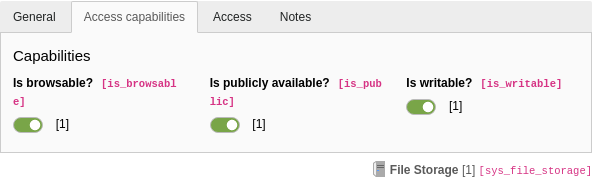
Special properties in the "Access capabilities" tab of a File storage
- Is browsable?
- If this box is not checked, the storage will not be browsable by users via the Media module, nor via the link browser window.
- Is publicly available?
-
When this box is unchecked, the
publicproperty of files is replaced by an eID call pointing to a file dumping script provided by the TYPO3 Core. The public URL looks something likeUrl index.. Behind the scenes, the classphp?e ID=dump File&t=f&f=1230&token=135b17c52f5e718b7cc94e44186eb432e0cc6d2f \TYPO3\is invoked to manage the download. The class itself does not implement any access checks, but provides the PSR-14 event ModifyFileDumpEvent for doing so.CMS\ Core\ Controller\ File Dump Controller Warning
This does not protect your files, if the configured storage folder is within your web root. They will still be available to anyone who knows the path to the file. To implement a strict access restriction, the storage must point to some path outside the web root. Alternatively, the folder it points to must contain web server restrictions to block direct access to the files it contains (for example, in an Apache
.htaccessfile). - Is writable?
- When this box is unchecked, the storage is read-only.
- Is online?
-
A storage that is not online cannot be accessed in the backend. This flag is set automatically when files are not accessible (for example, when a third-party storage service is not available) and the underlying driver detects someone trying to access files in that storage.
The important thing to note is that a storage must be turned online again manually.
Warning
This does not protect your files, if the configured storage folder is within your web root or accessible via a third-party storage service which is publicly available. The files will still be available to anyone who knows the path to the file.
Assuming that a web project is located in the directory
/var/(the "project root path" for Composer-based projects) and the publicly accessible directory is located atwww/ example. org/ /var/(the "public root path" or "web root"), accessing resources via the File Abstraction Layer component is limited to the mentioned directories and its sub-directories.www/ example. org/ public/ To grant additional access to directories, they must be explicitly configured in the system settings of $GLOBALS['TYPO3_CONF_VARS']['BE']['lockRootPath'] - either using the Install Tool or according to deployment techniques.
Example:
config/system/settings.php// Configure additional directories outside of the project's folder // as absolute paths $GLOBALS['TYPO3_CONF_VARS']['BE']['lockRootPath'] = [ ‘/var/shared/documents/’, ‘/var/shared/images/’, ];Copied!Storages that reference directories not explicitly granted will be marked as "offline" internally - no resources can be used in the website's frontend and backend context.
See also the security bulletin "Path Traversal in TYPO3 File Abstraction Layer Storages".