
Site settings definitions
Site settings definitions allow to define settings with a type and a guaranteed
default value. They can be defined in Site sets, in a file called
settings.definitions.yaml.
It is recommended to use site-sets and their UI configuration in favor of TypoScript Constants.
All available settings are displayed in the Site settings editor.
The site settings provided by an extension can be automatically documented in the extensions manual, see site settings documentation.
Table of contents
Site setting definition example
categories:
  BlogExample:
    label: 'Blog Example' # (1)
  BlogExample.templates:
    label: 'Templates' # (2)
    parent: BlogExample
  BlogExample.pages:
    label: 'Pages'
    parent: BlogExample

settings:
  blogExample.templateRootPath:  # (5)
    label: 'Templates' # (3)
    category: BlogExample.templates # (2)
    description: 'Path to template root'  # (4)
    type: string  # (6)
    default: 'EXT:blog_example/Resources/Private/Templates/'  # (7) + (8)
  blogExample.partialRootPath:
    label: 'Partials'
    category: BlogExample.templates
    description: 'Path to partial root'
    type: string
    default: 'EXT:blog_example/Resources/Private/Partials/'
See the complete example at settings.definitions.yaml (GitHub).
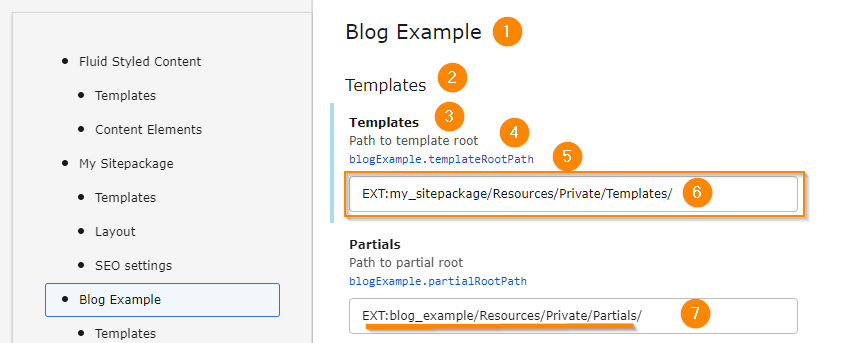
The parts marked by a number can be configured, see list below
Site setting definition properties
| Name | Type | Required |
|---|---|---|
| array | ||
| string | ||
| categories key | ||
| array | ||
| string | ||
| string | ||
| categories key | ||
| a definition type | true | |
| mixed | true | |
| bool | ||
| array |
categories
-
- Type
- array
label
-
- Type
- string
parent
-
- Type
- categories key
settings
-
- Type
- array
label
-
- Type
- string
description
-
- Type
- string
- Example
- 'Configure
bazto be used inbar.'
While Markdown syntax can be used in YAML to provide rich text formatting, there are a few gotchas. Because YAML is sensitive to special characters and indentation, you might need to wrap your Markdown text in single quotes (') to prevent it from breaking the YAML syntax.
category
-
- Type
- categories key
type
-
- Type
- a definition type
- Required
true
default
-
- Type
- mixed
- Required
true
The default value must have the same type like defined in type.
readonly
-
- Type
- bool
If a site setting is marked as readonly, it can be overridden only by editing the
config/sites/my-site/settings.yamldirectly, but not from within the editor.
enum
-
- Type
- array
- types
- string
Site settings can provide possible options via the
enumspecifier, that will be selectable in the editor GUI.EXT:my_extension/Configuration/Sets/MySet/settings.definitions.yaml
Note
The settings. does not allow any kind of imports. All
settings must be defined in a single file.
Definition types
| Name | Type | Required |
|---|---|---|
| string | ||
| string | ||
| string | ||
| string | ||
| string | ||
| string | ||
| string | ||
| string | ||
| string |
int
-
- Type
- string
- Path
- settings.[my_val].type = int

Checks whether the value is already an integer or can be interpreted as an integer. If yes, the string is converted into an integer.
number
-
- Type
- string
- Path
- settings.[my_val].type = number
Checks whether the value is already an integer or float or whether the string can be interpreted as an integer or float. If yes, the string is converted to an integer or float.
settings:
  example.types.number:
    type: number
    default: 3.16
    category: Example.types
    label: 'Type number'
    description: 'Checks whether the value is already an integer or float or
      whether the string can be interpreted as an integer or float. If yes,
      the string is converted to an integer or float.'
bool
-
- Type
- string
- Path
- settings.[my_val].type = bool

If the value is already a boolean, it is returned directly 1 to 1.
If the value is an integer, then
falseis returned for 0 andtruefor 1.If the value is a string, the corresponding Boolean value is returned for
true,false,yes,no,on,off,0and1.
string
-
- Type
- string
- Path
- settings.[my_val].type = string
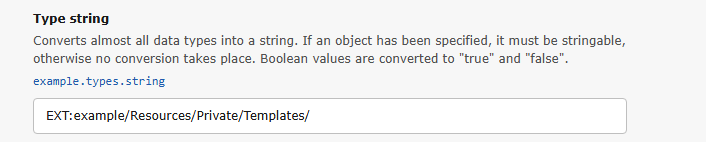
Converts almost all data types into a string. If an object has been specified, it must be
stringable, otherwise no conversion takes place. Boolean values are converted totrueandfalse.settings: example.types.string: type: string default: 'EXT:example/Resources/Private/Templates/' category: Example.types label: 'Type string' description: 'Converts almost all data types into a string. If an object has been specified, it must be stringable, otherwise no conversion takes place. Boolean values are converted to "true" and "false".'
text
-
- Type
- string
- Path
- settings.[my_val].type = text
Exactly the same as the
stringtype. Use it as an alias if someone doesn't know what to do withstring.
enum
-
- Type
- string
- Path
- settings.[my_val].type = enum
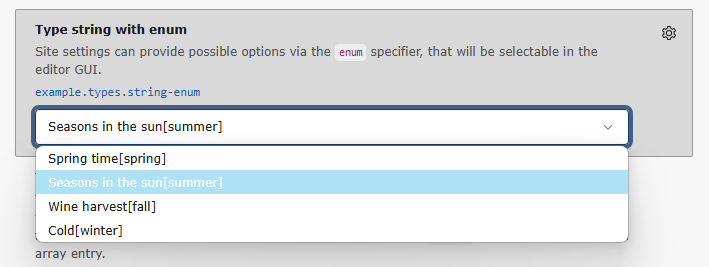
Site settings can provide possible options via the
enumspecifier, that will be selectable in the editor GUI.settings: example.types.string-enum: type: string default: 'summer' category: Example.types label: 'Type string with enum' enum: spring: 'Spring time' summer: 'Seasons in the sun' fall: 'Wine harvest' winter: 'Cold' description: 'Site settings can provide possible options via the `enum` specifier, that will be selectable in the editor GUI.'
stringlist
-
- Type
- string
- Path
- settings.[my_val].type = stringlist
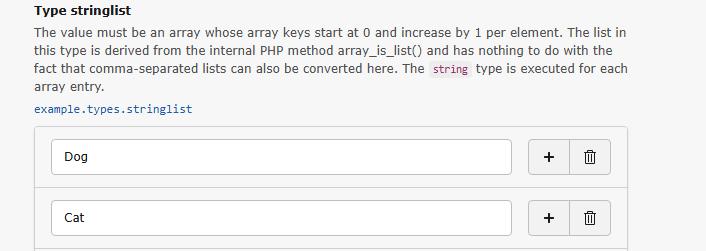
The value must be an array whose array key starts at 0 and increases by 1 per element. This sequence is checked using the internal PHP method array_is_list in order to prevent named array keys from the outset. This also means that comma-separated lists cannot be converted here.
The
stringtype is executed for each array entry.settings: example.types.stringlist: type: stringlist default: ['Dog', 'Cat', 'Bird', 'Spider'] category: Example.types label: 'Type stringlist' description: 'The value must be an array whose array keys start at 0 and increase by 1 per element. The list in this type is derived from the internal PHP method array_is_list() and has nothing to do with the fact that comma-separated lists can also be converted here. The `string` type is executed for each array entry.'
color
-
- Type
- string
- Path
- settings.[my_val].type = color
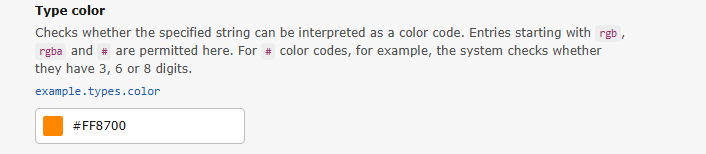
Checks whether the specified string can be interpreted as a color code. Entries starting with
rgb,rgbaand#are permitted here.For
#color codes, for example, the system checks whether they have 3, 6 or 8 digits.settings: example.types.color: type: color default: '#FF8700' category: Example.types label: 'Type color' description: 'Checks whether the specified string can be interpreted as a color code. Entries starting with `rgb`, `rgba` and `#` are permitted here. For `#` color codes, for example, the system checks whether they have 3, 6 or 8 digits.'
page
-
- Type
- string
- Path
- settings.[my_val].type = page
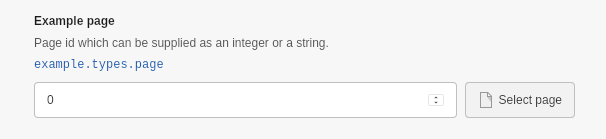
Checks whether the value is already an integer or can be interpreted as an integer. If yes, the string is converted into an integer.
Additionally renders a page browser in the settings editor to allow the user to select a page for a specific setting, while still displaying the UID in the field.
Translating labels and descriptions for settings
To translate the labels and descriptions for the settings you have defined in
settings., remove the label entry from there and create a
labels. file in the same directory.
The key of the translation unit must be the key of the setting.
For example, the label of the setting is simply label in the XLF file.
<trans-unit id="label">
    <source>My Custom Set</source>
</trans-unit>Important
To translate the labels of your settings using Crowdin, you need to adjust your extension's Crowdin configuration file.
Translating category labels
To translate category labels and descriptions, use the following format:
<trans-unit id="categories.mycustomcategory">
    <source>My Custom Category</source>
</trans-unit>

<trans-unit id="categories.description.mycustomcategory">
    <source>Description of My Custom Category</source>
</trans-unit>Translating settings labels and descriptions
To translate the label and description of a specific setting, use this structure:
<trans-unit id="settings.mycustomsetting">
    <source>My Custom Setting</source>
</trans-unit>

<trans-unit id="settings.description.mycustomsetting">
    <source>My Custom Setting description</source>
</trans-unit>Translations for other languages
To provide translations in another language, use the two-letter language prefix in the filename. For example:
de.