
New content element wizard
Table of contents
The content element wizard opens when a new content element is
created. It can be fully configured using ref:Page TSconfig <t3tsref:.
The wizard looks like this:
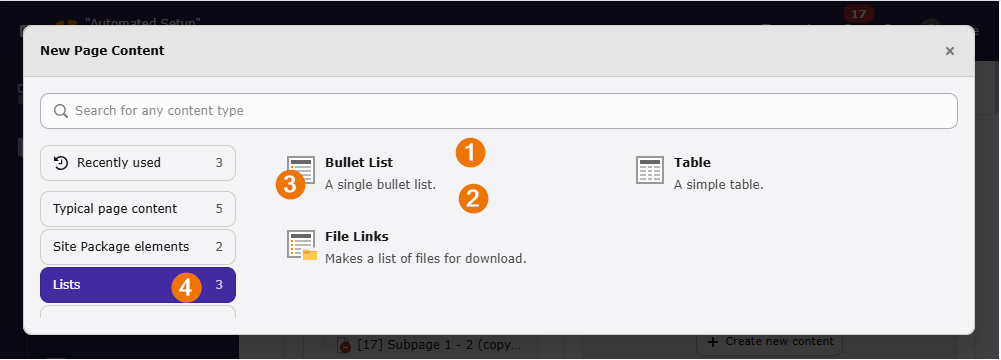
- The
titlecan be a string or, recommended, a language reference. - The
descriptioncan be a string or, recommended, a language reference. - The
groupcan be one of the existing group identifiers or a new one. - The
iconcan be one of the existing registered icon keys or a custom icon key registered in the icon API.
Any of these entries can be omitted. You should at least define a title.
New content elements are usually added in extensions in file
EXT:.
The following groups are available by default:
- default
- Default group for commonly used content elements
- forms
- Content elements representing forms like a contact form or a login form
lists
- menu
- Menus that can be inserted as content elements like a sitemap or a menu of all subpages.
- plugins
- Plugins provided by extensions
- special
- Content elements that are used of special cases
All content element groups are listed in
$GLOBALS you can
debug them in the TYPO3 backend using the backend module
System > Configuration if
typo3/cms-lowlevel
is installed
and you are an administrator.
Some third party extensions like bk2k/bootstrap-package are altering the available groups.
Plain content elements or plugins
You can add a content element or plain plugin (no Extbase) using method
ExtensionManagementUtility::addPlugin():
of class
\TYPO3\.
<?php

declare(strict_types=1);

use TYPO3\CMS\Core\Utility\ExtensionManagementUtility;

defined('TYPO3') or die();

ExtensionManagementUtility::addPlugin(
    [
        'label' => 'LLL:EXT:my_extension/Resources/Private/Language/locallang.xlf:myextension_myplugin_title',
        'value' => 'myextension_myplugin',
        'icon' => 'content-text',
        'group' => 'plugin',
        'description' => 'LLL:EXT:my_extension/Resources/Private/Language/locallang.xlf:myextension_myplugin_description',
    ],
);
The key value in the parameter $item is used as key of the newly added
content element representing the plugin.
Changed in version 14.0
The method's second and third parameter have been dropped. This method can
only be used with the field CType of table tt_.
This method supplies some default values:
group- Defaults to
plugins
While it is still possible to use ExtensionManagementUtility::addTcaSelectItem() as is commonly seen in older extensions this method is not specific to content elements and therefore sets not default values for group and icon.
Plugins (Extbase) in the "New Content Element" wizard
To add an Extbase plugin you can use Extension
of class
\TYPO3\.
This method is only available for Extbase plugins defined via
Extension in file EXT:my_extension/ext_localconf.php
<?php

declare(strict_types=1);

use TYPO3\CMS\Extbase\Utility\ExtensionUtility;

defined('TYPO3') or die();

ExtensionUtility::registerPlugin(
    'my_extension',
    'MyPlugin',
    'LLL:EXT:my_extension/Resources/Private/Language/locallang.xlf:myextension_myplugin_title',
    'myextension_myplugin',
    'plugins',
    'LLL:EXT:my_extension/Resources/Private/Language/locallang.xlf:myextension_myplugin_description',
);
Override the wizard with page TSconfig
The TCA is always set globally for the complete TYPO3 installation. If you have a multi-site installation and want to alter the appearance of content elements in the wizard or remove certain content elements this can be done via page TSconfig. This is commonly done on a per site basis so you can use the Site set page TSconfig provider in your site package.
You can use the settings of newContentElement.wizardItems.
Remove items from the "New Content Element" wizard
Using [group].removeItems you can remove a content element type from the wizard.
This removes the content element "Plain HTML" from the group special.
Note
The affected content elements are only removed from the specified group and
only in the wizard. Editors can still switch the CType selector to create
such a content element. The content element might also appear in another tab.
Use User settings configuration to effectively ban usage for non-admin users.
You can also remove whole groups of content elements from the wizard:
Change title, description, icon and default values in the wizard
You can use the following page tsconfig properties to change the display of the element in the wizard:
Register a new group in the "New Content Element" wizard
New groups are added on the fly, however it is recommended to set a localized header:
<?php

declare(strict_types=1);

use TYPO3\CMS\Core\Utility\ExtensionManagementUtility;
use TYPO3\CMS\Extbase\Utility\ExtensionUtility;

defined('TYPO3') or die();

ExtensionManagementUtility::addTcaSelectItemGroup(
    'tt_content',
    'CType',
    'myextension_myplugingroup',
    'LLL:EXT:my_extension/Resources/Private/Language/locallang.xlf:myextension_myplugin.group',
);

ExtensionUtility::registerPlugin(
    'my_extension',
    'MyPlugin',
    'LLL:EXT:my_extension/Resources/Private/Language/locallang.xlf:myextension_myplugin_title',
    'myextension_myplugin',
    'myextension_myplugingroup',
    'LLL:EXT:my_extension/Resources/Private/Language/locallang.xlf:myextension_myplugin_description',
);
The headers can also be overridden on a per site basis using page TSconfig.